
Knowledge base integrations connect approved content, search, metadata, users, permissions, feedback, or workflow events with another system. A useful integration might surface articles inside a help desk, synchronize external documentation into an AI assistant, send article changes to a project-management queue, or let employees search restricted knowledge from Microsoft Teams or Slack.
Start with the user’s workflow—not a directory of app logos. Define what information must move, which system owns it, who may access it, how quickly updates must appear, and what should happen when the connection fails.
This guide explains the main integration categories, implementation methods, permission risks, AI connector decisions, testing requirements, and maintenance responsibilities. It also includes a fictional architecture example and a reusable planning worksheet.
Start with the workflow the integration should improve
An integration should solve a defined workflow problem. “Connect our knowledge base to everything” is not a useful requirement. “Let support agents find approved troubleshooting articles without leaving the ticket” is specific enough to design and test.
The Consortium for Service Innovation’s technology-integration guidance emphasizes minimizing context switching, reusing information already entered, and combining relevant customer, account, product, and issue context. The goal is a coherent workflow—not simply a larger collection of connected software.
| Workflow need | Possible integration | Evidence of success |
|---|---|---|
| Agents repeatedly leave the ticket to search for answers | Help desk article search or suggestion panel | Agents can locate and reuse the correct approved article during a representative case. |
| Employees ask recurring questions in chat channels | Slack or Microsoft Teams knowledge search | The intended group can retrieve applicable guidance without exposing restricted articles to other channels. |
| Article defects disappear into comments | Feedback-to-project-management automation | A qualifying report creates a traceable task with an owner and source article. |
| An AI assistant answers from scattered documentation | Permission-aware knowledge connector | The assistant retrieves current approved sources for allowed users and refuses or escalates when evidence is unavailable. |
| Downstream search remains stale after publication | Webhook-triggered refresh or scheduled synchronization | New, updated, unpublished, and deleted content reach the destination within the agreed freshness window. |
Do not use ticket reduction, clicks, or article suggestions as automatic proof that an integration works. Define the intended task and test whether the integration helps the user complete it accurately.
Separate integration categories from implementation methods
An integration category describes the business workflow. An implementation method describes how systems exchange or display information. A CRM integration, for example, might use a native app, an embedded panel, an application programming interface (API), scheduled synchronization, or a combination of those methods.
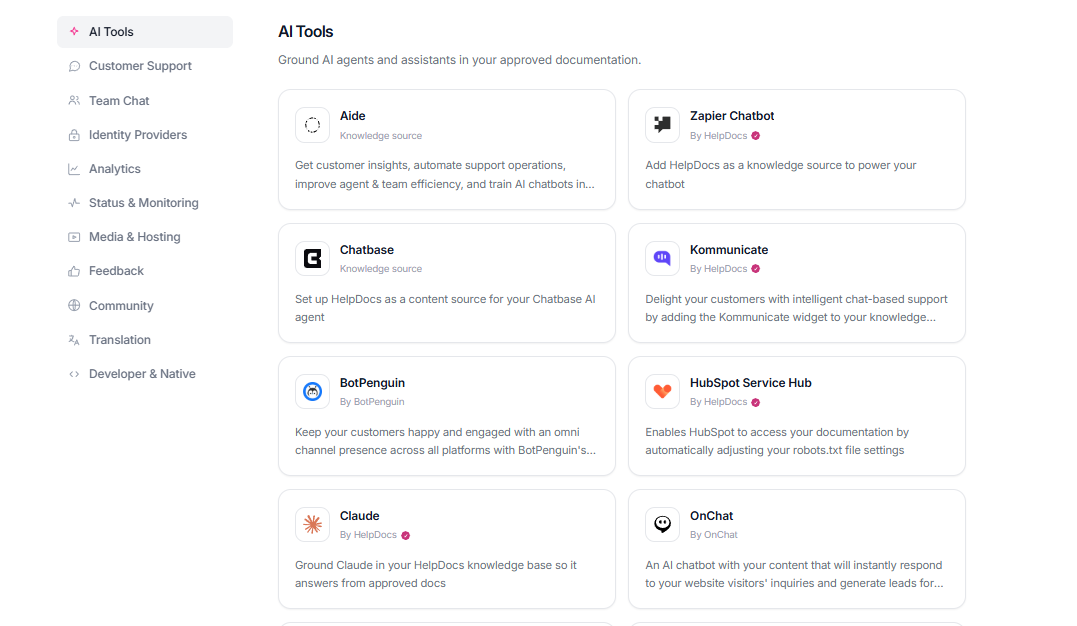
Integration directories often group connections by purpose. The current HelpDocs integration directory, for example, includes categories such as AI tools, customer support, team chat, identity providers, analytics, feedback, translation, and developer tools. Those categories help identify a use case, but they do not establish whether the connection is one-way, real-time, permission-aware, or maintained by the vendor.
Common integration categories
| Category | Typical workflow | Important boundary |
|---|---|---|
| Help desk and case management | Search, suggest, link, or reuse articles while handling a case; turn repeated issues into content work. | A suggested article is not proof that the agent used it or that it resolved the issue. |
| CRM and customer success | Surface account-relevant guidance or trigger onboarding content according to lifecycle context. | Private CRM fields must not leak into public articles or broadly visible widgets. |
| Live chat and in-product help | Search content in a chat composer, suggest answers before escalation, or embed a help panel. | An embedded widget can display knowledge without synchronizing article data. |
| Slack and Microsoft Teams | Search and share approved internal content, send change notifications, or capture unanswered questions. | A bot must not post restricted content into a channel whose membership is broader than the article’s audience. |
| Enterprise search and AI assistants | Retrieve information from several repositories, return citations, and answer according to user permissions. | Retrieval, permission enforcement, answer correctness, and source freshness are separate checks. |
| Analytics and feedback | Send search, view, feedback, or content-gap events into analytics and work queues. | A page view or click does not establish task completion. |
| Translation and localization | Send source content for translation and return localized versions with status information. | A later source edit can leave translations outdated or overwrite reviewed localized content. |
| Identity and user lifecycle | Authenticate readers, provision accounts, remove departed users, and map roles or groups. | Signing in successfully does not guarantee correct article-level authorization. |
Choose the smallest integration method that satisfies the requirement
Use the least complex method that meets the workflow, freshness, security, and ownership requirements. A native app may be sufficient for article search inside a help desk. A custom API may be justified when you need object-level control or a workflow the marketplace app does not support.
| Method | Best suited to | Questions to resolve |
|---|---|---|
| Native or marketplace integration | A supported workflow that both vendors already maintain. | Is it one-way or two-way? Which plans support it? What objects and permissions are included? |
| Embedded widget or app panel | Displaying search, help content, chat, or contextual guidance inside another interface. | Does it only display content, or does it exchange user, case, or article data? |
| One-time import | Migration or creating an initial copy in another system. | Who owns the imported copy, and how will later updates and deletions be handled? |
| Scheduled synchronization | Keeping a destination reasonably current when immediate updates are unnecessary. | What is the sync interval? How are conflicts, failures, and deletions handled? |
| Crawler or indexed connector | Making external content searchable without manually recreating every article. | What is indexed, how often it refreshes, and are access-control lists preserved? |
| Federated or live retrieval | Querying the source at runtime while leaving it as the system of record. | What happens when the source is slow, unavailable, or denies the requesting user? |
| API integration | Custom content, user, permission, analytics, or workflow operations. | Authentication, scopes, pagination, rate limits, error handling, versioning, and maintenance. |
| Webhook | Notifying another system when an event occurs. | Signature verification, duplicate delivery, retries, idempotency, and failed-event recovery. |
| Integration platform or iPaaS | Connecting several systems through configurable workflows. | Additional subscription, data exposure, execution limits, observability, and vendor dependency. |
| Custom integration | A high-value workflow that cannot be satisfied by supported connectors. | Development ownership, security review, tests, documentation, on-call responsibility, and decommissioning. |
Import, sync, index, and live retrieval are not interchangeable
An import creates a copy. A synchronization process updates a destination according to an interval or trigger. An indexed connector stores searchable representations and metadata. Federated or live retrieval queries the original source when the user requests information.
Intercom’s current knowledge-source documentation distinguishes native content, synchronized websites, imported PDF files, and sources that can be imported or synchronized from products such as Zendesk, Confluence, Guru, and Notion. It also documents different eligibility across Fin, Copilot, and the Help Center.
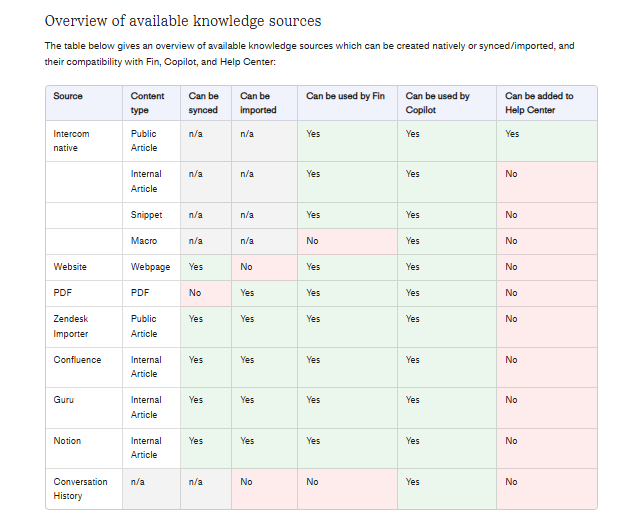
Freshness can differ by source type. Intercom states that its native articles are ingested by Fin almost immediately, while external content connected through public URLs is updated weekly. Treat that as an Intercom-specific behavior—not a universal connector schedule.
Zendesk similarly distinguishes dedicated connectors, a universal REST API connector, and uploaded CSV files. Its universal connector performs a full refresh every 24 hours. The documentation also warns that the universal connector uses the permissions of its configured API credentials and does not preserve individual source-record permissions inside Zendesk.
These examples show why “supports external knowledge” is not enough for a buying or architecture decision. Ask exactly how content enters the destination, how frequently it changes, and whether the permission model remains suitable.
Map the data flow before configuring a connector
Document the proposed flow before choosing a vendor feature or writing code. This exposes missing requirements and prevents a convenience integration from quietly becoming an uncontrolled content repository.
| Design question | What to record |
|---|---|
| User problem | The task the integration should improve and the intended users. |
| Source and destination | The systems involved and which one owns the authoritative information. |
| Data objects | Articles, categories, metadata, attachments, users, groups, translations, feedback, or events. |
| Direction and trigger | One-way or two-way; push, pull, scheduled, event-driven, or runtime retrieval. |
| Freshness | Expected update interval and maximum acceptable lag. |
| Identity and authorization | Authentication method, service identity, scopes, role mapping, and article-access behavior. |
| Lifecycle | Creation, update, unpublish, archive, delete, restore, and translation behavior. |
| Failure handling | Retries, duplicate handling, alerts, backfill, rollback, and manual recovery. |
| Ownership | Technical, content, security, and operational owners. |
| Success evidence | The test or measurement that proves the intended workflow works. |
Do not assume an API provides create, read, update, and delete access for every content type. For example, the current Document360 API v3 documentation describes project-scoped endpoints for articles, categories, readers, team accounts, and settings, with role and access settings attached to API keys. Another platform may expose a much narrower set of resources.
Establish one authoritative source for each type of information
A source-of-truth policy identifies which system is authoritative and what downstream systems may do with its information. Without one, a two-way integration can produce conflicting article versions, update loops, and unclear deletion behavior.
| Information type | Example authoritative system | Downstream rule |
|---|---|---|
| Article text | Knowledge base | Search, AI, and help-desk copies are read-only representations. |
| Reader permissions | Identity provider plus knowledge base access rules | Connectors must preserve or reproduce the intended audience. |
| Translations | Translation management system or designated localization workflow | Source changes create a review state rather than silently overwriting reviewed translations. |
| Support-case data | Help desk | Only reusable, approved knowledge moves into the article system. |
| Content defects | Project-management or content-operations queue | The task links to the article; it does not become another editable copy of the article. |
| Generated answers | No independent source of truth | The answer must remain traceable to eligible source material. |
Distinguish canonical content, synchronized copies, indexed records, cached representations, and generated summaries. A citation shows where an answer came from; it does not prove that the source is current, applicable, or technically correct.
Keep authentication, provisioning, and article authorization separate
Authentication establishes identity. Authorization determines what that identity can access. Provisioning creates, updates, and removes accounts. A successful single sign-on configuration does not prove that private articles, attachments, search results, and AI answers are restricted correctly.
Products may support several authentication methods. HelpDocs, for example, publishes integrations for JSON Web Token single sign-on and OpenID Connect. These can authenticate users to private documentation, but the organization must still define and test its content-access rules.
System for Cross-domain Identity Management (SCIM) addresses account lifecycle operations rather than knowledge permissions. Okta’s SCIM integration guidance describes provisioning operations for creating, reading, updating, and deleting user profile information. Article-level access still depends on the connected application’s authorization model.
- SSO: Confirms how the user signs in.
- SCIM: Helps create, update, suspend, or remove user accounts and group assignments.
- Role and group mapping: Connects identity attributes to application roles or audiences.
- Article authorization: Decides whether a specific identity can access a specific article, attachment, result, or generated answer.
Use least privilege for service identities
Give an integration only the scopes and content access it needs. Use separate test and production credentials, store secrets server-side, rotate them, and assign an owner for the integration account.
Authentication methods vary by vendor. The current KnowledgeOwl API documentation, for example, uses an API key as the username in basic authentication and requires HTTPS. Do not assume every knowledge API uses OAuth, bearer tokens, or the same scope model.
Test denied access, not only successful access
- An authorized user can open the article through navigation, search, and a direct link.
- An excluded user cannot retrieve the article through normal search.
- An excluded user cannot retrieve the content through an AI assistant.
- Restricted attachments remain inaccessible even when someone knows the direct URL.
- Changed group membership takes effect within the documented period.
- Deprovisioned accounts lose access to connected knowledge experiences.
- Cached or indexed copies do not bypass the source policy.
Evaluate AI and enterprise-search connectors as permissioned content pipelines
An AI knowledge integration can import, synchronize, crawl, index, or retrieve content. It may then return relevant passages, citations, summaries, or generated answers. These are separate stages with separate failure modes.
Microsoft’s indexed Copilot connector documentation explains that external items enter the Microsoft Graph index with content, metadata, and access-control lists. Search and Copilot then apply permission-based filtering. Microsoft also warns that a connection configured as visible to everyone can overshare content; administrators must validate that connector permissions match the intended visibility model.
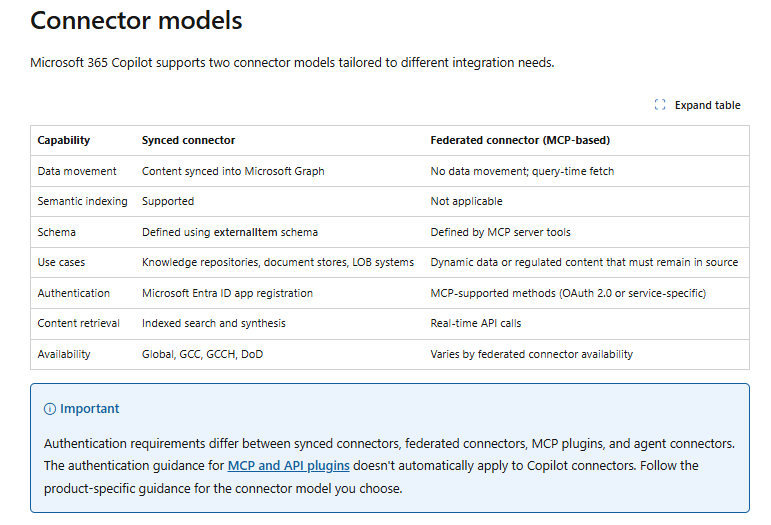
Microsoft also documents federated connectors that retrieve data from the source at runtime rather than copying it into Microsoft 365. In that model, the external source remains the system of record and the authenticated user’s source permissions govern access.
| Question | What to verify |
|---|---|
| Which content is eligible? | Source, status, language, collection, metadata, and exclusion rules. |
| How is content obtained? | Import, scheduled synchronization, crawling, indexing, or runtime retrieval. |
| How are permissions enforced? | Source access-control lists, connector mapping, destination groups, or a broad visibility setting. |
| How fresh is the answer? | Sync frequency, indexing delay, cache behavior, and source update propagation. |
| What happens after deletion? | Removal from search, AI retrieval, caches, citations, and downstream exports. |
| Can the answer be verified? | Source citations, version context, and a route to inspect the underlying article. |
| What happens when evidence is insufficient? | No-answer behavior, clarification, safe refusal, or human escalation. |
Do not treat successful retrieval as proof of a correct answer. An assistant can accurately summarize an outdated source, retrieve the correct article for the wrong audience, or cite conflicting documents without resolving which one applies.
Use APIs for operations and webhooks for events
An API normally lets one system request or change information. A webhook sends a notification when an event occurs. Many reliable integrations use both: a webhook announces that an article changed, and the receiving system then uses the API to retrieve the current record.
API design questions
- Which objects and operations are available?
- Which authentication method and scopes are required?
- How does pagination work?
- What are the rate limits and retry expectations?
- How are partial failures and validation errors returned?
- How will API versions and deprecations be handled?
- Can the integration operate in a test environment?
The GitBook API, for example, documents operations for spaces, pages, users, access permissions, content import and export, change requests, comments, sites, analytics, and integrations. That coverage is GitBook-specific and should not be assumed for another knowledge base API.
Webhook reliability questions
- Which events are available?
- How is the sender authenticated?
- Can the recipient verify a signature and timestamp?
- Which responses trigger a retry?
- Can the same event arrive more than once?
- How will the receiver remain idempotent?
- Where do failed events go after retries are exhausted?
GitBook’s webhook documentation provides one product-specific example: it signs requests with HMAC-SHA256, retries qualifying failures three times with exponential backoff and jitter, and recommends idempotent processing. These numbers and headers are not universal webhook standards.
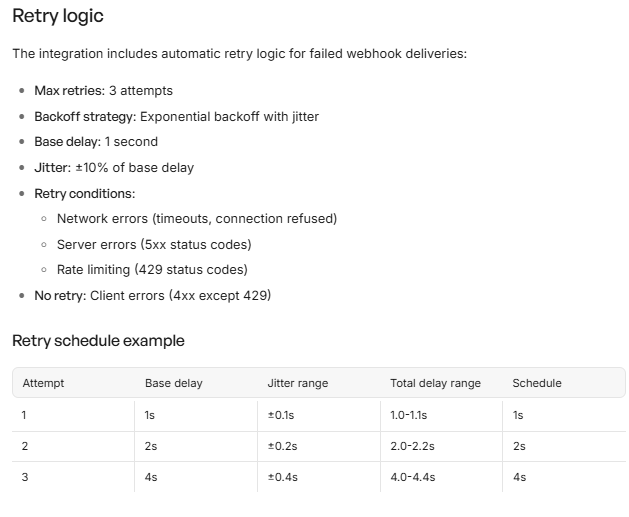
Other products expose different models. Document360 webhooks can send structured JSON events to destinations such as automation tools and can include article-deletion slugs for cache invalidation. KnowledgeOwl webhooks can publish article, category, comment, and contact-form events to a configured endpoint.
Returning HTTP 200 only confirms that an endpoint accepted the request. It does not prove that a downstream search refresh, cache purge, task creation, or notification completed successfully.
Implement the integration in controlled stages
- Define the user problem. State the task, intended users, current friction, and expected outcome.
- Choose the authoritative source. Decide which system owns article text, permissions, translations, feedback, and analytics.
- Select the smallest viable method. Prefer a supported native integration when it satisfies the workflow and permission requirements; escalate to API or custom work only when needed.
- Map the data flow. Record objects, direction, trigger, frequency, freshness, transformations, and deletion behavior.
- Define identity and access. Document service credentials, scopes, role mapping, and denied-access behavior.
- Verify licensing and limits. Confirm the required plan, API coverage, connector availability, rate limits, storage, and usage charges.
- Build in a controlled environment. Use test accounts, sample content, and nonproduction credentials where supported.
- Test lifecycle events. Create, update, unpublish, move, translate, delete, and restore representative content.
- Test failure conditions. Include expired credentials, unavailable systems, malformed payloads, rate limits, partial synchronization, and duplicate events.
- Pilot with a bounded audience. Observe whether the integration improves the actual task and whether access behaves as intended.
- Document operations. Record owners, monitoring, alerts, runbooks, rollback, secret rotation, and vendor-support boundaries.
- Review its continued value. Retire integrations whose cost, risk, or maintenance burden exceeds their workflow benefit.
Worked example: connect support knowledge without creating competing copies
This scenario is fictional. Northstar Tasks sells a browser-based project workspace. It maintains a public customer help center and a restricted agent collection in one knowledge platform. The company uses a help desk, Microsoft Teams, an AI support assistant, and a project-management tool.
The help center remains the authoritative source for article text. The identity provider and knowledge platform jointly determine access. The help desk owns case records, and the project-management tool owns content-defect tasks.
| Trigger or request | Source and destination | Data flow and permission rule | Failure handling and success test |
|---|---|---|---|
| Agent searches during a ticket | Knowledge platform → help desk | A native one-way search panel returns public and agent-only articles according to the signed-in agent’s access. | If search fails, the ticket remains usable. Test that an agent can find the correct article and a customer account cannot retrieve the restricted version. |
| Article is published, updated, or deleted | Knowledge platform → webhook receiver → AI refresh queue | The webhook contains the article identifier and event type. The receiver retrieves the current eligible record through the API. | Duplicate events are ignored by event identifier. Failed refreshes enter a retry queue and alert the technical owner. |
| Employee asks a question in Teams | Teams → permission-aware enterprise-search connector | The connector retrieves internal content according to the employee’s source permissions. | Test with an authorized support employee and an excluded contractor. Restricted citations must not appear for the contractor. |
| Reader reports an incorrect article | Knowledge platform → project-management queue | The automation creates a task containing the article ID, feedback, locale, and source link—not a duplicate article body. | If task creation fails, feedback remains in the knowledge platform and the content owner receives an alert. |
Northstar rejects a two-way article-text synchronization with the help desk because it would create two editable versions. Agents can search and link articles from the help desk, but corrections occur in the knowledge platform.
The public AI assistant can use only published customer articles. Agent-only troubleshooting material enters a separate permission-aware experience for employees. The team does not expose restricted documents through a public crawl merely to simplify ingestion.
Test the integration beyond the happy path
A successful initial connection proves very little. Test content lifecycle, denied access, stale indexes, duplicate events, and operational recovery before broader rollout.
| Test area | Representative checks |
|---|---|
| Connectivity | Valid, invalid, expired, and revoked credentials; timeouts; source and destination outages. |
| Authorization | Allowed user, excluded user, changed group, removed user, private article, restricted attachment, direct URL, search, and AI retrieval. |
| Content lifecycle | New, updated, unpublished, archived, deleted, restored, moved, renamed, translated, and attachment-updated content. |
| Synchronization | Expected delay, missed job, duplicate event, out-of-order event, retry, partial failure, backfill, and reconnection. |
| Data quality | Missing title, unsupported markup, long article, malformed metadata, duplicate identifier, and unsupported file type. |
| Search and AI | Correct source, correct audience, useful citation, outdated source, conflicting sources, unanswerable question, and escalation. |
| Operations | Logging, alert delivery, runbook, rollback, key rotation, plan downgrade, vendor deprecation, and integration removal. |
Set a maximum acceptable update lag and verify it. “Near real time,” “automatic,” and “synchronized” are not testable commitments until the team defines the expected interval and evidence.
Monitor technical health and workflow usefulness separately
Technical monitoring shows whether the integration is operating. Workflow measurement shows whether it helps people accomplish the intended task.
| Technical signals | Workflow signals |
|---|---|
| Successful and failed synchronization jobs | Whether intended users adopt the integrated workflow |
| API errors and rate-limit events | Time and assistance required to find an applicable answer |
| Webhook delivery and retry failures | Verified task completion |
| Sync lag and queue depth | Quality of escalation when knowledge does not resolve the task |
| Duplicate records and missing deletions | Content gaps identified through the workflow |
| Authentication and permission failures | Relevant article reuse with its denominator and context defined |
Do not equate a search with success, a click with resolution, an article suggestion with reuse, or a conversation without a ticket with verified deflection. Investigate the user’s outcome before attributing a business result to the integration.
Assign a technical owner, content owner, and security owner where relevant. Define who receives alerts, who handles incidents, what triggers a review, and who can decommission the connection.
Evaluate integration support before buying knowledge base software
A long marketplace directory is not evidence that a platform supports your required workflow. Review the exact connector, plan, object coverage, permissions, support boundary, and maintenance model.
- Native integrations: Which workflows and objects do they actually support?
- API coverage: Can you manage the content, users, metadata, permissions, feedback, and analytics you need?
- Webhooks: Which events are available, and how are authenticity, retries, and failures handled?
- Identity: Does the product support the required SSO, provisioning, groups, roles, and deprovisioning flow?
- Permission-aware retrieval: Can search and AI enforce the intended article and attachment access?
- Plan restrictions: Which tier includes the connector, API, webhooks, SSO, SCIM, audit logs, or sandbox?
- Limits: What rate, storage, source, item, user, or usage limits apply?
- Observability: Are logs, delivery history, failed jobs, and alerts available?
- Change management: How does the vendor announce API versions, connector changes, and deprecations?
- Portability: Can you export content, metadata, permissions, and integration configuration when leaving?
- Support boundary: Which vendor investigates a failure that crosses two products?
A well-documented API or maintainable custom connection may be more suitable than a limited native app. Conversely, a custom build is not automatically more capable if no team owns its security, monitoring, and updates.
Reusable knowledge base integration worksheet
Copy these fields into a planning document or implementation ticket. A blank field represents an unanswered requirement—not an acceptable default.
| Design field | What to record |
|---|---|
| Integration name and user problem | [Name] and the specific workflow outcome it should improve. |
| Intended users | Roles, groups, channels, regions, and excluded audiences. |
| Source and destination | Systems involved and the authoritative source for each data type. |
| Category and method | Help desk, AI, analytics, identity, or another purpose; native app, API, webhook, sync, embed, or retrieval method. |
| Data objects | Articles, metadata, attachments, languages, users, groups, feedback, or events. |
| Direction and trigger | One-way or two-way; scheduled, event-driven, user-requested, or runtime retrieval. |
| Freshness | Sync frequency and maximum acceptable lag. |
| Authentication | OAuth, API key, service account, JWT, or another verified method; credential owner and rotation process. |
| Authorization | Scopes, roles, groups, article rules, attachment rules, and denied-access behavior. |
| Plan and limits | Required vendor plan, rate limits, source limits, storage, and additional charges. |
| Operational field | What to record |
|---|---|
| Update and deletion behavior | How create, edit, unpublish, archive, delete, restore, and translation events propagate. |
| Duplicate and conflict handling | Unique identifier, source priority, and treatment of competing edits. |
| Retry and failure behavior | Retry conditions, idempotency, dead-letter process, backfill, rollback, and manual recovery. |
| Monitoring | Logs, alerts, sync-lag threshold, failed-job queue, and owner notification. |
| Owners | Technical, content, security, vendor, and business owner. |
| Success evidence | Representative task, expected result, guardrails, and measurement method. |
| Review trigger | Product change, permission change, source change, deprecation, incident, plan change, or scheduled reassessment. |
| Decommissioning | How credentials, cached data, indexed content, webhooks, tasks, and downstream access will be removed. |
A useful integration puts trustworthy knowledge into the right workflow without creating uncontrolled copies or bypassing access rules. Define the task, choose the smallest suitable connection, preserve a clear source of truth, test both allowed and denied access, and give someone responsibility for keeping the integration healthy.
Sources verified: November 7, 2026.