Independent knowledge base software guide Evidence-led Updated 2026


SaaS Knowledge Base: The Complete Guide to Building One That Scales Support
A SaaS knowledge base is the customer-facing and internal system that explains how to start, configure, use, troubleshoot, secure, and administer a software product. The useful version is not a pile of feature descriptions. It connects each user question to one current, findable, actionable answer—and gives the support team a safe route when no approved answer exists.
Quick answer
For most SaaS teams, the right knowledge base has six foundations: task-based search, lifecycle-based navigation, public and private content in separate permission scopes, an owner and review trigger for every article, analytics tied to support and activation outcomes, and an escape path to human help. Start with the 20–30 issues that create the most customer friction; do not wait to document every feature.
Contents
- What a SaaS knowledge base is
- Original help-center findability test
- Information architecture
- The minimum viable content system
- How to choose software
- Implementation plan
- Governance and release workflow
- Metrics that reveal real progress
- Frequently asked questions
What is a SaaS knowledge base?
A SaaS knowledge base is a governed library of product answers for customers, administrators, developers, partners, and customer-facing employees. It commonly includes onboarding, configuration, permissions, billing, troubleshooting, integrations, API guidance, security explanations, and release notes. A public help center is one delivery surface. The underlying knowledge system may also power support replies, onboarding emails, in-app guidance, a chatbot, and private agent notes.
This distinction matters. A help center is what a visitor sees; a knowledge base includes the content model, ownership, permissions, search vocabulary, review history, and distribution workflow behind that experience. If you only redesign the homepage while the source articles remain duplicated or stale, the problem survives.
| Resource | Best use | Typical limitation |
|---|---|---|
| FAQ page | Short answers to a small set of common questions | Weak for multi-step or role-specific tasks |
| Product documentation | Complete feature, API, and technical reference | Can assume more context than a new customer has |
| Help center | Browsable and searchable customer support | May omit private diagnosis and escalation guidance |
| Internal runbook | Agent decisions, exceptions, and operational response | Should not be exposed to customers |
| SaaS knowledge system | Governed source content delivered to all relevant surfaces | Requires ownership and workflow discipline |
If your immediate goal is reducing repetitive customer questions, use the more focused customer self-service knowledge base guide. If the work is owned by onboarding or account teams, the companion guide to a knowledge base for customer success explains the lifecycle connection.
Original test: can common SaaS answers be found?
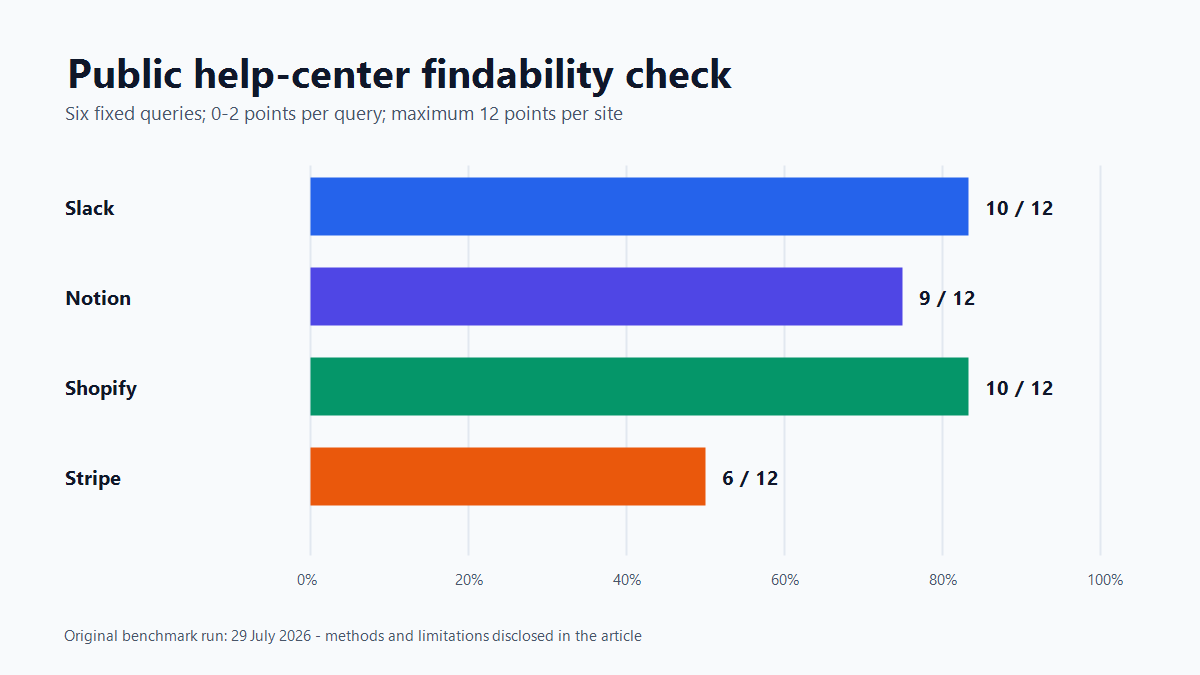
We ran a small public-web findability check on 29 July 2026. It tested official help content from Slack, Notion, Shopify, and Stripe with the same six phrases: “reset password,” “enable two-factor authentication,” “invite team member,” “export account data,” “download invoice,” and “contact support.” These are not claims about overall product quality. They are a controlled look at whether a searcher using ordinary words encounters a direct official answer.
Method and scoring
- We limited each query to the vendor’s official help or support domain.
- We recorded the first visible official result relevant to the task.
- We awarded 2 points for a direct, task-completing English page; 1 point for a useful but indirect, narrower, localized, or audience-mismatched page; and 0 when no task-completing official page appeared in the returned set.
- With six queries, each site could score 12 points.
| Site | Observed score | Examples from the returned set |
|---|---|---|
| Slack | 10/12 | Reset your password and Export your workspace data were direct. The first invitation result described invited members before the procedural page. |
| Notion | 9/12 | Export your content and Invoices were direct. The password result used the broader title “I can’t log in.” |
| Shopify | 10/12 | Resetting passwords and How to Contact Shopify Support matched cleanly. The first account-export result covered user-management data, not a complete account export. |
| Stripe | 6/12 | I forgot my password and the team invitation guide were direct. No task-completing result was observed for two of the fixed phrases. |
What the observations mean
The combined score was 35 of 48 possible points, or 72.9%. The important pattern was not the ranking of four brands. It was the failure mode: the information often existed, yet the first result could be a broader title, the wrong audience, a different language, or only part of the requested task. That suggests four practical controls for your own help center:
- Use the customer’s task in the title, not only the internal feature name.
- Keep locale and canonical signals consistent so the intended language wins.
- Separate customer, administrator, developer, and partner variants clearly.
- Answer the complete intent or state the boundary and link to the next step.
Limitations
This was a small, reproducible diagnostic—not a usability study and not a native help-center search test. Public-web results change, six phrases cannot represent every customer vocabulary, and the four products have different scopes. We did not test logged-in contextual help, AI answers, accessibility, task completion, article accuracy, or whether a reader avoided a ticket. Treat the observations as hypotheses for your own search-log and customer tests, not universal market scores.
Organize the knowledge base around the customer journey
A feature-by-feature menu mirrors the product team. A lifecycle structure mirrors the customer. The latter is usually easier for a new user because it starts from the outcome they are trying to reach.
| Lifecycle stage | Questions to cover | Primary evidence |
|---|---|---|
| Evaluate | Compatibility, security, limits, migration, plan boundaries | Sales questions and trial objections |
| Start | Create a workspace, verify an account, reach the first useful outcome | Activation funnel and onboarding calls |
| Configure | Roles, permissions, integrations, data import, notifications | Implementation tickets and admin sessions |
| Adopt | Core workflows, templates, automation, collaboration | Feature usage and customer-success notes |
| Troubleshoot | Symptoms, causes, diagnostic checks, safe fixes, escalation | Resolved tickets and incident reviews |
| Administer | Billing, seats, security, export, retention, offboarding | Admin tickets and account changes |
| Expand | Advanced workflows, API, governance, additional teams | Expansion discovery and developer support |
Keep categories shallow enough to scan. A useful default is six to nine top-level categories, then specific articles underneath. Use tags for product, role, plan, platform, and lifecycle stage, but do not force customers to understand the tagging model before they can search.
The minimum viable SaaS content system
1. Getting-started paths
Build one short path per meaningful role: account owner, administrator, everyday user, and developer where relevant. State the outcome and prerequisites, then link each step to a focused procedure. A getting-started path should not duplicate every linked article.
2. Task articles
One task article should resolve one intent. A durable structure is: outcome, who can do it, prerequisites, numbered steps, success check, common failure, rollback or reversal, and related tasks. Use the exact interface labels a customer sees. The reusable layouts in our knowledge base templates and examples guide can speed up standardization.
3. Troubleshooting articles
Start with the symptom in customer language. Add a “before you begin” check, then order causes from common and reversible to rare and risky. For every fix, describe what success looks like. End with the information support needs—error text, timestamp, affected workspace, browser or app version, request ID—without asking customers to publish secrets.
4. Administrator and security guidance
Admins need plan requirements, permission levels, downstream effects, audit implications, and recovery options. Separate conceptual security explanations from configuration procedures. Date-sensitive claims should have a source and a review trigger.
5. Release-linked documentation
Every customer-visible product change should answer three documentation questions before release: Which current articles become wrong? Which new intent appears? Which screenshots or UI labels change? A release note announces a change; it does not replace an updated procedure.
How to choose SaaS knowledge base software
Choose the platform against workflows, not a feature-count spreadsheet. Run a trial using your own content and at least one administrator, author, reviewer, support agent, and outside reader. If you already use a support suite, compare the advantage of one connected workflow against the portability of a dedicated platform. The knowledge base versus help desk comparison explains where the systems overlap.
| Decision area | Test in the trial | Warning sign |
|---|---|---|
| Search | Run ticket phrases, synonyms, misspellings, and zero-result terms | Only exact product terminology works |
| Permissions | Verify public, customer-only, partner, and private agent content | Visibility depends on manual workarounds |
| Workflow | Draft, technical review, approval, scheduled publish, rollback | Anyone can publish high-risk content without review |
| Maintenance | Assign owners, review dates, status, and stale-content reports | Age is visible but accountability is not |
| Analytics | Inspect failed searches, reformulations, article feedback, and support escalation | Only page views are available |
| Portability | Export articles, media, redirects, metadata, and version history | Export loses structure or relationships |
| Distribution | Reuse an approved answer in the app, agent workspace, and chatbot | Every channel needs a separate copy |
| Experience | Keyboard, mobile, screen-reader, speed, and no-result behavior | A polished homepage hides weak article usability |
For an established collaboration stack, our Confluence knowledge base review focuses on authoring and internal governance. For a standalone publishing approach, compare it with the Document360 review. The best answer depends on your audience and operating model, not the vendor category alone.
A practical implementation plan
Step 1: define the job
Write a one-sentence charter: “Help [audience] complete [top workflows] without waiting for [team], while escalating [risk boundary].” This prevents a customer help center, internal wiki, and developer portal from being mixed without intent.
Step 2: build the evidence backlog
Export 60–90 days of tickets, chats, failed searches, onboarding notes, and product feedback. Remove personal data before analysis. Group by the customer’s goal, not the support queue. Record frequency, severity, lifecycle stage, affected role, and whether an approved answer already exists.
Step 3: prioritize by avoidable friction
A simple prioritization score is frequency × customer impact × answerability. “Answerability” prevents the team from documenting a product defect as though instructions were the fix. High-frequency, high-impact, well-understood questions come first; systemic product problems go to product design with temporary support guidance only where useful.
Step 4: map and migrate
For every old page, choose keep, rewrite, merge, redirect, restrict, or retire. Preserve URLs when the intent stays the same. If several weak pages become one authoritative article, redirect each retired URL to the closest matching section rather than the help-center homepage.
Step 5: test before launch
Give five to eight representative users task prompts without telling them article titles. Record whether they find the right article, the search phrase used, time to first useful action, completion, and escalation. Test keyboard navigation, mobile layout, zoom, link purpose, headings, contrast, and form labels. Our knowledge base UX and layout guide provides a focused interface checklist.
Step 6: launch with a feedback loop
Publish the priority set, connect it to support macros and onboarding, and review searches weekly during the first month. A zero-result query should create a triage item, not automatically create an article: sometimes a synonym, redirect, product label, or better result ranking solves the gap.
Governance that survives weekly releases
Each article needs one accountable owner, even when several people contribute. Add an approver for billing, security, legal, data migration, and destructive actions. Use event-based review triggers—feature change, incident, policy change, repeated negative feedback—in addition to calendar reminders.
| Field | Why it matters |
|---|---|
| Audience and permission | Prevents private diagnostics or exceptions from reaching customers |
| Product area and lifecycle stage | Supports routing, navigation, and analytics |
| Owner and approver | Makes accuracy and publication accountable |
| Last verified and next review | Separates a recent edit from an actual accuracy check |
| Applies to plan, role, platform, and version | Stops correct instructions from being used in the wrong context |
| Source or test evidence | Lets reviewers verify sensitive claims |
| Supersedes and related articles | Reduces duplicates and creates a safe migration trail |
Measure resolution, not just traffic
Page views describe demand, not success. High traffic may indicate an excellent article or a confusing product area. Combine behavioral and operational signals:
- Search success rate: search sessions that reach a relevant article without immediate reformulation, divided by all search sessions. Define the time window.
- Task completion: users who complete the associated product event after reading, divided by eligible readers.
- Assisted escalation rate: readers who contact support, with the viewed article and search context carried into the request.
- Repeat-contact rate: cases reopened or followed by another contact about the same issue.
- Freshness coverage: priority articles verified within their policy window, divided by all priority articles.
- Activation linkage: onboarding readers who reach the defined activation event compared with an appropriate baseline.
Do not call every article view a deflected ticket. A defensible deflection measure needs an opportunity to contact support, an observation window, and a rule for repeat contacts. Report the definition next to the number so the metric remains comparable over time.
A 30–60–90 day operating plan
| Period | Deliverable | Exit check |
|---|---|---|
| Days 1–30 | Charter, evidence backlog, taxonomy, templates, baseline metrics, and top 20 articles | Priority searches reach an approved answer or a clear escalation |
| Days 31–60 | Migration map, onboarding paths, support integration, analytics dashboard, and user test | Critical tasks can be completed on desktop and mobile without coaching |
| Days 61–90 | Release workflow, ownership coverage, review triggers, redirects, and improvement cadence | No priority article lacks an owner, status, and verification date |
Frequently asked questions
Does a small SaaS company need a knowledge base?
Yes, when repeat questions or onboarding friction are consuming time. A small company does not need hundreds of pages. It needs a small set of accurate articles for the highest-frequency, highest-impact tasks, plus a lightweight ownership and review process.
Should the knowledge base be public or private?
Usually both, in separate permission scopes. Publish safe product guidance and troubleshooting for customers. Keep security-sensitive diagnostics, account exceptions, internal escalation rules, and unpublished roadmap information private.
How many articles should we launch with?
There is no universal count. Launch when the priority workflows have complete, tested coverage and unanswered cases have a clear support route. Twenty accurate articles can outperform two hundred stale pages.
Can AI write or answer from the knowledge base?
AI can assist drafting, classification, and retrieval, but it does not remove the need for approved sources, permission enforcement, version control, and escalation. Evaluate answers against a fixed set of real questions and include “no approved answer” as a valid outcome.
How often should SaaS articles be reviewed?
Review frequency should follow change and risk. Billing, security, destructive actions, and core onboarding deserve shorter intervals. Event triggers after releases and incidents are more important than a single annual review date.
The practical standard
A strong SaaS knowledge base helps a customer recognize their problem, find the right answer in their own words, complete the task, and know what to do when the answer does not apply. Build that path first. The software, visual design, and automation should reinforce it—not substitute for it.