Independent knowledge base software guide Evidence-led Updated 2026


How to Write Effective Knowledge Base Articles: A Practical Guide + Templates
Effective knowledge base articles help users solve one specific problem quickly and confidently. The best articles are easy to find, simple to scan, accurate, actionable, and regularly updated. They use clear titles, short summaries, step-by-step instructions, helpful visuals, troubleshooting advice, and links to related resources so customers can get answers without contacting support.
Many knowledge base articles fail because they are too vague, too long, hard to search, or outdated. Some explain features instead of solving problems. Others assume the reader already understands product terms, permissions, settings, or technical steps.
A strong knowledge base article does the opposite. It starts with the user’s question, explains the answer in plain language, and guides the reader from problem to resolution with as little friction as possible.
This guide explains how to write effective knowledge base articles for customer support, SaaS products, internal teams, and help centers. You will also get a practical framework, templates, examples, a checklist, and SEO guidance you can use immediately.
What Is a Knowledge Base Article?
A knowledge base article is a self-service support document that helps users understand, use, fix, or complete something without needing direct help from a support agent.
A knowledge base article can take several forms, including:
- A how-to guide
- A troubleshooting article
- A FAQ article
- A product guide
- A setup guide
- A process document
- An internal standard operating procedure
- A feature explanation
- A policy or account-management article
Knowledge base articles can be created for external or internal audiences.
An external knowledge base article helps customers, users, partners, or website visitors. For example, “How to reset your password” or “Fix payment method errors.”
An internal knowledge base article helps employees, support agents, sales teams, operations teams, or product teams. For example, “How to escalate a billing dispute” or “Refund approval workflow for enterprise customers.”
The goal is the same in both cases: make reliable information easy to find, understand, and apply.
Why Effective Knowledge Base Articles Matter
Effective knowledge base articles are not just support documents. They improve the entire customer and employee experience.
First, they make self-service faster. When users can find answers on their own, they do not need to wait for a support reply. This is especially important for common questions, setup tasks, account issues, and basic troubleshooting.
Second, they reduce repetitive support tickets. If your team answers the same question every day, that question probably deserves a dedicated help center article.
Third, they create consistent support answers. Instead of different agents explaining the same process in different ways, your team can rely on one approved source of truth.
Fourth, they improve onboarding. New customers and new employees can learn processes, features, and workflows at their own pace.
Fifth, they protect institutional knowledge. Without documentation, important knowledge stays inside individual employees’ heads. A knowledge base turns that knowledge into a searchable, reusable asset.
Finally, structured customer support documentation can improve the quality of AI and chatbot responses. When articles are clear, specific, and well-organized, automated systems have better source material to retrieve and summarize.
What Makes a Knowledge Base Article Effective?
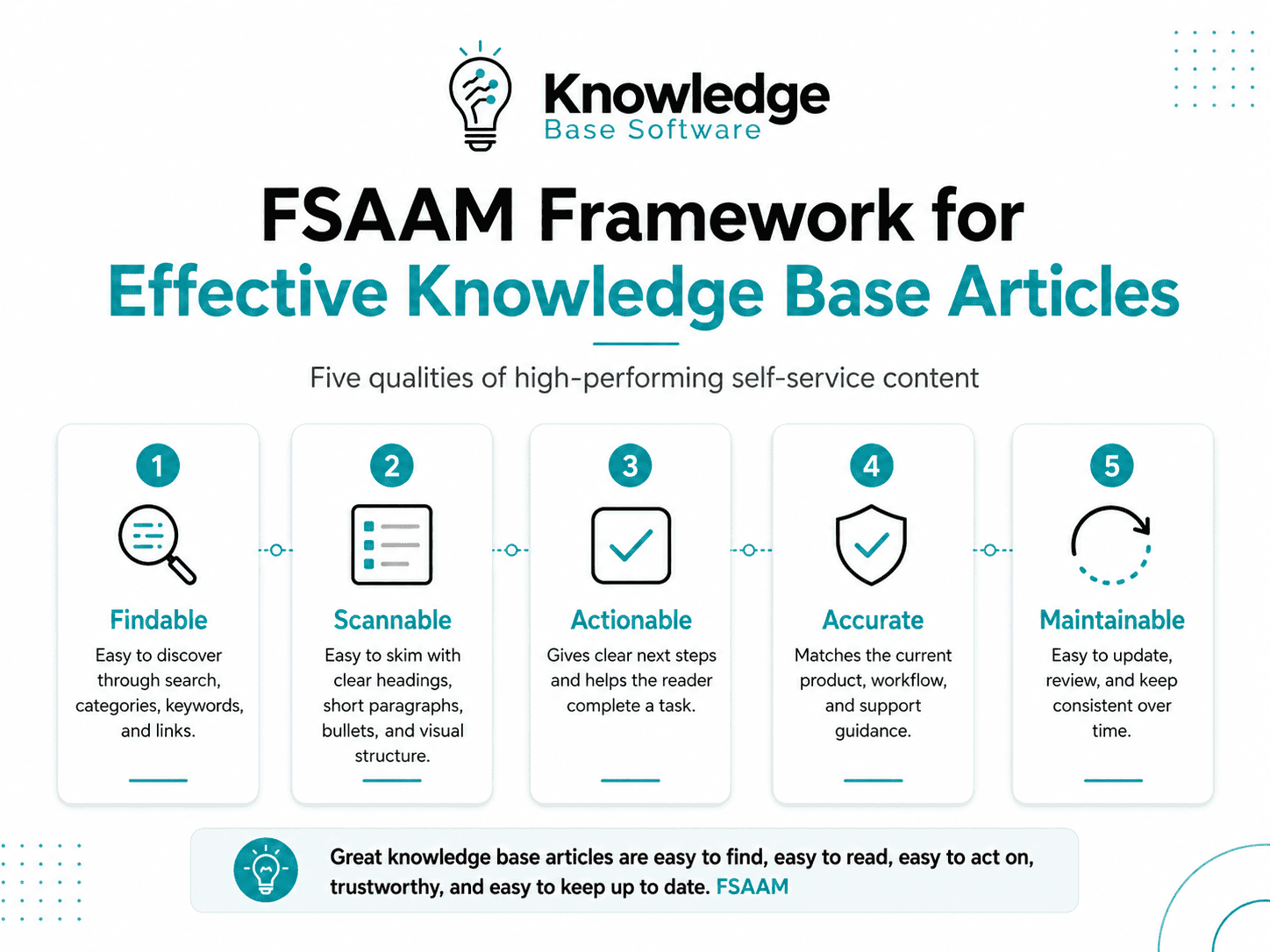
A useful way to evaluate a knowledge base article is the FSAAM Framework:
- Findable
- Scannable
- Actionable
- Accurate
- Maintainable
Findable
A knowledge base article must be easy to discover through your help center search, website search, Google, internal search, chatbot, and related article links.
Findability depends on clear titles, natural keywords, synonyms, tags, categories, and internal links. If users search for “change email address,” but your article is titled “User Identity Management,” they may never find it.
Scannable
Most users do not read help center articles from top to bottom. They scan for the answer.
Use descriptive headings, short paragraphs, numbered steps, bullet points, tables, screenshots, and bold labels where appropriate. A user should be able to understand the article’s purpose within a few seconds.
Actionable
A good knowledge base article tells the reader exactly what to do. Avoid vague instructions like “configure your settings.” Instead, write clear steps such as “Go to Settings > Billing > Payment methods, then select Add payment method.”
Each step should move the reader closer to the outcome.
Accurate
Knowledge base content must match the current product, policy, workflow, interface, and permissions. Inaccurate articles create confusion, support tickets, and customer frustration.
Accuracy requires subject matter expert review, version awareness, and a clear approval process.
Maintainable
A knowledge base article should be easy to update. Include an owner, last updated date, review cycle, tags, and links to related articles. If screenshots, product names, or workflows change, the article should be easy to find and revise.
How to Write Effective Knowledge Base Articles
Writing effective knowledge base articles is easier when you follow a consistent process. Use the steps below to create articles that are useful for users and manageable for your team.
1. Start With One Clear User Question
Every article should answer one main question.
For example:
- “How do I reset my password?”
- “Why was my invoice declined?”
- “How do I invite a new team member?”
- “How do I connect Slack to my account?”
When one article tries to answer too many questions, it becomes difficult to search, scan, and maintain. Instead of creating one long article called “Account Settings,” create separate articles for password resets, email changes, two-factor authentication, billing details, and profile updates.
This makes each article more specific and easier to rank, link, and update.
2. Define the Audience and Their Context
Before writing, identify who the article is for and what they already know.
Ask:
- Is the reader a beginner or advanced user?
- Is this for customers or internal employees?
- What role does the reader have?
- Which product version does this apply to?
- Is the user on desktop, mobile, or API?
- Does the user need a specific plan or permission level?
- Are there prerequisites before starting?
For example, an article about exporting reports may need to mention that only admin users can export certain data. A setup guide may need to clarify that the user must connect an integration before completing the steps.
Context prevents confusion and reduces unnecessary support follow-ups.
3. Choose the Right Article Type
Different questions need different article formats. Choose the structure that fits the user’s goal.
| Article Type | Best For | Structure | Example Title |
|---|---|---|---|
| How-to article | Completing a task | Summary, prerequisites, numbered steps, expected result | How to Add a New User to Your Account |
| Troubleshooting guide | Fixing an error or issue | Symptoms, causes, solutions, escalation path | Fix Login Errors After Enabling 2FA |
| FAQ article | Answering short related questions | Question-and-answer format | Billing FAQs for Monthly Plans |
| Concept explanation | Explaining how something works | Definition, use cases, examples, related tasks | What Is Role-Based Access Control? |
| Product/service description | Describing a feature or offering | Overview, benefits, limitations, setup links | What the Advanced Reporting Feature Includes |
| Process/SOP article | Standardizing internal workflows | Scope, owner, steps, rules, exceptions | How to Escalate Enterprise Support Tickets |
Choosing the right article type helps the reader know what to expect and helps your team write with less guesswork.
Once you have verified source notes, use the free Knowledge Base Article Generator to structure them as an Article, FAQ, SOP, or How-to draft before review.
4. Write a Clear, Searchable Title
The title is one of the most important parts of a knowledge base article. It affects search, click-through, and user confidence.
Use titles that match how users describe their problem or goal.
Good title formulas include:
- How to [complete task]
- Fix [specific problem]
- [Feature]: What it is and how it works
- Set up [feature] in [product]
- Troubleshoot [error or workflow]
- Change [setting or account detail]
- Manage [feature, users, billing, permissions]
- Understand [concept or policy]
Examples:
- How to Reset Your Password
- How to Add a New Team Member
- Fix Payment Method Declined Errors
- Set Up Two-Factor Authentication
- Export Monthly Billing Reports
- Change the Email Address on Your Account
- Slack Integration: What It Is and How It Works
- Troubleshoot Missing Email Notifications
Avoid vague titles such as “Account Information,” “Settings,” or “Important Update.” They do not tell the reader what problem the article solves.
5. Add a Short Summary Before the Steps
A short summary helps users confirm they are in the right place before they invest time reading the full article.
The summary should answer:
- What does this article help with?
- Who does it apply to?
- What will the user achieve?
- Are there any important limitations?
Example:
“This article explains how account admins can invite new users, assign roles, and resend pending invitations. You must have admin permissions to complete these steps.”
That short summary prevents non-admin users from following steps they cannot complete.
6. Use a Consistent Article Structure
Consistency makes your knowledge base easier to use and easier to manage.
A strong knowledge base article structure includes:
- Title
- Summary
- Applies to
- Prerequisites
- Steps
- Expected result
- Troubleshooting
- Related articles
- Last updated / owner
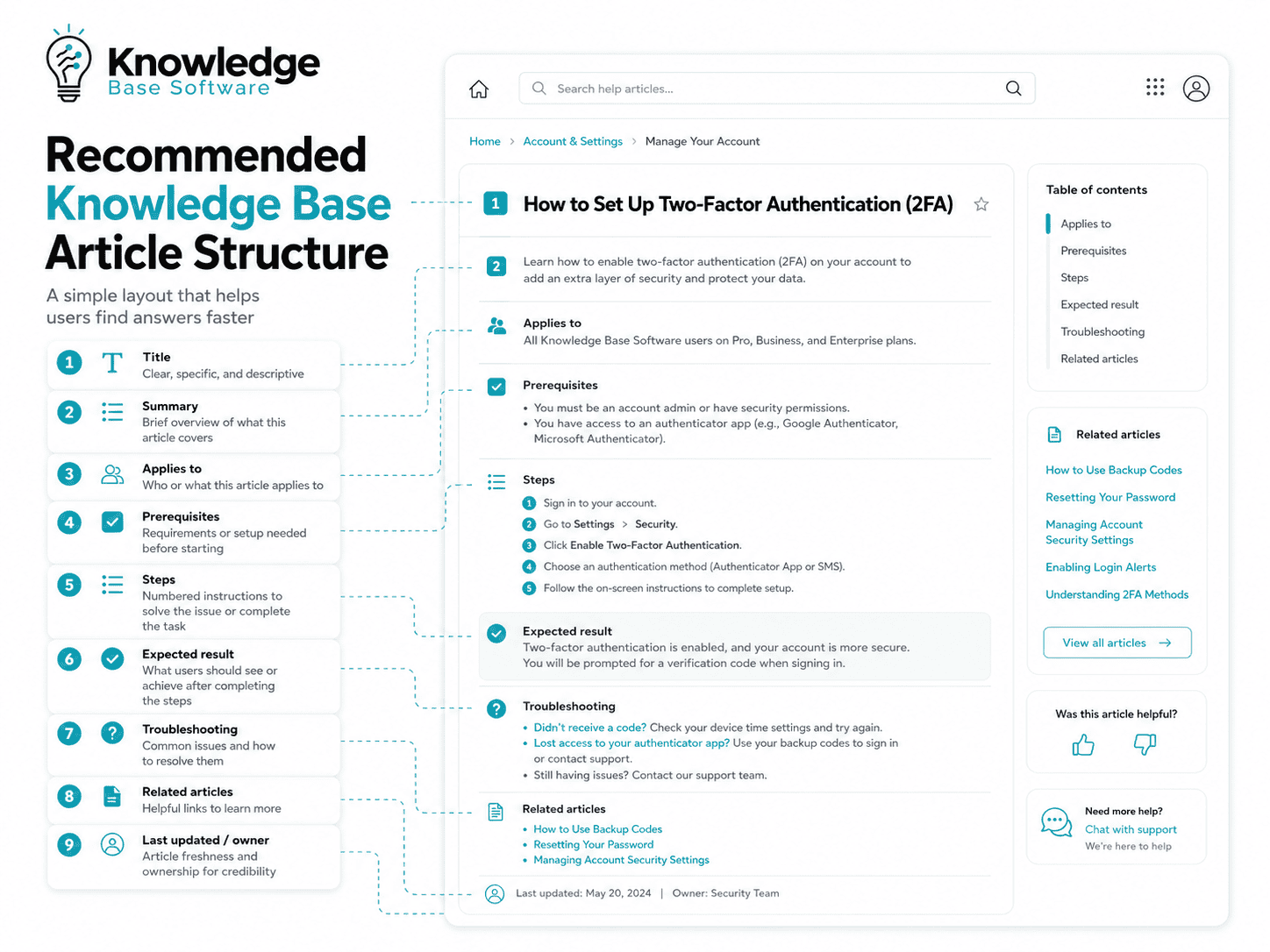
Not every article needs every section, but using a standard structure improves readability and helps support teams create content faster.
For technical documentation, you may also include:
- Product version
- User role
- Permission requirements
- Platform or device
- API endpoint
- Known limitations
- Security notes
The more complex the product, the more important this structure becomes.
7. Write Clear Step-by-Step Instructions
Step-by-step instructions are the core of most help center articles.
Use numbered steps when the order matters. Start each step with a verb. Mention exact button names, field names, menu paths, and expected results.
Instead of writing:
“Update the payment information in your billing settings.”
Write:
- Sign in to your account.
- Select Settings from the left menu.
- Select Billing.
- Under Payment methods, select Add payment method.
- Enter your card details.
- Select Save.
Each step should contain one main action. If a step has too many actions, split it into smaller steps.
Also include the expected result. For example:
“After saving, the new payment method appears under Payment methods and becomes available for future invoices.”
Avoid unexplained jargon. If a technical term is necessary, define it briefly.
Use notes and warnings carefully. Too many warnings make the article harder to scan. Add them only when they prevent mistakes, data loss, security issues, or failed setup.
8. Add Screenshots, GIFs, Videos, or Diagrams When Needed
Visuals are useful when the interface is complex, the task involves multiple screens, or the user needs to recognize a specific button, error message, or setting.
Use screenshots for:
- Product settings
- Error messages
- Setup workflows
- Account management
- Dashboard navigation
Use GIFs or short videos for:
- Multi-step visual workflows
- Drag-and-drop actions
- Repeated actions
- Interface transitions
Use diagrams for:
- System architecture
- Integration workflows
- Decision trees
- Troubleshooting paths
Every visual should support the article. Do not add screenshots just to make the page look longer.
Write useful alt text for accessibility and search. Instead of “screenshot,” use “Billing settings screen showing the Add payment method button.”
Keep visuals updated. Outdated screenshots can make an accurate article feel wrong.
9. Optimize the Article for Search
Search optimization matters inside your help center and in Google.
Use natural keywords in the title, introduction, headings, body, tags, and related links. Include synonyms users might search for.
For example, users may search:
- “reset password”
- “forgot password”
- “change password”
- “can’t log in”
- “recover account”
A good article can include these terms naturally without keyword stuffing.
Use clean URL slugs. For example:
/reset-password/
is better than:
/article/93485-user-access-general-settings/
Add internal links to related articles using descriptive anchor text. For example, link to “Set up two-factor authentication” instead of “click here.”
Add a clear meta title and meta description when publishing long-form articles or public help center content. These elements help search engines and users understand what the page covers.
Search optimization should never make the article harder to read. The best SEO for customer support documentation is clear, useful, specific content.
10. Add Troubleshooting and Edge Cases
Many users visit a knowledge base article because something did not work as expected.
A troubleshooting section can reduce follow-up tickets by addressing common issues immediately.
Include:
- Common errors
- Possible causes
- Alternative steps
- Permission limitations
- Product plan limitations
- Browser or device issues
- When to contact support
- What information to include in a support request
Example:
“If you do not see the Export button, you may not have admin permissions. Contact your account owner or ask an admin to update your role.”
Troubleshooting content is especially useful for technical products, integrations, billing workflows, login issues, and account settings.
11. Review With a Subject Matter Expert
A knowledge base article should be reviewed before publication, especially if it covers billing, security, legal, technical setup, compliance, or product configuration.
A subject matter expert can confirm:
- The steps are accurate
- The product names are correct
- The screenshots are current
- The limitations are clear
- The article does not expose sensitive information
- The workflow matches current policy
- The article is safe for customers or employees to follow
For internal knowledge base articles, review may involve support managers, operations leads, legal teams, security teams, or product owners.
Create a simple approval workflow so content does not get stuck in review forever.
12. Keep the Article Updated
Publishing the article is not the end of the process.
Knowledge base articles become less useful when products, policies, screenshots, or workflows change. Assign an owner and review schedule for every important article.
Update articles when:
- A product feature changes
- A screenshot becomes outdated
- A support policy changes
- A link breaks
- Users leave negative feedback
- Search queries show confusion
- Support tickets continue after users view the article
- A new edge case appears
- The article has not been reviewed recently
Use analytics and feedback to decide what to improve. A high-traffic article with poor feedback should be reviewed quickly. A zero-result search query may show that users are looking for an article that does not exist yet.
Knowledge Base Article Template
Use this copy-and-paste template to create consistent help center articles.
# [Article Title]

## Summary
[Briefly explain what this article helps the reader do or understand.]

## Applies To
- Product/feature: [Product or feature name]
- Audience: [Customers, admins, support agents, internal team, etc.]
- Platform: [Web, mobile, API, desktop, etc.]
- Plan/permission required: [Plan or role if applicable]

## Before You Start
Make sure you have:
- [Prerequisite 1]
- [Prerequisite 2]
- [Required permission, setting, or account access]

## Steps
1. [Start with a clear action verb.]
2. [Mention exact button, menu, or field names.]
3. [Keep one action per step.]
4. [Add more steps as needed.]

## Expected Result
[Explain what the user should see or what should happen after completing the steps.]

## Troubleshooting
### [Problem or error]
[Explain the likely cause and solution.]

### [Problem or error]
[Explain the likely cause and solution.]

## FAQs
### [Question]
[Short answer.]

### [Question]
[Short answer.]

## Related Articles
- [Related article 1]
- [Related article 2]
- [Related article 3]

## Last Updated
[Date]

## Owner
[Team or person responsible for maintaining the article]

## Tags
[Keyword, feature, category, product area]
Knowledge Base Article Examples
1. How-To Article Example
Title: How to Add a New Team Member
Short summary:
This article explains how account admins can invite a new team member, assign a role, and resend an invitation if needed.
Mini outline:
- Applies to account admins
- Before you start
- Steps to invite a user
- How to assign a role
- Expected result
- Troubleshooting invitation issues
- Related articles
Why it works:
It focuses on one clear task, identifies the required permission, uses step-by-step instructions, and includes a troubleshooting section for invitation problems.
2. Troubleshooting Article Example
Title: Fix Login Errors After Enabling Two-Factor Authentication
Short summary:
This article helps users resolve common login issues after two-factor authentication is enabled.
Mini outline:
- Common symptoms
- Possible causes
- Check your authentication app
- Use backup codes
- Contact an admin
- When to contact support
Why it works:
It starts with the problem, explains likely causes, and gives users several resolution paths depending on their situation.
3. FAQ Article Example
Title: Billing FAQs for Monthly Plans
Short summary:
This article answers common questions about invoices, payment methods, billing dates, failed payments, and plan changes.
Mini outline:
- When will I be charged?
- How do I update my payment method?
- Why did my payment fail?
- Can I change plans mid-cycle?
- Where can I download invoices?
Why it works:
It groups short, related billing questions in one place while linking to detailed how-to articles for tasks that require step-by-step instructions.
Common Mistakes to Avoid
Even helpful teams often create knowledge base articles that are difficult to use. Avoid these common mistakes.
Writing About Too Many Topics in One Article
One article should solve one primary problem. If the article covers several unrelated tasks, split it into separate pages.
Using Vague Titles
Titles like “Settings Overview” or “Managing Your Account” are hard to search. Use specific, action-based titles.
Skipping Prerequisites
Users need to know what access, permissions, tools, or information they need before starting.
Assuming Users Know Product Jargon
Internal product terms may confuse customers. Use plain language and define technical terms when needed.
Hiding the Answer Too Low on the Page
Do not make users read a long introduction before finding the answer. Put the most important information near the top.
Using Screenshots That Become Outdated
Screenshots are helpful, but they require maintenance. Review them when the product interface changes.
Not Linking Related Articles
Related links help users continue their journey and reduce dead ends.
Not Tracking Feedback
Article feedback, search behavior, and support tickets can reveal whether the article is actually working.
Not Assigning Ownership
Every important article should have a clear owner. Without ownership, content becomes outdated.
Forgetting to Update Content After Product Changes
Product releases should trigger documentation reviews. Add content updates to your release process.
How to Measure Whether a Knowledge Base Article Works
A knowledge base article is successful when it helps users solve problems with less effort.
Useful metrics include:
- Article views
- Search queries
- Click-through rate from search
- Upvotes and downvotes
- Ticket deflection
- Time on page
- Scroll depth
- Support tickets created after viewing the article
- Zero-result searches
- Article freshness or last reviewed date
Use these metrics to improve content, not just report performance.
For example, if an article gets many views but many users still contact support, the article may be unclear, incomplete, outdated, or missing a troubleshooting section.
If users search for a term that does not match any article, add that term to an existing article or create a new one.
If users downvote an article, review the title, summary, steps, screenshots, and expected result. Negative feedback is not just a score. It is a signal that the article is failing a real user need.
Knowledge Base Article Checklist
Use this checklist before publishing or updating a help center article.
- The article answers one clear user question.
- The title is specific and searchable.
- The first few lines summarize what the article helps with.
- The audience is clear.
- Prerequisites, permissions, or limitations are included.
- Steps are numbered when order matters.
- Each step starts with a clear action.
- Button names, menu names, and field names are exact.
- The article avoids unexplained jargon.
- Screenshots, GIFs, videos, or diagrams are included when helpful.
- Visuals have useful alt text.
- The article includes troubleshooting guidance when needed.
- Related articles are linked with descriptive anchor text.
- Keywords and tags reflect how users search.
- A subject matter expert has reviewed the content.
- The article has a last updated date.
- The article has an assigned owner.
- There is a feedback mechanism for users.
FAQs About Writing Effective Knowledge Base Articles
What is the best structure for a knowledge base article?
The best structure is title, summary, applies to, prerequisites, steps, expected result, troubleshooting, related articles, and last updated information. This structure helps users quickly understand whether the article applies to them and what to do next.
How long should a knowledge base article be?
A knowledge base article should be as long as necessary to solve the user’s problem, but no longer. Simple tasks may need only a few steps. Complex workflows may need detailed instructions, screenshots, troubleshooting, and related links.
Should knowledge base articles include screenshots?
Yes, include screenshots when they help users recognize screens, buttons, settings, or error messages. Avoid unnecessary screenshots, and update them when the product interface changes.
How often should you update knowledge base articles?
Update articles whenever the product, workflow, policy, screenshot, or user feedback changes. Important articles should also have a regular review cycle, such as monthly, quarterly, or after major releases.
What is the difference between a knowledge base article and a blog post?
A knowledge base article helps users complete a task, fix a problem, or understand a product or process. A blog post usually educates, informs, promotes, or explores a broader topic. Knowledge base articles are more direct, structured, and support-focused.
How do you make knowledge base articles easier to find?
Use clear titles, natural keywords, helpful tags, related article links, clean URL slugs, descriptive anchor text, and search terms that match how users describe their problems.
Can AI help write knowledge base articles?
Yes, AI can help draft outlines, rewrite unclear steps, identify missing sections, summarize support tickets, and suggest article titles. However, a human subject matter expert should review the article for accuracy, safety, product fit, and tone.
What are the most common types of knowledge base articles?
The most common types are how-to guides, troubleshooting articles, FAQ articles, product explanations, setup guides, internal SOPs, account-management articles, and policy documents.
Conclusion
Learning how to write effective knowledge base articles starts with one principle: help the user solve one problem quickly and confidently.
A strong article is not just a page of instructions. It is a reliable support experience. It gives the reader a clear title, a useful summary, accurate steps, the right context, helpful visuals, troubleshooting advice, and links to the next best resource.
Start with your most common support question. Turn it into a clear, searchable article. Review it with the right expert, publish it, measure how users respond, and keep improving it over time.
That is how you create effective knowledge base articles that support customers, reduce repetitive tickets, and make your knowledge base more valuable with every update.