Independent knowledge base software guide Evidence-led Updated 2026

Knowledge Base Disaster Recovery: Backups, RTO/RPO, Testing, and Recovery Playbook
Knowledge base disaster recovery is the tested capability to restore a usable help center, internal wiki, documentation site, support portal, or operational runbook library after a serious disruption. A backup is only one input to that capability. Recovery also requires documented objectives, accountable roles, clean recovery points, dependencies, restore procedures, security controls, validation tests, communications, and business acceptance.
A successful recovery does not end when the application starts or the article count matches. The restored service must deliver the correct content, files, permissions, translations, search results, links, integrations, and AI answers to the intended users without reintroducing corruption or compromise.
The safest approach is to identify critical knowledge services, define realistic recovery time and data-loss tolerances, protect the complete system rather than article text alone, maintain alternate access to essential runbooks, and repeatedly prove the plan through isolated restore exercises.
Disaster recovery is not the same as backup, export, or business continuity
The NIST contingency-planning guidance describes recovery as a coordinated strategy involving plans, procedures, and technical measures that restore systems, operations, and data after disruption. This is broader than producing a copy of the content.
| Mechanism | Primary purpose | What it does not prove |
|---|---|---|
| Version history | Reverse an article edit or restore a previous revision. | Recovery of the platform, hierarchy, files, permissions, search, or configuration. |
| Trash or recycle bin | Recover recently deleted supported objects within the retention window. | Protection after retention expires or recovery from system-wide corruption. |
| Export | Create a portable or readable copy of selected content. | That the export can recreate the original permissions, workflows, settings, history, and integrations. |
| Backup | Preserve point-in-time data and system components for restoration. | That the backup is complete, uncorrupted, clean, or restorable within the required time. |
| Replication | Maintain one or more current copies of live data. | Protection from replicated deletion, corruption, malicious changes, or overbroad permissions. |
| High availability | Reduce disruption from routine component and infrastructure failures. | Recovery from a major destructive event, ransomware, or logical corruption. |
| Disaster recovery | Restore an acceptable knowledge service after a major disruption. | That essential work can continue during the entire recovery period. |
| Business continuity | Keep critical business processes operating during and after disruption. | Full technical restoration of the original platform. |
| Archive | Preserve historical or records content for long-term reference. | Rapid restoration of a current operational service. |
Microsoft’s business-continuity guidance separates high availability, which addresses regular faults and day-to-day uptime, from disaster recovery, which prepares for uncommon major events. Both contribute to continuity, but neither replaces the other.
A bad edit may require only article rollback. A region outage, corrupted permissions model, failed migration, or compromised administrator may require a much broader response. The recovery mechanism should match the failure scenario.
Define the complete knowledge-service boundary
A disaster-recovery plan that protects only article bodies will usually restore an incomplete service. Inventory every component required to make the knowledge base useful, secure, searchable, and maintainable.
| Recovery domain | Objects to inventory | Key recovery question |
|---|---|---|
| Content | Article IDs, titles, bodies, slugs, URLs, publication states, owners, dates, tags, metadata, and review status. | Can the correct version and state of every critical article be recovered? |
| Structure | Categories, spaces, collections, sections, folders, page trees, ordering, and navigation. | Will readers find content in the expected location after restoration? |
| Media | Inline images, downloadable files, diagrams, videos, embeds, and reusable content. | Are media objects protected independently of article records? |
| Languages | Source articles, translations, locale relationships, and fallback behavior. | Will every required language reconnect to the correct source and URL? |
| Access | Readers, authors, owners, groups, roles, tenants, guests, service accounts, and permissions. | Will allowed users retain access while denied users remain blocked? |
| Governance | Drafts, approvals, comments, subscriptions, revisions, feedback, verification, and audit records. | Which workflow and history objects must survive the disaster? |
| Presentation | Themes, templates, custom pages, CSS, JavaScript, and portal settings. | Can the site be restored without losing critical navigation or functionality? |
| Discovery | Search indexes, synonyms, filters, analytics, snippets, and no-result data. | Should these objects be restored or rebuilt from validated source content? |
| Web delivery | Custom domains, DNS, TLS certificates, CDN, reverse proxies, redirects, canonicals, hreflang, and sitemaps. | Can users reach the restored service through established links? |
| Integrations | APIs, webhooks, ticketing connections, widgets, macros, Slack, Teams, email, and notifications. | Which credentials, endpoints, and subscriptions must be recreated or rotated? |
| Infrastructure | Databases, filesystems, object storage, queues, caches, application versions, plugins, containers, and infrastructure code. | Can the full compatible application stack be rebuilt in the required order? |
| Identity | SSO, SCIM, MFA, identity-provider mappings, emergency accounts, tokens, and keys. | How will operators and readers authenticate if the primary identity service is unavailable? |
| AI and RAG | Source documents, connectors, chunks, embeddings, vector indexes, prompts, models, permission metadata, citations, caches, and evaluation sets. | Which objects are authoritative and which should be rebuilt after source recovery? |
For every object, record whether it is backed up, exportable, rebuildable, vendor-managed, protected through another system, or accepted as a documented loss. An unlisted dependency often becomes the longest recovery delay.
Start with business impact, not backup frequency
The NIST contingency-planning process begins with policy and a business impact analysis before recovery strategies and technical plans are selected. This order matters: backup design should follow the knowledge service’s business importance, not a default schedule copied from another system.
Identify which knowledge supports:
- Public customer self-service and product operation.
- Support-agent troubleshooting and approved responses.
- Employee procedures and service delivery.
- Security incidents, outages, and emergency operations.
- Compliance, policy, safety, and records obligations.
- Developer integration and production operations.
- AI assistants and search experiences used in live workflows.
Then assess what happens when the knowledge is unavailable, incomplete, stale, corrupted, or exposed to the wrong audience. A public FAQ outage may increase support contacts, while unavailable incident runbooks can delay restoration of other critical systems.
Critical recovery instructions should not exist only inside the platform, identity provider, network, password vault, or region whose loss they are intended to address.
Set RTO and RPO for each knowledge service
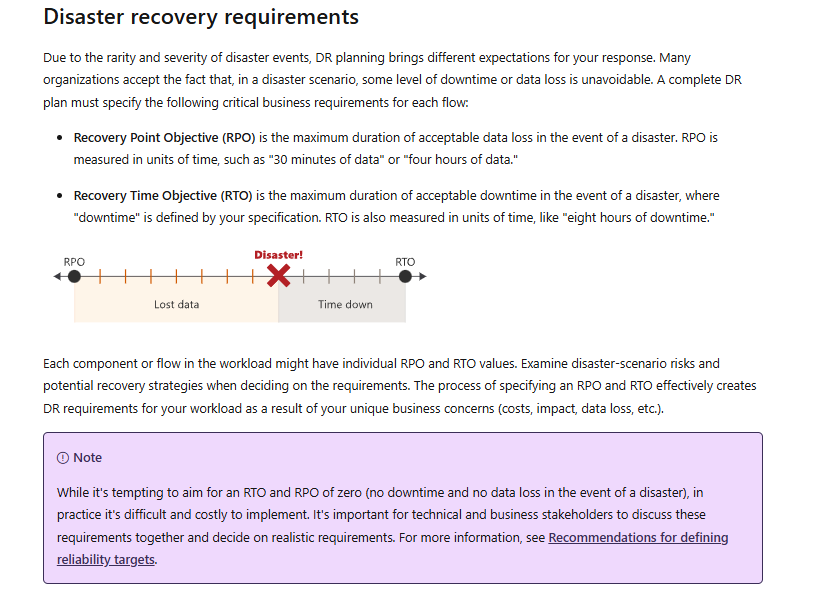
NIST defines the Recovery Time Objective as the overall length of time a system can remain in recovery before negatively affecting the organization’s mission or business processes. The Recovery Point Objective is the point in time to which data must be recovered after an outage.
| Objective | Question for a knowledge base | Important clarification |
|---|---|---|
| RTO | How long can this knowledge service remain unusable before business impact becomes unacceptable? | Define whether recovery ends at server availability, authenticated access, completed validation, or business-owner acceptance. |
| RPO | How much recent content and configuration change can be lost? | Express it as a time point and consider article edits, permissions, files, translations, and settings—not only database rows. |
| Maximum tolerable downtime | How long can the supported process remain disrupted before significant organizational harm occurs? | The knowledge system’s RTO should leave enough time for dependent business processes to recover. |
| Business acceptance point | When is the restored service useful enough for the supported process to resume? | A technically running application may still fail search, permission, link, or content-quality checks. |
Use different objectives for different knowledge tiers. Emergency runbooks may need faster alternate access than historical documentation. Frequently updated agent guidance may require a smaller RPO than a stable archive.
Microsoft notes that smaller RTO and RPO values generally require more cost and complexity. Zero downtime and zero data loss should not be adopted as casual defaults. Business owners and technical owners should agree on realistic objectives together.
Match each failure scenario to the correct recovery method
A full platform restore is unnecessary for some incidents and insufficient for others.
| Failure scenario | Likely first recovery method | Additional checks |
|---|---|---|
| Incorrect article edit | Restore a previous article revision. | Confirm links, files, translations, and publication status. |
| Recently deleted article | Recover from trash or item-level restore. | Verify original location, permissions, URL, and subscriptions. |
| Harmful bulk edit or import | Point-in-time content or database recovery, or controlled reverse transformation. | Identify every affected object before reopening editing. |
| Missing images or attachments | Restore file or object storage. | Check article references, access controls, MIME types, and direct URLs. |
| Corrupted permissions | Restore or reconstruct group, role, and object-level access configuration. | Run allowed and denied tests through every delivery path. |
| Search-index loss | Rebuild from validated authoritative content when supported. | Retest permission-aware results, snippets, synonyms, and no-result behavior. |
| SaaS platform outage | Vendor incident escalation plus approved continuity copy. | Monitor vendor communications and preserve temporary corrections for reconciliation. |
| Identity-provider outage | Approved break-glass access or alternate authenticated delivery. | Log emergency access and revoke it after recovery. |
| Failed migration or upgrade | Rollback to the verified source or previous compatible version. | Protect changes created after the migration window. |
| Region or infrastructure loss | Failover or rebuild according to the approved architecture. | Validate configuration drift, capacity, DNS, certificates, and integrations. |
| Ransomware or administrator compromise | Containment and isolated recovery from a verified clean point. | Rotate credentials, scan content, preserve evidence, and avoid premature reconnection. |
| AI index or retrieval corruption | Disable affected answers, restore authoritative sources, and rebuild derived stores. | Retest citations, permissions, deleted content, and stale caches. |
The newest backup is not always the safest recovery point. It may already contain malicious changes, corrupted records, poisoned knowledge, or compromised configuration.
Compare recovery mechanisms without overclaiming
| Mechanism | Useful for | Typical omission or risk |
|---|---|---|
| Article revision history | Recovering individual edits. | Does not restore deleted structure, platform configuration, integrations, or files. |
| Trash | Recovering recently deleted supported objects. | Retention expires and not every object type may be included. |
| Static HTML or PDF export | Readable continuity copy and selected content portability. | May omit permissions, workflow, metadata, history, and import-ready structure. |
| Markdown, JSON, XML, or API export | Structured content preservation and migration preparation. | Coverage may exclude themes, users, files, settings, and relationships. |
| Database backup | Restoring application records and relationships. | Uploaded media, secrets, configuration, and compatible application code may be missing. |
| File or object-storage backup | Restoring images, attachments, themes, and file-based content. | Cannot reconstruct database relationships and permissions alone. |
| Snapshot or point-in-time recovery | Returning a component to an earlier state. | Dependent components may represent a different point in time. |
| Replication | Fast failover from component or location failure. | Can rapidly replicate deletion, corruption, and malicious changes. |
| Vendor platform backup | Recovering the provider’s service from infrastructure failures. | May not support a customer-selected restore point or tenant-level rollback. |
| Customer-managed SaaS backup | Independent copies and customer-controlled restore options. | Coverage depends on APIs, plan, rate limits, permissions, and vendor object exposure. |
| Emergency read-only mirror | Maintaining access to approved critical knowledge during recovery. | Can become stale and does not restore authoring or full platform operation. |
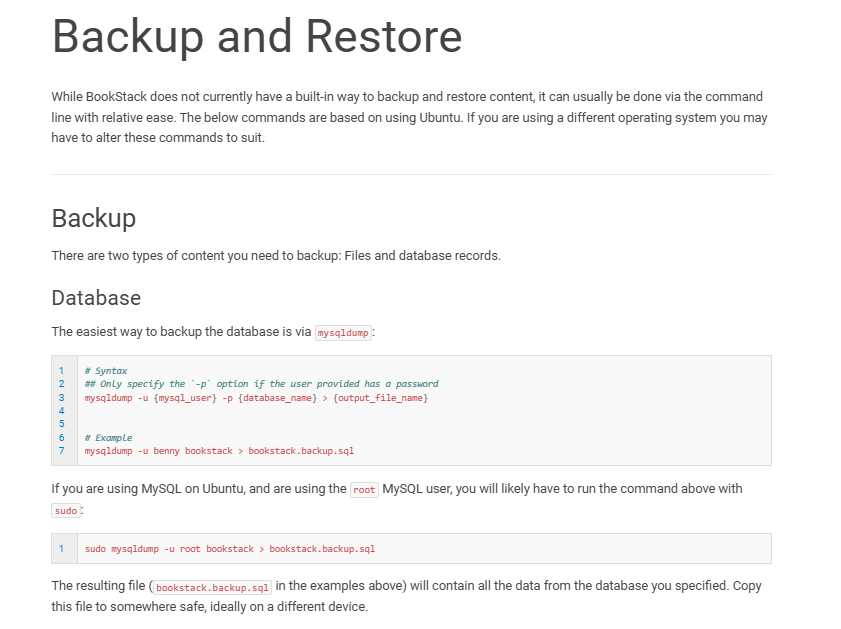
BookStack provides a clear product-specific example. Its backup and restore documentation requires both database records and uploaded files. It also warns that the original APP_KEY may be needed because it protects encrypted data such as multifactor-authentication credentials. BookStack’s user exports are useful for portability but are explicitly not intended to replace application backup and restore.
SaaS recovery and customer recovery are separate responsibilities
A SaaS provider may maintain excellent infrastructure backups while offering limited customer-level rollback. Ask whether the documented recovery process restores the vendor’s entire service, an individual tenant, a selected workspace, a deleted article, or a customer-chosen point in time.
Atlassian’s resilience documentation provides a useful example: its internal backup program supports service recovery, but those backups are not used to reverse customer-initiated destructive changes such as deleted sites or content overwritten through scripts.
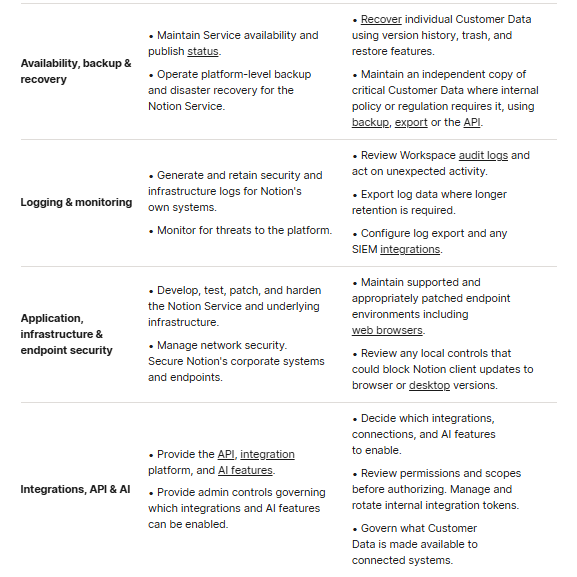
Notion’s shared-responsibility model makes a similar distinction. Notion operates platform-level backups and disaster recovery, while customers recover individual data through trash and version history and maintain independent copies where their obligations require them. Notion also states that an export does not recreate the original workspace permissions, settings, or complete configuration.
For a SaaS knowledge base, verify:
- Vendor service RTO and RPO versus customer-data restore objectives.
- Backup frequency, retention, geographic separation, and encryption.
- Item-, space-, tenant-, and point-in-time restore options.
- Handling of deletion, bulk overwrite, malicious administration, and failed synchronization.
- Export formats, API coverage, files, translations, permissions, and history.
- Plan restrictions and paid backup or restore add-ons.
- Emergency support channels, escalation, and restoration authorization.
- Final-export access after suspension or contract termination.
Do not treat “daily backups,” replication, a trust-center badge, or a compliance report as proof that the customer can restore its required knowledge objects within its own objectives.
Self-hosted recovery must restore the complete compatible stack
A self-hosted knowledge base usually requires several coordinated backups and a documented restoration order.
- Infrastructure: network, compute, storage, DNS, TLS, firewall, load balancer, and reverse proxy.
- Application runtime: compatible application version, containers, packages, plugins, extensions, and themes.
- Configuration and secrets: environment files, encryption keys, application keys, API credentials, email, storage, and identity configuration.
- Database: schemas, records, relationships, users, permissions, revisions, and workflow state.
- Files and object storage: images, attachments, custom themes, and generated assets.
- Identity: group mappings, SSO configuration, service accounts, emergency accounts, and certificates.
- Derived services: caches, queues, search indexes, previews, and AI stores that should be rebuilt where possible.
- Integrations: webhooks, ticketing systems, chat connections, notifications, and APIs.
Preserve infrastructure-as-code, container images, package lockfiles, supported software versions, license files, and upgrade documentation. A database backup may be technically valid but unusable if the compatible application release or decryption key is unavailable.
Docs-as-code recovery has a different source of truth
For static documentation, the source repository is often authoritative and the deployed website is derived. Protect:
- Repository history, branches, tags, permissions, and protected-branch settings.
- Markdown, MDX, code examples, assets, translated source, and versioned documentation.
- Build tools, package versions, themes, plugins, and lockfiles.
- CI/CD workflows, package registries, deployment tokens, and signing keys.
- Search-provider configuration, indexes, DNS, CDN, redirects, and hosting settings.
The decisive recovery test is whether a clean clone in a controlled environment can reproduce and publish the expected site. Keeping only the generated HTML can preserve reader access but may not preserve the maintainable source, build pipeline, or version history.
Design a cyber-resilient backup strategy
Backup frequency and retention should follow the approved RPO, content-change rate, criticality, records requirements, and threat model. There is no universal schedule for every knowledge base.
A resilient design should address:
- Separate storage accounts, providers, regions, or facilities.
- Offline or immutable copies for destructive attacks.
- Encryption in transit and at rest.
- Recovery of encryption, signing, and application keys.
- Least-privilege backup and restore identities.
- Separation between production administration and backup-deletion authority.
- Backup-job monitoring, alerting, and escalation.
- Checksums, integrity validation, and malware scanning.
- Retention tiers and protected deletion policies.
- Offline copies of source code, executables, images, licenses, and infrastructure definitions required to rebuild.
- An independently accessible recovery runbook and contact list.
The CISA StopRansomware Guide recommends offline, encrypted backups and regular testing because ransomware operators commonly seek to delete or encrypt accessible backup systems. It also recommends maintaining trusted system images and offline infrastructure definitions where appropriate.
A successful backup-job status proves that data was written somewhere. It does not prove that the copy contains every required component, is free from corruption, can be decrypted, or can restore a trusted service within the approved RTO.
Knowledge base disaster recovery runbook
The runbook should be executable by trained personnel other than its original author. Adapt the following sequence to the incident instead of forcing every step into every recovery.
- Declare the incident. Record the start time, incident owner, known scope, and affected business processes.
- Open an independent communication channel. Do not rely only on the failed platform, identity provider, network, or region.
- Classify the failure. Determine whether it is an article incident, tenant issue, dependency outage, platform disaster, or cyber event.
- Freeze risky activity. Pause imports, migrations, bulk edits, synchronizations, publishing automation, and AI re-indexing.
- Preserve evidence. Retain logs, audit records, timestamps, alerts, vendor messages, affected exports, and forensic data.
- Contain compromise. Isolate affected accounts, systems, connectors, networks, credentials, and automation where required.
- Confirm priorities. Review the approved RTO, RPO, criticality tier, continuity method, and accepted losses.
- Select a recovery point. Evaluate completeness, age, integrity, malware status, malicious changes, and configuration compatibility.
- Prepare an isolated environment. Restore into a clean location when the incident or architecture justifies it.
- Restore dependencies in order. Recover infrastructure, runtime, secrets, database, files, identity, configuration, and integrations.
- Recover authoritative knowledge. Restore content, hierarchy, translations, ownership, permissions, files, themes, and settings.
- Rebuild derived systems. Recreate search indexes, previews, embeddings, and caches only after source validation.
- Validate technical and business criteria. Test representative content, access, search, integrations, links, and real user tasks.
- Rotate affected access. Replace compromised passwords, API tokens, sessions, certificates, keys, and service credentials.
- Approve cutover. Switch DNS, traffic, integrations, or the active tenant only after authorized acceptance.
- Communicate clearly. State what has been restored, what remains unavailable, and which temporary processes are still in effect.
- Monitor stabilization. Watch for errors, broken links, failed searches, permission incidents, integration failures, and unusual support volume.
- Review and improve. Document causes, evidence, bottlenecks, corrective actions, owners, dates, and the next exercise trigger.
Validate the restored knowledge service
Article counts and HTTP availability are insufficient. Use automated reconciliation and human task testing across the restored service.
| Validation area | Checks | Evidence |
|---|---|---|
| Content | Titles, bodies, status, owners, tags, review dates, metadata, and representative historical versions. | Source-to-restore comparison and defect log. |
| Structure | Categories, sections, spaces, page trees, ordering, navigation, and breadcrumbs. | Automated relationship checks and user navigation tasks. |
| Files | Images, downloads, diagrams, embeds, MIME types, sizes, and access controls. | File inventory, checksums where appropriate, and direct-opening tests. |
| Languages | Translations, source relationships, locale URLs, navigation, and fallbacks. | Locale comparison and language-switching tests. |
| Permissions | Anonymous, signed-in, allowed, denied, author, reviewer, publisher, and administrator cases. | Role-based test record and access events. |
| Search | Exact title, synonym, misspelling, task phrase, restricted query, and no-answer behavior. | Expected-result set and permission-aware search results. |
| Web delivery | Custom domain, DNS, TLS, CDN, direct URLs, redirects, canonicals, hreflang, and sitemap. | Status-code report and browser tests. |
| Workflows | Drafting, approval, publication, ownership, comments, subscriptions, and notifications. | Representative end-to-end author task. |
| Integrations | APIs, webhooks, widgets, support tools, Slack, Teams, email, and analytics. | Success and controlled-failure tests. |
| AI and RAG | Citations, permissions, deleted sources, corrected content, cross-tenant isolation, and cache freshness. | Redacted retrieval traces and evaluation results. |
| Business usability | Critical support, employee, operational, and incident-response tasks. | Named business-owner acceptance. |
Record every defect, severity, owner, workaround, retest result, and acceptance decision. A technically restored platform should not return to production if it exposes restricted content, presents corrupted procedures, or reintroduces a cyber compromise.
Maintain business continuity during the recovery
Full recovery may take longer than the supported operation can tolerate. Prepare controlled alternate access to the most critical knowledge.
- A secure, read-only static mirror of approved critical articles.
- Encrypted offline HTML, PDF, or Markdown packages for selected runbooks.
- A protected alternate repository in a separate failure domain.
- Cached top support articles with a clearly displayed freshness date.
- Offline emergency contact, escalation, and vendor-support information.
- Temporary support macros, response templates, and manual triage procedures.
- An independent status page and communication channel.
- A temporary process for recording corrections and reconciling them after recovery.
- Disabling AI answers when authoritative sources are unavailable, incomplete, or untrusted.
Do not make sensitive security runbooks public merely to increase availability. Alternate access needs appropriate encryption, authentication, break-glass procedures, logging, and accountability.
An HTML ZIP or static export can be useful as a continuity copy. KnowledgeOwl, for example, documents an HTML ZIP export for backup use. The existence of a readable export still does not prove that the complete authoring platform can be restored.
Test the plan through an exercise ladder
Discussing a plan tests understanding. Restoring the service tests capability.
| Exercise | What it can demonstrate | What it cannot demonstrate alone |
|---|---|---|
| Document review | Current owners, links, contact details, and procedural completeness. | Whether recovery tools and backups work. |
| Runbook walkthrough | Whether trained personnel can follow and explain the steps. | Actual restore time and data integrity. |
| Tabletop exercise | Roles, decisions, escalation, communication, and scenario gaps. | Technical recovery performance. |
| Backup inspection | Presence, age, encryption, and expected components. | Restorability and usability. |
| Sample object restore | Article-, file-, or item-level recovery behavior. | Full application and dependency recovery. |
| Component restore | Database, file storage, or configuration recovery. | End-to-end service usability. |
| Full isolated restore | Application rebuild, data restoration, and technical validation. | Production traffic switching and real operational acceptance unless included. |
| Failover exercise | Alternate environment readiness and routing procedure. | Recovery from logical corruption when replicas share the problem. |
| User acceptance test | Whether representative business tasks work after recovery. | Safety against an unexamined cyber compromise. |
| Clean-room cyber exercise | Containment, trusted rebuild, credential rotation, and safe reconnection. | Every possible attacker technique or future incident. |
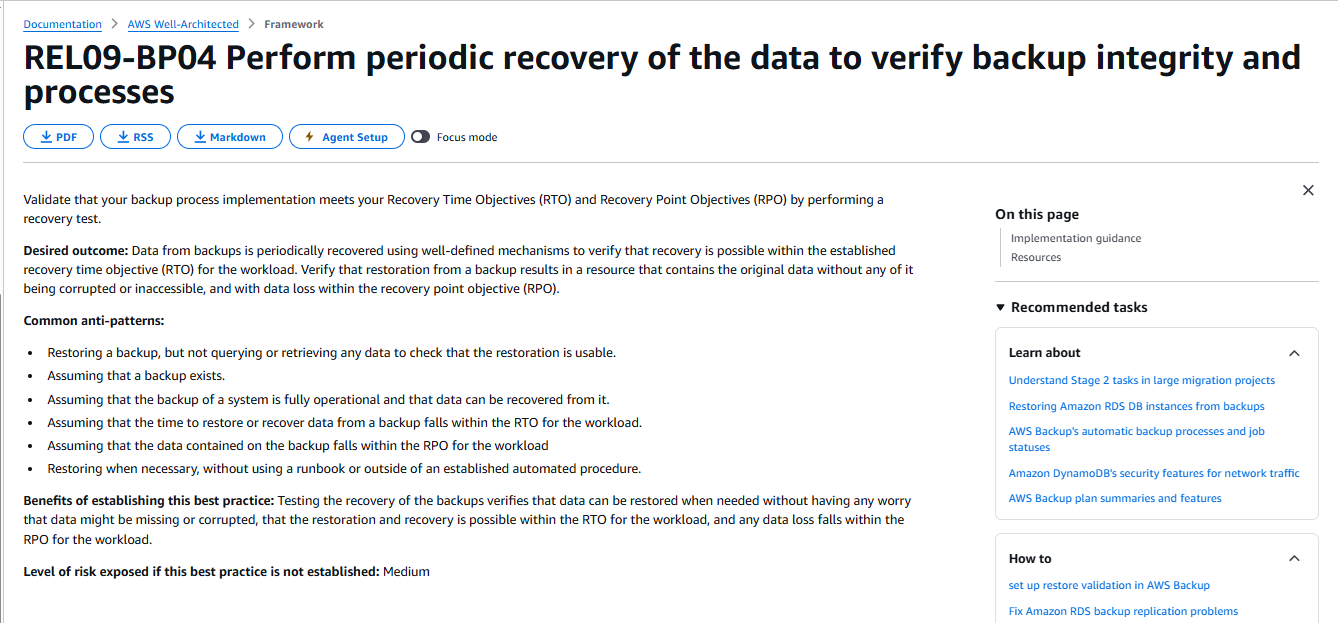
AWS recommends periodically recovering data to verify backup integrity, measuring restore time against the RTO, and confirming that the recovered data is usable and falls within the RPO. Merely creating the backup is a documented anti-pattern.
Choose exercise frequency according to criticality, change rate, architecture, incidents, contractual commitments, and risk. Rerun the relevant tests after major migrations, identity changes, backup redesign, new integrations, or changes to AI knowledge sources.
Ransomware recovery requires a verified clean point
Ordinary recovery often prioritizes speed. Cyber recovery must balance speed with containment, evidence preservation, and confidence that the restored environment is not compromised.
- Coordinate with the incident-response and security teams before altering affected systems.
- Preserve logs, suspicious content, affected accounts, and other evidence.
- Identify when compromise began and select a recovery point that predates malicious changes.
- Restore in an isolated or clean environment.
- Use trusted application images, packages, source code, infrastructure definitions, and backups.
- Scan restored content, files, themes, scripts, plugins, and integrations.
- Review articles and runbooks for malicious instructions, altered links, and changed permissions.
- Rotate passwords, sessions, API tokens, certificates, signing keys, and application secrets.
- Rebuild derived search and AI data from validated sources.
- Reconnect to production only after technical, security, and business approval.
Do not prioritize an arbitrary recovery target over safe containment. Restoring an infected copy or reconnecting to an untrusted network can restart the incident.
Recover AI, RAG, and enterprise search in the correct order
When the knowledge base supplies support bots, enterprise search, agent assist, or retrieval-augmented generation, classify every component as authoritative or derived.
| Component | Typical classification | Recovery approach |
|---|---|---|
| Approved source articles and files | Authoritative | Restore and validate before rebuilding dependent systems. |
| Ownership and permission metadata | Authoritative | Restore before any retrieval or answer service is enabled. |
| Connector configuration | Configuration | Restore or recreate securely; rotate credentials when required. |
| Parsing and chunking rules | Configuration | Preserve versions so rebuilt indexes remain reproducible. |
| Embeddings and vector index | Usually derived | Prefer rebuilding from validated sources when practical. |
| Search index | Usually derived | Rebuild and verify document counts, permissions, snippets, and filters. |
| Prompts and retrieval filters | Configuration | Restore from controlled configuration and review for unauthorized changes. |
| Generated-answer cache | Derived | Invalidate unless its contents and source state are demonstrably safe. |
| Feedback and evaluation data | Operational evidence | Restore when needed for analysis, auditing, and regression testing. |
Before enabling answers, test allowed and denied users, cross-tenant isolation, revoked permissions, deleted and corrected sources, conflicting guidance, stale citations, and cache invalidation.
The AI service should abstain, display a controlled outage response, or route the user to an approved continuity source when its authoritative knowledge is unavailable or untrusted.
Vendor disaster-recovery questions
Ask each vendor for service-, plan-, region-, and contract-specific answers:
- What are the published or contractual service RTO and RPO?
- Which customer objects and files are included in backups?
- How frequently are backups created, and how long are they retained?
- Are backups stored in a separate account, region, or provider?
- Does the vendor routinely test restorations?
- Can the vendor restore one article, folder, site, tenant, or point in time?
- Can customer-initiated deletion, overwrite, bulk corruption, and malicious administration be reversed?
- Which plan includes customer-level restoration?
- What can be exported, through which formats and APIs, and what is omitted?
- Can the export be re-imported without losing hierarchy, permissions, files, translations, and history?
- What emergency support channel and response commitment apply during recovery?
- Where are primary data and backups stored?
- What happens to recovery access after suspension or termination?
- Does the vendor support an independent backup product or customer-controlled API backup?
Zendesk’s Help Center API backup tutorial demonstrates an article-level copy-and-restore method. It is useful evidence that content can be accessed programmatically, but it should not be interpreted as a complete backup of categories, permissions, themes, media, workflow, integrations, and every other Help Center object.
Define ownership and communications before the incident
| Role | Primary recovery responsibility |
|---|---|
| Business owner | Approves criticality, RTO, RPO, accepted loss, and business acceptance. |
| Knowledge-base owner | Defines required content, workflow, permissions, and validation scope. |
| Recovery lead | Coordinates the runbook, dependencies, timing, decisions, and evidence. |
| Platform administrator | Restores application components and configuration. |
| Database and storage owners | Recover records, files, object storage, and recovery points. |
| Identity and network owners | Restore authentication, access paths, DNS, certificates, and routing. |
| Security lead | Directs containment, evidence preservation, clean recovery, and credential rotation. |
| Content owners | Validate critical guidance and approve temporary or restored versions. |
| Communications lead | Updates customers, employees, agents, executives, and vendors. |
| Vendor manager | Maintains support contacts, contracts, escalation paths, and restore entitlements. |
Document who declares the incident, chooses the recovery point, authorizes restoration, approves production cutover, accepts temporary loss, and closes corrective actions. Maintain succession contacts so the process does not depend on one person’s private account or undocumented knowledge.
Worked example: Northstar Support recovery plan
The following organization, objectives, architecture, and test results are fictional. They illustrate the method and are not vendor commitments or results from a real exercise.
Northstar Support operates a public help center, a restricted agent library, internal outage runbooks, English and Spanish articles, downloadable files, and a support bot that retrieves answers from approved content.
| Knowledge tier | Fictional objective | Protection and continuity method |
|---|---|---|
| Security and outage runbooks | RTO: 1 hour; RPO: 15 minutes | Encrypted offline package, separate protected repository, frequent versioned backup, and clean-room restore procedure. |
| Agent troubleshooting knowledge | RTO: 4 hours; RPO: 1 hour | Database and file backup, read-only mirror of priority content, and controlled agent macros. |
| Public customer help | RTO: 8 hours; RPO: 4 hours | Static continuity site, redirect plan, API export, and platform recovery. |
| Historical documentation | RTO: 48 hours; RPO: 24 hours | Lower-frequency encrypted archive and tested bulk restore. |
| Search and AI indexes | Rebuilt after authoritative content and permissions | Version-controlled indexing configuration and automated rebuild from validated sources. |
Fictional incident
A compromised administrator account deletes several folders, changes permissions on restricted articles, and triggers an AI re-index. The platform remains online, so infrastructure failover would not solve the problem.
- The team disables the compromised account, freezes synchronization and indexing, and preserves audit evidence.
- Support agents switch to the approved read-only continuity copy for priority procedures.
- The recovery lead identifies a clean point before the administrator compromise.
- Content, hierarchy, permissions, and files are restored into an isolated environment.
- Security and content owners compare critical articles, access rules, and audit history.
- The team rotates credentials and reconnects approved integrations.
- Search and vector indexes are rebuilt from the validated source instead of restoring potentially poisoned derived data.
- Allowed and denied identities test direct URLs, files, search, and bot responses.
- The business owner accepts the restored service, and temporary outage corrections are reconciled into the primary system.
The exercise record separates technical-ready time from business-accepted time and records one defect: a translated attachment did not restore with its article. The fictional team updates its inventory and adds that file relationship to future validation.
Measure recoverability, not only backup activity
- Age of the latest verified recovery point.
- Percentage of required content and configuration objects covered.
- Restore success rate across scheduled exercises.
- Achieved RTO and RPO.
- Technical-ready and business-accepted times.
- Search, permission, file, translation, and integration validation results.
- Number and severity of recovery defects.
- Age of the runbook, architecture inventory, and emergency contacts.
- Open corrective actions from exercises.
- Time required to reach the vendor and authorize a restore.
- Freshness of the emergency continuity copy.
- Percentage of critical knowledge with an alternate-access path.
Do not equate backup-job success, replicated bytes, export completion, or ordinary service uptime with disaster-recovery readiness. Recoverability is demonstrated when the organization restores and validates the service within its approved objectives.
Knowledge base disaster recovery checklist
- Inventory every knowledge base, audience, platform, dependency, connector, and owner.
- Identify critical articles and runbooks needed during an outage.
- Perform a business impact analysis before setting recovery targets.
- Define and approve RTO and RPO for each knowledge tier.
- Distinguish version history, trash, export, backup, replication, DR, and continuity.
- Map each failure scenario to the correct recovery method.
- Protect content, structure, files, translations, permissions, configuration, identity, integrations, and web delivery.
- Preserve compatible application versions, secrets, keys, themes, plugins, and infrastructure definitions.
- Maintain offline or immutable copies for destructive cyber events.
- Store the runbook and emergency contacts outside the primary failure domain.
- Create a secure continuity path for critical knowledge.
- Document the recovery order, decision points, stop conditions, and accountable roles.
- Test allowed and denied access after restoration.
- Validate files, translations, search, links, redirects, workflows, and integrations.
- Restore authoritative AI sources before rebuilding indexes, embeddings, and caches.
- Conduct walkthroughs, tabletop exercises, sample restores, full restores, and cyber scenarios according to risk.
- Measure actual recovery time, recovery point, defects, and business acceptance.
- Update the architecture, inventory, runbook, training, and vendor requirements after every exercise or incident.
A resilient knowledge base is not the one that merely produces backup files. It is the one the organization can restore safely, validate completely, and use within an approved business window—even when the primary platform, identity service, network, or administrators are part of the disruption.
Official NIST, CISA, AWS, Microsoft, Atlassian, Notion, BookStack, Zendesk, and KnowledgeOwl recovery documentation checked on November 3, 2026. No backup, restore, failover, ransomware-recovery, or vendor-recovery exercise was performed for this guide.