Independent knowledge base software guide Evidence-led Updated 2026

Agent Assist Knowledge Base: Current Google Cloud Setup Guide
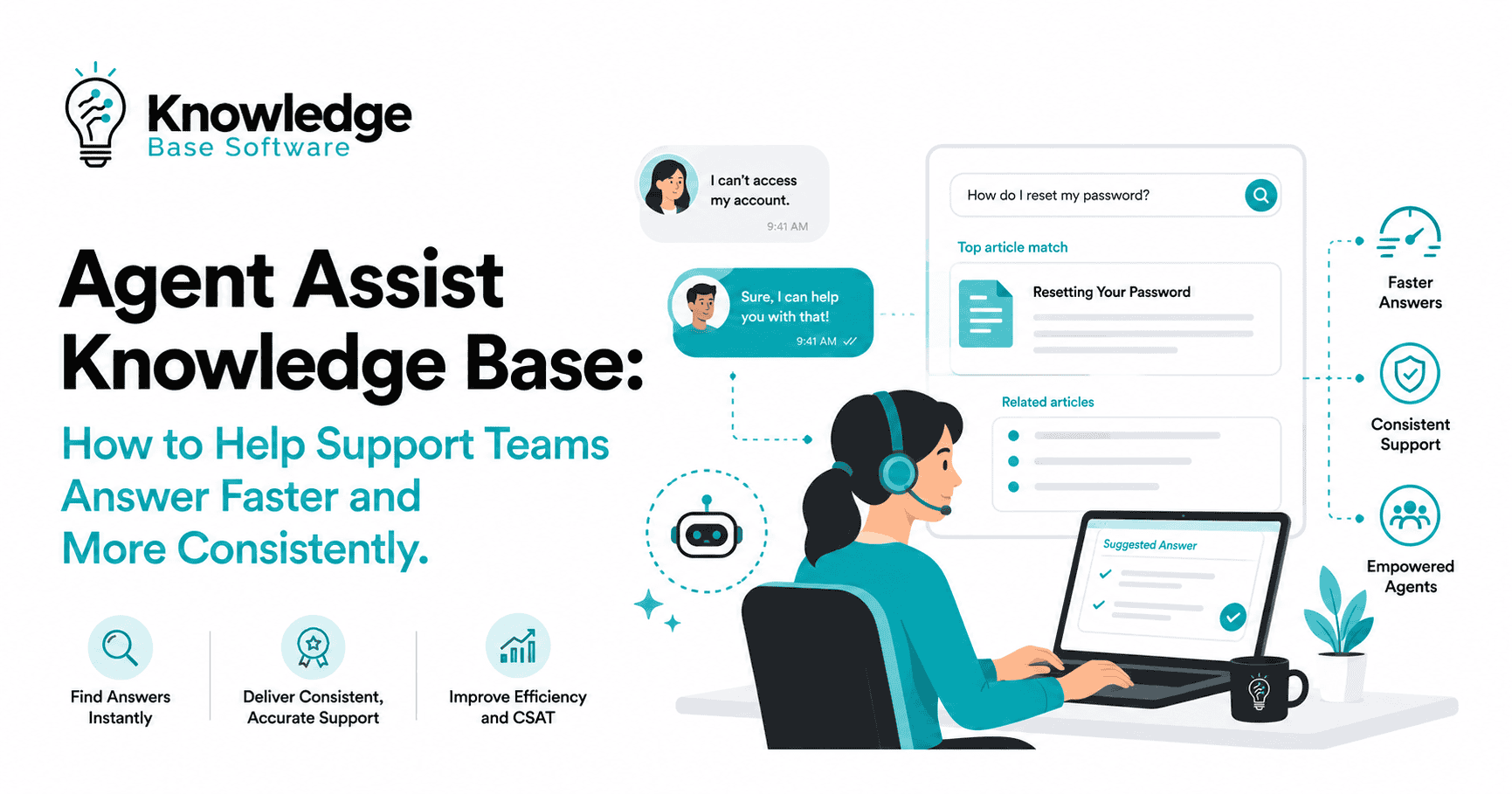
An Agent Assist Knowledge Base is the governed content layer an AI assistant searches while a human customer service representative handles a live conversation. It can surface relevant documents, generate grounded answers, or proactively suggest questions and responses, but the human agent remains responsible for deciding what to use and what to tell the customer.
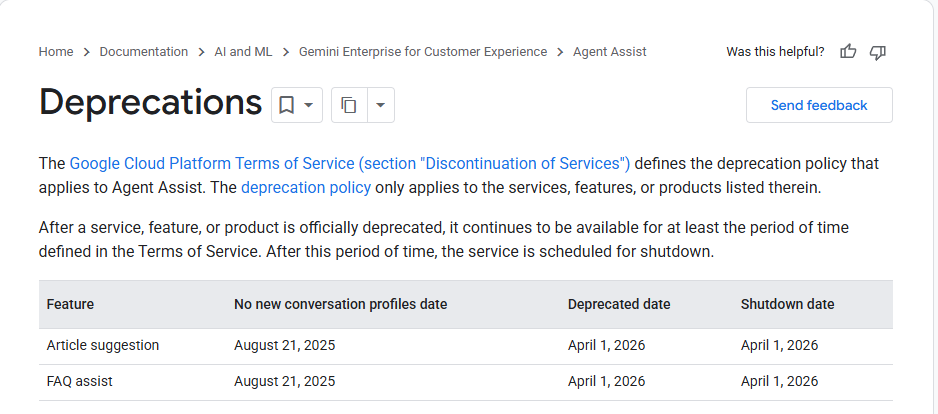
In Google Cloud, the term now requires an important distinction. The older Agent Assist knowledge-base workflow powered Article Suggestion and FAQ Assist. Google deprecated both features on April 1, 2026 and directs new implementations to Generative knowledge assist, which uses a flow-based or playbook-based data store agent rather than the legacy Article Suggestion or FAQ Assist setup.
Current implementation rule: Do not follow the old “Create a knowledge base” tutorial as the starting point for a new Google Cloud deployment. Use the current data store agent and Generative knowledge assist path, then treat the older documentation only as migration context.
This guide explains what the system does, how Google Cloud’s current architecture works, how to prepare the underlying knowledge, how to test answer quality, and how to govern the experience after launch.
Contents
- What an Agent Assist Knowledge Base is
- What changed in Google Cloud
- How the current architecture works
- Which knowledge-assist experience to build
- How to prepare the source content
- How to set up the current Google Cloud workflow
- How to test answer quality before launch
- Governance, privacy, and access controls
- Common failures and how to diagnose them
- What to measure after launch
- Frequently asked questions
What Is an Agent Assist Knowledge Base?
An agent assist knowledge base combines two separate capabilities:
- Knowledge management: the content, ownership, review process, metadata, permissions, and lifecycle rules that determine which information is trusted.
- Agent assist: the runtime experience that uses a customer’s question, conversation context, and permitted metadata to retrieve or generate relevant guidance for a human agent.
The knowledge base is not the assistant itself. It is the evidence layer the assistant searches. A well-designed interface cannot compensate for missing policies, contradictory articles, stale procedures, or content that the intended agent is not allowed to access.
Agent assist is also different from a customer-facing autonomous agent. An autonomous agent can communicate or take actions on the customer’s behalf. Agent assist works behind the scenes for a human representative, who reviews the suggestion and controls the customer interaction.
| Capability | Primary user | Typical behavior | Who controls the final response? |
|---|---|---|---|
| Traditional knowledge-base search | Human agent | The agent enters keywords and opens matching documents. | Human agent |
| Agent assist | Human agent | The system uses the live work context to surface documents, answers, or next steps. | Human agent |
| Customer-facing chatbot or AI agent | Customer | The system communicates directly with the customer and may complete supported actions. | The automated system within configured limits, with handoff when needed |
| Knowledge management program | Authors, reviewers, and consumers | The organization creates, approves, secures, updates, and retires trusted content. | Content owners and governance teams |
The Google Cloud Meaning Has Changed
The exact search phrase often leads to Google’s older Create a knowledge base tutorial. That page describes knowledge bases made from article documents or FAQ pairs for Article Suggestion and FAQ Assist. It remains useful for understanding the old resource model, but it is not the correct onboarding path for a new deployment.
Google’s current documentation states that Article Suggestion and FAQ Assist were deprecated on April 1, 2026. New conversation profiles for those features had already been blocked after August 21, 2025, and existing profiles were scheduled for removal on or after the deprecation date. Google identifies Generative knowledge assist as the alternative.
| Area | Legacy Article Suggestion / FAQ Assist | Current Generative Knowledge Assist path |
|---|---|---|
| Content container | An Agent Assist knowledge base containing articles or FAQ documents | A data store connected to a flow-based or playbook-based data store agent |
| Agent output | Suggested articles or FAQ answers | Generated answers grounded in provided documents, with source information |
| Context | Conversation-driven document or FAQ matching | Agent query, optional conversation context, search configuration, and permitted end-user metadata |
| Configuration | Knowledge base plus a legacy feature configuration in a conversation profile | Data store agent plus a conversation profile with Generative knowledge assist enabled |
| Status for new projects | Deprecated | Google’s documented alternative |
A practical warning about old CSV instructions
The legacy FAQ Assist tutorial required a two-column CSV without a header row. Current Dialogflow data stores use a different FAQ import format: the CSV requires a header row, with question and answer columns and optional title and url columns. Mixing the two formats is an easy way to create an avoidable import failure.
The same principle applies to document-count recommendations, console screens, API fields, and conversation-profile types found in old tutorials. Treat requirements attached to Article Suggestion or FAQ Assist as legacy requirements unless the current Generative knowledge assist and data store documentation repeats them.
How the Current Agent Assist Knowledge Workflow Works
A current Google Cloud implementation can be understood as an eight-stage pipeline:
- Source content: Approved policies, procedures, product documentation, FAQs, or other supported data are selected.
- Data store: The content is crawled or imported into a data store, where it can be searched and associated with metadata.
- Data store agent: A flow-based or playbook-based agent is connected to that data store. A playbook-based implementation uses a data store tool.
- Conversation profile: Agent Assist is configured to use the data store agent for Generative knowledge assist.
- Query and context: A human agent can enter a question, or the system can derive a query from the ongoing conversation. Optional customer metadata and document filters can refine retrieval.
- Retrieval and generation: Relevant source content is found and used to construct an answer. The response can include links or metadata for the supporting documents.
- Human review: The representative checks the suggestion, opens the source when needed, and decides whether or how to use it.
- Feedback and analytics: Display, click, copy, source-click, and correctness feedback can be captured to evaluate and improve the experience.
This is a grounded-generation workflow, but grounding is not a guarantee of correctness. Retrieval can select the wrong source, a source can be outdated, or a generated answer can misstate a correctly retrieved passage. Testing must therefore examine both what was retrieved and what the system said about it.
Example: from customer question to agent guidance
Suppose a customer asks whether an opened device can be returned after 20 days. The system may use the conversation to identify the product category and the customer’s market, filter the data store to the applicable policy, retrieve the current return document, and generate a concise answer with the source link. The agent should still verify that the policy applies to that customer, transaction, and jurisdiction before presenting it as final.
If two active documents provide different return windows, the failure begins in knowledge governance—not in the user interface. The correct response is to resolve the source conflict, not simply rewrite the prompt until one version appears more often.
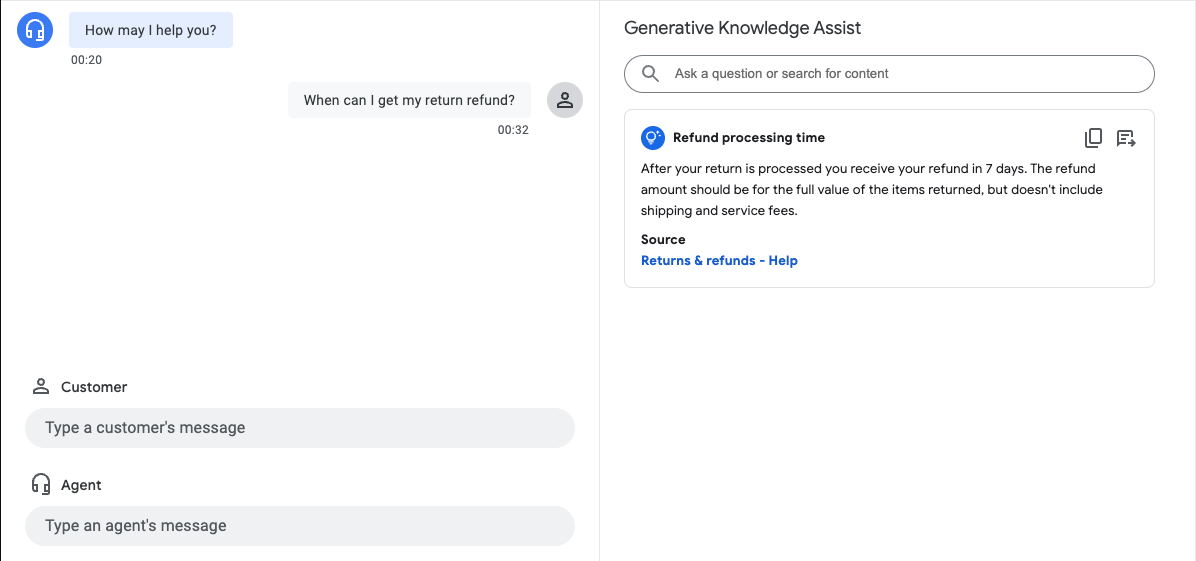
Choose the Right Knowledge-Assist Experience
Not every team needs the same degree of automation. Select the experience according to the work agents perform and the risk of presenting an incorrect answer.
| Experience | How it works | Best fit | Main design concern |
|---|---|---|---|
| On-demand generative search | The agent enters a question and receives a grounded answer. | Complex cases where the representative knows what to ask | Query quality and source relevance |
| Conversation-augmented search | The agent’s query is enriched with the current conversation context. | Questions whose meaning depends on details already discussed | Preventing irrelevant or sensitive context from distorting retrieval |
| Proactive Generative knowledge assist | The system follows the conversation and suggests queries and answers without waiting for a manual search. | High-volume, repeatable support conversations | Suggestion timing, noise, latency, and agent trust |
Google’s Proactive generative knowledge assist supports search context, multiple suggested queries, and configurable trigger events. Start with proactive delivery only after the underlying retrieval works reliably. Automating weak retrieval creates more visible errors, not better assistance.
How to Prepare Content for Agent Assist
1. Select the appropriate data source
Current Dialogflow data stores can use website content and imported data. Documented sources include website URLs, Cloud Storage, BigQuery, AlloyDB, Bigtable, Firestore, Cloud SQL, and Spanner. Additional first- and third-party connectors may require restricted access, so do not assume that a connector is available in every project.
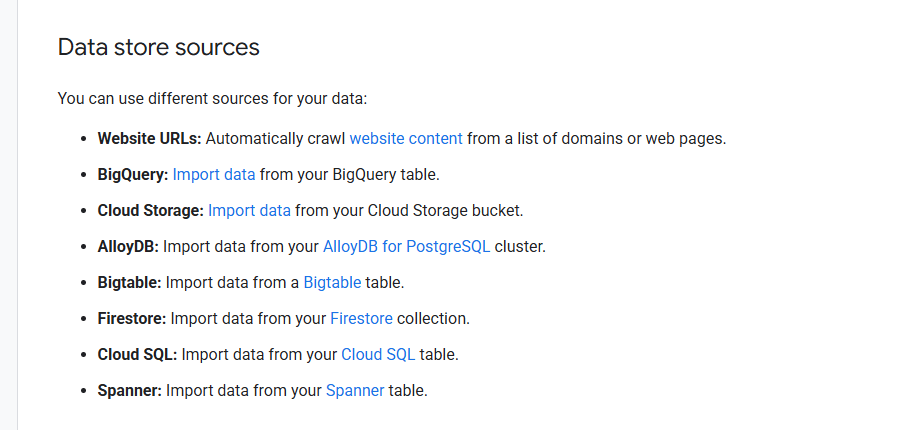
| Source approach | Useful for | What to verify |
|---|---|---|
| Website crawl | Public help centers and product documentation | Domain verification, crawl scope, exclusions, and whether the content is indexable |
| Cloud Storage import | Private or bulk unstructured documents | Bucket access, location alignment, file format, metadata, and update process |
| FAQ CSV | Stable questions with controlled answers | Required header row, clean CSV formatting, ownership, and whether an exact answer is appropriate |
| Structured data source | Records that benefit from fields, filters, and metadata | Schema quality, filterable fields, data freshness, and access boundaries |
For nonpublic content, Google’s data store documentation recommends Cloud Storage. The bucket should use the same location as the agent. Verify current region and source support before designing the ingestion pipeline.
2. Define one authoritative answer for each policy decision
Before ingestion, identify which system or document is authoritative for each topic. Retire duplicates, resolve contradictions, and separate policies that differ by product, market, customer type, or effective date. Metadata filters can help only when the underlying classification is accurate.
3. Make each document easy to retrieve and verify
- Use a specific title that reflects the question or task the document resolves.
- Place the direct answer or decision near the beginning.
- Separate unrelated procedures instead of storing several workflows in one broad page.
- Use descriptive headings, consistent terminology, and common customer synonyms.
- Remove navigation text, promotional copy, feedback widgets, and other boilerplate from imported content where possible.
- Attach a stable source URL or internal destination so an agent can inspect the evidence.
- Record an owner, approval state, audience, product, region, language, and review trigger.
- Test parse and chunk settings rather than assuming one document length works for every content type.
4. Use metadata to control relevance and visibility
Useful metadata may include product, plan, region, language, audience, document status, and public-versus-internal visibility. Google’s Generative knowledge assist supports search configuration for boosting and filtering documents, and it can return document metadata with the response. Design these fields before import so filtering rules remain stable.
Do not use metadata merely as decoration. Every field should support a retrieval, display, permission, or governance decision. Unreliable metadata can hide the correct source or expose an inappropriate one.
5. Format current FAQ data correctly
A current FAQ data store CSV needs a header row. A minimal reusable structure is:
"question","answer","title","url"
"How long do refunds take?","Refund timing depends on the payment method and the approved return status.","Refund timing","https://example.com/refund-timing"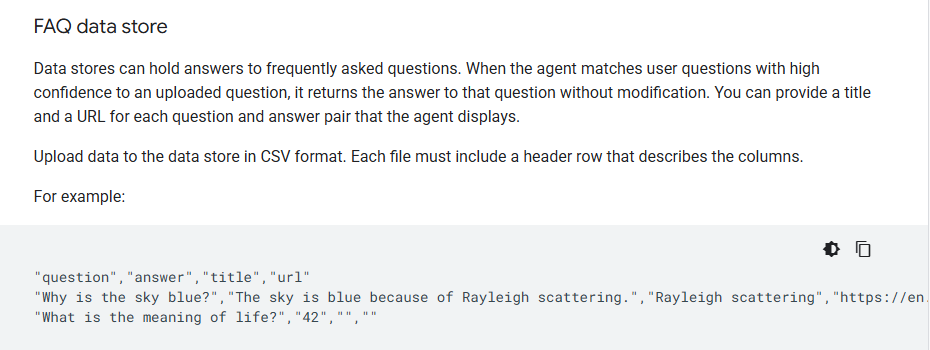
The title and url columns are optional in Google’s current data store format. Keep the answer precise and stable; use an unstructured document instead when the correct response requires substantial context or varies across several conditions.
How to Set Up the Current Google Cloud Workflow
The exact console labels can change, but the current implementation sequence is consistent across Google’s documentation.
Step 1: Confirm the project, location, and IAM model
Choose the Google Cloud project and supported location before creating the data store and agent. Unless the implementer is the project owner, Google’s Generative knowledge assist guide lists the Dialogflow API Admin and Discovery Engine Admin roles for creating a data store agent. Apply least privilege and separate build, review, and runtime responsibilities where your organization requires it.
Step 2: Enable the required API
Activate the AI Applications API in the Vertex AI console as directed by the current Generative knowledge assist setup guide. Confirm any additional APIs required by the selected source, storage service, integration, or runtime path.
Step 3: Create and populate the data store
Create the data store from the approved website or imported data. Configure parsing, chunking, metadata, and update behavior according to the source type. Allow ingestion and indexing to finish before judging retrieval quality.
Step 4: Create the data store agent
Create either a flow-based or playbook-based data store agent. For a playbook-based agent, create a data store tool and connect it to the selected data store. The choice should reflect how much deterministic flow control, tool orchestration, and instruction-driven behavior the use case requires.
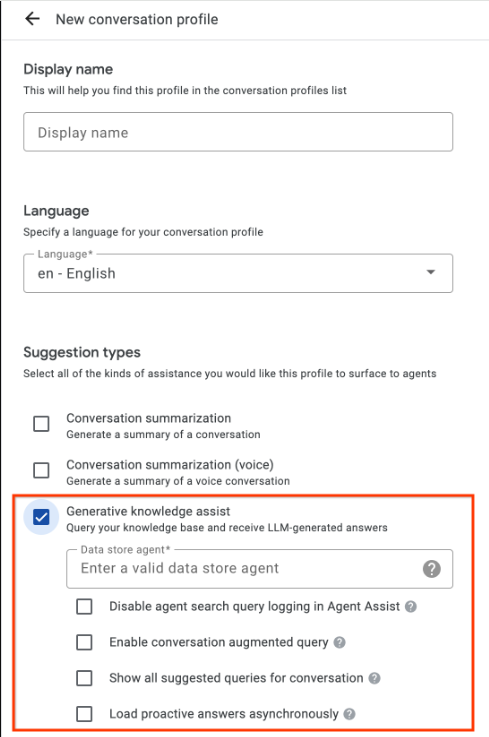
Step 5: Create the conversation profile
In the Agent Assist console or API, create a conversation profile, enable the Generative knowledge assist suggestion type, and link the profile to the data store agent. Decide whether to enable conversation-augmented queries and whether to disable agent search-query logging. Google describes collected search queries as redacted, but your team should still make the logging decision under its own privacy, retention, and compliance rules.
Step 6: Configure search behavior
The SearchKnowledge request can identify the query source, use exact search, attach permitted end-user metadata, and apply search configuration for boosting or filtering documents. Use these controls only when the data and business rules are well defined; over-filtering can remove the correct answer, while weak filtering can return a policy for the wrong customer or region.
Step 7: Test in the Agent Assist simulator
Verify the conversation profile and data store agent in the simulator. Test direct questions, realistic dialogue, follow-up questions, no-answer cases, conflicting sources, and queries that should not return restricted information.
Step 8: Build the runtime integration
The Agent Assist console is for design-time configuration and testing. Google states that runtime operations must use the API. Your production design therefore needs to manage conversations, participants, messages or audio events, suggestion delivery, authentication, error handling, and the agent-facing interface.
Step 9: Add proactive suggestions only when retrieval is ready
If agents benefit from automatic prompts, configure Proactive generative knowledge assist. It can generate multiple suggested queries, use conversation-derived search context, and initiate suggestions from supported events. Test suggestion timing and noise with real workflows before enabling it broadly.
Step 10: Capture feedback and operational evidence
Use answer records and the feedback API to capture whether a suggestion was displayed, clicked, copied, marked correct or incorrect, and whether the agent opened a cited URI. Combine this telemetry with qualitative review; a click does not prove that the answer was correct.
How to Test Answer Quality Before Launch
Build an evaluation set before the pilot. Each test case should include the user wording, relevant conversation context, expected source, required facts, forbidden claims, access scope, and the expected behavior when no supported answer exists.
| Test type | What it reveals | Pass condition |
|---|---|---|
| Common known-answer query | Baseline retrieval and answer quality | The correct current source supports the answer |
| Synonym, typo, or acronym | Vocabulary coverage | The intended topic is found without broad irrelevant matches |
| Ambiguous question | Clarification behavior | The system asks for or waits for the missing condition instead of guessing |
| Multi-turn question | Use of conversation context | The answer reflects relevant prior details and ignores unrelated ones |
| Missing-content query | No-answer behavior | The system does not invent a policy or unsupported resolution |
| Contradictory documents | Governance and ranking weakness | The conflict is detected and removed before launch |
| Restricted-information query | Filtering and access design | Unauthorized content is not returned |
| Outdated-policy wording | Freshness and version control | The current policy wins and the obsolete source is unavailable |
Score retrieval and generation separately
- Source relevance: Did the system retrieve the right document for the exact customer context?
- Factual support: Is every material statement in the answer supported by the retrieved source?
- Completeness: Does the answer include the conditions needed to avoid a misleading conclusion?
- Source usability: Can the agent open and understand the cited document quickly?
- No-answer discipline: Does the system avoid filling a content gap with a plausible but unsupported answer?
- Access correctness: Did filters and permissions keep the response within the agent’s authorized scope?
- Workflow value: Did the suggestion arrive early enough and in a form the agent could use?
Set acceptance thresholds according to the risk of the use case. A troubleshooting hint and a legally consequential eligibility decision should not share the same review standard. For high-impact topics, require the agent to inspect the source or route the case to an approved specialist.
Governance, Privacy, and Access Controls
An agent assist knowledge base is a production information system, not a one-time document upload. Its governance model should cover content ownership, technical ownership, approval, access, monitoring, and incident response.
- Assign an owner to every source. The owner approves changes and removes content that is no longer valid.
- Use risk-based review triggers. Review content when a policy, product, regulation, workflow, or source system changes rather than relying only on a calendar reminder.
- Separate public and internal knowledge. Use distinct stores or dependable metadata and filters when the audiences have different access rights.
- Minimize customer metadata. Send only the fields needed to improve retrieval or personalization, and document why each field is used.
- Make logging an explicit decision. Review query logging, answer records, retention, redaction, regional processing, and access to diagnostic data.
- Preserve source traceability. Agents and reviewers should be able to open the document that supports a suggestion.
- Design a safe fallback. When the system lacks evidence, it should say so or route the agent to an approved next step rather than improvise.
- Plan for change control. Test ingestion changes, chunking changes, filters, and agent configuration before promoting them to production.
A source link improves transparency, but it does not prove that the generated answer accurately represents the source. Keep human review in the workflow wherever an incorrect answer could create financial, legal, safety, privacy, or contractual harm.
Common Failures and How to Diagnose Them
| Symptom | Likely causes | What to check first |
|---|---|---|
| No answer appears | The source was not indexed, the query is outside scope, a filter removed the document, or the content cannot be crawled | Confirm ingestion status, source access, domain scope, metadata filters, and a direct test query |
| The answer is related but wrong | Broad documents, duplicate policies, weak metadata, or poor chunk boundaries | Inspect the top retrieved sources before changing the prompt |
| The correct source is retrieved but the answer is inaccurate | Generation omitted a condition, merged conflicting passages, or overgeneralized the source | Compare each sentence with the source, simplify conflicting content, and test exact or controlled FAQ behavior where appropriate |
| Restricted information appears | Incorrect store design, missing filters, overly broad metadata, or an access-control mistake | Stop the rollout and verify the full authorization path before further testing |
| Suggestions arrive too late | Trigger choice, synchronous delivery, integration latency, or slow retrieval | Measure each stage and review proactive trigger and asynchronous-delivery options |
| Simulator results are good but production results are weak | The evaluation set was unrepresentative, live context differs, or production metadata is missing | Compare real answer records with the test cases and reproduce the full runtime request |
| Agents ignore correct suggestions | Too many low-value suggestions, unclear previews, poor timing, or low trust from earlier errors | Review display, click, copy, and source-open behavior alongside agent interviews |
Do not diagnose every quality problem as a model problem. Retrieval, content governance, metadata, filters, indexing, integration behavior, and interface design can each produce a poor result even when the generation step works as configured.
What to Measure After Launch
Answer and retrieval quality
- Correct-source retrieval rate
- Answer correctness and completeness
- Unsupported-claim rate
- No-answer rate for covered and uncovered topics
- Source-link accuracy and usability
- Performance by product, queue, language, region, and question type
Agent interaction
- Suggestions displayed, clicked, and copied
- Supporting URIs opened
- Positive and negative correctness feedback
- Manual searches after a proactive suggestion
- Time from customer question to usable guidance
- Agent-reported reasons for rejecting a suggestion
Business and knowledge outcomes
- Average handle time and time to resolution
- First-contact resolution and escalation rate
- Transfer rate and repeat-contact rate
- Customer satisfaction
- Agent onboarding time and confidence
- Knowledge gaps, stale documents, and conflicting sources discovered
Operational metrics are influenced by staffing, routing, product complexity, seasonality, policy changes, and other tools. Use controlled pilots, segmented analysis, and qualitative review before attributing an improvement or decline to Agent Assist.
A Practical Rollout Sequence
- Choose a bounded use case. Start with one queue, product family, or repeatable issue where the source of truth is clear.
- Clean the knowledge first. Resolve duplicate, stale, contradictory, and unowned content before ingestion.
- Build the evaluation set. Include normal, ambiguous, adversarial, missing-content, and restricted-access cases.
- Deploy on-demand search. Confirm that agents can retrieve reliable answers before adding proactive behavior.
- Run a controlled agent pilot. Collect answer records, agent feedback, and workflow observations.
- Fix the highest-risk failures. Prioritize unsupported answers and access problems over cosmetic interface changes.
- Add proactive suggestions selectively. Enable them where timing and coverage are strong enough to help rather than distract.
- Establish ongoing governance. Assign owners, monitor quality by segment, and retest after content or configuration changes.
A launch is ready when the team can explain which sources are authoritative, who can access them, how a suggestion was produced, what happens when evidence is missing, and who is accountable for correcting a bad answer.
Frequently Asked Questions
Is “Agent Assist Knowledge Base” a general term or a Google Cloud feature?
It can mean either. Generically, it describes the knowledge layer used to help human support agents. In Google Cloud, “knowledge base” also refers to the older resource used by Article Suggestion and FAQ Assist. Those features are deprecated, so new Google Cloud implementations should follow the current Generative knowledge assist and data store agent documentation.
Should a new Google Cloud project create the legacy Agent Assist knowledge base?
No. Google directs users of the deprecated Article Suggestion and FAQ Assist features to Generative knowledge assist. A new implementation should create the appropriate data store, connect it to a flow-based or playbook-based data store agent, and configure a conversation profile for the generative feature.
Does agent assist replace customer service representatives?
No. Agent assist provides information or guidance to a human representative. A customer-facing autonomous agent is a different system that communicates or acts directly. Organizations may use both, but they require different controls and success measures.
Can Generative knowledge assist use private documents?
Yes, when the documents are imported through a supported data store source and the project, storage, metadata, and runtime access are configured correctly. Google recommends Cloud Storage for nonpublic data store content. This does not remove the need to design and test access controls.
Does a cited source eliminate hallucinations?
No. The system may retrieve an irrelevant source, misread a relevant source, omit a condition, or combine inconsistent passages. Evaluate retrieval and generated wording separately, and require source review for high-risk answers.
How many documents should an Agent Assist Knowledge Base contain?
There is no useful universal number for every current implementation. Google’s old knowledge-base tutorial recommended at least 50 documents for the deprecated workflow, but that should not be treated as a current Generative knowledge assist requirement. Measure whether the selected content fully covers the scoped use case and passes the evaluation set.
What is the difference between Generative and Proactive knowledge assist?
Generative knowledge assist can answer a question entered by the human agent and can optionally use conversation context. Proactive generative knowledge assist follows the ongoing conversation and automatically suggests queries and answers according to its configuration.
Sources Checked
Product status and setup details were checked on November 9, 2026 against the following official Google Cloud documentation: