Independent knowledge base software guide Evidence-led Updated 2026

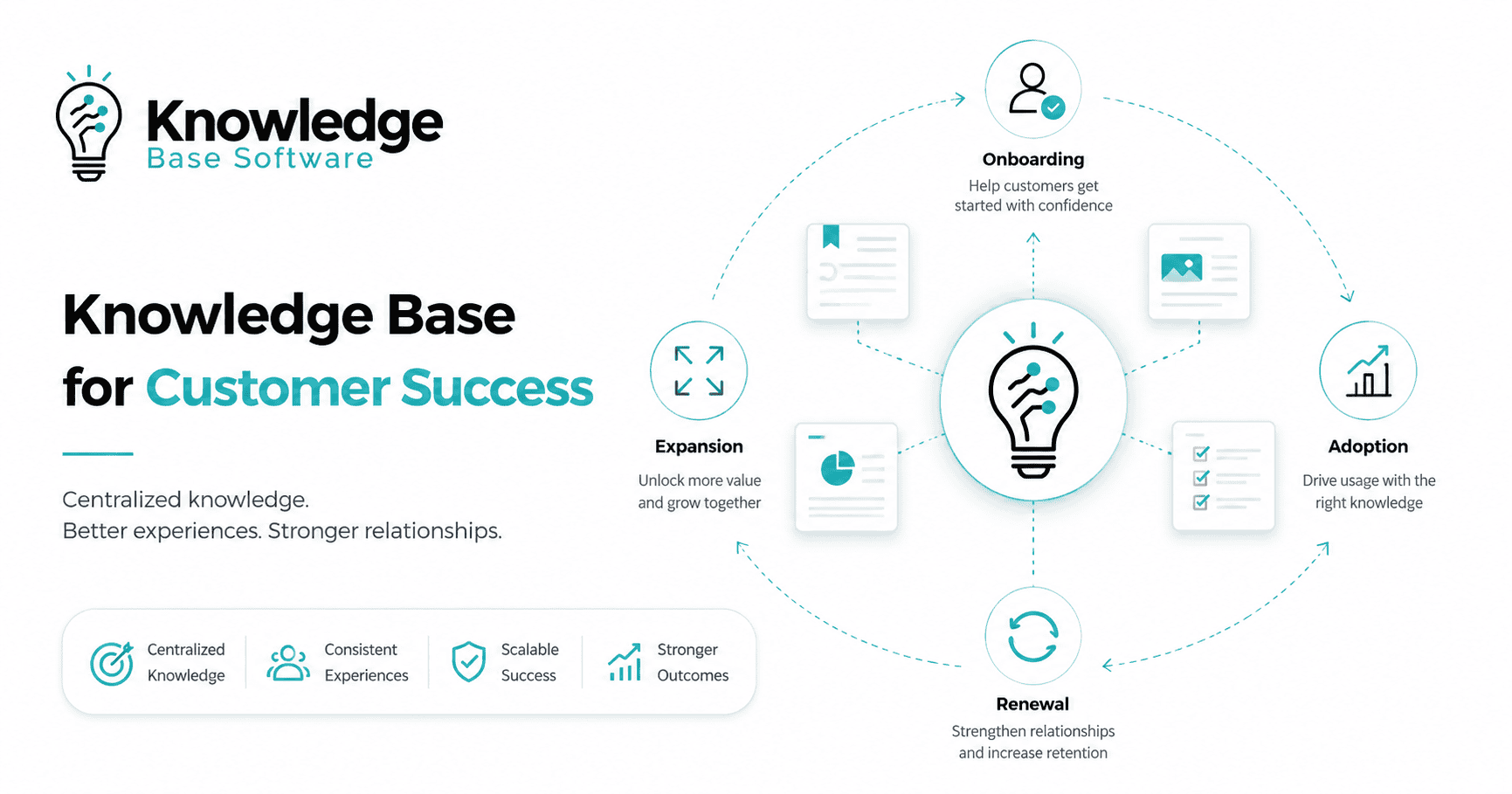
Knowledge Base for Customer Success: Onboarding, Adoption, Renewal, and Expansion Playbooks
A customer success knowledge base turns repeatable experience into guidance that customers and customer success managers can use at the right moment. It should do more than answer support questions. It should help a new account reach its first value, help an existing team deepen adoption, give decision-makers credible renewal evidence, and guide a qualified expansion without turning every customer journey into a one-off project.
Quick answer: Organize customer success knowledge around lifecycle jobs, not around your company departments. Give every article an audience, stage, trigger, owner, evidence source, review date, and next action. Keep reusable guidance in the knowledge base, account-specific facts in the CRM or success platform, and sensitive case details in the appropriate system of record.
Table of contents
- What a customer success knowledge base is
- The four-layer architecture
- Content for each lifecycle stage
- How we tested lifecycle-aware routing
- Original benchmark results
- How to build the knowledge base
- Practical article templates
- Routing and delivery rules
- Ownership and governance
- Metrics that show useful outcomes
- A 90-day implementation roadmap
- Benchmark limitations
- Frequently asked questions
What is a knowledge base for customer success?
A knowledge base for customer success is a governed, searchable collection of reusable guidance for customers, customer success managers, implementation teams, support agents, and account stakeholders. Its unit of value is not “a document.” It is an answer or playbook that helps a defined audience complete a lifecycle job with less uncertainty.
That definition separates it from three related systems. A help center primarily answers customer questions and resolves known issues. A customer success platform tracks accounts, health signals, tasks, and lifecycle activity. A CRM records commercial relationships, contacts, opportunities, and account history. The customer success knowledge base supplies reusable guidance to all three, but it should not duplicate account records or become a dumping ground for private notes.
The idea aligns with the Consortium for Service Innovation’s current Knowledge-Centered Success (KCS®) guidance: reuse, improve, and capture knowledge as part of the workflow. The current Practices Guide integrates knowledge reuse, improvement, and capture into the work itself rather than treating documentation as a separate activity. For customer success, that means onboarding calls, adoption reviews, risk interventions, renewal preparation, and expansion planning should continuously improve the reusable guidance.
KCS® is a service mark of the Consortium for Service Innovation™.
The four-layer architecture
| Layer | Audience | What belongs there | What does not |
|---|---|---|---|
| Public customer knowledge | Prospects, users, admins, customer stakeholders | Getting started, workflows, role-based guides, troubleshooting, best practices, release guidance | Private account context, internal escalation rules, security-sensitive workarounds |
| Authenticated customer knowledge | Customers with a defined role, plan, or product | Plan-specific features, tenant administration, implementation resources, restricted technical material | Another customer’s information or internal-only decision criteria |
| Internal CS playbooks | CSMs, implementation, support, account teams | Discovery questions, kickoff agendas, risk responses, EBR/QBR preparation, renewal and expansion playbooks | Uncontrolled copies of current pricing, legal language, or security claims |
| Systems of record | Authorized internal users | Account health, contacts, milestones, product events, tasks, opportunities, private interaction history | Reusable how-to guidance that multiple accounts need |
This separation protects privacy and makes maintenance possible. The knowledge base explains how to run a kickoff; the CRM records who attended a particular kickoff. The knowledge base defines the evidence needed for a renewal review; the success platform stores one account’s actual usage and risk. The knowledge base explains an integration; the ticket or incident system stores the customer-specific error and diagnostic history.
For customer-facing formats, use the task, troubleshooting, FAQ, and agent templates in our knowledge base templates guide. For help delivered inside the product, see the in-app knowledge base guide.
Map content to onboarding, adoption, renewal, and expansion
| Lifecycle stage | Customer job | Customer-facing knowledge | Internal CS knowledge | Trigger |
|---|---|---|---|---|
| Onboarding | Reach the first meaningful outcome | Setup checklist, first integration, invite-and-role guide, activation path | Kickoff agenda, discovery prompts, responsibility matrix, implementation risk checklist | Contract start, workspace creation, implementation handoff |
| Adoption | Make valuable workflows repeatable | Role-based workflows, feature tutorials, use-case examples, team rollout guides | Adoption review, champion enablement, low-usage intervention, training plan | Activation completed, usage plateau, new department, feature release |
| Renewal | Confirm value and remove decision risk | Outcome reporting guide, administration review, security and continuity information | Value evidence checklist, stakeholder map, risk plan, procurement timeline | Renewal window opens, risk signal, executive review scheduled |
| Expansion | Evaluate additional value for a qualified need | Advanced use cases, plan comparison, rollout guidance, integration requirements | Qualification questions, business-case template, sponsor alignment, rollout plan | New team request, capacity limit, advanced requirement, executive initiative |
A lifecycle label should not replace a customer-friendly title. “Adoption content” is useful metadata; “Bring another department into the workspace” is a useful article title. Use both. The label supports routing and reporting, while the title mirrors the task a customer or CSM is trying to complete.
How we tested lifecycle-aware knowledge routing
We ran a transparent synthetic retrieval benchmark on July 29, 2026. The fixed corpus contained 16 short knowledge articles: four each for onboarding, adoption, renewal, and expansion. Within every stage, the articles covered the same four broad intent families—access, integration, value, and engagement—so that ordinary words such as “users,” “integration,” “ROI,” and “stakeholders” could be ambiguous across the lifecycle.
We wrote three query variants for every article, producing 48 test cases. Examples included “What permissions should a second team receive?”, “Build an ROI summary from usage trends,” and “How do we align a new executive sponsor?” The data order was shuffled with fixed seed 20260729. Retrieval used the same dependency-free BM25 implementation in both conditions, with k1=1.2 and b=0.75; article titles received a fixed boost by being indexed twice.
The baseline searched all 16 articles. The lifecycle-aware condition first filtered the corpus to the lifecycle stage assumed to be known from a CRM or customer success platform, then ran the identical ranker. We measured top-one accuracy, top-three accuracy, and mean reciprocal rank. The script, complete dataset, seed, parameters, and machine-readable output are retained with the editorial research record so the benchmark can be rerun rather than reconstructed from prose.
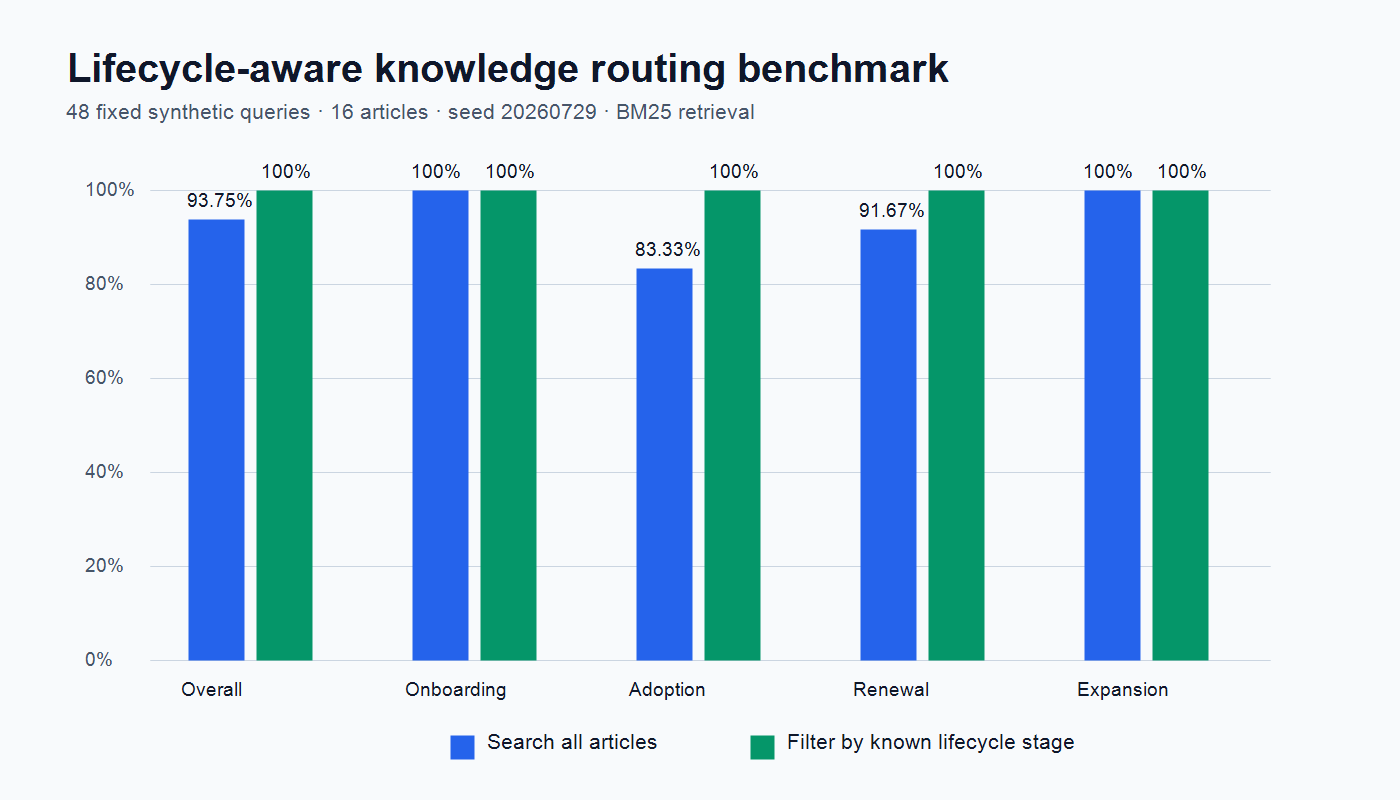
Benchmark results: stage context corrected three ambiguous routes
| Slice | Search all 16 articles | Filter by known stage, then search |
|---|---|---|
| Overall top-one accuracy | 45/48 (93.75%) | 48/48 (100%) |
| Overall top-three accuracy | 48/48 (100%) | 48/48 (100%) |
| Mean reciprocal rank | 0.9618 | 1.0000 |
| Onboarding top one | 12/12 | 12/12 |
| Adoption top one | 10/12 | 12/12 |
| Renewal top one | 11/12 | 12/12 |
| Expansion top one | 12/12 | 12/12 |
The three baseline errors reveal the practical value of context. “What permissions should a second team receive?” ranked the first-team onboarding article above the adoption rollout article. “How do we discuss blockers with an existing customer?” ranked a technical renewal blocker above an adoption review. “Build an ROI summary from usage trends” ranked an expansion business case above renewal value evidence. Filtering to the correct lifecycle stage returned the intended article first in all three cases.
The important lesson is not that lifecycle filtering always produces 100% accuracy. It will not. The lesson is that the same vocabulary means different things at different points in the relationship. A routing layer can use known context—stage, role, product, plan, language, permissions, and current screen—to narrow the candidate set before ranking. That can reduce avoidable ambiguity, provided the metadata is accurate and the user can escape an incorrect filter.
This supports a broader self-service principle from the Consortium for Service Innovation: successful self-service depends on findability, completeness, access, and navigation, and should provide “no dead ends” to assisted help. Read the official KCS self-service success guidance. A stage-aware recommendation is useful only when the underlying article is current, complete, permission-safe, and connected to a next step.
How to build a customer success knowledge base
- Define lifecycle outcomes. Name the first value, recurring value, renewal evidence, and qualified expansion outcome for each product and segment. Avoid vague stages that no one can observe.
- Collect real questions. Review onboarding notes, tickets, call summaries, CRM tasks, search queries, implementation plans, training questions, renewal risks, and expansion requests. Remove customer-identifying data before reusing examples.
- Build an intent inventory. Group questions by job to be done, audience, stage, product area, and risk. Count repetition, but also flag high-impact low-volume topics such as security, billing, or data migration.
- Separate reusable from account-specific knowledge. A general process belongs in the knowledge base. One customer’s dates, health score, contacts, exceptions, and commitments remain in the system of record.
- Choose a minimum taxonomy. Start with audience, lifecycle stage, intent, product, role, visibility, owner, and review trigger. Add fields only when they change routing, access, or reporting.
- Create one article per clear task or decision. Start with the answer, list prerequisites, provide steps or criteria, explain verification, and show an escalation path. Do not bury the useful action under a long introduction.
- Assign authority. The article owner maintains it; a subject-matter expert validates accuracy; a publisher controls release; legal, security, or finance review only the content that needs those controls.
- Deliver knowledge in the workflow. Link onboarding guidance from welcome messages, surface relevant articles inside the product, give CSMs playbooks from their success workspace, and connect unresolved searches to support.
- Measure outcomes and gaps. Combine search behavior, article feedback, escalation, product events, milestone completion, and ticket topics. Treat each signal as evidence, not proof by itself.
- Improve from reuse. When a CSM or support agent finds an article incomplete, update the shared source instead of creating a private workaround. The KCS article-structure guidance emphasizes consistent, reusable context; see the official KCS article structure.
Four practical content templates
Onboarding task article
- Outcome: what the customer will have completed
- Who should do it and required permissions
- Prerequisites and information to prepare
- Numbered steps with current interface labels
- Verification: how to know it worked
- Common blocker and safe recovery
- Next activation step
Adoption playbook
- Signal: the usage pattern or customer request that starts the play
- Diagnosis questions: role, workflow, value, skills, and technical friction
- Recommended customer resources by role
- CSM actions and responsibility boundaries
- Expected observable behavior, not an invented benchmark
- Review date and exit criteria
Renewal evidence brief
- Original success criteria and any approved changes
- Evidence sources and reporting period
- Outcomes achieved, partially achieved, or not established
- Open risks, owners, and dates
- Stakeholders and decision process
- Next-period success plan
Expansion qualification guide
- New business problem or team need
- Evidence that the current use case is healthy enough to expand
- Additional users, workflows, integrations, or controls required
- Commercial, technical, security, and change-management constraints
- Decision stakeholders and rollout owner
- Clear “not yet” conditions to prevent premature selling
Route knowledge with context, but keep search transparent
A useful routing sequence is: apply permissions first; read known context; generate a safe candidate set; rank by query relevance; show why an item was recommended; and provide a route to broader search or human help. Permissions must come before personalization. A recommendation engine that retrieves the “right” restricted article for the wrong user is a security failure, not a relevance success.
Start with deterministic rules before adding AI. For example, show setup articles to an account in implementation, show admin guidance to an administrator, and exclude plan-specific content the account cannot use. Then test lexical and semantic search against real query sets. If AI generates answers, require citations to approved source articles, permission-aware retrieval, uncertainty handling, and escalation when sources are missing.
Do not force an incorrect lifecycle label. Customers can be onboarding one new workflow while renewing the overall account. A large account can have mature administrators and a newly added department. Allow multi-stage tags at the article level, but make the routing event specific: current task, current screen, role, and account state. Our SaaS knowledge base guide covers the wider product, support, and documentation system.
Governance: who owns customer success knowledge?
| Role | Responsibility | Useful control |
|---|---|---|
| Knowledge program owner | Taxonomy, standards, backlog, reporting, and operating cadence | Monthly gap review and quarterly architecture review |
| Article owner | Accuracy, links, screenshots, review trigger, and retirement | Named owner and visible last-reviewed date |
| Subject-matter expert | Technical or process validation | Approval limited to the relevant domain |
| Customer success contributor | Capture customer language, reuse content, and report gaps | Simple improve-or-request workflow inside daily tools |
| Publisher | Audience safety, style, metadata, links, and release | Draft/review/publish permissions and rollback |
| Legal, security, finance, or product | Review only claims and policies within their authority | Event-based review when a controlled fact changes |
Review cadence should follow risk and volatility. A UI tutorial needs review after interface changes. A security statement needs review after control or policy changes. A renewal playbook needs review after the decision process changes. A stable conceptual guide may need only a periodic check. “Review every article every quarter” creates busywork; “review nothing until someone complains” creates stale knowledge.
Metrics that show whether the knowledge base is helping
- Findability: successful search sessions, no-result queries, refinements, rank of the selected article, and browse-to-answer paths.
- Task outcome: completion of the relevant setup, workflow, or milestone after knowledge use. Define a reasonable attribution window and keep correlation separate from causation.
- Assisted escalation: the share of knowledge sessions that move to chat, ticket, or CSM help, with query and viewed-article context preserved.
- Knowledge reuse: how often CSMs and support agents link approved content instead of recreating answers in email or slides.
- Coverage: high-impact recurring intents with a current, owned answer; segment by stage, role, product, and language.
- Content health: overdue reviews, broken links, missing owners, low feedback, repeated searches, and articles associated with unresolved tasks.
- Lifecycle support: activation milestones, adoption behaviors, renewal evidence completion, or expansion readiness after content use. These are business outcomes influenced by many factors, not proof that an article caused the result.
Do not report “tickets deflected” by subtracting article views from potential tickets. A view is not a resolved issue. Combine explicit helpfulness, task completion, absence of immediate escalation, and controlled experiments where possible. The goal of self-service is customer success with less effort, not making support harder to reach. Our customer self-service knowledge base guide explains the broader measurement and escalation model.
A practical 90-day implementation roadmap
Days 1–30: scope and evidence
- Name the primary audience, lifecycle outcomes, and knowledge owner.
- Collect questions from real calls, tickets, searches, and CSM workflows.
- Audit existing help-center, onboarding, enablement, and playbook content.
- Define public, authenticated, and internal boundaries.
- Select 20–30 high-value intents for a pilot rather than migrating everything.
Days 31–60: build and test
- Create templates, taxonomy, ownership fields, and review rules.
- Rewrite pilot articles around customer jobs and observable outcomes.
- Test access with separate user roles and accounts.
- Run a fixed query set, including ambiguous lifecycle language and zero-result terms.
- Connect escalation so the customer does not repeat context.
Days 61–90: launch and improve
- Launch to one segment, product, or lifecycle stage.
- Train CSMs to search, reuse, improve, and request missing knowledge.
- Instrument search, article use, escalation, and relevant product milestones.
- Review failures weekly during the pilot and publish the change log.
- Decide whether to expand based on evidence, not article count.
When selecting software, test the workflow you just designed. The knowledge base RFP template covers audiences, permissions, search, analytics, localization, integrations, export, governance, and total cost. A product demo should answer your requirements; your requirements should not be rewritten to match the demo.
Common mistakes to avoid
- Organizing around departments. Customers do not know which internal team owns their task. Organize around jobs and lifecycle context.
- Copying account notes into reusable articles. This creates privacy risk and content that no other customer can use.
- Publishing slide decks as the knowledge base. Decks are difficult to search, update, link to a specific answer, and measure at the task level.
- Automating stale guidance. Faster retrieval makes inaccurate content more dangerous, not less.
- Using stage as the only signal. Role, product, plan, language, permissions, and current task can matter more.
- Hiding human help. Self-service needs a clear path to an informed escalation.
- Rewarding article volume. Count coverage, reuse, freshness, and customer outcomes instead of pages created.
Benchmark limitations
- The 16 articles and 48 queries were synthetic, English-only, and intentionally compact. They do not represent a production corpus.
- The benchmark assumed that the lifecycle stage was correct and available. Real CRM stages can be late, broad, or inconsistent.
- Filtering improved three ambiguous top-one results in this dataset. The result must not be presented as a guaranteed production uplift.
- The test isolated routing. It did not measure article accuracy, readability, accessibility, task completion, customer satisfaction, retention, expansion, or vendor search quality.
- Top-three accuracy was already 100% in both conditions, so the observed benefit was ranking the intended answer first, not retrieving previously absent answers.
- A production evaluation should use consented, de-identified real queries, permission tests, human relevance judgments, and downstream task outcomes.
Frequently asked questions
How is a customer success knowledge base different from a help center?
A help center is usually customer-facing and focused on answers and troubleshooting. A customer success knowledge base also includes internal playbooks and lifecycle guidance for onboarding, adoption, renewal, and expansion. The two can share approved source content, but they serve different audiences and permissions.
Should customer success knowledge live in the CRM?
Account-specific facts should. Reusable guidance usually should not. Store contacts, dates, commitments, health, opportunities, and interaction history in the CRM or success platform. Store reusable tasks, playbooks, explanations, and decision criteria in a governed knowledge system, then link them from the workflow.
What content should we create first?
Start with recurring, high-impact questions that block a defined outcome. Good pilot candidates include first setup, roles and permissions, the first integration, activation verification, a common adoption blocker, renewal evidence preparation, and a qualified expansion rollout. Use actual query and conversation language.
Can AI build the knowledge base automatically?
AI can cluster questions, propose drafts, summarize source material, and help retrieve approved articles. It cannot establish product truth, permission boundaries, ownership, or legal and security authority by itself. Require human validation for high-risk content and keep generated answers grounded in permission-safe sources with citations.
How often should customer success articles be reviewed?
Use event-based review first: product change, process change, new plan, policy update, failed search pattern, repeated escalation, or low task completion. Add periodic review based on risk and volatility. A billing or security article needs tighter control than a stable conceptual guide.
Bottom line: A customer success knowledge base works when it connects reliable guidance to the customer’s current job and preserves a path to informed human help. Build the operating model before buying software, keep reusable knowledge separate from account records, and test routing against real language instead of assuming that a larger document library is more useful.