Independent knowledge base software guide Evidence-led Updated 2026

Healthcare Knowledge Base Software: A Practical Buyer’s Guide
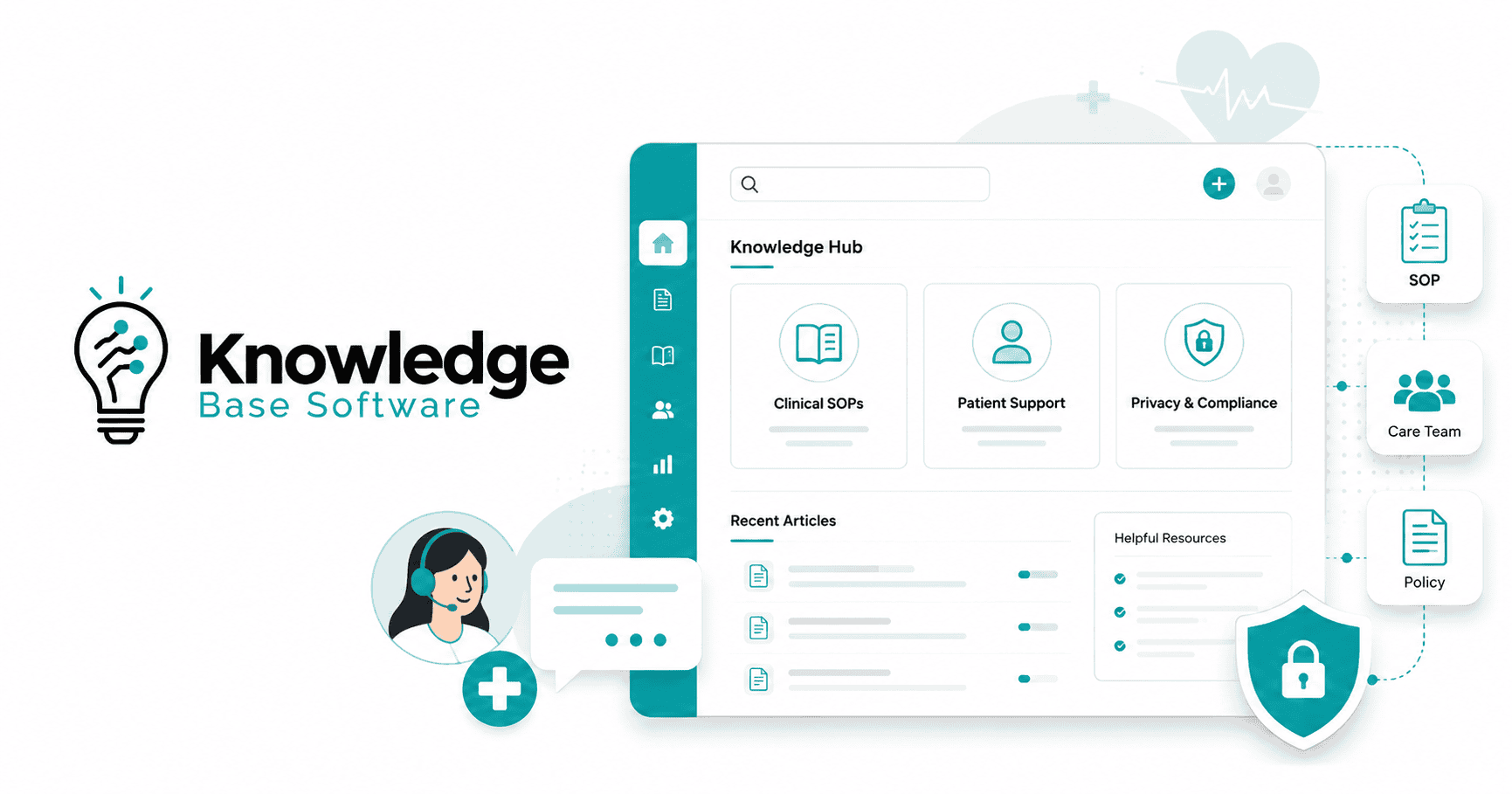
Healthcare knowledge base software gives patients, employees, or clinicians a searchable place to find reusable information. Choosing it starts with the work you need to support: answering public questions, maintaining staff procedures, helping customers use healthcare technology, or distributing approved clinical guidance.
Those uses call for different capabilities. A patient help center may prioritize clear navigation and accessible content. A staff policy repository needs ownership, review, and controlled access. A clinical knowledge platform must fit the organization’s process for approving, updating, and distributing guidance.
Start with the audience, the information the system will handle, and the evidence you need before purchase. Then compare products that fit those requirements. This guide covers representative options, contractual checks, practical evaluation criteria, and a pilot you can adapt to your organization.
Information verified on November 18, 2026.
Choose the Software Category That Fits the Work
Write down the recurring task you want to improve before building a feature list. “Help front-desk staff find the approved portal-support procedure” is a more useful requirement than “centralize knowledge.” It identifies a user, a task, and a result you can test.
APQC’s guidance on healthcare knowledge management similarly recommends starting with the knowledge need and choosing connected capabilities to address it. That approach helps avoid buying a broad platform when the main problem is a specific publishing, search, or governance workflow.
| Primary use case | Software category to evaluate | Requirement to prioritize |
|---|---|---|
| Public patient FAQs and administrative information | A public help center or external knowledge base | Accessible answers, clear navigation, controlled publishing, and a route to appropriate support. |
| Staff procedures, onboarding, and IT instructions | An internal knowledge base or an existing intranet with suitable controls | Owners, approval stages, search, role-based access, and a workable review cycle. |
| Formal policy distribution and acknowledgment | Policy-management or controlled-document software | Approval evidence, effective dates, acknowledgments, and retirement of superseded versions. |
| Clinician-facing local guidance | A clinical knowledge platform | Clinical governance, facility-specific applicability, current-version visibility, and mobile or offline access when needed. |
| Healthcare technology customer support | A customer-support knowledge base | Product-version accuracy, customer-specific access, release updates, and integration with the support workflow. |
A general knowledge base should not be treated as a replacement for an electronic health record (EHR), a patient portal, or clinical decision support. Keeping reusable instructions separate from individual patient records also makes the intended data boundary easier to explain to staff and vendors.
Include your existing platform in the evaluation if it can meet the requirements. Identify what would require an add-on, custom development, or ongoing manual administration. A dedicated product earns its place when it closes a meaningful gap that the team can demonstrate.
Define What Data the System May Handle
A healthcare topic does not automatically make an article protected health information (PHI). The HHS Privacy Rule summary describes PHI in terms of individually identifiable health information held or transmitted by a covered entity or its business associate. Electronic PHI is commonly abbreviated as ePHI.
For example, a public explanation of office hours can be written without patient information. A support submission containing an identifiable patient’s care or billing details requires a different assessment. Review the actual information and organizational relationship with your privacy team.
Look Beyond the Published Articles
Map the complete workflow, including places where someone could enter information that the content team did not intend to collect:
- Attachments, screenshots, comments, and contact forms.
- Search queries, feedback, support conversations, and analytics.
- AI prompts, generated answers, retrieval indexes, and conversation records.
- Administrative access, backups, exports, integrations, and subprocessors.
For each entry point, decide what is permitted, who can access it, where it goes, and how it is retained or deleted. If the knowledge base is intended to contain no PHI, configure the workflow around that boundary and provide a separate approved route for patient-specific support.
Verify the BAA and the Exact Services It Covers
According to HHS guidance on cloud computing, a cloud provider that creates, receives, maintains, or transmits ePHI on behalf of a covered entity or business associate is a business associate and requires a HIPAA-compliant business associate agreement (BAA). This can apply even when the provider stores encrypted ePHI without holding the decryption key.
Ask for written confirmation of the covered product, deployment, subscription, and features. Include AI processing, file storage, support access, integrations, and relevant subcontractors in that review. Confirm any exclusions and the responsibilities your organization retains.
A signed agreement is one part of the assessment. The HHS Security Rule summary also addresses risk analysis and administrative, physical, and technical safeguards. Evaluate how the proposed configuration and your operating procedures will meet the applicable requirements.
HHS and OCR do not certify products as “HIPAA compliant.” Treat a vendor’s compliance statement as a claim to investigate. Security reports and certifications can provide useful evidence within their scope, but they do not establish that every feature is suitable for your intended data.
Healthcare Knowledge Base Software Examples to Evaluate
The following products illustrate different buying paths. They were selected for their documented relevance to patient support, operational documentation, or clinical knowledge. This is a comparison of published capabilities and terms, not a report of hands-on testing or a ranking of clinical performance.
| Product and potential fit | What the official sources document | What to resolve before selection |
|---|---|---|
| HelpSite Public information and separate staff documentation. | Multiple-site documentation describes separate articles, search, privacy settings, and user access across sites managed under one account. | Confirm the required plan and authentication options. Establish contractual data scope before considering any workflow involving PHI; the cited documentation does not establish BAA coverage. |
| KnowledgeOwl Healthcare technology customer documentation and controlled knowledge. | Its healthcare solution page focuses on healthcare software companies and their clients. Its HIPAA documentation describes individual accounts, SSO, and group or role controls. | BAAs are available to Business and Enterprise customers. The same documentation prohibits uploading files containing PHI and lists other feature-specific restrictions. Review these against the intended workflow. |
| Document360 Documentation teams with structured review processes. | The Workflow designer supports custom review stages, automatic assignment, and read-only restrictions at selected stages. | Section 3.7 of its terms restricts handling Health Data and other regulated data unless expressly agreed in writing, including through a BAA or similar addendum. Confirm the services and permissions covered by your agreement. |
| Eolas Medical Reference resources for healthcare professionals. | Its standard-user guide describes departmental spaces, conventional search, source-linked AI when enabled, and a mobile Offline Mode. | Its EULA and disclaimer prohibit including or sharing patient data and state that the application is not tailored for HIPAA or patient-data processing. Evaluate it within that reference-content scope. |
| Quris Clinical Companion Hospital guideline governance and distribution. | The Quris product page describes review workflows, version history, web and mobile access, offline availability, and optional AI based on approved guidance. | Validate the described behavior with your content and users. Confirm contractual data scope, required capabilities, and offline limitations; the cited page does not establish BAA coverage. |
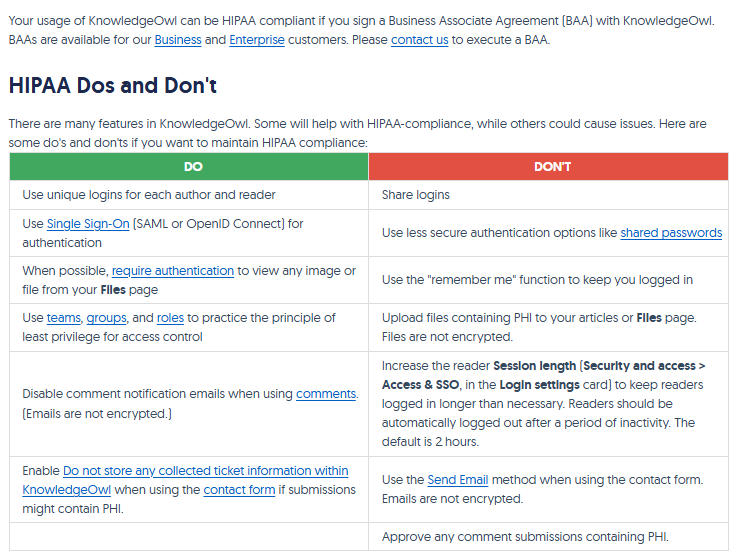
A product can be useful for healthcare reference information while restricting patient data. Likewise, BAA availability can coexist with limitations on individual features. Apply those boundaries before comparing convenience, appearance, or AI demonstrations.
Request confirmation of every requirement that could disqualify a product. Where public documentation does not establish a capability or agreement, record it as unverified until the vendor supplies evidence.
Evaluate How Content Stays Approved, Findable, and Restricted
Give Each Important Resource an Owner and a Lifecycle
Ask a content owner to demonstrate the full path from draft to approval, publication, revision, and retirement. A document history is useful, but the buying question is whether staff can identify the version they are supposed to use.
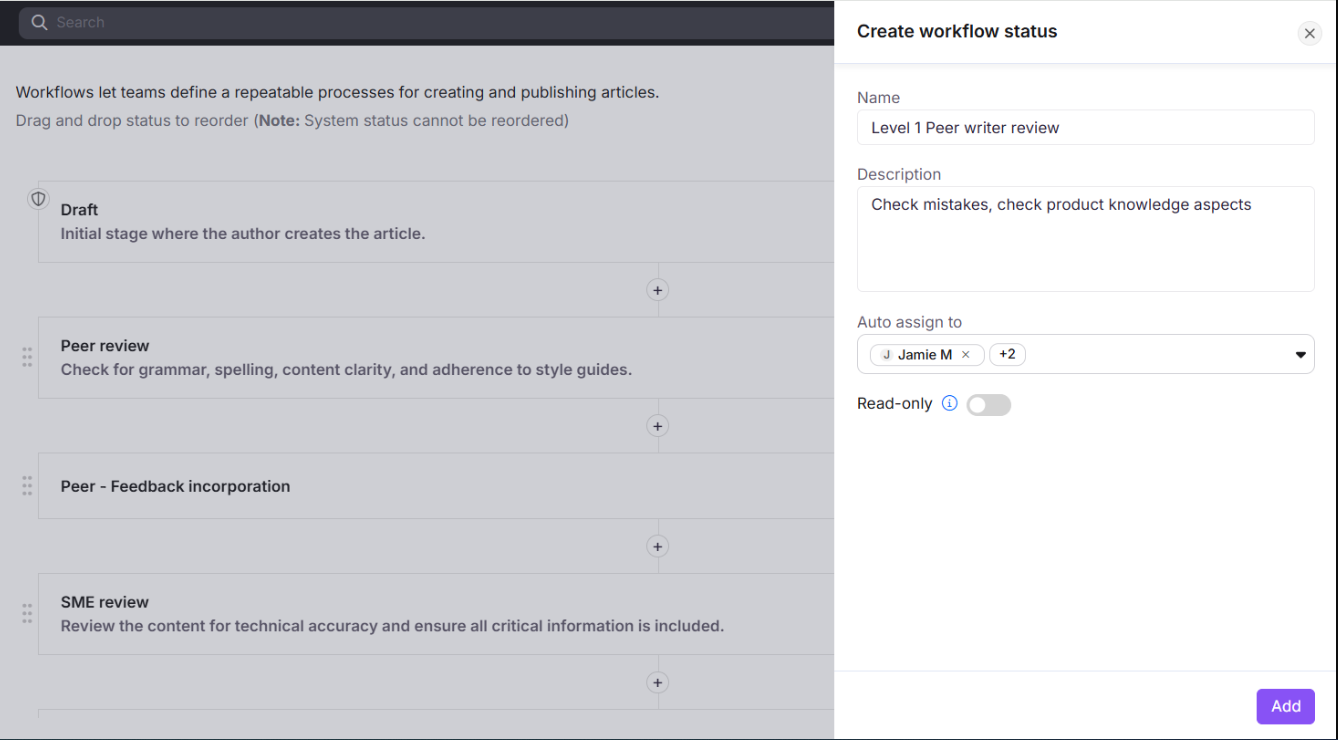
For content that requires control, capture an accountable owner, an appropriate approver, an intended audience, applicable locations, an effective date, and a review trigger. Make the current status visible where the reader consumes the information.
Use a routine administrative procedure to test a change. The published version should remain clear while a revision is under review. After approval, the replacement should reach the relevant search results, links, and distribution channels. Decide who can access archived versions and how those versions will be labeled.
If acknowledgment is required by your process, ask what is recorded and whether it is tied to a specific version. Record a completed acknowledgment separately from any assessment of comprehension.
Test Search With the Language People Actually Use
Build a search set from approved, nonsensitive examples of recurring questions. Include abbreviations, alternative terminology, incomplete phrases, and questions that require a location or role to be specified.
Observe whether users find the correct resource, recognize its applicability, and complete the task. Check titles, summaries, filters, navigation, and no-result behavior. A result that appears quickly but applies to a different facility has not solved the user’s problem.
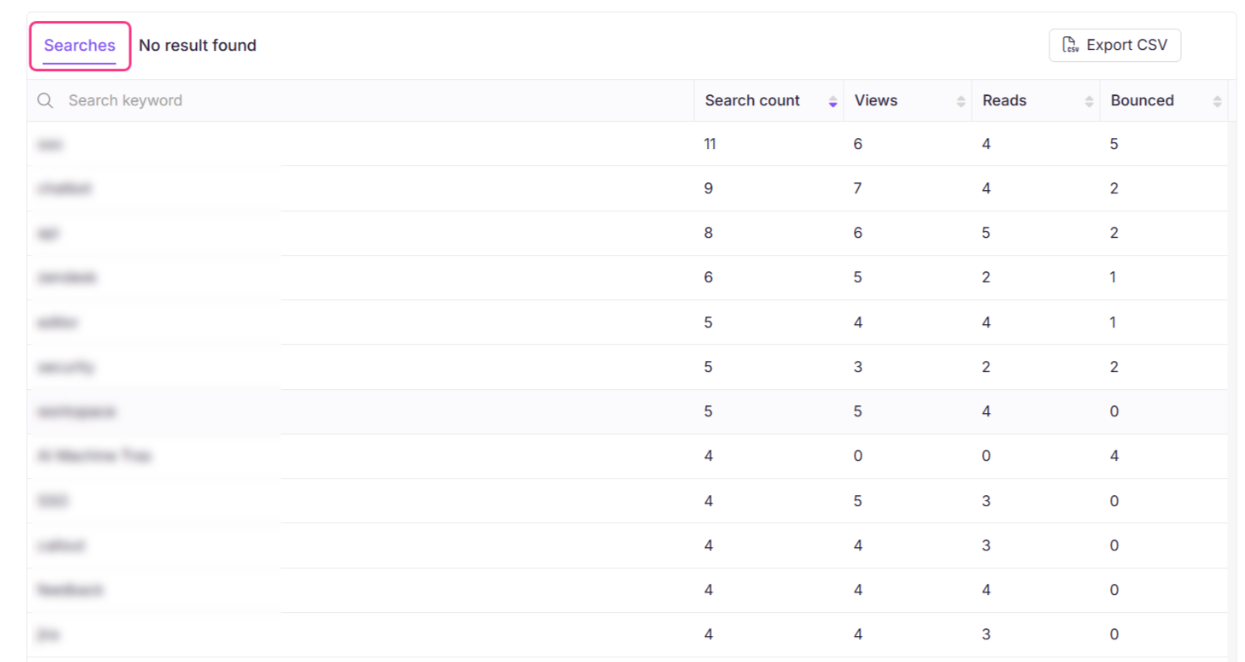
Review what search reporting retains before enabling it broadly. Give someone responsibility for investigating missing answers and confusing results, with a process for correcting content or navigation.
Separate Identity, Permissions, and Activity Records
Ask the vendor to demonstrate single sign-on (SSO), the applicable multifactor authentication (MFA) arrangement, and the permissions that follow after login. Specify who may read, edit, approve, publish, export, and administer content.
Use representative accounts rather than an administrator account for the demonstration. Check contractors, staff who work across locations, and users whose access changes. Include direct article URLs and attachments, not only the navigation menu.
Define the activity records you need: content changes, approvals, permission changes, or access events relevant to the workflow. Ask which events are captured, how long records are available, who can alter or export them, and whether the purchased plan includes the required reporting.
Check Mobile Access, Accessibility, and Downtime Behavior
Test the published experience with keyboard navigation, zoom, and relevant assistive technology. W3C’s Web Content Accessibility Guidelines provide testable accessibility criteria; its Easy Checks guide offers an initial review of issues such as keyboard access, visible focus, headings, and form labels. An initial check is not a complete conformance assessment.
Evaluate the articles and documents your team will publish as well as the platform interface. For patient-facing content, include plain language and the languages your audience needs. Check how translations are reviewed and updated when the source changes.
If offline access matters, ask which content is downloaded, how a device shows its last synchronization, and what happens after a document or a user’s access changes. Establish an approved fallback for content that may be out of date. Offline document availability does not, by itself, establish that AI answers work offline.
Verify Integrations Against a Specific Workflow
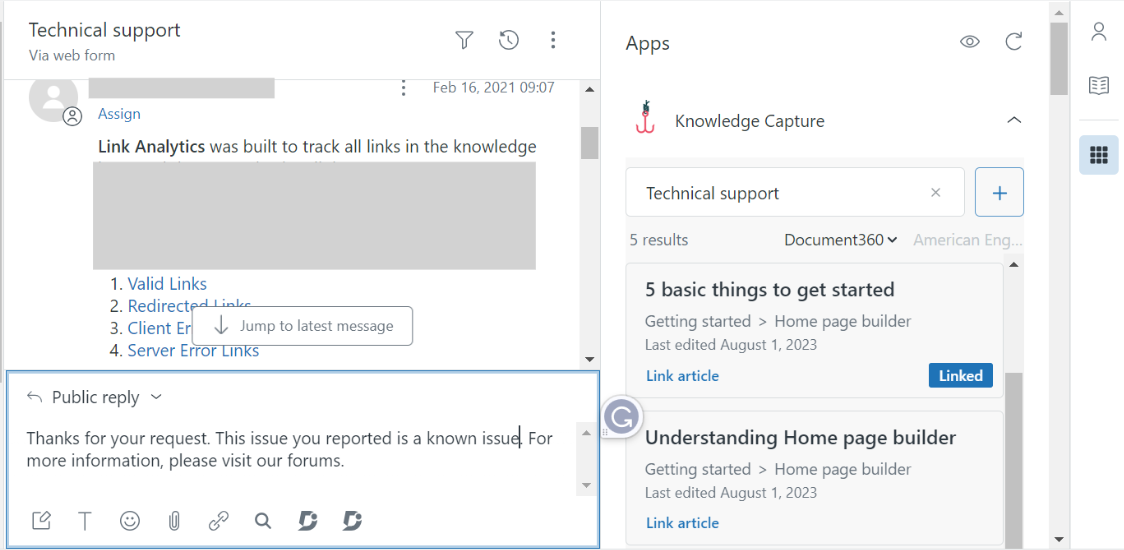
Turn each integration requirement into an observable action. “Find an approved troubleshooting article while handling a support request” is testable. “Integrates with healthcare systems” leaves the actual work undefined.
Ask the vendor to identify which of these it is offering:
- A supported native integration: request the named connector, supported product versions, configuration steps, and support responsibilities.
- An API-based implementation: establish which endpoints, permissions, development work, and ongoing maintenance are required.
- An embedded interface or link: verify what the user can do, what context is passed, and how authentication behaves.
For a proposed EHR connection, have your informatics or integration team review the exact workflow and data exchange. A generic application programming interface (API) claim is insufficient evidence of compatibility with a particular EHR or a particular interoperability workflow.
Include updates and failures in the demonstration. Determine what happens when source content changes, a connected system is unavailable, or permissions differ between systems. Assign responsibility for monitoring and repairing the connection.
Also test the export path. Confirm what can be extracted in a usable form, including articles, attachments, metadata, and any history needed for your transition plan.
Evaluate AI Answers as a Separate Capability
An AI search or assistant feature needs its own evaluation even when the underlying knowledge base meets your publishing requirements. Identify which sources it can use, which users can enable it, and what happens when it cannot find a supported answer.
NIST’s Generative AI Profile describes the risk of confidently presented false content and fabricated citations. It recommends reviewing sources and citations during evaluation and ongoing monitoring. A source link is useful evidence to inspect; its presence alone does not prove that an answer is correct.
Review the assistant across three dimensions:
- Answer support: does the response accurately reflect an approved source, preserve relevant conditions, and identify the applicable version or location?
- Access enforcement: can it retrieve or reveal only the content the current user may access, including after permissions change?
- Data handling: where are prompts, answers, logs, and indexes stored, who can access them, and which services or subprocessors process them?
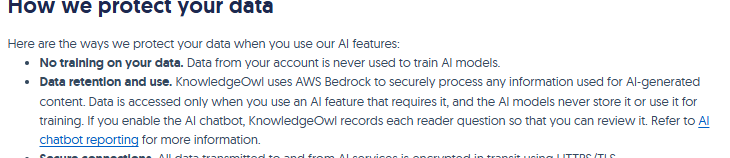
Distinguish training use from retention. For example, KnowledgeOwl’s AI privacy documentation says account data is not used to train AI models while also stating that KnowledgeOwl records reader questions when its chatbot is enabled. Those are different data-handling questions, and both matter to the proposed workflow.
Ask for the documented time required to apply content and permission changes to AI retrieval. Test that behavior rather than assuming an update reaches every index or cache immediately. Verify AI-specific contractual coverage and settings before allowing sensitive information.
Include unsupported and ambiguous questions in the pilot. Define when the assistant should ask for clarification, provide an approved escalation route, or report that it lacks enough information. For clinician-facing material, keep review and accountability with the appropriate clinical owners; retrieval convenience does not replace professional judgment.
Retain a usable search and browsing route for users who cannot or should not use the AI feature. Evaluate the actual fallback instead of assuming that switching off AI leaves the same experience.
Run a Pilot With Clear Acceptance Criteria
Create a small, synthetic content set representing your real workflow: a public administrative article, a staff-only procedure, two location-specific versions, an approved revision, and a retired document. Include an attachment and a question the content cannot answer. Use no real patient information.
The following are proposed acceptance tests, not reported product test results. Agree on the expected behavior and permitted update windows before the pilot, then keep evidence of what happened.
| Test | Expected result to agree on | Evidence to retain |
|---|---|---|
| Find the applicable instruction | A representative user finds the approved resource for the correct role and location using natural wording. | The query, selected result, version, and observed task completion. |
| Change and retire content | After the agreed update window, search and AI use the approved replacement; archived content is not presented as current. | Approval history and before-and-after search or answer records. |
| Attempt unauthorized access | A restricted user cannot obtain protected content through search, a direct URL, an attachment, or an AI response. | Results from each access route using the restricted account. |
| Remove a user’s access | Online access is removed within the approved requirement; session and offline behavior match documented controls and limitations. | Identity-change time, access results, and any documented residual exposure. |
| Ask an unsupported question | The system follows the agreed clarification or escalation behavior without inventing a policy. | The question, response, and supporting source check. |
| Use the system on required devices | Users complete the selected task with required accessibility features; any offline copy displays information needed to assess its currency. | Observed barriers, synchronization information, and the task result. |
| Recover and export content | The team can carry out the agreed recovery demonstration and obtain a usable export for the tested content. | Recovery record, exported files, and a check that essential content is usable. |
Have a frontline user, a content owner, and an IT administrator participate. Add privacy, security, and clinical reviewers according to the data and content involved. Ask participants to complete tasks without relying on the vendor’s presenter to navigate for them.
Separate mandatory requirements from preferences. A failure involving unauthorized disclosure or an unusable approval process should not disappear inside an average feature score. Record the issue, responsible owner, proposed correction, and evidence required before approval.
For usability and search targets, establish a baseline with your current process and choose thresholds appropriate to the task. Do not borrow an unexplained industry benchmark or convert a faster search into an assumed clinical benefit.
Compare the Full Cost of Operating the Knowledge Base
Ask shortlisted vendors to quote the same scope. Include the expected authors, readers, sites, languages, storage, integrations, support needs, and AI usage. Identify which required capabilities depend on a higher plan or an additional agreement.
Build the cost comparison around the work your organization will actually fund:
- Software and required options: subscriptions, necessary security or workflow tiers, AI usage, and relevant add-ons.
- Implementation: content inventory, cleanup, migration, configuration, integration development, and accessibility remediation.
- Ongoing ownership: administration, editorial work, subject-matter review, translation, training, and support.
- Change and exit: renewal terms, growth assumptions, export work, transition support, and deletion commitments.
Ask a future content owner to update an article during the evaluation. Observe the steps and assistance required to publish the change correctly. Include that maintenance effort when comparing a simpler tool with a platform offering more sophisticated workflows.
Do the same for adding a new location, changing an approver, and removing access. If routine work depends on a specialist, custom script, or vendor service, make that dependency visible in the operating plan.
Confirm what happens at contract termination: which data can be returned, in what format, when access ends, and how deletion is handled across the applicable service. Keep these commitments aligned with the data scope established earlier.
Launch With a Maintainable Content Process
Start with a bounded workflow and a content collection the responsible team can review. Expanding an uncontrolled document archive into a new platform can reproduce the same ownership and search problems.
- Inventory and decide. Identify authoritative resources, duplicates, obsolete material, sensitive content, and documents with no owner. Decide what to migrate, rewrite, archive, or exclude.
- Assign responsibility. Name the publishing owner, subject-matter approvers, access administrator, and contact for corrections. Define an urgent-change route.
- Configure before importing broadly. Establish audience separation, permissions, templates, metadata, review stages, and the allowed data entry points.
- Validate the migration. Check links, attachments, formatting, search behavior, permissions, and the mapping between old and new resources.
- Release and monitor. Show users where the authoritative information lives, collect issues, and expand after the team can sustain the review and correction process.
Set retention by information type and applicable obligations. HHS explains that the HIPAA Privacy Rule does not prescribe medical-record retention periods; state laws generally govern those periods. Keep medical-record requirements separate from the policies for knowledge revisions, compliance documentation, operational logs, and backups. Have the responsible owners approve each schedule.
Measure whether the system helps people complete the intended work. Useful operational measures include success on representative search tasks, unresolved questions, overdue reviews, time to correct a reported issue, and adherence to the approval process.
Interpret those measures carefully. A high article-view count does not tell you whether someone found the right answer. Pair usage data with task observations and feedback, and protect any sensitive information in the reporting workflow.
Choose the platform that meets your mandatory requirements and that your team can keep accurate. Before committing, retain the agreed data scope, relevant contracts, pilot evidence, complete cost assumptions, and named content owners. Together, those records provide a defensible basis for the purchase and a practical starting point for operating the knowledge base.