Independent knowledge base software guide Evidence-led Updated 2026

Knowledge base migration: a zero-loss guide
A knowledge base migration succeeds when every retained answer, file, permission, metadata field, and useful URL has an accounted-for destination—and when the team can prove that with a crawl before and after cutover. Do not treat migration as a bulk copy. Build a content inventory, decide what to keep, map the destination model, import into a non-public environment, validate the result, then switch traffic with direct permanent redirects and a tested rollback point.
Quick answer
To migrate a knowledge base without losing data, export content and attachments before changing anything; inventory both visible and restricted material; preserve stable source IDs; create a one-to-one field and URL map; import into staging; compare record counts, metadata, permissions, and file checksums; crawl every old and new URL; correct redirect chains and broken assets; freeze source edits briefly; perform a final delta import; then launch and monitor. Use a 301 or 308 for content that moved permanently, a relevant consolidated destination for a true merge, and a 404 or 410 for intentionally retired content. Never send unrelated old URLs to the home page.
Planning a migration? Turn your content inventory, measured work rates, delivery capacity, and readiness evidence into a reviewable project range.
In this guide
- What “without losing data” means
- A practical migration plan
- How to inventory and export the source
- How to map content, metadata, and permissions
- How to preserve URLs and search visibility
- The end-to-end migration workflow
- Original crawl, import, and redirect experiment
- Acceptance tests and rollback
- Migration checklist
- Frequently asked questions
What does a zero-loss migration protect?
“No data loss” is broader than matching the number of article titles. A platform may import the body while dropping attachments, authors, access rules, translations, labels, canonical URLs, review dates, comments, or revision history. A visually correct page can still expose internal instructions, break an embedded file, or become invisible to search.
| Layer | Examples to preserve or deliberately retire | Proof required |
|---|---|---|
| Content | Title, body, tables, code, callouts, alt text, locale | Source-to-destination record comparison and sampled visual review |
| Structure | Categories, collections, parent-child relationships, related articles | Navigation and hierarchy comparison |
| Metadata | Owner, status, labels, created date, updated date, review date | Field-level completeness report |
| Assets | Images, PDFs, downloads, captions, embedded media | HTTP checks and file checksums |
| Access | Public, customer, partner, staff, group, and role restrictions | Role-based tests using real test identities |
| Discovery | Old URLs, redirects, canonical tags, sitemap entries, internal links | Full crawl with status and redirect-chain reports |
| History | Revisions, comments, approvals, audit events | Explicit preservation, archive, or accepted-loss decision |
Define the required layers before choosing a tool. If the destination cannot represent a source feature, record the limitation and select one of four outcomes: transform it, archive it outside the new platform, retain the source read-only, or accept the loss with approval. Silence is not a migration decision.
A practical knowledge base migration plan
| Phase | Primary output | Exit condition |
|---|---|---|
| 1. Scope | Owners, goals, exclusions, freeze window, rollback authority | Decision makers approve success criteria |
| 2. Inventory | Article, asset, URL, metadata, locale, and permission manifests | Every source record has a stable ID |
| 3. Triage | Keep, update, merge, archive, or retire decision | Every item has an outcome and owner |
| 4. Model | Source-to-destination field and hierarchy map | Unsupported fields have documented treatment |
| 5. Pilot | Representative staged import and defect log | High-risk content types pass |
| 6. Full import | Destination records, assets, and redirect map | Automated acceptance tests pass |
| 7. Cutover | Final delta, redirects, sitemap, and public destination | Smoke tests pass and rollback remains available |
| 8. Stabilization | Monitoring, corrections, and signed reconciliation | Owners accept residual exceptions |
Begin with a knowledge base content audit. Migration is an expensive time to preserve obsolete duplicates. It is also a dangerous time to rewrite everything. Separate transformation from editorial improvement: clean obvious duplicates and unsafe content before launch, but avoid changing URLs, platform, structure, and every article at the same moment.
Inventory and export the source
Create manifests before an export
After generating the package, use the free Knowledge Base Export & Recovery Readiness Validator to inspect its CSV, JSON, and ZIP evidence locally and compare an optional post-restore export before the migration cutover.
Use the working inventory: download the knowledge base migration inventory template to assign owners, map destinations and redirects, track assets and fields, and gate launch readiness with recorded evidence.
An export file is not an inventory. Create separate manifests for content, URLs, and assets so you can reconcile them independently. At minimum, the content manifest should include the immutable source ID, title, current URL, locale, status, visibility, parent or section ID, owner, created and updated timestamps, review date, labels, and attachment count. Add traffic or inbound-link data only as prioritization context; it does not decide whether required or regulated content may be deleted.
Use an authenticated export with enough permission to see every in-scope record. Zendesk’s Help Center API, for example, filters responses according to the requesting user’s permissions. An anonymous export can appear complete while silently excluding restricted articles. Its Articles API supports cursor pagination and an incremental endpoint, so a script must continue until the final cursor rather than trusting the first response.
Capture a restorable source package
Keep the original vendor export unchanged, then work from a copy. Store the export time, account or space, exporting identity, platform version where relevant, record totals, and a checksum for each package. Include independently downloaded attachments if the primary format only references them.
Format choice is platform-specific and changes over time. WordPress’s official export creates a WXR XML file containing posts, pages, custom post types, comments, custom fields, taxonomies, and users. Confluence Cloud currently offers CSV, HTML, PDF, and XML space exports, but Atlassian states that XML site and space export reaches end of life on December 1, 2026; CSV remains the supported alternative for Cloud-to-Cloud use, while the documented formats serve different destinations. Verify the current export documentation on migration day instead of reusing an old runbook.
Map content, metadata, and permissions
Create a field map before writing the importer. Each row needs a source field, destination field, transformation, default, validation rule, and owner. Do not overload the article body with metadata the destination could store structurally.
| Source concept | Destination treatment | Validation example |
|---|---|---|
| Stable article ID | Store as an external or legacy ID | Unique and present on every imported record |
| Published/draft/archived | Map to destination workflow states | No source draft becomes public |
| Audience or user segment | Map to a tested role or group | Allow and deny tests for each role |
| Locale and translation group | Preserve locale and sibling relationship | Language selector reaches the correct sibling |
| Owner and review date | Use native ownership and lifecycle fields | No published item lacks an accountable owner |
| Unsupported macro | Convert, replace, or flag for manual repair | No unresolved source markup in rendered HTML |
| Attachment | Upload, relink, and retain filename or ID map | HTTP 200 plus matching checksum where bytes should be identical |
Permissions deserve a separate matrix. Test the anonymous visitor, an ordinary customer, each restricted customer or partner group, staff, authors, and administrators. Validate both article visibility and asset visibility. A restricted page with a publicly accessible PDF is still a permission failure. Use the controls in the knowledge base security and compliance guide to define owners, evidence, and exceptions.
Preserve URLs and search visibility
Create the URL map from the source inventory, not after importing. Each old indexable URL should end in one of three defensible outcomes:
- Moved: one direct 301 or 308 to the closest equivalent new URL.
- Merged: one direct permanent redirect to a genuinely consolidated article that satisfies the old intent.
- Retired: a 404 or 410 when no relevant replacement exists.
Google’s current site-move guidance recommends preparing a URL map, testing redirects, updating internal links and canonical annotations, submitting the new sitemap, and generally retaining redirects for at least one year. It also warns against redirecting many unrelated old URLs to one irrelevant destination such as the home page; that can confuse users and may be treated as a soft 404. Google states that permanent redirects do not cause a loss of PageRank.
Test with automatic redirect following disabled so chains are visible. An old URL that returns 301 appears healthy in a browser even if it then passes through another redirect or ends in an error. Record the first status, first Location header, final status, hop count, and destination canonical. Replace every internal link with the final URL so users and crawlers do not depend on redirects.
The end-to-end migration workflow
- Assign authority. Name the migration lead, platform administrator, content owners, security reviewer, SEO owner, and the person authorized to roll back.
- Back up and inventory. Preserve an untouched export and generate content, asset, URL, and permission manifests.
- Triage content. Mark every record keep, update, merge, archive, or retire. Give exceptions an owner and rationale.
- Design the destination. Confirm information architecture, locales, templates, workflows, and roles. The information architecture guide helps separate a necessary structural change from arbitrary URL churn.
- Build deterministic mappings. Map IDs, fields, parents, users, roles, URLs, and assets. Store source-to-destination IDs so reruns update rather than duplicate records.
- Run a representative pilot. Include a long article, tables, code, a translated set, restricted content, several attachments, duplicate titles, an archived item, and the largest content tree.
- Import idempotently. A second run with the same source version should not create a second article. Log created, updated, skipped, quarantined, and failed records separately.
- Validate in staging. Compare counts and checksums, crawl links and assets, render difficult pages, test roles, inspect search, and reconcile every exception.
- Prepare cutover. Lower change volume, communicate the freeze, capture a final backup, import records changed since the earlier export, activate direct redirects, update canonicals and internal links, and publish the new sitemap.
- Stabilize and close. Monitor errors, search behavior, permissions, support reports, and old-URL requests. Keep the source read-only until reconciliation and rollback windows close.
Original experiment: crawl, import, and redirect validation
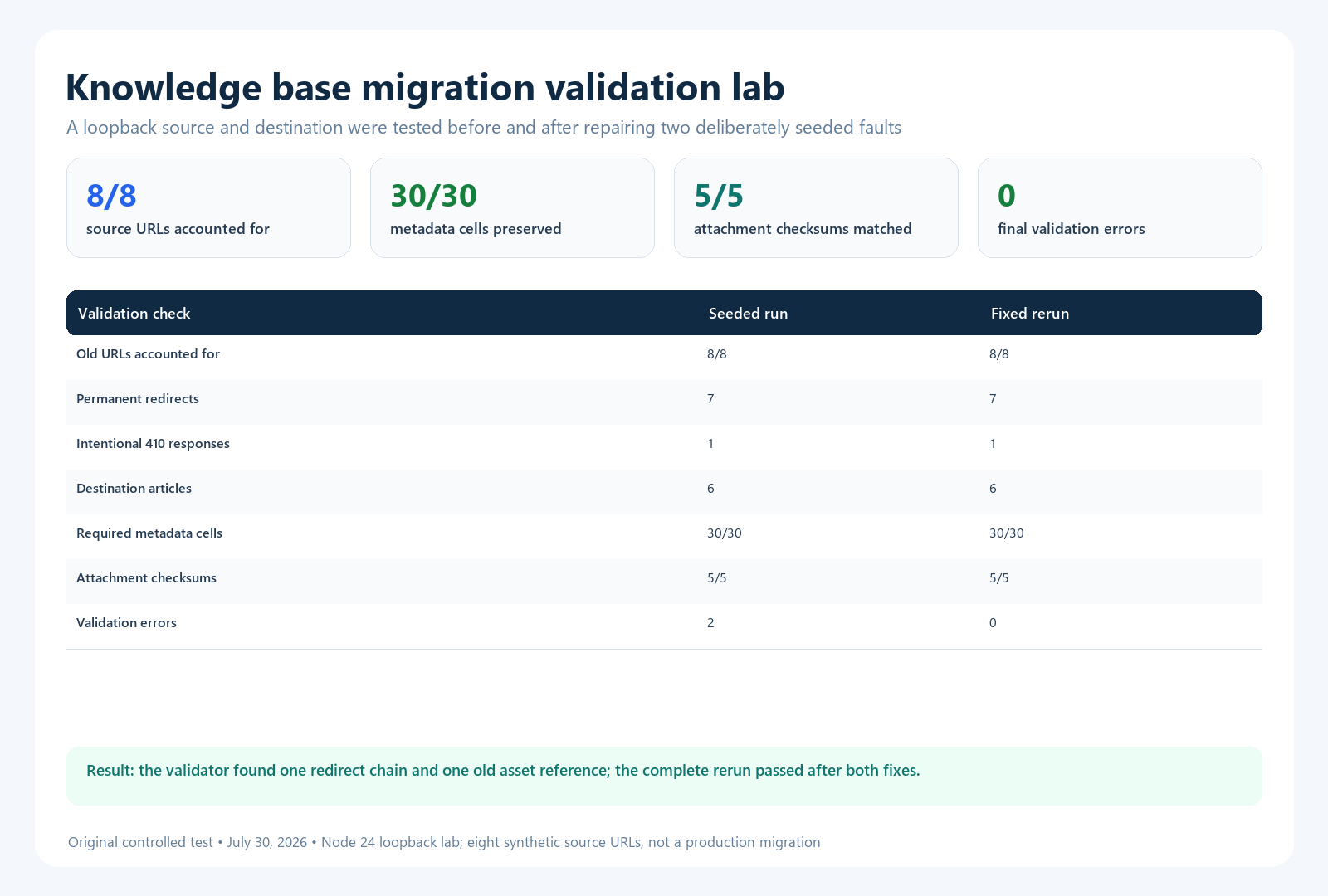
On July 30, 2026, we executed a reproducible local migration lab using Node.js 24.14.0 and a loopback HTTP server. It did not connect to a vendor account. The purpose was narrower: verify that the proposed acceptance checks detect two realistic faults and pass after correction.
Fixture and method
The synthetic source contained eight old URLs. Six represented canonical articles to import, one duplicate billing article was merged into a canonical billing page, and one discontinued article was deliberately retired. The records carried five required metadata fields: title, locale, visibility, owner, and last-reviewed date. Five attachments were represented by independent byte strings and SHA-256 checksums.
We deliberately seeded two defects. The merged billing URL redirected first to an intermediate archive URL and then to its destination. The API-authentication article retained one old asset path. The validator requested every old URL without following redirects automatically, counted destination articles, checked all 30 required metadata cells, compared five attachment checksums, and scanned imported HTML for old asset references. We then corrected both defects and repeated the entire run.
| Check | Seeded run | Fixed run |
|---|---|---|
| Old URLs accounted for | 7 permanent redirects; 1 intentional 410 | 7 permanent redirects; 1 intentional 410 |
| Canonical destination articles | 6 | 6 |
| Required metadata cells | 30 of 30 present | 30 of 30 present |
| Attachment checksum comparisons | 5 of 5 matched | 5 of 5 matched |
| Redirect chains | 1 detected | 0 |
| Old asset references | 1 detected | 0 |
| Final validation errors | 2 | 0 |
The result supports a practical point: count parity alone would have passed both runs. Only the redirect-hop and rendered-reference checks exposed the seeded defects. The test does not prove that a real migration will pass. Its source contained only eight synthetic URLs; bodies were small; and it did not test vendor macros, comments, translations, authentication, API quotas, or binary conversion. Repeat the same categories of checks against the actual export, destination API, CDN, and real permission roles.
Set acceptance criteria and a rollback trigger
Define thresholds before cutover. “Looks good” cannot settle a disagreement during an incident.
| Area | Example launch criterion | Rollback trigger |
|---|---|---|
| Record reconciliation | 100% of source IDs have an approved outcome | Unexplained missing published or restricted records |
| Permissions | All allow and deny tests pass | Any restricted content or asset exposed publicly |
| URLs | Every retained or merged old URL has one direct permanent redirect | Systemic loops, chains, or irrelevant destinations |
| Assets | All required assets return the expected status; checksum exceptions approved | Missing safety, legal, or task-critical downloads |
| Metadata | Required fields complete; controlled exceptions listed | Workflow, locale, or ownership fields broadly missing |
| Search and navigation | Critical task queries and paths reach the intended answers | Critical content cannot be found |
| Operations | Error rates and response times remain within the agreed range | Sustained failure beyond the cutover limit |
A rollback plan needs more than a backup. Record how to restore traffic, whether writes can safely return to the source, how changes made during the failed cutover will be reconciled, and who makes the decision. The knowledge base disaster recovery guide provides a wider continuity framework.
Common migration mistakes
- Comparing only totals: equal counts can hide duplicates, missing restricted articles, or records imported into the wrong locale.
- Using titles as identifiers: titles change and may repeat. Retain immutable source IDs.
- Trusting a single export page: APIs may paginate and permission-filter results.
- Importing directly into production: staging exposes mapping and rendering errors without making them public.
- Rewriting everything during the move: simultaneous platform, URL, structure, and content changes make defects hard to isolate.
- Redirecting retired pages to the home page: use a relevant consolidated destination or return 404/410.
- Testing pages but not files: images and downloads may use different storage and access controls.
- Skipping the final delta: content edited after the first export is otherwise lost or overwritten.
- Deleting the source immediately: retain a read-only source and export until reconciliation and retention obligations are satisfied.
Knowledge base migration checklist
- Migration lead, owners, security reviewer, SEO owner, and rollback authority named.
- Untouched source export stored with timestamp and checksum.
- Content, URL, asset, locale, metadata, and permission manifests complete.
- Every source ID marked keep, update, merge, archive, or retire.
- Destination field, hierarchy, role, user, asset, and URL mappings approved.
- Representative pilot imported and defects resolved.
- Importer is rerunnable without creating duplicates.
- Required counts, fields, relationships, and attachment checksums reconciled.
- Public and restricted content tested with appropriate identities.
- Old URLs return direct 301/308, justified 404/410, or an approved exception.
- Internal links, canonicals, hreflang where used, and sitemap URLs point to final destinations.
- Source freeze and final delta import rehearsed.
- Cutover smoke tests, monitoring, communications, and rollback steps assigned.
- Post-launch defects tracked to closure and the read-only source retained through the agreed window.
Frequently asked questions
How long should knowledge base redirects remain?
Google recommends keeping site-move redirects for as long as possible and generally at least one year. Keeping useful redirects indefinitely can also help people following old bookmarks or external links. Update your own internal links to the final URLs so routine navigation does not depend on them.
Should every old article be migrated?
No. Migrate content that remains required, accurate, or valuable. Merge true duplicates, archive records needed for retention but not active use, and retire material with no relevant replacement. Every source ID still needs a recorded outcome.
Can a migration preserve revision history and comments?
Only if the source can export them and the destination can represent or archive them. Test this early. If native import is unavailable, preserve an immutable archive and link its identity to the destination record rather than implying the history was transferred.
How do you prevent duplicate articles during repeated imports?
Store the immutable source ID on the destination and use it as the upsert key. A repeated import of the same source version should update or skip the existing destination record, never create another one.
What should be monitored after launch?
Monitor old-URL requests, 404s, redirect chains, destination errors, missing assets, permission incidents, search no-result queries, critical task findability, support reports, crawl and indexing signals, and records changed during stabilization. Treat a reduced assisted-contact rate as a signal, not proof that users solved their tasks.
Verification note: This guide and its linked official documentation were checked on July 30, 2026. Product export formats, API versions, limits, and plan availability can change; verify the source and destination documentation again before execution.