Independent knowledge base software guide Evidence-led Updated 2026


12 Knowledge Base Article Templates You Can Copy and Use
Knowledge base templates work best when you choose them by the reader’s job. Use an FAQ when the reader needs one direct answer, a how-to guide when they need to complete a task, a troubleshooting guide when something is not working, and a runbook when an internal team must respond to an operational event. The structure should follow the job rather than forcing every article into one generic format.
Below are 12 copyable templates for customer support, product documentation, developer documentation, internal operations, and IT. Each one includes the fields needed to publish and maintain the article, including ownership, review information, validation, exceptions, and safety controls where they are relevant.
You can add these structures to your existing knowledge base software or use them as the starting point for a new documentation workflow.
If you want a guided next step, the free Knowledge Base Article Generator turns verified notes into a structured Article, FAQ, SOP, or How-to draft without inventing missing details.
We also ran a deterministic structural test using 36 realistic documentation briefs. That test checks whether a template asks the writer for necessary information. It does not claim that a template will make an article accurate, improve Google rankings, reduce tickets, or help a reader complete a task without further testing.
Last tested and updated: July 29, 2026.
On This Page
- Choose the right template
- How we tested the templates
- Copy the 12 templates
- See the fields every template needs
- Compare internal and external templates
- Implement the templates
- Set governance and review rules
- Use the publishing checklist
- Read frequently asked questions
Choose the Right Knowledge Base Template
Choose the narrowest template that matches the reader’s intent. A specific structure usually gives the writer more useful prompts and gives the reader fewer irrelevant sections.
| Reader’s goal | Use this template | Use it when | Essential output |
|---|---|---|---|
| Understand one focused topic | General article | No more specific format fits | Clear answer, context, exceptions, and source |
| Get a quick answer | FAQ | The answer is short and does not require a procedure | Direct answer, conditions, and a supporting reference |
| Complete a task | How-to guide | Steps must be followed in order | Prerequisites, numbered steps, and verification |
| Fix a problem | Troubleshooting guide | A symptom or error is already known | Diagnosis, ordered fixes, resolution check, and escalation |
| Reach first value | Getting started guide | A new user needs a short path through initial setup | First actions, success criteria, and next steps |
| Understand a capability | Feature documentation | Readers need behavior, availability, setup, and limits | Feature explanation, configuration, example, and limitations |
| Connect two systems | Integration or API setup | Credentials, permissions, testing, and errors matter | Secure setup, test, rollback, and support path |
| Learn what changed | Release notes | A product, API, policy, or security change must be communicated | Change, impact, action, deadline, and verification |
| Understand a term | Glossary entry | A term needs one consistent definition | Plain-English definition, example, and disambiguation |
| Follow an internal process | SOP or procedure | A repeatable activity needs roles, controls, and evidence | Approved procedure, acceptance criteria, and retained record |
| Request an internal service | IT or service request | An employee needs access, equipment, software, or support | Requirements, approval, fulfillment check, and expiry |
| Respond to an incident or known error | Runbook | A support, IT, or engineering team needs an operational response | Trigger, diagnosis, response, recovery check, and handback |
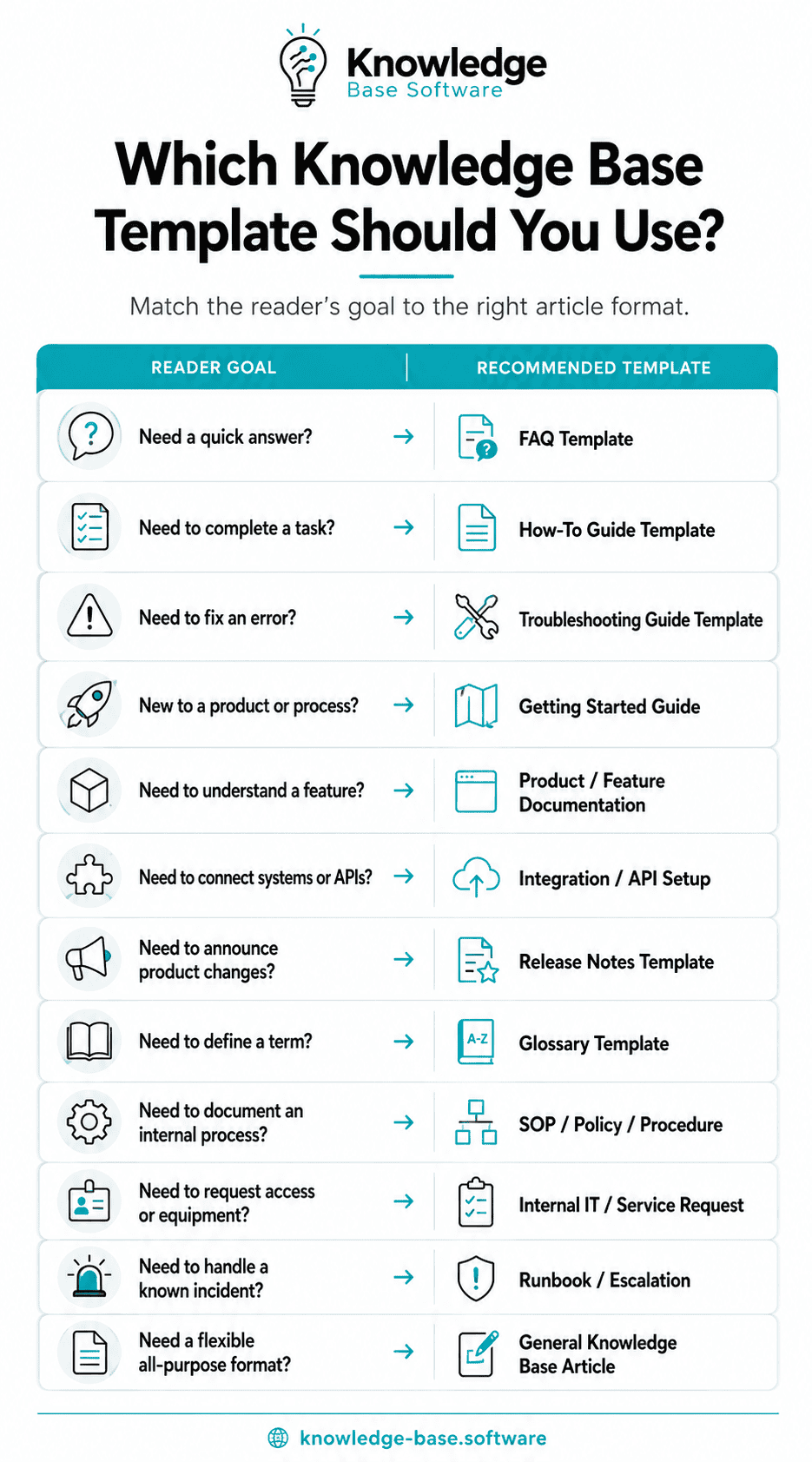
A broad topic may need more than one article. For example, feature documentation can explain how approval workflows behave, while a separate how-to guide explains how an administrator enables them. Link the two pages instead of combining every possible reader job in one document.
How We Tested These Templates
We ran a deterministic structural test on July 29, 2026. We created 36 synthetic but realistic documentation briefs: three for each of the 12 template types. The scenarios ranged from a low-risk workspace URL question to high-risk access, privacy, API, and incident-response tasks.
Every brief was scored against all 12 templates, creating 432 template–scenario comparisons for the original set and another 432 after revision. Results for an individual template are the mean of its three intended scenarios.
Test scenarios
| Template | Three briefs used in the test |
|---|---|
| General article | Annual subscription billing cycles; data retention after cancellation; regional tax invoice availability |
| FAQ | Changing a workspace URL; AI training and customer data; a mid-cycle downgrade |
| How-to | Inviting a teammate; rotating an API key; exporting audit logs |
| Troubleshooting | A failed invoice export; an SSO login loop; a webhook delivery failure |
| Getting started | Support dashboard setup; employee IT onboarding; a first authenticated API call |
| Feature documentation | Approval workflows; scheduled exports; AI answer citations |
| Integration/API | HubSpot OAuth; signed outbound webhooks; SCIM provisioning |
| Release notes | A reporting update; API v1 deprecation; a required security patch |
| Glossary | SSO; retrieval-augmented generation; ticket deflection |
| SOP/procedure | Refund processing; privileged-access review; a PII deletion request |
| IT/service request | Salesforce access; a new laptop; temporary administrator access |
| Runbook | Payment webhook failures; elevated 5xx errors; a suspected credential leak |
Frozen scoring rubric
We defined the requirements before revising the templates and did not change them between runs.
| Dimension | Weight | What received credit |
|---|---|---|
| Core-task coverage | 45 | Explicit prompts for the answer, steps, diagnosis, procedure, request data, or other information essential to the article type |
| Validation | 15 | An example, test, success criterion, definition of done, recovery check, or equivalent proof |
| Exceptions and safety | 15 | Relevant limitations, exceptions, security, approval, rollback, escalation, or risk controls |
| Lifecycle | 15 | Required ownership, review or effective dates, versioning, evidence, and related content |
| Context and findability | 10 | Required title, summary, audience, applicability, availability, or date context |
An element counted only when the template explicitly prompted the writer to provide it. A writer might add useful information voluntarily, but an unprompted possibility did not earn credit. A dimension with no requirement for a scenario received full credit; a low-risk glossary entry was not penalized for lacking an incident rollback section.
The calculation for each dimension was:
dimension score = dimension weight × matched explicit prompts ÷ required prompts
The five dimension scores were then added. For each run, we froze the required prompts for every brief, marked whether each template contained those prompts, applied the formula, and averaged the three intended-scenario scores for each template.
Results
| Template | Original | Revised | Change |
|---|---|---|---|
| General article | 75.4 | 100.0 | +24.6 |
| FAQ | 67.5 | 100.0 | +32.5 |
| How-to guide | 95.8 | 100.0 | +4.2 |
| Troubleshooting guide | 80.8 | 100.0 | +19.2 |
| Getting started guide | 70.0 | 100.0 | +30.0 |
| Feature documentation | 92.5 | 100.0 | +7.5 |
| Integration/API setup | 97.5 | 100.0 | +2.5 |
| Release notes | 75.4 | 100.0 | +24.6 |
| Glossary | 71.2 | 100.0 | +28.8 |
| SOP/procedure | 78.1 | 100.0 | +21.9 |
| Internal IT/service request | 70.0 | 100.0 | +30.0 |
| Known error/runbook | 77.0 | 100.0 | +23.0 |
| Overall across 36 intended-template runs | 79.3 | 100.0 | +20.7 |
The original templates already covered all context and core-task prompts in this dataset. Their main structural gaps were validation, which had 25.0% coverage, and scenario-relevant exceptions and safety, which had 46.2% coverage. Lifecycle coverage was 90.6%. Frequently missing prompts included rollback or reversal, an authoritative source, security notes, an effective date, and an example.
The revised templates below contain an explicit place for every element required by the frozen 36-scenario checklist. A score of 100 means checklist coverage only. The scenarios were synthetic, no customers or employees participated, and the test did not measure readability, factual accuracy, accessibility, search performance, completion time, localization, ticket deflection, or business outcomes. A useful next step would be a moderated test in which representative writers complete several templates and representative readers attempt the resulting tasks.
12 Copy-Paste Knowledge Base Templates
The examples in this section are illustrative. Replace factual details with information verified against your own product, policy, system, or process.
1. General Knowledge Base Article Template
Best for: A focused explanation that does not fit a more specialized article type.
Use it when: The reader needs one answer with context, applicability, examples, and exceptions. If the article mainly contains ordered actions, use the how-to template instead.
Title: [Clear title using the reader’s language]
Summary: [What this article answers in one or two sentences]
Audience: [Customer, employee, administrator, agent, or developer]
Applies to: [Product, plan, department, role, region, or version]
Prerequisites, if any:
- [Requirement]

Answer:
[State the answer first.]

Key information:
- [Important fact]
- [Important fact]

Steps, if applicable:
1. [Action]
2. [Action]

Example:
[A realistic example showing how the answer applies]

Exceptions or conditions:
- [Exception, limit, or edge case]

Risk, privacy, or compliance notes, if applicable:
- [Relevant control or caution]

Source of truth:
[Approved policy, product specification, system record, or owner]

Effective date: [Date]
Related articles:
- [Directly related article]

Owner: [Person, team, or role]
Last reviewed: [Date]
Feedback: [How readers can report a problem]
Filled example: An article titled “How annual subscription billing cycles work” can state that an illustrative annual term begins on the activation date, show a January 15 renewal example, identify the billing policy as the source of truth, and list regional or contract-specific exceptions.
Quality check: The answer should be understandable without reading the background first. Confirm that the applicability, effective date, exception, and authoritative source are explicit.
2. FAQ Template
Best for: A direct answer to one question.
Use it when: The reader can act after a short answer plus limited context. Do not use an FAQ to hide a multi-step procedure or complex diagnostic process.
Title: [Question in the reader’s language]
Question: [Exact question]
Short answer: [Direct answer in one to three sentences]
Who this applies to: [Audience, plan, role, region, or version]

More details:
[Necessary explanation]

Example:
[Short example that removes ambiguity]

Exceptions or conditions:
- [Condition or exception]

Risk or privacy notes, if applicable:
- [Relevant caution]

Source of truth:
[Approved policy, product specification, or accountable owner]

Effective date: [Date]
Related questions:
- [Closely related question]
Related articles:
- [Detailed guide or policy]

Owner: [Person, team, or role]
Last reviewed: [Date]
Feedback: [How to report an unclear or outdated answer]
Filled example: “Can I change my workspace URL?” can answer yes or no immediately, state which role may make the change, explain whether existing links or sessions are affected, and link to the full change procedure.
Quality check: Read only the question and short answer. If they do not resolve the basic uncertainty, rewrite them. Check that conditions are not buried in the final paragraph.
3. How-To Guide Template
Best for: A task completed through ordered actions.
Use it when: The reader knows the desired outcome but needs instructions. Follow consistent procedure-writing conventions such as action-led steps and one primary action per step.
Title: How to [complete the task]
Summary: [Outcome the reader will achieve]
Audience: [Intended role]
Estimated time: [Realistic range]

Prerequisites:
- [Access, permission, information, or tool]

Before you begin:
- [Warning or important condition]

Steps:
1. [Action]
2. [Action]
3. [Action]

Verification:
[How to confirm the task succeeded]

Limitations:
- [What the procedure does not cover]

Rollback or reversal, if the action is risky:
[How to undo the change or return to a safe state]

Security notes, if applicable:
- [Credential, access, data, or device precaution]

Troubleshooting:
- If [problem], [safe response].

Related articles:
- [Relevant guide]

Owner: [Person, team, or role]
Last reviewed: [Date]
Feedback: [How to report a failed or outdated step]
Filled example: “How to invite a teammate to a workspace” can identify the administrator permission, list the invitation steps, and define success as the new member appearing in the member list with the intended role.
Quality check: Follow the procedure from a clean starting state. Confirm that prerequisites appear before the steps and that the verification tests the intended outcome rather than the final click.
4. Troubleshooting Guide Template
Best for: A known symptom, error, or unexpected behavior.
Use it when: Readers know what is wrong but not the cause. Order fixes from common and low-risk to less common or higher-risk.
Title: Troubleshooting [problem, error, or symptom]
Summary: [Issue this guide helps diagnose and resolve]
Audience: [Intended role]
Symptom:
[What the reader sees, including exact error text if useful]

Possible causes:
- [Likely cause]

Before troubleshooting:
- [Safe precheck]

Fix 1: [Most likely, lowest-risk fix]
1. [Action]
2. [Action]

Fix 2: [Alternative fix]
1. [Action]
2. [Action]

How to confirm the issue is resolved:
[Observable recovery check]

Rollback or reversal:
[How to undo a risky diagnostic change]

Security notes, if applicable:
- [Sensitive-data or access precaution]

When to escalate:
[Threshold and destination]
Information to collect:
- [Timestamp, ID, log, screenshot, environment, or reproduction steps]

Related articles:
- [Relevant article]

Owner: [Person, team, or role]
Last reviewed: [Date]
Feedback: [How to report an unsuccessful fix]
Filled example: A failed invoice export guide can start with the export status and timestamp, check date-range limits before advanced steps, and define recovery as a downloadable file whose record count matches the selected range.
Quality check: Make sure the article distinguishes the symptom from its possible causes. Every risky change needs a reversal path, and escalation must specify what evidence to collect.
5. Getting Started Guide Template
Best for: A new user’s shortest path to an initial useful state.
Use it when: The reader is unfamiliar with a product, tool, role, or process. Keep advanced configuration out of the critical path.
Title: Getting started with [product, feature, tool, or process]
Summary: [Who this is for and what they will accomplish]
Audience: [New customer, employee, administrator, agent, or developer]

What you will learn:
- [Outcome]

Before you begin:
- [Account, access, information, or tool]

First steps:
1. [First essential action]
2. [Second essential action]
3. [Third essential action]

You are done when:
- [Observable success criterion]

Common blockers:
- [Blocker]: [Safe response]

Security notes, if applicable:
- [Credential, access, or data precaution]

Recommended next steps:
- [Next action or article]
Common questions:
- [Relevant question]
Related articles:
- [Relevant guide]

Owner: [Person, team, or role]
Last reviewed: [Date]
Feedback: [How a new user can report confusion]
Filled example: A support-dashboard guide can lead a new administrator through inviting an agent, connecting one inbox, and setting business hours. Its success criterion can be a test message appearing in the assigned queue.
Quality check: Remove any step that is not necessary for initial success. A reader should know exactly when setup is complete and where to go if a blocker prevents that outcome.
6. Product or Feature Documentation Template
Best for: Explaining what a feature does, who can use it, how it behaves, and where its boundaries are.
Use it when: Readers need more than a task recipe. Create separate how-to or troubleshooting pages if setup and failure handling become long.
Title: [Feature name]: overview and setup
Summary: [What the feature does and why it is used]
Audience: [Customer, administrator, developer, or agent]
Availability: [Plan, role, region, version, or feature state]

Use cases:
- [Appropriate use]

How it works:
[Behavior in plain language]

Setup:
1. [Action]
2. [Action]

Configuration options:
- [Setting]: [Effect]

Permissions or approval:
[Who can view, configure, or approve it]

Limitations:
- [Boundary or unsupported case]

Data, privacy, compliance, or risk impact, if applicable:
- [Relevant impact and control]

Source of truth:
[Product specification, approved policy, or accountable owner]

Example:
[Realistic configuration and expected behavior]

Related articles:
- [How-to, troubleshooting, or policy page]

Owner: [Product or documentation owner]
Last reviewed: [Date]
Version history:
- [Date]: [Change]
Feedback: [How to report inaccurate behavior]
Filled example: Approval-workflow documentation can explain when a rule runs, who can configure it, which plans or roles have access, how approvers are selected, and what happens when no eligible approver is available.
Quality check: Separate observed product behavior from marketing language. Verify availability, permissions, defaults, limits, and the source of truth against the current product version.
7. Integration or API Setup Template
Best for: Connecting systems, authenticating an API client, or configuring data exchange.
Use it when: Credentials, permissions, fields, testing, error handling, and safe disconnection are part of the task. A larger developer portal may also need a separate API knowledge base architecture rather than one long setup page.
Title: How to connect [integration or API] to [system]
Summary: [What will be connected and what will happen]
Audience: [Administrator, developer, or technical user]

Requirements:
- [Plan, role, endpoint, account, or tool]

Security notes:
- [How to handle credentials, scopes, secrets, and sensitive data]

Setup:
1. [Create or locate the required credential]
2. [Configure the connection]
3. [Select permissions or synchronization behavior]
4. [Save the configuration]

Required fields:
- [Field]: [Format and purpose]

Test the connection:
[Test request, test record, expected response, and success signal]

Common errors:
- [Error]: [Likely cause and safe fix]

Disconnect, revoke, or roll back safely:
[How to stop data flow and revoke access without leaving active credentials]

When to contact support:
[Escalation threshold and evidence to provide]
Related articles:
- [Authentication, webhook, or error guide]

Owner: [Integration or developer-documentation owner]
Last reviewed: [Date]
Version history:
- [Date]: [Change]
Feedback: [How to report a setup problem]
Filled example: A HubSpot OAuth guide can list the required administrator access and scopes, explain the authorization flow, test with a non-sensitive record, and describe how to disconnect the app and revoke its grant.
Quality check: Have a reviewer confirm the minimum permissions, secret-handling guidance, test result, revocation steps, and current API version. Never include live credentials in an example.
8. Release Notes Template
Best for: Communicating product, API, policy, bug-fix, deprecation, or security changes.
Use it when: Readers need to know what changed, who is affected, whether action is required, and how to confirm readiness.
Title: Release notes: [Product or feature] — [date or version]
Summary: [Most important change and user impact]
Release date: [Date]
Audience: [Affected users or roles]

What changed:
- [Change]

Why it matters:
[User or operational impact]
Who is affected:
[Plan, role, region, environment, or API version]
Action required:
[No action, optional action, or required action with deadline]

How to verify:
[How readers can confirm the new behavior or successful update]

Migration check, if applicable:
[How to determine whether migration is required]
Deprecation deadline, if applicable: [Date]
Migration steps, if applicable:
1. [Action]
2. [Action]

Rollback or support path:
[Supported recovery or escalation route]

Security notes, if applicable:
- [Risk and required precaution]

Known limitations:
- [Current limitation]
Related articles:
- [Feature, migration, or troubleshooting page]

Owner: [Product or documentation owner]
Last reviewed: [Date]
Version history:
- [Date or version]: [Change]
Feedback: [Where readers can ask a release question]
Filled example: Notes for a reporting update can identify the release date, affected administrator roles, new filters, whether saved reports change, and a verification step that compares a known report before and after enabling the update.
Quality check: Translate internal work items into reader impact. Required actions, deadlines, verification, and recovery paths must be distinguishable from optional information.
9. Glossary Template
Best for: Defining a recurring product, technical, support, or business term consistently.
Use it when: Readers encounter the term across several articles. A glossary entry should clarify language, not become a complete guide.
Title: [Term]
Short definition:
[One-sentence definition]

Plain-English explanation:
[Simple explanation without circular jargon]

Why it matters:
[Reason the audience needs the term]

Example:
[Accurate use in context]

Not the same as:
- [Similar term]: [Difference]

Limitations or common misuse:
- [Boundary or misleading use]

Authoritative reference:
[Approved specification, standard, policy, or product owner]

Related terms:
- [Term]
Related articles:
- [Relevant article]
Audience: [Customer, employee, agent, administrator, or developer]

Owner: [Person, team, or role]
Last reviewed: [Date]
Feedback: [How to question or correct the definition]
Filled example: An SSO entry can define single sign-on, show an employee authenticating through an identity provider, and explain that SSO is not the same as multi-factor authentication.
Quality check: A reader unfamiliar with the term should understand the definition without opening another glossary entry. Check the disambiguation and authoritative reference.
10. SOP, Policy, or Procedure Template
Best for: An approved internal process that must be completed consistently and leave evidence.
Use it when: Roles, approvals, exceptions, effective dates, records, security, or compliance controls matter. Separate a policy’s rule from the procedure used to carry it out when either becomes complex.
Title: [SOP, policy, or procedure name]
Summary: [What this document governs]
Purpose: [Why the process exists]
Scope: [People, systems, regions, and situations covered]
Audience: [Employees or roles]

Roles and responsibilities:
- [Role]: [Responsibility]

Prerequisites:
- [Access, approval, information, or training]

Procedure:
1. [Action and responsible role]
2. [Action and responsible role]
3. [Action and responsible role]

Acceptance criteria:
- [Evidence that the procedure is complete and correct]

Exceptions:
- [Approved exception and decision authority]

Compliance notes, if applicable:
- [Relevant obligation]
Security and risk notes, if applicable:
- [Risk and control]

Approval requirements:
[Approver and approval point]
Effective date: [Date]

Evidence or record to retain:
- [Record, location, access rule, and retention owner]

Related documents:
- [Policy, form, checklist, or system guide]
Owner: [Accountable team or role]
Last reviewed: [Date]
Version history:
- [Date]: [Change and approver]
Feedback: [How to propose a controlled change]
Filled example: A refund-processing SOP can assign evidence collection to support, payment verification to billing, and exception approval to a manager. Completion requires a recorded decision and customer notification.
Quality check: Ask an authorized reviewer to confirm scope, responsibilities, acceptance criteria, exception authority, retained evidence, effective date, and current approval.
11. Internal IT or Service Request Template
Best for: Requesting access, equipment, software, facilities, onboarding support, or another internal service.
Use it when: Employees need to know eligibility, required information, approval, timing, fulfillment, rejection, escalation, and access expiry.
Title: How to request [service, access, equipment, or support]
Summary: [What can be requested and how the process works]
Audience: [Eligible employees, contractors, or managers]
Request type: [Access, equipment, software, service, or support]

Before submitting:
- [Eligibility, information, training, or approval]

How to submit:
1. [Open the approved request channel]
2. [Select the request type]
3. [Provide required information]
4. [Attach approval or business justification]
5. [Submit]

Required information:
- [Identity, department, manager, system, role, reason, and due date]

Expected response time:
[Published service target or explanation of variability]
Approval process:
[Approver and criteria]
Rejection criteria:
- [Reason a request may be rejected or returned]

What happens next:
[Review, fulfillment, and notifications]
Fulfillment confirmation:
[How the requester verifies the correct service or permission]

Urgent or escalation path:
[When and where to escalate]
Security notes:
- [Least privilege, device, identity, or data control]
Expiry or revocation, if temporary:
[End date, review, and removal process]

Related articles:
- [Relevant policy or setup guide]
Owner: [Service owner]
Last reviewed: [Date]
Feedback: [How to report a request-process problem]
Filled example: A Salesforce access request can require the user’s department, manager, business reason, intended role, and start date. The requester verifies fulfillment by confirming only the approved objects and actions are available.
Quality check: Confirm that approval and rejection rules are visible before submission. Temporary or privileged access needs an expiry or revocation process, not only a grant process.
12. Known Error, Runbook, or Escalation Template
Best for: A repeatable operational response to a known issue, alert, or incident.
Use it when: Support, IT, security, or engineering teams need precise actions under pressure. Align incident procedures with the organization’s approved incident-response process.
Title: Runbook: [Known issue, alert, or escalation scenario]
Summary: [When to use this runbook]
Audience: [Authorized responder roles]
Trigger: [Alert, report, threshold, or observed condition]
Severity: [Classification rule]
Impact: [Users, data, systems, or operations affected]

Initial diagnosis:
1. [Safe check]
2. [Confirm scope and evidence]

Immediate response:
1. [Contain or reduce impact]
2. [Apply approved workaround]
3. [Notify required roles]

Approved communication:
[Audience, owner, channel, and message guidance]
Escalation path:
- [Level or condition]: [Team or role]

Information to collect:
- [Timestamp, ID, logs, status, screenshot, or reproduction steps]

Resolution steps:
1. [Authorized action]
2. [Authorized action]

Recovery verification:
[Service, data, security, and monitoring checks]
Rollback:
[How to reverse the response if it causes harm or fails]
Stop or handback conditions:
[When responders must stop, transfer control, or obtain approval]
Security notes:
- [Evidence handling, credential, access, or disclosure control]

Post-incident review:
- [Cause, impact, resolution, follow-up owner, and documentation change]

Related articles:
- [Troubleshooting, communication, or incident policy]
Owner: [Operational owner]
Last reviewed: [Date]
Version history:
- [Date]: [Change and approver]
Feedback: [Controlled channel for runbook corrections]
Filled example: A payment-webhook failure runbook can trigger after an approved failure threshold, direct responders to check provider status and recent deployments, define recovery through successful test delivery and queue normalization, and hand control to engineering when data integrity is uncertain.
Quality check: Validate the runbook in a safe exercise. Confirm authority, evidence handling, recovery checks, rollback, communications, escalation, and explicit stop or handback conditions.
Fields Every Knowledge Base Template Needs
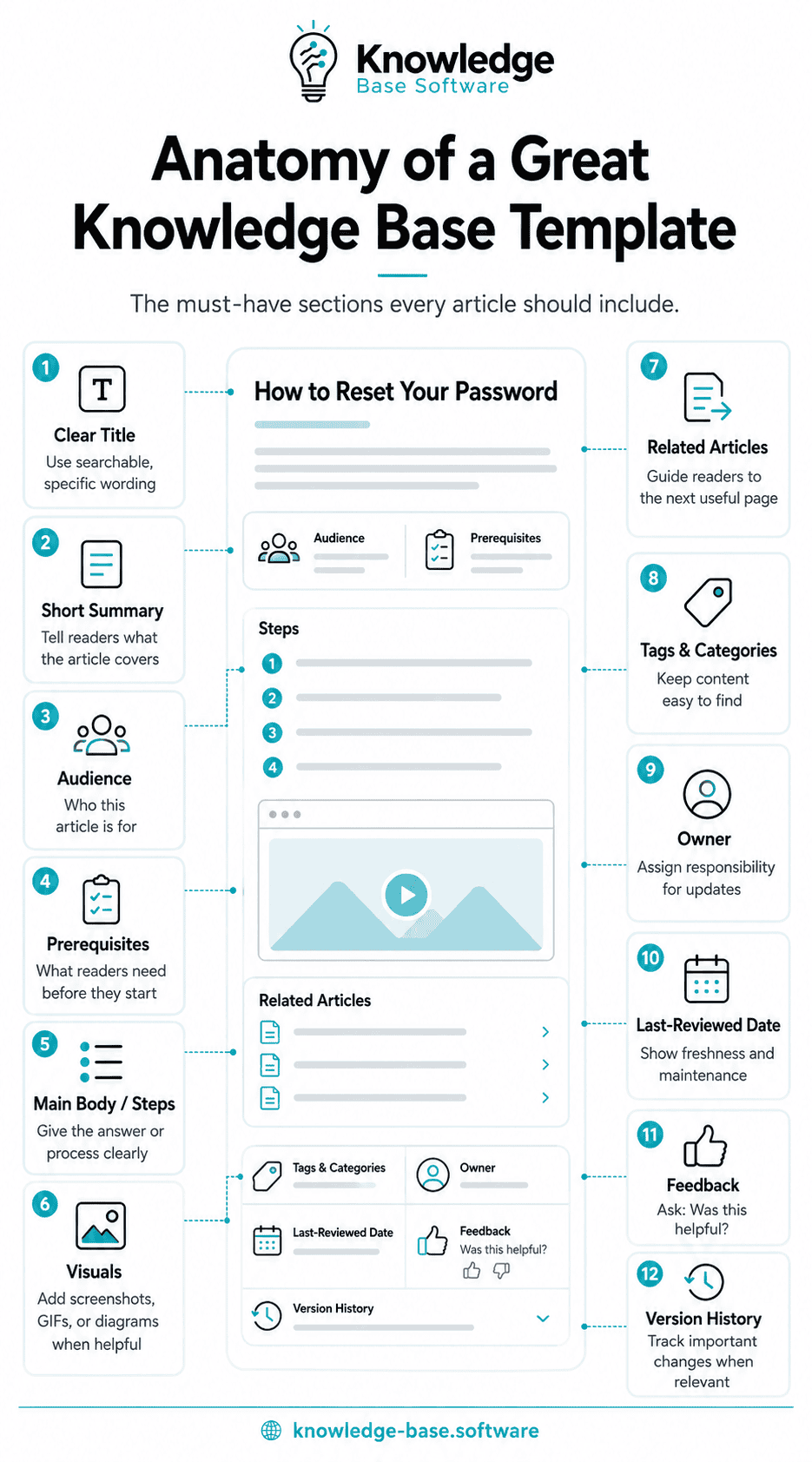
Not every field belongs in every article. The article type and risk determine what is required.
| Field group | Usually required | Add when relevant |
|---|---|---|
| Findability | Searchable title, summary, audience | Plan, role, region, version, release date |
| Core answer | Direct answer, steps, definition, diagnosis, or procedure | Configuration fields, roles, approved communication |
| Validation | Example, verification, acceptance criterion, or recovery check | Migration check, retained evidence |
| Safety | Conditions, limits, or exceptions | Security, privacy, approval, rollback, escalation, stop conditions |
| Maintenance | Owner and last-reviewed date | Effective date, source of truth, version history, expiry |
| Navigation | Closely related articles | Related questions, terms, forms, policies, or troubleshooting |
| Feedback | A way to report an issue | Controlled change request for policies and runbooks |
“If applicable” fields should remain visible in the authoring template but may be removed from the published article when a reviewer confirms they are irrelevant. This preserves the prompt without forcing empty headings onto readers.
Internal vs External Knowledge Base Templates
Audience changes what may be disclosed and what the article must help someone do.
| Knowledge base | Primary audience | Common templates | Additional considerations |
|---|---|---|---|
| Customer-facing | Customers and end users | FAQ, how-to, troubleshooting, getting started, feature docs | Plain language, public-safe details, accessibility, and self-service outcome |
| Internal employee | Employees and departments | SOP, policy, onboarding, IT request, glossary | Permissions, process accuracy, ownership, and compliance controls |
| Agent-facing | Support and success teams | Known error, troubleshooting, escalation, approved response | Internal evidence, decision authority, approved messaging, and handoff |
| Developer documentation | Developers, administrators, and technical users | API setup, integrations, feature docs, release notes | Versioning, authentication, tested examples, limits, and deprecation |
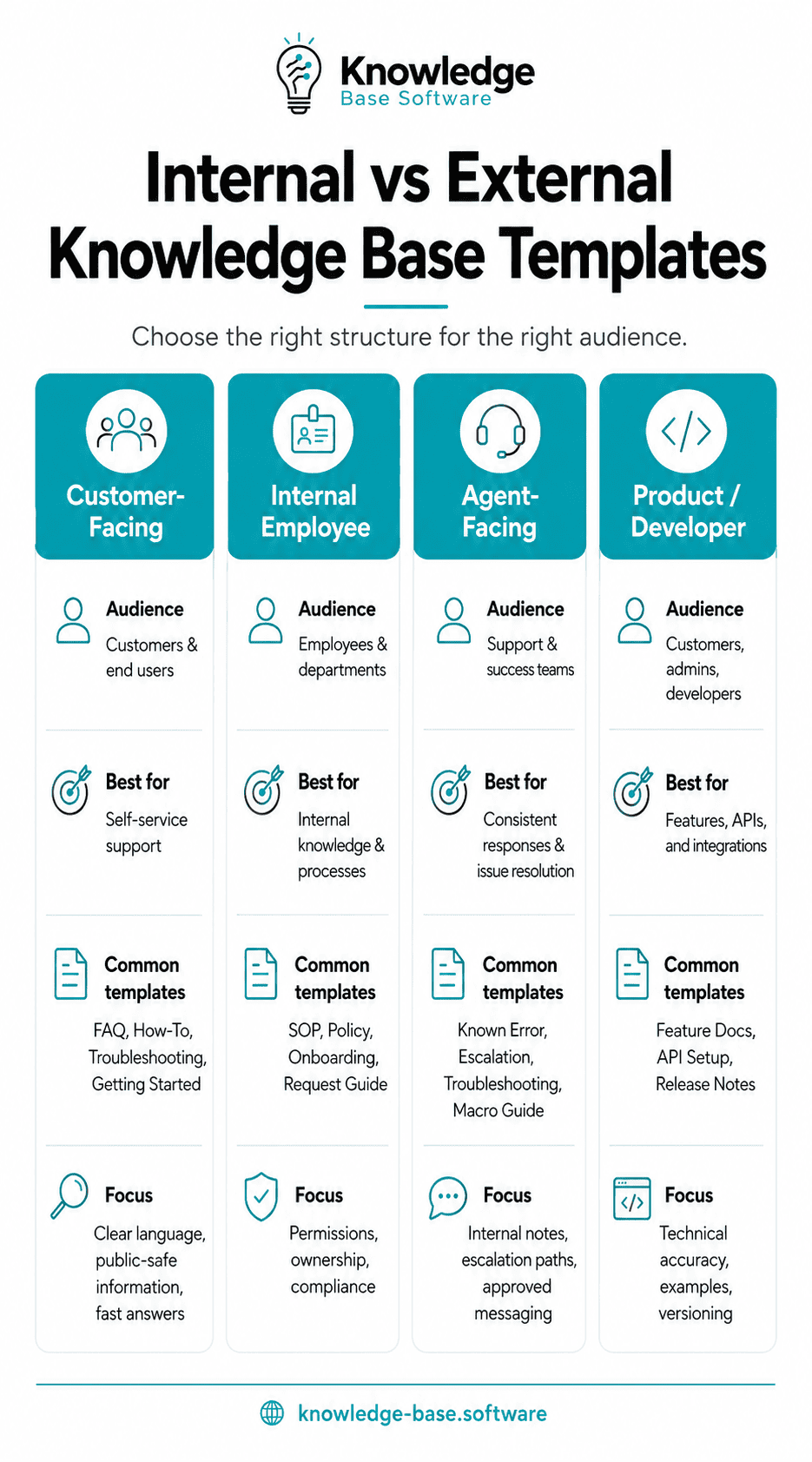
Keep internal escalation contacts, security controls, customer data, private logs, and privileged procedures out of public articles. Likewise, a customer-facing article should not depend on internal language or tools the customer cannot access. An internal knowledge base should use permissions and audience-specific navigation to keep these boundaries clear.
How to Implement Templates in Your Knowledge Base
Start with the article types your team repeatedly creates. A support team may begin with FAQ, how-to, troubleshooting, feature, and known-error templates. An internal knowledge program may prioritize SOP, service request, glossary, getting started, and general articles.
- Audit recurring demand. Review support questions, internal requests, search terms, failed searches, and recent changes. Group them by reader job rather than department. A structured knowledge base content audit can reveal missing and duplicated article types.
- Install a small default set. Add the selected structures directly to the authoring workflow. Keep conditional fields visible to writers, but allow reviewers to remove irrelevant empty sections before publishing. Treat this as one part of the wider knowledge base implementation process.
- Define writing and review rules. Use a knowledge base style guide for titles, tone, steps, terminology, links, and screenshots, and use the detailed guide to writing effective knowledge base articles when a contributor needs help turning the template into finished copy. The Microsoft Writing Style Guide and Google Developer Documentation Style Guide provide useful public references, but product facts and policy decisions still require an internal source of truth.
- Assign responsibility. Give every template an owner and every high-impact article a reviewer. Define events that trigger review, such as a product release, policy change, incident, API version change, or repeated negative feedback. Document those decisions in a knowledge base governance framework.
- Measure and revise. Monitor searches with no useful result, article feedback, failed task reports, escalations, and contributor confusion. These signals identify questions for investigation; they do not prove causation by themselves.
Template Governance and Review Rules
Governance should be proportional to risk. A glossary definition may need a lightweight review after terminology changes. A privileged-access procedure or incident runbook may require formal approval, version history, controlled permissions, and a test exercise.
The Knowledge-Centered Success (KCS®) practice “reuse is review” offers a useful maintenance principle: review valuable knowledge while people are using it and the context for improving it still exists. Scheduled checks can supplement this feedback loop for high-risk or rarely reused content.
KCS® is a service mark of the Consortium for Service Innovation™.
- Owner: The role accountable for accuracy and review.
- Reviewer: A subject-matter expert or control owner who verifies high-impact content.
- Source of truth: The approved specification, policy, system, standard, or decision record used to resolve conflicts.
- Review trigger: A product, process, legal, security, staffing, or data change that may invalidate the article.
- Effective and reviewed dates: The effective date tells readers when a rule applies; the reviewed date shows when accuracy was last checked.
- Version history: Use it where readers must understand material changes.
- Access control: Restrict internal, personal, security-sensitive, or privileged information to the intended audience.
- Retirement rule: Merge, redirect, archive, or remove an article when its task, product, or policy no longer exists. Preserve required records separately from reader documentation.
Calendar reviews can provide a backstop, but a universal quarterly promise may create false confidence. Event-based triggers are more important for rapidly changing product, API, security, and policy documentation.
Knowledge Base Template Publishing Checklist
Use this checklist after drafting and before publication:
- [ ] The article serves one identifiable audience and one primary job.
- [ ] The title uses language that audience is likely to recognize.
- [ ] The answer, outcome, or purpose appears near the beginning.
- [ ] Applicability, availability, scope, or effective date is clear where needed.
- [ ] Prerequisites, permissions, and approvals appear before dependent actions.
- [ ] Ordered actions use numbered steps.
- [ ] The article defines success through an example, verification, acceptance criterion, or recovery check.
- [ ] Relevant exceptions, limitations, risks, privacy, security, and compliance notes are included.
- [ ] A risky or reversible action has a rollback, revocation, or recovery route.
- [ ] Escalation and stop conditions are explicit where delay or unauthorized action could cause harm.
- [ ] Product behavior, policy, terminology, and procedures were checked against an authoritative source.
- [ ] Examples contain no live credentials, personal data, private logs, or confidential details.
- [ ] Links lead to directly useful and current content.
- [ ] Images add information, have appropriate alternative text, and do not carry essential instructions alone.
- [ ] The page is readable on a narrow screen and follows the site’s knowledge base accessibility checks.
- [ ] The owner, last-reviewed date, and feedback route are present.
- [ ] Effective date, version history, evidence retention, and expiry are included when required.
- [ ] An authorized reviewer approved high-risk content.
Frequently Asked Questions
What is a knowledge base template?
A knowledge base template is a reusable structure for a particular documentation job. It prompts a writer for the information that type of article needs, such as a direct answer for an FAQ, verification for a how-to guide, or recovery and escalation for a runbook.
What should every knowledge base template include?
Most templates need a clear title, summary, audience, core answer or action, an owner, a last-reviewed date, related content, and a feedback route. Validation, exceptions, security, approval, source, effective date, version history, rollback, and escalation should be added according to the article’s type and risk.
What is the difference between an FAQ and a how-to template?
An FAQ resolves one question with a short answer and limited detail. A how-to guide leads the reader through ordered actions and confirms completion. If the answer contains several dependent steps, it is probably a how-to guide rather than an FAQ.
Should internal and customer-facing articles use the same template?
They can share basic fields, but they should not be identical. Internal templates may include approval paths, confidential evidence, operational contacts, and access controls. Customer-facing templates should contain only public-safe information and focus on actions the customer can perform.
How often should templates be reviewed?
Review a template when product behavior, policy, risk, audience, or workflow changes. A scheduled review can catch neglected content, but it should not replace event-based review. The appropriate interval depends on impact and rate of change.
Can AI fill in these templates?
AI can help organize supplied information or produce a draft, but a template does not guarantee factual accuracy. A knowledgeable reviewer should verify product behavior, policy, security, privacy, compliance, examples, links, and any action that could affect users or systems.
What is the best troubleshooting article structure?
Start with the exact symptom, list likely causes, perform safe prechecks, order fixes from low-risk to higher-risk, and define how to confirm recovery. Include rollback, security precautions, evidence to collect, and an escalation threshold when relevant.
Does using a template improve search rankings?
A template alone does not establish search performance. It can prompt a more complete and maintainable article, but rankings depend on whether the published page satisfies the searcher’s need and on many other content, site, and search-system factors. The structural test reported here did not measure rankings.
Sources and Further Reading
- Google guidance for helpful, reliable, people-first content
- Google Developer Documentation Style Guide
- Microsoft Writing Style Guide
- Microsoft guidance for step-by-step instructions
- KCS article structure and content standard
- KCS: Reuse is Review
- NIST SP 800-61 Rev. 3: Incident Response Recommendations and Considerations
- NIST SP 800-63B: Authentication and Authenticator Management
- W3C guidance for descriptive headings and labels
- W3C Web Content Accessibility Guidelines 2.2 Quick Reference