Independent knowledge base software guide Evidence-led Updated 2026


Knowledge base information architecture: task paths and governance
Knowledge base information architecture is the system that decides what content exists, how it is labeled, where it appears, how pages connect, what metadata supports retrieval, and who maintains the structure. Categories are one visible part. A complete architecture also includes article types, task paths, search vocabulary, permissions, internal links, templates, ownership, and change rules.
Last tested: July 31, 2026.
Scope: This guide focuses on reader tasks, content models, navigation, search, and governance. The original evidence is a controlled local synthetic task-path comparison, not a usability study of this site.
What information architecture controls
| Layer | Decision | Example |
|---|---|---|
| Content model | Which article types and fields exist | Troubleshooting article with symptoms, environment, steps, result, and escalation |
| Taxonomy | How content is grouped and labeled | Billing, account access, integrations, admin and security |
| Navigation | Which paths readers can follow | Homepage, task hub, breadcrumb, related step, next step |
| Metadata | Which attributes support filters, search, permissions, and automation | Product, role, plan, platform, locale, version, owner, review state |
| Retrieval | How search interprets vocabulary and ranks answers | Synonyms, titles, structured fields, permissions, zero-result handling |
| Governance | Who can create or change the structure | Owner, inclusion rule, review trigger, merge and retirement process |
These layers must agree. A menu can look tidy while the search index uses inconsistent labels, the sitemap contains retired URLs, and articles lack owners. Conversely, a shallow hierarchy is not automatically usable if every top-level category is vague.
How we tested
We authored a controlled local fixture with 12 fictional support tasks. Each task had a department-led baseline path and a task-led revised path. The script counted navigation transitions, checked whether a task was reachable in three clicks or fewer, and recorded whether the visible labels matched the reader’s task language.
| Measure | Department-led baseline | Task-led revision |
|---|---|---|
| Tasks within three clicks | 4 of 12 | 12 of 12 |
| Labels matched task wording | 4 of 12 | 12 of 12 |
| Median path length | 4.5 clicks | 2.5 clicks |
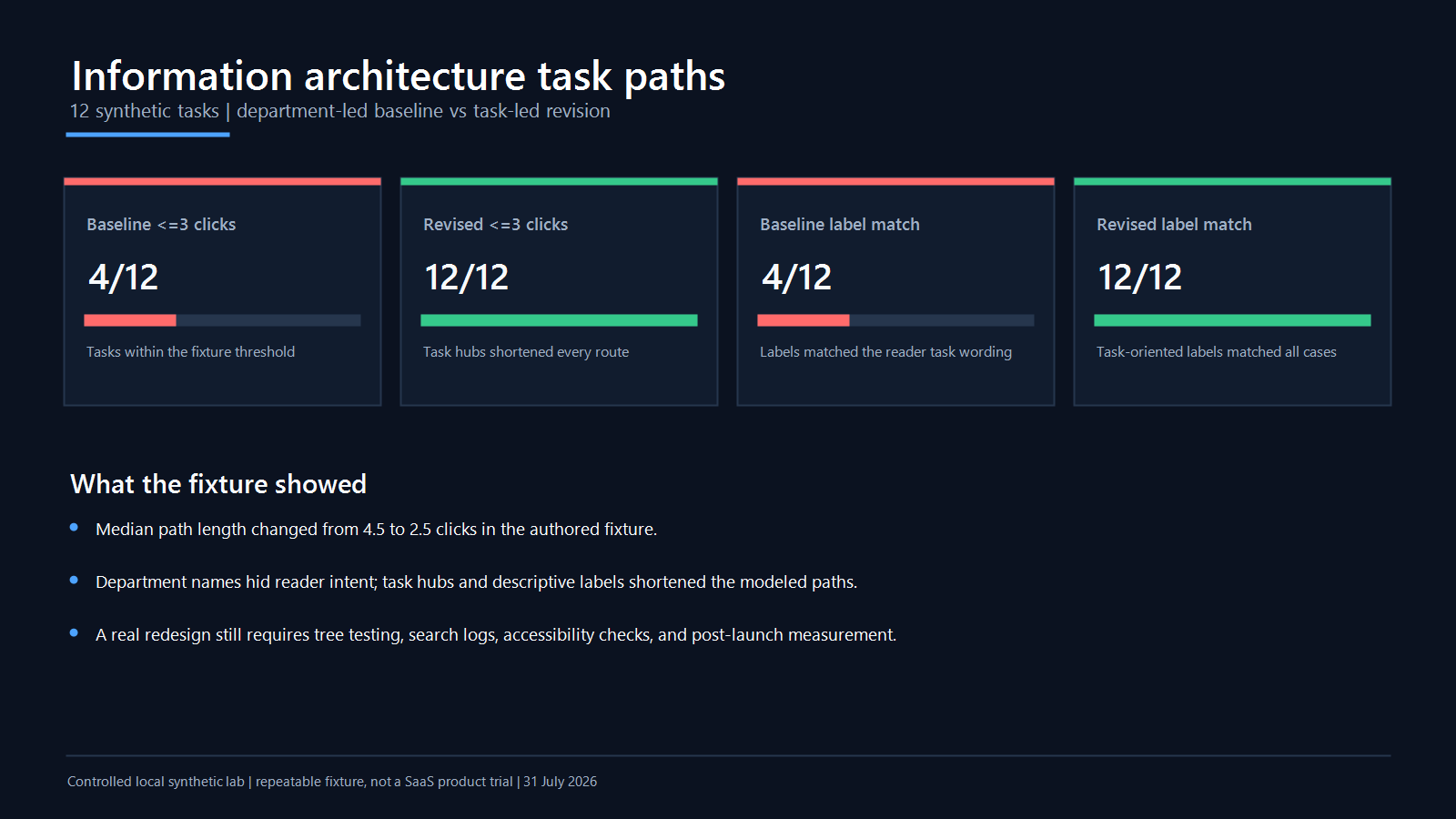
The revision performed better because it was deliberately designed around the tasks. The useful result is not “task-based always wins.” It is that a path worksheet makes label and depth assumptions explicit enough to test.
Limitations
The fixture did not involve tree-test participants, production navigation, search logs, accessibility testing, or this website. Both path sets were authored by the test designer, so the comparison is directional rather than causal. Real readers may choose another route, use search, misunderstand a label, lack permission, or abandon the task. Validate a proposed architecture with representative users and post-launch evidence.
Start with tasks and audiences
List the tasks the knowledge base must support before drawing categories. Use evidence from search queries, support topics, onboarding steps, product analytics, field observations, stakeholder interviews, policies, and release plans. Write each task in the reader’s language: “download an invoice,” not “accounts receivable operations.”
For every task, record:
- audience, role, locale, product, plan, device, and permission context;
- trigger, desired result, prerequisite, and escalation path;
- risk if the reader follows a wrong or outdated answer;
- words readers use and words the organization uses;
- the authoritative source and content owner;
- candidate paths through browse, search, contextual help, and direct links.
Separate public customer help, private employee procedures, partner content, and agent-only guidance when permissions or intent differ. Do not create duplicate copies merely to obtain separate menus; use metadata, conditional content, or distinct approved variants where the platform supports them safely.
Create a content and relationship inventory
Inventory the current article ID, canonical URL, title, audience, locale, article type, primary category, metadata, owner, source, visibility, product version, review state, inbound links, outbound links, and redirect status. Add relationship fields rather than inferring every connection from body links: parent hub, prerequisite, next task, alternative path, escalation, supersedes, localized variant, and duplicate candidate.
Model a representative set on cards before changing the full system. Each card should show the task, intended reader, article type, risk, primary label, useful facets, and relationships. Card sorting can reveal how participants group the cards; it does not automatically define the production taxonomy. Reconcile participant patterns with permissions, product boundaries, governance, and search behavior.
Flag orphans, pages with several competing parents, duplicate destinations, circular next steps, restricted pages linked from public content, and articles whose locale or version is unclear. Those are architecture defects even when every page returns HTTP 200.
Design the content model before the category tree
An article type defines the job a page performs. A compact model might include:
- How-to: a goal, prerequisites, ordered steps, expected result, and next action.
- Troubleshooting: symptom, environment, checks, resolution branches, and escalation evidence.
- Reference: definitions, limits, fields, parameters, and version scope.
- Policy: rule, audience, effective date, owner, exceptions, and authoritative approval.
- Concept: explanation, boundaries, examples, and related tasks.
- Hub: an intentional route into a task family, not a list of every page.
Use templates to enforce required fields while leaving room for the task. The knowledge base style guide can standardize titles, terminology, steps, warnings, and evidence without forcing every article into the same shape.
Create a taxonomy with inclusion rules
A taxonomy needs more than category names. For each category, write its audience, included tasks, exclusions, owner, examples, and split or merge trigger. This prevents categories such as “Resources,” “General,” or “Other” from absorbing unrelated content.
Use task or product language when it matches the reader’s mental model. Department labels can work for an internal audience that genuinely navigates by department, but test that assumption. Keep hierarchy as shallow as the task evidence supports; do not chase a universal maximum depth. A clear four-step route can outperform an ambiguous two-step route.
Create a controlled vocabulary for synonyms and related concepts. Distinguish hierarchical categories from faceted metadata: an article normally has one primary browse home but may have several products, roles, platforms, versions, or locales.
Write and test task-led labels
Draft labels from the words readers use, then define what each label includes and excludes. Avoid mixing organizing principles at the same level—for example, “Billing,” “Administrators,” “Tutorials,” and “Europe” combine topic, audience, format, and region. Choose a primary dimension for browsing and use metadata or separate entry points for the others.
Test labels without explanatory copy first. Give participants a task and ask where they would go; record the first choice, final destination, backtracks, confidence, and the labels they expected. A label that works only after a facilitator explains it is not ready.
Build multiple findability paths
Readers enter from the homepage, a search result, a product screen, a chatbot citation, an internal link, or an external search engine. Design every article as a possible entry page and supply orientation: scope, prerequisites, breadcrumb, related concepts, previous and next actions, and escalation.
W3C’s guidance for WCAG 2.2 Success Criterion 2.4.5 explains the value of providing more than one way to locate pages, such as navigation and search. Its consistent identification guidance also supports predictable labels for repeated functions.
Use concise, descriptive anchors instead of “click here.” Google’s current sitelinks guidance recommends a logical site structure and concise, relevant internal-link anchors. Link when the relationship helps the reader; a dense block of keyword links is not an architecture.
Connect metadata to search and AI retrieval
Metadata should power a defined behavior. Product and version can filter search; role and visibility can enforce retrieval permissions; article type can influence result presentation; owner and review state can drive governance. Do not create hundreds of tags that no interface, workflow, or report uses.
Test exact titles, synonyms, error messages, broad questions, and ambiguous queries. Record zero results, irrelevant top results, restricted-content leakage, duplicate answers, and stale citations. The knowledge base search experience guide covers query-set testing, while the metadata for AI search guide covers retrieval fields and chunking.
Test the proposed architecture
- Create a representative task set, including rare high-risk tasks.
- Run open card sorting to discover candidate groupings.
- Run a closed tree test against the proposed labels and hierarchy.
- Test search with the same tasks and vocabulary.
- Test direct-entry orientation and related links.
- Test mobile, keyboard, screen-reader, zoom, and locale variants.
- Test permissions before search results and AI answers are rendered.
- Record success, first path, backtracks, time, confidence, and comments.
Do not optimize only for average clicks. Review failures by audience and task. A security administrator and a first-time customer may need different routes to a similarly named topic.
Define scoring before the tree test. A strict success can require reaching the correct destination without backtracking; a directness score can compare the chosen route with the shortest intended route. Report the number of participants and tasks, confidence intervals where appropriate, and failures by task. Do not present an authored click count as a user success rate.
Use the same task set for navigation and search. If navigation succeeds while search fails, investigate titles, synonyms, metadata, indexing, and ranking. If search succeeds but browse fails, the taxonomy or labels need work. If both fail only for a role, locale, plan, or product version, check content coverage and permission filtering before reorganizing the whole site.
Govern architecture as content changes
| Change | Required architecture review |
|---|---|
| New product or audience | Tasks, article types, permissions, category inclusion, search vocabulary, and owners |
| Category split or merge | Navigation, hubs, breadcrumbs, internal links, URLs, redirects, and analytics continuity |
| Article merge or retirement | Destination intent, redirects, canonical, sitemap, locale variants, and inbound links |
| New AI or search feature | Metadata, chunking, permission filtering, citations, fallback, and evaluation set |
| Localization | Locale URLs, translation relationships, language selector, direction, and alternate annotations |
Assign an architecture owner and category owners. Require a brief for a new top-level category: reader need, evidence, inclusion rule, alternatives considered, migration impact, and success test. Run a periodic knowledge base content audit to find orphan pages, collisions, stale hubs, weak anchors, and unowned metadata.
Roll out without breaking findability
- Freeze the target inventory and map old URLs to destinations.
- Build the new taxonomy and hubs in a staging environment.
- Test representative tasks and permissions.
- Preserve valuable URLs where possible; otherwise use direct redirects.
- Update breadcrumbs, internal links, canonicals, sitemaps, locale mappings, and contextual help.
- Launch in a measured cohort or section when risk warrants it.
- Monitor failed searches, backtracks, abandoned routes, task-success signals, errors, and support feedback.
- Keep a rollback map for high-impact navigation changes.
Validate the migration with two crawls: one before launch to freeze the source inventory and one after launch to compare destinations. Every retired URL should have an explicit outcome; every redirect should land directly on a relevant canonical 200 page; and the sitemap should contain only intended canonical URLs. Recheck important external landing pages and high-use in-product links manually.
Preserve locale and version constraints during the move. An English successor is not automatically the right target for a retired Arabic page, and a current procedure may not replace documentation retained for a supported older release. Record exceptions and test them as separate task paths.
Frequently asked questions
What is the difference between taxonomy and information architecture?
Taxonomy defines controlled groupings and labels. Information architecture includes taxonomy plus content types, metadata, navigation, search, relationships, permissions, and governance.
How many top-level categories should a knowledge base have?
There is no universal number. Use the smallest set that represents important reader tasks without forcing unrelated content together, then validate it with representative users.
Is three clicks a required rule?
No. This guide used three clicks as a synthetic fixture threshold. Clarity, confidence, accessibility, and successful completion matter more than an arbitrary universal limit.
Should navigation mirror the company organization chart?
Only when readers actually think and navigate that way. Customer help usually benefits from product, journey, problem, or task labels. Test the labels rather than assuming either model.