Independent knowledge base software guide Evidence-led Updated 2026

Developer Portals and API Knowledge Bases: A Practical Guide
Developer portals and API knowledge bases should help a developer move from choosing an API to completing an integration—and recover when something goes wrong. The portal provides the entry point and, where needed, access-management workflows. The API reference describes operations and data structures. The knowledge base supplies the practical guidance that connects those details to a working application.
These functions can live on one website. The important decision is not how many documentation products to buy, but which developer tasks your current experience leaves unfinished. Start with one integration, connect its instructions, and validate the complete journey before expanding the portal.
Decide what kind of developer experience you need
An API-consumer portal helps people discover and use APIs. Microsoft’s Azure API Management overview, for example, describes a portal where consumers can discover APIs, learn how to use them, request access, and try operations.
That audience can be public developers, business partners, or employees. An internal audience does not automatically mean you need a platform-engineering portal. The question is whether people are consuming APIs or managing the organization’s software environment.
An internal developer portal may instead connect service ownership, software catalogs, engineering workflows, and technical documentation. Backstage TechDocs illustrates this model: engineers maintain Markdown alongside code and discover documentation through the associated service in the Backstage catalog.
In this guide, API knowledge base means the human-oriented material supporting API use: quickstarts, integration guides, troubleshooting, operational explanations, and migration instructions. It does not mean an API for administering a help-center product or a vector database used by an AI assistant.
A documentation site may be sufficient when developers mainly need to learn and integrate. A fuller portal becomes relevant when they also need application registration, approval requests, subscriptions, credentials, or usage information. Verify those requirements individually; publishing an API reference does not automatically provide them.
Map documentation to the integration, not the organization chart
Choose a concrete outcome, such as retrieving available catalog items or receiving a delivery-status event. Then identify the information a developer needs before, during, and after that task. This keeps the navigation from becoming a collection of internal department names.
The Government Digital Service’s API documentation guidance recommends going beyond generated reference material: explain the API’s purpose, provide a simple request-and-response path, support common tasks, and explain changes and support options.
Put prerequisites before the first request
A quickstart should tell developers which environment to use, what account or approval they need, how to obtain appropriate test credentials, and what successful output looks like. Explain a dependency before the developer encounters it, not in an unrelated authentication page discovered after the request fails.
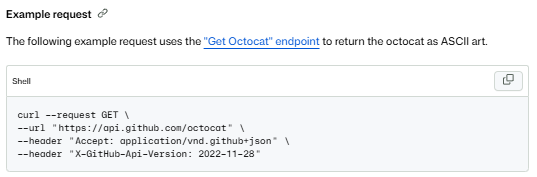
For a real example of this connection, GitHub’s REST API getting-started guide covers request components, authentication, making a request, and using the response, with links into endpoint documentation. The useful pattern is the connected path—not copying GitHub’s headers or authentication instructions into an unrelated API.
Give reference pages and task guides different responsibilities
The reference should make the contract explicit: methods, paths, parameters, security requirements, response schemas, and documented errors. A task guide should explain which operations belong together and why. A troubleshooting article should identify a symptom, safe checks, corrective action, and the point at which support is needed.
This separation follows the useful distinction in Diátaxis between learning-oriented tutorials, task-oriented how-to guides, reference, and explanation. You do not have to use those names in the navigation; use the distinction to avoid making every page do every job.
Recovery guidance must follow the particular API. Stripe’s idempotency documentation, for example, explains its own handling of repeat requests and distinguishes behavior between API versions. Do not reduce a provider’s retry policy to a generic instruction to keep resending a failed write.
Worked example: connect a catalog quickstart to the answers developers need
The following Lantern Catalog example is fictional. Its endpoint, permissions, responses, and documentation titles are design examples, not a live API or results from executed requests.
Assume approved partner developers need to read a demonstration product catalog. The sandbox contains two items. A sandbox administrator issues a test token with the catalog:read permission, and the read-only operation is GET /v1/items. Its optional limit parameter accepts integers from 1 to 50.
Connect the pages around one outcome
| Documentation entry | What it establishes | Where it sends the developer next |
|---|---|---|
| Catalog API overview | The API exposes catalog items for approved partners; the sandbox contains demonstration data. | Get sandbox access, then Read your first catalog items. |
| Get sandbox access | How an approved developer requests a sandbox token with catalog:read. | The first-request guide after the token is available. |
| Read your first catalog items | A complete request, expected output, and an explanation of the result. | The operation reference and permission-error guide. |
| GET /v1/items reference | The required permission, limit constraints, response fields, and documented errors. | Pagination guidance and relevant troubleshooting. |
| Resolve insufficient_scope | How to recognize a valid token that lacks the required permission. | The approved access-request process and a safe retry. |
These are proposed page titles, not links to existing resources. On a real portal, connect them directly. A developer arriving from a search result on the operation reference should be able to find the setup instructions without returning to the home page.
Show both the request and the expected result
A concise quickstart could show this request shape. The .example address is illustrative and is not a working sandbox; CATALOG_TOKEN represents the environment variable holding the imagined test credential.
curl --request GET \
  --url 'https://sandbox.lantern.example/v1/items?limit=2' \
  --header "Authorization: Bearer ${CATALOG_TOKEN}" \
  --header 'Accept: application/json'
For the example’s two-item fixture, define the successful outcome as HTTP 200 with this constructed JSON body:
{
  "items": [
    {"id": "item_101", "name": "Desk lamp"},
    {"id": "item_102", "name": "Notebook"}
  ],
  "next_cursor": null
}
Explain what the developer should verify: the two expected item IDs are present, and next_cursor is null because this fixture has no remaining results. In the proposed contract, a non-null cursor would be supplied as the next request’s cursor parameter. The reference and a pagination guide would document that continuation behavior.
A production quickstart should state its fixture assumptions. Otherwise, a changing dataset can make a healthy response look wrong simply because the displayed sample contains different records.
Complete the example with a recoverable failure
Suppose the fictional API defines 403 with error code insufficient_scope when an otherwise valid sandbox token lacks catalog:read. The troubleshooting article should tell the developer to confirm the token’s permission through the approved credential-management process, request the missing permission, and repeat the same read-only request after receiving an appropriate token.
It should not suggest bypassing authorization or sharing another person’s token. It should also distinguish this case from the fictional API’s 401 response for a missing or invalid token. These are explicit choices in this example’s contract, not a claim that every provider diagnoses errors identically.
The integration path is now complete enough to evaluate: access instructions lead to a request, the reference explains its fields, and the error article gives a legitimate recovery route.
Use OpenAPI without assuming every tool supports the same features
OpenAPI is a machine-readable interface description for HTTP APIs. It can describe operations, parameters, schemas, examples, and security requirements. It does not implement the API or prove that a deployed service behaves as described.
Choose an authoritative change workflow. In a specification-first process, the approved description guides implementation. In a code-first process, an implementation produces the description. Either way, reviewers still need to resolve mismatches among the specification, running service, and handwritten instructions.
“Supports OpenAPI” is only the beginning of a compatibility check. ReadMe’s compatibility chart documents support and limitations field by field for its API Explorer. Check the features your actual description uses rather than assuming a supported version means every rendering or interaction works identically.
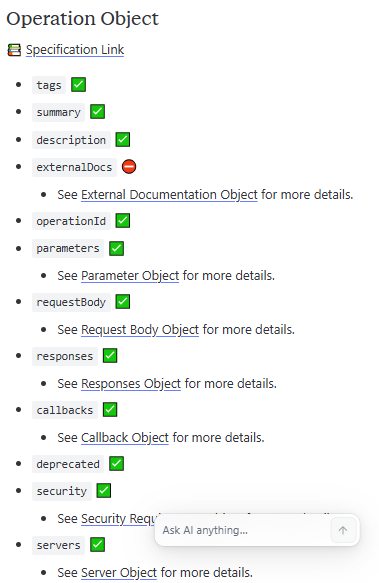
Evaluate importing, reference rendering, validation, SDK generation, and interactive requests separately. Use a representative description containing the elements you rely on: reusable references, required fields, examples, security schemes, and different response cases. Compare the resulting documentation with the source and record anything omitted or transformed.
Also check where supplemental writing is stored. ReadMe’s OpenAPI guide explains that additional Markdown can remain attached to an imported operation through resynchronization, but removing or changing the associated operationId can remove that content. Stable identifiers therefore matter to the documentation workflow, not just generated code.
Separate portal access, API authorization, and test environments
Define separate permissions for reading documentation, downloading private specifications, registering an application, obtaining credentials, and calling API operations. An account allowed to read a partner guide should not automatically receive every runtime privilege.
Microsoft explicitly distinguishes developer-portal sign-in from OAuth configuration for API testing. Its documentation also states that the test console sends requests through API Management to backend APIs. A button labeled Try it is not evidence that the request is simulated.
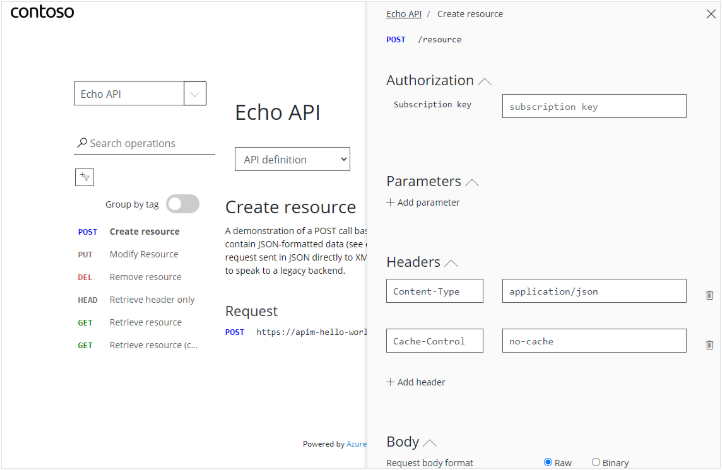
Label what an interactive console will call
Show whether a console targets a mock, sandbox, or production endpoint. Identify requests that change data, send messages, or incur charges. For onboarding, prefer a documented, harmless request using a low-privilege test identity and non-sensitive data.
Token acquisition and token validation are separate responsibilities. Microsoft’s OAuth test-console guide explains that the console can obtain and pass a token, while validation must be configured separately in API Management or the backend.
Do not publish client secrets in browser code or place API credentials in URLs. OWASP’s REST security guidance requires HTTPS for secure services, endpoint-level access controls, and care to prevent credentials from leaking through URLs and logs. Redact credentials and customer data from support examples and screenshots.
Test the resources behind the page
For private documentation, check the specification download, attachments, preview deployment, search results, and any AI answer interface—not only the landing page. Test direct links as both an allowed reader and a denied reader. Then test API access separately with an approved consumer identity.
If requests work in a terminal but fail in the browser, investigate the console’s origin and CORS configuration as well as authentication. OWASP treats CORS as browser cross-origin behavior, separate from API access control. Do not make every origin trusted or disable TLS checks simply to make the demonstration work.
Keep API, documentation, and SDK versions aligned
A version selector needs a clear meaning. The OpenAPI specification version identifies the description format; the API version identifies the service contract selected by the caller; the documentation version identifies the instructions being read; and an SDK version identifies a client-library release. Do not assume their numbers or release dates match.
Even within an OpenAPI document, the openapi field and info.version describe different things. The specification defines that distinction; neither field alone establishes how a client selects the running API’s version.
GitHub provides a concrete runtime example: its REST API uses the X-GitHub-Api-Version request header. The versioning guide describes selecting a version and checking breaking changes before upgrading. Reading a different documentation page does not itself change the header an application sends.
Verify which content your publishing system versions. In ReadMe, Guides, Recipes, and Reference are versioned, while the Landing Page, Discussions, and Changelog persist across versions. A version switch therefore does not imply that every visible resource has switched with it.
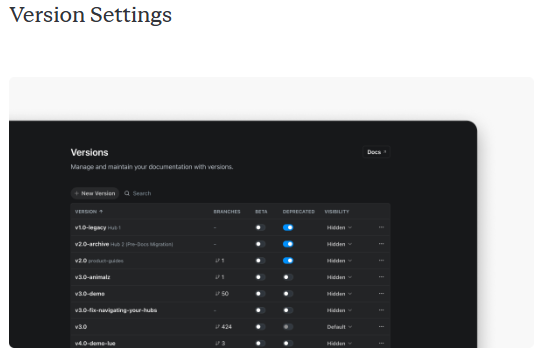
For a breaking change, publish more than a release announcement. Explain which integrations are affected, the old and new behavior, required client changes, and how to verify the migration. Keep deprecation and removal distinct, and state dates only when the API owner has approved them.
Choose an implementation approach before comparing brands
Shortlist implementations around the capabilities you need to operate, not a universal ranking. The following approaches solve different combinations of publishing, access, and developer self-service.
| Approach | When to investigate it | What to validate |
|---|---|---|
| Hosted documentation platform | Guides, reference material, and an editorial workflow are the main requirements. | Specification compatibility, version behavior, private access, authoring workflow, and export. |
| API-management-integrated portal | Developers need discovery plus application registration, approvals, credentials, or subscriptions. | Identity integration, runtime access boundaries, deployment options, and qualifying service tiers. |
| Docs-as-code publishing | The team wants repository-based review and can maintain the publishing infrastructure. | Builds, reference rendering, hosting, search, authentication, previews, and operational ownership. |
| Internal engineering portal | Documentation needs to be connected to service ownership and an internal software catalog. | The catalog relationship, content permissions, build workflow, and fit with engineering operations. |
For hosted reference publishing, ReadMe’s documented OpenAPI workflow is one example to investigate. For API-consumer self-service, Kong Konnect Dev Portal documents API discovery, specification-based documentation, application registration, and credential workflows for different audiences. These are candidates for different requirements, not equivalent products with an interchangeable feature checklist.
For repository-based publishing, Docusaurus builds static files and leaves hosting to the operator. Add the reference renderer and access arrangements the project requires; do not assume a successful static build includes key provisioning or private-reader authentication.
For an internal catalog-centered experience, TechDocs connects Markdown documentation to Backstage components. That can be useful for employees finding a service’s engineering information, but it is not automatically the right replacement for a partner API onboarding portal.
Price the required configuration and check the exit path
Ask each shortlisted vendor to identify the plan covering your author count, authenticated readers, private references, identity integration, versions, custom domains, and any AI usage. Separate the portal’s incremental cost from an existing API-management subscription. Do not compare a public documentation plan with a private enterprise configuration as though their prices cover the same requirements.
Before committing, inspect what can leave the system: specifications, authored guides, images, reusable components, navigation, redirects, and access settings. Exporting an OpenAPI file preserves that description, not necessarily the surrounding knowledge base. Test a representative export instead of assuming a download button guarantees a complete migration.
Make documentation changes part of the API release
Assign an owner for contract accuracy and an owner for the integration guidance. Define where developers report a mismatch and who decides whether the service, specification, or instructions need correction. A Git connection alone does not answer those questions or establish a synchronization policy.
A practical release workflow can use four checks:
- Identify the affected journey. Record changes to operations, permissions, response fields, SDK examples, troubleshooting, and migration instructions.
- Validate the source and preview. Check the API description, generate a preview, and inspect affected links and examples in the intended documentation version.
- Check behavior where authorized. Run appropriate contract or sandbox checks separately from static documentation validation. Record the environment and evidence.
- Review and release together. Have the responsible reviewers approve the contract and explanatory changes, then publish them in coordination with the supported API release.
Redocly CLI linting is an example of a tool that checks descriptions against rules and reports problems. That is useful evidence about the description, not proof that production authorization or business behavior matches it. A rendered preview or mock response has a similarly bounded purpose.
Include renamed operations in review. A change that preserves an endpoint’s behavior may still affect generated navigation or supplemental content associated with its identifier. Check the publishing tool’s documented behavior before treating a source-file change as harmless.
Use recurring support questions, failed searches, broken examples, and obsolete references to prioritize maintenance. A page’s updated timestamp should not be the only evidence that someone checked its instructions against the current API.
Validate one complete developer journey before launch
Use a representative API and a participant who did not write its documentation. Give the participant an approved test environment and a realistic task, then observe where the documentation succeeds or requires intervention. This is a proposed validation method, not a test performed for this guide.
- Find the right API and version. Start from the portal or a search result. Confirm that the audience, supported task, environment, and relevant version are understandable.
- Obtain appropriate test access. Follow the documented credential or approval process without borrowing an administrator’s credentials.
- Complete and interpret the first request. Use a harmless operation and verify the documented success condition, not merely the absence of an error message.
- Recover from a controlled failure. Use an approved non-sensitive case, find the relevant troubleshooting article, and check whether its instructions resolve the documented cause.
- Locate change guidance. Find the applicable release note and migration instructions, and check that they lead to the correct reference and examples.
Record obstacles precisely: an unavailable permission request, an example pointing to the wrong environment, a missing response-field explanation, or a guide that silently switches versions. Those observations are more actionable than a general judgment that the portal feels confusing.
If you measure time to a first successful call, define the starting event, success condition, participant group, and treatment of approval delays or abandoned attempts. Report observed results rather than an unsupported industry target. Page views and documentation searches can help locate problems, but they do not establish that an integration succeeded.
Apply the same journey to an optional AI search assistant: can it identify the correct version, preserve prerequisites, cite accessible evidence, and acknowledge an unsupported question? Keep those checks separate from permission to execute API operations. An answer interface should not quietly become a live-action tool without its own controls.
Launch when the essential path works and its owners know how to maintain it. Expand to more APIs and use cases from that foundation. A developer portal earns its value when the reference and knowledge base help someone finish the next step—not simply when every endpoint has a page.
Official documentation and referenced technical guidance checked on November 1, 2026. The Lantern Catalog example is fictional; no authenticated API calls or live integration tests were performed.