Independent knowledge base software guide Evidence-led Updated 2026


Knowledge Base Training: Build a Role-Based Program That Works
Knowledge base training teaches people how to find, evaluate, use, create, review, publish, and improve organizational knowledge. A useful program goes beyond showing employees where the Search and Publish buttons are. It teaches them how to make sound decisions about content quality, authoritative sources, visibility, permissions, workflow, and risk.
This article focuses primarily on training people who use or operate a knowledge base. That includes readers, support agents, contributors, authors, reviewers, publishers, content owners, administrators, coaches, and leaders. It is different from training a machine-learning or question-answering model, which is a separate technical use of the phrase.
Information reviewed on November 15, 2026.
Knowledge base training at a glance
| Training audience | Primary objective | Evidence of competence | Typical permission level |
|---|---|---|---|
| Readers and end users | Find, evaluate, and apply the correct knowledge | Locates the applicable article, checks context, and reports a gap correctly | Read and provide feedback |
| Support agents and knowledge workers | Reuse and improve knowledge during real work | Searches before answering, links the correct article, and identifies missing or outdated content | Read, suggest, flag, or create drafts |
| Contributors and authors | Create clear, reusable, findable content | Produces a source-supported draft that follows the required template and metadata rules | Create and edit drafts |
| Reviewers and subject matter experts | Verify accuracy, completeness, audience, and risk | Finds material errors, gives actionable feedback, and records an approval decision | Review or approve defined content |
| Publishers and owners | Control release, lifecycle, and accountability | Publishes to the correct audience, sets ownership and review controls, and handles retirement | Publish, archive, and manage lifecycle |
| Administrators and coaches | Maintain workflows, permissions, adoption, and proficiency | Configures appropriate access, observes real work, and responds to quality or behavior gaps | Administration or coaching privileges |
Small teams may combine several of these responsibilities. The important point is not to create the largest possible role structure. It is to ensure that each person is trained for the decisions and risks attached to the permissions they receive.
What knowledge base training should accomplish
A successful program changes behavior inside the workflow. After training, people should be more capable of retrieving the correct answer, recognizing when content cannot be trusted, improving an existing article instead of creating a duplicate, and escalating decisions that exceed their authority.
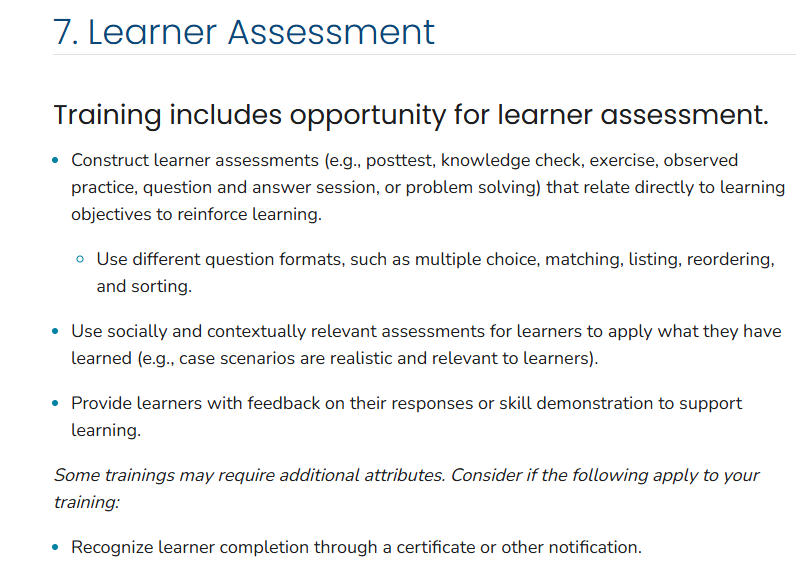
The goal should not be course completion alone. The CDC’s training development guidance defines the purpose of training in terms of improving competence, capacity, and performance. Its quality standards also recommend aligning assessments with learning objectives and using exercises, observed practice, problem solving, or other performance evidence where appropriate.
For a knowledge base program, this means training should produce observable capabilities such as:
- Finding the correct approved article for a realistic question.
- Recognizing when an article does not apply to the user, product, version, region, or situation.
- Deciding whether to reuse, improve, merge, create, restrict, or retire content.
- Writing a draft that follows the organization’s article template and content standard.
- Verifying claims against an authoritative source.
- Selecting the correct audience, visibility, metadata, and workflow.
- Protecting personal, confidential, security-sensitive, or restricted information.
- Providing review feedback that another person can act on.
- Escalating high-risk, uncertain, or unsupported content appropriately.
Define the operating model before building the course
Training cannot fix an undefined knowledge process. Before creating lessons, the organization should decide how content is owned, reviewed, approved, published, corrected, and retired.
At minimum, document the answers to these questions:
- Who is the knowledge base for?
- Is the content public, internal, partner-facing, agent-facing, restricted, or mixed?
- Which content types are in scope?
- Which systems or people are authoritative for each topic?
- Who can suggest, draft, edit, review, approve, publish, archive, and administer?
- Which content requires specialist review?
- What is the workflow for reporting a missing, incorrect, or outdated article?
- Which templates, metadata fields, and style rules are required?
- How are ownership and future review dates assigned?
- What harm could result from an incorrect or improperly visible article?
These decisions become the foundation of the curriculum. Training employees on a workflow that managers have not agreed on will create inconsistent behavior, even when the course itself is well designed.
Zendesk’s guidance on developing knowledge base content recommends identifying an owner, creating a process for flagging content needs, assigning writing responsibility, defining article standards, and requiring technical review before publication. Those operating decisions should exist before authors and reviewers are assessed against them.
Build different training paths for different roles
Giving every employee the same course produces unnecessary content for some roles and insufficient preparation for others. An end user does not need the same training as an external publisher, and a subject matter expert does not automatically know how to write or coach effectively.
APQC’s knowledge management training collection separates training needs among learners, contributors, knowledge leaders, and organizational leaders. A knowledge base program can apply the same principle more specifically to its own workflows and permissions.
Reader and end-user training
Reader training should help employees find the correct knowledge and recognize when it does not apply. It is especially important when an internal knowledge base contains several product versions, regional policies, customer-specific procedures, or restricted instructions.
Teach readers how to:
- Search using symptoms, tasks, questions, error messages, and customer terminology.
- Use filters, categories, products, versions, and audience labels.
- Check prerequisites, warnings, dates, ownership, and applicability.
- Distinguish internal guidance from customer-facing content.
- Recognize when an article is incomplete or contradictory.
- Report a missing answer or unclear step through the correct channel.
- Avoid copying restricted material into unauthorized tools or conversations.
- Escalate when an answer is uncertain or the potential harm is high.
Self-service adoption should not be assumed simply because access exists. A short search exercise using real employee questions is often more useful than a general tour of the portal.
Support agent and knowledge-worker training
Support agents and service employees should learn to use knowledge as part of problem solving rather than as a separate documentation task. Their training should reinforce searching before answering, linking the article used, improving content when it fails, and identifying reusable knowledge in resolved work.
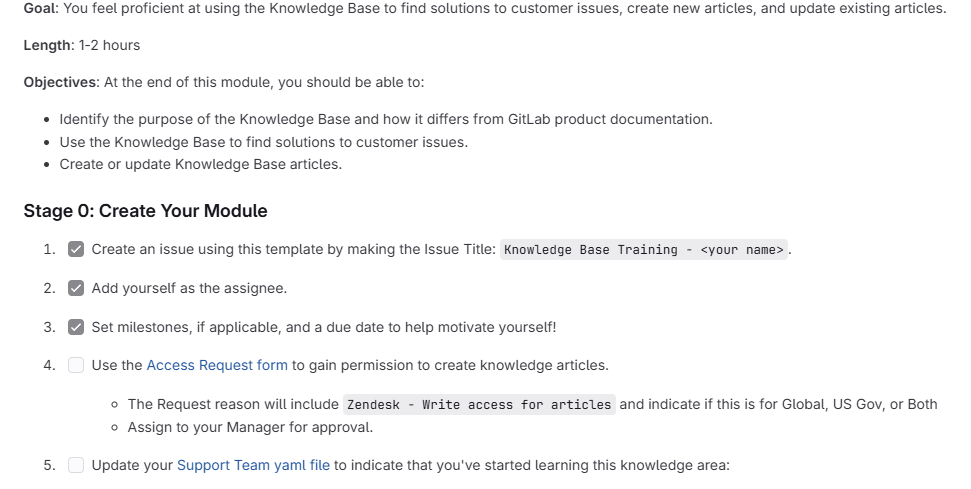
A public GitLab knowledge base training module, for example, asks support engineers to find solutions, create or update articles, understand the knowledge base workflow and style guide, and review technical-review responsibilities. It also connects training with access to article-writing permissions and manager or trainer review.
Agents should practice deciding whether to:
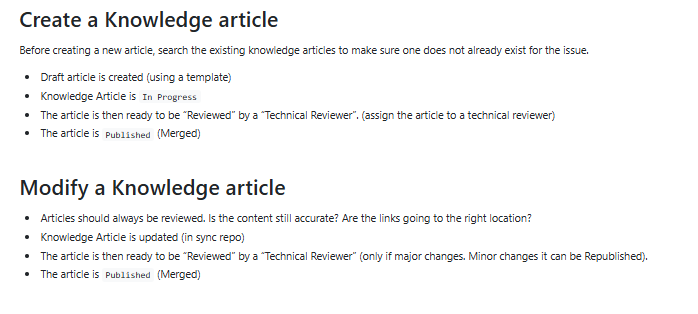
- Reuse the existing article without modification.
- Flag an article because it is outdated or incomplete.
- Improve the current article instead of creating a duplicate.
- Create a new draft because the knowledge gap is genuinely distinct.
- Escalate because the answer requires specialist validation.
- Keep case-specific or personal information out of reusable content.
Contributor and author training
Author training should cover more than writing style. Authors need to understand how content becomes findable, reusable, governable, and safe to publish.
A useful author curriculum includes:
- Searching before creating.
- Identifying a specific user intent and intended audience.
- Selecting the correct article type and template.
- Writing clear, action-focused titles.
- Using plain language and defining necessary terminology.
- Separating prerequisites, steps, outcomes, and troubleshooting guidance.
- Using numbered lists for sequences and bullets for unordered information.
- Adding screenshots or media without exposing personal or restricted data.
- Recording authoritative sources and avoiding unsupported statements.
- Applying product, version, audience, region, language, and topic metadata.
- Linking related content without duplicating it.
- Submitting the draft through the correct review path.
Zendesk recommends templates, short and scannable articles, clear action-based titles, appropriate lists, defined terminology, related links, and technical review. These are strong training topics because they translate directly into observable writing and review criteria.
Reviewer and subject matter expert training
Subject matter knowledge is necessary for review, but it is not sufficient. Reviewers also need to understand audience, structure, visibility, duplication, workflow, and the difference between a useful comment and an unsupported preference.
Train reviewers to verify:
- The source and technical or policy accuracy of each important claim.
- Whether the article addresses the intended user problem.
- Whether prerequisites and steps can be followed in the stated order.
- Whether another article already provides the same answer.
- Whether the audience, visibility, product, version, and region are correct.
- Whether screenshots and examples expose sensitive information.
- Whether legal, privacy, security, financial, medical, or operational specialists must review the content.
- Whether the article should be published, returned for changes, restricted, merged, or rejected.
- Whether an owner and future review trigger have been assigned.
Reviewer feedback should identify the problem, explain why it matters, and state what evidence or change would resolve it. “Rewrite this” is not useful review guidance.
Publisher and content-owner training
Publishing authority carries greater risk than drafting authority. Publishers should be trained to verify that approvals are complete, visibility is correct, required metadata is present, and the release will not expose restricted or unvalidated information.
Content owners also need to manage the complete lifecycle. Their curriculum should cover review queues, ownership gaps, duplicates, stale articles, archive decisions, search failures, feedback backlogs, translation dependencies, and major product or policy changes.
Current ServiceNow documentation illustrates why product training may be needed in addition to general knowledge training: article states can include Draft, In Review, Scheduled for Publish, and Published, while the available publishing path depends on workflow and access configuration. Platform-specific behavior should be taught only after the organization’s governance rules are clear.
Administrator, coach, and leader training
Administrators need to understand how configuration affects governance. Coaches and leaders need to reinforce the expected behaviors after formal training ends.
Administrator training may include:
- Roles, groups, and publishing permissions.
- Internal, external, and restricted audiences.
- Draft, review, approval, publication, and archive workflows.
- Templates, taxonomies, metadata fields, and required properties.
- Audit logs, access reviews, integrations, and reporting.
- Testing whether users can view and modify only intended content.
Coach and leader training should include observing real work, giving timely feedback, protecting time for knowledge contribution, correcting unsafe practices, and recognizing useful improvements rather than raw article volume.
Write learning objectives that describe observable behavior
Vague objectives make training difficult to design and impossible to assess. Objectives such as “understand the knowledge base” or “become familiar with the workflow” do not define what the learner must actually do.
The CDC’s guidance on designing learning objectives recommends behavioral objectives that describe specific actions demonstrating learning or skill development. Apply that principle to knowledge base work.
| Weak objective | Stronger observable objective |
|---|---|
| Understand knowledge base search | Find the correct approved article for three realistic support requests using search, filters, and metadata. |
| Know the authoring workflow | Create a draft, assign the required metadata, and route it to the correct reviewer. |
| Learn article quality | Review a draft against the content standard and identify accuracy, structure, audience, and source problems. |
| Understand permissions | Select the correct audience for three scenarios and explain why broader access would create risk. |
| Learn content maintenance | Determine whether an outdated article should be updated, merged, archived, or replaced. |
Each objective should connect to an exercise and an assessment. Do not teach material merely because it is available in the platform documentation.
Train decisions, not just software buttons
A product demonstration can show how to create or publish an article, but it does not teach whether the article should be created or published. Good knowledge base training makes the decision process explicit.
| Decision | Question the learner must answer |
|---|---|
| Search or create | Does an accurate article already address this user intent? |
| Reuse or improve | Can the current article solve the problem, or does it need a material update? |
| Merge or keep separate | Are the articles duplicates, or do they serve meaningfully different audiences or situations? |
| Internal or external | Would publication expose sensitive details, internal processes, or unsupported guidance? |
| Normal or high-risk review | Could an error create legal, financial, privacy, security, safety, or operational harm? |
| Human-authored or AI-assisted | Which sources, claims, and decisions still require human verification? |
| Publish or escalate | Does the learner have enough evidence and authority to release the content? |
The interface should be taught in service of these decisions. Otherwise, learners may become faster at producing the wrong content.
Use realistic scenarios for practice
Scenario-based practice exposes judgment problems that a multiple-choice quiz may miss. Use examples based on real search behavior, support requests, content failures, and permission risks—after removing personal or sensitive data.
| Scenario | Expected learner decision | Evidence of competence |
|---|---|---|
| An accurate article already answers the request | Reuse and link the article instead of creating a duplicate | Selects the correct article and explains why it applies |
| The article contains outdated steps | Flag or update the existing article through the approved workflow | Identifies the outdated step and verifies the replacement source |
| Two articles conflict | Do not choose based on preference; escalate to the responsible owner | Identifies the conflict and records the evidence needed for resolution |
| A support ticket contains reusable guidance and personal information | Capture the reusable knowledge without copying unnecessary personal data | Produces a sanitized draft that preserves the useful solution |
| An internal policy is proposed for public publication | Keep the content restricted and route it for appropriate review | Selects the correct audience and explains the exposure risk |
| An AI-generated draft includes an unsupported claim | Remove or correct the claim after checking the authoritative source | Identifies the unsupported statement and documents the source used |
For each exercise, define the learner’s task, the expected decision, the evidence required, and the failure that matters most. This keeps the exercise focused on job performance rather than abstract knowledge.
Assess competence before expanding permissions
Attendance does not prove that someone can publish reliable content. Assess learners through work that resembles the decisions they will make after training.
A practical assessment can combine:
- A search challenge using realistic terminology.
- An exercise choosing between reuse, improvement, and new content.
- A drafting task based on an approved source.
- A metadata and audience-classification exercise.
- A technical or policy review exercise.
- A privacy, security, or visibility scenario.
- An observed workflow task in a sandbox.
- A quality review of the learner’s first real contributions.
- A coach or reviewer recommendation.
A simple competency rubric
| Criterion | Not yet ready | Ready for the assigned permission |
|---|---|---|
| Accuracy and sources | Relies on assumptions or unsupported information | Verifies material claims against an appropriate source |
| Audience and visibility | Cannot consistently distinguish public, internal, and restricted content | Selects the correct audience and recognizes when specialist review is required |
| Findability and structure | Uses vague titles, inconsistent structure, or missing metadata | Creates content that follows the template and can be retrieved using likely user language |
| Workflow and lifecycle | Skips required steps or cannot determine the correct content action | Routes, updates, merges, publishes, or retires content according to the operating model |
| Judgment and escalation | Acts beyond available evidence or authority | Recognizes uncertainty, risk, and the need to escalate |
The rubric does not need to produce a complex percentage. A clear decision about whether the learner can safely perform the assigned work is usually more useful than a precise-looking score with no validated meaning.
Connect permissions to demonstrated proficiency
Knowledge permissions should reflect both competence and risk. Someone may be ready to create internal drafts but not ready to publish externally or approve security-sensitive instructions.
The current KCS proficiency model connects system rights and privileges to demonstrated behavior rather than organizational seniority. It describes progression through roles such as Candidate, Contributor, and Publisher while allowing organizations to adapt the structure to their trust model and needs.
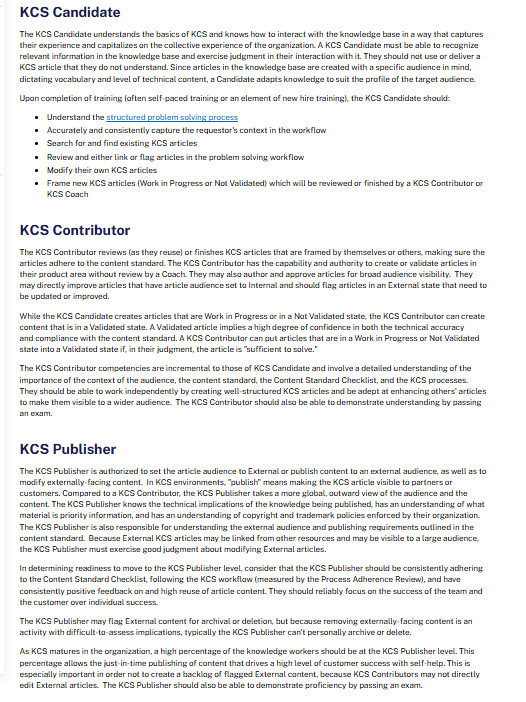
| Permission stage | Possible evidence before granting it |
|---|---|
| Read and provide feedback | Can find applicable content and submit actionable feedback |
| Suggest a gap or change | Can distinguish missing knowledge from a search or terminology problem |
| Create drafts | Can produce a source-supported draft using the correct template and metadata |
| Edit validated internal content | Can improve existing content without weakening accuracy, scope, or structure |
| Review or approve | Can apply the content standard consistently and identify material risk |
| Publish internally | Can verify approval, ownership, audience, and lifecycle controls |
| Publish externally | Can assess public exposure, customer impact, and required specialist review |
| Archive or administer | Can manage lifecycle or system configuration without creating access or governance failures |
This progression is an example, not a universal standard. Small teams may combine stages, while regulated or high-risk content may require additional approvals regardless of the author’s proficiency.
How KCS relates to knowledge base training
KCS is a specific methodology for creating, reusing, improving, and governing knowledge in the workflow. It is not a generic label for every internal knowledge base course.
The Consortium for Service Innovation announced the latest evolution, Knowledge-Centered Success, in April 2026. The Consortium states that updated training and certification are rolling out through late 2026 and 2027, while existing KCS v6 training and certification remain valid during the transition.
An organization can use KCS concepts—such as searching early, capturing knowledge in the workflow, reusing and improving articles, coaching, and proficiency-based permissions—without describing its internal course as official KCS certification.
Formal KCS training is most relevant when the organization intends to adopt the methodology systematically. Internal training is still necessary because employees must learn the organization’s own sources, audiences, permissions, platform configuration, content standard, and risk controls.
Choose the right delivery methods
The strongest program usually combines several delivery methods rather than relying on one long course.
| Delivery method | Best use | Limitation |
|---|---|---|
| Self-paced lesson | Terminology, policies, basic workflows, and platform orientation | Does not demonstrate judgment in realistic work |
| Live workshop | Discussion of decisions, edge cases, and shared standards | Can become passive if learners do not practice |
| Sandbox exercise | Drafting, metadata, workflow, permissions, and publishing practice | Requires realistic examples and a safe environment |
| Coaching or shadowing | Applying skills to live work and correcting judgment gaps | Requires reviewer capacity and consistent coaching standards |
| Job aid or checklist | Supporting infrequent or high-risk decisions in the workflow | Cannot replace foundational understanding |
| Peer review | Improving consistency and spreading practical knowledge | Can reinforce poor practices if standards are unclear |
| Office hours | Resolving unusual cases and identifying curriculum gaps | Depends on learners recognizing when they need help |
The CDC’s Quality Training Standards recommend practice-based learning when appropriate, along with learner assessments that align directly with the objectives. This supports a blended approach for knowledge work: concise instruction, realistic practice, feedback, and observation after training.
Do not assign one universal course duration. Training depth should reflect the learner’s role, previous experience, workflow complexity, platform complexity, content risk, and scope of permissions.
An adaptable 90-day rollout plan
The following plan is an example for organizing work, not a promise that every organization can achieve proficiency within 90 days.
Days 1–30: Define the program
- Define the knowledge base audience, scope, content types, and risk levels.
- Document roles, permissions, workflow, ownership, and authoritative sources.
- Review current search, contribution, quality, and permission problems.
- Identify the competencies required for each role.
- Write observable learning objectives.
- Select representative scenarios and create a safe practice environment.
- Define how competence and training effectiveness will be assessed.
Days 31–60: Pilot and assess
- Train a small group representing the intended roles.
- Combine self-paced instruction with live or coached practice.
- Run search, authoring, review, metadata, and visibility exercises.
- Assess learners against the defined competencies.
- Grant limited permissions according to demonstrated readiness.
- Collect feedback on unclear lessons, conflicting rules, and missing examples.
- Revise the curriculum and job aids before wider rollout.
Days 61–90: Reinforce and expand
- Coach learners through their first real contributions.
- Review a sample of drafts, approvals, publications, and feedback decisions.
- Track recurring quality, search, workflow, or permission errors.
- Provide targeted refreshers for the most common gaps.
- Expand permissions only where the evidence supports it.
- Train additional cohorts using the revised program.
- Establish ongoing ownership for curriculum updates and reassessment.
Reinforce training through coaching and workflow support
Training completion is the start of adoption, not the end. Skills weaken when people do not use them, workflows change, or managers reward behavior that conflicts with the course.
Useful reinforcement methods include:
- Reviewing the learner’s first drafts or approvals.
- Observing whether agents search and reuse content during work.
- Sampling articles for accuracy, structure, visibility, and metadata.
- Holding short office hours for difficult decisions.
- Giving targeted refreshers after recurring mistakes.
- Updating examples when products, policies, workflows, or platform features change.
- Practicing new edge cases discovered through incidents or feedback.
- Renewing high-risk permissions when appropriate.
- Recognizing useful corrections, reuse, and gap closure rather than article quantity.
Coaches should give feedback close to the work itself. A learner is more likely to understand a publishing error when the coach reviews the actual decision, source, audience, and consequence rather than repeating a general policy weeks later.
Measure behavior and content quality, not just completion
Course completion is useful for administration, but it does not show whether people apply the skills. The CDC’s guidance on measuring training effectiveness recommends evaluating how successfully learners met the objectives and considering factors related to transfer into performance.
| Measurement area | Useful indicators | Question answered |
|---|---|---|
| Learning | Scenario performance, rubric results, observed practice, coaching needs | Can the learner demonstrate the required competency? |
| Behavior | Search before creation, correct reuse, appropriate escalation, workflow adherence | Is the learner applying the training during work? |
| Content quality | Review pass rate, rework, duplicates, accuracy findings, metadata completeness | Are contributions becoming more trustworthy and usable? |
| Governance and risk | Incorrect visibility, unsupported claims, permission errors, overdue reviews | Is training reducing avoidable governance failures? |
| User outcomes | Search success, task completion, repeat questions, unresolved feedback | Is the knowledge base becoming easier to use? |
| Program health | Time to demonstrated proficiency, refresher needs, permission progression | Is the training model producing capable participants? |
Do not use article count as the primary target. It can encourage unnecessary or duplicate content. Measures such as ticket deflection, onboarding time, productivity, first-contact resolution, or return on investment may be valuable, but credible claims require appropriate definitions, baselines, and analysis.
Train employees to use AI without bypassing governance
AI can assist with outlines, summaries, title suggestions, restructuring, translation, metadata suggestions, and draft language. It cannot independently establish that a claim is correct, that a source is authoritative, that an article is safe for a particular audience, or that publication is permitted.
AI-related training should cover:
- Which tools and data types are approved.
- Which information must not be entered into external or unauthorized systems.
- How to verify generated claims against authoritative sources.
- How to review citations rather than assuming they support the text.
- How to check audience, visibility, version, product, region, and metadata.
- How to identify fabricated, incomplete, or overconfident statements.
- Which content requires specialist or human approval.
- How to document material AI-assisted changes when required.
Microsoft’s responsible AI guidance recommends carefully selecting trusted and relevant source data and encouraging human review before generated content is published or distributed. It also warns that model output can misrepresent source material even when trusted information is supplied.
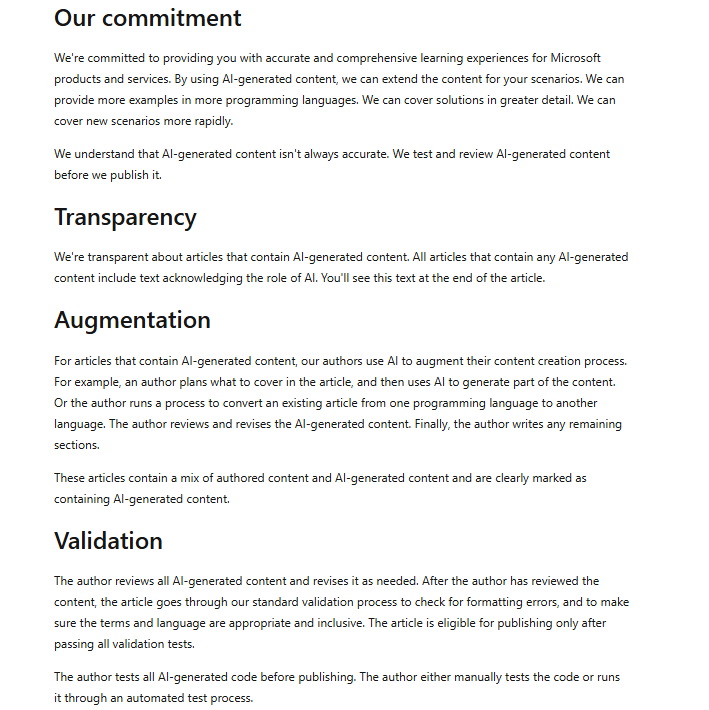
Do not allow AI-generated drafts to skip normal review merely because they are well written. Fluency is not evidence of accuracy.
Product training, internal training, or KCS training?
These training types solve different problems, and an organization may need more than one.
| Training type | Best for | What it does not replace |
|---|---|---|
| Product academy training | Learning a platform’s editor, configuration, reporting, and supported workflows | Your organization’s content standards, permissions, risks, and source rules |
| Internal knowledge base training | Teaching the company’s actual operating model, audiences, templates, workflows, and governance | Broader methodology or platform-specific technical administration |
| KCS training | Adopting knowledge creation, reuse, improvement, coaching, and proficiency in the workflow | Company-specific policies and system configuration |
| General knowledge management training | Knowledge strategy, transfer, communities, culture, retention, and organizational practices | Detailed operation of one knowledge base |
HubSpot Academy’s knowledge base lesson, for example, teaches the benefits of self-service documentation and how to create and manage a HubSpot knowledge base. That can support product adoption, but the organization still needs its own training on content authority, risk, workflow, permissions, and quality expectations.
Common knowledge base training mistakes
Giving everyone the same course
A reader, author, publisher, and administrator make different decisions. Replace the universal course with a shared foundation followed by role-specific paths.
Training the interface before defining the workflow
Learners cannot follow a process that leaders have not agreed on. Define ownership, sources, approvals, audiences, and lifecycle rules first.
Teaching how to create but not when to create
This produces duplicates and fragmented answers. Include search, reuse, improvement, merge, and retirement decisions in author training.
Granting publication rights based on attendance
Completion proves participation, not judgment. Require realistic performance evidence before expanding permissions.
Using only theoretical quizzes
A learner may know the correct definition and still make a poor visibility or source decision. Add scenario exercises, observed practice, and review of early real work.
Rewarding article volume
Article quotas can encourage duplicates and unnecessary content. Reward correct reuse, useful improvement, gap resolution, and quality.
Launching without coaching or reviewer capacity
New contributors need timely feedback. Limit the rollout if reviewers and coaches cannot support the expected volume.
Letting AI-generated drafts bypass review
Generated text can be fluent and wrong. Apply the same source, audience, privacy, version, and approval requirements used for human-authored content.
Frequently asked questions
Who needs knowledge base training?
Anyone who searches, contributes to, reviews, publishes, owns, administers, or coaches work involving the knowledge base may need training. The depth should match the person’s decisions, permissions, and risk—not merely their job title.
How long should knowledge base training take?
There is no universal duration. Reader training may be brief, while external publishing, administration, or high-risk review may require several learning activities, supervised practice, assessment, and coaching over time. Set the duration according to the competencies rather than an arbitrary number of hours.
Should knowledge base training be live or self-paced?
Use self-paced content for terminology, policy, and basic product orientation. Use workshops, scenarios, sandboxes, and coaching for decisions that require judgment. A blended program is usually more defensible than relying entirely on either format.
How often should refresher training occur?
Provide refreshers when workflows, permissions, standards, products, policies, or platform behavior change, and when quality evidence shows a recurring gap. High-risk roles may also require periodic reassessment, but the frequency should reflect actual risk and rate of change.
Is KCS training the same as internal knowledge base training?
No. KCS training teaches a defined methodology for creating, reusing, and improving knowledge in the workflow. Internal training teaches the organization’s specific platform, standards, sources, audiences, permissions, risks, and approval process. An organization adopting KCS will often need both.
How should a small team train contributors?
Start with a simple role structure, one or two article templates, a documented source and review process, a small scenario set, and coach review of the first contributions. Do not create enterprise-level bureaucracy when a lightweight process can control the real risks.
What is the difference between training employees and training a knowledge base model?
Employee training develops human skills and judgment for finding, creating, reviewing, and governing knowledge. Model training or configuration concerns how an AI, RPA, or question-answering system learns from examples, rules, source documents, feedback, or retrieval settings. The two activities require different expertise and evaluation methods.
Build the program around competent decisions
A strong knowledge base training program does not begin with a tour of the software. It begins with the decisions people must make, the risks attached to those decisions, and the evidence that proves they can perform the work responsibly.
Define the operating model, separate training by role, write observable learning objectives, use realistic scenarios, assess competence before granting permissions, and reinforce the skills through coaching and workflow evidence.
The goal is not to produce more trained users or more articles. It is to build a team that can consistently find, reuse, create, review, and maintain trustworthy knowledge.