
AI-powered knowledge base software can serve several different jobs: helping authors maintain documentation, answering employees’ questions, guiding customers through self-service, or supporting an AI agent that handles conversations. The right choice depends on which job you need and where your knowledge already lives.
For a dedicated documentation site, start with Document360 or KnowledgeOwl. For knowledge inside a customer support operation, examine Zendesk or Intercom with Fin. For internal knowledge across a workspace or connected systems, consider Notion AI or Guru. These are different buying paths, so compare the experience your readers need before comparing feature lists.
Last verified: November 21, 2026. This comparison is based on current official product, billing, and security documentation. Recommendations reflect documented capabilities and use-case fit; no hands-on performance testing was conducted.
Choose the right type of AI knowledge base
First decide whether you need to replace your knowledge repository or add AI to the systems you already use. A publishing platform needs editors, article organization, ownership, and a usable reader experience. An answer layer needs reliable connections to existing sources. A support agent also needs conversation handling, escalation, and controls for any actions it performs.
| Software | Primary fit | What to validate first |
|---|---|---|
| Document360 | A dedicated documentation portal with reader-facing AI answers | Published content coverage, document extraction, and the quoted AI allowance. |
| KnowledgeOwl | A defined knowledge base maintained by a small author team for many readers | Reader access, monthly AI credits, and required access-control features. |
| Zendesk Knowledge | Help-center answers and agent knowledge within a support operation | Which AI experience you need: search, agent assistance, or autonomous support. |
| Intercom and Fin | Customer conversations answered from knowledge, with configured actions or handoffs | Content audiences, source refresh behavior, and billable outcomes. |
| Guru | Internal answers across Guru content and connected business systems | Connector permissions, content governance, and action-credit consumption. |
| Notion AI | A collaborative internal wiki with workspace and connected search | AI plan eligibility, connector coverage, and per-member usage allowances. |
Within each category, distinguish three capabilities. AI authoring helps create or edit content. AI answers retrieve information and generate a response for a reader. Action-taking agents can perform configured work, such as gathering information before a handoff. Having one capability does not establish the scope or quality of the others.
For source-based answers, a common approach is retrieval-augmented generation, or RAG: the system finds relevant information and supplies it to a model to help generate a response. Connecting documents for retrieval does not, by itself, mean training a model on them. Evaluate the retrieved sources and the resulting answer together.
Six AI knowledge base platforms compared
Document360: A dedicated documentation portal with AI answers
Document360 is a strong candidate when your team wants to publish and maintain a knowledge base, then let readers ask questions about its content. Its Ask Eddy AI feature generates answers with numbered references to source articles. Administrators can select the workspaces, languages, and categories available to the feature and exclude individual articles through its AI search configuration.
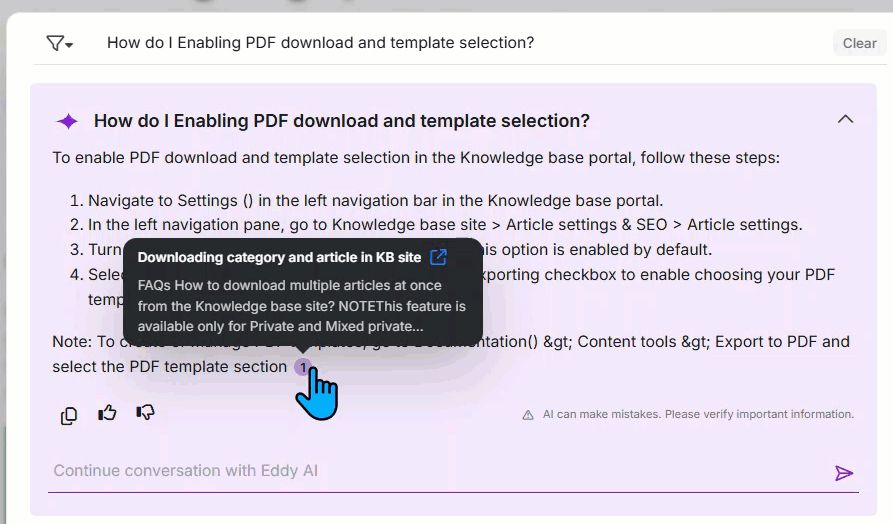
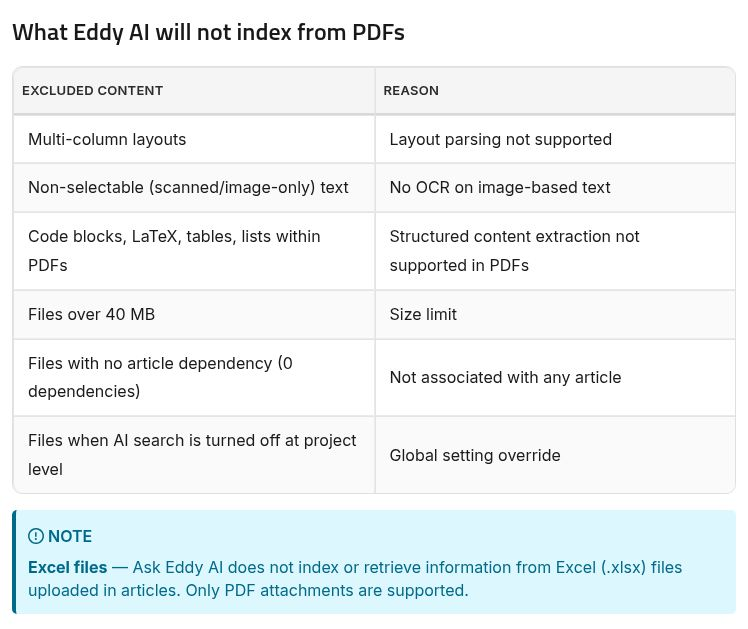
Source preparation matters. Eddy indexes published articles, excluding drafts, unpublished content, and archived articles. Its documented PDF support has specific limits: scanned text is not processed with optical character recognition, and tables and other structured PDF content have extraction exclusions. Uploaded Excel files are not indexed by this feature. Test your actual source formats before treating “PDF support” as sufficient.
Document360 uses custom pricing. Ask for a quote covering your publishing configuration, reader access, required security features, and AI usage. Its credit documentation defines one Eddy AI credit as one question or prompt; reaching the monthly limit stops the feature until credits are replenished or renewed.
Buying judgment: Shortlist Document360 when the documentation portal itself is central to the project. If critical answers live in scanned files or complex document tables, make extraction quality a condition of the pilot.
KnowledgeOwl: A small publishing team serving many readers
KnowledgeOwl is worth considering when a limited group maintains the content and a much larger audience reads it. Its pricing structure separates authors and knowledge bases from reader access, includes unlimited readers, and provides plan-specific AI credit allowances. Access, branding, and integration requirements still need to match the selected plan.
The chatbot uses KnowledgeOwl articles as its source material. According to the chatbot setup guide, it uses only articles the current reader may view. Administrators can separately restrict who can use the chatbot, which is useful for a staged launch. Semantic search must be enabled and the knowledge base reindexed before the chatbot can operate.
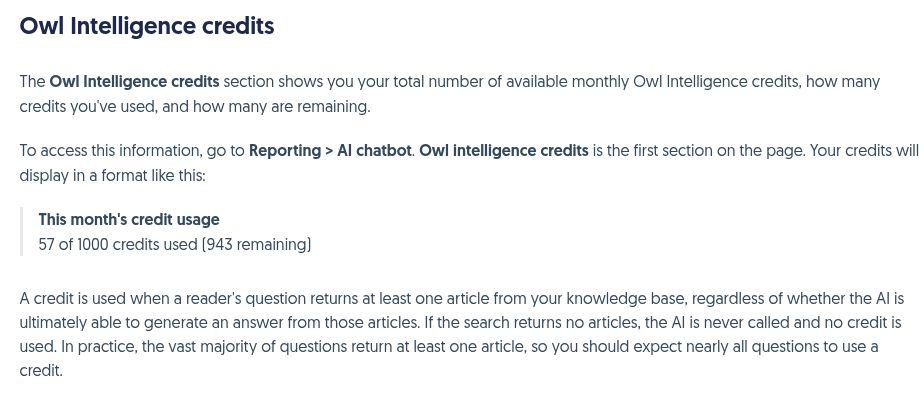
Its billing behavior deserves attention: a question consumes a credit when retrieval returns at least one article, even if the AI cannot produce an answer. If retrieval finds no articles, no AI call occurs and no credit is used. The reporting documentation also describes question, answer, and feedback reporting.
Buying judgment: Evaluate KnowledgeOwl around your author count, reader-access needs, and expected AI demand. Unlimited readers can suit a broad audience, but the monthly AI allowance remains a separate capacity decision.
Zendesk Knowledge: Help-center and agent knowledge in the support stack
Zendesk is a logical starting point for teams that already handle customer support there. Its help-center generative search produces answers from search results and limits them to articles the visitor has permission to view. Current documentation lists the feature across all Suite and Knowledge plans, with an eligible-search allowance and an extender for additional consumption.
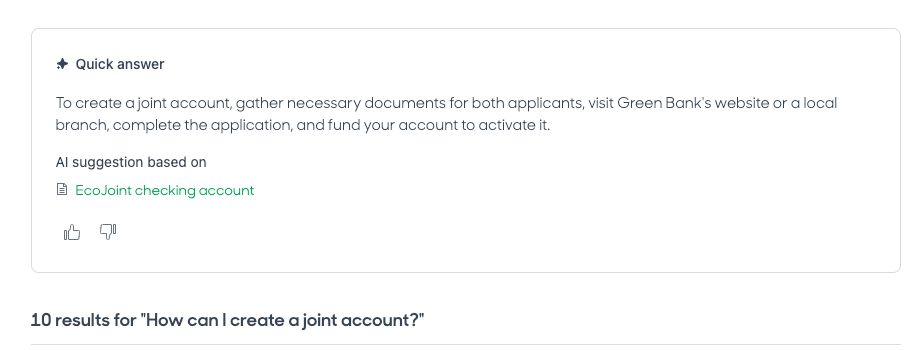
Agent assistance is a separate experience. Quick answers in Agent Workspace respond to agents’ searches in the knowledge section of the context panel. Zendesk’s AI feature overview also distinguishes included Suite tools, including Knowledge writing and translation, from Copilot add-on capabilities such as Auto assist.
Keep the commercial components separate: the underlying subscription, optional assistance features, eligible generative searches, and autonomous AI-agent usage. A Copilot description alone does not tell you whether the help-center feature you need is included. An older customized help-center theme may also need an update to display generative answers.
Buying judgment: Choose the exact support surface first. Zendesk is especially relevant when knowledge needs to connect with existing agent workflows; a team seeking only a standalone documentation site should also assess the administration and subscription scope it would be taking on.
Intercom and Fin: Knowledge that supports customer conversations
Intercom combines a Help Center with customer-facing Fin and teammate assistance through Copilot. Its plan documentation lists public Help Centers across current plans, while private and multilingual Help Centers require higher tiers. Fin can also work with an existing helpdesk without an Intercom platform subscription, subject to minimum commitments and the supported integration.
This route is useful when your main goal is handling conversations rather than replacing the article repository. However, content must be configured for the right audience. Intercom’s audience documentation says untargeted material defaults to Everyone, so source availability needs deliberate review.
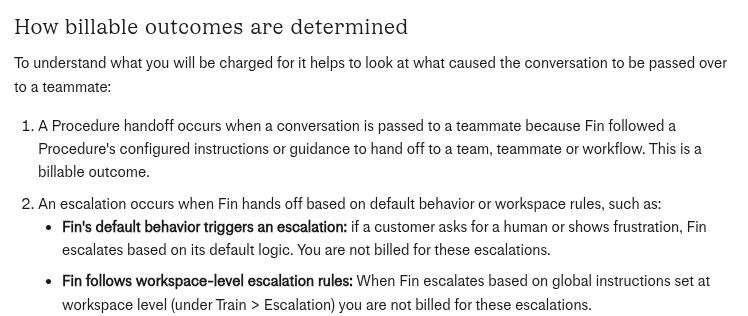
Fin uses outcome-based billing. After Fin provides an answer, a resolution may be confirmed by the customer or assumed when the customer leaves without requesting more help. A successfully completed Procedure configured to end in a handoff can also be a billable outcome. These definitions matter when estimating cost and interpreting reports.
Citation behavior also depends on the source. Fin can answer from unlisted public articles without showing source links. If readers must be able to open supporting documentation, test that requirement with the exact content type you plan to use.
Buying judgment: Shortlist Fin for conversational support automation. Validate customer targeting, evidence visibility, handoff behavior, and the contract’s outcome definition before forecasting savings.
Guru: Internal answers across connected systems
Guru suits organizations whose internal knowledge spans multiple tools. Its Knowledge Agents can answer from Guru Cards and connected sources, with source references. Employees can access these capabilities through interfaces including Guru search, Slack, and a browser extension. The platform also documents configured content-maintenance and automation capabilities.
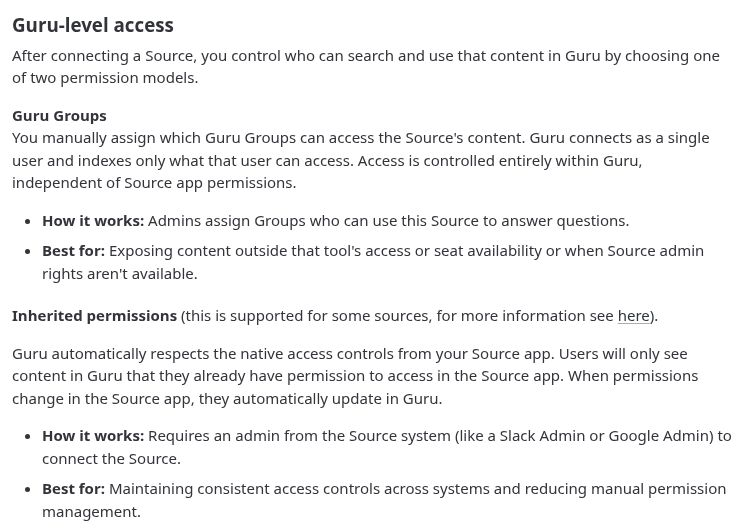
Check the connector’s permission model carefully. Guru supports both manually assigned Guru Groups and inherited source permissions. With manual groups, access inside Guru is configured independently of the source application. Inherited permissions are supported for certain sources and require the appropriate setup. The source documentation is more precise than a general claim that permissions are always inherited.
Guru’s current pricing is tailored to the organization and includes platform access and implementation expertise. AI consumption draws on a shared organizational credit pool. Its credit guide gives an example of two credits for one search plus one generated answer; more involved workflows consume credits for their underlying actions.
Buying judgment: Consider Guru when connected internal knowledge and ongoing governance justify a broader implementation. Confirm the permission model for each source and estimate consumption from complete workflows, since one employee question can involve several billable actions.
Notion AI: A collaborative internal wiki with connected search
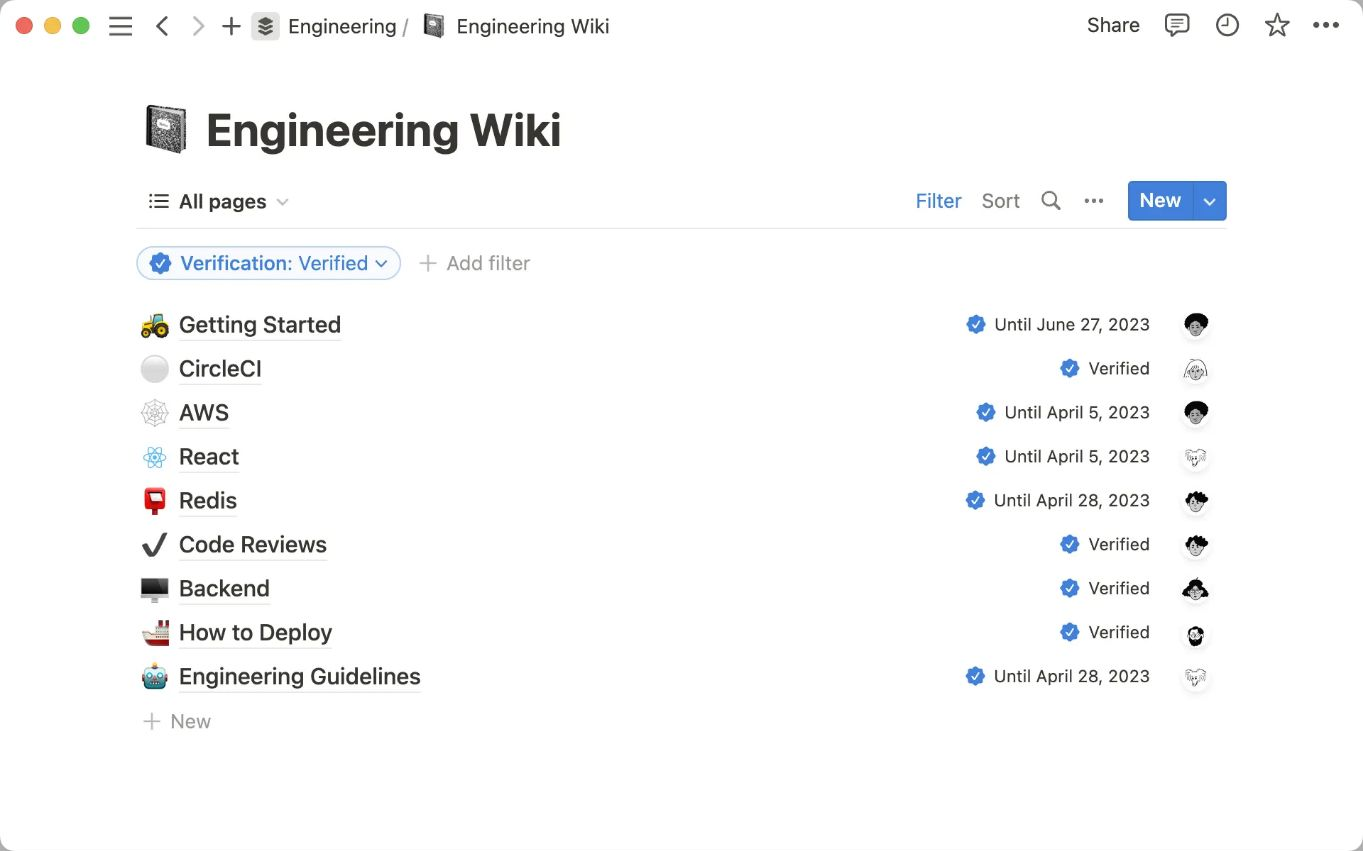
Notion is a practical candidate for teams already creating internal documentation in its workspace. Its wiki features include page ownership and verification periods, with notifications when verification expires. Those controls help assign maintenance responsibility; a verified-page label still needs a meaningful review process behind it.
Notion AI is available on Business and Enterprise plans, with limited complimentary usage on Free and Plus. It supports AI assistance within the workspace, while AI Connectors extend questions to supported external sources and provide citations. Check each connector’s requirements and coverage rather than assuming every connection behaves identically.
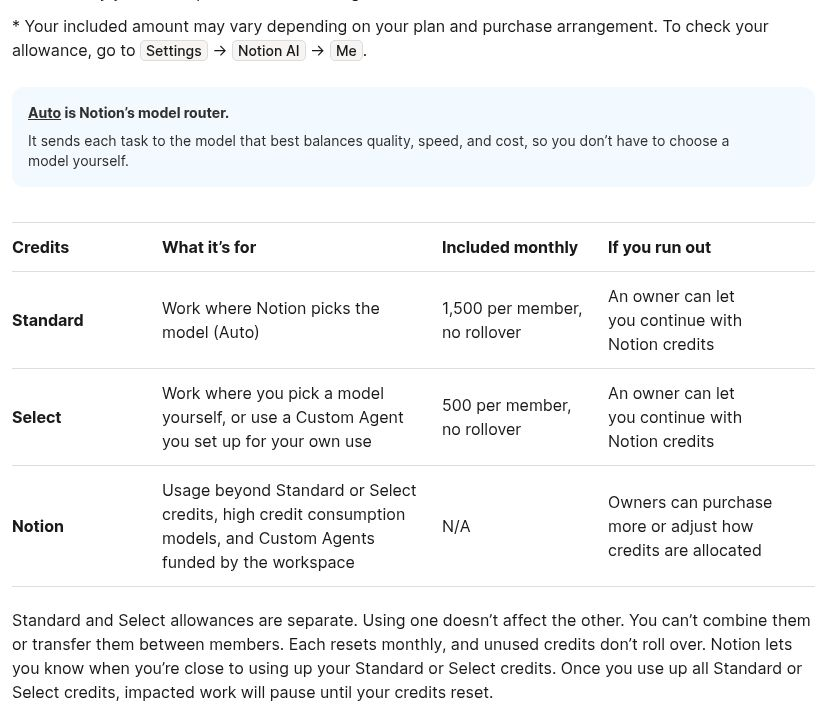
Budget for the per-member subscription and applicable AI usage. Current credit documentation describes separate monthly Standard and Select allowances per member. They cannot be pooled or transferred, and unused balances do not roll over. Additional eligible usage can draw on workspace-managed Notion credits when an owner enables it.
Buying judgment: Notion fits internal documentation and collaboration particularly well as a starting point. Validate connector coverage and the allowances for your actual AI tasks. If customer-facing support is also a requirement, evaluate that delivery experience separately from the internal wiki.
Compare total cost using the actual billing unit
Build a quote around the complete workflow: required platform and seats, necessary add-ons, and expected billable AI usage. Track migration, implementation, and ongoing content work separately. This gives you a useful comparison even when one supplier publishes subscription prices and another provides a custom quote.
Ask each shortlisted vendor to answer the same four questions:
- Who needs a paid seat? Identify authors, reviewers, employees, support agents, and authenticated readers separately. Include the security tier or companion platform required for those users.
- What event consumes usage? Request a worked example showing a successful answer, an unanswered question, a follow-up, and a handoff. Record whether one interaction triggers several actions or credits.
- What happens at the limit? Confirm the included allowance, reset period, rollover rules, top-ups, automatic overages, and whether the feature stops. Ask whether spending limits can be enforced.
- What happens when demand grows? Price your expected workload and a plausible busy period. Include additional languages, repositories, sites, and connectors only where they are part of the proposed deployment.
Do not compare a KnowledgeOwl credit, a Guru action credit, a Zendesk eligible search, and a Fin outcome as equivalent units. Their documented triggers differ. Measure consumption during the same evaluation tasks, then apply each vendor’s actual billing rules to your expected usage.
For Zendesk AI agents, also confirm which billing framework applies to your account. Its current resolution-tier documentation counts Verified resolutions against the allowance, while Contained resolutions and Assisted escalations do not. These are vendor-defined classifications, separate from your own review of customer outcomes.
Keep commercial success and answer quality in separate columns. A system can consume a chargeable unit without giving the reader a satisfactory answer, and a conversation ending does not establish that the underlying issue was solved.
Verify access, freshness, and AI data handling
Test what each reader can retrieve
Single sign-on establishes identity; it does not by itself demonstrate that every connected source is filtered correctly. Map permissions from the source application through retrieval to the final answer. Check generated text, document titles, citations, previews, and downloadable attachments.
For a private employee knowledge base, test users with different departmental access. For customer support, include anonymous visitors, authenticated customers, and staff. Also test an existing conversation after access changes, rather than checking only a new login. Define how quickly a revoked permission must take effect for your use case.
For Fin specifically, audience rules are evaluated at conversation start; later targeting changes apply to new conversations. That is a concrete reason to test ongoing conversations as well as newly opened ones.
Distinguish initial indexing from ongoing updates
Ask separately about the first content import, later edits, deleted sources, and access changes. A one-time import creates a copy; a synchronized connection must keep that copy or index aligned with the source. Document the expected behavior for each repository you intend to connect.
Refresh timing can vary within one product. Intercom’s Knowledge FAQs say native content changes are available immediately, several connected sources usually update within minutes, and public webpages are refreshed weekly unless manually resynced. Uploaded PDFs require replacement when their contents change.
Notion’s connector guidance separately describes initial ingestion of up to 36 hours and new-content indexing of up to three hours, with larger volumes potentially taking longer. Neither figure should be treated as a universal deletion or access-revocation guarantee.
Choose an acceptable update window for each content type. A frequently changing incident notice may need a different delivery process from a stable onboarding guide.
Read data-use promises at the feature and plan level
Ask what is sent to the model for inference, whether that data is used for training, what the provider retains, and what the application stores in conversation logs or analytics. Also check the deletion rules for indexed copies, embeddings, and backups, and distinguish storage location from AI processing location.
KnowledgeOwl, for example, states that account data is not used for model training while also explaining that it records reader questions for reporting in its AI privacy documentation. Those are different data-handling questions.
Notion’s security documentation makes Enterprise provider retention model-dependent: most models support zero retention, while models that retain data are disabled by default and require owner opt-in. Apply the terms for the actual model, feature, and plan being purchased.
Record the specific configuration your team approves. If an external AI application receives connected content, review that application’s terms as well as the knowledge platform’s.
Run a pilot with your own content before committing
Use the same approved or synthetic content and the same questions for each finalist. Write the expected answer, permitted sources, and allowed next step before testing. Include the languages and file types your users actually rely on, and make sure the trial configuration matches the proposed production plan.
The following is a proposed evaluation method, not a report of product test results.
| Test case | What to try | Evidence to record |
|---|---|---|
| Direct answer | Ask a question answered explicitly in one current article. | Whether the answer is correct and its citation supports the specific claim. |
| Paraphrase and multiple sources | Reword the question, then ask something that requires two approved articles. | Whether the system finds the right information and combines it without inventing a missing step. |
| Ambiguous request | Use wording that could refer to different products, policies, or account types. | Whether it asks for clarification or clearly states the relevant scope. |
| Missing or conflicting guidance | Ask an unsupported question, then introduce an older article that conflicts with the current one. | Whether it avoids unsupported certainty and follows your approved fallback or escalation path. |
| Restricted content | Ask the same question as users with different permissions. | Whether unauthorized information stays out of answers, titles, links, previews, and attachments. |
| Content and access changes | Edit, archive, or delete a source; then revoke a test user’s access. | The observed propagation time, including behavior in ongoing conversations. |
| Handoff or configured action | Request human assistance; for action-taking agents, use a harmless authorized sandbox task. | Whether context reaches the right destination and actions stay within the approved scope. |
| Usage and fallback | Repeat representative tasks and inspect usage records and configured limits. | Which events are charged and what the reader sees when AI is unavailable or capacity is exhausted. |
Have a content owner inspect the underlying sources for every sampled answer. A relevant-looking citation can point to a page that does not support the generated instruction. For procedures, check the complete sequence and any prerequisites, exceptions, or account restrictions.
Keep the measurements distinct:
- Answer rate: questions receiving a generated answer divided by eligible questions submitted.
- Reviewed answer correctness: generated answers judged correct and adequately supported divided by generated answers reviewed. Keep the review criteria consistent across products.
- Reader satisfaction: positive ratings divided by submitted ratings, with the response rate reported alongside it.
- Support demand: contacts per defined user group or task volume, compared with an appropriate baseline before attributing a reduction to AI.
- Billable usage: the supplier’s recorded credits, searches, or outcomes for the same evaluation set.
Evaluate missing-answer handling separately: a useful refusal or escalation may be the correct result. Set acceptance requirements before comparing results, with unauthorized disclosure or an unsafe action blocking rollout. Choose the option that meets the required workflow and constraints, then compare the cost of operating it.
Make content ownership part of the purchase
Before launch, assign an owner to each important topic, remove superseded guidance from answer sources, and decide who approves changes. For a public help center, separate customer instructions from staff-only procedures. For an internal wiki, identify the authoritative page when several teams describe the same process.
Use unanswered questions and reader feedback as review inputs. A content owner should decide whether the fix is a missing article, unclear wording, a permissions problem, a connector issue, or an unsupported request. Validate the fix with the original question and relevant variations before treating the issue as resolved.
Include an exit check in the pilot: export representative articles, attachments, and organizational structure, then inspect whether they remain usable outside the platform. Establish who owns source cleanup, access administration, usage monitoring, and escalation after the initial implementation.
Start with two candidates that fit the same reader workflow. Give them the same content, access rules, and evaluation tasks. The purchase decision should follow from documented requirements, observed pilot behavior, and a complete quote—supported by an ownership process that keeps the knowledge useful after launch.