Independent knowledge base software guide Evidence-led Updated 2026

Knowledge Base Content Audit: A Practical Guide and Template
A knowledge base content audit evaluates whether your help articles are accurate, complete, findable, and useful for their intended audience. Its purpose is to turn evidence into decisions: keep reliable content, verify uncertain guidance, update errors, merge genuine duplicates, retire obsolete material, and create answers that are missing.
Start with a defined part of your knowledge base, not an open-ended promise to review everything. Build an inventory, test the content against current sources and real tasks, assign corrective work, and verify that the changes solve the original problem.
An inventory records what exists; an audit evaluates what should happen to it. Digital.gov’s content audit guidance connects those activities with ownership, user journeys, and identifying gaps or redundant content. The workflow below applies that approach to customer-facing help centers and internal documentation.
1. Define a scope your team can finish
Choose a concrete objective, such as verifying account-management instructions after a product release or investigating why customers cannot find onboarding answers. “Improve the knowledge base” is too broad to tell reviewers what evidence to collect or when the work is complete.
Write a short scope statement covering the product or process, intended audience, article types, languages, access level, and reporting period. For example: Review published English-language onboarding instructions for customer administrators, using the currently supported interface and search data from the last complete reporting month. This is an illustrative scope, not a required audit window.
For a large collection, begin with a bounded pilot that includes changed procedures, frequently used articles, reported problems, and low-volume content with serious consequences if it is wrong. Include different article types before committing to a review method. Record what remains outside the scope; findings from a targeted pilot do not establish the health of the entire collection.
Assign review and approval responsibilities
Use an audit coordinator to manage scope and progress, a content owner to maintain the article, a subject-matter reviewer to confirm accuracy, and an approver to authorize consequential changes. A small team may combine these roles, but each action still needs an accountable person.
APQC’s knowledge base governance guidance distinguishes business ownership, subject-matter validation, and content-management checks. Apply that distinction when assigning work: being able to edit a page does not automatically qualify someone to approve its policy or technical claims.
Keep the boundaries clear. This is not an organization-wide knowledge audit of expertise and information flows, and it is not a replacement for a technical SEO audit. Public-page indexing matters, but it cannot establish whether a documented procedure works.
2. Build your inventory with this audit template
Collect the article list through an available platform export, approved crawl, existing report, or manual inventory. Reconcile it with the publishing system where possible: navigation alone may not reveal unlinked, restricted, or unpublished content. Include those items when they affect your scope, and label their status.
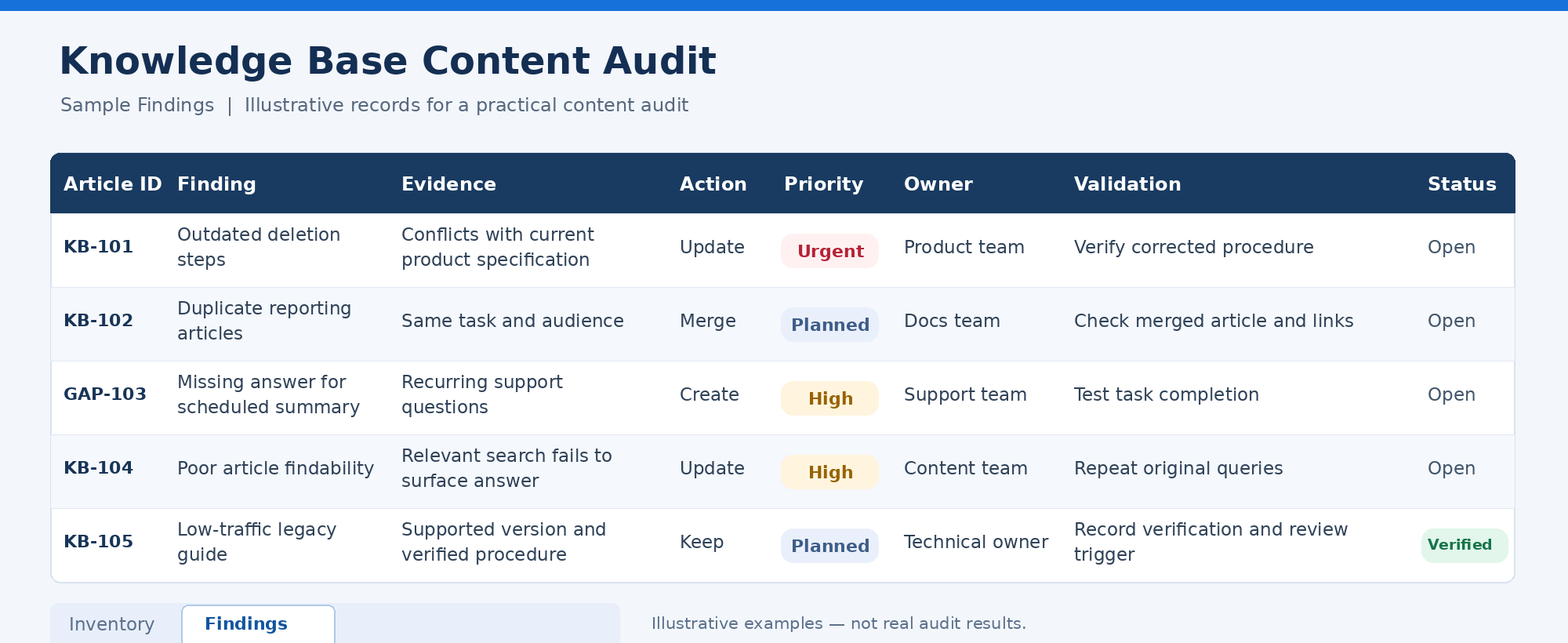
The following knowledge base content audit template is an adaptable working model, not a mandatory industry standard. Reproduce it in a spreadsheet with two tabs: Inventory for article records and Findings for decisions and corrective work.
Inventory tab: identify the content and its authority
Use one row per article variant you need to evaluate. Keep separate records when language, permissions, or supported versions materially change the answer.
| Essential field | What to record |
|---|---|
| Article ID | A stable identifier connecting the article to its findings. |
| Title | The published title, not a shortened internal nickname. |
| URL or location | The actual page or document location, including restricted locations where authorized. |
| Audience and scope | The user role, task, language, access level, and applicable product version. |
| Publication status | Published, draft, archived, or another accurately defined platform state. |
| Content owner | The person or accountable team responsible for maintaining the guidance. |
| Approved reference | The product specification, policy, release note, or accountable expert used to verify the answer. |
| Last verified | When accuracy was actually checked. Record “unknown” when there is no evidence. |
Findings tab: connect evidence to an action
Use one row per distinct finding, linked to the article ID. An article can have both an accuracy defect and an unrelated search problem. Give missing-content candidates their own gap ID rather than inventing an article URL.
| Field | What makes the entry useful |
|---|---|
| Finding ID and article or gap ID | Unique references that let reviewers track the issue without relying on titles. |
| Finding and evidence | The specific problem, supporting source or test, and observation date. |
| Evidence status | Confirmed, needs verification, or not applicable. Do not present an untested suspicion as a defect. |
| Recommended action | Keep, verify, update, merge, retire, or create, with a brief rationale. |
| Priority | The consequence and demand that justify the order of work. |
| Assignee and approver | Who will complete the action and who must validate it. |
| Target date and workflow status | The agreed deadline and state, such as open, blocked, ready for review, or verified. |
| Acceptance check and result | What must be true to close the finding, followed by the retest evidence. |
Separate combined fields into individual spreadsheet columns when you need to filter them. Optional extensions include topic, article type, last edited date, related articles, redirect destination, effort estimate, dependency, and performance measures.
For every performance measure, preserve its reporting period, source system, and audience or language filters. Zero is not the same as unavailable. Likewise, an edited timestamp does not prove that someone checked the instructions. Store “last edited” and “last verified” separately.
Without analytics, start with current reference documents, recurring support questions, frontline feedback, and observed task attempts. Keep sensitive evidence in an approved system and record an authorized reference rather than copying unnecessary customer information into the spreadsheet.
3. Review articles with a repeatable quality checklist
Before dividing the inventory, have reviewers assess a few shared examples and compare their conclusions. Resolve disagreements about what counts as a defect. Otherwise, one reviewer’s “complete” may be another reviewer’s “missing essential prerequisites.”
Use the following checklist as an adaptable review rubric. Record meets the check, needs action, needs verification, or not applicable for each dimension. Keep the evidence beside the assessment rather than hiding it inside an overall score.
| Dimension | What to inspect | When to act |
|---|---|---|
| Accuracy | Compare claims and steps with the approved source and applicable product behavior. | Instructions contradict the source, controls have changed, or the procedure fails. |
| Completeness | Check prerequisites, permissions, steps, expected outcomes, exceptions, and escalation. | A reader needs unstated knowledge or cannot proceed after a predictable failure. |
| Clarity | Read titles, headings, terminology, and instructions from the intended user’s perspective. | Ambiguous wording or unexplained terms prevent a clear next action. |
| Findability | Try realistic searches, navigation paths, and contextual links. | The correct answer exists but is difficult to identify or reach. |
| Relevance | Confirm the task, audience, and supported environment still exist. | The article serves an obsolete task or fails to distinguish current and legacy guidance. |
| Duplication | Compare overlapping pages by task, audience, cause, and resolution. | Pages unnecessarily compete to answer the same question or give conflicting guidance. |
| Accessibility | Inspect heading structure, link wording, image alternatives, and essential media information. | Meaning depends on an unlabeled image, unclear link, or inaccessible presentation. |
| Ownership | Confirm the responsible owner, verification evidence, and review trigger. | Nobody can approve a correction or explain when the article was last checked. |
For accessibility checks, W3C’s writing guidance covers meaningful headings and links, text alternatives, captions, and clear instructions. Use these as content checks; they do not constitute a complete accessibility evaluation of the platform.
Test procedures, not just the writing
A polished article can still describe the wrong process. The Consortium for Service Innovation explicitly explains that its Content Standard Checklist is not a technical accuracy review. Keep editorial checks and factual validation separate.
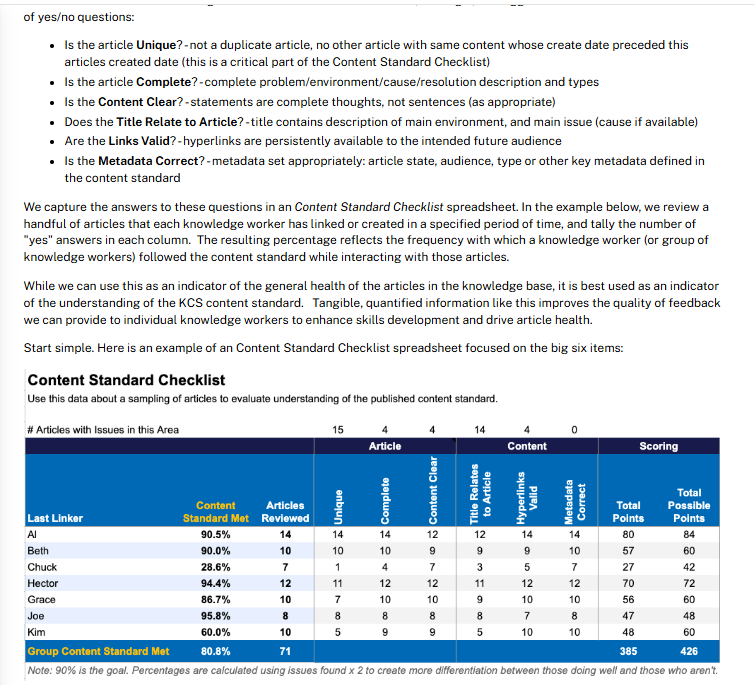
For procedural content, have a qualified reviewer follow the steps in an approved test environment with the intended permissions. Record the starting state, relevant version, expected outcome, and actual result. Do not test destructive actions against live customer data merely to finish an audit.
Then, where practical, observe an intended user attempting the task without coaching them through the answer. GOV.UK’s usability-testing guidance recommends realistic tasks with clear goals that do not reveal the solution. Record whether the person succeeded independently, needed assistance, or stopped—and where.
4. Separate missing answers from search and access problems
Search reports are investigation tools, not automatic publishing instructions. For example, Zendesk’s search analytics documentation describes examining queries, result counts, click behavior, and ticket correlations, with filters such as time, role, channel, and locale.
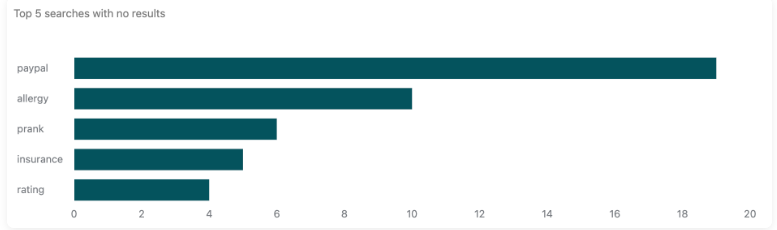
Use those signals alongside support conversations and the existing article collection. For each recurring question or unsuccessful search, follow this diagnostic sequence:
- Reproduce the experience. Use the query, language, channel, and authorized user role involved. An administrator’s search results may not represent the customer’s experience.
- Look for an existing answer. Search alternative terms and inspect related categories. Establish whether an accurate answer exists before proposing another article.
- Classify the failure. Is the answer absent, incorrect, incomplete, poorly described, unavailable to the intended audience, or not being retrieved?
- Assign the matching fix. Create missing guidance, correct the answer, improve titles and navigation, or route a search or permission issue to the platform owner.
A zero-result search does not prove a content gap. A search without a click also remains ambiguous: inspect whether the interface supplied a useful answer directly, displayed irrelevant results, or lost the user for another reason. The observation tells you where to investigate, not which conclusion to select.
For restricted documentation, confirm that the user should have access before changing permissions. Improving findability must not expose internal guidance to an unauthorized audience.
5. Choose an action and prioritize by consequence
Make the editorial decision explicit. “Needs improvement” is not enough to assign work, estimate dependencies, or determine whether the issue has been resolved.
| Action | Use it when | Check before proceeding |
|---|---|---|
| Keep | The article remains accurate, useful, and appropriate for its audience. | Record why it passed and its next review trigger. |
| Verify | Evidence is missing, contradictory, or insufficient. | Assign the unresolved question to a qualified reviewer. |
| Update | The task is still relevant, but the answer or presentation has a defect. | Identify the affected claim, step, screenshot, or access path. |
| Merge | Articles unnecessarily cover the same task for the same audience and environment. | Preserve useful detail, history, references, and a suitable destination. |
| Retire or archive | The content no longer belongs in the active collection. | Check supported versions, remaining users, retention requirements, and replacement paths. |
| Create | A relevant question lacks a sufficient maintained answer. | Confirm the gap cannot be resolved by improving an appropriate existing article. |
Do not treat similarity as proof of duplication. The Consortium’s guidance on article improvement and duplicates recognizes that different audiences or environments can justify separate articles. Compare the purpose and resolution before merging.
Use a simple, adjustable priority model
The following tiers are a proposed operating model, not universal benchmarks:
- Urgent: Confirmed guidance could cause serious harm, data loss, or inappropriate disclosure. Escalate promptly to the responsible owner and agree on containment as well as correction.
- High: A confirmed defect blocks an important task, affects a common workflow, or will affect an imminent release. Resolve dependencies and assign a clear completion target.
- Planned: The issue is lower consequence, cosmetic, or a manageable navigation improvement. Schedule it without allowing easier edits to displace important corrections.
Assess uncertainty separately. A potentially serious issue with weak evidence needs urgent investigation, not an automatic rewrite. Use demand and effort to order work within an appropriate risk tier; do not average away a critical accuracy defect because the article scores well on formatting.
Before retiring content, consult the applicable retention policy and responsible owner. Age, low traffic, and an overdue review are reasons to investigate—not sufficient authorization to delete.
Five worked examples of audit decisions
The following records are fictional examples showing how to connect evidence, action, priority, and verification. They are not customer results or measured outcomes.
Example 1: A procedure gives a dangerous assurance
Evidence: A workspace-deletion article says the action is reversible, but the approved product specification says it is permanent. The product owner confirms the mismatch.
Decision: Update urgently because readers could act on a false assurance. Assign the content owner to correct the affected guidance, with product-owner approval. Close the finding only after the warning, procedure, and related references match the approved behavior and pass a safe review.
Example 2: Two articles answer the same reporting question
Evidence: “Download an activity report” and “Export workspace activity” describe the same task for the same role and product version. One contains a useful troubleshooting note that the other lacks.
Decision: Merge into the maintained destination, preserving the unique note and relevant history. Treat this as planned consolidation unless conflicting instructions create greater risk. The documentation owner approves the result; verification checks the combined answer, old links, and any redirect.
Example 3: A recurring question has no documented answer
Evidence: Support repeatedly explains how to stop a scheduled summary. The inventory has no suitable article, and the product owner confirms the supported procedure.
Decision: Create an article in the high-priority queue because the question repeatedly interrupts a current workflow. The support content owner drafts it, and the product specialist validates it. Close the finding after a user can locate the answer and complete the task without an agent supplying missing steps.
Example 4: The answer exists under unfamiliar terminology
Evidence: Users search for “add a coworker,” but the relevant article is titled “Seat provisioning.” Testing confirms that the article is accurate and accessible to the intended role, yet the search path does not surface it.
Decision: Improve the title, wording, navigation, or supported search configuration rather than publish a duplicate. Prioritize it as high if it blocks onboarding. The content and search owners repeat the original queries and task after the change.
Example 5: A rarely viewed article is still important
Evidence: A recovery guide has little recorded traffic, but it supports a rarely needed task for an actively supported legacy version. Its technical owner verifies the procedure.
Decision: Keep it, clearly label the applicable version, and retain an accessible path for authorized users. Low demand does not justify retirement here. Record the verification evidence and trigger another review when recovery behavior or the version’s support status changes.
6. Implement fixes and retest the original problem
Move findings through a defined workflow, such as open, assigned, ready for review, and verified. Record blocked items with their dependencies rather than leaving them indistinguishable from work nobody has started.
Keep editorial actions separate from technical implementation. A merge consolidates the content; a redirect handles an old public address. For a permanent move, Google recommends a permanent server-side redirect when possible. Its migration guidance also warns against redirecting unrelated old URLs to a generic homepage.
When there is no relevant replacement, have the platform owner implement an appropriate removal response rather than inventing a destination. For internal material, preserve required history and authorized access according to organizational policy.
Use these acceptance checks before marking corrective work complete:
- The answer is validated: The appropriate reviewer confirms the revised content against its source and applicable environment.
- The reader’s path works: Search, navigation, links, media, and permissions support the intended task.
- Related material is handled: Identify affected translations, support macros, onboarding links, and other maintained copies; update them or assign explicit follow-up work.
- The original failure is retested: Save the result, reviewer, and verification date. A successful publication event alone is not acceptance evidence.
7. Measure whether the audit improved self-service
Select measures that match the audit objective. Use comparable audiences, channels, languages, and reporting windows before and after changes. Note product releases, incidents, seasonal demand, or instrumentation changes that could affect the comparison.
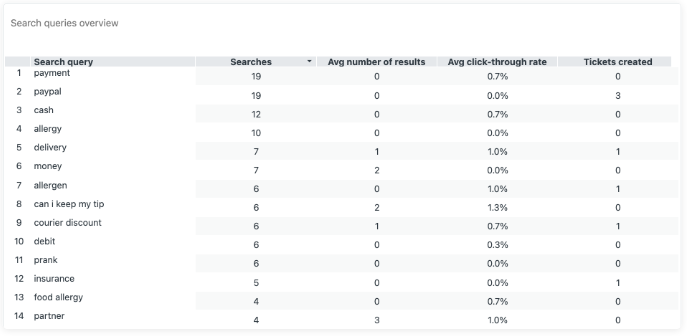
The definitions below are proposed measurement conventions. Reconcile them with your reporting system before calculating results; do not assume similarly named platform metrics use identical definitions.
| Measure | Working definition | What it cannot establish alone |
|---|---|---|
| Zero-result search rate | Recorded searches returning no results divided by all eligible recorded searches in the same scope and period, multiplied by 100. | Whether the answer is missing rather than poorly indexed, described, or permissioned. |
| Observed task completion | Attempts meeting the predefined outcome without assistance divided by all observed attempts under the test protocol, multiplied by 100. | How every user performs outside the observed tasks and participants. |
| Positive article feedback | Valid positive votes divided by all valid positive and negative votes for the reviewed articles and period, multiplied by 100. | The experience of readers who did not vote or the reason for dissatisfaction. |
| Verified corrective work | Count accepted fixes and remaining findings by priority, including overdue or blocked work. | Whether completing more editorial tasks improved user outcomes. |
Document exclusions, such as test traffic, and apply them consistently. Report an undefined rate as unavailable when its denominator is zero. For small usability samples, show the raw counts and observations rather than presenting a percentage as a population benchmark.
Article views indicate exposure, not resolution. Time on page can reflect either useful reading or confusion. Fewer support tickets may coincide with an improvement without proving that documentation caused it. Zendesk’s search documentation appropriately describes search and ticket relationships as potential correlations.
Pair an operational signal with direct evidence. For a findability fix, repeat the original searches and observe whether users reach the correct answer. For a procedural correction, confirm the task outcome. That gives the audit a stronger basis than a dashboard change alone.
8. Establish a review cycle that catches changes
APQC recommends combining recurring reviews with event-based triggers and notes that there is no single correct interval. Set the schedule according to the rate of change, the consequences of incorrect guidance, and the evidence you receive from users.
As an adjustable starting point, a fast-changing product team might review new flags weekly, examine priority workflows monthly, and revisit the broader inventory quarterly. A stable reference collection may need less frequent scheduled review. These are planning examples, not mandatory frequencies.
Trigger an earlier check when a product release changes a procedure, a policy owner approves new guidance, permissions change, a supported version retires, or users report a reproducible problem. Route the trigger to affected articles rather than adding an undifferentiated reminder to review everything.
Maintain an escalation path for missing owners and overdue reviews. Do not automatically remove a critical article simply because its review date passed; investigate and agree on an appropriate interim treatment.
The operating goal is straightforward: each important article should have an accountable owner, an identifiable authority, evidence of verification, and a reason to be reviewed again.
Knowledge base content audit FAQ
How long does a knowledge base audit take?
Estimate from a pilot rather than assuming a fixed time per article. Track evidence collection, review, correction, specialist approval, and retesting separately. Then plan the remaining work by article type and complexity, allowing for dependencies. Counting pages alone overlooks the difference between checking a short definition and validating a multi-step procedure.
Can AI perform the audit?
Use artificial intelligence (AI) as an optional assistant for bounded tasks such as organizing findings or proposing possible overlaps. Require source references for its suggestions, check them independently, and keep publication, deletion, and permission changes under human control.
The NIST Generative AI Profile identifies confidently incorrect output as a risk and recommends verifying generated sources and citations. Use only approved tools and authorized data. When auditing an AI-powered answer experience, separately inspect the source article, the retrieved material, and the generated answer rather than assuming every wrong response requires rewriting the source.
Begin with one important workflow and finish it through verification. A useful audit is not the largest spreadsheet or the highest average quality score. It is a documented set of decisions that leaves users with more dependable answers and gives the team a repeatable way to maintain them.
Sources verified: November 3, 2026.