Independent knowledge base software guide Evidence-led Updated 2026


Knowledge Base Content Lifecycle: Stages, Governance, and Templates
A Knowledge Base Content Lifecycle is the governed process that moves reusable knowledge from an identified need through intake, drafting, validation, approval, publication, observation, revision, and an approved final disposition.
The lifecycle begins before anyone writes an article. It continues after publication as people search, use, challenge, translate, update, replace, or retire the content. Publishing starts the evidence and improvement loop; it does not end the lifecycle.
A reliable lifecycle tells the organization who owns each decision, which evidence is required, which version is live, who may access the content, what should trigger a review, and what must happen when an article is replaced or removed from active use.
Model, not a universal standard: The lifecycle in this guide is a vendor-neutral operating model. Organizations should adapt its stages, controls, and terminology to their content types, risks, audiences, software, and policies.
Contents
- What a knowledge base content lifecycle covers
- A practical nine-stage lifecycle model
- Lifecycle stage vs status, confidence, version, and visibility
- How current product workflow models differ
- Review dates, verification, expiration, and freshness
- Revision and version control
- Translation and localization lifecycle
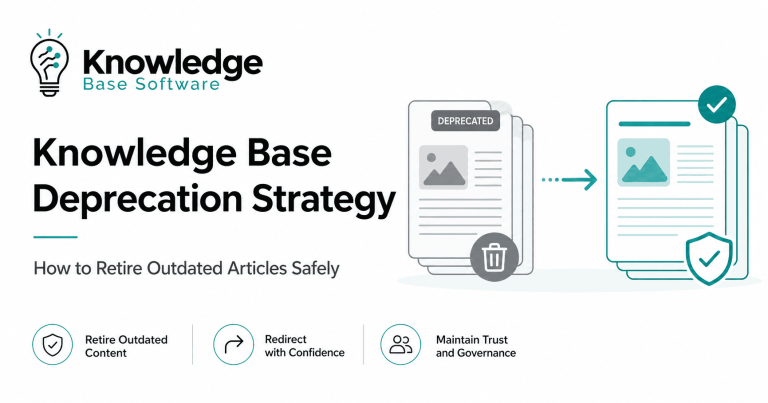
- Update, merge, deprecate, retire, archive, or delete
- KCS and the non-linear article lifecycle
- Roles, ownership, and lifecycle RACI
- Lifecycle metadata and evidence gates
- Emergency and temporary content
- AI and search throughout the lifecycle
- Security, privacy, records, and retention
- Accessibility throughout the lifecycle
- Software and automation requirements
- Lifecycle and content-health metrics
- Implementation roadmap
- Reusable lifecycle templates
- Common lifecycle mistakes
- Frequently asked questions
What Does a Knowledge Base Content Lifecycle Cover?
The lifecycle applies to more than the editorial steps used to publish one article. It connects the lifecycle of individual articles with the health of the complete knowledge corpus.
It normally covers:
- How content needs are discovered.
- How requests are triaged and prioritized.
- Who may author, review, approve, publish, and retire content.
- What evidence is required before publication.
- How audience, permissions, and visibility are controlled.
- How published content is monitored and improved.
- How working revisions coexist with live versions.
- How review dates, effective dates, and expiration dates are interpreted.
- How translations are updated and retired.
- How search, APIs, embedded help, chatbots, and AI systems receive lifecycle changes.
- How duplicate, superseded, restricted, or obsolete content leaves active use.
- How retention, legal hold, privacy, and deletion requirements affect disposition.
- How the organization measures flow, governance, quality, and content health.
Article lifecycle and corpus lifecycle
An article lifecycle follows one reusable answer from need identification through final disposition. A corpus lifecycle manages the health of the whole collection through ownership audits, duplicate detection, review backlogs, taxonomy changes, translation coverage, search analysis, and bulk retirement.
The two levels must work together. An article can follow its configured workflow correctly while the overall knowledge base still suffers from duplicate answers, unowned content, poor permissions, stale translations, broken links, or retired content that remains available through AI.
Lifecycle, workflow, and governance are different
The lifecycle is the complete operating process. A workflow is the configured sequence of actions and approvals used to execute part of it. Governance defines the ownership, standards, policies, controls, and enforcement that determine how those workflows should operate.
A team may therefore have one broad lifecycle, several workflows for different content types, and a governance model that establishes who may use each workflow.
A Practical Nine-Stage Knowledge Base Content Lifecycle
The following model is adaptable. Some teams combine stages, while others separate technical, editorial, legal, accessibility, security, or localization work into distinct gates.
| Stage | Primary question | Required output |
|---|---|---|
| 1. Need identification | What reusable knowledge need exists? | Documented signal or evidence |
| 2. Intake and triage | Should the need produce new or changed content? | Create, update, merge, link, reject, or route elsewhere |
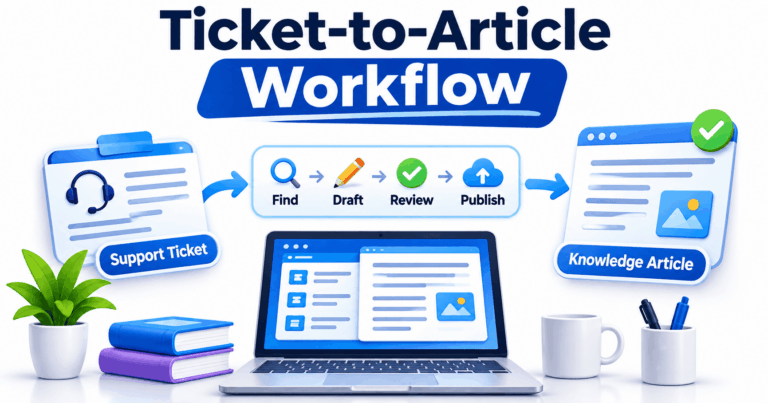
| 3. Drafting | What answer can another person validate? | Structured draft with sources and metadata |
| 4. Validation and review | Is the content accurate, usable, safe, and appropriate? | Approval, rejection, or changes requested |
| 5. Approval and release preparation | Is the correct version ready for the intended audience? | Approved release package |
| 6. Publication and distribution | Does the live experience work as intended? | Verified live article and downstream distribution |
| 7. Observation and feedback routing | What does real use reveal? | Signals routed to an accountable owner |
| 8. Revision and revalidation | What must change, and which controls must run again? | Approved replacement version |
| 9. Disposition | Should the content remain active, restricted, replaced, preserved, or removed? | Approved update, merge, deprecation, retirement, archive, or disposal |
1. Identify a reusable knowledge need
A lifecycle should begin with evidence of a repeatable need, not with an author’s desire to create another page.
Common triggers include:
- Repeated support requests.
- Searches that return no useful result.
- Repeated search refinements.
- A product, service, policy, or process change.
- A release, incident, known issue, or temporary workaround.
- Agent, employee, customer, or partner feedback.
- An audit, quality finding, or compliance change.
- An incorrect AI answer or unsupported chatbot response.
- A new market, language, audience, or product version.
- Retirement of a legacy system or process.
The output should be a documented user need. “Write an article about reporting” is weak. “Support administrators need to export last month’s unresolved cases without exposing restricted customer fields” is specific enough to triage.
2. Triage the request before drafting
Search for an existing answer before approving new content. The correct response may be to update an article, merge duplicates, add a synonym, improve navigation, change the product, create training, or handle a one-time case outside the knowledge base.
A useful intake decision records:
- The user need and expected outcome.
- The source of the request.
- The intended audience.
- Evidence of demand or risk.
- Existing related content.
- The authoritative source.
- The proposed owner.
- The content type.
- The risk or governance class.
- Product, service, version, region, or jurisdiction where relevant.
- The required release date.
- Security, privacy, legal, accessibility, and localization implications.
Do not prioritize only by search volume. A low-volume security procedure or emergency article may deserve more attention than a popular but low-risk FAQ.
3. Create a reviewable draft
The draft should convert the approved need into an answer that another person can test and validate. It should not depend on undocumented institutional memory.
Depending on the content type, a draft may include:
- A direct answer or defined task.
- The intended audience and scope.
- Prerequisites and required permissions.
- Product, service, environment, or version.
- Steps and expected result.
- Exceptions, limitations, and failure conditions.
- Troubleshooting and escalation.
- Source evidence.
- Owner, content type, access level, and lifecycle metadata.
- Related or replacement articles.
- Translation and accessibility requirements.
Do not copy a ticket, chat transcript, incident record, or customer email directly into a reusable article. Remove personal and confidential information, separate repeatable guidance from case-specific decisions, verify the answer, and assign an accountable owner.
4. Validate according to content risk
Review should match the audience, risk, and intended use. A low-risk product tip may need a knowledgeable peer. A billing, security, privacy, policy, legal, or regulated procedure may require several specialized reviewers.
Potential review paths include:
- Subject-matter or technical review.
- Process-owner review.
- Editorial and content-standard review.
- Product review.
- Security and privacy review.
- Legal, policy, or compliance review.
- Accessibility review.
- Localization review.
- Records-retention review.
- AI-readiness review.
Reviewers should record a decision: approved, rejected, or changes requested. An unresolved comment thread is not a lifecycle decision.
Editorial approval confirms clarity and structure. It does not independently prove factual accuracy.
5. Approve and prepare the release
Approval and publication may be separate actions. One authorized role may approve the substance, while another controls the production release.
Before publication, confirm:
- The approved article version.
- The approver and decision record.
- The audience, visibility, and access permissions.
- The publication channel.
- The effective date and publication date.
- Scheduled publication, when timing matters.
- The review trigger and next review date, where appropriate.
- The configured meaning of expiration.
- Translation readiness.
- Search metadata and navigation placement.
- In-app, API, chatbot, agent-assist, and AI eligibility.
- Replacement links and redirects.
- The rollback or recovery path.
- Required change communication.
6. Publish and verify the live experience
Publication is not complete when the status changes to Published. Test the live experience as the intended reader.
- The correct version is live.
- The intended audience can access it.
- Unauthorized users cannot access or discover it.
- Search returns the current article.
- Search snippets do not expose restricted content.
- Navigation, related articles, and links work.
- Attachments use the correct permissions.
- Images, code, tables, and media render correctly.
- Keyboard and screen-reader checks pass.
- Mobile, embedded, and in-app views work.
- APIs return the intended version.
- AI and chatbot systems retrieve the approved source.
- Old versions no longer appear as current.
- Redirects and canonical behavior work where relevant.
- Analytics events are recorded as designed.
7. Observe use and route feedback
A live article remains under observation. Useful signals include explicit corrections, failed searches, repeat questions, broken links, product changes, audit findings, accessibility issues, translation feedback, support escalation, and incorrect AI citations.
Every meaningful signal needs a routing rule. Feedback that remains in an unmonitored inbox or dashboard does not improve content.
A signal may lead to:
- No change after investigation.
- A metadata or synonym update.
- A revision.
- A new article.
- A merge.
- A product or process change.
- A restriction.
- An escalation.
- A retirement decision.
8. Revise and revalidate
A published article may need correction while users still depend on the current version. Where the software supports it, keep the live version available while a working revision passes through drafting, review, and approval.
For every material revision, record:
- What changed and why.
- The source evidence.
- The working and published versions.
- The affected audiences.
- Required reviewers.
- Related and dependent articles.
- Affected translations.
- Links, screenshots, APIs, embedded help, and macros that need updates.
- Search and AI index impact.
- The publication and rollback plan.
Do not silently alter high-risk official guidance without an audit record. Do not change a visible date merely to make content appear fresh.
9. Apply an explicit disposition
When content should no longer serve as the current answer, choose a specific outcome. Do not use “archive” as a catch-all for every situation.
The disposition decision must address replacements, redirects, backlinks, translations, search, APIs, embedded copies, cached versions, AI indexes, retention, legal hold, privacy obligations, and the audit trail.
Lifecycle Stage, Workflow Status, Confidence, Version, and Visibility Are Different
Many lifecycle failures occur because one field named “Status” is expected to answer several unrelated questions.
| Concept | Question it answers | Illustrative values |
|---|---|---|
| Lifecycle stage | What kind of work is happening? | Intake, drafting, review, publishing, revision, disposition |
| Workflow status | Which transition is allowed next? | Draft, In Review, Approved, Published |
| Confidence | How strongly has the answer been validated? | Work in Progress, Not Validated, Validated |
| Audience | Who is the content intended for? | Employee, customer, partner, public |
| Visibility | Where may it be discovered? | Internal search, public help center, API, chatbot |
| Governance class | How tightly must changes be controlled? | General, official, restricted, compliance-controlled |
| Version | Which revision is being viewed? | Published 2.0, working 2.1, translation 2.0 |
| Disposition | Should it remain an active answer? | Active, Deprecated, Retired, Archived, Disposed |
Dates also answer different questions
| Date | Meaning | What it does not prove |
|---|---|---|
| Effective date | When the guidance becomes applicable | That users can already see it |
| Publication date | When the content becomes visible | That the guidance is already effective |
| Last-modified date | When a field or content item last changed | That a substantive factual review occurred |
| Last substantive review | When an accountable reviewer verified the content | That no later event has invalidated it |
| Next review date | When the owner should re-evaluate the content | That the article must automatically disappear |
| Expiration date | A configured date that triggers product- or policy-defined behavior | That the content is deleted or archived |
| Retirement date | When the content leaves active use | That every retained or cached copy has been deleted |
Represent these dimensions separately when the platform allows it. When the platform does not, document how each configured field is being used and which questions remain outside the system.
Current Product Workflow Models Use Different States
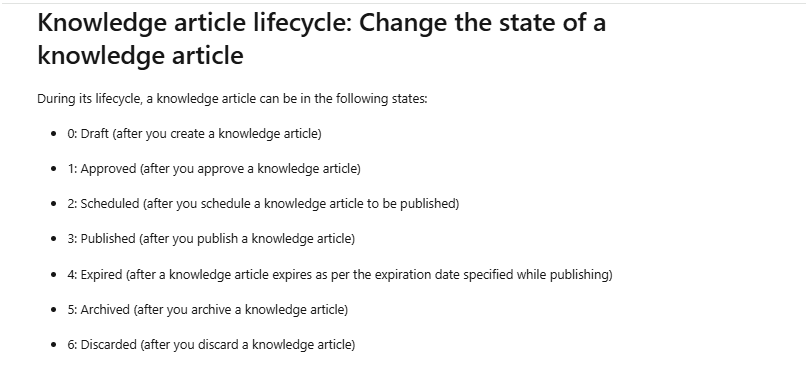
There is no universal set of knowledge article statuses. Current official documentation from major platforms demonstrates why organizations should not copy one vendor’s labels into a general lifecycle model.
| Model | Documented states or dimensions | Important distinction |
|---|---|---|
| Microsoft Dynamics 365 | Draft, Approved, Scheduled, Published, Expired, Archived, Discarded | These are Dynamics article states, not universal lifecycle definitions. |
| ServiceNow | Draft, Review, Scheduled for Publish, Published, Pending Retirement, Retired, Outdated | Versioning behavior and available states can depend on product configuration and plugins. |
| Zendesk Team Publishing | In Progress, Awaiting Review, Ready to Publish, Published, Archived | An article may have a published version while another version is in a review state. |
| Freshservice | Draft, In Review, Edits Suggested, Approved, Published | Its documented review-date behavior can either return content to draft or keep it published and flagged, depending on configuration. |
| Knowledge-Centered Success | Confidence, audience, and governance; confidence includes Work in Progress, Not Validated, Validated, and Archived | KCS article state is not simply an editorial workflow status. |
Use these as reference implementations. Verify plan, edition, plugin, configuration, API, translation, retirement, and deletion behavior before designing a workflow around any product.
Review Dates, Verification, Expiration, and Content Freshness
Content freshness is the continuing suitability of an article for its intended audience and task. It cannot be determined from the last-modified date alone.
A useful program combines:
- Risk-based review: Higher-risk content receives stronger controls.
- Calendar-based review: Owners verify content at a defined interval where useful.
- Event-triggered review: Relevant changes start review before the calendar date.
- Use-driven improvement: Reuse, feedback, search, and support interactions reveal changes that are needed.
APQC’s current knowledge base maintenance guidance emphasizes named ownership, pre-publication vetting, review timelines, early review triggers, audits, and workflow enforcement.
Event triggers that should not wait for the next review date
| Trigger | Likely lifecycle action |
|---|---|
| Product or service release | Review affected procedures, screenshots, versions, and links |
| Policy or process change | Revalidate official guidance and dependent content |
| Security incident or vulnerability | Restrict, correct, or replace affected content immediately |
| Legal or regulatory change | Route content through the required qualified review |
| Incorrect AI answer | Investigate source, permissions, retrieval, and index freshness |
| Repeated failed searches | Improve article, metadata, synonyms, navigation, or product design |
| Owner departure | Reassign ownership and review high-risk orphaned content |
| Source document change | Compare affected articles and translations |
| Replacement article published | Retire, redirect, merge, or deprecate the superseded answer |
Verification is not necessarily revision
Verification means an authorized person reviewed the article and determined that it remains accurate and appropriate. The article may be verified without changing its visible content.
Zendesk, for example, documents a separate article verification process that allows owners or authorized publishers to confirm that content remains current after review.
Do not update a last-modified date merely to record verification. Preserve a separate substantive-review field or audit event when the platform supports it.
Expiration is a trigger, not a universal disposition
Passing an expiration or review date can produce different outcomes. One system may unpublish the article, another may retain it while flagging it, and another may require a configured workflow.
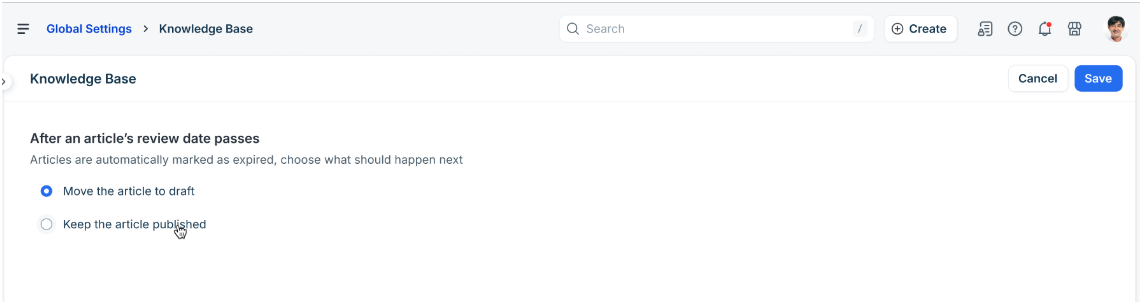
Freshservice’s current documentation illustrates the difference: administrators can configure past-review-date articles to return to draft or remain published while being flagged for review. Test the behavior in the proposed platform instead of assuming that “expired” means hidden, archived, or deleted.
Revision, Revalidation, and Version Control
Version control protects the live experience while changes are being prepared. It also creates traceability when a decision must be reconstructed later.
Published and working versions may coexist
A published version can remain available while a draft revision moves through review. The system should make it clear which version users see and which version reviewers are editing.
Zendesk documents that a published article can also have a version in another Team Publishing state. ServiceNow documents versioned workflows in which publishing a newer version changes the previous published version to Outdated. Microsoft documents article roots that can contain multiple versions and translations.
Major and minor revisions
A versioning policy may distinguish material changes from low-risk corrections. The organization must define that distinction according to content type and risk.
| Change | Possible treatment | Risk question |
|---|---|---|
| Typographical correction with no change in meaning | Lightweight approved correction | Could the correction alter a command, number, link, or legal meaning? |
| Updated screenshot or interface label | Minor revision and targeted validation | Did the underlying workflow change? |
| New prerequisite, limitation, or exception | Material revision | Could a user act differently because of the change? |
| Policy, security, billing, or legal change | Full required review | Which qualified reviewers and effective dates apply? |
| Complete replacement of the procedure | New major version or replacement article | Should old links redirect or remain available for legacy users? |
Revision impact assessment
- Which audiences are affected?
- Which translations need revision?
- Which related articles, macros, templates, and training refer to this content?
- Which links or embedded help experiences depend on it?
- Which APIs, search indexes, chatbots, or AI systems retrieve it?
- Does the change alter access permissions?
- Does it require notification or release notes?
- Can the previous version be restored safely?
Manage Every Translation as Governed Content
A translation is not merely a copy of the source text. It may have its own owner, reviewer, version, approval, publication date, review date, and retirement decision.
Translation lifecycle controls
- Maintain the source-to-translation relationship.
- Record locale and regional variant.
- Track draft, review, approval, and publication status for each language.
- Notify localization owners when the source changes.
- Record translation lag and outstanding impact.
- Use approved terminology and glossaries.
- Apply human review to high-risk content.
- Define fallback-language behavior.
- Test language-specific search and navigation.
- Define whether publication is synchronized or independent.
- Review translation handling during retirement, archive, and deletion.
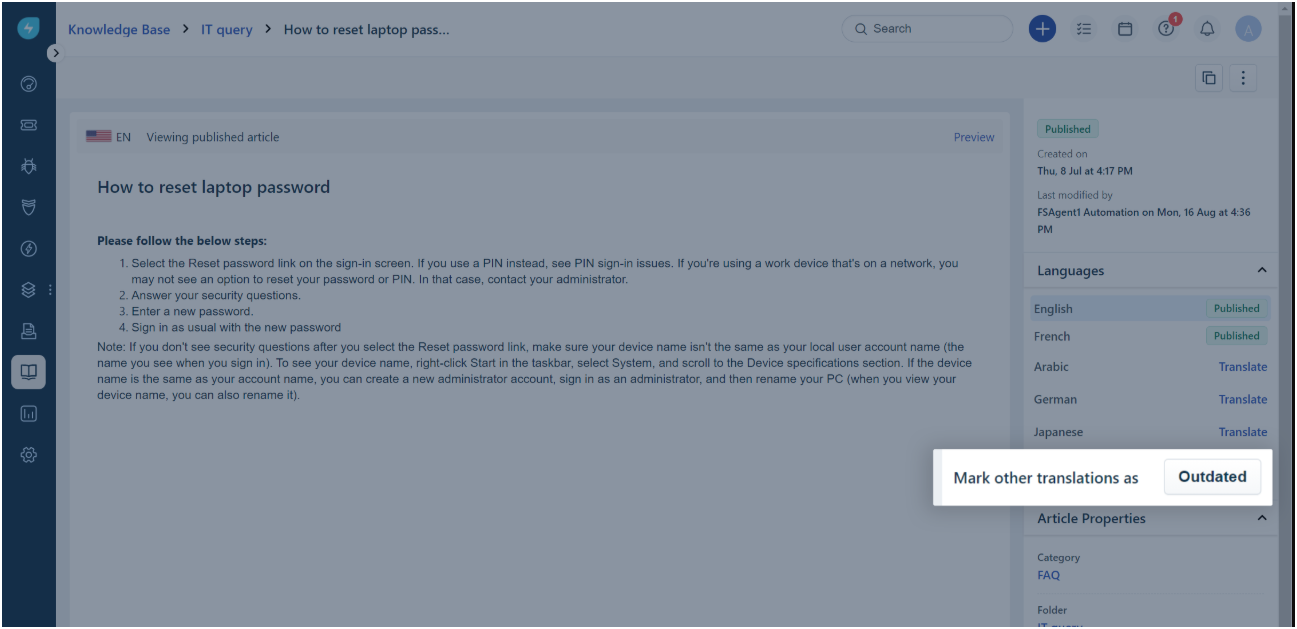
Do not assume lifecycle actions cascade automatically
Product behavior differs materially:
- ServiceNow documents that retiring a parent article does not automatically retire its translated child articles.
- Freshservice documents a workflow for marking other translations outdated when the primary-language article changes.
- Zendesk documents that permanently deleting an archived article also permanently deletes its associated translations.
Test source updates, translation status, retirement, deletion, restoration, search, and AI retrieval in every required language before relying on automated behavior.
Choose the Correct Content Disposition
Disposition is the approved decision about what should happen when content should no longer remain active in its current form.
| Outcome | Use it when | Key action |
|---|---|---|
| Update | The same user need remains and the answer can be corrected | Publish a validated replacement version |
| Merge | Several articles compete as answers to the same need | Create one authoritative answer and redirect or retire duplicates |
| Redirect | Old links should resolve to a current replacement | Preserve user and search continuity |
| Deprecate | Legacy users still need the old guidance, but it is no longer preferred | Label scope and direct most users to the replacement |
| Retire | The article should leave active search and ordinary use | Remove it from active discovery and address dependencies |
| Archive | The content must be preserved outside the active experience | Retain it under defined access and retention rules |
| Delete or dispose | Approved authority allows or requires permanent removal | Apply deletion, evidence, and backup-handling rules |
| Restrict | The article remains valid but should have a narrower audience | Change access and test all discovery channels |
| Move | The content is actually a record or asset that belongs elsewhere | Transfer it to the approved system of record |
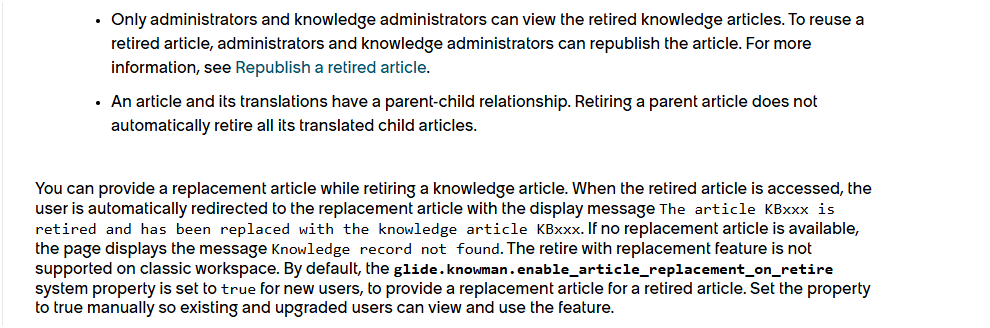
Retirement checklist
- Record the reason and decision owner.
- Identify the effective retirement date.
- Select the replacement article, if one exists.
- Configure and test redirects.
- Update backlinks and bookmarks under organizational control.
- Remove the article from active navigation and recommendations.
- Update internal and external search indexes.
- Remove or update AI, chatbot, agent-assist, and vector-store sources.
- Address API consumers and syndicated copies.
- Clear or expire cached versions where required.
- Review attachments and media independently.
- Process all translations.
- Preserve required analytics or audit history.
- Apply retention, legal-hold, privacy, and disposal rules.
- Define restoration or recovery behavior.
- Notify affected users where appropriate.
Archive and delete are not interchangeable
Archiving normally preserves content outside the active experience. Deletion removes it according to product behavior and applicable policy. Neither action automatically proves records-management compliance.
For U.S. federal records, the National Archives distinguishes active use, retention, transfer, and destruction through explicit disposition instructions. That federal framework does not apply to every knowledge base, but it illustrates why “keep until no longer needed” is too ambiguous for controlled disposition.
KCS Treats the Article Lifecycle as Non-Linear
Knowledge-Centered Success, or KCS, offers a distinct approach for environments where knowledge is captured and improved in the flow of work.
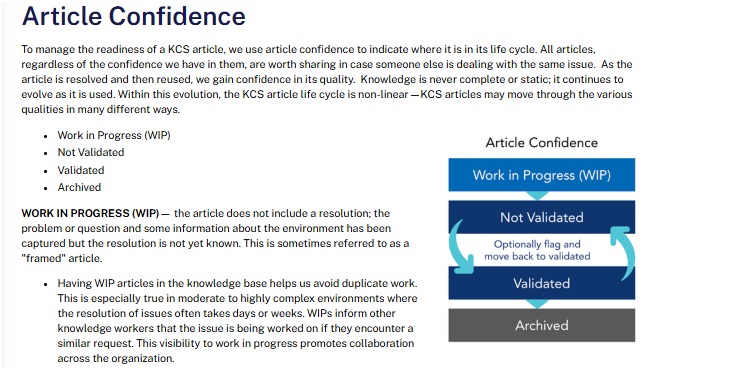
Current Consortium for Service Innovation guidance describes KCS article state through three separate metadata dimensions:
- Article confidence: the level of certainty in the structure and content.
- Article audience: who may see the article.
- Article governance: who may create or modify content with particular control requirements.
KCS confidence values include Work in Progress, Not Validated, Validated, and Archived. These values should not be merged carelessly with a generic Draft, Review, and Published workflow.
Reuse is review
The KCS reuse-is-review technique encourages knowledge workers to assess and improve content while using it, when the problem context is available.
This demand-driven approach focuses improvement effort on content that is being used. It should complement—not automatically replace—scheduled, legal, regulatory, security, or policy reviews where those controls are required.
Flag it or fix it
KCS also describes a flag-it-or-fix-it workflow. A trained and authorized person may correct an issue in the flow of work; otherwise, the person flags it for someone with the required expertise or authority.
KCS is a methodology, not a mandatory lifecycle for every organization. Teams can adopt useful principles without copying every KCS term into their software.
Roles, Ownership, and an Illustrative Lifecycle RACI
Every important article needs one accountable owner after publication. The author is not necessarily the continuing owner, and the approver is not necessarily the publisher.
Small teams may combine several responsibilities. High-risk content may require separation between author, reviewer, approver, and publisher.
| Lifecycle activity | Responsible | Accountable | Consulted | Informed |
|---|---|---|---|---|
| Intake and duplicate check | Intake owner or knowledge coordinator | Domain owner | Support, search, product, or process teams | Requester |
| Drafting | Author or knowledgeable practitioner | Article owner | Subject-matter expert | Requester |
| Validation | Required reviewers | Authorized approver | Editorial, legal, security, privacy, accessibility, localization | Author |
| Publication | Publisher or knowledge administrator | Article owner or release owner | Search, platform, product, communications | Affected audiences |
| Observation and feedback | Analytics and support teams | Article owner | Search and AI owners | Domain owner |
| Revision | Author or maintainer | Article owner | Impact-required reviewers | Publisher and localization owner |
| Disposition | Knowledge manager or administrator | Domain or records owner | Legal, privacy, security, records, search, AI, localization | Affected users and system owners |
This RACI is illustrative. Adapt it to the organization’s team size, content risk, and operating model.
Ownership transfer
Employee departure, role change, reorganization, or outsourcing should trigger ownership reassignment. A lifecycle dashboard should identify active articles without a current accountable owner.
Lifecycle Metadata and Evidence Gates
Metadata makes lifecycle controls searchable, reportable, and automatable. Do not add fields merely because the platform supports them.
Useful lifecycle metadata
- Stable article ID
- Content type and domain
- Audience and visibility
- Access classification
- Confidence or validation level
- Governance or risk class
- Lifecycle stage and workflow status
- Article owner, author, reviewers, approver, and publisher
- Authoritative source and source version
- Product, service, environment, version, region, or jurisdiction
- Current published and working versions
- Effective, publication, review, expiration, and retirement dates
- Locale and translation status
- Related and dependent articles
- Replacement article and deprecation reason
- Retention class and legal-hold status
- Search, API, chatbot, and AI eligibility
- Audit record
Every field should support search, access, governance, automation, measurement, traceability, or disposition. Do not force one status field to carry every lifecycle dimension.
Illustrative evidence gates
| Transition | Minimum evidence | Decision owner |
|---|---|---|
| Requested → Draft | Reusable need, duplicate check, audience, source, owner, risk, scope | Intake or domain owner |
| Draft → In Review | Complete draft, source evidence, metadata, access classification, sensitive-data check | Author or article owner |
| In Review → Approved | Required factual and risk reviews, resolved changes, identified version | Authorized approver |
| Approved → Published | Audience, access, timing, rendering, links, metadata, rollback, downstream checks | Publisher or release owner |
| Published → Needs Review | Qualifying signal, source change, error, feedback, audit, or scheduled review | Article owner |
| Needs Review → Published | Verification or approved revised version; dependencies checked | Required reviewer and publisher |
| Published → Retired | Reason, replacement, redirect, translation, search, AI, retention, and approval decisions | Domain owner plus required risk owners |
| Archived → Disposed | Disposition authority, retention completion, legal-hold check, audit evidence | Policy-defined authority |
The names are illustrative. A vendor may use different states, but the organization should still preserve the actor, evidence, reason, time, version, visibility effect, and rejection or rollback path.
Create a Separate Lifecycle for Emergency and Temporary Content
Outages, known issues, emergency workarounds, security advisories, incident communications, and temporary policy exceptions may need a faster release path.
A fast track should reduce delay, not remove accountability. Temporary content should have:
- A clearly identified owner.
- An authoritative incident or change source.
- A defined audience and access level.
- A temporary or emergency label.
- An effective time.
- An expiration trigger.
- A replacement or permanent-documentation plan.
- A post-incident review.
- Removal rules for search, recommendations, and AI.
Temporary content should not remain active indefinitely because no one owns its retirement.
AI and Search Throughout the Content Lifecycle
AI can assist at several stages, but it should not become the accountable content owner or bypass required review.
| Lifecycle stage | Potential AI use | Required control |
|---|---|---|
| Intake | Cluster repeated requests and identify candidate gaps | Verify that the pattern represents a reusable need |
| Triage | Detect possible duplicate or related articles | Human decision on create, update, merge, or reject |
| Drafting | Generate outlines, summaries, metadata, or proposed wording | Approved sources, sensitive-data control, and human validation |
| Review | Flag missing sections, broken links, terminology, or possible conflicts | Do not treat automated checks as factual approval |
| Translation | Produce a translation draft | Qualified review for meaning, terminology, and risk |
| Observation | Detect content gaps, repeated failures, and stale patterns | Explainable signals and owner review |
| Revision | Suggest changes based on approved evidence | Version-aware workflow and audit history |
| Disposition | Identify possible duplicate or low-value content | Do not retire content based only on low use or an automated score |
Atlassian currently documents a product-specific example in which Rovo analyzes recent work items and suggests either a new article or an improvement to an existing article. Its workflow still requires a person to review, edit, accept, discard, or publish the proposed content.
Downstream synchronization is part of every lifecycle change
Publishing, revising, restricting, or retiring an article must propagate beyond the authoring interface.
- Update keyword and semantic search indexes.
- Update vector stores and retrieval indexes.
- Remove retired or restricted sources from chatbots and AI agents.
- Update source citations and article identifiers.
- Invalidate outdated caches.
- Update APIs and syndicated channels.
- Update in-app help and embedded experiences.
- Update agent-assist and support macros.
- Test denied-access scenarios.
NIST’s AI Risk Management Framework provides a voluntary framework for managing AI risks. Apply proportionate controls to the organization’s use of generated content and knowledge retrieval.
Do not describe an AI system as hallucination-free. A cited answer can still select the wrong source, omit an exception, apply the wrong version, or retrieve content that should have been retired.
Security, Privacy, Records, and Retention Controls
The lifecycle may process personal information, customer records, employee data, security procedures, incident details, confidential operations, regulated guidance, attachments, and records subject to retention or legal hold.
Controls to apply throughout the lifecycle
- Access classification and least privilege.
- Separate permissions for articles and attachments.
- Redaction and data minimization.
- Audit logging.
- Secure export and download controls.
- Retention classification.
- Legal-hold checks.
- Approved deletion and secure disposal.
- Backup and restore handling.
- Owner and administrator offboarding.
- Incident response.
- Restrictions on AI and chatbot sources.
Do not publish passwords, secret keys, private tokens, unnecessary personal information, or confidential case details in reusable knowledge.
Do not treat a knowledge-base archive as a complete records-management system unless it has been evaluated and approved for that purpose. Retention and deletion decisions require the organization’s applicable legal, contractual, privacy, security, and records-management context.
Include Accessibility in Every Lifecycle Stage
Accessibility should not be a final publication check performed after the content is complete. It should be built into templates, authoring, review, translation, media creation, migration, revision, and replacement.
- Use descriptive semantic headings.
- Write meaningful link text.
- Provide appropriate text alternatives for images.
- Use accessible table structure.
- Maintain a logical reading order.
- Check contrast, zoom, and reflow.
- Provide captions and transcripts.
- Review PDFs and downloadable attachments.
- Identify the language of translated content.
- Test keyboard and screen-reader workflows.
- Recheck accessibility after material revisions and migrations.
W3C’s Writing for Web Accessibility guidance explains how semantic headings and structured content help users understand and navigate longer documents.
A platform accessibility statement does not prove that every article, attachment, custom theme, embedded component, or authoring workflow is accessible. Test representative content and workflows.
Software and Automation Requirements
Evaluate software against the lifecycle the organization intends to operate. Do not redesign governance around a limited status dropdown without first understanding the operational need.
| Capability area | Questions to test |
|---|---|
| Intake and backlog | Can requests, evidence, priority, owner, duplicate checks, and disposition decisions be tracked? |
| Templates and metadata | Can different content types use different templates and required fields? |
| Workflow | Can the organization configure review, rejection, approval, scheduling, and retirement paths? |
| Ownership | Can owners, groups, reviewers, approvers, and publishers be assigned and reassigned? |
| Published and working versions | Can a live version remain available while a revision is reviewed? |
| Version history | Can users compare, restore, audit, and distinguish major and minor revisions? |
| Dates and verification | Are effective, publication, review, expiration, and verification events separate? |
| Review automation | Are reminders, escalation, dashboards, bulk review, and configurable post-review-date actions available? |
| Translations | Can source changes flag translations, and how do retirement and deletion affect them? |
| Disposition | Does the system support replacement, redirects, retirement, archive, restoration, and controlled deletion? |
| Permissions | Are restrictions enforced in articles, attachments, search, APIs, exports, and AI? |
| Search and AI | Can lifecycle state, version, audience, expiration, and retirement control retrieval? |
| Auditability | Are transitions, decisions, comments, versions, and actors retained in an audit history? |
| Analytics | Can the organization measure flow, ownership, review, freshness, feedback, reuse, and disposition? |
| Export and portability | Can content, metadata, permissions, versions, translations, links, and audit data be exported? |
Vendor demonstration scenarios
- Create a request, search for duplicates, and approve it for drafting.
- Create an article from a content-type-specific template.
- Request changes and preserve the review decision.
- Publish one version while keeping a working revision separate.
- Verify an article without changing its visible content.
- Trigger an event-based review.
- Show what happens when a review or expiration date passes.
- Update a source article and identify affected translations.
- Retire an article with a replacement and redirect.
- Confirm that retired content leaves search, API, chatbot, and AI retrieval.
- Restore an archived article where the product allows it.
- Export article history, metadata, translations, and permissions.
Verify each capability in the proposed edition and configuration. A screenshot or marketing statement alone does not prove production behavior.
Lifecycle and Content-Health Metrics
Measure flow, governance, quality, and use separately. A single content-health score can hide the reason an article is failing.
Flow metrics
- Intake backlog and backlog age.
- Time from request to triage decision.
- Draft, review, and approval cycle time.
- Publication lead time.
- Rework and rejection rate.
- Time from detected error to correction.
- Content-gap closure time.
- Translation lag.
- Retirement backlog.
- Time from replacement publication to retirement.
Governance metrics
- Percentage of active articles with owners.
- Percentage with authoritative sources.
- Percentage with defined audiences and access classifications.
- Overdue-review rate.
- Unverified or expired content rate.
- High-risk articles without required approval.
- Orphaned content after owner departure.
- Translations marked outdated.
- Retired content still appearing in search or AI.
- Unauthorized-access test results.
Quality and use metrics
- Search success and refinement.
- Zero-result searches.
- Article reuse and links from support cases.
- Helpful and unhelpful feedback.
- Contact after article use.
- Repeat questions.
- Broken links.
- Duplicate rate.
- Incorrect-content reports.
- AI citation and answer issues.
- Replacement redirect success.
Interpret metrics carefully
- Article views do not prove resolution.
- Helpful votes do not prove factual accuracy.
- Fewer tickets do not automatically prove successful self-service.
- Low use does not prove that content has no value.
- High use does not prove content quality.
- Review completion does not prove the article is correct.
- AI-answer acceptance does not prove correctness.
Low-use content may be seasonal, emergency-only, legally required, high risk, or intended for a small audience. High traffic may indicate useful content, but it may also reveal a recurring product failure or confusing process.
How to Implement a Knowledge Base Content Lifecycle
- Define the scope. Identify the knowledge bases, audiences, content types, languages, and downstream systems included.
- Inventory current content and platforms. Document sources, versions, owners, permissions, translations, review dates, and lifecycle states.
- Classify content by type and risk. Separate ordinary FAQs from official, regulated, security-sensitive, emergency, and records-related content.
- Define lifecycle terminology. Agree on the meaning of stage, status, confidence, audience, version, visibility, expiration, retirement, and archive.
- Assign ownership. Define article, domain, workflow, platform, localization, search, AI, and records responsibilities.
- Design the metadata model. Keep fields only when they support a lifecycle decision or control.
- Design intake and prioritization. Require a user need, duplicate check, source, audience, owner, and risk decision.
- Define workflow transitions. Specify the actor, evidence, approval, rejection, version, visibility effect, and audit event for each transition.
- Define review triggers. Combine risk-based dates with product, policy, process, incident, feedback, owner, and source changes.
- Define translation handling. Decide how updates, review, publication, retirement, and deletion affect every locale.
- Define disposition and retention. Separate update, merge, redirect, deprecate, retire, archive, restrict, move, and delete.
- Define downstream synchronization. Include search, APIs, embedded help, chatbots, agent assist, caches, and AI indexes.
- Configure the software. Map the lifecycle to supported workflows without assuming unsupported behavior.
- Create templates and checklists. Tailor them to content type and risk.
- Pilot one domain. Test normal, rejected, revised, translated, restricted, expired, and retired scenarios.
- Measure flow and content health. Use the results to simplify controls and correct gaps before expansion.
Do not promise a universal implementation timeline. The effort depends on corpus size, content quality, languages, risk, integration scope, and available ownership.
Reusable Lifecycle Templates
The bracketed fields below are intentional customization fields.
Content request and intake record
| Requested topic or task | [Topic or Task] |
|---|---|
| User need | [What the user needs to understand or complete] |
| Evidence | [Tickets, searches, release, audit, feedback, incident, other] |
| Intended audience | [Audience] |
| Existing related content | [Article IDs or None] |
| Authoritative source | [Source and Version] |
| Proposed owner | [Owner] |
| Content type | [FAQ, How-To, Policy, Procedure, Known Issue, Other] |
| Risk or governance class | [Class] |
| Required release date | [Date or Not Applicable] |
| Required reviewers | [Roles] |
| Intake decision | [Create, Update, Merge, Link, Reject, Route Elsewhere] |
Article lifecycle record
| Stable article ID | [ID] |
|---|---|
| Title | [Title] |
| Content type | [Type] |
| Audience and visibility | [Audience and Channels] |
| Owner | [Accountable Owner] |
| Authoritative source | [Source] |
| Published version | [Version] |
| Working version | [Version or None] |
| Workflow status | [Status] |
| Confidence or validation | [Value] |
| Effective date | [Date] |
| Last substantive review | [Date] |
| Next review trigger | [Date and/or Event] |
| Translation status | [Status by Locale] |
| Search and AI eligibility | [Rules] |
| Replacement article | [ID or None] |
| Retention or legal hold | [Classification] |
Review checklist
- The user need and scope remain valid.
- The factual answer is supported by the current authoritative source.
- The audience and visibility remain correct.
- Prerequisites, exceptions, and limits are clear.
- Personal, confidential, and security-sensitive data are handled correctly.
- Required legal, policy, security, privacy, or compliance reviews are complete.
- Headings, links, media, tables, and attachments meet accessibility requirements.
- Metadata, ownership, dates, and versions are correct.
- The article does not duplicate or conflict with another active answer.
- Translations and regional variants have been assessed.
- Search terms, synonyms, and navigation remain useful.
- AI and chatbot eligibility remain appropriate.
- The escalation route is current.
Retirement decision record
| Article ID and version | [ID and Version] |
|---|---|
| Reason | [Reason] |
| Decision owner | [Owner] |
| Effective date | [Date] |
| Replacement article | [ID or None] |
| Redirect | [URL and Test Result] |
| Backlinks and dependencies | [Actions] |
| Translations | [Actions by Locale] |
| Search, API, and AI | [Removal or Replacement Actions] |
| Attachments and cached copies | [Actions] |
| Retention and legal hold | [Decision] |
| Audit evidence | [Location] |
| User communication | [Required or Not Required] |
Common Knowledge Base Content Lifecycle Mistakes
- Starting the lifecycle at Draft: Capture the user need, duplicate check, source, owner, and risk first.
- Treating Published as the final stage: Publication starts observation, reuse, feedback, revision, and disposition.
- Using one Status field for everything: Separate workflow, confidence, audience, visibility, version, and disposition.
- Copying a vendor’s status model: Design the operating model first, then map it to the product.
- Using one review interval for all content: Combine risk-based schedules with event-triggered review.
- Treating last modified as last reviewed: Record substantive verification separately.
- Assuming expired means unpublished: Configure and test the actual behavior.
- Editing the only live copy directly: Preserve a trusted published version while a material revision is reviewed.
- Ignoring translations: Track language-specific status, lag, review, and disposition.
- Automatically archiving every overdue article: Choose behavior according to risk, audience, and available replacement.
- Retiring the page but not its dependencies: Update redirects, links, search, APIs, embedded help, and AI indexes.
- Deleting without a retention decision: Check applicable policy, records, privacy, legal hold, and backup behavior.
- Allowing feedback to accumulate without routing: Assign owners and escalation rules for correction signals.
- Using AI drafts as approved content: Keep generated suggestions in draft until required review is complete.
- Retiring content because traffic is low: Assess risk, seasonality, emergency use, legal value, and target audience.
- Leaving temporary articles active indefinitely: Assign an owner, expiration trigger, and permanent-content decision.
- Failing to reassign owners: Monitor orphaned content after departures and reorganizations.
Frequently Asked Questions
What is a Knowledge Base Content Lifecycle?
It is the governed process that moves reusable knowledge from an identified need through intake, drafting, validation, approval, publication, observation, revision, and an approved disposition.
Is there one standard set of lifecycle stages?
No. Methodologies and software products use different stages, statuses, and metadata. Build a lifecycle that fits the organization’s users, content types, risks, languages, tools, and policies.
Does the lifecycle end after publication?
No. Publication begins the evidence loop. Search behavior, use, feedback, product changes, incidents, audits, translations, and AI answers can trigger verification, revision, restriction, or retirement.
How often should knowledge articles be reviewed?
There is no universal interval. Use risk-based review dates together with event triggers such as product, service, process, policy, legal, security, source, owner, or audience changes.
What is the difference between a review date and an expiration date?
A review date tells the owner when to evaluate the article. An expiration date triggers behavior defined by the organization or software. Expiration does not automatically mean deletion, archive, retirement, or unpublication.
Can a published article have a draft revision?
Yes, when the platform supports separate published and working versions. This allows users to retain access to the approved live answer while a revision passes through review.
Who owns an article after publication?
Every important article should have one accountable owner responsible for accuracy, audience, review, dependencies, and disposition. The original author does not have to remain the owner.
What is the difference between retiring and archiving an article?
Retirement removes an article from active use or ordinary discovery. Archiving preserves it outside the normal active experience. Product behavior varies, so permissions, search, restoration, retention, and deletion must be verified.
How do you prevent retired content from appearing in AI answers?
Remove or replace the article in every retrieval source, search index, vector store, chatbot, API, embedded copy, and cache. Then test direct, related, and permission-sensitive questions to confirm the old source is unavailable.
Can a small team use this lifecycle?
Yes. One person may perform several roles, and low-risk content can use a lightweight workflow. The team still needs a documented owner, source, audience, review trigger, version, and disposition path.
Sources Checked
- APQC: How Do You Keep a Knowledge Base Up to Date?
- APQC: What Is Knowledge Base Governance?
- Consortium for Service Innovation: KCS Article State
- Consortium for Service Innovation: Reuse Is Review
- Consortium for Service Innovation: Flag It or Fix It
- Microsoft Learn: Knowledge Article Lifecycle, Versions, and Translations
- ServiceNow: Knowledge Article States
- ServiceNow: Knowledge Article Version Numbers
- ServiceNow: Retire a Knowledge Article
- Zendesk: Team Publishing Workflow States
- Zendesk: Verifying Articles That Need Review
- Zendesk: Permanently Deleting a Knowledge Base Article
- Freshservice: Knowledge Base Article Lifecycle Enhancements
- Freshservice: Managing a Knowledge Base in Multiple Languages
- Atlassian: Knowledge Suggestions for New and Existing Articles
- NIST AI Risk Management Framework
- W3C WAI: Writing for Web Accessibility
- National Archives: Scheduling Records and Disposition
- Google Search Central: Article Structured Data
Sources and product information checked on November 13, 2026.