Independent knowledge base software guide Evidence-led Updated 2026

KnowledgeBasePersonalization:Strategy,Examples, and a Safe Implementation Framework
Knowledge base personalization tailors knowledge discovery, recommendations, presentation, and answers to an authorized user’s role, account, product, subscription, language, current context, or task. Instead of giving everyone the same undifferentiated content, it prioritizes the most applicable guidance for the situation.
Personalization should not decide whether a user is authorized to access restricted information. Access control must be enforced first. Personalization should then select, rank, or adapt only the content that the user is already permitted to retrieve.
This article uses “knowledge base personalization” to describe customer, employee, agent, and AI knowledge experiences. It is not about building a personal knowledge base for an individual’s notes, research, or private learning.
Information reviewed on November 18, 2026.
Knowledge base personalization at a glance
| Concept | Primary question | Example |
|---|---|---|
| Access control | Is this person authorized to retrieve the content? | Only payroll staff can access internal compensation procedures. |
| Personalization | Which eligible content is most relevant to this person and task? | An account administrator sees SSO setup before end-user login guidance. |
| Customization | How should the interface look or behave? | A company applies its branding, navigation, and page layout. |
| Localization | Which language, terminology, and regional variation applies? | A customer in France receives French content and region-specific policy details. |
| Contextual help | What guidance is relevant to the page or workflow being used now? | A billing page recommends invoice and payment articles. |
| Recommendation | Which eligible article is most likely to help next? | The system suggests an article based on the query, account attributes, and current page. |
| Personal knowledge base | How does one person organize personal information? | An individual maintains private notes, bookmarks, and research. |
The distinction between authorization and relevance is the most important one. A personalized result may be highly relevant and still be prohibited. A permitted article may be safe to retrieve but irrelevant to the user’s product, role, or plan.
How this framework was developed
This guide combines current documentation on knowledge-base audience targeting, contextual help, search recommendations, identity-aware retrieval, privacy, and public-search requirements.
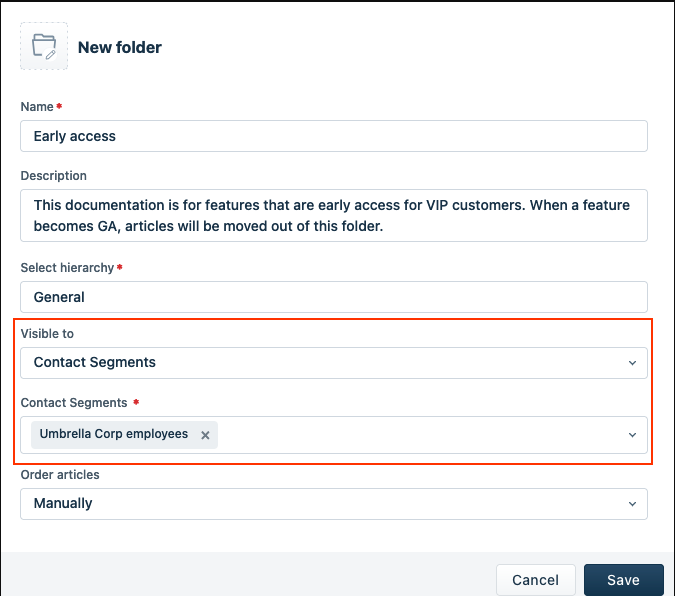
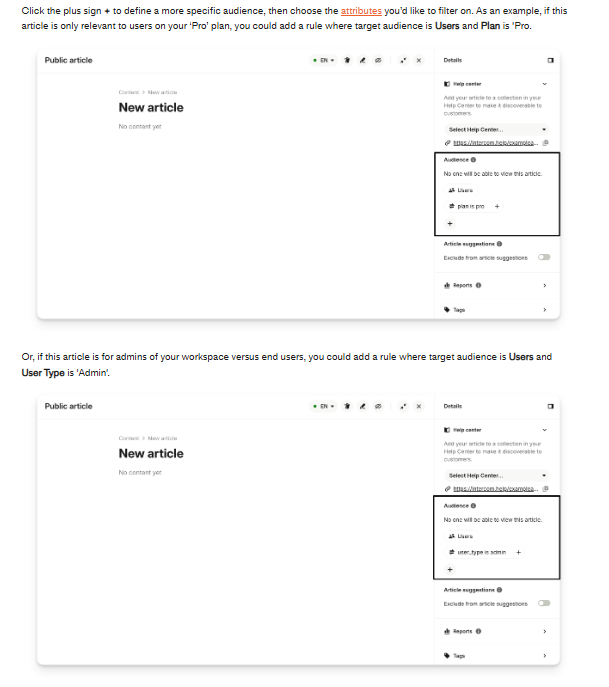
Real platform implementations illustrate different parts of the model. Intercom documents article targeting by login status, plan, location, and custom customer attributes. Freshdesk allows solution content to be restricted to customer segments. KnowledgeOwl can recommend articles according to the page where its contextual-help widget is opened.
For AI and retrieval security, the guide draws on current Microsoft and AWS documentation for document-level access and ACL-aware retrieval. Privacy guidance is grounded in the NIST Privacy Framework, while the SEO section uses current Google Search documentation.
The resulting model is a practical implementation framework, not an official industry standard.
Personalization must come after authorization
Access control and personalization may use similar inputs, but they perform different jobs. A user role may determine both which documents are permitted and which permitted document should appear first. Those decisions must remain separate.
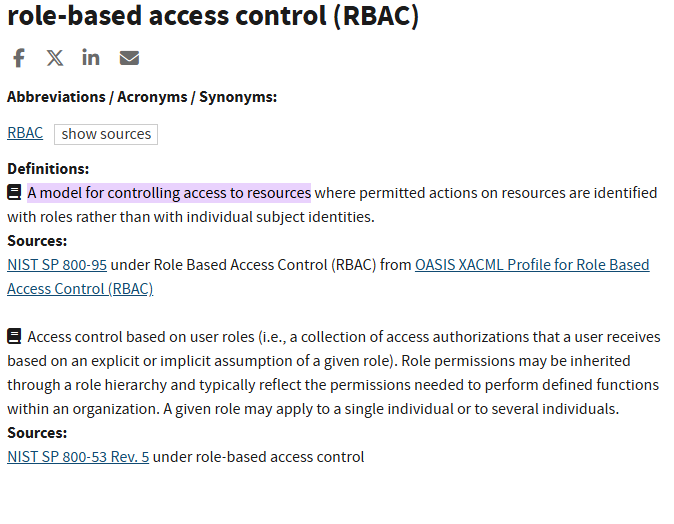
The NIST definition of role-based access control describes access as being assigned through organizational roles rather than individual identities. Attribute-based access control evaluates attributes associated with the requester, resource, environment, and applicable policies.
| Decision | Access-control layer | Personalization layer |
|---|---|---|
| User is an account administrator | Allow access to administrator-only articles if policy permits it | Prioritize configuration and governance guidance |
| Account has an enterprise plan | Allow content for entitled enterprise features | Boost advanced setup and integration articles |
| User is on the billing page | Do not change authorization merely because of the page | Recommend invoices, payment methods, and billing permissions |
| User searches for a restricted policy | Exclude the policy if the user is unauthorized | Rank only eligible alternatives or show an escalation path |
| AI receives a personalized query | Filter documents before they enter the model context | Assemble the answer from the most relevant eligible sources |
A hidden navigation link is not an access control. Neither is a low search rank, a personalization rule, or an instruction asking an AI model not to reveal a document. Authorization must be enforced at the content, retrieval, API, or source-system layer.
The main types of knowledge base personalization
| Type | Common signals | Example | Main risk |
|---|---|---|---|
| Role-based | Role, group, department, job function | Support agents see internal troubleshooting notes that customers cannot access | Confusing role-based relevance with authorization |
| Account-based | Company, contract, account tier, customer status | A managed customer sees implementation guidance for its contracted service | Stale CRM or account data |
| Plan or entitlement-based | Subscription, enabled feature, license, integration | Only users with an API add-on receive API configuration guidance | Showing unavailable features or exposing restricted documentation |
| Product and version-based | Product, operating system, deployment type, application version | A self-hosted customer receives installation steps that differ from the cloud version | Outdated or missing version metadata |
| Contextual | Current page, workflow, error code, ticket, selected object | An error dialog suggests the article for that exact error | Incorrect context or overly narrow recommendations |
| Behavioral | Recent searches, pages viewed, articles opened, feedback | The knowledge base suggests a setup article after several related searches | Privacy concerns and filter bubbles |
| Language and region-based | Locale, preferred language, country, regulatory region | A user receives the correct language and regional policy variation | Translation drift or incorrect regional inference |
| AI-assisted | Query, identity, account, context, metadata, retrieval results | An assistant combines eligible instructions into a concise answer with citations | Permission leakage, unsupported claims, or incorrect source selection |
Most organizations do not need every type. Start with the smallest number of signals required to solve one clear problem. Role, product, plan, language, and current page are often easier to govern than extensive behavioral profiling.
When personalization is worth implementing
Personalization becomes useful when a generic knowledge base creates a recurring relevance problem. Typical signs include:
- Users regularly follow instructions for the wrong product, version, region, or plan.
- Administrators and end users need materially different guidance.
- Customers must search through features they do not own.
- Internal agents need additional context that should not appear publicly.
- A large help center serves several brands, products, or customer segments.
- Users need assistance inside a workflow rather than on a separate documentation site.
- AI answers need account, product, and permission context to select the correct sources.
Personalization is less valuable when the content set is small, the audience is homogeneous, identity data is unreliable, metadata is incomplete, or the maintenance burden would exceed the expected benefit.
A practical personalization architecture
A safe knowledge base personalization system can be understood as seven connected layers:
- Identity and account data: authentication, user groups, CRM records, plan, entitlements, product configuration, language, and region.
- Context signals: current URL, feature, error code, workflow stage, ticket, conversation, device, or application version.
- Content metadata: audience, role, product, plan, version, region, language, sensitivity, owner, approval status, and review date.
- Authorization: determine which articles, blocks, or documents the user may retrieve.
- Eligibility and ranking: filter the permitted set and prioritize the most relevant items.
- Delivery: show an article, recommendation, contextual widget, search result, or AI-generated answer with sources.
- Evaluation and feedback: measure relevance, task completion, permission failures, missing content, and rule maintenance.
The architecture should fail safely. When identity, entitlement, or authorization cannot be confirmed, it should return generic public guidance, request clarification, or refuse the account-specific answer. It should never default to restricted content.
Choose signals that have a reliable source of truth
A personalization rule is only as reliable as the attributes behind it. Before using a signal, document where it comes from, how quickly it changes, who owns it, and what should happen when it is missing or contradictory.
| User need | Signal | Source | Content attribute | Fallback |
|---|---|---|---|---|
| Show administrator setup guidance | User role | Identity or product account | Audience: Administrator | Offer general setup guidance and ask the user to confirm the role |
| Hide features outside the subscription | Plan or entitlement | Billing or entitlement service | Required plan or feature | Show public plan-comparison guidance without exposing restricted details |
| Return the correct product instructions | Product and version | Account configuration or user selection | Product and version tags | Ask the user to choose a product or version |
| Recommend help for the current task | Page path or feature | Application context | Recommended page or workflow | Show general eligible search results |
| Apply the correct regional policy | Region | Verified account record or explicit choice | Region and effective date | Display a region selector or route to support |
| Generate an agent answer | Role, account, query, ticket context | Identity, CRM, support system | Audience, sensitivity, product, authority | Refuse or provide a generic answer when authorization is uncertain |
Avoid using inferred attributes when the consequence of being wrong is material. For example, browser location may be useful for a language suggestion, but it should not replace a verified account region when selecting contractual or regulated guidance.
Build a metadata model before building rules
Reliable personalization depends on governed content attributes. Without them, the system must guess whether an article applies to a user, product, or situation.
Useful metadata may include:
- Audience: public visitor, customer, partner, employee, agent, administrator, or developer.
- Account and entitlement: plan, contract, product, enabled feature, or integration.
- Product context: product family, deployment type, platform, version, or feature.
- Regional context: language, locale, country, regulatory region, or brand.
- Content state: draft, approved, effective, expired, archived, or obsolete.
- Authority: official policy, support guidance, community content, historical reference, or temporary workaround.
- Security classification: public, internal, confidential, restricted, or account-specific.
- Ownership: accountable owner, reviewer, approval date, review date, and escalation path.
- Context: related page, workflow, error code, ticket category, or user task.
Critical authorization attributes should not be inferred by a language model. They should come from controlled identity, account, entitlement, or content-management systems.
Avoid content explosion
Personalization can create an unmanageable number of variants if every plan, role, version, and region receives a separate article. Choose a content model deliberately.
| Content model | Use it when | Main advantage | Main risk |
|---|---|---|---|
| One canonical article | Differences are minor and can be explained clearly | Simple ownership and maintenance | The article becomes long or confusing |
| Conditional content blocks | The core procedure is shared but a few steps differ | Reduces duplication | Complex rules may be difficult to review and test |
| Separate articles | Audiences, risks, or procedures are materially different | Clearer user experience | Duplicate content and update drift |
| Reusable components | Several articles share approved warnings, prerequisites, or steps | One update can propagate to multiple destinations | A change may affect more pages than expected |
| Dynamic answer assembly | Approved content blocks must be combined for a specific context | Concise, contextual responses | Harder testing, traceability, and version control |
| AI-generated answer | A model summarizes eligible approved sources with citations | Natural conversational output | Incorrect synthesis, missing conditions, or unsupported claims |
Use separate articles when the complete procedure, audience, ownership, or risk differs. Use reusable or conditional blocks when the core answer is stable and only a limited portion changes. Do not create a separate page for every possible attribute combination.
Personalized search and recommendations
Search personalization should operate in two stages:
- Eligibility: remove content the user is not authorized or entitled to retrieve.
- Ranking: order the eligible content by query relevance, user context, source authority, freshness, and usefulness.
Intercom documents Help Center audience rules that can target articles according to login status, plan, location, and custom customer attributes. It also documents personalized article suggestions that use machine learning, custom data attributes, and visited URLs.
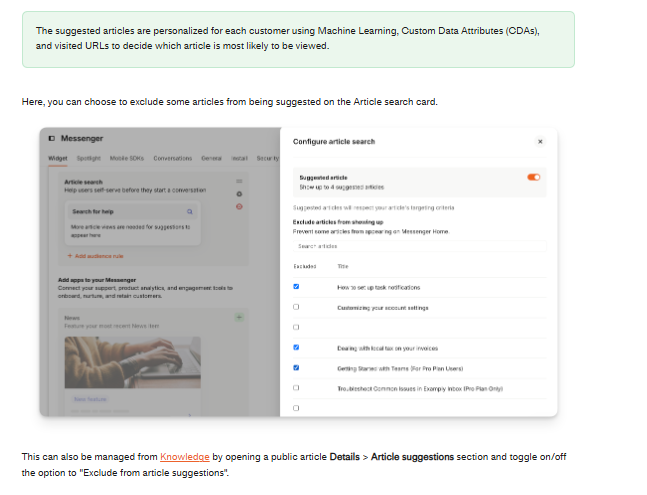
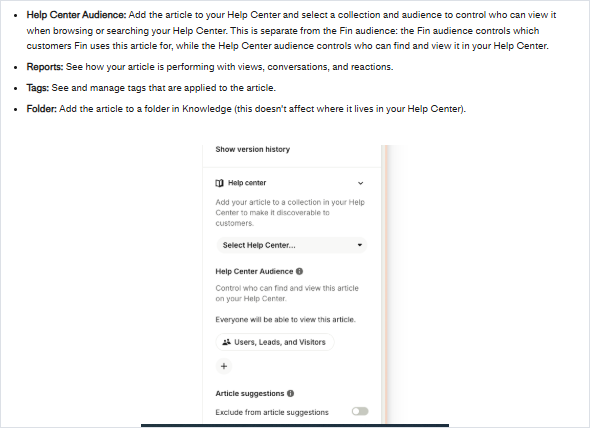
These are separate capabilities. In Intercom, Help Center audience rules and the audience used by its AI product are configured separately. This illustrates why teams must test every delivery channel rather than assuming one article rule automatically protects search, recommendations, widgets, and AI answers.
The recommendation layer should preserve ways to escape the personalized view. Useful controls include:
- A “show all eligible content” option.
- Clear product, plan, version, language, and source labels.
- A generic browsing hierarchy.
- Manual filters that can override an incorrect assumption.
- Feedback for irrelevant or incorrect recommendations.
- Source-authority and current-version boosts.
- Result diversity so one inferred topic does not dominate every search.
Contextual and in-app help
Contextual help recommends knowledge according to the page, feature, workflow, error, ticket, or form the user is interacting with. It reduces the need to leave the product and search a separate help center.
For example, KnowledgeOwl allows articles to be associated with page paths so its embedded widget can recommend relevant content for a particular application or website page. Freshdesk can apply customer segments to solution content, while other platforms use page URLs, account attributes, ticket context, or product events.
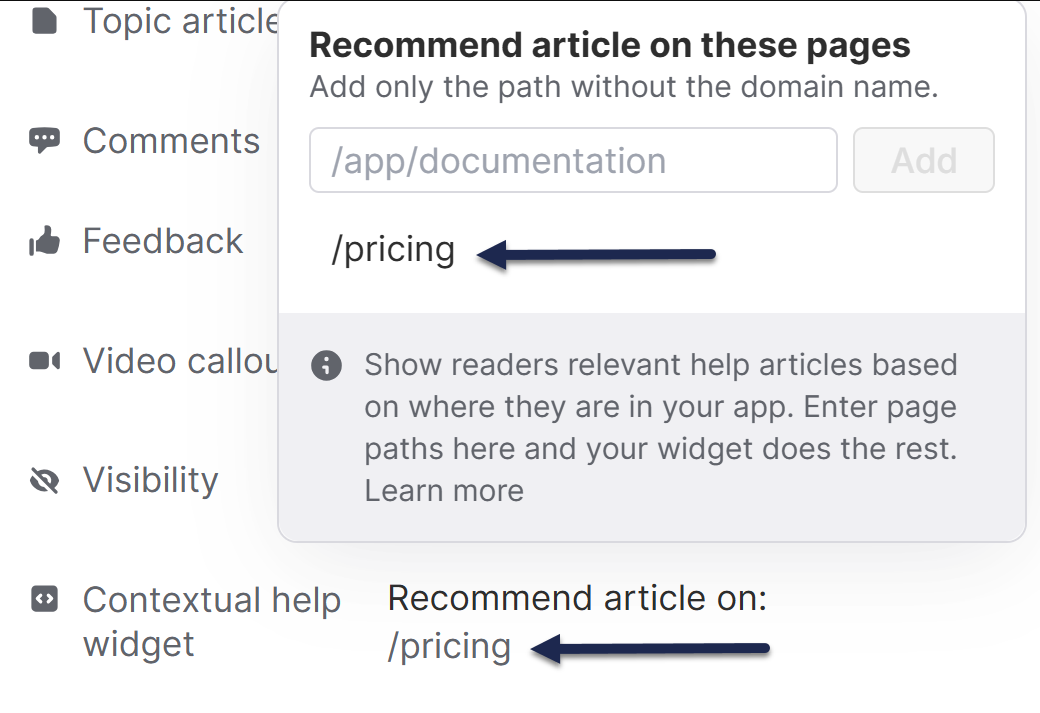
Contextual delivery may appear through:
- Embedded help widgets.
- Side panels and search drawers.
- Suggested articles beside a form or error message.
- Agent-assistance panels inside a support tool.
- Tooltips, resource centers, and walkthroughs.
- Chatbots or conversational assistants.
Contextual help should supplement, not replace, a complete searchable knowledge base. Users still need a stable way to browse, compare related options, and recover when the system misunderstands their context.
AI and permission-aware RAG
AI personalization can combine a user’s query, role, account, product, current task, and approved content into a concise answer. The difficult part is not generating the sentence. It is ensuring that the model receives only authorized, current, and applicable evidence.
A safe retrieval flow should be:
- Authenticate the user outside the language model.
- Retrieve trusted role, account, group, and entitlement data.
- Apply document-level authorization and tenant boundaries.
- Filter by product, version, region, language, and content status.
- Retrieve and rank the eligible evidence.
- Generate an answer from that evidence.
- Show sources and relevant scope, version, or audience information.
- Refuse or escalate when the evidence is missing, conflicting, or insufficient.
- Log and evaluate retrieval, citations, answer quality, and permission behavior.
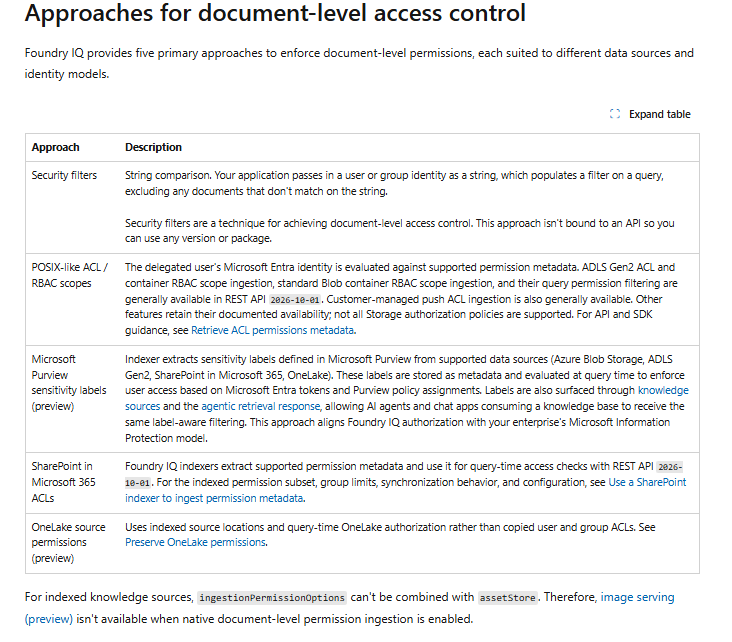
Microsoft documents document-level access controls that exclude content when the requesting identity does not match the stored permission information. The exact availability and behavior vary by data source and implementation.
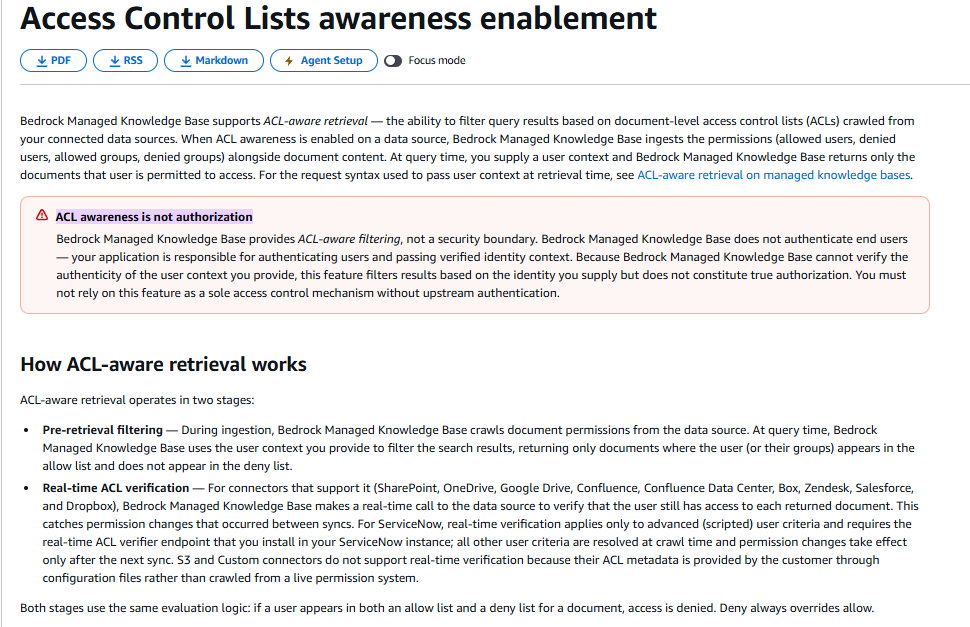
AWS documents ACL-aware retrieval that filters results using user and group permissions from connected sources. AWS also states that this filtering is not itself an authentication or complete authorization boundary: the application remains responsible for authenticating the user and passing verified identity context.
Do not allow the model to invent, remove, or relax an authorization filter. Do not treat metadata filtering, a citation, or a confident answer as proof that the result is safe or correct.
Design a safe fallback
A personalization system needs an explicit response for missing, stale, conflicting, or untrusted data.
| Failure condition | Safe fallback |
|---|---|
| Anonymous visitor | Show public guidance and explain that account-specific help requires sign-in |
| Unknown product or version | Ask the user to select one or display clearly labeled eligible options |
| Missing plan or entitlement | Show generic product information without assuming access |
| Conflicting role or account data | Stop account-specific personalization and route the discrepancy for correction |
| No matching article | Show broader eligible search results and record a content gap |
| Authorization cannot be confirmed | Refuse restricted retrieval and provide an escalation route |
| AI evidence is weak or contradictory | Do not synthesize a definitive answer; show sources or escalate |
| Integration or source is unavailable | Use a clearly labeled generic fallback and avoid cached restricted content unless authorization is still valid |
A fallback should be useful without pretending to know more than the available evidence supports.
Test permissions, not just relevance
Teams often test whether the intended user sees the correct article. They must also test whether every unintended user is prevented from retrieving it.
Include positive and negative cases for:
- A user who matches every rule.
- A similar user on a different subscription plan.
- An anonymous visitor.
- A user who recently changed roles or groups.
- A user whose entitlement expired.
- An offboarded employee.
- A user belonging to several groups.
- A guest or partner account.
- A user with conflicting attributes.
- A direct article URL.
- A search-result title or snippet.
- A contextual widget recommendation.
- An AI answer and each cited source.
- An API request, export, or cached page.
- Users from a different customer tenant.
Test what happens after a permission or plan change. A rule that works immediately after a full data sync may still expose outdated results when identity, group, or entitlement updates are delayed.
Privacy and data minimization
Personalization may process identity, account, behavioral, location, language, product, search, and conversation data. Collecting more signals can increase privacy risk and operational complexity without improving the knowledge experience.
The NIST Privacy Framework is a voluntary tool for identifying and managing privacy risk. NIST’s definition of data minimization limits the creation, collection, use, processing, storage, and disclosure of personal information to what is directly relevant and necessary for the intended purpose.
For every personalization signal, document:
- The exact purpose.
- The source and accountable owner.
- Whether the value is required or optional.
- How accuracy is checked.
- How long it is retained.
- Who can access it.
- Which processors or integrations receive it.
- How a user can correct or control it where appropriate.
- What happens when it is deleted or unavailable.
- Whether a less sensitive signal could achieve the same result.
Do not use sensitive personal attributes merely because the platform supports custom fields. The appropriate legal basis, notice, consent, retention, and user rights depend on the jurisdiction and use case and should be reviewed with qualified privacy or legal stakeholders.
SEO and indexability for personalized help centers
A customer-facing knowledge base often needs both public search visibility and authenticated personalization. Those goals require a deliberate publishing strategy.
- Keep stable, broadly useful guidance on crawlable public URLs.
- Use authentication for genuinely restricted content.
- Do not rely on robots.txt as a security control.
- Use noindex where a page may be crawled but should not appear in search results.
- Avoid creating many near-duplicate URLs for every audience segment.
- Use canonical URLs for duplicate or very similar public variants where appropriate.
- Ensure essential public text remains accessible in the rendered page and DOM.
- Do not serve a materially different search-engine version for the purpose of manipulating rankings.
- Separate public discovery metrics from authenticated self-service metrics.
Google’s developer SEO guidance explains that login-protected pages are not publicly crawlable and that robots.txt is not a mechanism for keeping a page out of the index. Google also provides guidance for consolidating duplicate URLs.
Dynamic personalization and legitimate testing are not automatically cloaking. However, Google’s spam policies prohibit showing search engines different content with the intent to manipulate rankings or mislead users.
Preserve accessibility and user control
A personalized interface can become less usable when navigation changes unpredictably or relevant alternatives disappear. Preserve a stable browsing path and give users control when the system may have inferred their context incorrectly.
- Keep headings, landmarks, focus order, and keyboard behavior consistent.
- Do not automatically replace visible content while the user is reading it.
- Allow users to change product, version, region, language, or role when appropriate.
- Provide a generic browsing mode or “show all eligible content” option.
- Explain why an article is recommended when that context would help the user.
- Label the applicable plan, version, region, and audience clearly.
- Ensure screen readers receive the same meaningful content and state changes.
- Test zoom, text resizing, responsive layouts, and embedded widgets.
Personalization should reduce effort without taking away useful choices.
A practical implementation roadmap
- Define one user problem. Identify the specific task, audience, and failure that personalization should address.
- Select a contained journey. Start with one product area, support workflow, account type, or contextual-help surface.
- Identify authoritative systems. Decide which system owns identity, role, account, plan, entitlement, product, and region data.
- Inventory the available signals. Assess accuracy, sensitivity, update speed, and missing-value behavior.
- Remove unnecessary signals. Keep only the attributes required for the defined use case.
- Create the content metadata. Define controlled values, owners, required fields, and review rules.
- Clean the source content. Remove duplicates, obsolete articles, unsupported claims, and unclear ownership.
- Define authorization separately. State exactly which users may retrieve each content class.
- Create personalization rules. Define eligibility, ranking, recommendation, and delivery behavior.
- Design the fallback. Specify what happens when identity, context, or content cannot be trusted.
- Choose the delivery surface. Help center, embedded widget, search, agent panel, chatbot, or AI assistant.
- Build a test matrix. Include matching, nonmatching, anonymous, stale, conflicting, and unauthorized cases.
- Run a limited pilot. Use a controlled audience and small body of approved content.
- Measure relevance and safety. Evaluate task completion, fallback, permission behavior, and rule maintenance.
- Resolve failures. Fix source data, metadata, content, permissions, and fallback gaps before expanding.
- Document ownership. Assign responsibility for signals, rules, content, integrations, and evaluations.
- Expand gradually. Add use cases only when the organization can govern and test them.
Build a reusable test matrix
A test matrix turns personalization rules into observable expectations.
| Test case | Expected eligible content | Content that must not appear | Expected fallback |
|---|---|---|---|
| Enterprise administrator on the SSO page | Enterprise SSO setup for the correct product version | Internal-only support notes and unrelated plans | General SSO overview if version data is missing |
| Starter-plan end user | Starter-plan user instructions | Enterprise-only configuration and contract-specific content | Public feature-comparison guidance |
| Anonymous public visitor | Public articles | Customer-only, internal, and account-specific content | Sign-in prompt for personalized help |
| User who recently lost an entitlement | Current eligible public or account content | Former entitlement documentation | Account support route if the entitlement state is disputed |
| AI query with no supporting article | No definitive generated answer | Inferred instructions without evidence | Clarification, eligible search results, or human escalation |
| Direct URL to a restricted article | Access denied | Article title, body, attachments, or revealing snippet | Neutral error or sign-in flow |
Add the actual result, pass or fail status, evidence, owner, and remediation date when using the matrix in a pilot.
Measure relevance, outcomes, safety, and maintenance
| Measurement area | Useful indicators | Question answered |
|---|---|---|
| Relevance | Search success, time to useful content, recommendation acceptance, query reformulation, fallback rate | Did the user receive applicable eligible content? |
| Task outcome | Task completion, self-service completion, repeat search, escalation after article use | Did the content help complete the intended task? |
| Content quality | Metadata completeness, owner coverage, stale content, duplicate content, gap closure | Can the personalization system rely on the content? |
| Safety | Unauthorized-result findings, wrong-audience exposure, direct-link failures, AI leakage findings | Did any delivery channel expose prohibited content? |
| Privacy | Data-retention exceptions, correction requests, opt-out failures, privacy complaints | Is personal data handled according to the defined purpose and controls? |
| Operations | Attribute-sync failures, stale rules, manual exceptions, integration failures, maintenance effort | Can the organization sustain the system? |
No single metric proves success. Click-through may indicate interest without proving that the article was correct. Ticket deflection, revenue, retention, satisfaction, productivity, and return on investment require appropriate baselines and causal analysis.
Common personalization mistakes
Treating personalization as security
Hiding or deprioritizing content does not prevent unauthorized access. Enforce permissions before search, recommendation, and generation.
Personalizing before cleaning the content
Better targeting cannot make an obsolete or contradictory article trustworthy. Resolve ownership, duplication, approval, and lifecycle problems first.
Using stale CRM or entitlement data
Define update expectations and test plan changes, offboarding, role changes, and delayed synchronization.
Creating too many segments
Every segment adds rules, content variants, tests, analytics, and ownership. Use the fewest distinctions that materially change the answer.
Creating a separate article for every variation
Use reusable blocks, conditional sections, or a canonical article when the core answer remains the same.
Providing no generic browsing option
Users must be able to recover when the system misunderstands their role, product, or task.
Testing only the intended audience
Test nonmatching, anonymous, expired, offboarded, and cross-tenant users through search, direct URLs, widgets, APIs, exports, and AI answers.
Letting the model choose authorization rules
Identity and authorization must be provided and enforced by trusted systems outside the language model.
Breaking public SEO through excessive gating
Keep valuable public guidance on stable crawlable URLs and add personalization around it when the core answer should remain discoverable.
When not to personalize
A static or lightly segmented knowledge base may be better when:
- The content set is small and easy to navigate.
- Most users need the same answer.
- Differences across plans, products, or regions are minor.
- Identity and entitlement data is unreliable.
- Content metadata and ownership are not established.
- The organization cannot test permissions across every delivery channel.
- The maintenance burden would exceed the likely benefit.
- The public content should remain stable and crawlable.
- Personalization would hide useful alternatives or choices.
- The use case involves high-risk content without adequate controls.
Greater personalization does not automatically mean greater knowledge maturity. A clear, accurate, well-governed article can be better than an elaborate dynamic experience built on weak data.
What to require from knowledge base software
When evaluating a platform, ask:
- Which role, group, account, plan, product, version, region, language, and custom attributes are supported?
- Are rules applied at the collection, folder, article, content-block, search-result, or AI-answer level?
- How are identity and account attributes synchronized?
- How quickly do role, plan, entitlement, and permission changes take effect?
- Can administrators test the experience as a specific user?
- How are anonymous and unidentified visitors handled?
- Can users browse all content they are authorized to access?
- How are conflicting rules resolved?
- Can rules be audited, exported, updated in bulk, and assigned to owners?
- Are recommendations rule-based, machine-learned, or both?
- Can the system explain why an article was recommended?
- Do search, direct URLs, widgets, APIs, exports, and AI answers enforce the same permissions?
- Can separate audiences be defined for the Help Center and AI assistant?
- Can the organization configure safe fallbacks?
- What personal data is processed, stored, and shared with subprocessors?
- Can personalization and behavioral tracking be disabled where needed?
- How are public, gated, noindex, and canonical content handled?
- What happens during an identity, CRM, entitlement, or search outage?
- Which logs and evaluation data can be exported?
- What administration and testing work remains with the customer?
Frequently asked questions
What is knowledge base personalization?
Knowledge base personalization adapts eligible knowledge articles, search results, recommendations, contextual help, or AI answers to a user’s authorized role, account, plan, product, language, location, context, or task.
How is personalization different from customization?
Personalization changes the knowledge experience according to information about the user or context. Customization changes branding, layout, navigation, settings, or interface preferences selected by the organization or user.
How is personalization different from access control?
Access control decides whether the user may retrieve content. Personalization decides which authorized content should be ranked, recommended, adapted, or presented. Personalization must not override access control.
Should anonymous visitors receive personalized content?
Anonymous visitors can receive limited contextual recommendations based on public signals such as the current page, selected language, or explicit product choice. Do not infer account entitlements or expose restricted content without authenticated and verified context.
Should every plan or audience have a separate article?
No. Create separate articles when the full procedure, risk, ownership, or audience differs materially. Use a canonical article, reusable blocks, or limited conditional sections when most of the content is shared.
What metadata is needed for personalization?
The exact fields depend on the use case, but common attributes include audience, role, account type, plan, entitlement, product, version, region, language, sensitivity, authority, owner, approval status, effective date, review date, and relevant page or error context.
How does RAG personalize knowledge answers?
A RAG system can use verified user and account context to filter authorized documents, retrieve the most applicable sources, and generate an answer from them. Authentication, authorization, tenant isolation, version selection, citations, refusal behavior, and evaluation remain necessary.
Can personalization harm SEO?
It can create problems when public content becomes inaccessible, many duplicate variants are published, canonical URLs are unclear, JavaScript prevents the core answer from being rendered, or search engines receive a misleading version. Keep stable public guidance crawlable and protect genuinely restricted content through authentication.
Which metrics show whether personalization works?
Use a balanced set that includes search success, time to useful content, task completion, fallback rate, wrong-segment results, permission-test failures, metadata completeness, stale rules, integration failures, and maintenance effort. Clicks alone do not prove that the content was correct or useful.
Start with one decision, not every possible signal
Knowledge base personalization works best when it solves a specific relevance problem with a small number of reliable signals. Begin with one audience, one task, one controlled body of content, explicit authorization rules, and a safe generic fallback.
Clean and classify the content before automating selection. Keep access control separate from ranking. Test unauthorized users as carefully as intended users, and require the same permission behavior across search, widgets, direct URLs, APIs, recommendations, and AI answers.
Scale only when the organization can maintain the data, metadata, rules, fallbacks, privacy controls, and evaluation process that personalization requires.