Independent knowledge base software guide Evidence-led Updated 2026


Knowledge Base SSO Integration: A Practical Setup Guide
Knowledge base SSO integration lets people use single sign-on (SSO) to access documentation through an existing identity system. Employees, customers, or partners authenticate through that system, then the knowledge base applies its access rules to the verified identity. The integration can reduce separate passwords while keeping documentation connected to your organization’s account controls.
To implement it, define who needs access, choose a supported sign-in method, exchange configuration details, map accounts and permissions, and test both access and offboarding. Treat account provisioning and session management as explicit parts of the deployment. A successful login alone does not establish that the right content is protected.
Information verified on November 17, 2026.
Decide who signs in and what stays public
Start with a written access policy. Identify who reads the documentation, who edits it, and who manages security settings. Then identify which articles, collections, and downloads each audience should reach. This gives the integration a measurable purpose before you change any authentication settings.
Separate reader access from author and administrator access
Reader SSO governs access to the published knowledge base. Author or administrator SSO governs access to the application used to create content and manage settings. Those audiences may use different configurations.
For example, KnowledgeOwl’s author SSO documentation explicitly allows authors to use Security Assertion Markup Language (SAML) while their knowledge base remains public or uses another authentication method. Consequently, an editorial login requirement does not establish a reader-facing content restriction.
Authentication establishes identity. Authorization determines the resources and actions that identity may use. OWASP’s authorization guidance recommends least privilege and permission checks on each request. Apply that distinction to article visibility, editing, exports, and security administration.
Choose an internal, customer, or mixed access model
- Internal documentation: Use your workforce identity system and grant access according to the employee’s responsibilities.
- Customer or partner documentation: Establish which customer account or partner organization the reader belongs to, then map the appropriate content entitlement.
- Mixed public and private documentation: Keep general help articles publicly accessible while requiring authentication and authorization for restricted material.
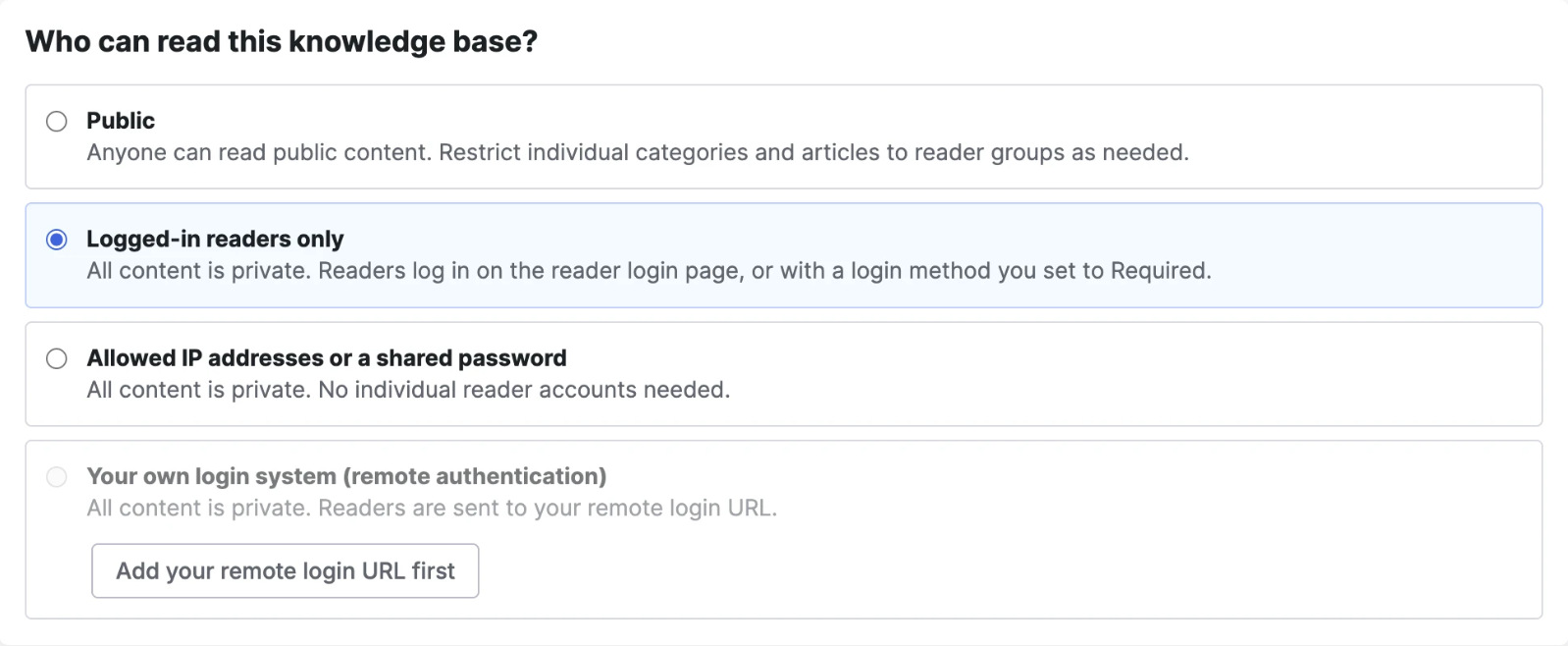
These patterns are reflected in KnowledgeOwl’s documented SSO access arrangements. For a customer portal, decide whether readers use your product’s login or their employer’s identity provider. If different customers need different providers, verify multiple-provider support and organization-specific access rules before choosing a platform.
Choose a compatible SSO method
Start with the overlap between your knowledge base’s supported integrations and your identity provider, or IdP. The knowledge base acts as the service provider (SP) in SAML and as a client, also called a relying party, in OpenID Connect.
| Method | When to consider it | What to verify |
|---|---|---|
| SAML 2.0 | Your knowledge base and IdP have a documented SAML integration that meets your access requirements. | Reader versus administrator coverage, attributes, certificate handling, and supported login initiation. |
| OpenID Connect (OIDC) | Both systems support OIDC and the integration fits your existing identity setup. | Issuer, application registration, redirect URI, claims, and supported lifecycle features. |
| Vendor-specific JWT or remote authentication | Your application already authenticates customers and the knowledge base supports a documented connection to that login. | Required development, identity matching, token validation, logout, and customer-level permissions. |
SAML uses XML assertions to convey identity information. OIDC provides an authentication layer built on OAuth 2.0 and uses ID tokens. The OpenID Foundation’s explanation describes these roles. OAuth 2.0 and OIDC are not interchangeable labels for a login feature, and JSON Web Token (JWT) is a token format rather than a universal SSO protocol.
A vendor can build a separate sign-in mechanism around JWT. For example, Aha! Knowledge documents JWT SSO for people who already authenticate to a custom application. That integration requires application work; it is not automatically equivalent to enabling OIDC.
Scope also varies by product. Document360 documents SAML and OIDC for its users and readers, while JWT is reader-only. Check the intended audience before treating a supported-method list as a complete answer.
Choose on compatibility, operational requirements, and documented behavior. Microsoft’s SAML and OIDC decision guide confirms that Entra supports both. Your knowledge base’s implementation determines which supported option fits the deployment.
Prepare the owners, accounts, and recovery plan
Before configuration, collect the following information in a short deployment record:
- Feature scope: The required subscription, reader and author coverage, supported IdP integration, and any separate provisioning capability.
- Administrative owners: Who can register the IdP application, configure the knowledge base, approve content access, and resolve incidents.
- Pilot identities: An authorized reader, an unauthorized reader, an existing account that must be matched, and an administrator.
- Access expectations: Public and restricted content, permitted groups, required authentication policy, and the intended logout behavior.
- Recovery and maintenance: A supported emergency administration route, configuration backup, credential owner, and renewal responsibilities.
Confirm the commercial prerequisites before spending time on setup. Ask whether SSO, reader authentication, additional identity providers, and automated provisioning are included for your intended audience. A plan that meets an administrator-login requirement may not meet a customer-access requirement.
Establish administrative recovery before requiring SSO. KnowledgeOwl, for example, recommends retaining an independently accessible administrator for SAML problems. Follow your product’s documented recovery method, protect that access, and define when it may be used. Ordinary readers should not receive an uncontrolled alternative to the intended policy.
Set multifactor authentication (MFA) and other sign-in requirements explicitly in the identity system where supported. SSO does not inherently mean passwordless authentication or MFA. Confirm the policy actually applies to the pilot accounts and application before expanding access.
Connect the knowledge base to your identity provider
1. Register the application and limit the initial assignment
Use the official integration guide for your exact knowledge base and IdP combination. Create the documented application registration or gallery integration, then assign only the pilot users or group. Confirm whether users start from the knowledge base, the IdP’s application launcher, or either supported route.
Do not assume every integration supports identical initiation or account-creation behavior. Microsoft’s ProProfs Knowledge Base tutorial describes IdP-initiated SSO, support-assisted configuration on the ProProfs side, and accounts that must exist before sign-in. Those are requirements for that documented integration, not universal steps.
Keep the current working access method available during the controlled pilot where your platform permits it. Agree on the change window and recovery owner before enforcing the final policy.
2. Exchange the correct connection details
Configuration values have a source and a destination. Use the exact values displayed by the relevant system; do not derive them from the homepage URL or copy another tenant’s example.
| Configuration value | Get it from | Use it in |
|---|---|---|
| SAML: SP entity ID and assertion consumer service (ACS) URL | The knowledge base’s SAML settings or SP metadata. | The IdP’s application configuration. |
| SAML: IdP entity ID and SSO endpoint | The IdP’s application settings or metadata. | The knowledge base’s identity-provider configuration. |
| SAML: IdP public signing certificate | The IdP’s documented certificate or metadata output. | The knowledge base’s SAML trust configuration. |
| OIDC: redirect URI | The knowledge base’s OIDC configuration. | The registered application’s allowed redirect URIs. |
| OIDC: issuer or discovery details | The identity provider’s documented configuration. | The knowledge base’s OIDC provider settings. |
| OIDC: client ID | The IdP’s application registration. | The knowledge base’s OIDC client configuration. |
| OIDC: client credential, when required | The registered client’s supported credential configuration. | The knowledge base’s protected credential field. |
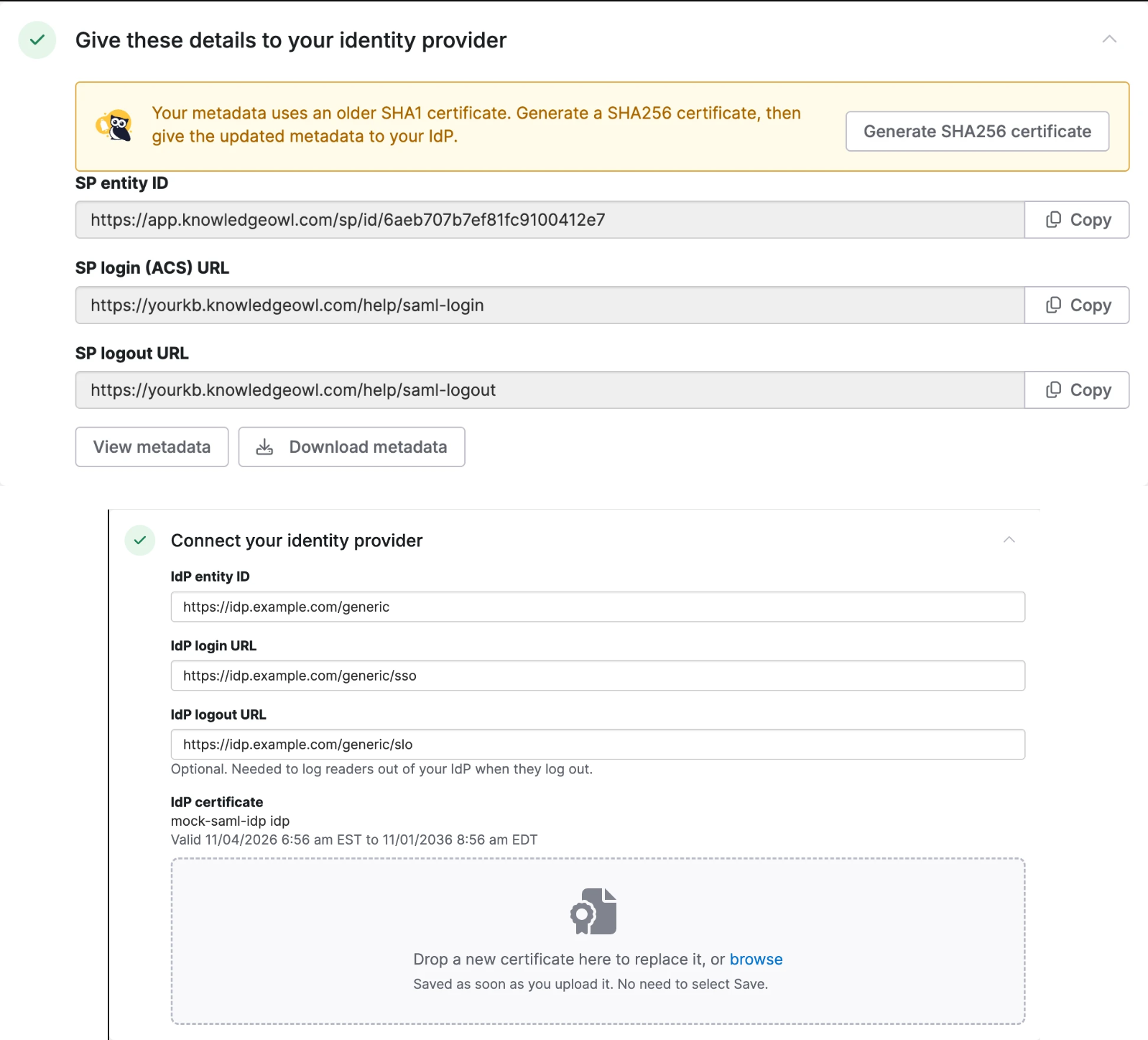
KnowledgeOwl’s SAML setup guide illustrates the exchange of SP details, IdP details, and the IdP certificate. Its OIDC configuration guide separately documents the redirect URI, issuer, client ID, and client secret used by that integration.
For OIDC, copy the redirect URI exactly, including the scheme, hostname, and path. KnowledgeOwl specifically notes that its configured custom domain affects this value. Verify domain and proxy requirements in your own platform’s documentation before changing a working URL.
Keep client secrets in the supported protected configuration, never in article content or browser-side code. A public signing certificate and a private credential serve different purposes. Signing establishes message authenticity and integrity; encryption is a separate control. Follow the integration’s documented validation requirements.
3. Match accounts before granting content access
Identify how the knowledge base recognizes an existing person. Confirm which incoming identifier matches the stored account and what happens when an email address changes. Use the documented stable identifier where supported; changing identity mappings without understanding the matching rules can create separate accounts or associate access incorrectly.
For example, KnowledgeOwl’s OIDC documentation describes a default subject-claim identifier and provider-specific matching rules. It also treats login restrictions separately. Apply your vendor’s rules rather than assuming that every system uses an email address as its permanent identifier.
Next, map trusted groups or attributes to the minimum necessary content permissions. The following is a hypothetical access design, not a set of vendor defaults:
- Anonymous visitors: Can read public setup instructions.
- Readers in customer-alder: Can read public instructions and Alder’s private integration notes, but not another customer’s documentation.
- Readers in support-readers: Can read internal triage procedures but cannot edit articles or administer identity settings.
- Named knowledge base administrators: Receive explicitly assigned management permissions.
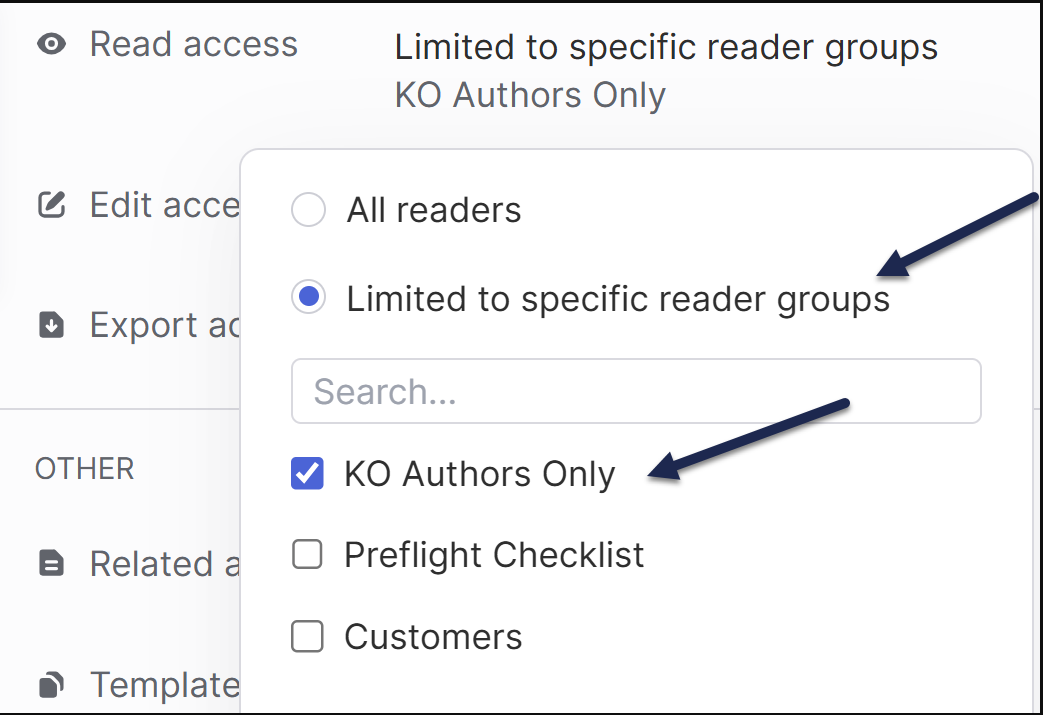
Decide what happens when a required group or attribute is missing. The account should not fall into a broad privileged group simply because authentication succeeded. For customer documentation, test separation between two customer organizations as well as separation between customers and employees.
Check how group changes reach the knowledge base: during sign-in, through provisioning, or through another supported synchronization mechanism. Record that behavior so content owners know when a permission change should take effect.
Plan account creation, offboarding, and existing sessions
Account provisioning determines how identities are created and maintained in the knowledge base. Select a supported method for each audience:
- Manual management: An administrator creates and removes accounts. Document who receives joiner, role-change, and departure requests.
- Just-in-time (JIT) provisioning: A supported login flow creates an account when the person first authenticates. Okta’s JIT documentation illustrates this login-triggered creation model.
- SCIM provisioning: System for Cross-domain Identity Management connects account lifecycle operations between systems. Microsoft documents provisioning that creates, updates, and removes users, with group operations available for supported applications.
JIT account creation alone does not establish an offboarding process. Confirm how the target account is disabled, which permissions are removed, whether other sign-in methods remain usable, and how existing sessions are handled.
Check the feature’s audience scope, too. KnowledgeOwl’s SCIM documentation covers authors and supports author provisioning with either native login or SAML. That documentation does not establish SCIM support for every reader use case.
Test new authentication and existing sessions separately
An application can maintain its own session after the IdP has authenticated the user. Microsoft explicitly states that Entra cannot directly revoke an application-issued session token. The application must enforce its own access and session behavior.
Build an offboarding procedure that addresses each relevant layer:
- Remove the person’s application assignment or entitlement and block new authentication as required.
- Disable the downstream account or remove its permissions through the supported provisioning or administrative process.
- Revoke application sessions where supported, and document any remaining session-expiration behavior.
- Verify a fresh access attempt and an already-open session using a controlled test account.
Set an acceptable revocation requirement for your organization, then verify that the chosen integration can meet it. If it cannot, resolve the gap before relying on SSO to protect that content.
Test the access policy before enforcing SSO
Use separate browser sessions and ordinary reader accounts. An administrator can have privileges that hide a reader-access problem. KnowledgeOwl’s testing instructions specifically warn that an account matching an author’s email may authenticate as an author.
Use the following as an acceptance-test plan. The outcomes describe the intended policy; they are not claims of tests performed on a particular product.
| Test | Expected outcome | If it fails |
|---|---|---|
| Open a public article while signed out. | The article remains readable if your design includes public content. | Review site-wide enforcement and article visibility. |
| Open a private article through its direct URL. | Authentication is required, followed by the appropriate permission check. | Inspect reader authentication and content access rules. |
| Have an Alder reader open Alder and another customer’s articles. | Alder content opens; the other customer’s content is denied. | Correct organization and group mappings. |
| Attempt access with an unassigned user or missing required group. | No unintended private-content or administrative access is granted. | Review assignment, restrictions, and default permissions. |
| Open a protected attachment’s direct link while signed out. | The file follows the intended protection policy. | Check file security independently of article security. |
| Start from a deep article link. | After sign-in, the authorized reader reaches the intended destination where supported. | Check the documented return-link behavior. |
| Remove access from a controlled test user. | Fresh access and the existing session meet the documented revocation requirement. | Inspect provisioning, permissions, and application sessions. |
| Try alternate sign-in paths and administrator recovery. | Ordinary users cannot bypass required controls; authorized recovery works. | Review available login methods and the recovery configuration. |
Also verify logout directly: check whether it ends the knowledge base session, the IdP session, or both. Record the supported behavior rather than assuming single logout across every connected application.
Check attachments and other delivery surfaces
File protection deserves its own test. KnowledgeOwl states that uploaded files do not automatically inherit its knowledge base login requirement. Its separate file-and-image protection option is available for private knowledge bases. This is a product-specific example of why a protected article does not prove that its download is protected.

Where you use search, embedded widgets, APIs, exports, or AI-generated answers, check how each surface applies reader permissions. Test the surfaces you actually publish. A browser sign-in test cannot establish the behavior of an independently configured delivery channel.
Preserve public discovery without weakening private access
Keep intentionally public documentation accessible to its intended audience. Protect private material through authentication and authorization. Google distinguishes access protection from noindex: a page excluded from indexing can still be visited through a direct link.
Robots.txt controls crawler access; it does not authorize readers or reliably remove a URL from search. If previously public material becomes private, treat search-result removal as a separate process and do not assume that SSO erases existing copies.
After the pilot passes, expand the assignment deliberately and verify enforcement. KnowledgeOwl’s SAML documentation notes that other available login methods can still work through their own links. Check every supported entry point against your intended policy.
Troubleshoot the point where access fails
Locate the failure before changing settings. Did the IdP reject the user, did the knowledge base reject the authentication response, did account matching fail, or did the content permission check deny access? Those outcomes require different fixes.
| Symptom | Likely area to inspect | First useful check |
|---|---|---|
| The user never reaches the knowledge base. | IdP application assignment or sign-in policy. | Review the matching IdP sign-in event and confirm the user is assigned. |
| Login loops or returns to the wrong location. | Callback, ACS, domain, or return-link configuration. | Compare the configured URLs with the platform’s current values. |
| Authentication succeeds but an article is denied. | Reader groups, customer entitlement, or article permissions. | Check the account’s effective access to that specific article. |
| A new account appears instead of the existing account. | Identifier mapping or account-linking behavior. | Compare the incoming identifier with the documented matching rule. |
| Login fails after a credential change. | Certificate, client credential, or trust configuration. | Check which side was updated and whether the current credential is active. |
| A removed user still reads content in an open browser. | Application session or downstream account state. | Check session revocation separately from blocked new authentication. |
| Administrators succeed but readers fail. | Role differences, reader configuration, or incomplete testing. | Repeat with a separate ordinary-reader identity. |
Use the knowledge base’s diagnostic records alongside the IdP’s logs. In KnowledgeOwl’s OIDC troubleshooting guide, administrators can inspect failed login reasons and received claims. Its documentation distinguishes connection failures from mapping problems, which helps narrow the next check.
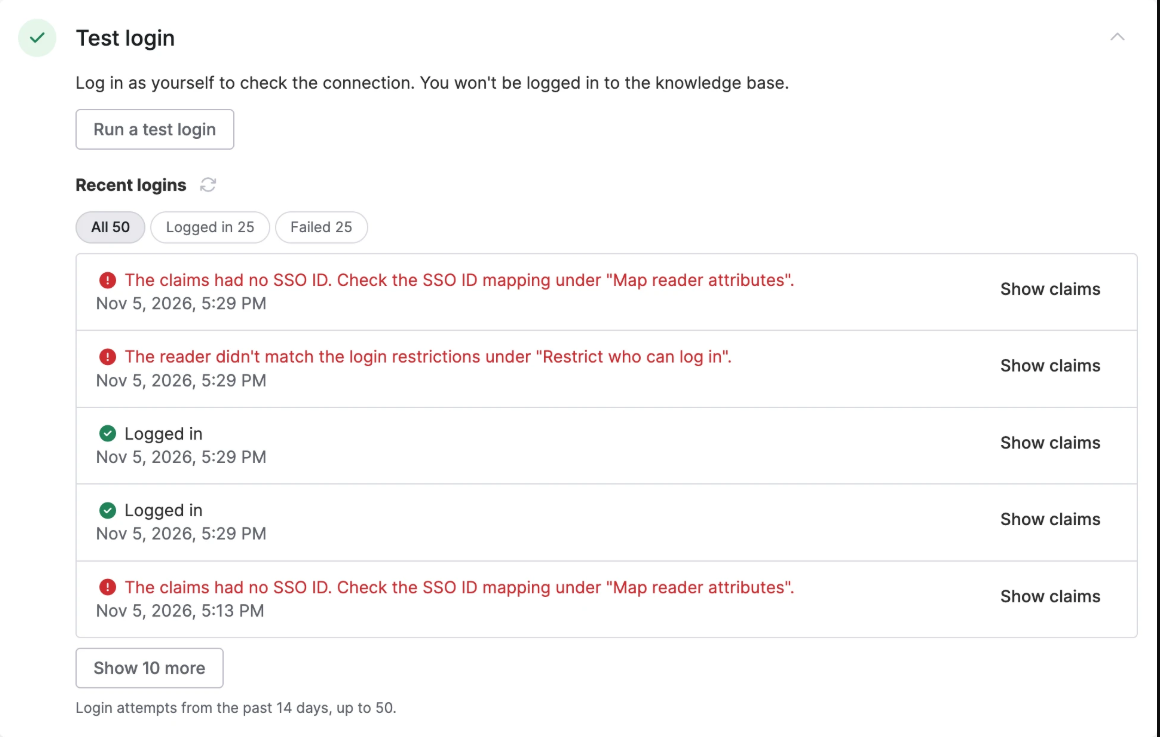
For a support escalation, collect the timestamp, affected application, intended reader role, relevant correlation identifier if available, and a redacted error message. Describe whether the failure affects all users or one group. Do not share live tokens, session cookies, or client secrets.
Correct the underlying mapping or trust configuration. Do not disable validation or make restricted content public to get a login test to pass. After a change, repeat both the affected positive test and the corresponding unauthorized-access test.
Keep the integration operable after launch
Assign ongoing ownership before closing the deployment. A useful operating record should identify:
- Credential maintenance: Who tracks certificate or client-credential expiration, performs supported rotation, and verifies sign-in afterward.
- Account lifecycle: Who monitors provisioning failures and checks access changes when employees move teams or customer entitlements end.
- Session policy: Which inactivity, maximum-duration, logout, and revocation controls the platform supports and how they meet your requirements.
- Recovery: Who can restore administrative access during an IdP or configuration problem without exposing private content.
- Change control: Which tests must be repeated after a domain, IdP, group-mapping, or authentication-method change.
OWASP’s session-management guidance emphasizes server-enforced expiration and invalidation. Use your platform’s supported controls; avoid assigning an arbitrary session duration without considering the content and operational requirements.
Before declaring the integration complete, record who can read each protected content area, what happens when that access is removed, and how administrators recover from a failed sign-in configuration. Those answers give your team a repeatable way to operate the knowledge base and evaluate future changes.