Independent knowledge base software guide Evidence-led Updated 2026

Education Knowledge Base Software: Buyer’s Guide for Schools, Universities, and EdTech
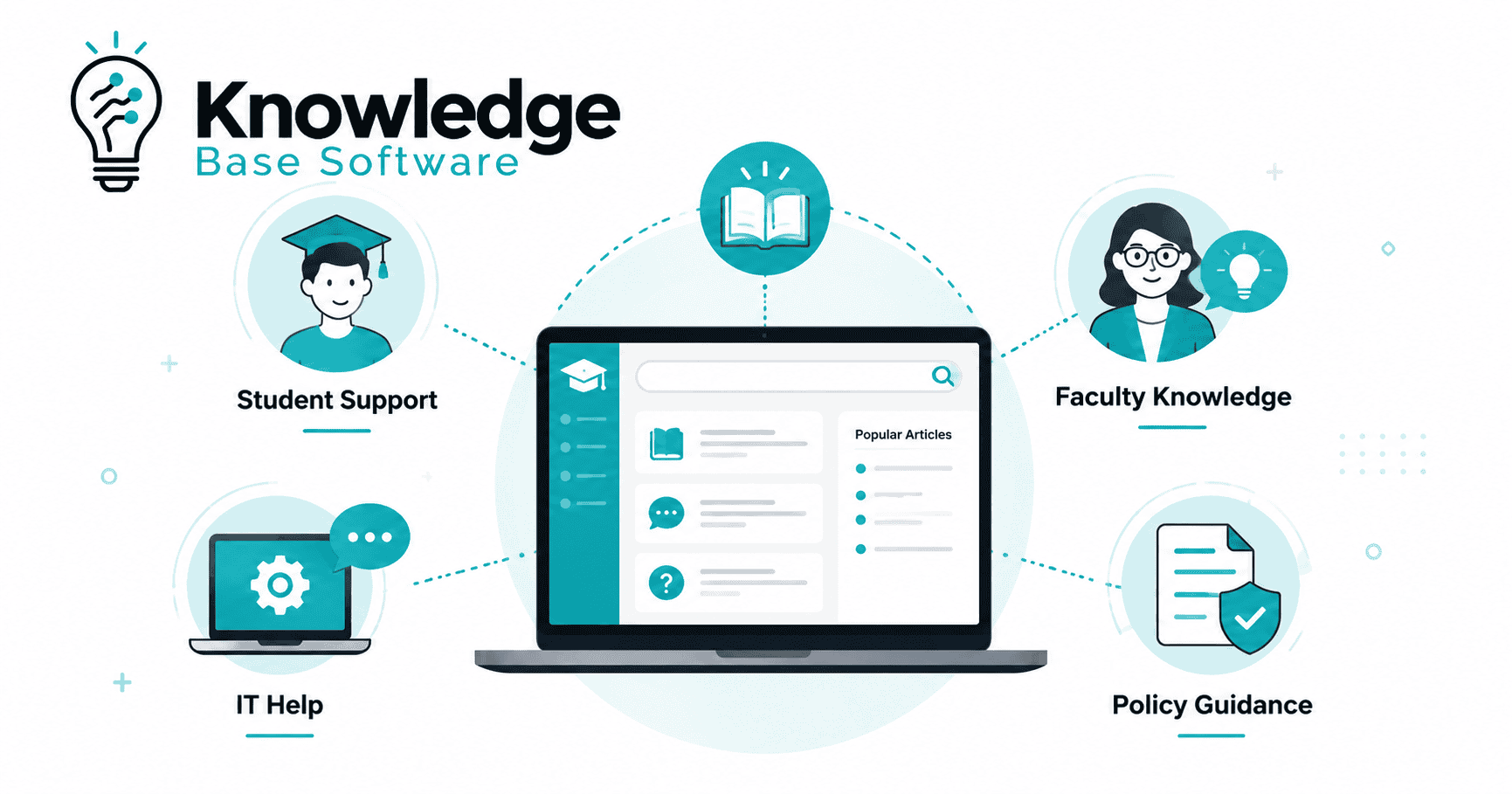
Education Knowledge Base Software is a platform for creating, approving, organizing, securing, searching, updating, and delivering reusable guidance to students, applicants, families, faculty, staff, administrators, support teams, or education-product users.
It can power a public student help center, an authenticated family portal, a faculty and staff knowledge base, an IT self-service site, or an EdTech product-support experience. The software should help people find trusted instructions without requiring them to identify the department that owns the answer.
A knowledge base is not a replacement for a Learning Management System, Student Information System, help desk, student portal, digital library, or emergency-alert system. It explains recurring tasks and policies; those other systems deliver courses, maintain student records, manage individual cases, or provide personalized services.
Quick buying rule: Choose the platform that can separate public, authenticated, internal, restricted, and student-specific information while preserving accessibility, ownership, search quality, integrations, and a reliable route to human help.
| Primary need | Likely software model | What matters most | Common mistake |
|---|---|---|---|
| Public answers for students, applicants, and families | Standalone knowledge base or customer-support help center | Public search, mobile access, branding, accessibility, multilingual publishing, and escalation | Publishing static PDFs without search, ownership, or effective dates |
| IT support for students, faculty, and staff | Knowledge base integrated with help-desk or ITSM software | Self-service search, ticket escalation, agent reuse, identity, analytics, and service ownership | Treating the ticket system as the only source of reusable guidance |
| Internal procedures for faculty and staff | Internal knowledge platform, wiki, intranet, or mixed-access knowledge base | Collaboration, review, ownership, permissions, version history, and findability | Allowing every department to create conflicting copies |
| Authenticated student or family guidance | Private knowledge base integrated with a portal or identity provider | SSO, role-aware access, account isolation, secure deep links, and source-of-truth integration | Assuming that signing in grants the correct authorization |
| EdTech customer support | Product knowledge base integrated with support, in-app help, and developer documentation | Teacher, student, and administrator roles; product versions; integrations; release updates; and in-app delivery | Using one article for every role, product plan, and implementation model |
| Personalized student information | SIS, student portal, financial-aid system, CRM, or another authorized system of record | Record-level permissions, data accuracy, auditability, and privacy | Copying individualized records into general knowledge articles or AI indexes |
Contents
- What education knowledge base software does
- Knowledge base vs LMS, SIS, portal, and help desk
- K–12, higher education, and EdTech requirements
- Public, authenticated, internal, and restricted knowledge
- Education-specific use cases
- How institutions use knowledge bases today
- Information architecture and academic metadata
- Which software model fits your organization?
- Software-evaluation criteria
- Reusable knowledge vs student records
- FERPA, COPPA, and vendor data practices
- Accessibility and procurement
- Identity, permissions, and security
- LMS, SIS, portal, and help-desk integrations
- LTI, OneRoster, and education standards
- AI in an education knowledge base
- Search, analytics, and measurement
- Implementation roadmap
- Content audit and migration
- Pricing and total cost
- Vendor demo and trial checklist
- Common implementation mistakes
- Frequently asked questions
What Does Education Knowledge Base Software Do?
The software turns recurring educational questions, policies, procedures, and support guidance into findable and maintainable answers. It provides the authoring, approval, search, access, publishing, analytics, and lifecycle controls around the content.
Typical questions include:
- How do I apply or enroll?
- Why can’t I register for this course?
- How do I connect to campus Wi-Fi?
- Where can I review my financial-aid status?
- How do I reset my school account password?
- How does a parent access the district portal?
- How does an instructor publish grades?
- Which office handles a transcript request?
- How does an administrator connect an EdTech product to the LMS?
- When should a user submit a ticket rather than follow a self-service article?
The knowledge base should explain the recurring process while directing personalized decisions and exceptional cases to the correct system or qualified person.
The software is only one part of the program
A platform does not automatically make knowledge accurate, accessible, or useful. The organization still needs:
- Named content owners.
- Authoritative source documents.
- Defined audiences and access levels.
- Review and approval rules.
- Academic-term and policy-version controls.
- Accessible content templates.
- Search terms that match user language.
- A process for corrections and feedback.
- A safe route to human support.
- A lifecycle for replacing and retiring obsolete content.
Education Knowledge Base vs LMS, SIS, Portal, and Help Desk
Education platforms frequently overlap, but they do not have the same primary purpose.
| System | Primary purpose | Typical contents | What the knowledge base adds |
|---|---|---|---|
| Education knowledge base | Publish and govern reusable answers | How-to articles, procedures, policy explanations, FAQs, troubleshooting, and support routes | It is the reusable explanation layer |
| Learning Management System | Administer and deliver courses and learning activities | Courses, modules, assignments, assessments, discussions, grades, and learning progress | Guidance for using the LMS, completing a process, or solving a recurring problem |
| Student Information System | Maintain student administrative records | Admissions, enrollment, registration, schedules, grades, transcripts, attendance, and related records | Instructions for accessing or understanding the process without duplicating the actual record |
| Student or family portal | Provide authenticated access to personalized services | Records, forms, balances, applications, schedules, links, and personalized tasks | Searchable explanations displayed beside or linked from those services |
| Help desk or ITSM | Manage individual requests and incidents | Tickets, assignments, statuses, conversations, escalations, and service workflows | Reusable solutions before, during, and after a support interaction |
| Intranet or wiki | Support internal communication and collaboration | News, team pages, policies, project information, directories, and shared documents | Stronger article ownership, search, audience controls, and lifecycle governance where required |
| Library discovery system | Find scholarly and library resources | Books, journals, databases, archives, and research materials | Operational guidance about using library services rather than the research collection itself |
| Institutional repository | Preserve and publish institutional scholarship | Research, theses, publications, datasets, and archival materials | Help and procedures related to deposit, access, and repository use |
| Course-content repository | Store and reuse instructional materials | Lessons, learning objects, assessments, and curriculum resources | Support articles for authors, instructors, administrators, and learners |
The U.S. Department of Education describes an LMS as a system for administering, documenting, tracking, reporting, and delivering courses or training. EDUCAUSE describes an SIS as software that manages student information and services such as admissions, registration, grades, schedules, and transcripts. A knowledge base complements these systems rather than replacing them.
K–12, Higher Education, and EdTech Need Different Knowledge Systems
Do not select software before identifying the education sector, audiences, and operational model.
| Sector | Typical audiences | High-value knowledge | Distinct requirements |
|---|---|---|---|
| K–12 district or school | Students, parents, guardians, teachers, staff, administrators, and community members | Enrollment, attendance, transportation, meals, devices, portals, learning platforms, calendars, forms, and district policies | Family access, multilingual content, child privacy, school-level variations, shared devices, and age-appropriate support |
| College or university | Applicants, students, faculty, staff, advisors, researchers, alumni, and visitors | Admissions, registration, advising, financial aid, billing, housing, IT, LMS, library, accessibility services, and graduation | Departmental ownership, academic-term metadata, campus and program variations, authenticated services, and decentralized governance |
| Online or continuing education provider | Learners, instructors, program administrators, employers, and partners | Enrollment, course access, certificates, payment, technical requirements, assessments, and learner support | Remote identity, global time zones, mobile access, program variations, and high dependence on self-service |
| EdTech company | Teachers, students, school administrators, district IT, product administrators, and support agents | Onboarding, rostering, SSO, LMS integration, roles, privacy settings, reporting, billing, APIs, and troubleshooting | Product and plan versions, school-account isolation, developer documentation, release notes, and in-app support |
| Education nonprofit or agency | Program participants, institutions, partners, employees, and public users | Program eligibility explanations, implementation guidance, resources, reporting procedures, and technical support | Program-specific access, public-sector accessibility, partner governance, and grant or policy changes |
Do not force one taxonomy onto every sector
A university may organize guidance around the student lifecycle. A K–12 district may prioritize family tasks and schools. An EdTech company may organize content by product role and implementation stage. The correct structure follows the user’s job rather than a generic education template.
Separate Public, Authenticated, Internal, Restricted, and Student-Specific Information
The following five-layer model is adaptable. Smaller organizations may combine layers, while institutions with higher-risk operations may require additional separation.
| Layer | Audience | Appropriate content | Do not place here |
|---|---|---|---|
| Public knowledge | Applicants, prospective students, families, visitors, and community users | Application steps, general enrollment guidance, public deadlines, services, technology requirements, and contact routes | Student-specific records, internal escalation rules, private cases, or sensitive security procedures |
| Authenticated student or family knowledge | Verified students, parents, guardians, or program participants | Role-specific portal guidance, registration instructions, student-only forms, plan or program guidance, and controlled service instructions | Another learner’s information, staff-only procedures, or internal risk assessments |
| Faculty and staff knowledge | Instructors, advisors, employees, and administrators | Teaching technology, LMS administration, grade submission, HR, purchasing, advising, research, and departmental procedures | Information unrelated to the employee’s duties or unrestricted student records |
| Restricted operational knowledge | Authorized security, finance, legal, accessibility, HR, or case-management roles | Incident procedures, account recovery, internal thresholds, sensitive case handling, and restricted administrative controls | Content intended for general employee or student search |
| Student-specific or case-specific records | Authorized people with a legitimate operational need | Grades, attendance, enrollment, aid, balances, accommodations, health records, discipline, advising notes, and individual cases | The general knowledge base; these belong in authorized systems of record |
A public article can explain how to request a transcript. The actual transcript belongs in the authorized record system. An authenticated article can explain how to review financial-aid requirements. The student’s award and eligibility status should come from the approved financial-aid system.
Education Knowledge Base Use Cases
Higher-education student services
- Admissions and application requirements
- Orientation and onboarding
- Registration, course changes, and academic calendars
- Advising and degree-planning processes
- Financial-aid and student-account explanations
- Housing, dining, transportation, and campus services
- Library and research support
- Accessibility-service contacts and process guidance
- International student service routes
- Graduation, transcripts, and records
- Career services and alumni resources
K–12 student and family support
- Enrollment and required documents
- Attendance and absence procedures
- Transportation and school meals
- District devices and accounts
- Student and parent portals
- Learning platforms and classroom technology
- School calendars, forms, and contacts
- Family communication and language access
- District policies and program information
- Technology troubleshooting
- Emergency-information routes without replacing the emergency system
Faculty and staff operations
- Faculty and employee onboarding
- Course creation and LMS administration
- Classroom technology
- Grade submission
- Student-referral processes
- Advising and academic procedures
- HR, purchasing, facilities, and finance
- Research administration and grants
- Data governance and information security
- Accessibility procedures
- IT service-management runbooks
EdTech product support
- Teacher, student, and administrator onboarding
- Rostering and user provisioning
- SSO and identity setup
- LMS and SIS integrations
- Roles, permissions, and school-account structure
- Assignments, grades, reporting, and analytics
- Privacy settings and data controls
- API and developer documentation
- Release notes and version-specific guidance
- Mobile support and troubleshooting
High-stakes guidance requires stronger controls
Financial aid, billing, academic standing, degree requirements, disability accommodations, immigration, health, counseling, conduct, discrimination reporting, safety, and emergency procedures need named owners, authoritative sources, clear scope, effective dates, and visible human escalation.
A general article should not make an individualized eligibility decision or replace the authorized office that manages the case.
How Education Institutions Use Knowledge Bases
Institution-owned help centers demonstrate several useful operating patterns.
| Institutional example | Documented pattern | Practical lesson |
|---|---|---|
| University of St. Thomas | Uses role tags for faculty, staff, and students; provides public getting-started and visitor content; requires sign-in for some system guidance | One knowledge environment can serve public and authenticated audiences when access rules and role labels are explicit |
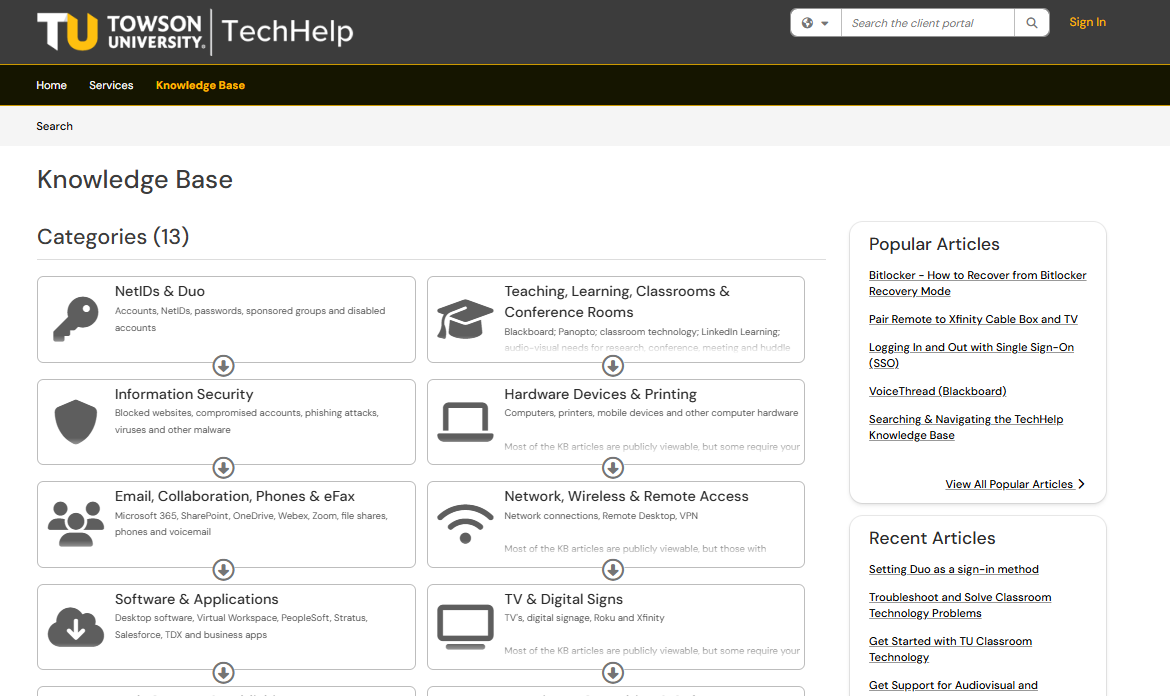
| Towson University | Publishes student, faculty, and staff articles; exposes popular tags; and provides a process for suggesting new articles | Search language, audience metadata, and a visible content-request route support continuous improvement |
| Morehouse College | Combines digital instruction, IT security, networking, classroom systems, devices, and campus applications | The knowledge base can bridge teaching technology and general IT support without becoming the LMS or campus app |
| Troy University | Includes admissions, registration, financial aid, records, billing, housing, career services, and conduct | Student self-service can extend beyond IT when departments share governance and ownership |
| Pace University | Publishes financial-aid, registration, transcript, tuition, health, and other student-service guidance | High-impact topics need strong ownership, scope, and escalation rather than generic FAQs |
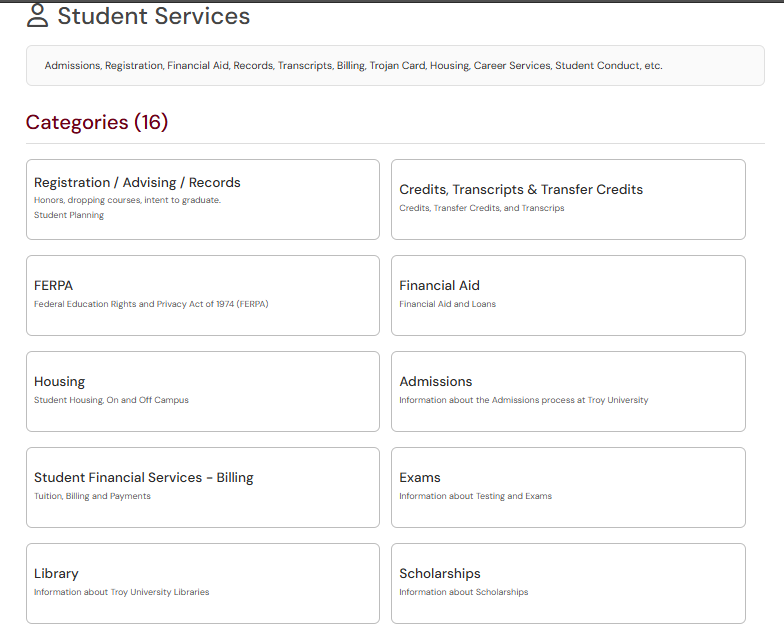
These examples show operating choices, not universal templates. Each institution has its own policies, systems, user roles, and service model.
Organize Knowledge Around User Tasks, Not Only Departments
A student may know that registration is blocked but not know whether the registrar, advisor, financial-aid office, or technology team owns the next step. Information architecture should help users identify the task before requiring institutional knowledge.
Potential student-facing categories
- Apply and Enroll
- Registration and Courses
- Advising and Academic Progress
- Financial Aid and Billing
- Accounts and Technology
- Learning Platforms
- Campus and Student Services
- Housing and Dining
- Library and Research
- Accessibility and Accommodations
- Safety and Support
- Graduation and Records
- Forms and Contacts
Potential faculty and staff categories
- Getting Started
- Teaching and Learning
- LMS and Classroom Technology
- Student Support
- Academic Administration
- Policies and Procedures
- HR and Employment
- Research and Grants
- Finance and Purchasing
- IT and Security
- Facilities and Operations
- Templates and Forms
- Service Requests
Metadata should prevent ambiguous guidance
- Audience
- Institution or district
- Campus
- School or college
- Department
- Academic program
- Grade level
- Applicant or student type
- Academic term and year
- Course modality
- Effective and expiration dates
- Deadline source
- Policy or system version
- Content owner and reviewer
- Authoritative source
- Language and translation status
- Access classification
- Search and AI eligibility
- Escalation route
A deadline copied into several articles can become inconsistent. When practical, link to or display dates from the authoritative calendar or system. Retire or clearly label previous academic-year guidance, and remove superseded versions from search and AI retrieval.
Which Education Knowledge Base Software Model Fits?
| Software model | Best fit | Strength | Trade-off to test |
|---|---|---|---|
| Standalone knowledge base | Public, authenticated, or mixed student and staff publishing | Reader experience, structured publishing, branding, search, multilingual content, and analytics | Integration with institutional systems and internal collaboration |
| Help-desk or ITSM knowledge base | IT support, service centers, and institutions connecting self-service with tickets | Search-to-ticket flow, agent reuse, service ownership, and support reporting | Non-IT content governance, public SEO, and department adoption |
| Internal wiki or collaboration platform | Faculty, staff, project, policy, and operational knowledge | Broad contribution, comments, internal context, and flexible pages | Controlled external publishing, formal verification, and student-facing experience |
| Knowledge feature inside an LMS or portal | Contextual help within an existing student or teaching workflow | Convenience and access to user context | Content portability, governance depth, public access, and cross-system reuse |
| Education-specific platform | Institutions needing education terminology, student-service templates, or prebuilt education integrations | Faster alignment with familiar workflows | Portability, governance depth, integration scope, and dependence on the vendor’s data model |
| Custom CMS or portal | Organizations with unusual design, integration, or data requirements | Control over experience and architecture | Development, accessibility, security, search, analytics, and long-term maintenance |
| AI enterprise-search layer | Finding approved knowledge across several existing repositories | Federated retrieval and conversational access | Does not replace ownership, publishing workflow, records systems, or source cleanup |
A product marketed to education is not automatically more private, accessible, secure, or accurate. Evaluate its actual behavior, evidence, integrations, contracts, and exit path.
Education Knowledge Base Software Evaluation Criteria
Authoring and governance
- Templates for different article types
- Collaborative editing and comments
- Draft, review, approval, and publication workflows
- Named article owners and owner reassignment
- Version history, comparison, and rollback
- Scheduled publishing and effective dates
- Review reminders and event-triggered review
- Expiration, retirement, archive, and redirects
- Translation workflow and source-language relationships
- Audit history and governance reporting
- Bulk metadata and academic-year updates
Search and discovery
- Keyword, semantic, and hybrid search
- Synonyms, acronyms, and misspellings
- Audience-, role-, campus-, program-, language-, and version-aware filters
- Permission-aware titles, snippets, attachments, APIs, and AI answers
- Search tuning and manually promoted results
- Zero-result and refinement reporting
- Federated search across approved sources
- Clear no-answer and escalation behavior
Publishing and delivery
- Public help center
- Authenticated student or family access
- Internal faculty and staff collections
- Restricted operational collections
- Student-portal, LMS, intranet, and mobile-app integration
- Custom domain and institutional branding
- Responsive and low-bandwidth behavior
- In-app widget or embedded search
- Human contact, ticket, chat, or office escalation
- Public search-engine controls where organic discovery matters
Permissions and identity
- Anonymous and authenticated content
- SSO through supported identity standards
- Roles, groups, and attributes
- Student, parent, faculty, staff, campus, school, and program segmentation
- Article- and collection-level restrictions
- Preview as a role or user
- Automated provisioning and deprovisioning
- Permission reports and denied-access testing
- Enforcement in search, APIs, exports, attachments, and AI
Accessibility
- Current Accessibility Conformance Report
- Authoring- and reader-interface accessibility
- Keyboard operation and visible focus
- Screen-reader labels and reading order
- Zoom, reflow, contrast, and touch targets
- Accessible search, forms, feedback, and escalation
- Accessible PDFs, Word files, tables, media, and code
- Mobile accessibility
- Custom-theme and third-party component impact
- Documented known issues and remediation plans
Integrations and portability
- LMS and SIS
- Help desk or ITSM
- Student and family portals
- CRM, admissions, financial aid, and billing
- Identity provider and HRIS
- CMS, intranet, campus app, and communication tools
- Library and research systems where relevant
- APIs, webhooks, bulk import, and raw export
- Content, metadata, attachments, languages, redirects, permissions, and analytics portability
Analytics
- Search queries and zero-result searches
- Search refinement and result clicks
- Article feedback and incorrect-content reports
- Contact or ticket creation after article use
- Ownership and review status
- Broken links and stale content
- Audience, campus, language, and device segmentation
- AI query and answer feedback
- Raw-data export and data-warehouse integration
Keep Reusable Knowledge Separate from Student Records
| Reusable knowledge | Student-specific record | Likely system of record |
|---|---|---|
| How to register for a course | The student’s schedule, holds, eligibility, and registration result | SIS and student portal |
| How the financial-aid process works | The student’s application, award, documents, and eligibility | Financial-aid system and authorized portal |
| How to request an accommodation | The student’s documentation, approved accommodation, and case notes | Authorized accessibility-services case system |
| How to submit grades | Individual students’ grades and academic records | LMS and SIS |
| How to report an absence | The student’s attendance record and supporting documentation | SIS or attendance system |
| How to open a support request | The actual ticket, conversation, attachments, and diagnostic data | Help desk or ITSM |
| How a parent accesses the portal | The verified parent or guardian relationship and authorized records | Identity, SIS, or family-portal system |
When personalized information appears beside an article, identify the authoritative source, enforce record-level authorization, show freshness where useful, and prevent the data from being indexed as general knowledge.
An AI-generated summary should not silently become the official student record. Consequential actions should be written back only through an authorized workflow.
FERPA, COPPA, and Education Vendor Data Practices
Privacy requirements depend on the institution, user population, data, purpose, jurisdiction, and contractual arrangement. The following points support software evaluation but do not replace qualified privacy or legal review.
FERPA considerations
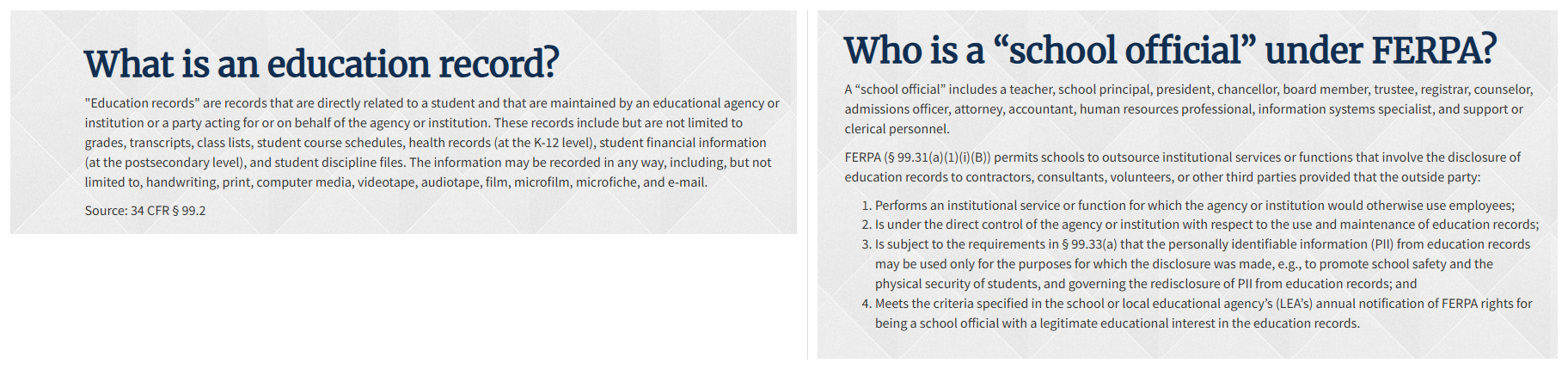
The U.S. Department of Education defines education records as records directly related to a student and maintained by an educational institution or a party acting for it. Examples can include grades, transcripts, schedules, K–12 health records, postsecondary financial information, and discipline files.
Where an institution relies on FERPA’s school-official exception to disclose education-record information to a service provider, official guidance describes conditions including performing an institutional function, remaining under the institution’s direct control for use and maintenance of the information, limiting use and re-disclosure, and meeting the institution’s criteria for legitimate educational interest.
Do not evaluate a platform through a marketing label alone. Document the actual data flows, purpose, user roles, contractual controls, subprocessors, retention, deletion, and ability to respond to institutional requests.
COPPA considerations for K–12 and child-directed services
The FTC’s current COPPA guidance explains that a school may sometimes act as the parent’s agent for an educational service used for the school’s benefit. That authority is limited to the educational context and does not authorize an operator to reuse children’s information for unrelated commercial purposes.
The operator remains responsible for complying with COPPA where it applies. Schools and providers must also consider notice, review, deletion, state privacy laws, and the actual age and use model.
Privacy questions for vendors
- Which student, parent, faculty, staff, device, search, and support data are collected?
- Which fields are required, optional, inferred, or generated?
- For which documented purposes is each data element used?
- Which subprocessors receive it?
- Where is it processed and stored?
- How long are content, searches, logs, AI prompts, and attachments retained?
- Can retention be configured?
- How does the institution access, correct, export, or delete data?
- Can the provider change terms or subprocessors, and how is notice delivered?
- Is data used for advertising, profiling, model training, or unrelated product development?
- How are parent, student, or institutional requests handled?
- What happens to data after contract termination?
Accessibility Must Be a Procurement and Implementation Requirement
Accessibility affects the software interface, published articles, search, authentication, attachments, mobile experience, chat, AI answers, and custom themes.
Current U.S. public-entity rule
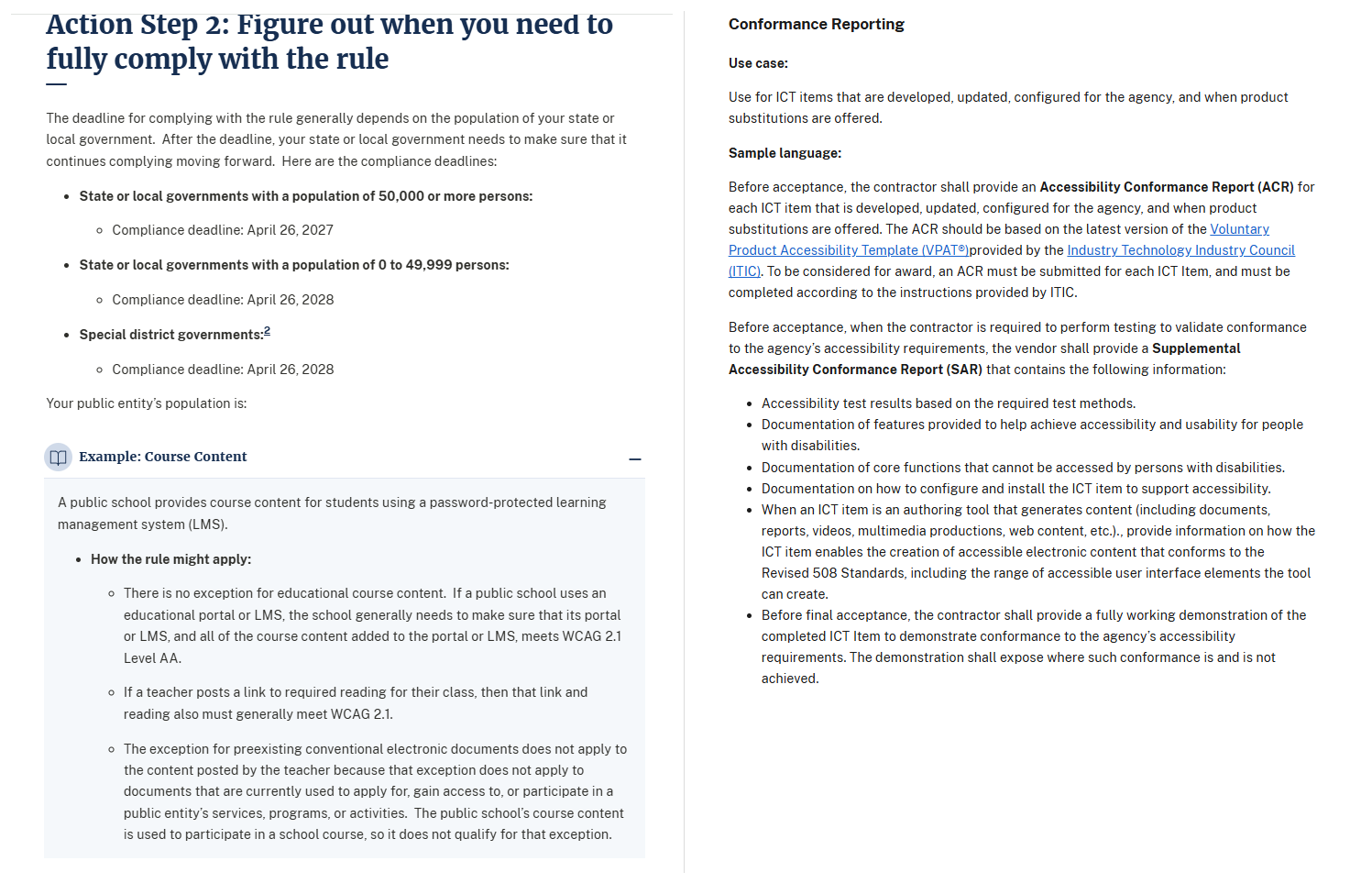
The Department of Justice’s Title II web and mobile accessibility rule applies to state and local government entities, including public schools, community colleges, and public universities. Its technical standard is WCAG 2.1 Level A and AA for covered web content and mobile apps, including content provided through contractual or licensing arrangements.
After a 2026 extension, the current general compliance dates are April 26, 2027 for entities with populations of 50,000 or more, and April 26, 2028 for smaller entities and special district governments. Verify the latest DOJ guidance before procurement or publication.
The DOJ also explains that public-school educational portals, LMS platforms, and current course content generally need to meet the applicable requirements. Contracting with a vendor does not automatically remove the public entity’s responsibility.
WCAG and procurement evidence
W3C recommends using the current WCAG 2.2 when developing or updating accessibility policies, while the current DOJ Title II rule specifically references WCAG 2.1 Level AA.
An Accessibility Conformance Report is a vendor’s completed conformance report, often created using a VPAT template. It is evidence to review, not proof that the exact configured deployment, content, integrations, and custom theme are accessible.
Accessibility evaluation checklist
- Request the current ACR and identify the product version, date, scope, and exclusions.
- Review testing methods, assistive technologies, known issues, and remediation commitments.
- Test the authoring interface as well as the reader experience.
- Search, open, read, navigate, provide feedback, and request help using only a keyboard.
- Test screen-reader labels, headings, reading order, forms, tables, dialogs, and status messages.
- Test zoom, reflow, contrast, touch targets, orientation, and mobile screen readers.
- Test PDFs, Word documents, videos, transcripts, equations, and embedded third-party content.
- Retest after configuration, branding, integration, and major product updates.
- Define accessibility acceptance criteria and a defect-remediation process in the contract.
Identity, Permissions, and Security
Authentication establishes identity. Authorization determines which content, records, attachments, APIs, exports, and AI answers that identity may access.
SSO does not automatically provide correct authorization. A signed-in student should not see every internal article, and a staff member should not receive access to every student record.
Access controls to evaluate
- SAML or OIDC SSO
- MFA support
- SCIM or other automated provisioning and deprovisioning
- Roles, groups, and attribute-based access
- School, campus, program, course, or organizational affiliation
- Article- and collection-level permissions
- Attachment permissions
- Search-result and snippet permissions
- API and export permissions
- AI retrieval permissions
- Session expiration and logout behavior
- Audit logs and administrative history
Permission test scenarios
- An anonymous visitor searches for a staff-only procedure.
- A prospective student follows a direct link to enrolled-student content.
- A student changes programs or campuses.
- A parent account attempts to access another child’s record.
- An adjunct instructor searches for a restricted HR article.
- A former employee opens an old bookmark after deprovisioning.
- An article is restricted but its attachment remains public.
- An API returns a title or snippet the user cannot open.
- An AI query asks for another student’s information.
- A user signs out while private content remains open in another tab.
Integrations and Systems of Record
Every integration should have a documented purpose, data owner, direction, permission model, update frequency, error path, and retention decision.
| System | Useful contribution | What should remain authoritative there | Common mistake |
|---|---|---|---|
| SIS | Student identity, enrollment, program, schedule, and administrative context | Official student records | Copying dynamic student information into static articles |
| LMS | Course context, roles, learning links, and contextual help | Courses, assignments, grades, and learning activity | Treating course pages as the permanent institutional knowledge base |
| Help desk or ITSM | Tickets, escalations, agent workflows, and support analytics | Individual cases and support history | Publishing raw case details as reusable guidance |
| Student portal | Authenticated delivery and personalized service links | Student-specific views and transactions | Assuming portal authentication grants access to every knowledge collection |
| CRM or admissions platform | Applicant, recruitment, communication, and relationship context | Prospect and applicant records | Using CRM notes as general answers |
| Financial-aid or student-account system | Aid, balance, document, and payment context | Individual financial records | Letting articles or AI invent current eligibility or balances |
| Identity provider | Authentication, groups, attributes, and user lifecycle | Identity and organizational affiliation | Relying on hidden navigation instead of authorization |
| CMS or institutional website | Public discovery, marketing pages, and broad service information | Public web experience | Maintaining an unsynchronized duplicate of the knowledge article |
| Data warehouse | Combined support, search, content, and operational analysis | Governed analytical datasets and metric definitions | Reporting without consistent event definitions |
When LTI and OneRoster Matter
Not every education knowledge base needs an education interoperability standard. Use one only when the use case and data flow require it.
LTI
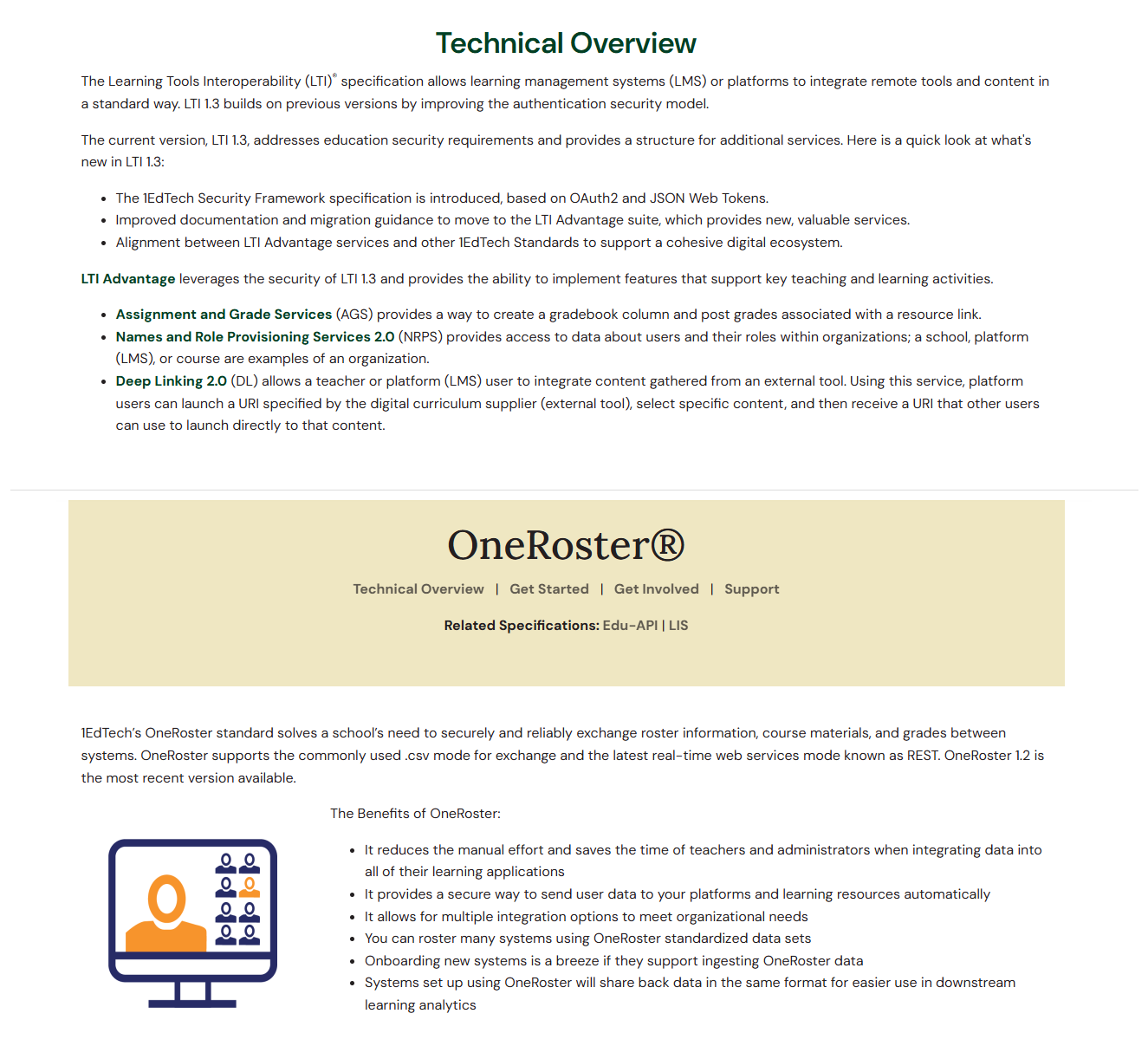
Learning Tools Interoperability is a technical standard for connecting learning tools with an institution’s learning environment. The current LTI 1.3 model uses a stronger authentication framework, and LTI Advantage adds services for roles, deep linking, assignments, and grades.
LTI may be relevant when users launch the knowledge experience from the LMS or when the integration needs approved course and role context. It is not necessary for a public help center that contains no course context.
OneRoster
OneRoster supports exchange of users, organizations, courses, classes, enrollments, resources, and gradebook information. OneRoster 1.2 is currently the latest published version.
It may matter for a K–12 product that requires roster or class context. A general support knowledge base should not receive roster data merely because the integration is available.
Compatibility is not certification
Ask which version and services the product implements, whether the implementation is certified, what data are exchanged, and which system is authoritative. A logo or general “compatible” claim does not prove complete conformance.
AI in an Education Knowledge Base
AI can improve search, recommend articles, summarize approved sources, assist authors, identify duplicate content, suggest metadata, and help detect content gaps. It should not become the policy owner or student-record system.
Keep different AI outputs separate
| AI output | What it represents | Required boundary |
|---|---|---|
| Generated public answer | A response based on approved public sources | Must not expose restricted or student-specific information |
| Authenticated support answer | A response that may use approved role or institution context | Must enforce authorization before retrieval |
| Student-record summary | A generated description of individualized data | Is not automatically an official record or authorized decision |
| Article draft | Proposed reusable content | Must remain in draft until required review is complete |
| Translation draft | Machine-generated localized content | High-stakes content needs qualified human review |
| Recommended action | A suggestion based on knowledge or context | Should not execute a consequential change without defined authority |
Education-specific AI risks
- Using an obsolete academic deadline or policy
- Applying guidance from the wrong campus, program, term, or student type
- Inventing financial-aid, registration, or academic-standing conclusions
- Mixing public, staff-only, and restricted content
- Exposing accommodations, health, conduct, or case information
- Using student data outside the approved purpose
- Presenting general guidance as individualized advice
- Leaving retired content in search or vector indexes
- Translating high-risk content without review
- Using prompts or logs for an unauthorized secondary purpose
AI controls
- Approved knowledge sources
- Permission-aware retrieval
- Institution and user isolation
- Source citations
- Academic-term, campus, program, and effective-date awareness
- Exclusion of drafts, expired content, and restricted collections
- No-answer behavior
- Human escalation
- Feedback and incorrect-answer reporting
- Traceability to source and configuration
- Model-provider and data-use disclosure
- Prompt, answer, and log retention controls
- Removal of retired content from search and vector indexes
The NIST AI Risk Management Framework provides a voluntary structure for governing, mapping, measuring, and managing AI risk. The U.S. Department of Education has also emphasized educator-led, accessible, transparent, ethical, and student-data-protective use of AI and education technology.
Do not describe any AI system as hallucination-free. A cited answer may still use the wrong source, omit an exception, or apply general guidance to the wrong student.
Search, Analytics, and Meaningful Measurement
Education search behavior includes institutional vocabulary, user vocabulary, abbreviations, and common alternatives.
Examples of terminology differences
- Course vs class
- Drop vs withdraw
- Bursar vs billing office
- Disability services vs accessibility services
- Student ID vs campus ID
- LMS vs learning platform
- Portal vs dashboard
- Parent vs guardian
- Registration hold vs block
- Transcript vs academic record
- Semester vs term vs quarter
- Program vs major
Use search logs, support tickets, student and family questions, advisor language, product labels, error messages, acronyms, multilingual terms, and misspellings to improve search.
Metrics to evaluate
| Metric | What it may reveal | Important limitation |
|---|---|---|
| Search success and result clicks | Whether users can find a plausible result | A click does not prove that the answer was correct |
| Zero-result searches | Vocabulary gaps or missing content | The answer may exist under language the user did not try |
| Search refinements | Where initial results are weak | Refinement can also indicate an exploratory task |
| Article feedback | Where users report confusion or problems | Positive feedback does not prove policy accuracy |
| Contact after article use | Where self-service may be incomplete | Contact can be the correct outcome for a complex case |
| Ownership and overdue review | Governance gaps | A completed review does not independently prove correctness |
| Task completion | Whether the user completed a defined process | Several systems and people may have contributed |
| AI-answer feedback | Potential retrieval or source problems | Acceptance does not prove correctness |
Do not claim that article views prove student success, fewer tickets prove task completion, or a knowledge base caused improvements in enrollment, retention, completion, or academic outcomes without an appropriate research design.
How to Implement Education Knowledge Base Software
- Define the institution and scope. Identify whether the project serves K–12, higher education, continuing education, EdTech customers, or a mixed audience.
- Identify audiences. Separate applicants, students, parents, faculty, staff, administrators, partners, and restricted roles.
- Map high-volume tasks. Review support requests, searches, calls, emails, portal questions, and service-center demand.
- Inventory existing systems. Document the LMS, SIS, portal, help desk, CMS, intranet, identity provider, and relevant departmental systems.
- Separate reusable guidance from records. Decide what becomes an article and what remains in an authorized system of record.
- Identify authoritative sources. Resolve conflicts among policy documents, calendars, websites, emails, system instructions, and departmental practice.
- Define access layers. Establish public, authenticated, internal, restricted, and record-specific boundaries.
- Define privacy and accessibility requirements. Involve the relevant institutional reviewers before selecting software.
- Choose a focused pilot. Start with one department, journey, or repeated support problem.
- Create taxonomy and metadata. Include audience, campus, program, term, owner, source, effective date, and access level where relevant.
- Create content templates. Standardize direct answers, prerequisites, steps, expected results, limitations, and escalation.
- Assign owners and reviewers. Make departmental responsibility visible.
- Configure identity and permissions. Test allowed and denied users, not only administrators.
- Connect required systems. Define the source of truth and minimum necessary data for each integration.
- Clean and migrate content. Remove duplicates, obsolete dates, private data, inaccessible documents, and unsupported claims.
- Configure search. Test student, family, faculty, staff, and product language.
- Configure multilingual content. Define translation ownership, review, fallback, and retirement.
- Enable AI only after source cleanup. Establish permissions, exclusions, no-answer behavior, and evaluation.
- Test accessibility and security. Use representative workflows, devices, roles, and assistive technologies.
- Launch a controlled pilot. Preserve a recovery path and a visible human-support route.
- Measure and improve. Review searches, content gaps, support demand, permissions, feedback, and stale content.
- Expand deliberately. Add departments or audiences only after ownership and governance are working.
Good pilot candidates
- Account setup and password help
- Wi-Fi and device onboarding
- LMS access and basic tasks
- Registration instructions
- Student portal guidance
- Parent portal access
- Common forms and transcript requests
- Faculty course setup
- One high-volume EdTech integration workflow
Audit and Clean Content Before Migration
Education knowledge often exists across institutional websites, department pages, PDFs, shared drives, LMS courses, portals, intranets, wikis, handbooks, email templates, videos, help-desk articles, and individual employee files.
Audit fields
- Title and content type
- Audience and access level
- Owner and authoritative source
- Institution, campus, department, and program
- Academic term and year
- Effective, review, and expiration dates
- Language and translation status
- Accuracy and duplication
- Accessibility
- Student-specific or sensitive information
- Search and AI eligibility
- Migration decision and replacement article
Migration decisions
| Decision | Use it when |
|---|---|
| Keep | The content is accurate, owned, accessible, appropriately classified, and useful |
| Update | The topic remains useful but dates, systems, screenshots, or procedures changed |
| Merge | Several pages compete as the answer to the same question |
| Split | One document mixes audiences, campuses, tasks, or access levels |
| Rewrite | The source is useful but written for a different audience or format |
| Restrict | The content is valid but should have a narrower audience |
| Move | The item is a record that belongs in the SIS, LMS, help desk, portal, or another approved system |
| Convert to training | The user needs a structured learning sequence rather than quick reference |
| Archive or delete | The content is obsolete and the approved retention or deletion process permits removal |
Do not migrate every PDF automatically. Remediate or replace inaccessible files, remove obsolete deadlines and screenshots, resolve conflicting policies, and protect student-identifying information before import.
Pricing and Total Cost of Ownership
Education organizations often have a small author group and a very large reader population. A pricing model that works for an employee wiki may become expensive when every student requires a paid account.
Pricing models to identify
- Per author, administrator, or reviewer
- Per support agent
- Per employee or internal user
- Per authenticated student or external user
- Per knowledge base, site, department, or brand
- Per search, page view, API call, or traffic volume
- Per AI query, token, answer, or usage allowance
- Custom institution or enterprise pricing
Total-cost lines
- Subscription and user tiers
- Public and authenticated readers
- Departments, campuses, sites, and languages
- SSO, SCIM, audit logs, and advanced security
- AI features and overages
- Storage, traffic, search, and API use
- Integrations and custom development
- Migration and content cleanup
- Accessibility testing and remediation
- Implementation and professional services
- Training and ongoing administration
- Support plan
- Data export and exit assistance
Verify current education discounts through official vendor documentation, but compare total cost after required add-ons and implementation rather than relying on the discount percentage.
Vendor Demo and Trial Checklist
Give each shortlisted vendor the same content, roles, questions, workflows, and evaluation rules.
Content and governance
- Create an article from the institution’s template.
- Assign an owner, audience, campus, academic term, source, and review trigger.
- Submit it for review and request changes.
- Approve and publish it.
- Prepare a revision while the approved version remains available.
- Schedule publication.
- Reassign ownership.
- Retire the article and redirect the old URL.
Search
- Search with student language, institutional terms, acronyms, synonyms, and misspellings.
- Search for content from the wrong campus or academic year.
- Run a deliberately unanswerable query.
- Review zero-result and refinement analytics.
- Confirm that restricted titles and snippets do not appear.
Permissions and privacy
- Test anonymous, applicant, student, parent, faculty, staff, and restricted roles.
- Test direct links and old bookmarks.
- Test attachments, APIs, exports, and AI answers.
- Change a user’s school, campus, program, or role.
- Deprovision a user and repeat the tests.
- Show what student, search, support, and AI data the vendor stores.
Accessibility
- Complete search, article reading, feedback, and escalation using a keyboard.
- Test with representative screen readers and mobile assistive technology.
- Test zoom, reflow, contrast, forms, tables, and focus management.
- Open representative PDFs, Word files, videos, and embedded content.
- Compare the live experience with the vendor’s current ACR.
Integrations and portability
- Demonstrate the required LMS, SIS, portal, help-desk, and identity flows.
- Explain which system owns each field.
- Show error, retry, and monitoring behavior.
- Import representative content and metadata.
- Export it again with attachments, languages, permissions, and redirects.
- Identify every object or field that cannot be exported.
AI
- Answer a supported public question and cite the source.
- Refuse an unsupported question.
- Refuse a restricted or cross-student question.
- Use the correct academic term, campus, and program.
- Exclude an expired article.
- Trace an incorrect answer to its sources and configuration.
- Delete the test data and confirm the documented retention process.
Common Education Knowledge Base Mistakes
- Treating the LMS as the complete knowledge base: Keep courses and learning activity in the LMS while governing reusable operational guidance separately.
- Treating the student portal as the authoritative source for every answer: Define which system owns the article and which owns the personalized record.
- Publishing student records as reusable knowledge: Keep individualized information in authorized systems of record.
- Organizing only by department: Add user tasks, roles, lifecycle stages, campuses, and programs.
- Publishing one article for several campuses with different rules: Label scope and maintain controlled variants.
- Copying deadlines into many pages: Link to or display the authoritative calendar where practical.
- Leaving prior-year content searchable: retire, redirect, or clearly label superseded guidance.
- Assuming SSO solves permissions: test authorization for every content and data path.
- Exposing restricted titles or snippets: enforce access in search, attachments, APIs, exports, and AI.
- Using inaccessible PDFs as the main answer: provide accessible HTML and remediate required files.
- Ignoring mobile and low-bandwidth users: test realistic devices, networks, and shared-device behavior.
- Creating the knowledge base only for IT: evaluate high-volume student and institutional services as well.
- Launching AI before cleaning content: assign owners, remove obsolete sources, and configure permissions first.
- Allowing AI to make personalized decisions: route high-stakes and record-specific questions to authorized systems and people.
- Using machine translation without review: require qualified review for high-impact guidance.
- Relying on a VPAT or ACR alone: test the configured product and representative workflows.
- Relying on a “FERPA compliant” claim: evaluate actual data, purpose, contracts, controls, retention, and institutional responsibilities.
- Choosing software before defining audiences: establish user groups, access layers, content, systems, and outcomes first.
- Paying for every student as an editor: compare author, reader, site, portal, and usage-based pricing.
- Hiding human help behind repeated searches: provide visible escalation for unresolved and high-stakes questions.
Frequently Asked Questions
What is Education Knowledge Base Software?
It is software for creating, governing, searching, securing, publishing, and measuring reusable educational guidance for students, families, faculty, staff, administrators, support teams, or EdTech users.
Is a knowledge base the same as an LMS?
No. An LMS delivers and tracks courses, assignments, assessments, and learning activity. A knowledge base explains recurring institutional or product tasks. The same guidance may appear inside the LMS, but the systems perform different jobs.
Is a knowledge base the same as an SIS?
No. The SIS maintains student administrative records such as enrollment, schedules, grades, and transcripts. The knowledge base explains how users complete or understand a process without becoming the authoritative student-record system.
Can one platform contain public and private knowledge?
Many platforms can, but buyers must verify how permissions apply to collections, articles, attachments, search results, APIs, exports, and AI. Public, authenticated, internal, and restricted content should have explicit boundaries.
Where should student-specific information live?
Keep grades, enrollment, aid, balances, accommodations, attendance, health information, discipline, and individual case records in authorized systems designed for those records. The knowledge base can explain how to access or manage them.
Does FERPA require a specific knowledge base product?
No specific product is universally required. Where FERPA applies, the institution must evaluate the data, purpose, access, control, use, re-disclosure, retention, and contractual arrangement. Qualified institutional review is necessary.
When is COPPA relevant?
COPPA may be relevant to online services directed to children under 13 or services with actual knowledge that they collect personal information from such children. School consent has limits and does not authorize unrelated commercial use.
Should buyers request a VPAT or ACR?
Request a current Accessibility Conformance Report and review the underlying VPAT edition, product version, scope, testing, exclusions, known issues, and remediation plan. Then test the actual configured deployment.
Does every knowledge base need LTI or OneRoster?
No. LTI may be useful for an LMS launch or role-aware learning context. OneRoster may be useful when a K–12 integration requires roster, class, organization, or enrollment data. A public help center may need neither.
Can AI safely answer student questions?
AI can answer from approved sources when permissions, scope, effective dates, citations, no-answer behavior, and escalation are configured. It should not invent or independently decide individualized financial-aid, academic, accommodation, conduct, or legal matters.
What content should be created first?
Start with frequent, consequential, repeatable questions that have an authoritative answer and a named owner. Common pilots include accounts, Wi-Fi, LMS access, registration, portal use, forms, transcripts, and faculty course setup.
How should education knowledge base software be priced?
Pricing varies by author, agent, authenticated user, site, knowledge base, traffic, search, storage, or AI usage. Model the complete cost using real author and reader counts, integrations, security, migration, accessibility, and exit requirements.
Sources Checked
- U.S. Department of Education: What Is FERPA?
- U.S. Department of Education: What Is an Education Record?
- U.S. Department of Education: School Officials and Third-Party Providers
- Federal Trade Commission: COPPA Frequently Asked Questions
- U.S. Department of Justice: Title II Web and Mobile Accessibility Rule
- U.S. Department of Justice: Title II Accessibility Rule Fact Sheet
- Section508.gov: Accessibility Conformance Reports and VPATs
- Section508.gov: Define Accessibility Criteria in Contracts
- W3C: Web Content Accessibility Guidelines 2.2
- 1EdTech: Learning Tools Interoperability
- 1EdTech: OneRoster
- NIST: AI Risk Management Framework
- University of St. Thomas: Knowledge Base Access and Role Tags
- Towson University: TechHelp Knowledge Base
- Morehouse College: Service Desk Knowledge Base
- Troy University: Student-Service Knowledge Base
- Pace University: Student and Institutional Knowledge Base
- Institute of Education Sciences: Learning Management System Definition
- EDUCAUSE: Student Information System and Education Technology Glossary
Sources, standards, and regulatory information checked on November 17, 2026.