Independent knowledge base software guide Evidence-led Updated 2026

HR Knowledge Base Software: 8 Tools and a Practical Buyer’s Guide
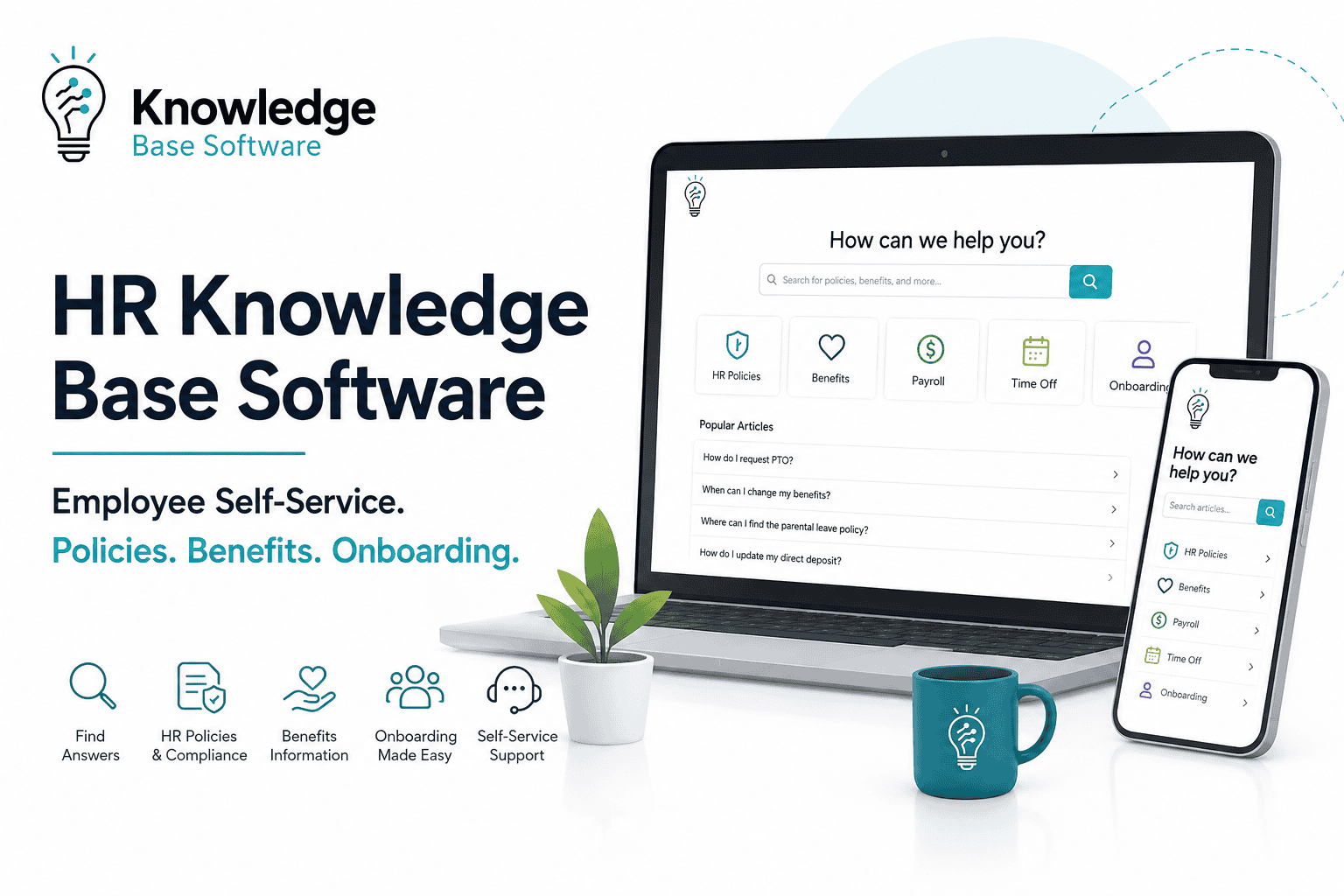
HR Knowledge Base Software helps employees and HR teams find approved, reusable guidance about policies, benefits, leave, payroll processes, onboarding, workplace procedures, and employee services.
The correct product depends on the problem you are solving. A company that needs an employee portal, HR cases, service-level agreements, and automated onboarding requires a different platform from a smaller HR team that primarily needs a secure, searchable policy library.
This guide compares eight current options across three different software categories:
- HR Service Delivery suites that connect knowledge, employee requests, cases, workflows, and portals.
- HR-specific knowledge platforms designed for contextual policies, audience targeting, governance, and employee answers.
- General internal knowledge and employee-service platforms that can support HR but require more configuration around employee context, cases, and sensitive-content controls.
The products are not ranked as universal winners. Each profile identifies the use case it fits best, what the official documentation supports, its important limitations, and what to verify during a demonstration.
What is HR Knowledge Base Software?
HR knowledge base software is a governed publishing, retrieval, and self-service system for reusable HR information. It helps employees understand policies, complete common HR tasks, find the correct system or form, and escalate to an HR professional when self-service is not enough.
A well-designed HR knowledge base may contain:
- Leave and time-off policies.
- Benefits enrollment guidance.
- Payroll schedules and process explanations.
- Onboarding and offboarding instructions.
- Manager self-service guidance.
- Expense and reimbursement procedures.
- Performance-cycle instructions.
- Workplace policies and employee FAQs.
- Links to HR systems, forms, requests, and escalation paths.
The knowledge base should normally contain reusable guidance rather than individual employee records. Personal payroll data, medical documentation, performance cases, investigations, disciplinary records, identity documents, and employee-specific correspondence belong in appropriately restricted HRIS, HCM, document-management, or case-management systems.
Choose the software category before choosing the product
| Software category | Best fit | Typical capabilities | Common limitation |
|---|---|---|---|
| HR Service Delivery suite | Organizations that need knowledge, employee requests, HR cases, SLAs, workflows, and an employee portal in one operating model. | Knowledge base, case management, service catalog, routing, approvals, employee journeys, analytics, and AI assistance. | Higher implementation complexity and usually quote-based pricing. |
| HR-specific knowledge platform | HR teams that need strong policy governance, contextual employee answers, segmentation, and multilingual delivery. | HR content authoring, audience targeting, approval, revalidation, employee search, and HR integrations. | May require a separate case-management or service-delivery product. |
| General internal knowledge platform | Teams that need governed internal knowledge across HR and other departments. | Search, AI answers, verification, versioning, permissions, templates, and integrations. | HR-specific employee context and HR case workflows may require custom configuration. |
| Employee-service platform | Organizations that want a cross-functional help desk for HR, IT, facilities, and other employee services. | Ticketing, internal knowledge, employee portal, routing, approvals, SLAs, and analytics. | May not use the HRIS as its native security and employee-context model. |
| Intranet or HCM portal | Organizations that already have a strong employee portal and primarily need to expose HR guidance inside it. | Pages, employee communications, document access, search, and embedded HCM actions. | Knowledge governance, case linkage, search analytics, and article lifecycle controls may be less specialized. |
A general wiki should not be compared directly with a full HR Service Delivery suite on price alone. The suite may include employee cases, sensitive-case controls, routing, service levels, and lifecycle workflows that the wiki does not attempt to provide.
HR Knowledge Base Software comparison
| Product | Category | Best-fit use case | HR case linkage | Knowledge targeting and governance | Pricing visibility |
|---|---|---|---|---|---|
| ServiceNow HR Service Delivery | Enterprise HR Service Delivery | Large enterprises standardizing HR services, knowledge, cases, journeys, and employee self-service. | Native Case and Knowledge Management. | HR criteria, user criteria, owners, managers, workflows, and separate knowledge-base structures. | Custom quote. |
| Oracle HR Help Desk | HCM-native HR Service Delivery | Organizations already using Oracle Fusion Cloud HCM. | Native HR service requests and cases. | Oracle HCM security model and employee-only knowledge groups. | Published list price exists; contract pricing may vary. |
| Freshservice for HR Teams | Cross-functional employee service | Midmarket and enterprise teams needing HR requests, workflows, service catalog, and knowledge with public pricing. | Native employee-request and case workflows. | Portal and workspace mapping, user conditions, solution visibility, and audit logs. | Public agent-based pricing. |
| Dovetail HR Knowledge Management | HR-specific knowledge and case platform | HR shared-services teams connecting contextual employee knowledge with HR cases. | Knowledge articles can be linked to cases. | HCM-informed audience controls, approval workflows, feedback, and detailed audit trails. | Pricing on request. |
| Applaud Knowledge Management | HR-specific knowledge platform | Global HR teams managing policies across countries, roles, sources, and employee channels. | Available alongside Applaud’s portal and case-management capabilities. | Country-, role-, and manager-based targeting, approval, revalidation, and retirement. | Pricing on request. |
| Neocase | HR Service Delivery platform | Multilingual organizations operating HR shared services and contextual employee support. | Native HR case and request management. | Contextual knowledge, role-based access, multilingual portal, and configurable processes. | Modular employee- and usage-based pricing. |
| Guru | General internal knowledge and AI search | Organizations connecting HR knowledge across SharePoint, Google Drive, Confluence, and other sources. | No native HR case-management workflow documented as the core product. | Object-level permissions, groups, verification states, and permission-aware Knowledge Agents. | Custom package. |
| Zendesk Employee Service | Cross-functional employee service | Teams using ticketing, internal knowledge, employee portals, and AI across HR and other internal services. | Native ticketing and employee-service workflows. | User segments, article-level view permissions, management permissions, and content workflows. | Public agent-based plans. |
“Not publicly documented” does not necessarily mean a feature is unavailable. It means the buyer should request evidence from the vendor rather than assume that the feature exists.
How the products were selected
The shortlist represents several software categories instead of ranking eight similar wikis. Products were included when current official documentation supported a meaningful HR knowledge, employee self-service, HR case, or governed internal-knowledge use case.
The comparison prioritizes:
- Employee self-service and portal experience.
- HR-specific knowledge and case-management capabilities.
- Policy targeting by role, location, country, or employee context.
- Approval, ownership, review, revalidation, and retirement.
- Permission-aware search and AI.
- Multilingual and global-workforce support.
- HRIS, HCM, employee-portal, and case integration.
- Official pricing visibility.
- Important limitations and demo questions.
The assessments are based on official product pages, documentation, help centers, and pricing material. They are not based on proprietary hands-on testing or undisclosed customer interviews.
Best HR Knowledge Base Software by use case
1. ServiceNow HR Service Delivery — Best fit for enterprise HR service operations
ServiceNow HR Service Delivery is an enterprise suite for employee self-service, HR cases, knowledge, journeys, workflows, and agent operations.
Its Case and Knowledge Management capability connects reusable HR guidance with employee inquiries. Employee Center provides a unified portal for employees to find information, request services, and get help. ServiceNow’s HR taxonomy can map knowledge articles and catalog items into shared topics, allowing employees to discover content and services together.
ServiceNow’s HR criteria and user criteria are particularly relevant to HR. They can filter content and services using employee and platform attributes. Current documentation describes criteria based on fields such as department, group, role, location, or company.
- Strengths: Native HR cases, Employee Center, service catalog, workflows, journeys, knowledge governance, audience criteria, analytics, and enterprise integrations.
- Pricing: Custom quote. Current packaging uses HR Foundation, HR Advanced, and HR Prime tiers, with specific AI and workflow capabilities varying by package.
- Important limitation: The platform’s breadth requires governance, implementation resources, and careful configuration. It may be excessive for a small HR team that only needs a private policy library.
Verify in a demo: Show one country-specific policy, confirm that excluded employees cannot retrieve it through Employee Center search or AI, and demonstrate the complete case-to-knowledge workflow.
2. Oracle HR Help Desk — Best fit for organizations using Oracle Fusion Cloud HCM
Oracle HR Help Desk combines employee self-service, HR service requests, case management, routing, knowledge, and analytics within the Oracle HCM environment.
The main advantage is its native relationship with Oracle Fusion Cloud HCM. Oracle states that HR Help Desk uses the same security and data model as HCM, allowing HR support to use current employee context while protecting sensitive information.
Employees can search knowledge, review existing requests, or create a new request through the Help Desk self-service experience.
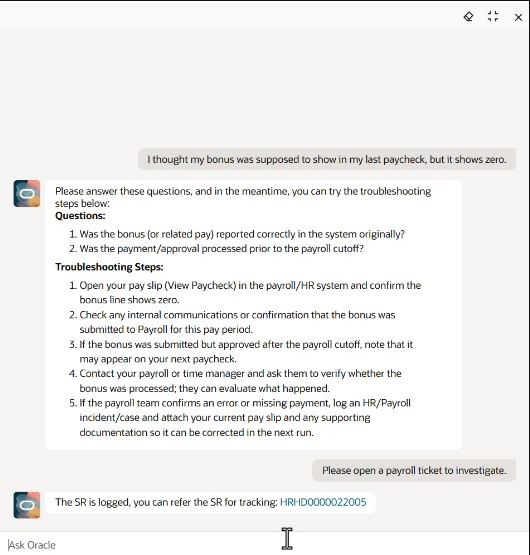
Agents can search knowledge from the request workspace while using assignment, milestones, messaging, and collaboration tools.
Oracle also documents an Employee user group for knowledge that should be visible only to authenticated HR Help Desk self-service users. Access requires both the appropriate employee role and the content’s assignment to the employee user group.
- Strengths: Native HCM security context, employee self-service, knowledge, routing, HR cases, service-request tracking, and Oracle analytics.
- Pricing: Oracle’s 2026 global price list publishes Fusion Help Desk Cloud Service at $4 per hosted employee per month, with a 500-employee minimum and a standard three-year cloud-subscription term. Actual contract pricing and required HCM components may differ.
- Important limitation: The strongest value appears when Oracle HCM is already the workforce system of record. Organizations using another HRIS should compare integration and implementation requirements carefully.
Verify in a demo: Demonstrate employee-only knowledge access, a sensitive HR case, employee-context personalization, and what data can be exported if the organization later changes platforms.
3. Freshservice for HR Teams — Best fit for transparent pricing and cross-functional employee service
Freshservice for HR Teams extends Freshservice into employee-service use cases such as HR requests, case workflows, service catalogs, onboarding, offboarding, approvals, document generation, and employee journeys.
The platform is useful when HR, IT, facilities, finance, and other internal teams need related but separately governed workspaces within one service-management environment.
Freshservice supports multiple requester portals. Portal mappings control which tickets, services, and solutions are available, while user mappings determine who can sign in. Current documentation shows that access conditions may use profile information such as location and custom user fields. Knowledge folders can also be limited to selected portals.
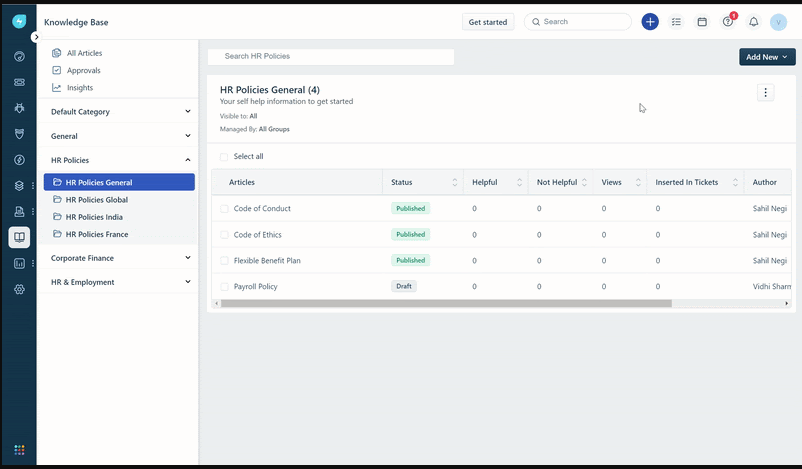
- Strengths: Employee portal, service catalog, HR cases, workflows, SLAs, journeys, knowledge articles, multiple portals, conditional access, and public pricing.
- Pricing: Freshservice for Business Teams Pro is publicly listed at $49 per agent per month when billed annually. AI, e-signatures, orchestration, connector tasks, and other capabilities may require add-ons.
- Important limitation: It is a cross-functional service platform rather than an HCM-native HR system. Employee context, policy targeting, and HR-record boundaries depend on configuration and integration design.
Verify in a demo: Configure one HR portal for UK employees, publish a UK-only policy folder, and confirm that an excluded employee cannot see the folder, articles, search results, suggestions, or attachments.
4. Dovetail HR Knowledge Management — Best fit for HR knowledge connected to employee cases
Dovetail HR Knowledge Management is designed specifically for HR service delivery rather than general company documentation.
The platform lets HR teams create knowledge articles, expose relevant content in an employee portal, search knowledge while handling HR cases, and link articles to cases. Dovetail states that HCM integration can tailor content to an employee’s profile and permissions.
Its governance model includes approval and maintenance workflows, employee feedback, and a detailed audit trail showing who changed an article, when the change occurred, and the previous and new values. Uploaded attachments can also be indexed for search.
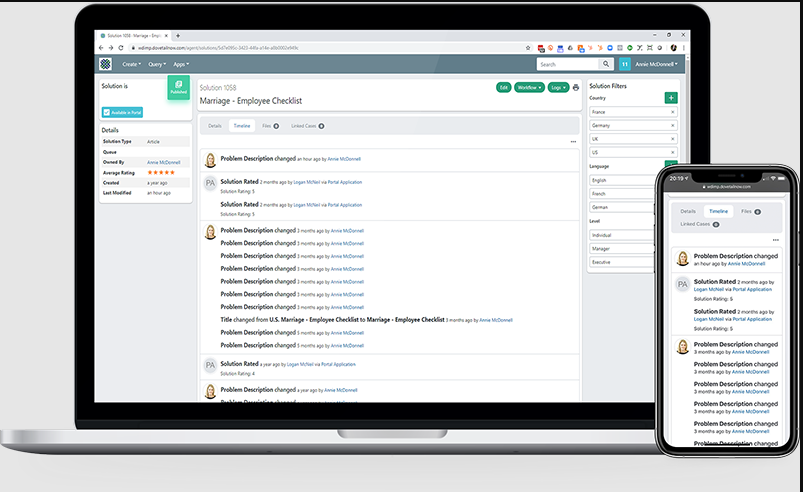
- Strengths: HR-specific authoring, profile-aware access, employee portal search, case linking, attachment search, workflow automation, article feedback, and detailed audit history.
- Pricing: Pricing is not publicly listed; request a vendor quote.
- Important limitation: Buyers should verify available HRIS integrations, multilingual behavior, AI capabilities, mobile experience, and packaging for their required modules.
Verify in a demo: Search for a policy from an employee portal and an HR case, link the article to the case, submit employee feedback, and show the complete approval and audit history.
5. Applaud Knowledge Management — Best fit for globally targeted and governed HR knowledge
Applaud Knowledge Management focuses on unifying HR content from sources such as SharePoint and Confluence, transforming it into employee-ready knowledge, and governing it through approval and lifecycle controls.
Its current product documentation emphasizes AI-assisted content creation, quality scoring, audience targeting, approval workflows, revalidation, retirement, analytics, and integration with existing HR sources.
Applaud’s audience-targeting model can serve content according to country, role, or manager view. This makes it especially relevant to global HR organizations where one policy topic may have different guidance by jurisdiction or employee population.
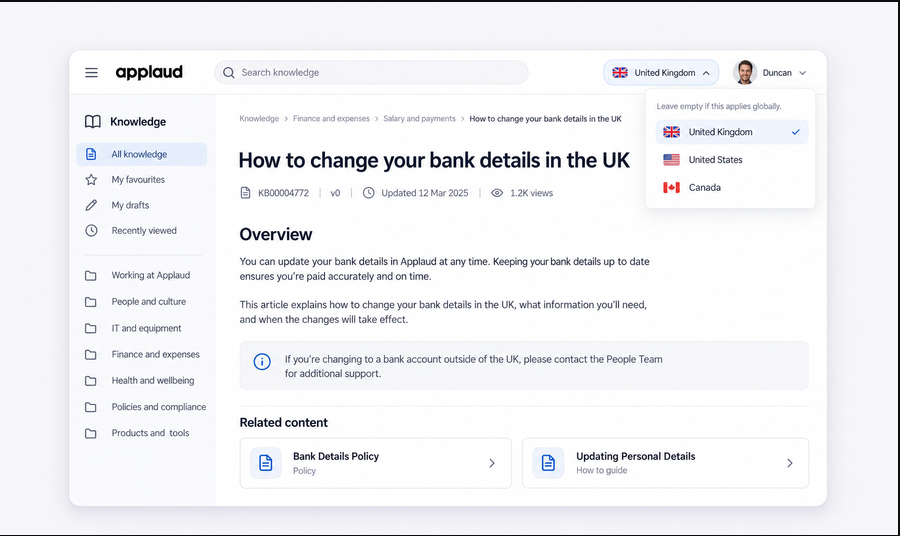
When paired with Applaud’s employee portal and case-management capabilities, employees can find knowledge, ask an AI assistant, complete HR tasks, or escalate to a case when self-service is insufficient.
- Strengths: HR-specific content transformation, country and role targeting, approval, revalidation, retirement, AI quality analysis, portal delivery, and broad connectors.
- Pricing: Pricing is not publicly listed; request a vendor quote.
- Important limitation: The platform’s AI-generated quality and accuracy assessments should support—not replace—HR subject-matter, legal, and policy-owner review.
Verify in a demo: Import a policy from SharePoint, generate an employee-facing article, route it through approval, target it to one country, and test that excluded users cannot retrieve it through portal search or AI.
6. Neocase — Best fit for multilingual HR shared services
Neocase combines an HR knowledge base with employee self-service, HR request management, case workflows, document management, and process automation.
Neocase describes its knowledge base as contextual: relevant content can be surfaced according to the nature of an employee’s request. Its self-service portal supports employees, managers, HR business partners, and other worker populations across web and mobile channels.
Current official material states that the portal is available in 28 languages and that access can be controlled by role. The platform also supports country-, population-, and entity-specific workflows, which is useful for global HR shared-services environments.
- Strengths: Multilingual employee portal, HR knowledge, case management, contextual articles, request routing, HR workflows, role-based access, chatbot, and mobile support.
- Pricing: Neocase describes its offering as modular, billed according to employee users and usage for certain features. Exact prices require a quote.
- Important limitation: Buyers should confirm which languages apply to the interface, authored knowledge, machine translation, search, and support—not treat “28 languages” as proof of identical capability in every language.
Verify in a demo: Show one global policy with local variations, search in two languages, create an HR request from the portal, and demonstrate how employee profile, country, and role affect visible content.
7. Guru — Best fit for governed HR knowledge distributed across existing tools
Guru is a general enterprise knowledge platform rather than an HR Service Delivery suite. It is relevant when HR guidance already exists across systems such as SharePoint, Google Drive, Confluence, and other repositories.
Guru’s knowledge layer combines connected sources, AI search, permission-aware answers, verification workflows, usage signals, and integrations. Its verification model marks content as verified, unverified, or neutral, and can apply to Guru content and connected external sources.
Permissions can be assigned to users or groups across Collections, Pages, Sources, and Knowledge Agents through predefined or custom roles.
- Strengths: Cross-system enterprise search, cited AI answers, permission-aware agents, verification, content quality workflows, groups, custom roles, and broad integrations.
- Pricing: Guru currently provides custom packages based on scale, knowledge complexity, and AI maturity rather than a standard public seat price.
- Important limitation: Guru does not replace an HRIS or a complete HR case-management suite. Employee eligibility, sensitive HR cases, service levels, and HR workflow routing require other systems or integrations.
Verify in a demo: Connect a restricted SharePoint HR library, ask an authorized and unauthorized user the same question, inspect the citations, and show how verification changes the answer’s trust state.
8. Zendesk Employee Service — Best fit for ticketing plus internal knowledge
Zendesk Employee Service combines employee ticketing, an internal knowledge base, AI, routing, analytics, and an employee portal.
Zendesk Knowledge supports separate viewing and management permissions. User segments can define who may view an article, while management permissions control who may create, edit, and publish it.
Zendesk can work for HR alongside IT and other employee-service teams, particularly when ticketing and internal support are already established. It is not an HCM-native platform, so HR-specific segmentation and employee context require careful user attributes, integrations, and permission design.
- Strengths: Internal knowledge, employee ticketing, AI suggestions, content management, article permissions, portal, integrations, analytics, and public pricing.
- Pricing: Employee Service Suite Team is publicly listed at $29 per agent per month billed annually, Suite Growth at $59, and Suite Professional at $99. Growth adds the employee portal, service catalog, tasks and approvals, and SLAs. Add-ons and higher-tier AI may add cost.
- Important limitation: Employee records, confidential investigations, individual leave documentation, and other sensitive HR data should not be treated like ordinary help-desk content.
Verify in a demo: Create separate employee and manager user segments, publish a manager-only policy, and test article visibility through search, direct URL, suggestions, AI, and attachments.
Which type of HR knowledge platform should you choose?
| Your primary need | Software category to investigate first |
|---|---|
| Enterprise HR cases, employee journeys, service catalog, SLAs, and advanced workflows | Enterprise HR Service Delivery suite such as ServiceNow HRSD or Oracle HR Help Desk. |
| Global HR policies with country-, role-, and manager-specific guidance | HR-specific knowledge platform such as Applaud or Dovetail. |
| Multilingual HR shared services with cases, portal, and workflow automation | HR Service Delivery platform such as Neocase. |
| HR, IT, facilities, and finance using related employee-service workflows | Cross-functional service platform such as Freshservice or Zendesk Employee Service. |
| HR knowledge distributed across SharePoint, Google Drive, Confluence, and other tools | Enterprise knowledge layer such as Guru. |
| A small team primarily needs a secure policy library | General internal knowledge base, but verify permissions, ownership, review workflows, SSO, export, and search before purchase. |
Essential HR knowledge base features
Employee self-service
- Searchable employee portal.
- Plain-language answers.
- Mobile access.
- Guidance displayed inside HR workflows.
- Clear escalation to an HR request or case.
- Request-status visibility.
Content governance
- Named content owners.
- Draft, review, approval, publish, revalidate, and retire states.
- Version history and audit trail.
- Scheduled and event-based review triggers.
- Reusable content blocks.
- Employee feedback and content-gap routing.
Audience targeting
The platform should be able to show the correct guidance according to the organization’s real workforce structure. Relevant attributes may include:
- Country and legal entity.
- Business unit and department.
- Location.
- Employee or manager role.
- Employment type.
- Language.
- Lifecycle stage.
Do not test targeting only on the article page. Test search results, snippets, recommendations, AI answers, direct links, related content, attachments, APIs, exports, and notifications.
HR case integration
- Article suggestions inside cases.
- Knowledge search from the HR agent workspace.
- Linking articles to resolved cases.
- Creating knowledge candidates from recurring inquiries.
- Escalating from self-service to a case.
- Case categorization, routing, SLAs, and workflow integration.
Search and global-workforce support
- Synonyms and employee-language search.
- Permission-aware search.
- Search suggestions and zero-result reporting.
- Country-specific policies.
- Translation workflow and source-language management.
- Localized labels, titles, search behavior, and escalation paths.
Keep reusable HR knowledge separate from employee records
| System | What normally belongs there |
|---|---|
| HR knowledge base | Approved policies, eligibility explanations, processes, forms, system instructions, deadlines, FAQs, and escalation guidance. |
| HRIS or HCM | Individual employment data, compensation, benefits elections, personal identifiers, transactions, performance data, and employee history. |
| HR case-management system | Individual questions, private case notes, attachments, approvals, investigations, employee-specific decisions, and restricted correspondence. |
| Document-management system | Employee files, signed agreements, medical or leave documents, retention-controlled records, and other sensitive documents. |
The knowledge base may link to an HRIS transaction, form, or case-creation page without copying unnecessary personal data into broadly searchable content.
Security and privacy requirements
HR content can be sensitive even when it is not an individual employee record. Evaluate:
- SSO, SCIM, and MFA.
- Role- and attribute-based access.
- Article-, folder-, section-, and portal-level permissions.
- Restricted attachments.
- Administrative roles and separation of duties.
- Audit logs and content-change history.
- Encryption, retention, backup, deletion, and export.
- Data residency, vendor support access, and subprocessors.
- AI source permissions and prompt handling.
Run negative-access tests. An excluded employee should not discover a restricted article through search snippets, AI answers, suggestions, direct URLs, related links, attachments, APIs, exports, or notifications.
SSO confirms identity; it does not automatically prove that article access, search, AI, and exported data follow the intended HR policy.
How to evaluate AI in an HR knowledge base
Do not accept “AI-powered” as a sufficient feature description. Ask the vendor to demonstrate:
- Which knowledge sources are eligible.
- Whether answers include source citations.
- How article, user, group, and employee-context permissions are enforced.
- What happens when sources conflict.
- How outdated policies are detected.
- Whether the system gives a safe no-answer response.
- How an employee escalates to a human.
- Where prompts, outputs, embeddings, and logs are stored.
- Whether customer content is used for model improvement.
- Whether AI can be disabled or restricted by source.
- How feedback and content gaps reach accountable owners.
A cited answer can still rely on an outdated source. A permission-aware portal does not prove that the AI layer applies identical permissions. AI-generated HR guidance should not become an approved policy without the required human review.
Compare pricing and total cost, not subscription alone
Align the pricing unit before comparing products. A platform may charge per employee, HR agent, author, workspace, portal, month, year, or AI transaction.
Total cost may include:
- Base platform and HR module.
- Employee, HR agent, and author licenses.
- AI usage.
- Employee portal and case-management modules.
- SSO, audit, security, and data-residency tiers.
- Multilingual content and translation.
- Integrations and orchestration.
- Implementation and migration.
- Content cleanup, taxonomy, and policy redesign.
- Training and ongoing administration.
- Premium support, renewal, export, and exit.
Do not compare published monthly prices without aligning the billing term, minimum employee population, included agents, required modules, and feature scope.
Use a task-based vendor demo
Ask vendors to demonstrate the following in a configured test tenant rather than using presentation slides:
- Publish a leave-policy article for employees in one country.
- Exclude employees in another country.
- Verify that excluded users cannot see the policy through search, AI, direct links, suggestions, or attachments.
- Update one reusable policy block across several articles.
- Route a policy change through approval and review.
- Show the article owner, effective date, revalidation, and retirement process.
- Search using employee language instead of the official policy title.
- Escalate from an unanswered search to an HR request.
- Suggest relevant knowledge inside the HR case.
- Show multilingual content, locale-specific policy, and translation status.
- Export the article, metadata, permissions, versions, and audit history.
- Retire the policy and verify its removal from search and AI retrieval.
Pilot and implementation plan
| Phase | Primary work | Evidence before expanding |
|---|---|---|
| 1. Define the use case | Audiences, top questions, HR services, content scope, security boundaries, and success criteria. | The organization agrees on the employee tasks and records that are in or out of scope. |
| 2. Audit current content | Policies, handbooks, PDFs, intranets, HRIS pages, shared drives, macros, case history, duplicates, and outdated guidance. | Authoritative sources and migration actions are known. |
| 3. Design governance | Owners, approvers, categories, article types, taxonomy, audience rules, review triggers, and escalation. | Each policy domain has an accountable owner and publishing process. |
| 4. Configure and integrate | SSO, SCIM, HRIS, portal, HR cases, search, AI, analytics, and notifications. | Identity, permissions, source authority, and data flows are validated. |
| 5. Pilot | Use a bounded domain such as leave, benefits, onboarding, payroll guidance, or manager self-service. | Representative users can find, understand, and act on the correct content. |
| 6. Launch | Employee communication, manager and agent training, in-workflow links, feedback, and support routes. | Employees know where to search and how to escalate. |
| 7. Improve | Search gaps, case demand, feedback, ownership, policy changes, translation gaps, and AI failures. | The operating model can sustain accurate content after launch. |
Measure success without relying on page views
| Measurement area | Useful measures |
|---|---|
| Content health | Assigned owners, approval status, overdue review, stale articles, broken links, duplicates, and missing translations. |
| Findability | Search success, zero-result queries, query refinement, time to find an applicable policy, and correct audience targeting. |
| Self-service behavior | Article use before case creation, successful task completion, escalation after article use, and employee feedback. |
| HR service outcomes | Repeat-question demand, case categorization, response time, resolution time, reopen rate, and consistency of HR answers. |
| Governance | Approval time, overdue reviews, unowned content, policy-change propagation, and access violations or near misses. |
Views, searches, chatbot messages, and estimated “tickets avoided” are useful activity signals, but they are not definitive proof that an employee received the correct answer or completed the task.
Worked example: a fictional HR software selection
This example is fictional. Northstar Manufacturing has 2,500 employees across several US states, the United Kingdom, and Germany. It uses a cloud HCM platform, but HR requests arrive through email and chat. Policies are distributed across PDFs, SharePoint, and local HR folders.
The organization requires:
- Country-specific leave and benefits policies.
- Manager-only guidance.
- An employee portal with search and request escalation.
- HR case routing and service-level reporting.
- English and German content.
- Permission-aware AI answers.
- A small HR service team that cannot maintain several separate platforms.
Northstar first removes general wikis from the primary shortlist because native HR cases, employee requests, and targeted policies are must-have requirements. It compares three HR Service Delivery products and one HR-specific knowledge platform with case integration.
During demonstrations, the team requires each vendor to publish a German leave policy, hide it from US employees, show it to eligible managers, escalate an unanswered query to a case, and prove that excluded users cannot retrieve the content through AI or direct links.
The pilot covers leave and time off rather than the entire HR policy library. Northstar measures search success, policy applicability, case escalation, permission failures, review workload, and employee task completion.
The final decision remains conditional on security review, export testing, HRIS integration evidence, multilingual search, and total implementation cost. This example demonstrates the selection process rather than recommending a predetermined winner.
HR Knowledge Base Software requirements worksheet
| Requirement area | What to record |
|---|---|
| Workforce | Employees, HR agents, authors, countries, languages, legal entities, managers, and worker types. |
| Current systems | HRIS, HCM, case management, employee portal, intranet, identity provider, and document repositories. |
| Content | Volume, formats, owners, languages, duplicates, restricted policies, and authoritative sources. |
| Self-service | Search, portal, mobile, AI, request creation, status tracking, and escalation. |
| Audience targeting | Country, legal entity, business unit, department, role, manager status, employment type, and language. |
| Governance | Owners, approval, review, revalidation, effective dates, versioning, feedback, and retirement. |
| HR cases | Routing, categories, SLAs, agent workspace, knowledge suggestions, sensitive-case controls, and analytics. |
| Security | SSO, SCIM, MFA, permissions, audit, attachments, export, retention, residency, and AI access. |
| Integrations | HRIS, payroll, benefits, ticketing, chat, collaboration, identity, analytics, and translation. |
| Commercial | Pricing unit, minimums, modules, AI usage, implementation, migration, support, renewal, and exit. |
Classify every requirement as:
- Must have.
- Should have.
- Nice to have.
- Disqualifying gap.
- Requires vendor confirmation.
Final recommendation
The best HR Knowledge Base Software is the least complex platform that satisfies the organization’s actual service, governance, targeting, security, integration, and employee-experience requirements.
Choose an HR Service Delivery suite when knowledge must operate alongside cases, service catalogs, SLAs, journeys, and employee workflows. Choose an HR-specific knowledge platform when policy governance, contextual targeting, multilingual delivery, and employee answers are the primary problem. Choose a general internal knowledge platform when the organization needs governed search across existing sources and can keep HR cases and sensitive employee records in separate systems.
Before purchasing, require a task-based demonstration, test excluded users, validate AI permissions, calculate total cost, and pilot one HR domain with real employee questions.
Sources verified: November 9, 2026.