Independent knowledge base software guide Evidence-led Updated 2026

Notion Knowledge Base Review: What Works, What Doesn’t, and When to Move
Independent review and evidence limits: Knowledge Base Software is an independent editorial resource, not a Notion partner or software vendor. Product, publishing, analytics, permission, and export claims in this review were checked against official Notion documentation on July 29, 2026; pricing and AI-plan claims were rechecked on August 16, 2026. We also ran a public, no-login test on five Notion-hosted help or knowledge sites. We did not enter a Notion workspace, use a paid plan, or test private editor, AI, analytics, billing, export, or administration screens. Those capabilities are documentation-verified, not presented as hands-on account experience.
Quick verdict: is Notion a good knowledge base?
Notion is a strong internal knowledge base and a capable lightweight publishing tool, but it is not a complete replacement for every dedicated help center. It is a particularly good fit when employees already use Notion for projects and documents, knowledge changes frequently, and contributors need flexible pages, databases, wikis, comments, permissions, owners, and verification in one workspace.
For public documentation, Notion Sites can publish unlimited pages, enable search-engine indexing, expose a Site search, connect Google Analytics on paid plans, and use a custom domain through a paid add-on. That is enough for a small public FAQ, handbook, onboarding hub, or early-stage product guide. It becomes a weaker fit when documentation is a measurable customer-support operation that needs mature article feedback, public failed-search reporting, localization workflows, ticket deflection, controlled releases, or detailed URL migration controls.
The practical decision is audience-first. Use Notion for collaborative internal knowledge. Consider dedicated knowledge base software when the documentation itself is a customer-facing product. A hybrid setup—Notion internally and a dedicated platform externally—is often the cleanest path for a growing SaaS company.
| Need | Notion fit | Why |
|---|---|---|
| Internal wiki, SOPs, onboarding, and team knowledge | Strong | Flexible pages, wikis, collaboration, permissions, owners, and verification |
| AI retrieval and automation across company knowledge | Strong on eligible plans | Enterprise Search and core Notion AI are included on Business and Enterprise; Custom Agents are a separate credit-metered automation layer |
| Lightweight public documentation | Good | Notion Sites supports publishing, indexing, navigation, search, and paid customization |
| Customer support help center | Limited | Confirm public-search analytics, feedback, support integrations, localization, and deflection requirements |
| Password-protected public documentation | Poor | Notion says Sites do not currently support page password protection |
| Complex documentation governance | Mixed | Internal permissions and verification are useful, but a formal public publishing workflow may need additional process or software |
Contents
- Research method and evidence limits
- Original five-site public test
- Notion pricing and plan fit
- Internal knowledge base strengths
- Notion Sites for public documentation
- Public knowledge base limitations
- Export and migration
- Notion vs dedicated software
- When to choose Notion
- When to choose dedicated software
- The hybrid model
- Evaluation checklist
- Final verdict
- Frequently asked questions
How this Notion knowledge base review was researched
We separated two kinds of evidence so that public observations are not confused with private product testing.
- Official-document review: We checked Notion’s current pricing, plan, Enterprise Search, wiki, verification, Sites, custom-domain, analytics, sharing, permission, and export documentation. Important claims link to the closest official page.
- Original public test: We inspected five Notion-hosted help or knowledge sites discoverable on the open web. The checks used public requests and did not require an account.
The public test was deliberately narrow. It checked reachability, selected subpage links, visible content, metadata, robots directives, sitemap behavior, and migration notices. It did not test the editor, workspace search quality, Enterprise Search answers, permission changes, analytics dashboards, export fidelity, billing, domain setup, or administrative controls. If your buying decision depends on one of those workflows, verify it in an eligible workspace using your own content and users before signing a contract.
Original test: five public Notion help and knowledge sites
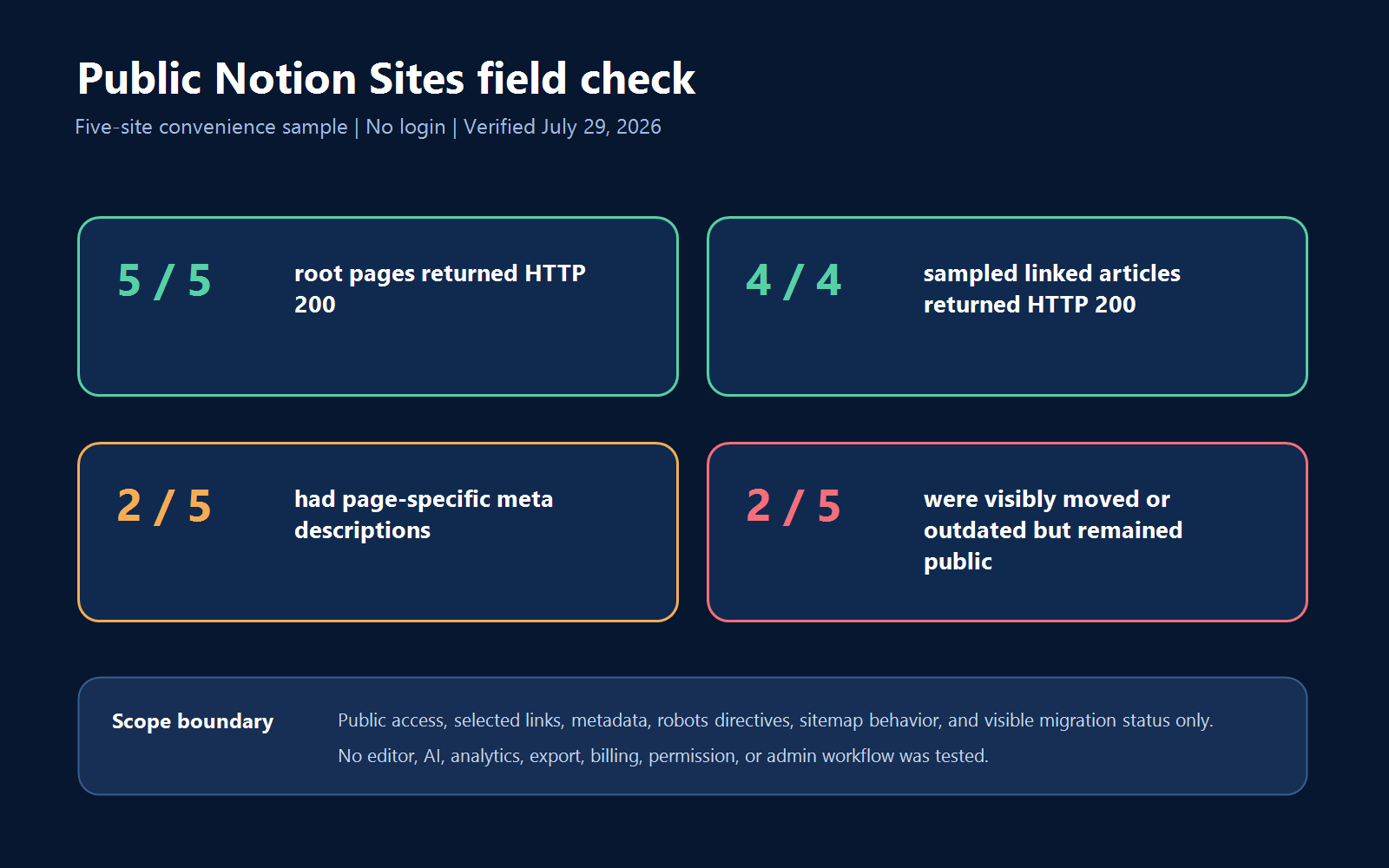
Test date: July 29, 2026. We discovered a convenience sample through public search queries for site:notion.site pages containing “knowledge base” or “help center.” We sent unauthenticated HTTP HEAD and GET requests, opened the public text, checked one linked article on four sites, inspected the metadata returned for the Twitterbot/1.0 user agent, and reviewed each host’s robots.txt and sitemap response.
The sample included the Notion Templates Help Center, INTO Knowledge Base, Tella Knowledge Base, Niice Help Center, and Standards FAQ.
| Public check | Result | Interpretation |
|---|---|---|
| Root page returned HTTP 200 | 5/5 | All five sampled Sites were publicly reachable without a login |
| Sample linked article returned HTTP 200 | 4/4 attempted | All four sampled linked article URLs returned HTTP 200; a visual click path was not tested |
| Descriptive title in crawler/social metadata | 5/5 | Each response exposed a page-specific title |
| Page-specific meta description | 2/5 | Three responses used the generic “Hosted by Notion Sites” description |
| Canonical present | 5/5 | Every sampled metadata response exposed a canonical URL |
| Canonical retained a 32-character page ID | 5/5 | Notion-hosted canonical URLs in this sample were not simple human-only slugs |
robots.txt allowed crawling | 5/5 | None of the sampled hosts blocked all crawlers |
| Page said it moved or was outdated but remained public and searchable | 2/5 | Content retirement requires deliberate migration work |
Includes the per-site CSV observations and the published scope and limitations.
What the test tells us
The test confirms that a Notion knowledge base can expose readable, crawlable pages and linked articles without requiring a visitor account. It also shows why owners must configure metadata rather than assuming a useful description will appear automatically: three of the five sampled metadata responses used Notion’s generic hosting description.
The stronger finding concerns retirement. Tella’s page says its help center moved to another domain, while Standards labels its Notion page as outdated. Both old pages still returned HTTP 200 and appeared in public search. A migration banner helps a human reader, but it is not the same as a redirect, an unpublish action, or removal from search. That distinction matters when old troubleshooting, billing, or policy instructions can continue competing with the current source.
All five robots.txt files allowed crawling and pointed to Notion’s shared sitemap index. In our checks, the hostname-level /sitemap.xml response listed Notion marketing URLs rather than a Site-specific page inventory. This does not show that Notion Sites cannot be indexed—the five pages were discoverable—but it does mean buyers should test the exact sitemap, canonical, indexing, and retirement behavior they need instead of assuming it works like a conventional documentation CMS.
Limits of the public test
Five sites are not a representative sample of all Notion Sites. Each check was a single point in time, not uptime monitoring. Search presence does not measure rankings, organic traffic, or the cause of indexation. The social-crawler metadata response does not prove the exact HTML or snippet Google will choose. We did not run a complete JavaScript visual render, mobile usability test, keyboard audit, Core Web Vitals test, or Site-search relevance study. We also did not test any private account feature. The results should be used as a reproducible observation and a source of evaluation questions, not as a universal score for Notion.
What is a Notion knowledge base?
A Notion knowledge base is a structured collection of pages, databases, and wikis used to store and retrieve team or customer information. Typical content includes onboarding material, company policies, SOPs, product decisions, support playbooks, troubleshooting notes, handbooks, and project documentation.
Notion’s advantage is that knowledge can remain connected to the work that creates it. A product decision can link to the project, meeting notes, owner, status, and related specifications. A policy can live inside an HR wiki with an owner and verification date. A support team can maintain internal answers beside issue databases and escalation notes. That flexibility makes Notion a natural candidate for an internal knowledge base.
A public help center has a different job. It must deliver an approved answer to a customer quickly, expose predictable navigation and search, protect private material, survive product changes, and show the team where self-service fails. Notion Sites can cover the publishing layer, but the required operating model determines whether it is enough.
Notion knowledge base pricing in 2026
On August 16, 2026, the official Notion pricing page showed Free at $0, Plus at $10 per seat/month, Business at $20 per seat/month, and Enterprise as a sales-assisted plan. Notion’s product page describes paid plans as starting at $10 per member/month when billed annually. Prices can vary by region, tax, billing interval, and workspace eligibility, so treat $10 and $20 as the public US-dollar annual-billing equivalents checked on that date—not guaranteed monthly prices for every buyer. Model member growth, add-ons, administration, migration, and support work with the site’s guide to knowledge base software pricing and total cost of ownership.
| Plan | Public price checked | Knowledge-base-relevant features | Main caution |
|---|---|---|---|
| Free | $0 | Basic Sites, one notion.site domain, indexing, 7-day page history, limited AI trial | Team block limits, 5 MB file uploads, and trial AI |
| Plus | $10/seat/month with annual billing | Unlimited collaborative blocks, paid Site customization, Google Analytics integration, 30-day history | AI remains a limited trial; verify availability for the workspace |
| Business | $20/seat/month with annual billing | Notion Agent, AI Meeting Notes, Enterprise Search, page verification, SAML SSO, granular database permissions, and 90-day history; Custom Agents use Notion credits | Cost scales by member; some features are still labeled beta |
| Enterprise | Contact sales | Notion Agent, AI Meeting Notes, Enterprise Search, Custom Agents using Notion credits, enterprise analytics, advanced administration and security controls, and unlimited history | Contract, implementation, and plan-specific controls require written verification |
Notion’s plan documentation says Free and Plus AI usage is limited and intended for trying the features. Business and Enterprise include core Notion AI features such as Notion Agent, AI Meeting Notes, and Enterprise Search. This distinction is important: a team should not select Plus on the assumption that the Enterprise Search experience is included indefinitely.
Custom Agents use separate credits: Since May 4, 2026, Custom Agent runs use Notion credits. Notion’s current credit guide lists $10 per 1,000 monthly credits. Credits are shared across the workspace, reset monthly, and unused monthly credits do not roll over. Consumption varies with content read, steps and tool calls, run frequency, and model choice; agents pause when the available balance is exhausted. Treat per-run examples as estimates rather than fixed prices.
Why Notion works well as an internal knowledge base
Wikis, page owners, and verification
Notion can turn a page into a wiki with Home, All pages, and Pages I own views. Its official wiki documentation also supports page owners and content verification. Owners can verify a page until a selected date or indefinitely, and Notion notifies them when timed verification expires. Verified pages show a blue check in mentions and Notion search results.
That is a meaningful knowledge-management feature. It can help employees distinguish an approved policy from an abandoned draft and gives owners a prompt to revisit changing content. Verification is still a signal, not proof that a subject-matter expert completed a formal approval. High-risk policy, legal, security, or billing content needs a defined knowledge base governance framework around the product feature.
Enterprise Search replaces the old Q&A framing
Older Notion comparisons often refer to Q&A. The current product is Enterprise Search, available on Business and Enterprise. It can search the workspace and connected tools such as Slack, Microsoft Teams, Google Drive, and Jira. When an answer uses workspace or connected-app content, Notion says it cites the sources so the reader can inspect the underlying page or item.
Users can narrow the search scope and choose among models from OpenAI, Anthropic, and Google. There is an important official caveat: depending on the model selected, Notion AI may use only web information and may not search the workspace or connected apps. Teams should therefore test their real permissions, documents, acronyms, duplicate pages, and answer-critical questions rather than treating “AI search” as one uniform behavior.
The name can also be confusing: Enterprise Search is included in Business as well as Enterprise. As of our verification date, Notion’s pricing and product pages still labeled it beta. Buyers should confirm connector availability, synchronization, data handling, usage boundaries, and release status for their account. If the decision is between a public support surface and company-wide retrieval, use the site’s separate comparison of knowledge base software versus enterprise search; the two products serve different audiences and evidence requirements.
Collaboration and access control
Notion’s sharing and permissions documentation supports invited-only access, workspace-wide access, and anyone-on-the-web links. Page roles include Full access, Can edit, Can comment, and Can view, with additional database-specific levels. Subpages inherit parent permissions by default, and Notion applies the broadest access a person has been granted.
For internal knowledge, this is flexible and useful. It also creates an administration responsibility. A restrictive page rule can be defeated by broader access inherited through another group, teamspace, parent page, or public link. Permission tests should use representative employees, guests, and restricted users—not only an owner account.
Content and search analytics
Notion has three different analytics layers. Page analytics lets an owner or editor review total and unique views plus creation, editing, and viewing activity. Paid Notion Sites can connect a Google Analytics measurement ID. Enterprise workspace analytics covers Members, Content, AI, and Search.
The official workspace analytics guide adds several limits. Analytics begin when the workspace enters Enterprise, show up to 365 days, and should be exported regularly if longer history matters. Search queries appear only when more than one person searched the term and it was searched more than once. View recording can be affected by ad blockers and user opt-out, while anonymous visitors with cookies disabled may be counted as new unique viewers on repeated visits.
These are useful internal signals, but they should not automatically be treated as a replacement for public help-center metrics. Product and support teams often need failed searches, no-result queries, helpfulness feedback, and search-to-contact behavior. See the site’s guide to knowledge base analytics for the questions a customer-facing platform should answer.
What Notion Sites can do for public documentation
Notion Sites is more capable than many older comparisons suggest. According to Notion’s Sites availability documentation, Free users can publish unlimited Sites, claim one notion.site domain, and enable search-engine indexing. Paid users can claim up to five notion.site domains, set a homepage, customize the Site, and connect Google Analytics.
- Publish pages and updates without a separate deployment workflow.
- Enable public Site search, breadcrumbs, and navigation on paid plans.
- Customize the page title and description used for SEO and share previews on paid plans.
- Choose a theme and favicon, subject to documented browser limits.
- Allow visitors to browse public database views and subpages.
- Connect a custom domain through a separate paid add-on.
Notion’s publishing guide says Sites can take up to four weeks to appear in search results. That is not a guarantee of ranking or a substitute for a crawl and index check after launch. Paid metadata controls are useful, but the public test shows why teams should inspect the rendered output rather than assuming every page has a specific description.
Custom domain cost and behavior
A custom domain is not bundled into the base plan. Notion’s official setup guide lists the add-on at $10/month/domain with monthly billing or $8/month/domain with annual billing. The workspace must be paid, the customer must already own the domain, and each domain needs a separate add-on, up to 25.
Notion requires a subdomain such as www, help, or docs. If the root domain should lead to the Site, Notion recommends redirecting it to the configured subdomain through the DNS provider. Using a custom domain also allows the owner to remove Notion branding. Calculate that add-on separately when comparing total cost, especially when multiple brands, products, or regional domains are required.
Where a public Notion knowledge base starts to struggle
Public access is simple, not deeply segmented
Anyone can view a published public Site, but Notion says page password protection is not currently available. Named private sharing is possible for people with Notion accounts, and Enterprise owners can disable public publishing across the workspace. That supports either open publishing or workspace-controlled collaboration, but it is not the same as a branded customer portal with password access, account-level entitlements, or product-plan segments.
Publishing also requires a privacy review. Notion warns that public-page metadata can include the names, profile photos, and email addresses of people who contributed to the page. Subpages are published by default unless their permissions are restricted. A public launch checklist should therefore inspect contributors, nested pages, linked databases, relation fields, attachments, and every path exposed through navigation or search.
Help-center feedback and support outcomes need verification
The official Notion pages reviewed for this article document page views, workspace search behavior, Google Analytics integration, and public Site search. They do not describe a complete native customer-support workflow for article helpfulness, negative-feedback queues, public failed-search investigation, search-to-ticket conversion, contextual support widgets, or ticket deflection. That is not proof that no integration or workaround exists. It is a reason to verify the exact workflow rather than inferring it from general analytics.
Localization is not the same as translating a page
Notion can store pages in many languages, and AI can assist with text. A multilingual help center, however, needs controlled relationships between source and translated versions, locale-specific URLs, a language switcher, translation status, reviewer ownership, update propagation, and analytics by locale. We did not find a dedicated Notion Sites localization workflow in the official Sites pages reviewed for this comparison. Teams serving several markets should test those requirements against a multilingual knowledge base specification before choosing Notion for the public layer.
Content flexibility can become structural debt
Notion lets teams create pages quickly, which is valuable until every department invents a different template, title style, taxonomy, owner field, and navigation path. Search can surface duplicates and drafts alongside approved answers if governance is weak. Verification helps, but it does not automatically consolidate content or decide which page should be canonical.
Use a defined knowledge base content lifecycle: capture demand, draft, validate, approve, publish, monitor, update, archive, and retire. The tool can support those steps; the organization still has to assign responsibility and enforce the rules.
Export and migration: portability has limits
Notion’s official backup documentation supports exporting workspace pages as HTML or Markdown, databases as CSV, and uploaded files. The package includes an index.html sitemap for navigating the export. However, Notion explicitly says the export cannot instantly recreate a workspace by being uploaded again.
Exports also follow access. Private pages the exporter cannot see are omitted, and teamspace settings can exclude content. The emailed download link expires after seven days. Notion acknowledges that large workspace exports may fail and recommends smaller top-level batches as a workaround.
There is a time-sensitive 2026 change: whole-workspace PDF export for Business and Enterprise is being removed gradually by August 31, 2026. Individual-page PDF export remains. Do not buy a plan based on whole-workspace PDF backup without confirming its current status.
A move from Notion to another platform is therefore an information-architecture and SEO project, not a file transfer. Inventory pages, owners, access rules, attachments, database properties, public URLs, internal links, and replacement destinations before migration. Define the target hierarchy first with the site’s guide to knowledge base information architecture, then use the knowledge base migration guide for redirects and QA.
Notion vs dedicated knowledge base software
| Evaluation area | Notion | Dedicated knowledge base software |
|---|---|---|
| Primary operating model | Connected workspace for docs, wikis, databases, projects, and AI | Structured authoring, publishing, retrieval, and support self-service |
| Internal collaboration | Usually excellent | Varies; often more controlled and article-focused |
| Content flexibility | Very high | More standardized around articles, collections, and templates |
| Ownership and trust | Wiki owners and verification are meaningful strengths | Often combines ownership with review, approval, and publication states |
| Public publishing | Capable through Notion Sites | Usually the core product experience |
| Public analytics | Page analytics, paid Google Analytics, Enterprise workspace analytics | Often adds failed searches, article feedback, and support outcome reporting |
| SEO controls | Indexing and paid title/description controls; test sitemap and migration needs | Often provides deeper URL, redirect, canonical, and structured publishing controls |
| Localization | Possible to organize manually; verify workflow requirements | Some platforms provide linked locales and translation management |
| Support integrations | General workspace connections and AI connectors | Often connects articles directly to help desk, chat, or in-app support |
| Best fit | Internal knowledge and lightweight public docs | Customer-facing, measurable, governed self-service |
When to choose Notion
- Your primary audience is employees, contractors, or a small invited group.
- Your team already works in Notion and adoption is more important than a specialized public interface.
- Knowledge needs to connect with projects, meetings, databases, and decisions.
- You can enforce page ownership, verification, templates, naming, and review rules.
- A lightweight public FAQ or handbook is sufficient.
- Your Business or Enterprise budget supports the AI, verification, permission, or analytics features you actually need.
When to choose dedicated software
- Public documentation is part of the customer support experience.
- You must measure failed searches, article helpfulness, support contact after reading, or ticket deflection.
- Writers need formal draft, review, approval, schedule, and version-publishing states.
- You need managed locales, translation status, and locale-specific analytics.
- Customers require segmented, authenticated documentation that is not simply open or shared with named Notion users.
- You need predictable redirects, URL migration, canonical control, and help-center-specific SEO QA.
- Documentation must appear in a support messenger, ticket editor, or in-product widget.
For a customer-facing SaaS knowledge base, those workflow and measurement requirements usually matter more than editor flexibility.
The hybrid model: Notion inside, dedicated help outside
A hybrid model separates knowledge creation from customer publication. Product, support, engineering, sales, and operations can collaborate in Notion. Approved customer-safe articles then move to a dedicated public knowledge base with its own URLs, analytics, feedback, localization, and support integrations.
- Capture raw knowledge and product decisions in Notion.
- Assign an owner and mark the source page’s status.
- Rewrite the answer for the customer audience; do not publish internal notes directly.
- Complete product, support, security, and editorial review.
- Publish the approved version in the external platform.
- Feed public searches, article feedback, and ticket patterns back to the Notion source.
- Review both versions when the product or policy changes.
The risk is duplication: two copies can diverge. Record the internal source, public destination, owner, last review, and update trigger. Automation can help move content, but it should not bypass audience, privacy, or accuracy review.
A practical Notion knowledge base evaluation checklist
Run a time-boxed pilot with real content before choosing a plan. The broader knowledge base software buyer’s guide explains how to compare platforms without relying on a generic feature list. For a Notion-specific pilot, verify:
- Audience: internal employees, named guests, anyone on the web, or authenticated customers.
- AI retrieval: test Enterprise Search with ten real employee or customer questions, including acronyms, synonyms, outdated pages, and permission-restricted content.
- Custom Agents: test one scheduled or triggered workflow separately from Enterprise Search, record the credits used, and review actual consumption over one to two billing cycles before forecasting cost.
- Trust: owners, verification dates, approval responsibility, and a response when verification expires.
- Permissions: parent/subpage inheritance, teamspaces, groups, guests, broadest-access behavior, and accidental public exposure.
- Public UX: navigation, Site search, mobile rendering, keyboard use, no-result behavior, and support fallback.
- SEO: title, description, canonical, robots, sitemap discovery, indexing, old URL retirement, and domain changes.
- Analytics: the exact report that answers your content and support questions, including its plan and privacy limits.
- Export: a representative batch with pages, databases, files, nested content, and restricted material.
- Total cost: paid members, annual versus monthly billing, custom-domain add-ons, Notion credits, administration, content cleanup, and migration.
Record the result as passed, failed, plan-dependent, not tested, or requires vendor confirmation. If a feature needs a login or eligible paid plan that is unavailable, stop at documentation verification rather than inventing a result.
Final verdict
Notion deserves to be considered as knowledge base software, especially for internal use. Its connected workspace, flexible pages, wikis, owners, verification, permissions, and Business/Enterprise search capabilities solve real team-knowledge problems. Notion Sites also makes simple public publishing viable without a separate CMS.
The decision changes when documentation becomes support infrastructure. Public access controls, help-center analytics, article feedback, localization, publishing governance, and URL migration can matter more than the editing experience. The five-site public test demonstrates both sides: Notion-hosted help pages were reachable and crawlable, but default metadata and stale public documentation still required active owner intervention.
Choose Notion when knowledge is collaborative, internal, and closely connected to daily work. Choose a dedicated platform when knowledge must be published, measured, segmented, localized, and optimized as a customer self-service product. Use a hybrid model when both needs are important.
Frequently asked questions
Can Notion Sites serve as a public knowledge base?
Yes, for a lightweight public FAQ, handbook, onboarding hub, or early product guide. A support operation should first verify public failed-search reporting, article feedback, localization, authenticated access, support integrations, publishing workflow, and migration controls.
Does Enterprise Search replace public help-center search?
No. Enterprise Search is designed to retrieve answers across an eligible Notion workspace and connected company tools. Public Site search serves unauthenticated readers on the published Site. Test the audience, content scope, permissions, analytics, and no-result behavior of each surface separately.
What can be exported before moving away from Notion?
Notion documents whole-workspace exports to HTML or Markdown, CSV for full-page databases, and included uploaded files, subject to permissions and teamspace limits. The package cannot instantly recreate a workspace by being uploaded again. Run a representative export before migration and verify nested pages, databases, files, links, restricted content, and the target import.
When is a hybrid Notion-plus-dedicated-knowledge-base stack worth it?
Use the hybrid model when employees need Notion’s collaborative workspace while customers need a governed, measurable, localized, or access-controlled help center. Define the authoritative source, owner, review trigger, privacy check, and publishing workflow so the internal and public copies do not diverge.

