Independent knowledge base software guide Evidence-led Updated 2026

Freshservice Knowledge Base: Setup, Pricing, Permissions, and Freddy AI
Freshservice Knowledge Base is the knowledge-management capability inside Freshservice’s IT service management and employee service platform. It lets IT and business teams publish solution articles, organize them into categories and folders, restrict them to selected audiences, route content through approvals and reviews, analyze article usage, and reuse governed knowledge through Freshservice portals, tickets, and Freddy AI.
Freshservice is usually a strong fit when the knowledge base needs to work inside an ITSM or enterprise service management environment. It is less suitable when the organization only needs a lightweight public FAQ, a flexible company wiki, or repository-native developer documentation without the broader service-management platform.
Knowledge management and the support portal are included across Freshservice’s current paid plans, but deeper hierarchy, multiple portals, audit logs, sandbox environments, and AI capabilities have different plan and usage requirements. The correct buying decision therefore depends on the full configuration—not merely whether the pricing table contains a Knowledge Management checkmark.
Freshservice Knowledge Base is not the same as Freshdesk Knowledge Base
Freshservice and Freshdesk are separate Freshworks products. Freshworks describes Freshdesk as a customer-service ticketing product, while Freshservice is an ITSM and enterprise service management platform focused on employee and internal service delivery.
| Term | What it means | Why it matters |
|---|---|---|
| Freshservice | An IT and employee service management platform used by IT, HR, Facilities, Finance, Legal, and other internal teams. | The knowledge base is part of a broader service-management environment that includes incidents, requests, assets, workflows, and portals. |
| Freshdesk | A customer-support help desk designed primarily for external customer service. | Its audience, product plans, portal behavior, and knowledge-base context differ from Freshservice. |
| Solutions module | The Freshservice administration area where agents create and manage categories, folders, and solution articles. | Older and current Freshservice documentation frequently uses “Solutions” when referring to knowledge-base administration. |
| Knowledge Base | The organized repository of solution articles that agents and eligible requesters can search and read. | It is the content layer, not the entire Freshservice product. |
| Requester or Support Portal | The requester-facing site used to search solutions, view services, submit requests, and track tickets. | Portal mappings and access settings affect which knowledge content a requester can see. |
| Freddy AI Copilot | Agent-facing AI assistance, including knowledge recommendations and draft article generation. | It is an add-on on eligible plans and serves a different job from a requester-facing AI Agent. |
| Freddy AI Agent | A conversational self-service system that can answer from Freshservice and connected knowledge sources. | It has its own plan, session, source, channel, and governance considerations. |
Choose Freshservice when knowledge needs to support employee service delivery, agents, incidents, service requests, approvals, Slack or Teams workflows, and internal portals. Choose Freshdesk when the primary job is external customer support and the broader ITSM model is unnecessary.
Freshservice pricing and Knowledge Base plan differences
The current U.S. Freshservice pricing page lists four IT-team plans. Prices below are per agent per month with annual billing unless otherwise stated.
| Plan | Current public price | Knowledge-related considerations |
|---|---|---|
| Starter | $19 per agent/month, billed annually | Includes Knowledge Management and a Support Portal. Suitable for a basic employee knowledge base without the advanced hierarchy, multiportal, sandbox, audit-log, or AI requirements of higher plans. |
| Growth | $49 per agent/month, billed annually | Includes everything in Starter plus broader service-management automation. Do not assume that every knowledge-governance or portal capability is included merely because Knowledge Management is present. |
| Pro | $99 per agent/month, billed annually | Adds broader ITSM capabilities. Enhanced nested folders and multiple requester portals are documented for Pro and Enterprise. Freddy AI Copilot is listed as a $29-per-agent monthly add-on. |
| Enterprise | Custom pricing | Adds features such as Sandbox, Audit Logs, Freddy AI Agent (Classic), and Freddy AI Insights on the current pricing page. Freddy AI Copilot remains a separately listed add-on. |
Freshservice currently offers a 14-day trial without requiring a credit card. The pricing FAQ says the trial provides unrestricted access to Freshservice features for that period, so record which plan-level capabilities were used before assuming they will remain after conversion to a paid subscription.
Freshservice primarily bills by agent. Requesters are the employees or other end users receiving service, while agents administer and work in the platform. AI may introduce a separate billing basis: Freddy AI Copilot is priced per eligible agent, while Freddy AI Agent uses session allowances.
Freshservice’s AI Agent documentation currently states that each Enterprise license includes 1,200 sessions per year. A session is counted when a unique user interacts with the AI Agent during a 24-hour period. Verify current packaging, overage treatment, and contract terms before calculating total cost.
How to set up a Freshservice Knowledge Base
A good setup connects the article structure, reader audience, publishing workflow, portal experience, search behavior, and maintenance owner. Do not create a large library before confirming how each intended audience will access it.
1. Confirm the workspace, plan, and administrative roles
Confirm which Freshservice product and account mode the organization uses, which workspace owns the content, and whether the selected plan supports the required hierarchy, portals, analytics, AI, and administrative controls.
The agent creating or importing articles needs appropriate Solutions permissions. Freshservice’s current import documentation, for example, requires the Publish a Solution permission and write or publish access to the destination folder.
2. Define the requester audience and portal model
Decide whether the knowledge is intended for everyone, signed-in requesters, agents, departments, or specific groups. Also decide whether one requester portal is sufficient.
Freshservice documents multiple requester portals for Pro and Enterprise in Employee Support mode. Portals can have different workspace mappings, user mappings, branding, authentication, and visible knowledge content. Freshservice for Business Teams Pro also supports the documented multiportal capability.
Do not assume that a second portal automatically isolates all data. Workspace mappings, user mappings, folder visibility, request forms, service items, files, and AI behavior still need separate validation.
3. Design categories, folders, and articles
The traditional Freshservice structure contains three levels:
- Category: the highest-level subject grouping.
- Folder: a collection of related solution articles inside a category.
- Article: the individual instruction, policy, FAQ, or workaround.
The official three-level hierarchy guide recommends organizing solution articles into folders and categories so requesters can browse related information.
A fictional employee IT knowledge base might use:
Category: Employee IT
Folder: Remote Access
Article: Install the approved VPN client
Design categories and folders around requester tasks rather than the internal organizational chart. A technically accurate library can still fail when employees cannot predict where the answer lives.
4. Create the first representative article
Freshservice’s current article-management guide uses this path:
- Open Solutions → Knowledge Base.
- Select New Article.
- Enter the title and article content.
- Select the category and folder in Article Location.
- Select Permanent or Workaround as the article type.
- Set the author, review date, tags, and attachments.
- Save the article as a draft.
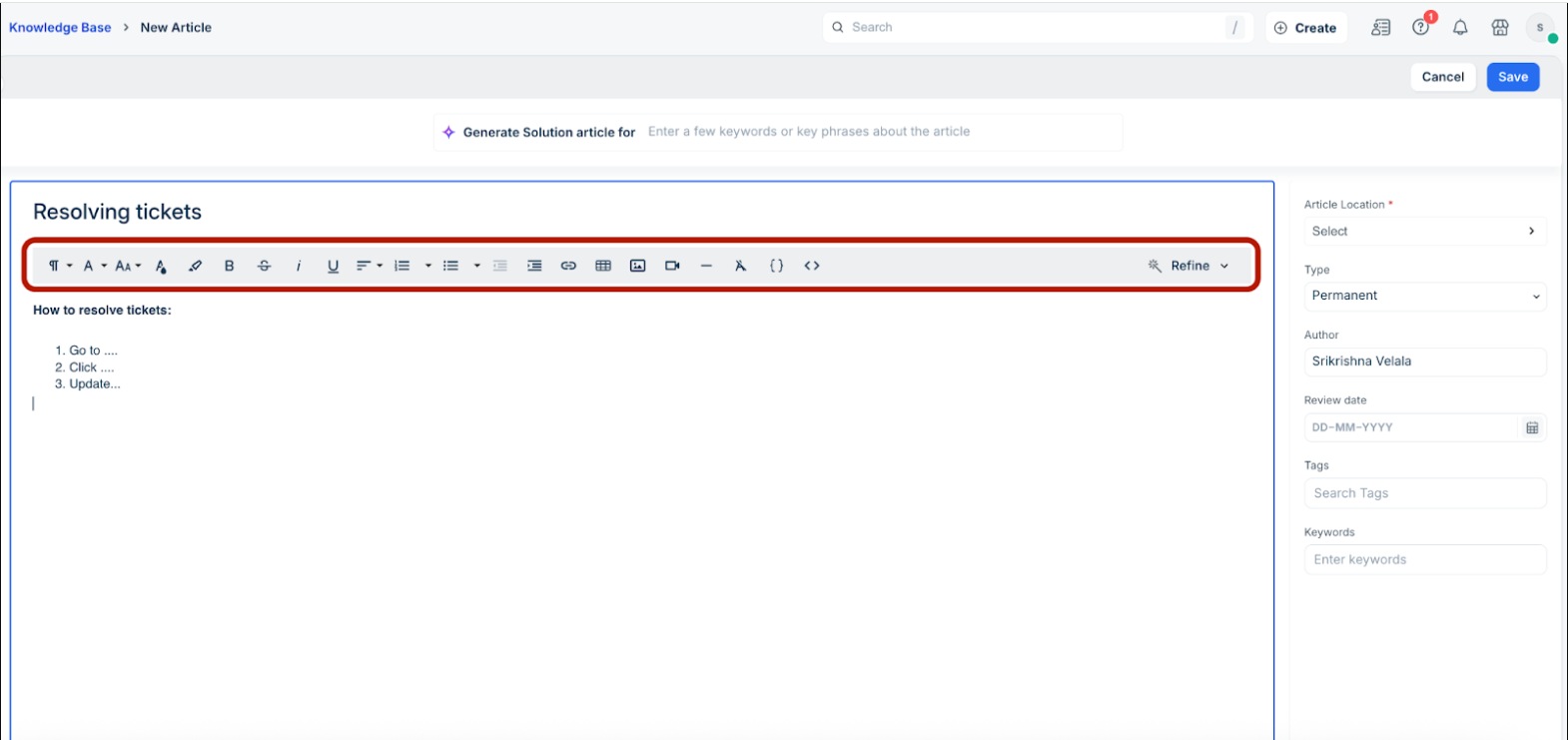
A useful article should tell the requester who the instructions apply to, what they need before starting, the exact steps, the expected result, and what to do when the normal path fails.
5. Configure the folder’s visibility, management, and approvers
Freshservice controls important knowledge settings at the folder level. In the folder editor, administrators can configure the folder name, description, category, management groups, reader visibility, and approvers.
Set:
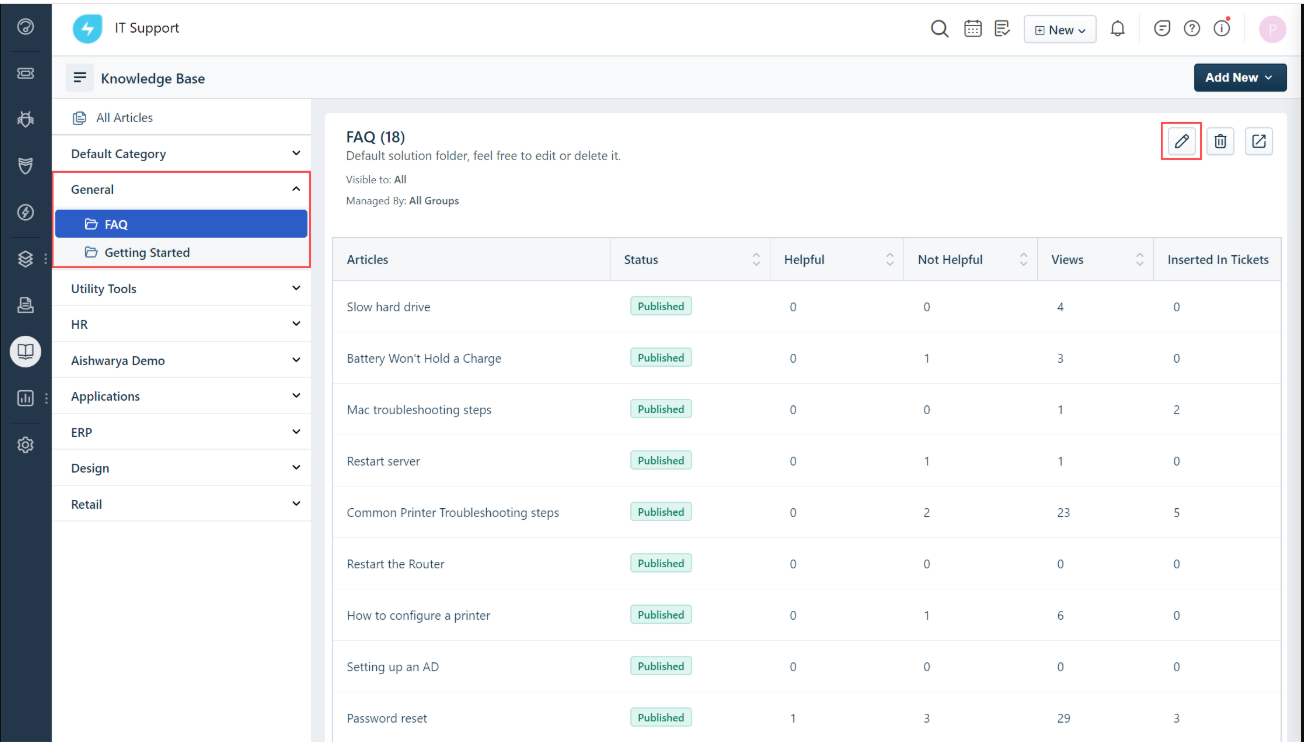
- Managed By: which agent groups can create, edit, and manage articles in the folder.
- Visibility: which requesters or agents can read the folder’s articles.
- Approvers: who must review articles before publication when an approval workflow is required.
- Approval rule: whether all named approvers or any one approver may approve or reject.
6. Draft, approve, publish, and test
Save the article as a draft first. When its folder has approvers, the author can use Send for Approval. Approvers can then choose Approve, Approve and Publish, or Edits Required, according to Freshservice’s knowledge-base approval workflow.
Test the complete path with:
- An author or agent who creates and submits the article.
- An approver who reviews it and requests edits or approves it.
- An allowed requester who finds it through the portal, search, and direct URL.
- A denied requester who attempts the same paths and required attachments.
An administrator’s successful preview is not sufficient evidence that the requester-facing visibility and search behavior are correct.
Freshservice hierarchy and nested-folder limits
Freshservice’s enhanced hierarchy allows root folders to contain subfolders and articles. The nested-folder documentation currently states that a root folder can contain subfolders up to 10 levels deep.
The same documentation identifies important conditions:
- The enhanced nested hierarchy is available only on Pro and Enterprise.
- It requires version 2 of the end-user portal or a portal created with the no-code portal experience.
- Subfolders inherit visibility and other folder configuration from the root folder.
- Article location selection in the enhanced hierarchy is not supported while creating articles in non-primary languages.
- Bulk folder operations are limited, and deleting a folder also deletes the folders and articles under it.
- Older portal customizations can prevent the nested layers from displaying correctly.
The ability to create 10 levels is not a recommendation to use all 10. Deep structures make articles harder to browse, maintain, and relocate. Use search data and requester tasks to justify each additional level.
Reader visibility and article-management permissions are different
Freshservice’s visibility documentation separates who may read a folder’s solutions from which agent groups may manage them.
| Setting | What it controls | Current documented options |
|---|---|---|
| Visibility | Who can read the articles in the folder | Everyone, logged-in users, agents, departments, agent groups, and requester groups |
| Managed By | Which agent groups can create, edit, and manage the folder’s solutions | All groups or selected agent groups |
| Portal visibility | Which requester portals display the folder in a multiportal account | All mapped portals or selected portals, where the current multiportal model applies |
| Portal-level solution access | Whether the portal broadly exposes solutions to everyone or only authenticated users | Configured separately in portal administration |
All draft articles remain visible in the agent portal according to the access documentation. Requester access is a separate concern and should be tested using requester identities.
For nested folders, Freshservice currently applies root-folder visibility and management settings to the subfolders. Do not assume that each nested folder can establish an independent audience unless the current account interface and documentation explicitly support it.
Test authorization through every relevant route:
- Portal navigation.
- Knowledge-base search.
- Direct article URLs.
- Attachments and embedded files.
- Slack and Microsoft Teams experiences.
- Freshservice APIs.
- Freddy AI answers and source references.
Hidden navigation or an absent search result is not proof that the underlying article or file is inaccessible.
Approvals, review dates, version history, and Trash
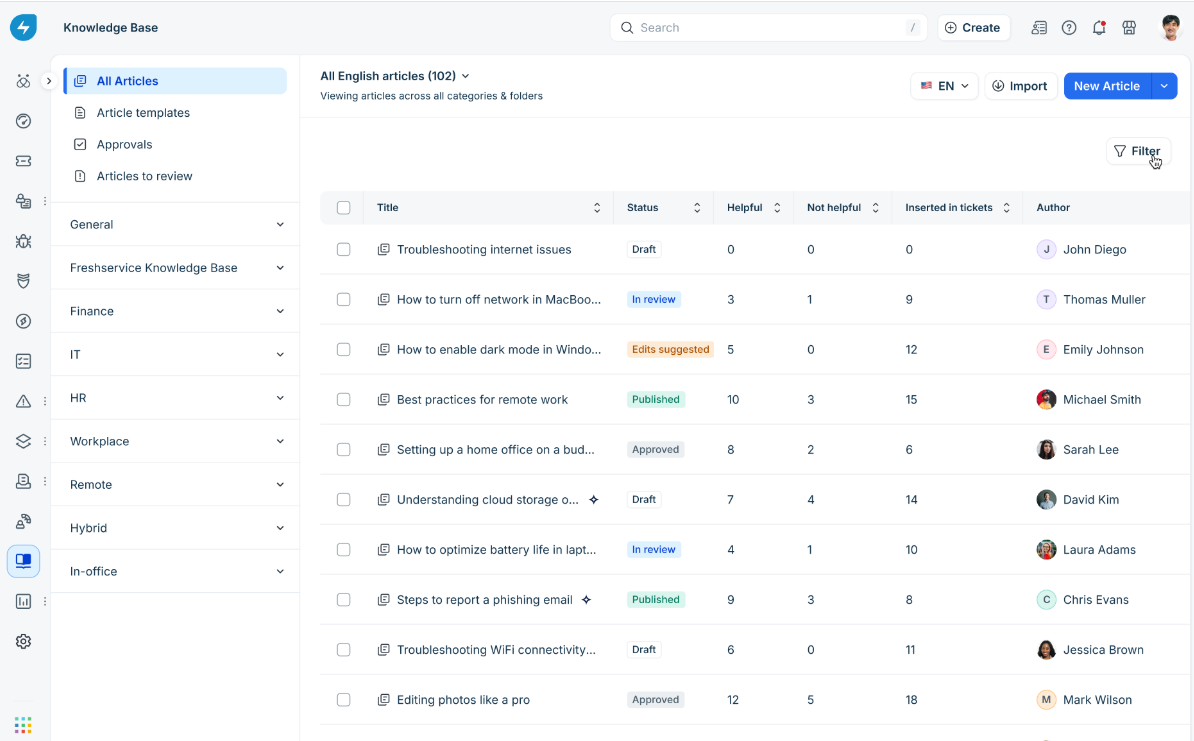
Freshservice’s current content lifecycle extends beyond Draft and Published. The June 2026 lifecycle documentation identifies these article statuses:
- Draft: the article is being written.
- In Review: it has been submitted for approval.
- Edits Suggested: an approver has requested changes.
- Approved: it has passed review and is ready for publication.
- Published: it is live for the eligible audience.
Review-date behavior
Administrators can currently choose what happens after an article passes its review date:
- Move it to draft: the article is hidden from requesters until it is reviewed and republished.
- Keep it published: the article remains visible but is flagged internally for review.
Authors receive review reminders and can renew an article after confirming its continued accuracy. A review date is a workflow mechanism; it does not prove that the content is factually correct.
Version history and concurrent editing
Freshservice supports named versions, links to specific versions, and restoration of an earlier article version. Its version-history documentation notes that restoring an older version makes it current and moves the previously published version to draft.
Freshservice does not automatically merge simultaneous edits. Saving can overwrite another agent’s latest changes, although the overwritten work remains available in version history. Teams collaborating on complex articles should coordinate authorship and use descriptive version labels.
Trash and recovery
The current Knowledge Base experience includes Trash for deleted articles, folders, and categories, allowing authorized users to restore content within the documented retention window.
Trash and version history are useful recovery tools, but neither is a complete backup. They do not necessarily preserve the portal configuration, analytics, integrations, AI indexes, or every administrative relationship needed to recreate the service.
Search, external articles, and employee self-service
Freshservice knowledge can reach requesters through the support portal, ticket suggestions, chat experiences, Slack, Microsoft Teams, and Freddy AI. Evaluate each path separately because they may use different mappings and access rules.
External URL articles
Freshservice can create a local knowledge entry that points to an external URL. Its external document search documentation states that Freshservice crawls and indexes the web page but does not store its article content in the local knowledge base.
The documentation currently notes that:
- External articles can take up to 24 hours to appear in Freshservice search.
- Authenticated external pages cannot be crawled like public pages; manually supplied titles, tags, and keywords therefore become more important.
- External article links remain dependent on the source site’s availability, URL, access model, and content maintenance.
An indexed URL is not equivalent to a synchronized repository. Establish which system is authoritative and how broken links or source changes will be detected.
Freshservice Knowledge Base reporting
Freshservice’s knowledge-base reporting documentation describes metrics covering article operations, usage, feedback, and maintenance.
| Reporting area | Examples | Useful decision |
|---|---|---|
| Content inventory | Status, review date, creation date, last modified date, type, author, folder, and category | Find drafts, aging content, missing owners, and review queues. |
| Production activity | Articles created, updated, approved, and published | Understand editorial workload and approval bottlenecks. |
| Reader usage | Requester views and agent views | Identify heavily and lightly used content while separating audience types. |
| Feedback | Helpful and not-helpful votes | Prioritize articles that may need clarification or correction. |
| Agent contribution | Articles created by agents and related rankings | Understand contribution patterns without treating volume as quality. |
| Action needed | Upcoming review dates and long-pending approvals | Assign maintenance work before content becomes stale. |
The reporting article includes a release or beta caveat and notes that older historical data can be incomplete because some events began flowing to analytics more recently. Verify availability and history in the specific account before making the reports part of an audit or performance commitment.
A view, vote, or article insertion does not prove that the requester’s issue was resolved. Use reports to identify questions and maintenance priorities, then confirm outcomes with search tests, requester behavior, ticket analysis, and content review.
Multilingual Freshservice knowledge
Freshservice supports a primary language and additional supported languages. Its multilingual knowledge documentation explains how agents create a translated article from the source article and maintain a relationship between language versions.
Important behaviors include:
- Agents can refer to the primary-language article while creating a translation.
- Related language versions remain linked, helping agents switch between them.
- When the source article changes, an agent can mark other translations as outdated.
- Translation owners must update the secondary versions and mark them current again.
- Requesters see the article in their primary language where available; otherwise Freshservice can display the source-language version.
This is a managed translation workflow, not automatic synchronization of meaning. A source change can leave translations stale until a responsible person reviews and updates them.
Freddy AI Copilot and Freddy AI Agent serve different jobs
Freshservice uses the Freddy name across several AI capabilities. Evaluate the actual job, plan, billing unit, source behavior, and audience rather than treating “Freddy AI” as one feature.
| Capability | Primary user | Knowledge-related role | Current purchasing consideration |
|---|---|---|---|
| Freddy AI Copilot | Agents | Assists with ticket work, writing, summaries, translation, knowledge recommendations, and draft article creation. | Listed as a $29-per-agent monthly add-on on Pro and Enterprise. |
| Help Article Generator | Agents and knowledge authors | Creates draft knowledge articles from ticket context or provided input. | A Copilot knowledge-assistance capability; generated drafts require human review. |
| Knowledge Content Recommendations | Agents | Surfaces relevant knowledge during troubleshooting. | Evaluate search relevance, access boundaries, and agent workflow fit. |
| Freddy AI Agent | Requesters and employees | Provides conversational answers grounded in connected knowledge sources. | Enterprise documentation currently includes 1,200 sessions per license per year. |
| Enterprise Search | Employees and agents | Searches Freshservice and connected organizational repositories. | Verify source connectors, permissions, channels, and account entitlements. |
Knowledge sources for Freddy AI Agent
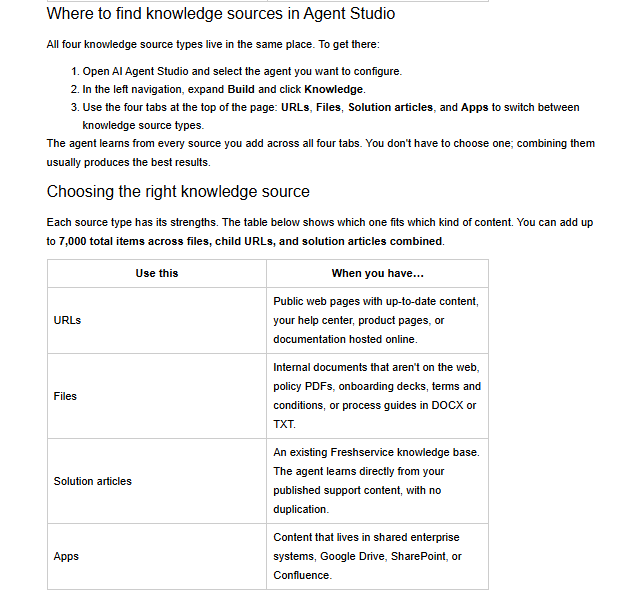
Freshservice’s current AI Agent knowledge-source documentation supports four source types:
- Public URLs.
- Uploaded files.
- Published Freshservice solution articles.
- Connected apps such as Google Drive, SharePoint, and Confluence.
The current documentation lists several material limits:
- Up to 7,000 total items across files, child URLs, and solution articles.
- Up to 25 parent URLs, with as many as 3,000 discovered child links per parent URL.
- Up to 200 files per AI Agent, with each file no larger than 35 MB.
- Supported uploaded file types currently include PDF, DOCX, and TXT.
- One Freshservice knowledge-base portal can be connected to an AI Agent at a time.
For Freshservice solution articles, the documentation says the agent honors configured article visibility and learns only from content it can access. Updates are picked up during the next synchronization, and source references can be displayed in answers.
Those documented controls should still be tested with an allowed requester, a denied requester, changed access, an updated article, a deleted source, and a citation link. Do not assume that a grounded answer is correct merely because it contains a source.
Freshservice also warns against connecting duplicate versions of the same information. A policy supplied through both a file and a web page can generate inconsistent answers when the copies drift apart.
Importing articles into Freshservice
Freshservice’s September 2026 article-import documentation supports document and spreadsheet imports.
| Import method | Supported formats | Current limits and behavior |
|---|---|---|
| Document import | DOCX, TXT, and Markdown | Multiple files can be uploaded in one batch when the combined size stays under 10 MB. |
| Spreadsheet import | CSV and XLSX | One spreadsheet file per batch, under 10 MB. |
| Not supported by the article importer | Content must be converted to a supported format before import. |
Document imports create individual articles in Draft status within the selected destination folder. Spreadsheet imports map columns to fields such as title, HTML content, category, folder, type, tags, keywords, and review date.
Missing categories and folders are not automatically created. Freshservice can use a fallback folder when a row has no usable location, but the hierarchy should still be created and validated before a large migration.
A successful import does not prove that images, attachments, translations, permissions, approval states, versions, and links moved as intended. Run a representative pilot and inspect the destination articles as both agents and requesters.
Export, API access, and backup limitations
Freshservice does not currently document a direct CSV export for solution articles. Its knowledge-base documentation instead points to two broader routes:
- Account-wide XML export: an account administrator can request a service-desk data export by email.
- API retrieval: solution content can be retrieved programmatically in structured JSON, subject to the current API and account permissions.
The account export documentation describes an XML export of the complete service-desk dataset. This is broader than a simple article export but should not automatically be treated as a tested, one-click restoration package.
Freshservice’s current API documentation is version 2 and specifies JSON-only, HTTPS-only requests, plan-dependent rate limits, and page sizes up to 100. However, some older knowledge-base support articles still link to legacy solution examples. Confirm the currently supported solution endpoints and product-specific behavior with Freshworks before building a new extraction or migration process.
A complete exit may require separate preservation of:
- Categories, folders, and ordering.
- Article bodies, types, tags, and review dates.
- Images, attachments, and embedded media.
- Authors, management groups, visibility, and approvers.
- Translations and their source relationships.
- Versions, approvals, helpful votes, views, and analytics.
- Portal mappings, themes, integrations, and AI knowledge sources.
Test the actual export path before purchase or renewal. A readable XML or JSON file is not necessarily a backup that can recreate every Freshservice configuration.
When Freshservice Knowledge Base is a strong fit
- The knowledge base is part of an ITSM or enterprise service management operation.
- The primary readers are employees, internal requesters, agents, or controlled external audiences.
- Articles need to work alongside incidents, service requests, service catalogs, workflows, Slack, Teams, or employee portals.
- The team needs folder-level reader controls, agent-group management, approvals, review dates, and article lifecycle states.
- The organization wants knowledge reporting and AI inside the same service-management ecosystem.
- Pro or Enterprise pricing is justified for nested hierarchy, multiple portals, advanced administration, sandbox testing, audit logs, or AI.
When another knowledge platform may fit better
- The main requirement is a public customer help center without ITSM or employee-service workflows.
- The organization needs a highly flexible collaborative wiki or database-style workspace.
- Technical documentation requires Git-native reviews, API-reference generation, code examples, or product-version documentation.
- The team needs a lightweight publishing product with a lower per-author cost.
- A simple structured export or complete self-service backup is a mandatory requirement.
- The required hierarchy, portals, audit controls, sandbox, or AI capabilities are available only on a Freshservice plan outside the approved budget.
The relevant comparison is not Freshservice against every knowledge-base product. It is Freshservice’s qualifying configuration against the smallest alternative that satisfies the same audience, permissions, publishing workflow, search, integrations, AI, migration, and operating requirements.
Freshservice Knowledge Base launch checklist
- Confirm the Freshservice product, account mode, workspace, plan, trial scope, and written price.
- Define the requester audiences and whether one or multiple portals are required.
- Design categories and folders around employee tasks rather than department charts.
- Confirm whether the project needs the Pro or Enterprise nested hierarchy.
- Create representative permanent and workaround articles.
- Configure Managed By groups, visibility, portal visibility, and approvers.
- Test Draft, In Review, Edits Suggested, Approved, and Published states.
- Set realistic review dates and decide what happens when they expire.
- Test version restoration and deletion recovery without treating them as a complete backup.
- Validate search, external URLs, attachments, Slack, Teams, and direct links.
- Verify allowed and denied requester behavior.
- Confirm the reporting feature’s availability, history, and definitions.
- Create and maintain translation relationships where required.
- Separate Freddy AI Copilot requirements from Freddy AI Agent requirements.
- Test AI answers, citations, source updates, duplicate sources, and permission changes.
- Run a representative article import and inspect the Draft results.
- Test XML and API exit paths and document what they do not preserve.
Freshservice Knowledge Base is most valuable when knowledge is treated as part of employee service delivery rather than as a separate page library. Its strongest advantages come from the connection between solution articles, agents, requesters, service workflows, approvals, portals, reporting, and AI. The correct configuration, however, depends heavily on plan level, access design, article governance, portal architecture, and the organization’s ability to maintain and export the content over time.
Official Freshworks and Freshservice pricing, hierarchy, permissions, lifecycle, reporting, multilingual, AI, portal, import, export, and API documentation checked on November 2, 2026. No live Freshservice account, import, connector, or AI test was used for this guide.