Independent knowledge base software guide Evidence-led Updated 2026

Knowledge base vs help desk: Which do you need?
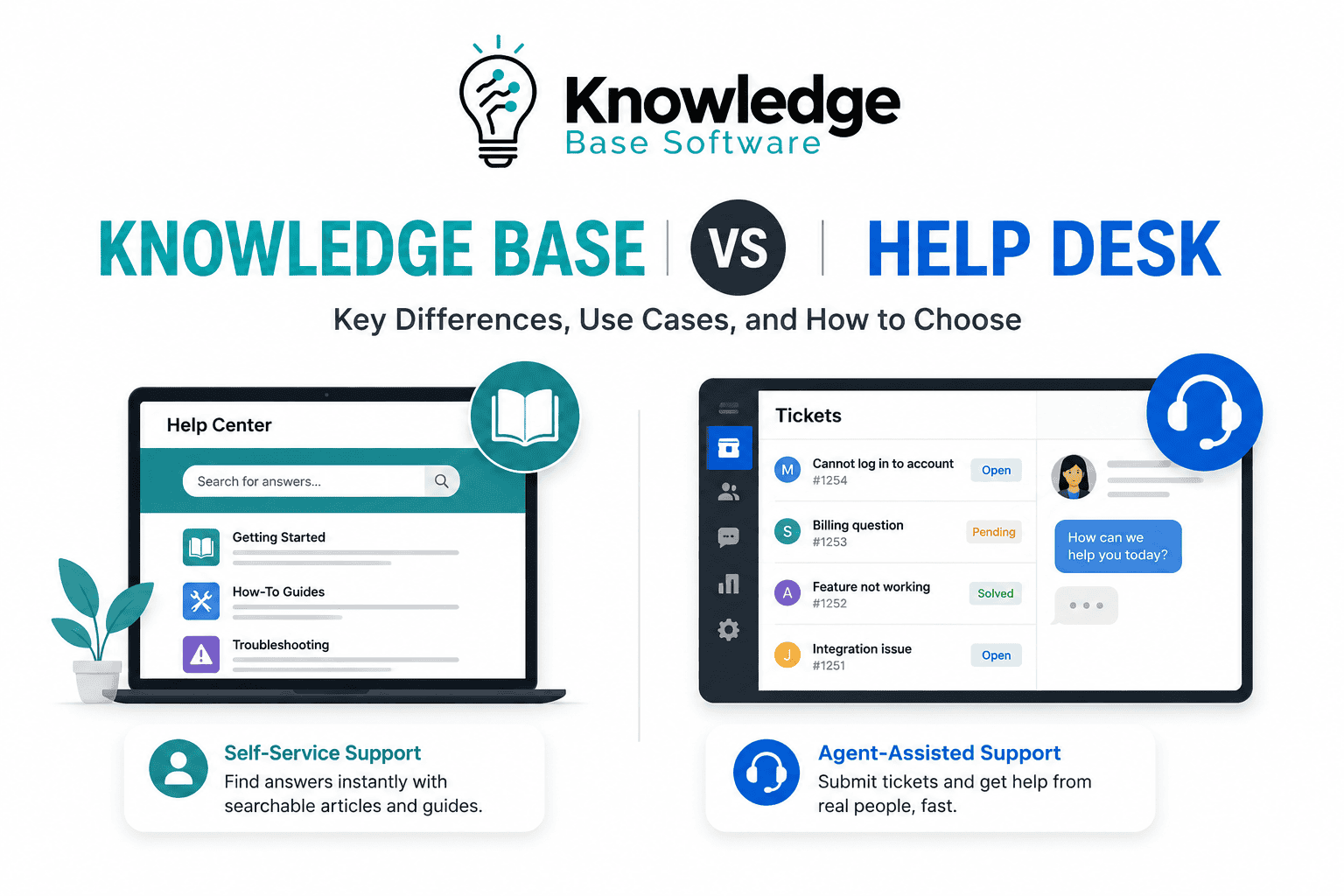
A knowledge base publishes reusable answers; a help desk manages individual requests. Use a knowledge base for repeatable questions, instructions, policies, and product documentation. Use a help desk when a person needs investigation, account-specific action, routing, an SLA, or a tracked conversation. Most support teams need both, whether they buy two products or one suite that contains separate ticketing and knowledge components.
Last verified: July 30, 2026. Current workflow examples use official Zendesk documentation as a public reference implementation, not as a universal description of every vendor.
Knowledge base vs help desk at a glance
| Question | Knowledge base | Help desk |
|---|---|---|
| What is the unit of work? | An article, answer, procedure, or document | A ticket, request, case, or conversation |
| Who starts the interaction? | A reader searches, browses, or receives a suggested answer | A requester contacts support or a system creates a case |
| What is the primary workflow? | Draft, review, publish, measure, update, retire | Receive, classify, assign, respond, escalate, solve, close |
| What is it best at? | One maintained answer serving many readers | Handling a specific situation with accountability |
| Typical controls | Owners, permissions, versions, approvals, review dates | Queues, statuses, priorities, SLAs, routing, automations |
| Typical evidence | Search behavior, task completion, feedback, freshness | Backlog, response time, resolution time, SLA status, reopen rate |
| Core limitation | Cannot perform every account-specific or sensitive action | Does not turn repeated answers into maintained public knowledge by itself |
The boundary is functional, not commercial. A vendor may sell both components in a suite, bundle a basic help center with ticketing, or offer a standalone knowledge product. Compare the actual components and plan entitlements rather than treating the vendor name as one undivided tool.
What is a knowledge base?
A knowledge base is a searchable, governed collection of reusable information for customers, employees, partners, agents, or other defined audiences. Common content includes setup guides, troubleshooting procedures, FAQs, billing explanations, release notes, internal SOPs, and policies.
Its job is to make a dependable answer available at the moment of need. The content workflow matters as much as the search interface: an article should have a purpose, audience, owner, approved source, publication state, feedback path, and maintenance rule. A page that ranks well but gives an obsolete instruction is not successful.
- External knowledge base: customer-facing help and product documentation.
- Internal knowledge base: approved guidance for employees or agents.
- Segmented knowledge base: content limited by customer, plan, region, role, or partner group.
- Embedded knowledge: the same governed content surfaced in a product, support form, agent workspace, or AI answer.
If you are starting from scattered documents, follow the step-by-step knowledge base guide before choosing a theme or importing everything.
What is a help desk?
A help desk is a system and operating process for receiving, tracking, assigning, and resolving requests. The request may arrive through email, a form, messaging, voice, an API, or another channel. The system preserves the conversation and operational state so the team knows who owns the work, what happens next, and whether a commitment is at risk.
Zendesk’s current ticket-lifecycle documentation provides a concrete example: tickets move through standard status categories such as New, Open, Pending, On-hold, Solved, and Closed, with custom statuses available. Status can move backward when the requester replies, and closed requests may generate follow-up tickets. That is case-management behavior, not article publishing.
- Account-specific billing questions or refunds
- Bug reports that require logs and investigation
- Access requests that require identity checks or approval
- Incidents requiring ownership, escalation, and updates
- Questions where the requester and agent must exchange information
- Requests governed by service targets or contractual SLAs
A help desk may also recommend knowledge, let agents search articles, and expose a customer portal. Those integrations do not erase the boundary: the article remains reusable content, while the ticket remains a tracked instance of work.
The differences that matter in operations
One-to-many answers vs one-to-one cases
An article can serve many readers without creating a new work item for each view. A ticket creates a case that must be triaged and completed. Put stable, reusable guidance in the knowledge base; keep identity-specific facts, private investigation, and the case record in the help desk.
Content lifecycle vs ticket lifecycle
A knowledge article moves from demand and drafting through validation, publication, monitoring, revision, and retirement. A ticket moves from intake through assignment, response, waiting states, resolution, and closure. Trying to use ticket status as article governance—or page status as case management—creates gaps in accountability.
Known answer vs uncertain diagnosis
Knowledge works when the situation can be recognized and the approved answer applies. A ticket is appropriate when the team must diagnose, choose an exception, change account data, coordinate another team, or document a decision. A useful article should say when its instructions stop and how to escalate.
Public explanation vs private record
Do not paste personal data, credentials, private logs, or contractual details into a reusable article. Conversely, do not trap a generally useful solution in a private ticket forever. Extract the reusable, sanitized answer and route it through review while the original case remains protected.
Different success evidence
Help-desk metrics describe managed work: response time, time to resolution, backlog, SLA status, reopen rate, and customer feedback. Knowledge metrics describe discovery and content quality: searches, result clicks, zero results, reformulation, task completion, feedback, contact after viewing, corrections, and freshness. Neither set should be interpreted without a defined denominator and time window.
Original test: tracing ten support tasks across the boundary
We performed a reproducible public-documentation trace on July 30, 2026. We defined ten common support tasks, then classified the component responsible for the primary state change in Zendesk’s documented Support and Knowledge workflow. “Both” means the task requires a knowledge action and a ticket action. We used current official pages for the ticket lifecycle, help-center search methods, and the combined Support–Knowledge workflow.
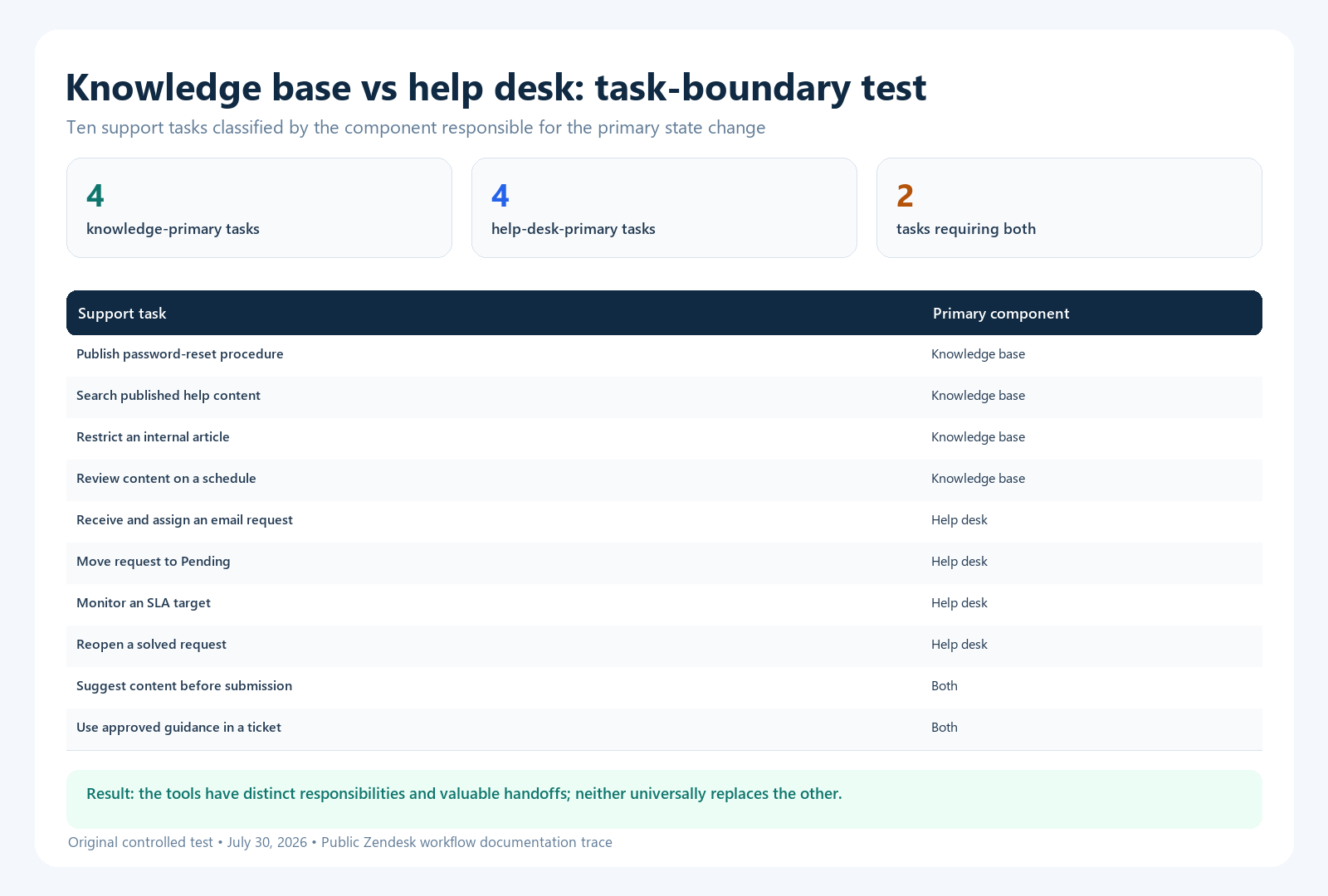
| Task | Primary component | Reason |
|---|---|---|
| Publish a password-reset procedure | Knowledge base | The durable output is a reusable article |
| Search article titles, body text, and labels | Knowledge base | Search operates on published help content |
| Restrict an internal article to an audience | Knowledge base | The state change is article visibility |
| Review an article after a scheduled interval | Knowledge base | The state change is content verification |
| Receive and assign an emailed support request | Help desk | A tracked ticket and owner are created |
| Move a request from Open to Pending | Help desk | The state change belongs to the ticket lifecycle |
| Monitor an active SLA target | Help desk | The commitment applies to a ticket |
| Reopen a solved request after a reply | Help desk | The conversation returns to active case work |
| Suggest an article before a user submits a request | Both | Knowledge is retrieved inside the request path |
| Search approved guidance while answering a ticket | Both | The agent uses article content within case work |
Result: four tasks were knowledge-primary, four were help-desk-primary, and two required both. The exercise supports a component model: the systems have distinct responsibilities and valuable handoffs. It does not support the claim that one universally replaces the other.
How to reproduce it: inspect Zendesk’s official pages for ticket lifecycle and status, help-center search methods, and using Support and Knowledge together. For each task, identify which object changes: article, ticket, or both.
Limitations: this is a workflow-boundary test, not a vendor ranking. It used one suite as an observable reference, did not require a paid account, and did not measure usability, speed, search relevance, or plan cost. Repeat the same trace in every shortlisted product and on the plan you intend to purchase.
When a knowledge base is enough
A knowledge base may be enough when the audience needs published information but your organization does not promise individual case handling through that channel. Examples include public product documentation, an employee handbook with a separate HR contact route, developer documentation, or a small reference site.
- Questions are mostly repeatable and low-risk.
- Readers can complete tasks without private account changes.
- There is a clear escalation route outside the platform.
- You do not need queues, assignment, tracked status, or SLA reporting.
- Your team can govern ownership, review, and correction.
Do not call a contact form a help desk unless someone owns the resulting queue and the requester can receive appropriate follow-up.
When a help desk is enough
A help desk can launch before a formal knowledge base when request volume is low, cases are highly individual, or the organization is still learning the problem space. Agents can use macros or internal notes temporarily, but repeated answers should become governed articles once patterns are clear.
- Nearly every request requires account context or judgment.
- The team must route, prioritize, escalate, and report on work.
- Identity verification or sensitive information is involved.
- The product or policy changes so quickly that stable public guidance is still limited.
- A reliable queue matters more than public discovery at the current stage.
A ticket archive is not a knowledge base. It contains private, duplicated, contextual, and sometimes incorrect material. Reuse requires sanitization, consolidation, validation, and ownership.
When you need both
Use both when customers expect immediate answers for common questions and accountable help for exceptions. This is the normal pattern for SaaS, e-commerce, financial services, IT support, healthcare administration, marketplaces, and other operations with a mix of reusable guidance and individual cases.
| Handoff | Required behavior | Failure to test |
|---|---|---|
| Knowledge to ticket | Preserve article, query, product, language, and attempted steps with consent and minimal data | The customer repeats everything |
| Ticket to knowledge | Capture a sanitized candidate when a repeatable gap is confirmed | Useful answers remain trapped in cases |
| Agent assist | Search only content the agent and requester may use; show the source | Private or obsolete guidance leaks into replies |
| Feedback to owner | Route article problems to the accountable content owner | Downvotes accumulate without correction |
| Escalation | Offer a support route when the article does not apply or the task fails | Self-service becomes a dead end |
For broader architecture choices, see the knowledge base integrations guide and the focused guide to CRM and knowledge base integration.
How to measure the combined journey without overstating deflection
A session that does not create a ticket is not automatically a solved issue. The user may have abandoned the task, contacted another channel, or returned later. Treat ticket deflection as a signal unless you also have an explicit success event or a credible causal design.
| Measure | Definition to record | What it does not prove alone |
|---|---|---|
| Search success signal | Eligible searches followed by a defined useful action | That the real-world task was completed |
| Contact-after-view | Eligible article journeys followed by assisted contact within a stated window | That the article caused or prevented contact |
| Explicit task success | User confirms completion or the product records the intended outcome | That every silent user had the same result |
| First response time | Elapsed time from eligible request to qualifying first response | Resolution quality |
| Resolution time | Elapsed time under defined status and calendar rules | That the requester agrees the issue is solved |
| Reopen rate | Solved tickets that return to active work under a stated rule | The exact reason for failure |
Connect event definitions before interpreting trends. Use the site’s knowledge base benchmarking framework to document eligibility, denominator, window, exclusions, and limitations.
How AI changes the architecture
AI can retrieve articles, generate grounded answers, summarize conversations, suggest replies, classify requests, or route work. It does not make the two components interchangeable. The knowledge layer supplies approved source material; the help-desk layer supplies case context, identity, workflow state, and escalation.
- Require source links for generated factual answers.
- Apply the reader’s permissions at retrieval and response time.
- Exclude drafts, retired pages, and disallowed sources.
- Define when the system must stop answering and create or transfer a request.
- Preserve the user’s question and attempted guidance during handoff.
- Evaluate unsupported-answer rate, source correctness, task outcome, and escalation quality.
Read the AI chatbot knowledge base guide before using ticket reduction as the only success target.
A 30-day implementation sequence
- Map demand: group recent requests by intent, risk, channel, language, and whether a reusable answer exists.
- Set channel rules: define what belongs in self-service, what must become a ticket, and what must escalate immediately.
- Build the minimum knowledge set: publish tested answers for high-volume, stable, low-risk intents.
- Configure the help desk: create queues, ownership, statuses, priorities, schedules, escalation, and reporting definitions.
- Connect the handoff: pass safe context from search or article to ticket and expose approved knowledge to agents.
- Assign content owners: route feedback and recurring ticket themes to accountable people.
- Test ten journeys: include a successful self-service task, a failed task, a restricted article, an urgent case, and a reopened request.
- Measure a baseline: record search behavior, explicit task success, contact after view, backlog, response time, resolution time, and reopen rate.
- Review weekly: fix the highest-impact gaps rather than maximizing article count.
Final recommendation
Choose a knowledge base when the primary output is a reusable answer. Choose a help desk when the primary output is a resolved, tracked request. Use both when a support journey must move safely from self-service to assisted service and back into improved knowledge.
During procurement, test components rather than brand labels. A bundled suite may simplify identity and handoff; separate products may provide stronger publishing or workflow capabilities. The better choice is the one that passes your real article, ticket, permission, escalation, measurement, and export tests on the contracted plan.
Frequently asked questions
Is a help center the same as a knowledge base?
Not always. A help center is the user-facing destination and may contain a knowledge base, community, request form, and customer portal. The knowledge base is the governed article collection within or behind that experience.
Can a help desk include a knowledge base?
Yes. Many suites include both, but features and plan gates can differ. Evaluate article workflow, search, permissions, localization, analytics, and export separately from ticketing.
Does a knowledge base reduce tickets?
It can reduce assisted demand for eligible, repeatable issues, but a no-ticket session does not prove resolution. Use explicit task signals or a causal comparison before claiming prevented tickets.
Which should a small team launch first?
Launch the smallest system that closes the current risk. If requests are being lost, establish a help-desk queue first. If agents repeat stable answers, publish a small governed knowledge base. Connect them as soon as both workflows exist.

