Independent knowledge base software guide Evidence-led Updated 2026

Knowledge Base vs Intranet: Differences, Use Cases, and When You Need Both
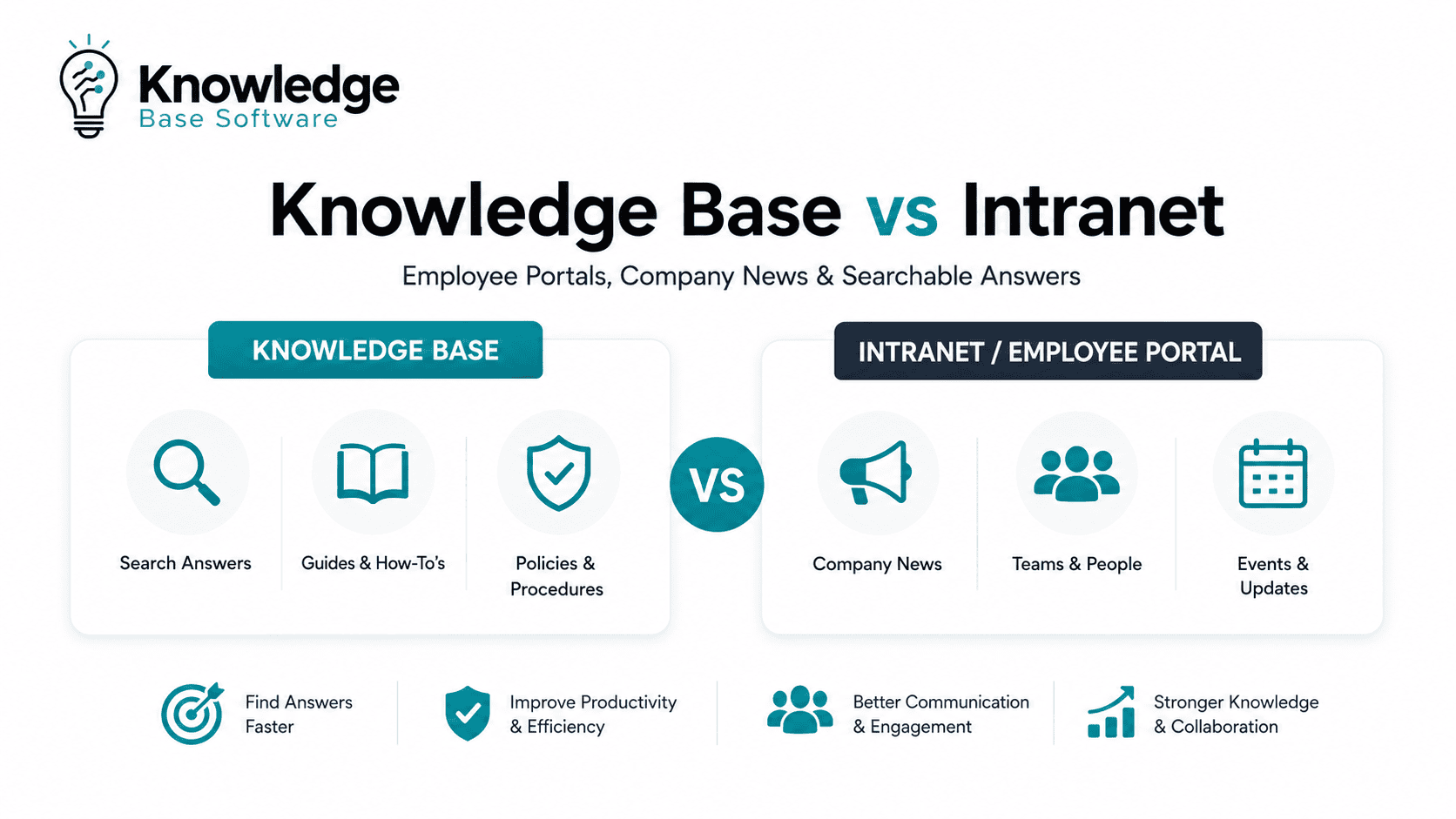
Knowledge Base vs Intranet is not a choice between two identical systems. An intranet is usually the broader employee environment for company news, resources, department pages, directories, applications, and internal communication. A knowledge base is a structured answer system for policies, procedures, troubleshooting, how-to guidance, and repeated questions.
The practical distinction is simple: an intranet helps employees understand what is happening and where to go; a knowledge base helps them find the trusted answer and complete a task correctly.
Many organizations need both functions, but they do not always need two separate products. SharePoint, Confluence, and other broad platforms can support intranet and knowledge-base experiences when content types, ownership, search, permissions, lifecycle rules, and analytics are designed separately.
Bottom line: choose an intranet first when communication and employee navigation are the primary problems. Choose a knowledge base first when inconsistent answers and self-service are the primary problems. Use both when employees need a broad digital workplace and a governed layer of reliable operational knowledge.
Information reviewed on November 20, 2026.
Knowledge base vs intranet at a glance
| Comparison area | Intranet | Knowledge base |
|---|---|---|
| Primary purpose | Inform, connect, and route employees | Provide accurate, reusable answers |
| Typical user intent | Browse, discover, stay informed, or find a destination | Search, solve a problem, or complete a task |
| Main audience | Employees and authorized internal users | Employees, customers, partners, support agents, or other defined audiences |
| Typical content | News, events, leadership updates, department pages, directories, application links, campaigns | Policies, SOPs, how-to articles, troubleshooting, FAQs, decision guidance, approved templates |
| Common owners | Internal communications, HR, IT, leadership, and department site owners | Knowledge managers, process owners, policy owners, subject matter experts, and support teams |
| Content lifecycle | News campaigns, periodic page maintenance, event-driven updates | Review dates, approval, versioning, feedback, deprecation, and retirement |
| Navigation model | Company, department, resource, application, and audience navigation | Task, question, product, service, process, and topic organization |
| Search priority | Broad discovery across people, sites, news, files, pages, and tools | Precise retrieval of the most relevant approved answer |
| Common failure mode | Becomes a cluttered portal or document dump | Becomes stale, duplicated, or untrusted |
| Best success measures | Reach, resource adoption, navigation success, and communication visibility | Search success, task completion, usefulness, freshness, and content-gap closure |
The categories overlap. A knowledge base can live inside an intranet, and one platform can host both. The important question is whether the organization has created two clear experiences rather than one undifferentiated collection of pages and files.
What is an intranet?
An intranet is a private organizational environment that gives employees a central place for communication, resources, services, people information, and links to business applications.
Microsoft describes a modern SharePoint intranet as a collection of experiences that may include the organization’s main landing page, corporate communication portals, department or division sites, targeted news, community content, navigation, and access to services. Its communication-site guidance explains that communication sites are primarily designed to inform broad audiences rather than support a small group creating content together.
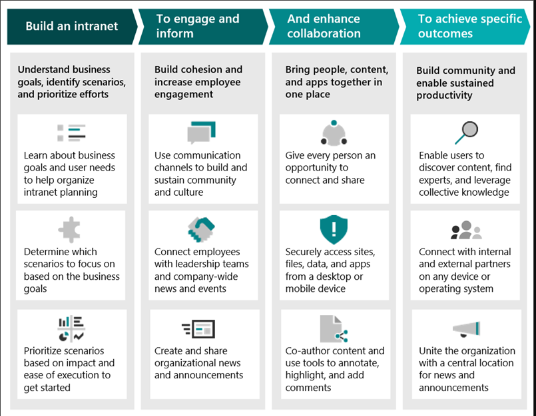
A typical intranet may include:
- Company news and leadership announcements.
- Employee campaigns and recognition.
- Department homepages.
- Employee directory and organizational information.
- Events and calendars.
- Application, form, and service links.
- Benefits and HR resource pages.
- Communities and social content.
- Personalized links, tasks, or resources.
- Links to policies, procedures, and knowledge articles.
The intranet is broader than a document repository. It is usually designed to act as the employee-facing front door to information, tools, people, and services.
What is a knowledge base?
A knowledge base is a structured, searchable collection of maintained articles designed to answer questions, explain procedures, resolve problems, and support self-service.
An internal knowledge base may contain HR policies, IT troubleshooting, standard operating procedures, onboarding instructions, decision trees, product guidance, approved templates, and frequently asked questions. An external knowledge base may publish customer documentation, partner guidance, developer content, or public support answers.
Atlassian distinguishes internal and external knowledge bases according to audience and use. Its current guidance describes internal knowledge articles such as runbooks, SOPs, and sensitive troubleshooting guidance for support agents and internal teams. Zendesk’s knowledge-base content guidance emphasizes consistent templates, clear titles, focused articles, plain language, links, and expert review.
A well-managed knowledge base answers questions such as:
- How do I complete this task?
- Which policy or procedure applies?
- How do I troubleshoot this error?
- Which version is current?
- What should I do before escalating?
- Where is the approved template?
- What is the authoritative answer to this repeated question?
Intranet, employee portal, wiki, and digital workplace are not the same thing
| Category | Primary job | Typical content |
|---|---|---|
| Employee portal | Show employees the tasks, links, applications, updates, and resources most relevant to them | Personalized cards, shortcuts, forms, tasks, alerts, and links |
| Intranet | Inform and connect employees across the organization | News, department pages, directories, events, campaigns, and resource navigation |
| Knowledge base | Provide structured, governed answers | Policies, SOPs, troubleshooting, FAQs, how-to guidance, and approved templates |
| Wiki | Enable collaborative documentation and evolving team knowledge | Team notes, project documentation, draft procedures, and collaboratively edited pages |
| Digital workplace | Connect communication, knowledge, collaboration, workflow, and productivity systems | The broader ecosystem containing portals, intranets, knowledge, apps, search, and collaboration tools |
A wiki can become a knowledge base when content has ownership, review, validation, structure, and lifecycle governance. An employee portal can expose knowledge without owning the canonical article. The digital workplace may contain all of these experiences.
The user journey is different
Intranet use often begins with browsing, discovery, or navigation. Knowledge-base use more often begins with a question, problem, or task.
| Typical employee question | Best primary experience |
|---|---|
| What is happening in the company? | Intranet |
| Which announcements apply to my location? | Intranet or employee portal |
| Where is the IT or HR department page? | Intranet |
| Which application should I open? | Intranet or employee portal |
| How do I submit an expense correctly? | Knowledge base |
| Which parental-leave policy applies to me? | Knowledge base, with appropriate audience or regional context |
| How do I fix a VPN error? | Knowledge base |
| Which form should I use for this request? | Knowledge base article linked to the current form |
This is not an absolute distinction. Intranets support search, and knowledge bases support browsing. The difference is the experience being optimized: broad employee discovery versus precise retrieval of a trusted answer.
What content belongs in each system?
| Content type | Primary home | How the other system should use it | Main risk |
|---|---|---|---|
| Company news | Intranet | Knowledge articles may link to relevant long-term guidance | Old news competing with current instructions |
| Leadership announcement | Intranet | Link to any durable policy or procedure separately | Temporary communication being mistaken for policy |
| Employee directory | Intranet or employee portal | Knowledge articles may link to a service or process owner | Duplicated and outdated people information |
| Department homepage | Intranet | Link to the department’s canonical knowledge collection | Procedures buried under organizational navigation |
| HR policy | Knowledge base or controlled policy system | Intranet announces changes and links to the canonical policy | Several conflicting copies |
| IT procedure | Knowledge base | Intranet or portal links to popular IT self-service content | Outdated steps or unowned documentation |
| SOP | Knowledge base or controlled-document system | Intranet provides navigation and communication | Wrong version being applied |
| Troubleshooting guide | Knowledge base | Intranet may link to an IT or service center | Search returning unofficial alternatives |
| Benefits enrollment announcement | Intranet | Link to the complete benefits instructions or policy | Announcement remaining visible after the deadline |
| Onboarding instructions | Knowledge base, LMS, or employee-service system depending on the task | Intranet or portal presents the onboarding journey | Task steps copied across several sites |
| Temporary outage notice | Intranet, status page, or service portal | Knowledge base contains durable troubleshooting and recovery guidance | Temporary notice becoming the permanent answer |
| Community discussion | Intranet community or collaboration tool | Validated lessons can be converted into governed knowledge | Discussion being treated as an approved answer |
A useful operating rule is: announce on the intranet, govern the complete answer in the knowledge base, keep transactional records in the appropriate system of record, and link instead of copying whenever possible.
Can an intranet function as a knowledge base?
Yes, an intranet can function as a knowledge base when it provides the structure and governance required for reliable answers.
The intranet platform should support:
- Structured article or page types.
- Consistent templates.
- Task-oriented titles and summaries.
- Metadata and taxonomy.
- Strong search and useful filters.
- Content owners and review dates.
- Approval and publishing workflows.
- Version history and rollback.
- Permissions and audience separation.
- User feedback and search analytics.
- Stale-content management.
- Archiving and retirement.
- Stable canonical URLs.
- Accessible, mobile-ready pages.
An intranet is failing as a knowledge base when procedures are buried under department sites, employees must know the organization chart to find an answer, policies exist as several PDFs or page copies, search returns old news before the approved article, or nobody owns the content.
Having SharePoint, Confluence, or an intranet homepage does not automatically create an effective knowledge base. The organization must design article structure, ownership, review, search, and lifecycle intentionally.
Can a knowledge base replace an intranet?
A knowledge base can replace some intranet documentation, especially for a small organization whose main needs are policies, FAQs, how-to articles, and employee self-service.
It usually does not replace the complete intranet role when the organization needs:
- Company news and leadership communication.
- Employee campaigns and recognition.
- Department landing pages.
- Employee directory.
- Events and calendars.
- Communities and social interaction.
- Personalized applications, forms, and tasks.
- Broad navigation across the digital workplace.
- Employee-brand and culture content.
A small company may need only a lightweight employee homepage that links to a well-governed knowledge base. A larger or distributed organization may benefit from a full intranet, but company size alone should not determine the architecture.
Five practical architecture patterns
1. Intranet as the front door, knowledge base as the answer layer
The intranet handles news, department navigation, resources, applications, and discovery. The knowledge base holds official policies, procedures, troubleshooting, and reusable answers.
This pattern works well when employees already use an intranet but operational content needs stronger ownership, templates, search, and lifecycle controls.
2. One platform with two distinct experiences
One suite hosts both functions, but the organization separates content types, templates, ownership, navigation, search scopes, permissions, review cycles, and metrics.
This approach can reduce licensing and integration complexity. It still requires deliberate configuration and administration; one platform does not mean one undifferentiated content model.
3. Separate specialist products with SSO and integrated search
A dedicated intranet focuses on communication and employee experience, while a dedicated knowledge base focuses on governed self-service and answers.
The tradeoff is integration. Identity, navigation, search, analytics, links, lifecycle events, and AI retrieval must work across two systems without creating duplicate sources.
4. Knowledge base with a lightweight employee homepage
A simple homepage supplies announcements, key links, forms, and navigation, while the knowledge base manages durable guidance.
This pattern can suit a smaller organization that does not need rich communities, complex department hubs, or a large internal-communications program.
5. Composable digital workplace
The intranet, knowledge base, enterprise search, identity service, collaboration tools, analytics, and AI remain separate but integrated layers.
This gives each system a clear job but creates more governance, synchronization, observability, and administration work.
Can SharePoint serve as both?
SharePoint can support intranet and knowledge experiences, but the current capabilities should be evaluated separately.
Microsoft positions communication sites as a primary building block for broad intranet communication. Home sites, hub sites, news, audience targeting, navigation, pages, libraries, search, content types, metadata, and permissions can be combined to create an employee environment.
Microsoft also currently documents a distinct SharePoint Knowledge Base capability. At the review date, Microsoft labels it a Frontier preview rolling out to organizations in the Frontier program. It uses a specialized SharePoint library containing linked Markdown pages, SharePoint permissions, version settings, and Copilot-based management capabilities.
Because it is a preview, availability, features, limitations, and billing terms can change. Current documented limitations include restrictions involving bulk file operations, simultaneous updates, sharing, sensitivity labels, automated updates, and some migration scenarios. Buyers should verify tenant access and production suitability rather than assuming the feature is generally available.
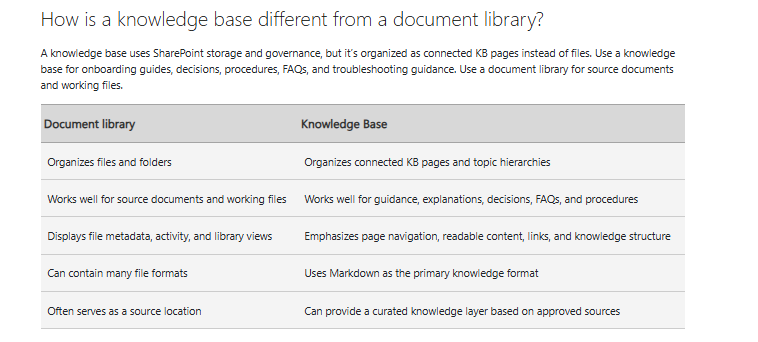
Even without the preview capability, SharePoint pages and libraries can support knowledge content. The implementation still needs task-oriented structure, owners, review rules, metadata, canonical URLs, search tuning, and a plan for retiring duplicate files and pages.
Can Confluence serve as both?
Confluence can support internal knowledge bases, team documentation, collaborative pages, and an intranet-style company hub.
Atlassian’s internal knowledge-base guidance describes using Confluence for reusable internal content, while Company Hub provides a company-wide destination for announcements, news, resources, menus, cards, and curated search.
Company Hub is currently documented as a Confluence Cloud Premium and Enterprise capability. Organizations on other plans should not assume it is included.
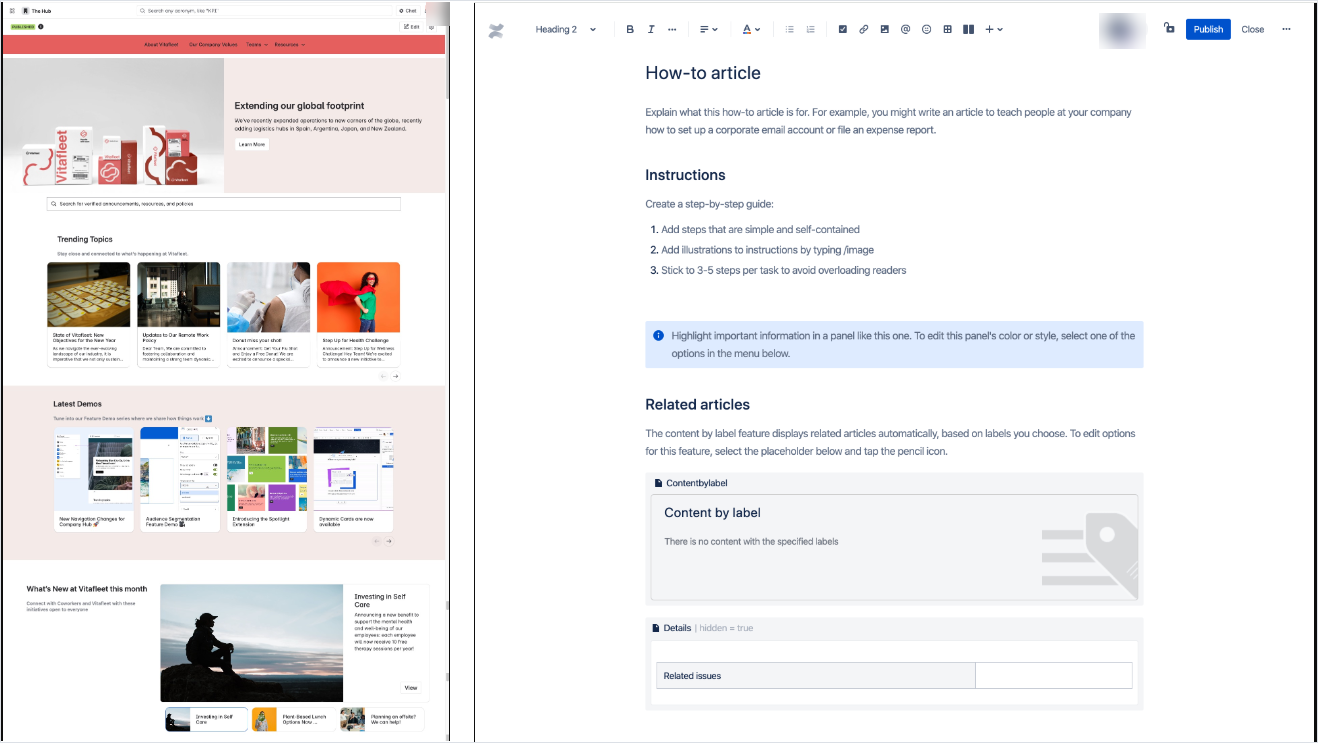
Confluence may serve both purposes well when spaces, permissions, templates, ownership, page status, search, and lifecycle are configured deliberately. A general collection of collaboratively edited pages can still become difficult to trust when authoritative procedures are not distinguished from drafts, team notes, and outdated content.
Create one canonical source for every durable answer
The most important design rule is not whether content technically can appear in both systems. It is whether one location is clearly responsible for the complete, current, approved answer.
A new expense policy, for example, may produce:
- An intranet announcement explaining what changed.
- A canonical policy article containing the complete approved policy.
- A how-to article explaining how to submit an expense.
- A link to the current expense form or application.
- A manager FAQ addressing common scenarios.
The announcement should link to the canonical policy rather than repeat the full policy text. Otherwise, old announcements may continue to appear in search after the policy changes.
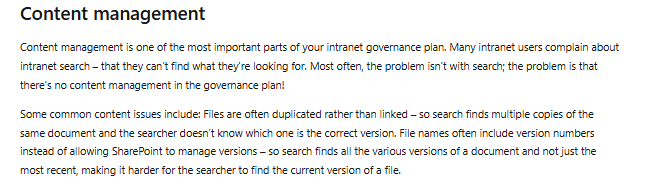
Microsoft’s SharePoint intranet-governance guidance warns that users may create file names containing version numbers instead of relying on managed version history. Search can then surface several versions, making it difficult to identify the current file.
Search and information architecture determine whether either system works
A knowledge base should not require employees to understand the organization chart before finding an answer. Organize operational knowledge around user tasks, questions, products, services, processes, and common language.
The intranet still needs intuitive global and department navigation, but it should not bury every procedure several levels below the department that owns it.
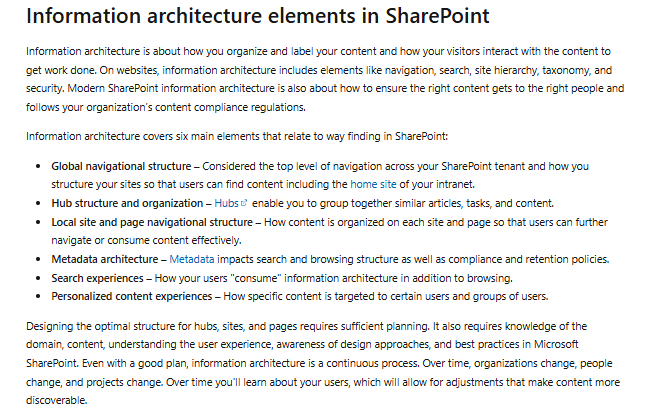
Microsoft’s SharePoint information-architecture guidance identifies navigation, search, site hierarchy, taxonomy, metadata, and security as connected design areas. It also describes columns and content types as important metadata tools and explains that search relies on information-architecture decisions to help users find content when they do not know its location.
Evaluate whether the combined environment supports:
- Task-based and topic-based navigation.
- Clear content types.
- Controlled metadata and taxonomy.
- Synonyms, abbreviations, and employee terminology.
- Search scopes for official knowledge.
- Filters and facets.
- Promoted or authoritative results.
- Current-version ranking.
- Permission-aware titles and snippets.
- Zero-result and failed-search analysis.
- Redirects from old titles or URLs.
Enterprise search can improve discovery across both systems. It cannot decide which of several conflicting pages is authoritative unless ownership, metadata, lifecycle, and ranking signals have already been established.
Governance and ownership should differ
| Responsibility | Intranet governance | Knowledge-base governance |
|---|---|---|
| Business ownership | Intranet owner, internal communications, HR, IT, executive sponsor | Knowledge manager, process owners, policy owners, support operations |
| Content creation | Department editors, communicators, site owners, campaign teams | Subject matter experts, authors, agents, technical writers |
| Approval | Communications, brand, department, legal, or leadership review as needed | Process owner, policy owner, technical reviewer, publisher, or compliance reviewer |
| Accuracy | Department or communication owner | Named article, process, or policy owner |
| Review trigger | Campaign, event, organizational change, or periodic site review | Review date, product change, policy change, feedback, incident, or failed search |
| Search management | Digital workplace, platform, and enterprise-search teams | Knowledge manager, search owner, content owners, and support operations |
| Retirement | Remove expired campaigns, old pages, outdated sites, and redundant links | Supersede, merge, deprecate, archive, redirect, or delete through a controlled lifecycle |
| Primary metrics | Reach, navigation, communication visibility, and resource adoption | Answer success, usefulness, task completion, freshness, and content gaps |
Internal Communications should not be expected to validate every IT procedure, HR policy interpretation, finance rule, or technical runbook. The people accountable for the process must own the answer.
Audience targeting is not access control
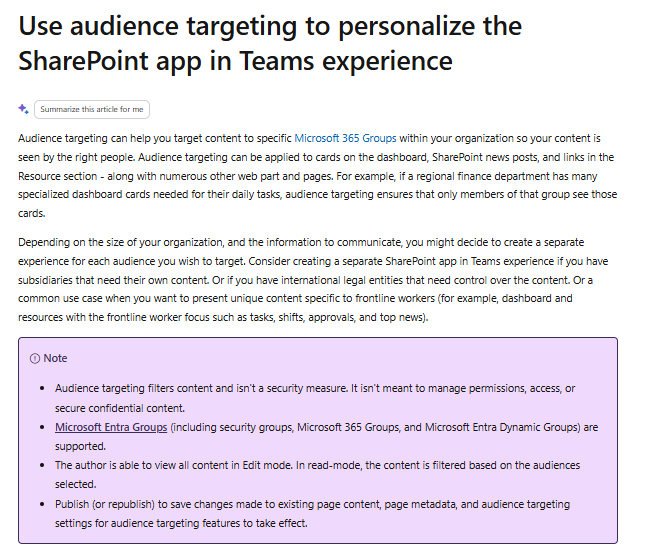
Audience targeting determines which content is promoted, prioritized, or shown to a particular group. Permissions determine whether the person is authorized to access it.
Microsoft explicitly states that SharePoint audience targeting filters content and is not a security measure. A targeted news card or navigation link may be hidden from one audience while the underlying page remains accessible through search or a direct URL if permissions allow it.
Test permissions across:
- The complete page or article.
- Search-result titles and snippets.
- Direct URLs.
- Related-content modules.
- Mobile experiences.
- APIs and exports.
- Analytics.
- AI-generated answers and citations.
- Guest and contractor accounts.
- Recently changed or offboarded users.
Hidden navigation is not security. A unified search or AI assistant must preserve the source system’s access boundaries.
Internal and external knowledge create another important difference
An intranet is primarily an employee environment. A knowledge base may support employees, customers, partners, suppliers, developers, support agents, or AI systems.
An organization may need:
- A public customer help center.
- An authenticated partner knowledge base.
- An internal employee knowledge base.
- An agent-only troubleshooting collection.
- A developer documentation portal.
- A shared source that publishes approved variants to several audiences.
Do not expose internal troubleshooting notes merely because the customer-facing and employee-facing content share a platform. Public content should be crawlable when organic discovery is important; restricted content should be protected through authentication and permissions.
AI and enterprise search need source authority, not just access
An AI assistant may retrieve content from both the intranet and the knowledge base. The architecture must distinguish authoritative operational guidance from news, discussions, campaign pages, old announcements, and draft collaboration content.
Useful metadata may include:
- Content type.
- Canonical status.
- Owner.
- Approval status.
- Effective and review dates.
- Superseded relationship.
- Audience and permissions.
- Region, role, product, or service.
- Source authority.
- Retention and lifecycle state.
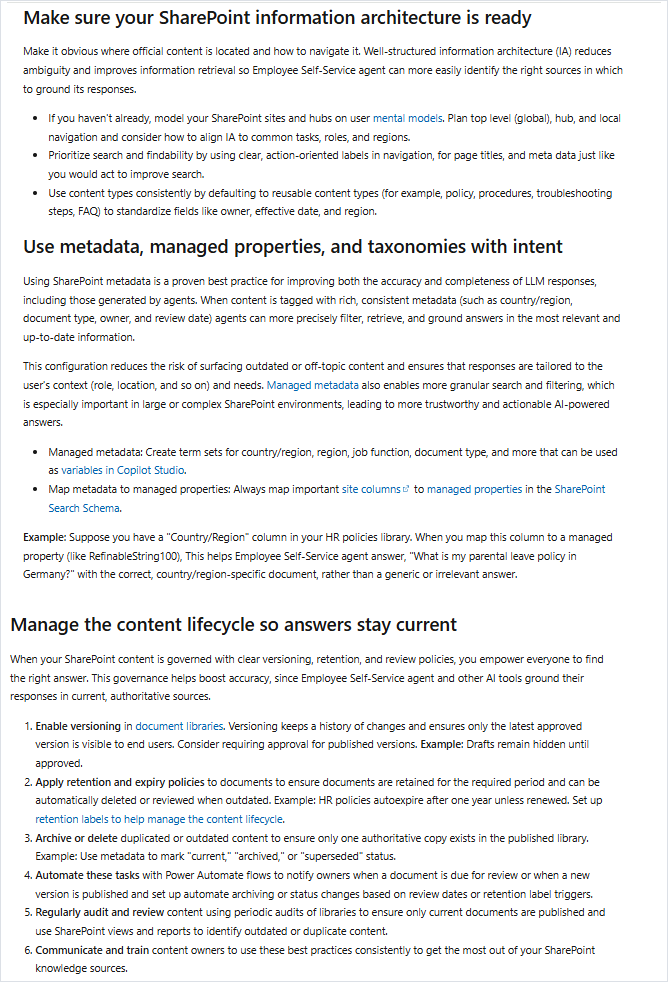
The retrieval process should authenticate the user, apply permissions, exclude obsolete sources, prioritize approved content, and show usable citations. When no approved answer exists, the assistant should refuse or escalate instead of synthesizing a confident response from unrelated news and discussion pages.
RAG does not eliminate hallucinations, and citations do not prove that an answer applied the correct version or audience. A unified search box also does not create a canonical source automatically.
Measure the systems according to their jobs
| Measurement area | Intranet indicators | Knowledge-base indicators |
|---|---|---|
| Reach | Active usage, news readership, announcement visibility, mobile adoption | Usage by intended audiences and recurring self-service journeys |
| Findability | Navigation success, application-link usage, resource discovery | Search success, zero-result queries, reformulation, time to useful answer |
| Content quality | Page freshness, site-owner coverage, outdated campaign removal | Owner coverage, review compliance, stale articles, duplicate answers |
| Outcome | Campaign completion, resource adoption, successful routing | Task completion, usefulness, correct article reuse, escalation after article use |
| Cross-system quality | Canonical-link coverage, duplicate-content findings, conflicting-source findings, permission failures, successful handoff from intranet to knowledge base | |
Page views alone do not prove that communication was understood or that an answer was correct. Avoid claiming productivity, engagement, support reduction, or return on investment without an appropriate baseline and causal analysis.
When should you use one system or both?
| Situation | Recommended starting point |
|---|---|
| Repeated questions, inconsistent procedures, and weak self-service are the main problems | Knowledge base first |
| Company communication, navigation, directories, department sites, and resource discovery are fragmented | Intranet first |
| Employees need both a broad company hub and precise operational answers | Both functions |
| A small organization needs announcements, key links, policies, and how-to guidance | Lightweight homepage plus knowledge base |
| The existing suite provides strong content types, ownership, workflow, search, permissions, and analytics | One platform with distinct experiences |
| The intranet cannot support governed articles or the knowledge base must publish externally | Separate specialist tools with integration |
| Knowledge must remain in several systems of record but employees need unified discovery | Composable architecture with enterprise search and clear source authority |
The decision should be driven by the content problem and operating model, not by a desire to minimize the number of product logos.
A practical implementation and migration plan
- Define the business problems. Separate communication, navigation, self-service, policy, troubleshooting, and collaboration needs.
- Inventory the current environment. Include intranet sites, knowledge bases, wikis, shared drives, PDFs, news, portals, Teams or Slack content, and external help centers.
- Classify content by purpose and audience. Identify communication, durable knowledge, collaborative drafts, records, and transactional information.
- Identify the canonical source. Assign one owner and location to every important policy, procedure, and reusable answer.
- Remove or merge duplicates. Do not migrate every existing copy.
- Define content types and templates. Separate news, department pages, policies, how-to articles, troubleshooting, and reference content.
- Assign owners and review rules. Set review triggers, feedback routes, and retirement responsibilities.
- Design both information architectures. Plan intranet navigation and task-oriented knowledge organization separately.
- Configure permissions and targeting separately. Do not confuse relevance with authorization.
- Design search. Define scopes, metadata, synonyms, promoted sources, and authority signals.
- Map integrations and links. Connect the portal, forms, applications, ITSM, HR systems, search, and AI without creating uncontrolled copies.
- Migrate a high-value pilot set. Start with representative HR or IT self-service journeys.
- Test realistic tasks. Include browsing, search, permissions, mobile, direct URLs, and AI.
- Train content owners. Intranet editors and knowledge owners need different guidance.
- Monitor and improve. Use communication, search, quality, and cross-system metrics.
- Retire old sources deliberately. Redirect, archive, restrict, or delete only after dependencies are addressed.
What to test during a pilot
- Find the latest company announcement.
- Find the current approved expense policy.
- Complete an IT troubleshooting task.
- Find the owner of a department or service.
- Open the correct form or application.
- Distinguish an old announcement from the current procedure.
- Search using employee terminology rather than the official article title.
- Verify that an unauthorized user cannot see a restricted title, snippet, page, attachment, or AI citation.
- Confirm that intranet pages link to the canonical article instead of copying it.
- Confirm that mobile navigation and search remain usable.
- Confirm that an AI assistant cites the approved source rather than an old news post.
- Export representative content and metadata.
- Archive or retire a page and verify that search and links behave as intended.
Define success and failure criteria before the pilot begins. A demonstration has not succeeded merely because the platform can display news and documents on one homepage.
Questions to include in an RFP
- Does the product primarily optimize communication, governed knowledge, or both?
- Can it provide clearly separated news, portal, wiki, and knowledge experiences?
- Which content types and templates are available?
- Can metadata and taxonomies be configured?
- Can each policy, procedure, and article have a named owner and review date?
- Which approval, publishing, versioning, archive, and retirement workflows are supported?
- Can content be targeted to audiences without using targeting as a substitute for permissions?
- How are permissions enforced in pages, search, snippets, direct URLs, APIs, exports, and AI?
- Can the platform support internal and external knowledge safely?
- Can users search by task, question, synonym, and employee language?
- Can search be scoped to authoritative knowledge?
- How are duplicates, promoted results, old URLs, and stale content handled?
- Can intranet pages link to canonical knowledge without copying it?
- Can administrators preview the experience as different users or audiences?
- Can analytics separate communication engagement from answer success?
- Which SSO, identity, and provisioning standards are supported?
- Which HR, ITSM, CRM, directory, collaboration, and search integrations are available?
- What content is copied, indexed, cached, or synchronized by each integration?
- Which AI capabilities are generally available, preview, beta, or optional?
- Which sources can AI use, and how are permissions and source authority enforced?
- How are retired sources removed from search and AI indexes?
- How can content, metadata, files, redirects, and history be exported?
- Which migration, implementation, training, and governance responsibilities remain with the customer?
- How are employees, external users, storage, search, AI, and support priced?
Compare total cost, not just license price
A one-platform strategy can reduce integration cost but may require more configuration and governance work. Two specialist products can improve each experience but create identity, search, analytics, and administration costs.
Include:
- Licensing for employees and external users.
- Storage, search, AI, and API usage.
- Migration and content cleanup.
- Information architecture and taxonomy design.
- Branding and page design.
- Workflow and permission configuration.
- Identity, SSO, and provisioning.
- Integrations and unified search.
- Accessibility and mobile work.
- Training and change management.
- Internal communications operations.
- Knowledge ownership and governance.
- Search tuning and analytics.
- Customization maintenance after upgrades.
- Export, contract termination, and future migration.
Do not assume that one platform is cheaper merely because it removes a second subscription. Internal labor and configuration debt may cost more than the license being avoided.
Common mistakes
Treating the intranet and knowledge base as the same thing
Define the communication experience and the answer experience separately, even when one platform hosts both.
Organizing procedures only by department
Add task, topic, product, and service organization so employees do not need to know which team owns the answer.
Copying policies into several sites
Maintain one canonical policy and use links, summaries, and announcements elsewhere.
Publishing a durable procedure as a news post
Use news to explain the change, then link to the maintained procedure.
Treating files as knowledge articles automatically
Convert high-use guidance into task-oriented, accessible pages when a file is difficult to search, scan, update, or use on mobile devices.
Using audience targeting as security
Use permissions for access control and test search, direct URLs, APIs, exports, and AI separately.
Buying two systems without defining the canonical source
Document which system owns each content type before integration or migration begins.
Buying one system and assuming no configuration is required
Separate content models, workflows, search experiences, ownership, and analytics even when the infrastructure is shared.
Using unified search to hide poor governance
Search cannot determine truth reliably when several unowned and contradictory versions remain active.
Buying AI before governing the sources
Define authority, ownership, lifecycle, version, audience, and permissions before using intranet and knowledge content for generated answers.
Frequently asked questions
What is the main difference between a knowledge base and an intranet?
An intranet is a broad internal environment for communication, resources, people, applications, and navigation. A knowledge base is a structured collection of maintained answers, procedures, and troubleshooting content.
Is a knowledge base part of an intranet?
It can be. A knowledge base may be hosted inside the intranet platform or integrated as a separate system. The important requirement is that its article structure, ownership, search, permissions, and lifecycle remain clear.
Can an intranet replace a knowledge base?
Only when it supports structured articles, task-oriented organization, strong search, owners, review dates, approval, versioning, feedback, analytics, permissions, and stale-content management. An intranet homepage alone is not a knowledge base.
Can a knowledge base replace an intranet?
It can replace some documentation and self-service pages, especially for a small organization. It usually does not replace company news, department hubs, directories, events, communities, campaigns, and broad employee navigation.
Do companies need both?
Many do, but the functions may be delivered through one configured platform or two integrated products. The decision depends on communication needs, knowledge complexity, external publishing, governance, search, and administration capacity.
Where should HR policies live?
The complete reviewed policy should live in the canonical knowledge or policy system. The intranet can announce changes, promote important deadlines, and link employees to that source.
Which system is better for employee self-service?
A knowledge base is usually better for precise self-service answers and procedures. An intranet or employee portal is better for routing employees to applications, services, forms, departments, and relevant knowledge.
Can SharePoint serve as both?
Yes, SharePoint can support intranet and knowledge experiences through communication sites, pages, libraries, metadata, search, permissions, and governance. Microsoft also currently offers a distinct SharePoint Knowledge Base capability in Frontier preview, so availability and limitations must be verified before relying on it.
Can Confluence serve as both?
Yes, Confluence can support internal knowledge and company-wide hub content. Company Hub is currently documented for Confluence Cloud Premium and Enterprise, and organizations still need to separate authoritative knowledge from collaborative and communication content.
Is audience targeting the same as permissions?
No. Audience targeting changes which content is prioritized or displayed to a group. Permissions determine whether the user is authorized to access the content.
Use the intranet to route employees and the knowledge base to answer them
The strongest architecture gives each experience a clear job. The intranet informs employees, connects them to people and services, and guides them through the digital workplace. The knowledge base provides maintained, searchable answers for policies, procedures, troubleshooting, and repeated tasks.
They may run on one platform or two. What matters is that the organization separates communication from durable guidance, assigns a canonical source, prevents uncontrolled copies, designs search around real user intent, and gives every important answer an accountable owner.
Choose one system when it can deliver both experiences without weakening governance or usability. Choose integrated specialist tools when the intranet and knowledge requirements are materially different. In either case, employees should experience one coherent journey from “What is happening?” to “What should I do?”