Independent knowledge base software guide Evidence-led Updated 2026


Customer Self-Service Knowledge Base: How to Build and Measure One
A customer self-service knowledge base is a searchable collection of approved answers that helps customers complete a task, understand a policy, or troubleshoot a problem without waiting for an agent. It can include setup guides, billing instructions, troubleshooting flows, account-management steps, product documentation, known issues, and a clear route to human support when the content cannot resolve the case.
The useful question is not whether a help center receives traffic. It is whether people can find the right answer, act on it safely, verify the result, and recover when the answer does not apply. This guide explains how to build that system, how to measure it without calling every page view a “deflected ticket,” and what we learned from an original editorial stress test of a task-article template.
Customer Self-Service Knowledge Base: Quick Answer
A customer self-service knowledge base is a governed help resource built around customer tasks. A strong implementation combines findable content, accurate instructions, accessible search, visible ownership, feedback, and an escalation path. Measure verified task outcomes separately from help-center sessions, article views, and estimated ticket reduction.
What Is a Customer Self-Service Knowledge Base?
A customer self-service knowledge base is both a content collection and an operating process. The collection holds customer-facing answers. The process determines who approves them, when they are reviewed, how search failures become content work, and how customers move to assisted support when self-service is not appropriate.
The knowledge base may appear inside a public help center, a signed-in customer portal, a mobile app, a support widget, or an AI answer interface. The channel can change; the underlying requirements do not. Customers still need a trustworthy source, the correct scope, a usable sequence of actions, and a next step.
| Resource | Primary purpose | Typical content | Important limitation |
|---|---|---|---|
| Knowledge base | Store and govern reusable answers | How-to guides, troubleshooting, policies, reference material | Content can still fail if search and ownership are weak |
| FAQ page | Answer a short set of common questions | Brief question-and-answer entries | Usually too shallow for multi-step or high-risk tasks |
| Help center | Provide the customer-facing support destination | Knowledge base, search, contact options, community, status links | It is a delivery layer, not proof that issues are resolved |
| Customer portal | Provide authenticated account and support access | Tickets, orders, subscriptions, private documentation | Authentication and permissions can add friction |
| Chatbot or answer assistant | Retrieve or compose an answer conversationally | Answers grounded in approved source content | It needs citations, limits, and a safe handoff |
Why Self-Service Often Fails
Self-service availability is not the same as self-service resolution. In an original Gartner survey of 5,728 customers conducted in December 2023, 14% of customer-service issues were fully resolved in self-service. Among respondents whose self-service journey failed, the most common reason reported was an inability to find content relevant to the issue. These figures describe that survey; they are not a universal benchmark for every company or channel. The practical lesson is narrower and more useful: publishing more pages does not fix an intent-matching problem. See the Gartner survey release and methodology summary.
Common failure modes include:
- The article title uses an internal feature name instead of the customer’s task.
- The answer omits prerequisites, permissions, plan limits, or regional exceptions.
- Search returns a popular article rather than the article that matches the query intent.
- A troubleshooting page gives steps but no expected result or recovery path.
- Policy content is copied into several pages and drifts out of sync.
- The article has no accountable owner or event-based review trigger.
- The contact path is hidden, generic, or asks the customer to repeat information already provided.
- An AI answer removes qualifications or combines incompatible source passages.
Start With Customer Tasks, Not a Category Tree
Begin with evidence about what customers are trying to do. Useful inputs include tagged support tickets, contact reasons, search queries, zero-result searches, onboarding questions, product error codes, cancellation reasons, and feedback from frontline agents. Treat stakeholder opinions that are not supported by user evidence as hypotheses. The GOV.UK Service Manual similarly distinguishes researched user needs from internal assumptions.
Write each need as an outcome:
- “I need to reset my password without losing access to my authenticator.”
- “I need to download an invoice for a specific workspace.”
- “I need to know whether this error is an outage or a local configuration problem.”
- “I need to cancel before the renewal date and understand what happens to stored data.”
Then define acceptance criteria for the answer. What must the customer know or complete? What conditions change the instructions? What evidence marks completion? When must the issue move to an agent?
What Content Should a Self-Service Knowledge Base Include?
| Customer intent | Best starting format | Essential fields |
|---|---|---|
| Complete a task | Step-by-step how-to | Scope, prerequisites, steps, completion signal, recovery |
| Diagnose a problem | Troubleshooting decision flow | Symptoms, checks, branches, stop conditions, escalation data |
| Understand a rule | Policy explanation | Who it applies to, effective date, exceptions, authoritative owner |
| Check a changing condition | Status or known-issue page | Current state, affected scope, timestamp, workaround, update cadence |
| Look up a value | Reference page | Definitions, units, versions, limits, source |
| Get started | Short guided checklist | Goal, sequence, prerequisites, next milestone |
| Use an API | Developer documentation | Authentication, request, response, errors, version, runnable example |
An FAQ can route a simple question, but it should link to a complete task or policy article when the answer depends on steps, permissions, risk, or exceptions.
A Customer Self-Service Article Template
Use one reusable template for task articles, then add content-type-specific fields where needed:
- Outcome-specific title: use the words customers use for the task.
- Scope: state which product, plan, role, version, region, or account type the instructions cover.
- Before you start: list permissions, required information, risks, and estimated system waiting time when verified.
- Steps: provide one action per step in the order it must occur.
- Expected result: describe the message, state change, file, or screen that confirms completion.
- If it does not work: give diagnostic branches and safe recovery actions.
- Escalation: identify the correct support route and the details to include.
- Governance: record the content owner, last verified date, and review trigger.
Write for the actual audience rather than an arbitrary reading grade. Digital.gov’s official plain-language principles recommend defining the audience, organizing information, using active voice, and choosing familiar words. Clear language does not mean removing necessary technical detail.
Original Editorial Stress Test: Eight Synthetic Support Tasks
On July 28, 2026, we froze and scored a single-reviewer editorial stress test to check whether the template above makes critical information fields visible across different support situations. This was not a user study or an independent comparative trial. We did not observe customers, test a vendor help center, or measure ticket deflection.
We wrote eight synthetic task briefs: password reset, account cancellation, data export, invoice download, API 429 recovery, product return, active outage, and workspace deletion. Each task has a complete minimal FAQ-style fixture and a complete structured task-article fixture. One reviewer applied eight published binary rules: outcome title, scope, prerequisites, ordered steps, expected result, exceptions or warnings, recovery or escalation, and owner plus review trigger. A field scored zero when it was absent, merely implied, or represented only by an unresolved placeholder.
| Synthetic task | Primary risk tested | FAQ-style fields present | Structured fields present |
|---|---|---|---|
| Password reset | Identity and recovery conditions | 2/8 | 8/8 |
| Cancel an account | Irreversibility and billing effects | 2/8 | 7/8 |
| Export account data | Scope, format, and completion signal | 3/8 | 7/8 |
| Download an invoice | Role and navigation requirements | 2/8 | 8/8 |
| API 429 error | Retry rule and escalation data | 3/8 | 7/8 |
| Return an item | Eligibility exceptions | 2/8 | 7/8 |
| Active outage | Stale advice during a live incident | 2/8 | 7/8 |
| Delete a workspace | Ownership and recovery warning | 2/8 | 8/8 |
| Total | 64 available checks per format | 18/64 (28.13%) | 59/64 (92.19%) |
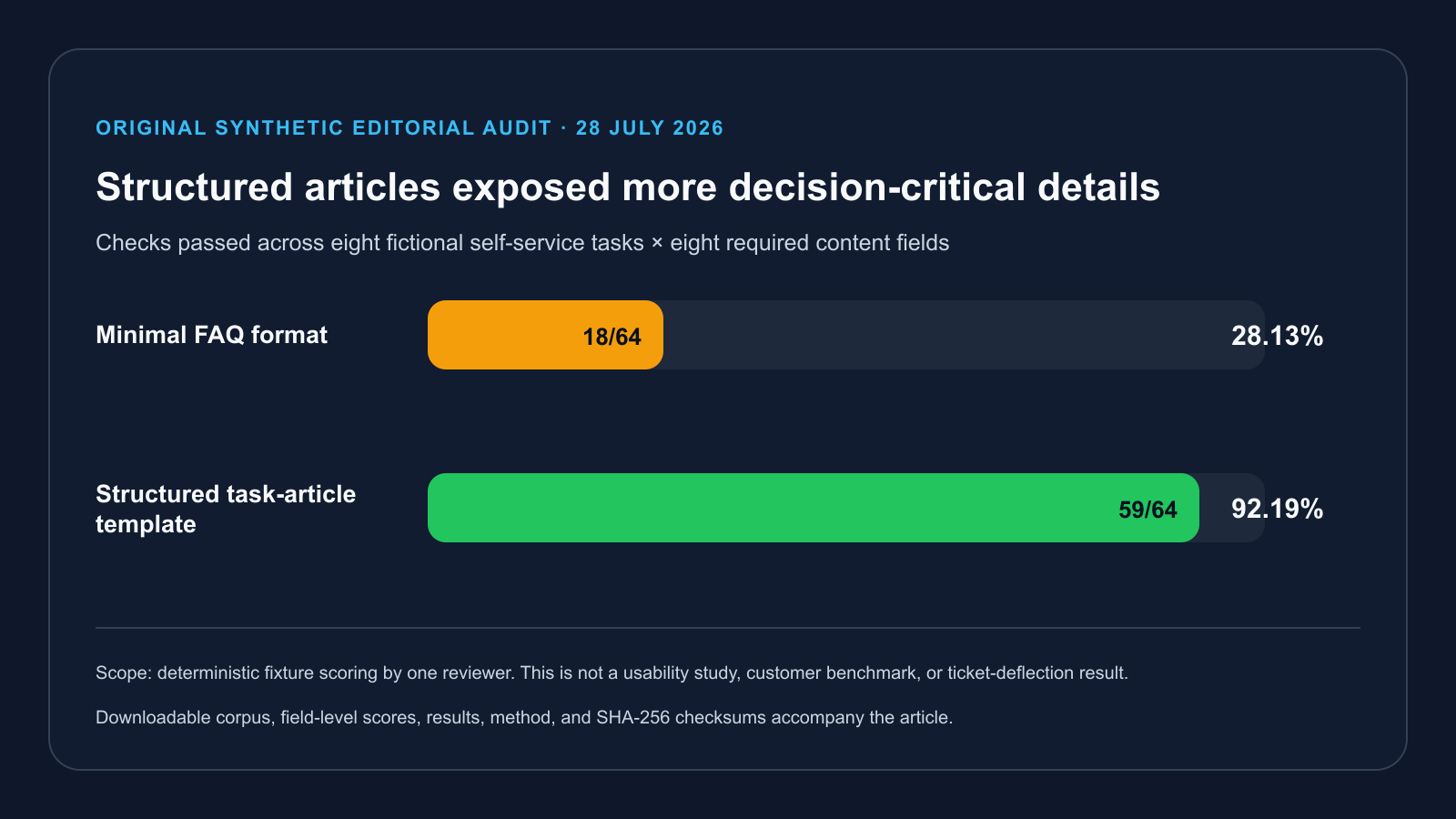
The result shows that the structured template exposed more rubric fields in this deliberately constructed synthetic fixture set. All 16 frozen bodies and all 128 task-format-field decisions are in the public package, so the arithmetic and every scoring choice can be inspected. The fixtures were authored for this rubric and reviewed once by one reviewer. The result does not show that customers understood the articles, completed the tasks, preferred the format, or avoided support. Five remaining structured gaps require live product, policy, or telemetry data that a generic template cannot provide.
Artifact SHA-256: fixture-bodies.md — 134EE4168D41464CCA93734112DEBB0A2AF1E88B23CA26737711566E97EF1098; field-level-scores.csv — A172341B317353764B456794A0FEE137EE5A25724F29C9058DD412EB509C42B8; results.json — 2E667AA6FB8F33F73D88AAF72EFE05E1757B823CE37FD32E87B29778FC827295. The archive also contains the aggregate CSV, methodology, and complete checksum manifest.
How to Build a Customer Self-Service Knowledge Base
1. Define the Boundary
Choose the audience, products, languages, channels, and issue types included in the first release. Document what remains agent-only, such as identity disputes, safety issues, legal exceptions, or cases that require account-specific judgment.
2. Establish a Baseline
Before changing content, record eligible ticket volume, top contact reasons, search terms, zero-result searches, support-contact events, article feedback, and the population that creates demand. Keep the same definitions after launch. Our knowledge base ROI guide explains why a pre-intervention ticket baseline must not be confused with the lower ticket count observed after a successful rollout.
3. Prioritize by Evidence and Risk
Rank topics using ticket frequency, customer impact, handling time, search demand, and risk. High-volume topics are not always first. A lower-volume issue involving data loss, security, billing, or an irreversible action may require stronger content sooner.
4. Design the Information Architecture
Use categories as a secondary route, not the only route. Customers should be able to search by task, error message, feature name, and common synonym. Keep one canonical article for each governed answer and link to it rather than copying policy text into multiple pages.
5. Write, Review, and Verify
Ask a product or policy owner to verify the factual steps. Ask an editor to verify structure and language. For consequential workflows, execute the steps in the supported environment and record the product version, account role, date, and exceptions tested. Screenshots should support the text, not carry instructions that disappear when the image is unavailable.
6. Make Search and Navigation Accessible
Search, filters, result counts, feedback controls, and escalation forms must work from a keyboard and expose meaningful names, roles, and status updates. WCAG 2.2 includes requirements for keyboard access, headings and labels, reflow, focus, input assistance, and status messages. W3C’s page-structure tutorial explains how logical headings and semantic regions support navigation.
7. Connect Self-Service to Human Support
A knowledge base should reduce unnecessary effort, not block access to an agent. Preserve the customer’s query, article viewed, steps attempted, account context, and error details when the journey escalates. Offer a specific next route: billing, technical support, security, accessibility assistance, or emergency contact—not a generic dead end.
8. Create a Maintenance System
Assign an owner and review trigger to every critical article. Time-based review is useful, but event-based triggers are stronger: product release, policy change, price change, incident, repeated negative feedback, a new zero-result query, or a material increase in contact rate.
Search and AI Requirements
- Query coverage: map common language, synonyms, error codes, and product terminology to the same intent.
- Result quality: test whether the correct article appears for a labeled query set, not only whether the engine returns something.
- Useful empty states: show spelling help, alternative terms, popular tasks, and a support route.
- Filters: expose product, version, platform, language, and content type only when they help distinguish answers.
- Freshness: prevent deprecated versions and outdated incidents from outranking current instructions.
- AI grounding: require the answer to cite approved source passages and preserve policy qualifications.
- Abstention: when sources conflict or do not contain the answer, the assistant should say so and escalate.
- Evaluation: test answer correctness, source support, completeness, conflict handling, and safe refusal separately.
For a deeper implementation treatment, see our guide to designing a knowledge base search experience.
How to Measure Customer Self-Service
Use a measurement hierarchy. Activity metrics explain what happened in the help center; diagnostic metrics point to friction; outcome metrics show whether a task reached a defined result. Do not rename an activity metric as an outcome.
| Class | Metric | What it can support | What it cannot prove alone |
|---|---|---|---|
| Activity | Sessions, views, searches | Reach and content demand | Resolution or avoided tickets |
| Search diagnostic | Zero-result rate, labeled-query success, reformulation | Findability and query coverage | Task completion |
| Content diagnostic | Helpful vote, feedback reason, stale-content flag | Perceived usefulness and maintenance needs | Causal cost savings |
| Journey diagnostic | Support contact after article view | Where escalation follows self-service | What non-contacting visitors would otherwise have done |
| Operational outcome | Issue-matched completion or explicit solved event | Resolution under a published rule | A randomized counterfactual |
| Business outcome | Eligible contact rate per demand unit | Change relative to a normalized baseline | Knowledge-base attribution without controls |
Zendesk’s official documentation defines a self-service score as help-center sessions divided by users who submitted tickets. That ratio can be useful for trend monitoring, but the numerator is not a count of solved issues. Atlassian’s product documentation separately describes requests deflected and requests resolved reports. Use the exact event definitions provided by your platform and disclose them when publishing results.
Customer Self-Service Software Checklist
- Can authors assign an owner, reviewer, status, and review trigger?
- Can the platform maintain one canonical source while reusing content safely?
- Can search logs be exported at query level without exposing personal data?
- Can you evaluate ranking with a labeled query set?
- Can customers report “wrong,” “outdated,” “unclear,” and “did not apply” separately?
- Can the support handoff preserve article and query context?
- Can public and private content be separated with tested permissions?
- Can translations show source version and review state?
- Can AI answers cite sources, preserve access controls, and abstain?
- Can all core workflows be completed by keyboard and at 200% zoom?
- Can you export content, metadata, redirects, and analytics?
- Can you measure defined outcomes without relying on page views as deflection?
SEO for a Public Customer Knowledge Base
Search optimization should help people discover a correct answer. Use one descriptive title, a stable canonical URL, a clear opening answer, logical headings, descriptive internal links, and indexable text that contains the same facts shown in screenshots or video. Keep obsolete or account-private content out of public search.
Google’s official guidance recommends helpful, reliable, people-first content, including original information, clear sourcing, accurate authorship, and an explanation of how content was produced when readers would reasonably expect one. Google also states that it has no preferred word count. Expand an article because the task requires detail, not to reach a target length.
A Practical 30/60/90-Day Rollout
Days 1–30: Define and Instrument
- Define audiences, issue scope, exclusions, and escalation boundaries.
- Freeze baseline definitions and capture ticket demand by topic and denominator.
- Create the article templates and governance fields.
- Label an initial search-query evaluation set.
- Configure privacy-reviewed events for search, completion, feedback, and escalation.
Days 31–60: Publish and Verify
- Publish the highest-evidence, highest-risk tasks first.
- Verify steps in the supported product state.
- Test keyboard access, zoom, headings, links, status messages, and form errors.
- Run the labeled query set and record failures.
- Test the support handoff with context preserved.
Days 61–90: Evaluate and Improve
- Compare eligible contact rates using the same baseline rules.
- Review zero-result queries, reformulations, negative feedback, and escalation reasons.
- Separate confirmed outcomes from modeled attribution.
- Update content and search mappings, then rerun the same test set.
- Publish limitations with any performance or ROI claim.
Frequently Asked Questions
What is customer self-service?
Customer self-service is a support path that allows a customer to find information or complete a defined task without an agent performing the work. A knowledge base is one component; portals, status pages, account workflows, communities, and grounded answer assistants may also participate.
What should a customer self-service knowledge base include?
Include task guides, troubleshooting, policies, known issues, reference information, setup content, and a visible escalation route. Every critical article should state its scope, prerequisites, expected result, owner, and review trigger.
Does a knowledge base automatically reduce support tickets?
No. It may reduce eligible contacts when customers can find and use correct answers, but page views and sessions do not prove avoided tickets. Compare normalized ticket demand with a defined baseline and keep confirmed outcomes separate from assumed attribution.
Is an FAQ page the same as a knowledge base?
No. An FAQ page is usually a short question-and-answer collection. A knowledge base supports deeper content types, search, permissions, governance, analytics, versioning, and maintenance workflows.
How should AI be used in customer self-service?
Use AI to retrieve or summarize approved content with visible sources and access controls. Test correctness, source support, completeness, conflict handling, and abstention. Send the customer to a person when the sources are missing, conflicting, or require judgment.
How often should articles be reviewed?
Set a risk-based schedule and event triggers. Review immediately after relevant product, policy, price, security, or workflow changes. High-impact content should also be monitored for failed searches, negative feedback, and increasing escalation.
Conclusion
A customer self-service knowledge base succeeds when it helps a defined audience reach a safe, verifiable outcome. Build from researched tasks, publish governed answers, design an accessible search and escalation journey, and measure outcomes with explicit definitions. Traffic is useful context. It is not resolution, deflection, or ROI by itself.
Research disclosure: The original template stress test was performed on July 28, 2026 using eight synthetic tasks, two frozen formats per task, eight binary field rules, and one reviewer. The fixtures were deliberately authored for the rubric; this is not an independent product comparison. No customers, customer records, vendor help centers, or behavioral outcomes were tested. External factual claims in this guide link to the originating organization or standard.