Independent knowledge base software guide Evidence-led Updated 2026


Confluence vs Knowledge Base Software: Which Is Better for Your Team?
Updated July 29, 2026. Confluence is a strong knowledge workspace for teams that create information together, especially when Jira is already central to their work. Dedicated knowledge base software is usually the better fit when the primary job is publishing governed answers to customers through a searchable, branded help center. The distinction is not “wiki versus knowledge base.” It is collaboration-first knowledge creation versus reader-first knowledge delivery.
Quick answer: Choose Confluence for an internal wiki, project documentation, product requirements, engineering decisions, and broad employee contribution. Choose a dedicated knowledge base for public support content, search-gap analysis, article feedback, controlled publishing, localization, and customer self-service. Use both when teams need a flexible internal source workspace and a separately governed public help center.
Table of contents
- Comparison at a glance
- What Confluence is—and is not
- How we tested Confluence
- Hands-on authoring results
- Evidence-weighted fit benchmark
- Pricing and plan limits
- When to choose Confluence
- When to choose dedicated knowledge base software
- When the hybrid model wins
- Decision checklist
- Test limitations
- Frequently asked questions
Confluence vs knowledge base software at a glance
| Decision area | Confluence | Dedicated knowledge base software |
|---|---|---|
| Primary operating model | Many contributors create and discuss shared knowledge | A defined authoring group publishes reliable answers for a larger reader audience |
| Typical structure | Spaces, nested pages, live docs, blogs, databases, labels | Knowledge bases, categories, collections, articles, versions, portals |
| Best-known fit | Internal wiki, project documentation, product and engineering work | Customer help center, product documentation, support knowledge, governed internal answers |
| Collaboration | Core strength: editing, comments, mentions, page history, Jira context | Usually narrower contribution with clearer draft, review, approval, and publish roles |
| Public delivery | Anonymous access and paid-plan public links are available; public-link SEO has an important limitation | Usually built around a branded, searchable, public or authenticated reader experience |
| Analytics | Content insights are available by plan; deeper analytics require higher tiers | Often emphasizes searches, no-result queries, article feedback, and support outcomes |
| Support workflow | Strongest when paired with Jira Service Management | May be native to a help desk or integrate with the existing support stack |
| Buying question | Will collaboration and Atlassian context create the most value? | Will findability, governance, and reader outcomes create the most value? |
If you need a product shortlist rather than a category comparison, start with our independently researched guide to the best knowledge base software. It separates internal knowledge products, standalone documentation systems, support-suite knowledge bases, and self-hosted options.
What Confluence is—and is not
Confluence is Atlassian’s collaborative knowledge workspace. Content can live as pages, live docs, blog posts, whiteboards, databases, Smart Links, or slides. Published pages support drafts, nested hierarchy, versions, and separate edit and view modes. That makes Confluence more than a basic wiki: it can hold policies, requirements, project plans, technical documentation, meeting decisions, and internal knowledge that changes with the work.
Its most distinctive advantage is proximity to Jira. Atlassian documents the ability to display Jira work items in Confluence, create work items from page content, and move between related Jira and Confluence records. Jira Service Management can also surface Confluence knowledge in a customer portal. See Atlassian’s official guide to using Jira and Confluence together.
Confluence can be used as a knowledge base, but that does not make every Confluence space a finished help center. Internal pages often contain project history, private terminology, unresolved discussion, and context that customers neither need nor understand. A customer-facing article needs a clear outcome, safe language, a support path, accountable ownership, and evidence that readers can find and use it. Our knowledge base best practices explains how those content and governance requirements fit together.
How we tested: one hands-on task plus a documented requirements benchmark
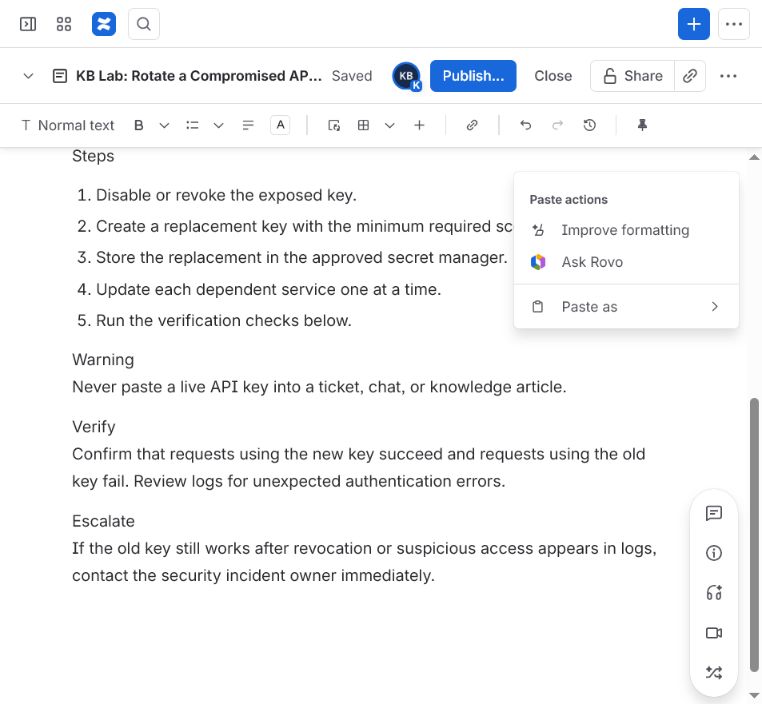
We used two complementary methods on July 29, 2026. First, we ran a controlled authoring task in a Confluence Cloud Standard trial and a Freshdesk Omni 14-day trial. Both editors received the same 953-character support article, “KB Lab: Rotate a Compromised API Key.” The source contained a quick answer, applicability statement, prerequisites, five numbered steps, a warning, verification criteria, and an escalation path. It contained no live credentials or customer data.
The task was deliberately small: open a new page or article, paste the same title and source, observe structural conversion, inspect required fields and reader-facing controls, and attempt to save or publish. Browser-interface timings were recorded only to diagnose the scripted interaction. They are not measures of human authoring speed or employee productivity.
Second, we scored Confluence Cloud Standard against 12 requirements using a fixed 0–2 evidence scale: 0 meant that a qualifying capability was not established in the official sources reviewed; 1 meant partial, constrained, tier-dependent, or dependent on an adjacent Atlassian product; and 2 meant a documented native fit. We applied one set of weights for an internal wiki and another for a public self-service knowledge base. Every row is traceable to an official Atlassian page. This makes the result reproducible as a decision rubric, but it does not turn documentation into a usability or search-quality test.
Hands-on authoring results
| Observed task detail | Confluence Cloud Standard trial | Freshdesk Omni trial |
|---|---|---|
| Plain-text numbered steps | Converted automatically into an ordered list | Remained paragraphs beginning with “1.”, “2.”, and so on |
| Text labels such as “Quick answer” and “Warning” | Remained ordinary paragraphs rather than becoming headings | Remained part of the pasted article body |
| Save model visible in test | Autosave displayed “Saved,” with one Publish action | Separate Save and Publish controls |
| Required publishing structure | No equivalent mandatory hierarchy field appeared in this task | A hierarchy field was marked required; save did not progress without it |
| Templates and metadata | Templates, collaboration controls, sharing, comments, page details, and read-time estimate were visible | Three sample templates, tags, hierarchy, and article properties were visible |
| SEO fields visible in editor | No dedicated SEO title and meta-description fields were observed in this page editor | Dedicated SEO title and meta-description fields were visible |
| Final outcome | Draft content was retained; successful publishing was not established | Successful save or publishing was not established |
The most useful result was not a winner. It was the way each interface expressed its operating model. Confluence made a page feel like collaborative workspace content: flexible hierarchy, automatic formatting, autosave, comments, sharing, and one eventual publish action. Freshdesk made the same text feel like a support article: required placement in a knowledge hierarchy, article templates, explicit Save and Publish actions, and dedicated search snippet fields.
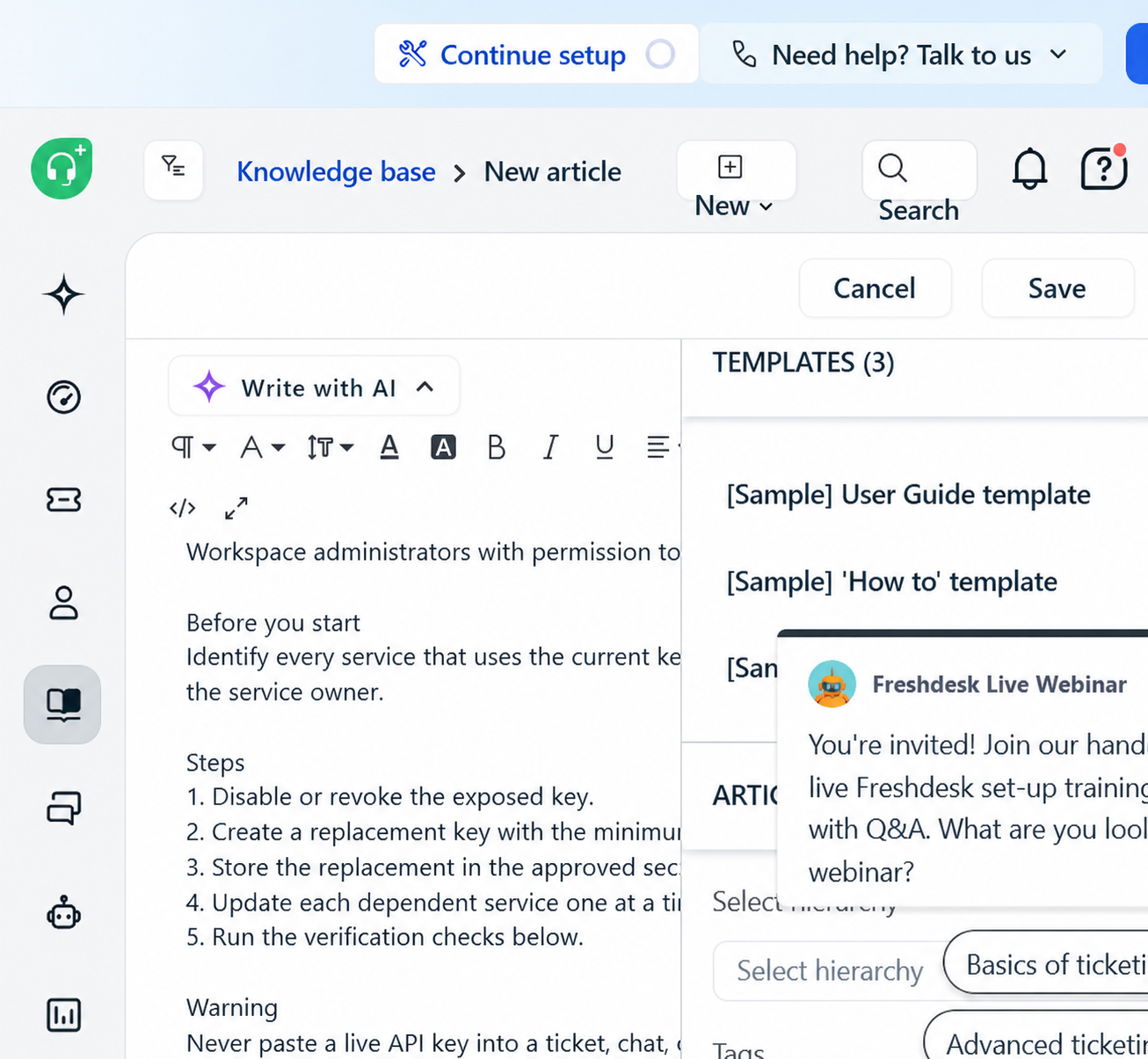
Neither publishing attempt supports a reliability conclusion. Confluence showed an issue message on one publish attempt and a later controlled click timed out; Freshdesk’s properties panel was partly obscured by an in-product webinar overlay. In both cases, the safe conclusion is only what the interface exposed and retained—not that one platform publishes more reliably than the other.
Evidence-weighted benchmark: 89/100 for an internal wiki, 71/100 for public self-service
Our 12-criterion rubric gave Confluence Cloud Standard an 89/100 internal-wiki fit score and a 71/100 public self-service fit score. Seven requirements received a full 2, four received a partial 1, and one received 0 because a qualifying Standard-only capability was not established in the reviewed official sources.
| Requirement group | Observed evidence | Interpretation |
|---|---|---|
| Authoring and collaboration | Nested pages, templates, drafts, collaborative editing, comments, version history | Strong native fit for living internal knowledge |
| Permissions and guests | Standard documents space and content permissions plus single-space guest access | Strong fit for controlled internal and partner collaboration |
| Atlassian workflow | Deep Jira links and a Jira Service Management knowledge path | High value when Jira already owns project or service work |
| Public delivery | Anonymous access and public links exist, but public links are designed not to be indexed | Partial fit for a public help center; requirements must distinguish link sharing from organic discovery |
| Editorial governance | Drafts, versions, restrictions, and automation can support a process | Partial until the exact review, approval, expiry, and ownership workflow is proven in the intended plan |
| Reader analytics | Standard content insights; deeper analytics on higher tiers; Jira Service Management can add deflection reports | Partial for customer self-service measurement and potentially dependent on another product |
| Portability | Documented PDF, CSV, HTML, and XML exports with format-specific exclusions | Strong, but test a representative export before migration |
The largest public-help-center caveat is discoverability. Atlassian states that it takes steps to prevent Confluence public links from being indexed by search engines. A public link is therefore useful for sharing a view-only page with someone who already has the URL, but it is not equivalent to an indexable documentation page designed to earn organic search visibility. Review the official explanation of Confluence public-link behavior before treating public links as an SEO channel.
Anonymous access is a separate publishing path and is available on Standard, according to Atlassian. That still does not answer every help-center requirement. Buyers should test navigation, canonical URLs, metadata, redirects, structured data, accessibility, mobile behavior, branding, language workflow, search reporting, and escalation to support. Our knowledge base UX and layout guide provides a practical reader-experience checklist.
Confluence pricing and plan limits to verify
Confluence Free supports up to 10 users and includes 2 GB of storage, but Atlassian states that Free does not provide customizable space or page permissions and does not provide public links. Standard adds advanced permissions, guest access, public links, 250 GB of storage, support, and more automation runs. Premium adds deeper administration and analytics, unlimited storage, a financially backed uptime SLA, and more automation capacity. Enterprise is quote-based and adds cross-product data and large-scale controls.
Pricing is user-based and changes with billing cycle, user count, region, and vendor updates. Use the official Confluence pricing calculator on the day you buy. Then add implementation, migration, Marketplace apps, Jira Service Management, identity controls, content cleanup, training, and ongoing governance to the year-one total. Subscription price alone cannot tell you which operating model costs less.
Choose Confluence when collaboration is the main job
- Your readers are primarily employees. They understand internal terminology and need context around projects, decisions, and teams.
- Many people should contribute. Engineers, product managers, operations teams, and leaders need to edit, comment, mention, and connect work.
- Jira is already central. Requirements, work items, incident context, sprint planning, and service knowledge benefit from close links.
- Knowledge changes with the work. A living page, version history, and discussion matter more than a formal publishing pipeline.
- Partner collaboration is bounded. Single-space guests can work when external collaborators need access to one controlled area.
Confluence is also a credible candidate for an internal support knowledge base. The important step is designing the space around user questions rather than the organization chart. See our guide to knowledge base templates and examples for task, troubleshooting, policy, and agent-facing structures.
Choose dedicated knowledge base software when reader outcomes are the main job
- Customers greatly outnumber authors. A small content team publishes to a large audience that does not know your internal structure.
- Organic discovery matters. Documentation must be indexable with controllable titles, descriptions, canonical URLs, redirects, and public navigation.
- Publishing must be governed. Draft, review, approval, scheduled publishing, ownership, expiry, and audit requirements need a demonstrable workflow.
- Support leaders need outcome signals. Searches, no-result terms, article feedback, escalation, and ticket relationships must inform content work.
- Multiple sites, brands, audiences, or languages matter. Verify exact limits and translation workflow in the plan, not just a “multilingual” feature label.
A dedicated platform is not automatically better. It must still pass a controlled trial. Import representative articles, run real customer queries, test private content with separate accounts, complete the review path, inspect analytics, and export everything again. The knowledge base software RFP template turns those checks into comparable vendor questions.
The hybrid model: Confluence inside, governed help center outside
Many product and support organizations should not force one system to do two different jobs. Confluence can hold product decisions, investigation notes, engineering context, support runbooks, and early drafts. A dedicated help center can hold approved public procedures, troubleshooting articles, release notes, and customer-safe explanations.
The hybrid model fails when it becomes uncontrolled copying. Define a promotion workflow: identify reusable internal knowledge, remove private context, validate the procedure, rewrite in customer language, obtain the required approval, publish to the external system, and link the two records. Assign one public article owner and a review trigger. When the product changes, the internal source and public answer must enter the same change process.
For support-led organizations, pair that workflow with a clear customer self-service strategy. The goal is not to hide support; it is to let customers complete known tasks quickly and move to assisted help without a dead end.
A practical decision checklist
- Name the primary audience. Employees, customers, partners, agents, developers, or a controlled mix?
- Define the unit of knowledge. Collaborative page, approved article, troubleshooting decision tree, policy, runbook, or API reference?
- Mark non-negotiable access rules. Public, anonymous, authenticated, role-based, space-based, plan-based, or tenant-specific?
- Write the publishing workflow. Who drafts, verifies, approves, publishes, reviews, and retires each article?
- List discovery requirements. Internal search, public search, search-engine indexing, synonyms, filters, no-result reporting, and in-product help.
- Map integrations. Jira, help desk, CRM, chat, customer success platform, product analytics, identity provider, and AI answer layer.
- Run the same trial in every candidate. Use 20–25 representative articles and real query language; do not rely on a vendor’s prepared demo.
- Test the exit. Export pages, attachments, metadata, permissions, comments, and redirects. Record what is missing.
- Model year-one cost. Include every license, adjacent product, add-on, implementation hour, migration task, and governance owner.
- Record accepted trade-offs. A high score cannot compensate for a failed mandatory requirement.
Test and evidence limitations
- The hands-on lab used one short support article in new trial workspaces. It was not a multi-user usability study.
- Scripted browser-response timings do not represent human productivity and are not used to choose a winner.
- Neither controlled session established a successful final publish, so the article makes no platform-reliability comparison.
- The 89 and 71 scores are transparent requirement-fit calculations, not measurements of search relevance, accessibility, support quality, or customer task completion.
- The public-self-service score credits Jira Service Management capabilities only where stated. That adjacent product has its own licensing and implementation requirements.
- Features and prices can change. Verify the exact plan, region, and contract against current official documentation before purchase.
Frequently asked questions
Is Confluence a knowledge base?
Yes. Confluence can organize searchable knowledge in spaces and nested pages, control access, retain versions, and connect content with Jira. It is especially strong as an internal knowledge base. Whether it is the right customer help center depends on public delivery, indexing, branding, analytics, governance, language, and support-integration requirements.
Can Confluence pages rank in Google?
Do not assume that a shareable Confluence public link is an SEO page. Atlassian explicitly says it takes steps to prevent public links from being indexed by search engines. Anonymous site access is a different configuration, but it still needs a technical and editorial SEO review before being treated as a public documentation strategy.
Do I need Jira Service Management for a Confluence customer knowledge base?
Not for every public use, but Jira Service Management is the documented Atlassian path for surfacing Confluence knowledge in a customer portal and reporting helpfulness or request-deflection signals. Treat it as a separate product decision and price the complete stack.
What is the best Confluence alternative?
There is no universal replacement. A standalone documentation platform may fit a public product knowledge base; a support-suite knowledge base may fit ticket-connected self-service; an internal knowledge tool may fit permission-aware employee answers; and a self-hosted system may fit infrastructure control. Shortlist by mandatory requirements before comparing product names.
Should we migrate everything out of Confluence?
Usually not. Audit first. Keep collaboration-heavy project history and internal context where it remains useful. Move or rewrite only the content that needs a different audience, publishing workflow, reader experience, or measurement model. Preserve important URLs and test Atlassian’s documented PDF, CSV, HTML, and XML export paths on representative content before committing to a migration.
Bottom line: Confluence is a capable knowledge base when knowledge creation and teamwork are central. Dedicated knowledge base software is the stronger default when reliable customer discovery and governed delivery are central. The right answer comes from testing your actual articles, permissions, searches, publishing steps, and exit requirements—not from comparing feature-count marketing pages.

