Independent knowledge base software guide Evidence-led Updated 2026

Cloud-Based vs On-Premise Knowledge Base: Which Is Right for Your Business?
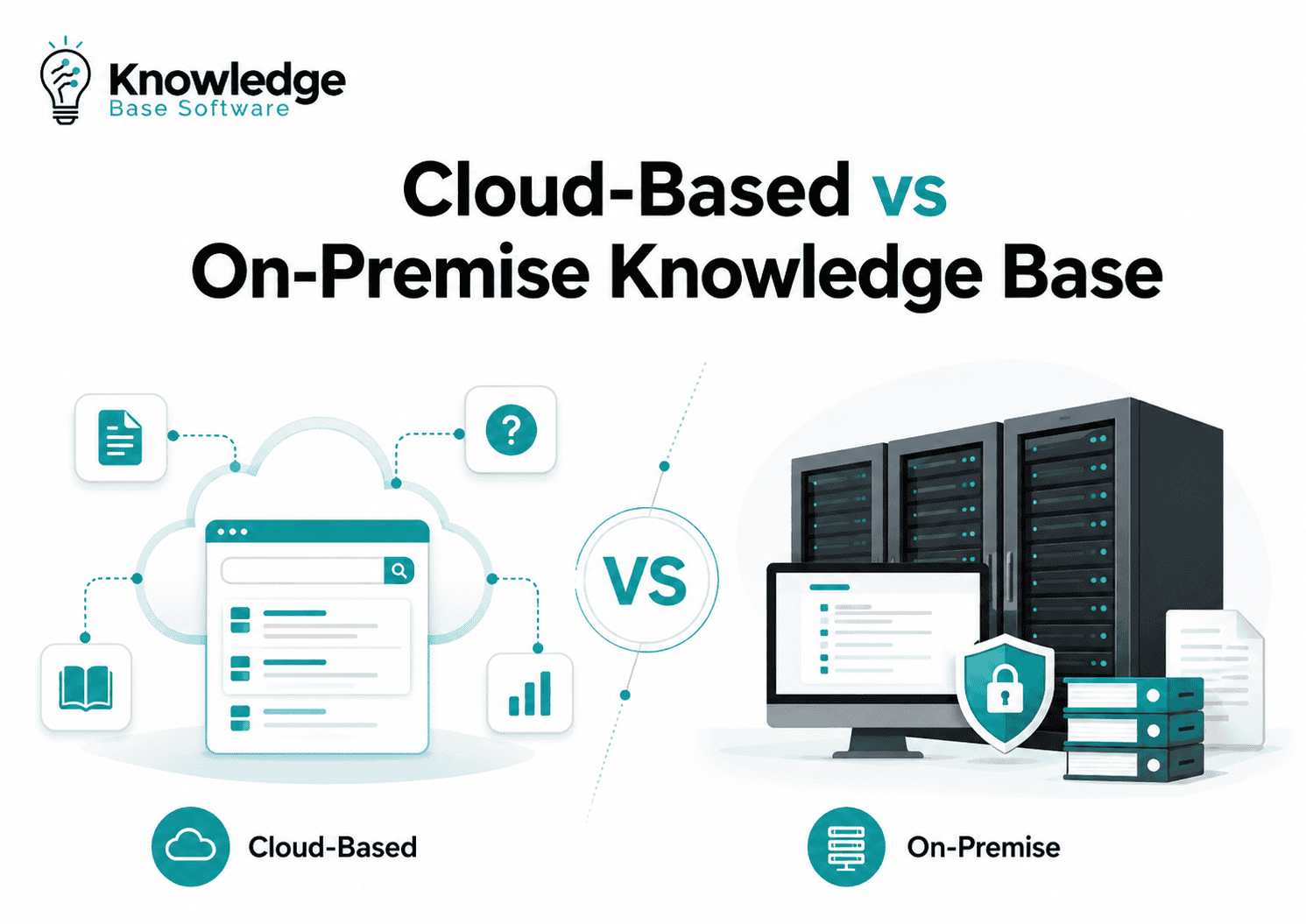
Choosing between a cloud-based vs on-premise knowledge base comes down to control, cost, compliance, scalability, and how your teams or customers need to access information. Cloud is usually better for speed, remote access, and low maintenance. On-premise is usually better for organizations that need maximum data control, strict compliance, or deep infrastructure customization.
Neither model is universally better. A SaaS startup, a healthcare provider, a government contractor, and a global enterprise may all need different knowledge base deployment strategies.
The right decision depends on what your knowledge base will store, who will use it, how sensitive the content is, and how much responsibility your IT team wants to own.
Quick Verdict
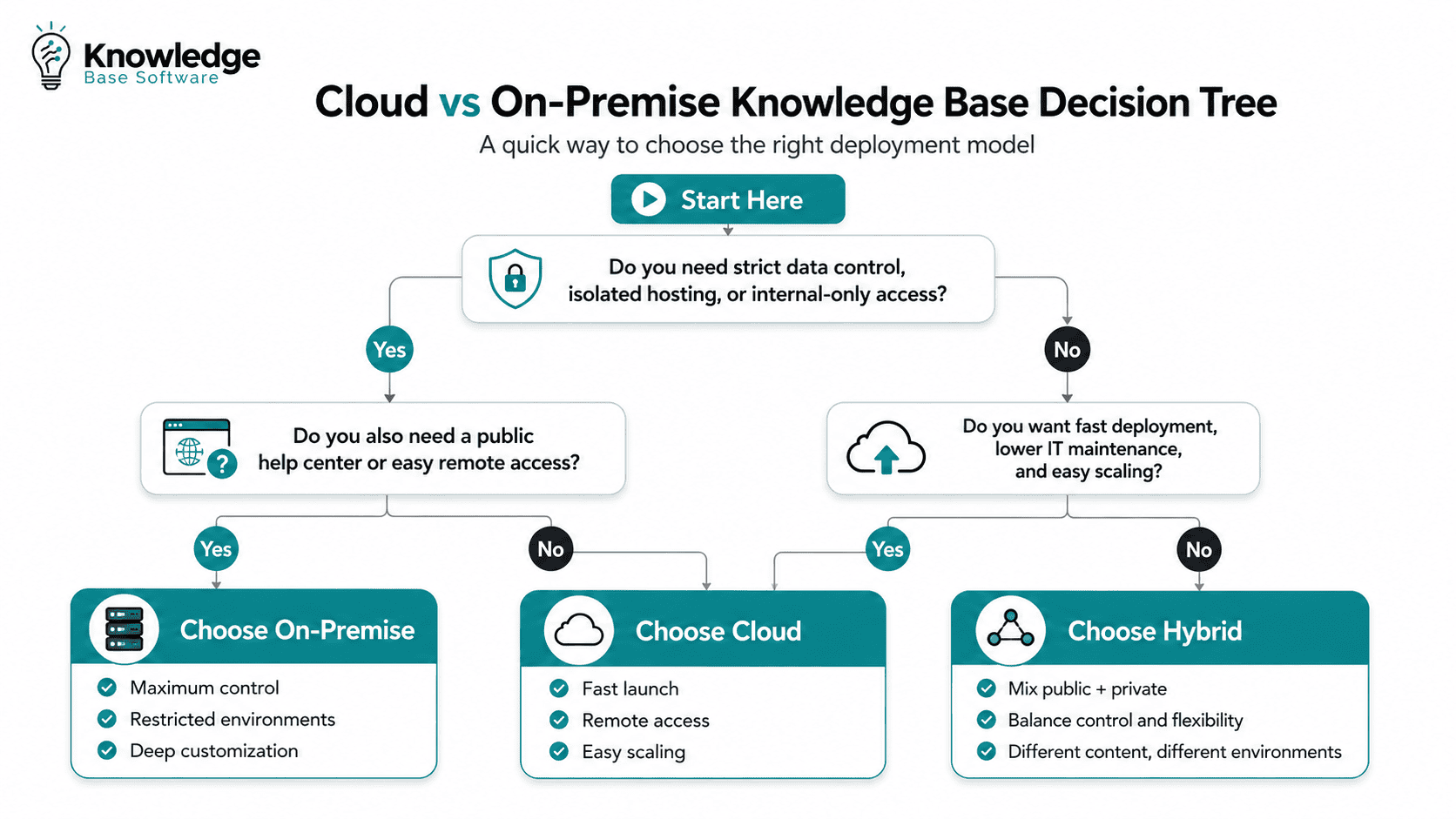
Choose a cloud-based knowledge base if you need fast deployment, simple scaling, lower upfront cost, remote access, automatic updates, and minimal IT maintenance.
Choose an on-premise knowledge base if you need maximum control over infrastructure, strict data residency, deeper customization, isolated hosting, or tighter integration with internal systems.
Choose a hybrid knowledge base deployment if your organization has mixed needs. For example, you may host a public customer help center in the cloud while keeping sensitive internal knowledge on-premise or in a private environment.
Cloud-Based vs On-Premise Knowledge Base: Quick Comparison Table
| Factor | Cloud-Based Knowledge Base | On-Premise Knowledge Base | Best Fit |
|---|---|---|---|
| Deployment | Hosted by a SaaS or cloud provider | Installed on company-controlled infrastructure | Cloud for speed; on-premise for control |
| Upfront cost | Lower initial cost | Higher initial investment | Cloud for budget flexibility |
| Ongoing cost | Subscription-based | Maintenance, infrastructure, staff, licenses | Depends on scale and duration |
| Maintenance | Vendor handles updates and infrastructure | Internal IT manages updates, patches, monitoring | Cloud for lean teams |
| Scalability | Easier to scale up or down | Requires capacity planning and infrastructure expansion | Cloud for growth |
| Security responsibility | Shared between vendor and customer | Mostly owned by the organization | Depends on security maturity |
| Data control | Less direct infrastructure control | Full infrastructure and storage control | On-premise for sensitive data |
| Compliance/data residency | Depends on vendor regions and controls | Easier to enforce internal residency rules | On-premise or private cloud for strict requirements |
| Customization | Configurable, but often limited by vendor platform | Deep customization possible | On-premise for complex environments |
| Integrations | APIs, apps, marketplaces, webhooks | Direct internal integrations possible | Depends on architecture |
| Remote access | Built for browser-based access | Requires VPN, private network, or secure gateway | Cloud for distributed teams |
| Performance | Good for global users when backed by CDN | Strong local performance near internal users | Depends on user location |
| Disaster recovery | Often vendor-managed | Must be designed and tested internally | Cloud for lower operational burden |
| Vendor lock-in | Possible due to data models and subscriptions | Possible due to custom code and infrastructure | Evaluate export options |
| Time to launch | Days or weeks | Weeks or months | Cloud for fast rollout |
What Is a Cloud-Based Knowledge Base?
A cloud-based knowledge base is knowledge base software hosted by a third-party provider or cloud platform. Users access it through a browser, and the vendor typically manages hosting, availability, updates, storage, and infrastructure.
This is often called a SaaS knowledge base or cloud knowledge base. It is commonly used for customer help centers, internal documentation portals, product support libraries, onboarding hubs, and searchable self-service content.
Cloud-based knowledge base software is especially common for distributed teams, SaaS companies, fast-growing support teams, and organizations that want to launch quickly without managing servers.
Cloud computing is generally defined as on-demand network access to shared configurable computing resources that can be rapidly provisioned with minimal management effort, according to NIST’s widely cited cloud computing definition.
Pros of a cloud-based knowledge base
A cloud knowledge base can be deployed quickly. Teams can create articles, FAQs, troubleshooting guides, and internal documentation without waiting for infrastructure procurement.
It also reduces IT workload. The provider usually manages hosting, backups, system updates, uptime, and security patches. That makes cloud attractive for SMBs and teams without dedicated infrastructure engineers.
Cloud is also strong for remote access. Support agents, customers, contractors, and employees can access approved content from different locations, devices, and time zones.
Common benefits include:
- Fast implementation
- Lower upfront cost
- Automatic updates
- Easier scaling
- Browser-based access
- Managed backups and uptime
- Faster access to new features, including AI search and analytics
Cons of a cloud-based knowledge base
Cloud does not remove responsibility. It shifts part of the responsibility to the vendor, but your organization still needs to manage users, permissions, data governance, access policies, and content quality.
Cloud can also create concerns around data residency, vendor lock-in, internet dependency, and long-term subscription costs.
Potential limitations include:
- Less direct infrastructure control
- Subscription costs that grow over time
- Data residency or data sovereignty concerns
- Dependence on internet availability
- Possible vendor lock-in
- Customization limits compared with self-hosted systems
What Is an On-Premise Knowledge Base?
An on-premise knowledge base is knowledge base software installed on infrastructure controlled by your organization. That may mean physical servers in your data center, a private cloud, a restricted internal network, or an isolated hosting environment.
It is also called an on-premises knowledge base, self-hosted knowledge base, or privately hosted knowledge base.
This model is often used by organizations with strict security, compliance, data control, or network isolation requirements. Examples include financial institutions, healthcare organizations, defense contractors, government agencies, and enterprises with mature internal IT operations.
Pros of an on-premise knowledge base
The biggest advantage is control. Your organization controls infrastructure, storage, access rules, network architecture, backup design, retention policies, and integration pathways.
This matters when the knowledge base stores regulated data, proprietary technical documentation, internal procedures, or confidential employee and customer information.
On-premise can also support restricted environments where public internet access is limited or not allowed.
Common benefits include:
- Maximum control over infrastructure and data
- Strong customization potential
- Direct integration with internal systems
- Data sovereignty and residency advantages
- Predictable local performance
- Support for restricted, private, or air-gapped environments
Cons of an on-premise knowledge base
The control comes with responsibility. Your IT team must manage servers, patches, security hardening, monitoring, backups, disaster recovery, upgrade testing, and incident response.
On-premise deployment also tends to take longer. It often requires infrastructure planning, procurement, security review, installation, configuration, and ongoing administration.
Potential disadvantages include:
- Higher upfront cost
- Greater IT maintenance burden
- Manual updates and patches
- Harder scaling
- Backup and disaster recovery responsibility
- Longer implementation timeline
Cost and Total Cost of Ownership
The cost comparison is not just “subscription vs server.” A proper total cost of ownership analysis should look at the full 3–5 year lifecycle.
Cloud usually follows an OpEx model. You pay subscription fees based on users, content, usage, storage, features, or support level. Microsoft’s Cloud Adoption Framework describes cloud adoption as a shift from traditional CapEx-heavy IT spending toward OpEx-style consumption, where costs are tied more closely to usage and services.
On-premise often follows a CapEx + operational maintenance model. You may pay for licenses, servers, storage, security tools, backups, implementation, and internal staff time. Even if license costs appear lower over time, operational cost can be significant.
Hidden Costs to Check Before Choosing
| Cost Area | Cloud-Based Knowledge Base | On-Premise Knowledge Base |
|---|---|---|
| Implementation | Usually lower, faster setup | Higher planning and deployment effort |
| Licensing | Subscription or usage-based | License, support contract, or self-hosted plan |
| Infrastructure | Included in vendor pricing | Servers, storage, network, monitoring |
| IT staffing | Lower infrastructure burden | Requires admin, security, and maintenance time |
| Security | Vendor provides platform controls; customer configures usage | Organization owns full stack controls |
| Backups | Often included, but verify retention | Must design, test, and monitor internally |
| Scaling | Plan upgrades or usage tiers | Hardware or private cloud capacity expansion |
| Support | Vendor support tiers may vary | Internal support plus vendor support |
| Migration | Export/import and reconfiguration | Infrastructure and content migration complexity |
| Long-term growth | Costs may rise with users or usage | Costs may rise with capacity and admin complexity |
Cloud is often cheaper at the start. On-premise may become cost-effective at scale only if the organization already has infrastructure, IT staff, and governance processes in place.
Security, Compliance, and Data Sovereignty
Security is one of the most misunderstood parts of the cloud vs on-premise knowledge base debate.
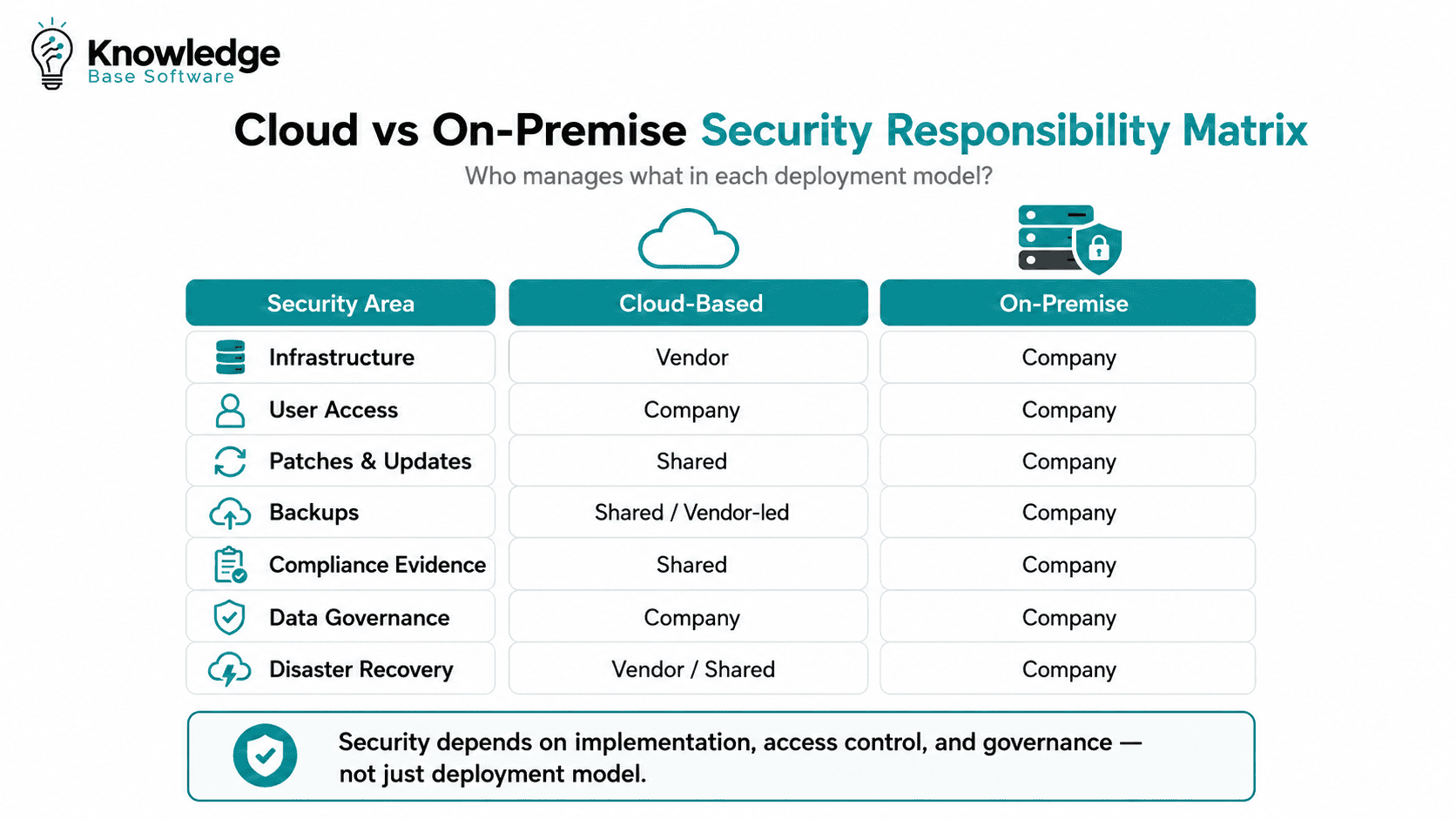
Cloud is not automatically less secure. On-premise is not automatically safer. Both can be secure or insecure depending on configuration, governance, access control, monitoring, and operational discipline.
In cloud environments, security and compliance are commonly treated as a shared responsibility between the provider and the customer. AWS describes this as the provider managing parts of the underlying cloud infrastructure while the customer remains responsible for how services and data are configured and used.
With on-premise systems, the organization usually carries more direct responsibility. That includes operating systems, network controls, patches, physical security, backups, access management, and incident response.
Security controls to evaluate
For either deployment model, evaluate whether the knowledge base supports:
- Role-based access control
- Granular permissions by space, team, category, or article
- SSO, SAML, OAuth, and SCIM
- MFA enforcement
- Encryption in transit and at rest
- Audit logs
- Version history
- Content approval workflows
- IP allowlisting
- Data export controls
- Backup and restore options
- Admin activity monitoring
Compliance and data residency considerations
Compliance requirements vary by country, industry, customer contract, and data type. GDPR, HIPAA, SOC 2, ISO 27001, FedRAMP, and ITAR may influence your decision, but they do not automatically require one deployment model in every case.
A regulated organization may still use a cloud knowledge base if the vendor provides appropriate controls, agreements, certifications, residency options, encryption, audit logs, and access governance.
However, on-premise or private cloud may be more suitable when:
- Data must remain in a specific jurisdiction
- Content includes regulated personal, health, financial, or defense-related information
- Vendor access must be tightly restricted
- The system must run inside an internal network
- Encryption keys must be controlled internally
- Public cloud processing is not allowed by policy or contract
This section should be reviewed by legal, compliance, and security teams before purchase. It is not legal advice.
Scalability, Performance, and Availability
A cloud-based knowledge base usually scales more easily. If your customer help center receives sudden traffic during a product incident, launch, or outage, the cloud provider can often absorb demand more efficiently than a fixed internal server.
Cloud platforms may also provide better global access through distributed infrastructure, CDN support, and managed availability.
On-premise can perform very well for internal users located near the company network. It may also offer predictable performance for local teams using internal systems. But scaling requires planning. You must estimate storage, traffic, users, indexing load, backup size, and future growth.
Ask these questions:
- How many users will access the knowledge base?
- Are users mostly internal, external, or both?
- Will traffic spike during incidents or product launches?
- Do users need global access?
- What uptime target is required?
- What is the recovery time objective?
- What is the recovery point objective?
- Who is responsible for disaster recovery testing?
Cloud often wins on elasticity. On-premise can win on controlled local performance and restricted access.
Maintenance, Updates, and IT Workload
Cloud reduces infrastructure maintenance. The vendor typically handles hosting, server upgrades, security patches, product updates, uptime monitoring, and platform improvements.
That does not mean cloud is maintenance-free. Your team still needs to manage article quality, permissions, taxonomy, integrations, user access, lifecycle workflows, and analytics.
On-premise requires more technical ownership. Your IT team must monitor the system, apply patches, test upgrades, secure the environment, validate backups, and handle incidents.
The tradeoff is simple: cloud gives more convenience; on-premise gives more control.
A cloud knowledge base is often better when the business wants to focus on support content and self-service. An on-premise knowledge base is often better when the organization wants to control every layer of the environment.
Customization and Integrations
Cloud knowledge base platforms usually provide APIs, integrations, webhooks, identity provider support, analytics connectors, and marketplace apps. That is enough for many teams.
However, customization is often limited by the vendor’s product architecture. You may not be able to change the database, backend logic, search engine, hosting environment, or AI processing layer.
On-premise systems often allow deeper customization. You may integrate directly with internal identity systems, legacy databases, intranet portals, ticketing systems, monitoring tools, and private search infrastructure.
The risk is over-customization. Heavy custom changes can make upgrades harder, increase maintenance cost, and create dependency on a small group of internal experts.
Before choosing either model, ask:
- Can we export all content and metadata?
- Are APIs available?
- Can we integrate with our identity provider?
- Can permissions sync with existing groups?
- Can the platform connect with CRM, ticketing, chat, and analytics tools?
- Will customizations survive upgrades?
- Can search be tuned for our terminology?
AI, Search, and Analytics Considerations in 2026
Modern knowledge base software is no longer just a static article repository. Search quality, AI assistance, analytics, and content workflows can make or break adoption.
Many platforms now include AI-powered search, semantic search, summarization, article suggestions, content gap detection, and retrieval-augmented generation, often called RAG.
This adds a new dimension to the cloud vs on-premise knowledge base decision.
For cloud platforms, AI features may run in the vendor’s cloud environment or through third-party AI providers. That can be useful, but you need to understand how your data is processed.
For on-premise or self-hosted systems, AI may be more limited, harder to configure, or require private model infrastructure. But it may offer stronger control over sensitive data, logs, embeddings, and model access.
Questions to ask vendors about AI
- Is customer content used to train AI models?
- Where are prompts, search queries, and AI logs stored?
- Are embeddings stored in the same region as the source content?
- Can AI features be disabled for sensitive spaces?
- Can AI search run in a private or self-hosted environment?
- What retention policy applies to AI interactions?
- Are generated answers citation-backed?
- Can admins audit AI recommendations?
- Is feature parity available between cloud and self-hosted versions?
Analytics also matters. A strong knowledge base should show failed searches, popular articles, zero-result queries, deflection trends, content freshness, and article quality signals.
Without analytics, teams cannot improve self-service performance.
Cloud vs On-Premise Knowledge Base by Use Case
| Use Case | Recommended Model | Why |
|---|---|---|
| Startup/SaaS company | Cloud | Fast launch, low infrastructure burden, easy scaling |
| SMB with limited IT | Cloud | Lower maintenance and simpler administration |
| Remote-first support team | Cloud | Browser-based access for distributed agents and customers |
| Healthcare organization | Hybrid or on-premise | Depends on PHI, HIPAA requirements, and vendor controls |
| Financial services company | Hybrid or on-premise | Strong governance, audit, and data residency needs |
| Government/defense contractor | On-premise or private cloud | Restricted data, ITAR/FedRAMP, or isolated environment needs |
| Enterprise with existing data center | Hybrid or on-premise | Existing infrastructure may support private deployment |
| Public customer help center | Cloud | High availability, SEO, global access, fast updates |
| Internal employee knowledge base | Cloud, hybrid, or on-premise | Depends on sensitivity and access model |
| Air-gapped or restricted network | On-premise | Cloud access may not be permitted |
For many organizations, the decision is not binary. A public customer-facing knowledge base may belong in the cloud, while sensitive internal procedures, security runbooks, or regulated documentation may remain in a private environment.
Decision Framework: Which One Should You Choose?
Use this scoring framework during vendor evaluation. For each question, mark whether the answer favors cloud, on-premise, or hybrid.
| Decision Question | Favors Cloud | Favors On-Premise | Favors Hybrid |
|---|---|---|---|
| Do we need to launch quickly? | Yes | No | Sometimes |
| Do we have strict data residency requirements? | Only if vendor supports required regions | Yes | Yes |
| Do we have a mature IT infrastructure team? | Not required | Required | Helpful |
| Is global access important? | Yes | Only with added network design | Yes |
| Do we need deep customization? | Limited | Yes | Yes |
| Are most users remote? | Yes | Requires secure remote access | Yes |
| Will we store sensitive or regulated data? | Possible with controls | Often preferred | Often best |
| Do we prefer subscription pricing? | Yes | No | Mixed |
| Do we prefer upfront ownership? | No | Yes | Mixed |
| Do we need AI features quickly? | Often yes | Depends on vendor and private AI support | Depends on architecture |
| Do we require isolated hosting? | Usually no | Yes | Yes |
| Do we need low IT workload? | Yes | No | Partial |
Choose cloud if…
Choose a cloud-based knowledge base if your priority is speed, scalability, remote access, automatic updates, and lower infrastructure overhead. It is the practical choice for many SaaS companies, SMBs, distributed support teams, and public customer help centers.
Choose on-premise if…
Choose an on-premise knowledge base if your priority is control, compliance, data sovereignty, deep customization, or restricted network hosting. It is often the better fit for regulated, security-sensitive, or infrastructure-mature organizations.
Choose hybrid if…
Choose hybrid if your organization has different sensitivity levels across content types. For example, product documentation and customer FAQs can live in the cloud, while security procedures, employee records, internal architecture documents, or regulated workflows remain privately hosted.
Migration Considerations
Migration can be straightforward or complex depending on content volume, permissions, integrations, and public SEO requirements.
Moving from on-premise to cloud
When migrating to cloud, confirm that the vendor supports content import, role mapping, attachment migration, redirects, analytics continuity, and search indexing.
For public help centers, preserve SEO value by mapping old URLs to new URLs with 301 redirects. Keep important metadata, headings, canonical tags, and internal links consistent where possible.
Moving from cloud to on-premise
When moving from cloud to on-premise, verify export rights before signing with any vendor. You need access to articles, categories, tags, authors, attachments, revisions, permissions, and analytics data.
Cloud-to-on-premise migration can be harder if the vendor uses proprietary content structures or limited export formats.
Migration checklist
- Export all content and attachments
- Back up the source system before migration
- Map categories, spaces, labels, and permissions
- Preserve public URLs where possible
- Create 301 redirects for changed URLs
- Rebuild internal links
- Re-index search
- Validate access permissions
- Test SSO and identity sync
- Train users on the new system
- Monitor analytics after launch
Vendor Evaluation Checklist
Use this checklist before choosing cloud-based or on-premise knowledge base software.
- Deployment options: cloud, on-premise, private cloud, hybrid
- Security certifications and audit reports
- Data residency choices
- Backup and recovery policy
- Uptime SLA
- AI data usage policy
- Access control and permissions
- SSO, SAML, OAuth, SCIM, and MFA support
- Content approval workflows
- Version control and rollback
- Search quality and semantic search
- Analytics and reporting
- API and webhook availability
- Export options and portability
- Integration with CRM, ticketing, chat, and intranet tools
- Support response times
- Pricing transparency
- Long-term product roadmap
- Feature parity between cloud and self-hosted versions
- Contract terms around data deletion and retention
A strong vendor should make these answers easy to find. If basic questions about security, exports, AI usage, or data residency are vague, treat that as a risk signal.
Key Takeaways
- Cloud is usually better for fast deployment, remote teams, scalability, and lower IT maintenance.
- On-premise is usually better for control, compliance, customization, and restricted environments.
- Security depends on implementation, not just deployment model.
- Total cost of ownership should include infrastructure, support, staffing, backups, security, and migration.
- Hybrid deployment is often the best option when public and sensitive internal knowledge have different requirements.
Decision in one sentence: If your priority is speed and scalability, choose cloud; if your priority is control and compliance, choose on-premise; if you need both, design a hybrid model.
Final Recommendation
For most growing teams, a cloud-based knowledge base is the fastest and most practical option. It reduces infrastructure work, supports remote access, scales more easily, and gives teams faster access to product improvements.
For organizations with strict compliance, data residency, internal hosting, or customization requirements, an on-premise knowledge base may be the better long-term choice.
For enterprises with mixed content sensitivity, hybrid is often the most realistic model. Keep public, low-risk, customer-facing knowledge in the cloud and protect sensitive internal content in a controlled environment.
The best decision is not based on where the software is hosted. It is based on the risk profile of your content, the maturity of your IT team, the expectations of your users, and the total cost of operating the system over time.
FAQ
Is a cloud-based knowledge base secure?
Yes, a cloud-based knowledge base can be secure if the vendor provides strong controls and your organization configures them correctly. Look for encryption, SSO, MFA, audit logs, permissions, backup policies, and clear data residency options.
Is on-premise always better for compliance?
No. On-premise gives more control, but compliance depends on implementation, policies, audits, access controls, monitoring, and documentation. Some cloud vendors can support regulated industries if they provide the right contractual, technical, and security controls.
Which is cheaper: cloud or on-premise knowledge base software?
Cloud is usually cheaper to start because it avoids major infrastructure costs. On-premise may become cost-effective at scale if your organization already has infrastructure and IT staff. Always compare 3–5 year total cost of ownership, not only the license price.
Can a cloud knowledge base meet GDPR or HIPAA requirements?
It can, depending on the vendor, configuration, agreements, access controls, encryption, audit logging, data residency, and how the system is used. Compliance teams should review vendor documentation before storing regulated or personal data.
What is a self-hosted knowledge base?
A self-hosted knowledge base is software installed and operated in an environment controlled by your organization. It may run on internal servers, a private cloud, or a restricted hosting environment. It is often used interchangeably with on-premise knowledge base.
When should a company choose a hybrid knowledge base deployment?
Choose hybrid when different content types require different controls. For example, customer FAQs may be hosted in the cloud, while confidential internal procedures, security documentation, or regulated records remain on-premise.
Can an on-premise knowledge base support remote teams?
Yes, but it requires secure remote access such as VPN, private network access, zero-trust access controls, or secure gateways. This adds complexity compared with a cloud-based knowledge base built for browser access.
What should I ask vendors before choosing a deployment model?
Ask about deployment options, data residency, security certifications, AI data usage, export rights, backup policies, uptime SLAs, access controls, integrations, support, pricing, and whether cloud and self-hosted versions have the same features.

