Independent knowledge base software guide Evidence-led Updated 2026

Helpjuice Review: Pricing, Features, AI, and Public Search Test
Last verified: July 29, 2026. Helpjuice is a dedicated hosted knowledge base platform, not a complete help desk. Its public plans start at $249 per month for 30 credentialed users, while the complete AI Suite and single sign-on are shown on higher plans. That makes it most relevant to organizations that treat documentation as a managed product and can justify a specialist platform.
For this independent Helpjuice review, we checked current Helpjuice pricing, feature, privacy, workflow, analytics, API, export, and security documentation. We also ran five unauthenticated queries through the public search used by Helpjuice’s own support knowledge base. We did not use a Helpjuice administrator account or test its editor, private permissions, migration service, analytics dashboard, integrations, or AI answers. Those capabilities are identified as vendor-documented rather than hands-on findings.
Knowledge-Base.software is an independent educational resource and is not affiliated with or endorsed by Helpjuice. The site may be supported by display advertising and selected affiliate partnerships, but commercial relationships do not determine the facts or conclusions in this review.
Helpjuice review: the quick verdict
Shortlist Helpjuice when you need a highly branded public or private knowledge base, controlled publishing, localization, analytics, and a relatively large allowance of credentialed users. Compare alternatives when ticketing is the main requirement, the budget is below $249 per month, or SSO and the full AI Suite would force an unjustified upgrade.
| Area | Current buying signal |
|---|---|
| Product type | Dedicated hosted knowledge base |
| Public entry price | $249/month |
| Entry allowance | 30 credentialed users and 12 GB of file storage |
| Full AI Suite | Shown on the $449 and $799 plans |
| SSO | Shown on the $449 and $799 plans |
| Free access | 14-day trial; no permanent free plan shown |
| Best fit | Teams making public or internal documentation a formal operating system |
| Main constraint | High starting price for a basic FAQ or small private team |
Helpjuice’s strongest case is specialization. Knowledge management is the product’s primary job rather than a secondary module inside a ticketing, CRM, or project-management suite. That can be valuable when documentation has its own owners, approval process, design requirements, and improvement metrics. It is less compelling when a team needs only a few public answers or wants articles embedded in an existing support operation.
What we actually tested
On July 29, 2026, we sent the following queries once through the unauthenticated search behind the official Helpjuice support knowledge base. We recorded the number of returned results and the first article. The query set covers an exact phrase, a common feature phrase, two task-oriented searches, and a deliberately meaningless control.
| Public query | Results | First result |
|---|---|---|
| single sign-on | 5 | Single Sign-On Authentication |
| custom domain | 8 | How To Set Up Custom Domains |
| export knowledge base | 13 | How to Export Your Helpjuice Data and Articles |
| restore deleted article | 6 | How to Restore Deleted Content and Backups |
| zzqvnotarealquery | 0 | No result |
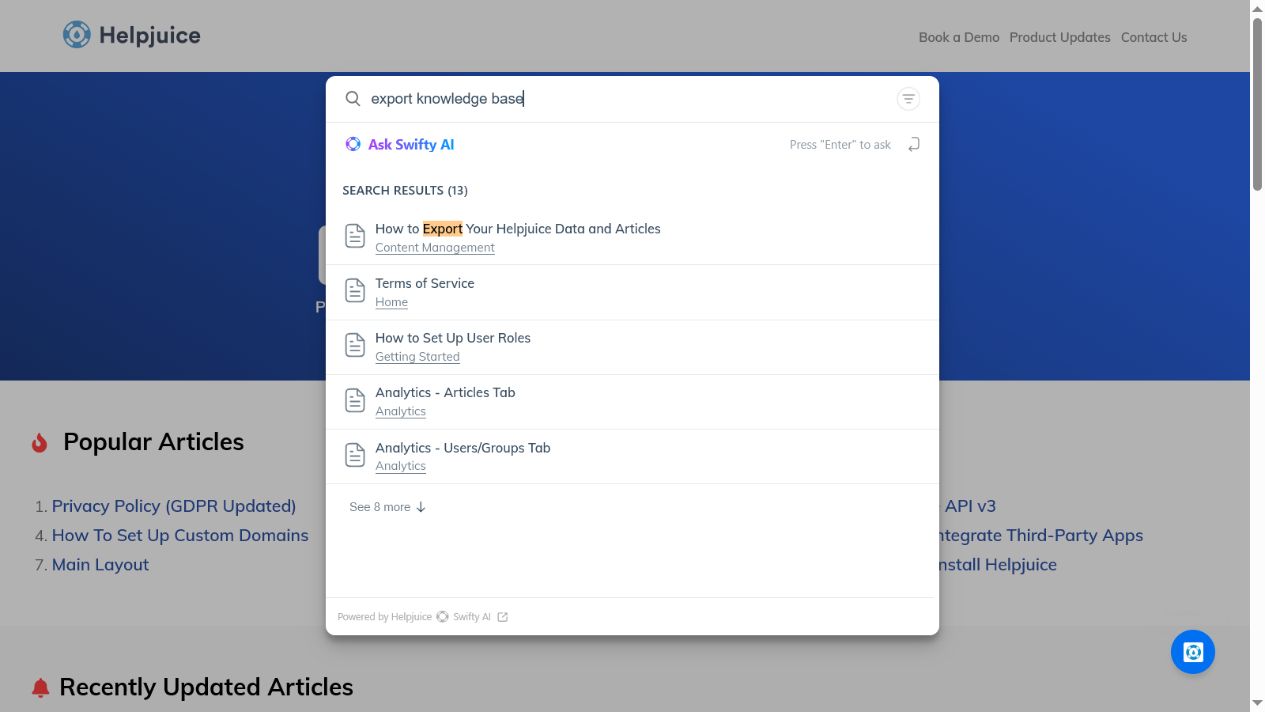
All four positive queries placed the expected official article first, and the nonsense control returned zero results. This is a useful signal for selected navigational and task searches. It does not establish universal relevance, typo handling, multilingual quality, permission-aware retrieval, AI accuracy, speed, or ticket deflection. Search performance will depend on the customer’s own titles, content, taxonomy, synonyms, languages, permissions, and configuration. We did not ask Swifty AI a question, so this review makes no hands-on claim about its answers or citations.
Helpjuice pricing and the plan gates that matter
The official Helpjuice pricing page displayed three monthly plans when checked. Prices below are public list prices in US dollars and exclude taxes, negotiated terms, implementation work, and optional services.
| Plan | Listed price | Users | Storage | Full AI Suite | SSO |
|---|---|---|---|---|---|
| Knowledge Base | $249/month | 30 | 12 GB | Not included | Not shown |
| AI-Knowledge Base | $449/month | 100 | 24 GB | Included | Included |
| Unlimited AI-Knowledge Base | $799/month | Unlimited | 38 GB | Included | Included |
The word user needs careful treatment. Helpjuice’s pricing FAQ defines a user as every person with credentials to log in to the knowledge base. The allowance is therefore not simply “author seats.” Administrators, writers, and credentialed private viewers can all affect the required plan. Anonymous visitors reading unrestricted public articles do not need those credentials. During the trial, model the real number of employees, customers, contractors, partners, reviewers, and SSO-provisioned readers who will log in.
The $249 plan includes the core knowledge base, customization, live collaboration and workflows, localization, and AI Article Translation. The broader AI Suite—described on the pricing page with tools such as AI Writer, AI Search, AI Chatbot, the Chrome extension, and tutorial creation—is shown as excluded from that plan. SSO is likewise shown only on the $449 and $799 cards. If either capability is mandatory, calculate from the required tier rather than the advertised entry price.
Helpjuice advertises a 14-day trial with no credit card and says it provides full feature access during the trial. No permanent free plan is displayed. The pricing FAQ says an expired trial becomes inactive until a paid plan is chosen and that the data is saved, but buyers with retention requirements should confirm the applicable contractual period. Use the site’s broader knowledge base pricing and total-cost guide to include migration, design, identity, training, translation, and administration—not only the subscription.
Content authoring, review, and lifecycle controls
Helpjuice documents article revisions, scheduled publishing, expiration dates, content reuse, team comments, and private or internal sections. Its official review-process guide describes assigning reviewers, adding notes, commenting on selected text, approving or rejecting an article, setting the required number of approvals, and allowing selected roles to bypass the rule.
These controls can support a mature editorial operation, but feature availability does not create governance by itself. A buyer still needs named owners, review criteria, service levels, escalation rules, and a retirement policy. Use the knowledge base content lifecycle guide to define those responsibilities, then verify that Helpjuice’s states and notifications fit the process.
The public role documentation also needs a trial check. Helpjuice’s general features page says there are four role levels, while its current role guide lists five: Super Administrator, Administrator, Collaborator, Draft Writer, and Internal Viewer. This review does not silently choose one number. Test the current default roles, custom-role options, permission inheritance, reviewer eligibility, and whether administrators can bypass approvals before relying on the model.
Search and analytics: useful signals, not automatic deflection
Helpjuice’s Searches Tab documentation describes queries with matches, zero-result searches, clicks, views, readings, and bounced searches, with XLS and CSV export. It defines a reading as a visit lasting more than ten seconds. The Articles Tab documents views, readings, likes, dislikes, average time, and last-updated data.
Those metrics can reveal missing content or weak results, but they are not interchangeable. A match is not necessarily a correct answer; a view is not a reading; a reading is not a solved problem; and none alone proves that a support case was avoided. Helpjuice’s public Analytics Overview currently appears to render its Solution Quality Index formula as searches divided by answers found, so we would ask Helpjuice to clarify the calculation rather than reproduce it. If deflection matters, connect help-center sessions, contact attempts, ticket categories, and article feedback through a documented measurement method.
Helpjuice AI: documented features and data-handling questions
Helpjuice’s AI packaging is more specific than a simple “AI included” label. AI Article Translation is shown across the current plans, while the complete AI Suite is reserved for the two higher plans. We did not test AI Writer, AI Search, AI Chatbot, Swifty, translation quality, tutorial creation, or the Chrome extension.
The Helpjuice Privacy Policy, updated May 4, 2026, says AI features may process relevant knowledge base content, prompts or queries, generated output, and limited metadata. It names OpenAI, Anthropic, and ElevenLabs as examples of third-party AI providers, while allowing for other providers disclosed in applicable documentation, a data processing agreement, or subprocessor disclosures.
The policy says AI queries and responses are generally deleted from Helpjuice AI interaction logs after 24 hours, with exceptions for security, abuse prevention, legal compliance, or a clearly disclosed product function. It also says customer data is not used to train or improve third-party foundation models where provider settings and contractual arrangements are designed to prohibit that use. Those qualifications matter; they should not be shortened to “logs are always deleted” or “data is never used for training.”
Helpjuice says administrators can control certain AI features and that optional Swifty functionality generally must be configured and enabled. It also warns that AI output may be inaccurate and requires customer review. A responsible evaluation should test answerable, ambiguous, unsupported, conflicting, outdated, and permission-sensitive questions; verify source citations and abstention; and confirm provider, retention, deletion, and plan-specific controls in the contract.
Security, privacy, and access control
Helpjuice displays GDPR and SOC 2 badges and documents access controls, user roles, SSO, IP restrictions, encrypted-URL access, API authentication, and SSL-related protections. These are useful screening signals, not a complete security assessment. The public pages reviewed do not establish the SOC report type, audit period, scope, exceptions, or whether the current report will be supplied to every buyer. Do not state “SOC 2 Type II certified” without reviewing the report.
Encrypted-URL access also needs precise language. Helpjuice’s official guide says anyone with the secret link can see public and internal content by default, and administrators can regenerate the token. That can be useful for low-friction link sharing, but it is not identity-based authentication. Use SSO or another appropriate access model when individual revocation, group enforcement, or auditable identity is required.
Before purchase, request the current SOC report and bridge letter, DPA, subprocessor list, data-residency and transfer details, incident-notification terms, encryption and key-management details, audit-log coverage, backup objectives, deletion evidence, and AI-provider controls. Test employee, contractor, customer, partner, author, reviewer, and administrator access. Helpjuice’s own search-analytics documentation says external searches can be recorded with an IP address, while internal searches can include a user name and IP, so include analytics data in the privacy review.
Customization, localization, integrations, and portability
Helpjuice positions visual and code-level customization, custom domains, branding, localization, API access, webhooks, and integrations as core strengths. Our public reader test confirms only the current Helpjuice support site’s visible search behavior—not the ease of building or maintaining a branded theme. Request a working prototype using your navigation, design system, mobile layouts, accessibility requirements, and analytics consent rules. For several portals or brands, use the multi-brand knowledge base guide and confirm every site, domain, language, and cost in writing.
The language claims are currently inconsistent. The pricing page specifies 40+ languages for one-click AI Article Translation, the homepage mentions 50+, and the features page says 300+. These may refer to different layers, but the public wording does not resolve the distinction. Test every required locale, right-to-left layout, terminology workflow, search behavior, fallback language, translation review, and plan entitlement rather than quoting one universal total.
Integration counts also vary by page. A safer conclusion is that Helpjuice documents named Slack and Zapier integrations, REST API v3, embedded access, and webhooks. Its API documentation states a limit of 100 requests per minute. Confirm which connections are native, which rely on Zapier or custom development, their authentication method, sync direction, retry behavior, monitoring, and plan access. We did not authenticate to the API or integration settings.
Portability deserves an actual trial. Helpjuice documents complete backup downloads and exports of individual articles or categories to PDF, DOCX, or HTML. Its recovery guide says deleted articles remain in Activities for up to 90 days and that automated backups default to every 12 hours with seven-day storage. These are documented defaults, not a tested recovery result. Export representative articles and verify body HTML, files, images, categories, authors, dates, redirects, permissions, translations, and revision history before signing.
Who should choose Helpjuice?
- A support or documentation team whose help center is a material part of the product experience.
- An organization that needs branded public content and controlled internal or private content in a specialist platform.
- A team prepared to use review workflows, search analytics, and content ownership continuously.
- A company whose number of credentialed users fits the flat plan allowances better than per-seat alternatives.
- A buyer that can justify the higher tier when SSO and the complete AI Suite are mandatory.
When should you compare an alternative?
Choose by operating model, not by the length of a feature list:
- Ticketing and shared support: compare the dedicated Freshdesk knowledge base review and other support-suite options.
- Structured product documentation: compare Document360 and other dedicated documentation platforms.
- Flexible internal collaboration: consider Notion or Confluence and use the internal knowledge base comparison.
- Self-hosted control: start with the open-source knowledge base comparison.
For the category-wide decision, use the knowledge base software comparison and the software selection guide. Those pages own the broad market comparison; this page is deliberately limited to deciding whether Helpjuice belongs on a shortlist.
A practical 14-day Helpjuice trial plan
- Import 25 representative articles with long text, tables, images, files, internal links, and nested categories.
- Create every real role and audience, including credentialed viewers, then test read, search, edit, review, publish, and export access.
- Run at least 30 documented searches: exact titles, acronyms, synonyms, misspellings, error codes, questions, and zero-result controls.
- Move one article through draft, rejection, revision, approval, scheduled publication, expiration, recovery, and export.
- If buying an AI plan, test grounded, ambiguous, unsupported, conflicting, stale, and permission-sensitive questions. Record citations and abstention; do not publish generated text without review.
- Test every required language with a qualified reviewer, including mobile and right-to-left layouts where applicable.
- Build a branded prototype and check keyboard access, headings, focus, contrast, forms, mobile navigation, canonical tags, robots directives, and structured data.
- Test Slack, Zapier, API, and webhook workflows that the business will actually operate, including failure and retry behavior.
- Export and restore representative content, then calculate first-year cost including the necessary plan, design, migration, identity, translation, training, and administration.
- Write a go/no-go decision against mandatory requirements before the trial ends.
Helpjuice FAQ
How much does Helpjuice cost?
Helpjuice listed monthly plans at $249, $449, and $799 when verified on July 29, 2026. They include 30, 100, and unlimited credentialed users, with 12 GB, 24 GB, and 38 GB of storage respectively. Taxes, implementation, and optional services may change the total.
Does Helpjuice have a free plan?
No permanent free plan was displayed. Helpjuice advertises a 14-day trial with no credit card and says the trial provides full feature access.
Who counts as a Helpjuice user?
Helpjuice defines a user as every person with credentials to log in to the knowledge base. Do not count only authors. Include credentialed readers, reviewers, contractors, partners, and SSO-provisioned users when selecting a plan.
Which plan includes the full Helpjuice AI Suite and SSO?
The current pricing page shows the full AI Suite and SSO on the $449 AI-Knowledge Base and $799 Unlimited AI-Knowledge Base plans. AI Article Translation is shown separately across the plans. Confirm the exact account entitlements during the trial.
Does Helpjuice use customer data to train AI models?
Helpjuice’s privacy policy says it does not use customer data to train or improve third-party foundation models where provider settings and contractual arrangements are designed to prohibit such use. Because that statement is qualified, review the current DPA, providers, settings, and contract rather than converting it into an unconditional promise.
Is Helpjuice SOC 2 compliant?
Helpjuice displays a SOC 2 badge, but a badge is not enough to evaluate the audit. Request the current report and verify its type, period, scope, exceptions, complementary customer controls, and bridge coverage before making a compliance decision.
Is Helpjuice a help desk?
Helpjuice is positioned as dedicated knowledge base software. It can support customer self-service and connect to other systems, but it is not documented as a complete replacement for ticketing, a shared support inbox, telephony, or a full customer-service suite.
How many languages does Helpjuice support?
The public Helpjuice pages are inconsistent: the pricing page specifies 40+ languages for one-click AI Article Translation, while other pages publish 50+ and 300+ claims. Treat these as different or unresolved vendor statements and test every required language, translation method, layout, and plan entitlement.
Final verdict
Helpjuice is a credible specialist option for organizations that will actively manage a branded public or private knowledge base. Its documented strengths include customization, publishing workflows, localization, search analytics, access controls, integrations, and portability. The tradeoff is a $249 starting price, with the full AI Suite and SSO shown only on higher plans.
The right next step is a controlled trial, not a feature-checklist decision. Use real content, real credentialed audiences, a documented query set, a complete security request, and a round-trip export. That will show whether Helpjuice’s specialist model produces enough operational value to justify its required tier.

