Independent knowledge base software guide Evidence-led Updated 2026

Zoho Desk Knowledge Base Review (2026): Plans, Features, and Limits
Quick answer: Zoho Desk is a capable knowledge base when your main requirement is to keep ticketing, agent knowledge, and customer self-service in one support platform. However, the edition matters more than many reviews suggest. A public knowledge base begins on Standard, a multilingual knowledge base begins on Professional, and article auto-translation, multi-brand Help Centers, HTML or script customization, and Employee Self-Service are Enterprise features.
The most important correction is about languages. It is not accurate to say that Zoho’s native Zia service automatically translates knowledge base articles into more than 50 languages. Zoho’s current multilingual Help Center guide lists 15 languages for Zia article auto-translation. Zoho supports a broader set of languages for Help Center localization, and other translation extensions have their own coverage, but those are different claims.
How this review was researched: We checked Zoho’s plan-comparison table, pricing page, multilingual Help Center guide, supported-languages page, Generative AI setup documentation, multi-brand guide, customization guide, and Employee Self-Service guide on July 23, 2026; AI Agents, Agent Studio, and model-allowance claims were rechecked on August 16, 2026. Where a marketing statement was broader than the administration guide or entitlement table, we used the narrower, feature-specific documentation. This is a documentation-based review; we do not claim hands-on testing of a paid Enterprise account.
Independent disclosure: Knowledge Base Software is an independent editorial website and is not affiliated with or operated by Zoho. Product features and entitlements can change, so confirm contract-critical requirements with Zoho before buying.
Quick Verdict: Is Zoho Desk Good for Knowledge Base Use?
Zoho Desk is a good fit when the knowledge base supports a customer-service operation rather than functioning as a standalone documentation product. Agents can use a private knowledge base across all current editions, and teams on Standard or higher can publish customer-facing content without moving to a separate platform. The connection between support work and reusable answers is the main reason to choose it.
Zoho Desk is less compelling when multilingual publishing, multiple brands, deep front-end control, or a broad employee portal are baseline requirements rather than advanced ones. Those capabilities sit on Professional or Enterprise, and the translation workflow still requires human work. Categories, sections, and sub-sections need manual translation; automatic article translations are saved as drafts; and later changes to the master article do not automatically refresh existing translations.
- Best reason to choose Zoho Desk: One system for support tickets, agent knowledge, and customer self-service.
- Minimum edition for a public Help Center: Standard.
- Minimum edition for multilingual publishing: Professional.
- Minimum edition for native KB article auto-translation: Enterprise.
- Biggest fact-checking risk: Treating Help Center language availability as if it were Zia auto-translation coverage.
Zoho Desk Knowledge Base Plans at a Glance
The table below summarizes the current Zoho Desk plan comparison. A dash means the feature is not listed for that edition in Zoho’s table. “BYOK” means the customer connects a supported external model provider using its own API credentials; it should not be interpreted as an included native model allowance.
| Knowledge base capability | Free | Express | Standard | Professional | Enterprise |
|---|---|---|---|---|---|
| Private knowledge base for agents | Included | Included | Included | Included | Included |
| Article versioning | Included | Included | Included | Included | Included |
| KB article templates | — | — | Included | Included | Included |
| Public knowledge base | — | — | Included | Included | Included |
| Multilingual knowledge base | — | — | — | Included | Included |
| KB article auto-translation | — | — | — | — | Included |
| Multi-brand Help Center | — | — | — | — | Included |
| CSS customization | — | — | — | Included | Included |
| HTML customization | — | — | — | — | Included |
| Custom Script | — | — | — | — | Included; JavaScript beta requires activation by Zoho |
| Employee Self-Service | — | — | — | — | Included |
| Generative AI service access | — | BYOK | BYOK | BYOK and native | BYOK and native |
Plan availability was checked July 23, 2026. Zoho may change entitlements. Use the official comparison table and your written quote as the final commercial reference.
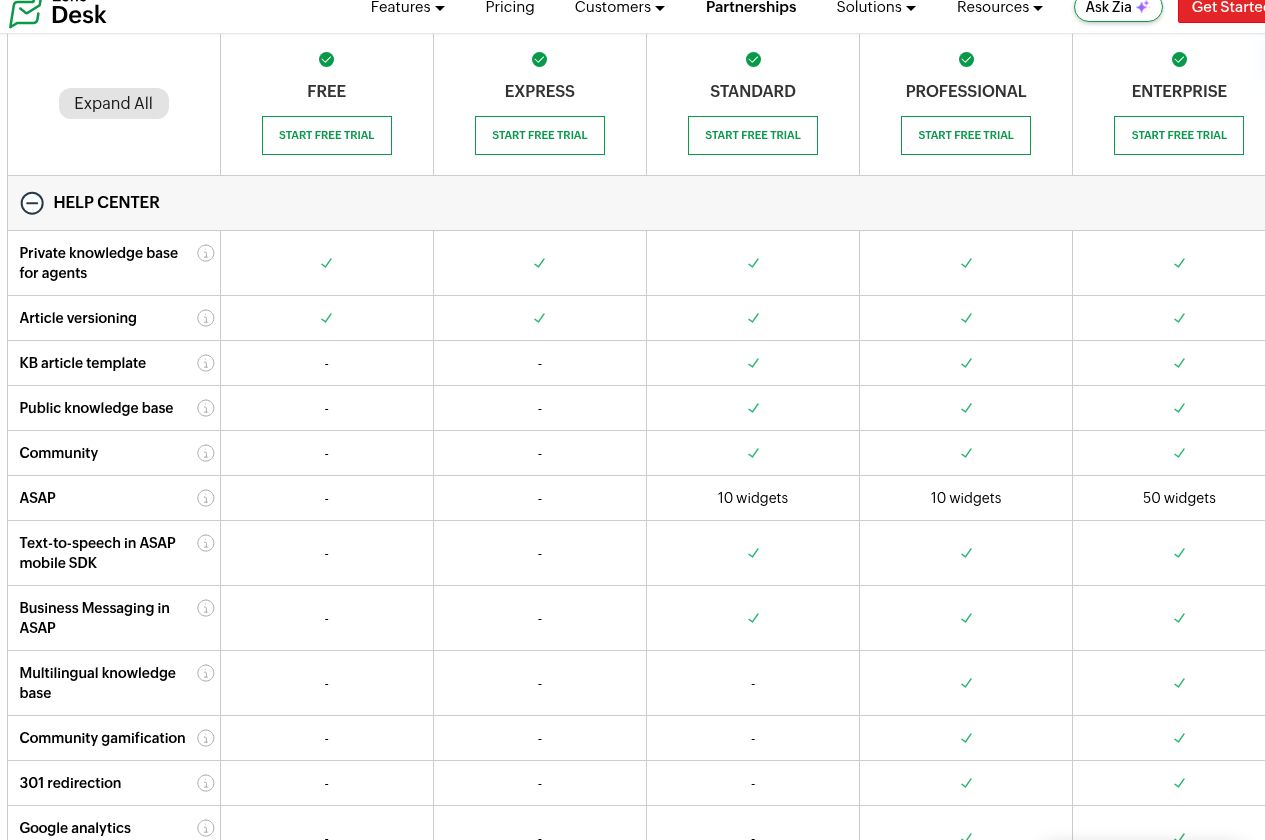
This plan structure changes the buying decision. Express may work as an inexpensive agent-support workspace, but it is not the entry point for a public customer knowledge base. Standard is the first sensible edition for public self-service. Professional adds multilingual publishing and several Help Center controls. Enterprise is the edition for automated article translation, multiple branded Help Centers, advanced code customization, and the internal Employee Self-Service experience.
What Is the Zoho Desk Knowledge Base?
Zoho Desk is primarily help desk software. Its knowledge base is one part of a wider customer-support system that includes tickets, channels, automation, reporting, agents, departments, and customer-facing Help Centers. That distinction matters when comparing it with dedicated knowledge base software.
The knowledge base can serve two different audiences:
- Agents: A private knowledge base can hold internal answers and procedures. Zoho’s plan table lists this capability across Free, Express, Standard, Professional, and Enterprise.
- Customers: A public knowledge base can publish self-service articles through a Help Center. This starts on Standard, not Express.
This integrated model is useful when a recurring support issue should become reusable documentation. A team can identify repeat questions from its support operation, create an article, and make the answer available to agents or customers in the same product family. If that workflow is central to your content program, compare it with the process in our ticket-to-article workflow guide.
Core Knowledge Base Features
Private and Public Knowledge
The private agent knowledge base is the most widely available part of the product. It can be useful for troubleshooting notes, support procedures, policies, and answers that should not appear in the public Help Center. Public content requires Standard or higher, so teams comparing Free or Express should not assume that “knowledge base included” means a publishable customer portal.
Article Structure and Versioning
Zoho’s plan table lists article versioning across all five editions. KB article templates begin on Standard. Public Help Center content is organized through categories, sections, sub-sections, and articles. This hierarchy is adequate for a conventional support center, but multilingual teams must maintain localized names for the hierarchy separately from translated article content.
Customer Access
Zoho’s Help Center onboarding documentation distinguishes public reading from registered-user actions. Public articles can be read without registration, while signing in can unlock additional interactions such as following or commenting, depending on configuration. Procurement teams should test anonymous access, authenticated access, article permissions, and ticket submission as separate user journeys.
SEO Fields and Help Center Controls
Zoho documents article-level SEO fields, including an SEO title, meta description, and meta keywords. The plan table places 301 redirection, Google Analytics integration, themes, and CSS customization on Professional and Enterprise. HTML customization and Custom Script are Enterprise-only. This means the edition that can publish a public KB is not necessarily the edition that provides the front-end and measurement controls an SEO-led documentation team expects.
These tools do not guarantee Google rankings. Search performance still depends on indexability, information architecture, useful original content, internal links, page experience, and ongoing maintenance. Treat the Help Center as the publishing system, not as a substitute for an SEO strategy.
Multilingual Knowledge Base: What Zoho Actually Supports
Zoho’s multilingual terminology can be confusing because several different capabilities are discussed together. A reliable comparison must keep them separate:
| Capability | What it means | Plan or limit |
|---|---|---|
| Multilingual Help Center / KB | Publish and manage articles in more than one Help Center language | Professional and Enterprise |
| Manual translation | An editor creates and maintains each localized article version | Available within the multilingual workflow |
| Automatic article translation | Translate supported article fields through Google Translate, Unbabel, or Zia | Enterprise |
| Zia article auto-translation | Zoho’s native translation option for a defined language list | 15 documented languages |
| Help Center supported languages | The broader catalog in which Help Center content or interface localization may be configured | Not evidence that Zia auto-translates every listed language |
Fact-check correction: Zoho’s public knowledge base product page uses a broad “50+” auto-translation claim, while its pricing presentation uses “over 40” for multilingual Help Center support. The feature-specific administration guide is narrower: it lists 15 languages for Zia article auto-translation. A broader Help Center language catalog, or the coverage of an external translation extension, must not be presented as Zia’s native coverage.
The 15 Languages Zoho Lists for Zia Auto-Translation
As of the last fact check, Zoho lists: German, Russian, Swedish, Portuguese, Italian, French, Hungarian, Chinese, Spanish, Czech, Arabic, Japanese, Polish, Romanian, and Dutch.
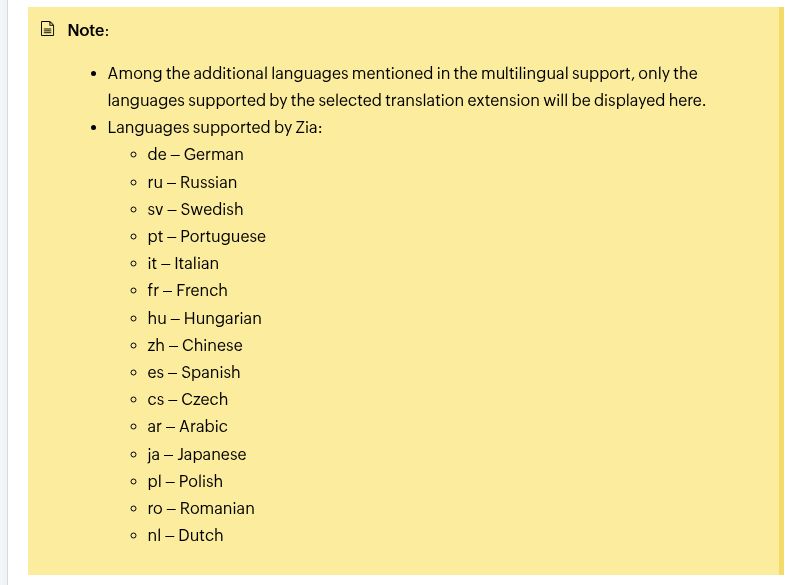
The correct number for a buyer may still depend on the chosen translation extension. Zoho’s guide says the automatic workflow can use Google Translate, Unbabel, or Zia. Google Translate and Unbabel require their corresponding authentication details or API key, and the languages presented in setup depend on what the selected extension supports.
If multilingual self-service is a core requirement, map every target language to the actual engine, edition, reviewer, and publishing workflow. Our separate multilingual knowledge base guide explains the broader governance questions that apply regardless of vendor.
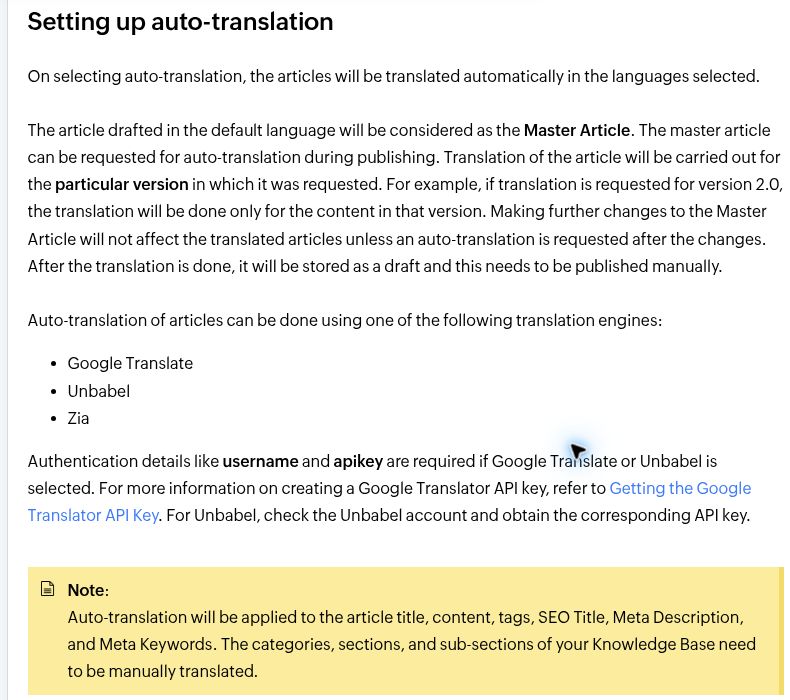
How Zoho Desk Article Translation Works
Automatic translation is not a one-click replacement for a localization workflow. Zoho’s documentation establishes several operational limits that should appear in any accurate review:
- Article fields covered: The automatic workflow applies to the article title, content, tags, SEO title, meta description, and meta keywords.
- Structure not covered: Categories, sections, and sub-sections must be translated manually.
- Draft status: An automatically translated article is stored as a draft and must be published manually.
- Master updates: Later changes to the master article do not update existing translations automatically. A new auto-translation request is required.
- Version scope: Translation is performed for the particular article version for which it was requested.
- Per-brand setup: In a multi-brand configuration, multilingual support and default or additional languages must be configured for each brand.
- Browser language: Zoho says the Help Center is not automatically displayed according to the visitor’s browser language setting.
A practical rollout therefore needs a language owner, translated navigation labels, a review queue, and a process for re-translating changed source articles. Without those controls, a team can publish accurate English content while leaving stale or mismatched localized versions online.
Zia AI and Article Generation by Plan
Zoho’s plan comparison lists article generation among its Generative AI capabilities, but the service model is not the same on every edition. The same table shows:
- Free: Generative AI Services are not listed.
- Express: BYOK.
- Standard: BYOK.
- Professional: BYOK and native.
- Enterprise: BYOK and native.
This is why “AI article generation is included on every Zoho Desk plan” is not a safe statement. Express and Standard rely on BYOK for Generative AI service access. A connected external provider can require a separately billed API account, and provider availability varies by data center. Professional and Enterprise add access to Zoho’s native Generative AI service alongside BYOK.
Zoho’s current Generative AI setup guide distinguishes its native Zia service from external BYOK options such as ChatGPT, with DeepSeek documented for the China data center. Only publish a provider, model, data-residency, or cost claim after checking the applicable data center and contract.
AI output should remain a draft input to the knowledge process. Test factual accuracy, permissions, source coverage, tone, screenshots, and version-specific instructions before publishing. Article generation can accelerate a first draft; it does not remove the need for a content owner.
AI Agents: Zia Agent Studio and pre-built Desk agents
Zoho now presents three distinct AI layers: classic Zia features, generative assistance for summaries, replies, and article drafting, and AI Agents that can act in ticket workflows. These should not be treated as one entitlement.
| AI-agent layer | What current official sources say | Buying boundary |
|---|---|---|
| Zia Agent Studio and Agent Store | Zoho Desk’s current pricing page lists AI Agents from Express, using either a customer-provided key or Zoho-hosted models, with access to pre-built agents. | Confirm the plan, data center, external-model bill, and written allowance for the account. |
| Zoho-hosted model allowance | The Desk plan surface lists up to 30 million Zoho-hosted LLM tokens per month. Zoho’s separate agent-pricing page explains that model or API consumption and service-plan limits can still create costs. | Do not describe the allowance as unlimited or apply it to external BYOK models. |
| Pre-built Desk agents | The Zia Agents FAQ documents Support Specialist, which drafts knowledge-base-grounded replies and steps back when no suitable answer is available, and Resolution Expert, which adds or updates resolution notes after ticket closure. | Zoho currently limits these pre-built Desk agents to selected users in the US and India data centers. Confirm account availability before purchase or rollout. |
AI-agent entitlements, model allowances, and data-center availability rechecked August 16, 2026. These agents augment ticket workflows; they should not be presented as a general replacement for human support or as the same feature as article generation.
Branding, Multi-Brand, and Employee Self-Service
Multi-Brand Help Centers
Zoho Desk’s true Multi-brand Help Center feature is Enterprise-only. It is built around departments: an organization creates the relevant departments and then associates a Help Center with each brand or department. Each Help Center can have its own customer-facing identity and configuration.
Do not describe this as “unlimited brands.” The number of department-based brand environments remains subject to the account’s department limits and any purchased add-ons. Zoho also documents two user-base models: a common user base across Help Centers or a unique user base for separate registration. Unique User Base requires at least two Help Centers, and Zoho says returning to Common User Base later requires help from its support team.
If you need several portals, compare this architecture with the criteria in our multi-brand and white-label knowledge base software guide. A separate logo and domain do not automatically provide tenant-level isolation.
CSS, HTML, and JavaScript
CSS customization starts on Professional. HTML customization and Custom Script are Enterprise features. Zoho’s advanced customization guide adds an important caveat: JavaScript customization is a beta capability that Zoho enables on request. Therefore, an Enterprise check mark should not be translated into a promise that arbitrary JavaScript is immediately available in every account.
Employee Self-Service
Employee Self-Service is also Enterprise-only. Zoho describes it as an internal portal for agents, Desk users, and internal stakeholders who need access to published knowledge and learning material. It should not be presented as an unrestricted public employee intranet included with every plan. Confirm which employees need a Zoho Desk identity, which departments they can access, and whether agent-only articles should appear in the portal.
Zoho Desk Knowledge Base Pros and Cons
| Advantages | Limitations |
|---|---|
| Private agent knowledge base is listed across all current editions. | A public customer knowledge base does not start until Standard. |
| Ticketing and self-service content live in the same support platform. | Multilingual publishing starts on Professional; auto-translation requires Enterprise. |
| Article versioning is listed across all editions, and templates start on Standard. | Categories, sections, and sub-sections still need manual translation. |
| Professional adds multilingual publishing, CSS, themes, analytics integration, and 301 redirects. | Automatic translations are drafts and do not update automatically when the master article changes. |
| Enterprise combines multi-brand portals, auto-translation, advanced customization, and Employee Self-Service. | HTML, scripts, multi-brand, and Employee Self-Service are concentrated in the highest edition. |
| Professional and Enterprise support native Generative AI as well as BYOK. | Express and Standard list BYOK only, which can mean separate provider setup, billing, and data-processing considerations. |
Zoho Desk vs Dedicated Knowledge Base Software
The correct comparison is not “which category is always better?” It is which system should own the support content and publishing workflow. Zoho Desk has an advantage when the knowledge base exists primarily to support a Zoho Desk operation. A dedicated platform may be more appropriate when documentation is a product in its own right.
| Requirement | Zoho Desk is usually the stronger fit when… | Evaluate a dedicated KB when… |
|---|---|---|
| Support workflow | Tickets, agents, departments, and self-service should share one operational platform. | The documentation team works independently from the help desk. |
| Public Help Center | Standard or higher already fits the broader support stack. | You want a docs-first product without buying help desk capabilities. |
| Multilingual content | Professional or Enterprise fits the budget and the documented workflow is sufficient. | Translation memory, localization automation, language routing, or complex review stages are primary requirements. |
| Multiple brands | Enterprise department-based Help Centers match the account structure. | You need hard tenant separation, independent administration, or a different cost model for many sites. |
| Front-end control | Professional CSS or Enterprise HTML/script access is enough. | Deep design and developer control is required at a lower tier or for every portal. |
| AI | Zoho’s native or BYOK model and data-center options pass your review. | You need model independence, different grounding controls, or a documentation-specific AI workflow. |
A combined stack is also possible: Zoho Desk can remain the ticketing system while a separate platform publishes the knowledge base. Do not assume a turnkey integration. Depending on the selected product, content links, article suggestions, search, analytics, and ticket-to-article handoff may require a connector, API work, or a manual process. Our knowledge base vs help desk comparison explains why many teams need both functions even when they do not come from the same vendor.
Which Zoho Desk Plan Should You Choose?
Choose Free or Express for Agent-Only Knowledge
These editions can support a private knowledge base for agents, but neither is the right choice if the project requires a public Help Center. Express also lists BYOK Generative AI service access, but that does not change the public-KB entitlement.
Choose Standard for a Basic Public Knowledge Base
Standard is the practical entry point for public customer self-service. It adds the public knowledge base and KB article templates. Choose it when one language and standard Help Center presentation are sufficient and when BYOK, rather than native Generative AI, is acceptable.
Choose Professional for Multilingual Publishing and More Help Center Control
Professional is the first edition with a multilingual knowledge base. It also adds CSS customization, themes, Google Analytics integration, and 301 redirection in the current table. It supports BYOK and native Generative AI. It does not include KB article auto-translation or a Multi-brand Help Center.
Choose Enterprise for Auto-Translation, Multi-Brand, and Advanced Portals
Enterprise is required for article auto-translation, Multi-brand Help Centers, HTML customization, Custom Script, and Employee Self-Service. It is the appropriate edition to pilot when those requirements are mandatory, but verify JavaScript activation, department limits, target-language coverage, identity architecture, and the ongoing translation-review workload before signing.
Zoho’s public prices vary by geography, billing period, currency, taxes, and commercial terms. Use the current Zoho Desk pricing page for your region instead of copying a universal price into a long-lived comparison.
Alternatives to Evaluate
Zoho Desk should be compared with products that match the same buying problem, not with an arbitrary list of popular software. Useful next comparisons include:
- Document360 knowledge base review for a documentation-first alternative.
- Freshdesk knowledge base comparison for another help desk-centered option.
- Zendesk knowledge base review for a support-suite and Help Center alternative.
- How to choose knowledge base software for a requirements-led procurement process.
Pilot Checklist Before You Buy
- Confirm the edition in writing. Map every required capability to Standard, Professional, or Enterprise rather than relying on a general “knowledge base included” statement.
- Build one real public section. Test article authoring, templates, images, tables, mobile presentation, search, permissions, and ticket escalation.
- Test every target language. Confirm whether it uses manual translation, Zia, Google Translate, or Unbabel and who pays for or manages the extension.
- Translate the hierarchy. Localize categories, sections, and sub-sections, then check what visitors see when a structural label is missing.
- Update the master article. Verify how translated drafts are marked, retranslated, reviewed, and published after a source change.
- Validate AI access. Confirm native versus BYOK service access, provider billing, data center, data handling, and the exact article-generation workflow.
- Prototype each brand. Test domains, themes, departments, users, authentication, forms, analytics, and content separation. Do not infer tenant isolation from different logos.
- Test code customization. Confirm whether JavaScript beta has been enabled and whether security policies permit the required third-party scripts.
- Measure findability. Review search queries, failed searches, article feedback, support-ticket reasons, and the availability of the analytics integrations required by your edition.
- Plan an exit. Check export formats, media handling, redirects, custom-domain ownership, and what would be required to migrate the content later.
For a reusable procurement sequence, use our knowledge base implementation checklist.
Final Verdict
Zoho Desk can be a strong knowledge base for a support team that wants tickets and self-service in one platform. Standard is the true starting point for a public knowledge base. Professional is the meaningful upgrade for multilingual publishing and several Help Center controls. Enterprise is the edition for automatic article translation, multiple branded Help Centers, HTML or script customization, and Employee Self-Service.
The product should not be evaluated through broad language or AI claims alone. Zia’s documented article auto-translation list contains 15 languages, translated navigation structures still need manual work, auto-translated articles require publishing, and Express or Standard Generative AI access is BYOK rather than the same native service offered on higher editions. Once those limits are included, buyers can judge Zoho Desk on its real strength: an integrated support and knowledge workflow, with advanced publishing capabilities available when the corresponding plan and operating process are justified.
Frequently Asked Questions
Does Zoho Desk include a knowledge base on every plan?
Zoho’s current plan table lists a private knowledge base for agents on Free, Express, Standard, Professional, and Enterprise. A public customer knowledge base begins on Standard.
Which Zoho Desk plan includes a multilingual knowledge base?
Multilingual knowledge base publishing begins on Professional and is also included on Enterprise. Automatic translation of KB articles is a separate feature that is listed only for Enterprise.
How many languages can Zia auto-translate for KB articles?
Zoho’s current multilingual Help Center guide lists 15 Zia-supported languages: German, Russian, Swedish, Portuguese, Italian, French, Hungarian, Chinese, Spanish, Czech, Arabic, Japanese, Polish, Romanian, and Dutch.
Does Zoho Desk auto-translate categories and sections?
No. Zoho says categories, sections, and sub-sections must be translated manually. The automatic workflow covers specified article and SEO fields, not the knowledge base hierarchy.
Are automatically translated articles published immediately?
No. Zoho says the translated article is stored as a draft and must be published manually. Changes to the master article also require another auto-translation request if the translated version should be updated.
Which plan includes multi-brand Help Centers?
Multi-brand Help Centers are listed for Enterprise. They are department-based and remain subject to the account’s department limits. They should not be described as unlimited or as proof of tenant-level isolation.
Is AI article generation included in the same way on every paid plan?
No. Zoho’s plan table lists Generative AI service access as BYOK on Express and Standard, and BYOK plus native on Professional and Enterprise. BYOK can require a separately billed provider API and depends on supported providers and data centers.
Which plan includes HTML, scripts, and Employee Self-Service?
HTML customization, Custom Script, and Employee Self-Service are listed for Enterprise. CSS customization begins on Professional. Zoho’s customization guide says JavaScript support is a beta capability enabled on request.
Official Sources and Verification Notes
- Zoho Desk plan comparison — plan entitlements for public KB, multilingual KB, auto-translation, multi-brand, customization, Employee Self-Service, and Generative AI services.
- Zoho Desk pricing — current regional plans and commercial presentation.
- Zoho Desk knowledge base product page — the broad marketing claim that requires qualification against the feature-specific language guide.
- Guide to Building a Multilingual Help Center — Zia’s 15 languages, translation engines, draft workflow, manual hierarchy translation, and update behavior.
- Languages supported in Zoho Desk Help Center — the broader Help Center language catalog, which should not be substituted for Zia’s list.
- Setting up Generative AI services — native and BYOK provider options and data-center considerations.
- Providing Multi-brand Customer Support — department-based Help Centers and common or unique user-base models.
- Advanced Help Center customization — CSS, HTML, Custom Script, and JavaScript beta conditions.
- Employee Self-Service Portal guide — intended users and portal behavior.

