Independent knowledge base software guide Evidence-led Updated 2026


How to Choose Knowledge Base Software: A Test-Driven Buyer Framework
Choose knowledge base software by eliminating products that fail a non-negotiable requirement, then testing the remaining products with the same content, queries, user roles, and exit task. Compare evidence – not feature-page checkmarks – with a weighted scorecard. The right product is the one that passes your gates and performs reliably in your operating conditions, not the one with the longest feature list.
Last verified: July 29, 2026.
Scope: This is a test-driven selection framework, not a vendor ranking. Our original work combines a four-vendor public documentation audit, a no-login reader check, and one narrow authenticated KnowledgeOwl HTML ZIP test using a synthetic draft article. We did not test private APIs, approval workflows, permission boundaries, integrations, AI answers, re-import, or production-scale exports.
Independence: Knowledge-Base.software is an independent educational resource and is not affiliated with the vendors included in the documentation sample.
This guide does not rank vendors. Use the current knowledge base software comparison to build a shortlist, then use the framework below to test each shortlisted product under the same conditions.
Contents
- The short answer: use gates, evidence, and one controlled trial
- Step 1: Define the job and required outcomes
- Step 2: Apply pass/fail gates before comparing features
- Step 3: Build an evidence ledger
- Original audit: what “export” meant in four official help centers
- Step 4: Build a representative pilot
- Step 5: Run the same six tests in every product
- Step 6: Score only observed evidence
- Step 7: Compare total cost and contract evidence
- Step 8: Make and document the final decision
- Methodology and limitations
The short answer: use gates, evidence, and one controlled trial
A defensible knowledge base software decision has eight stages:
- Define the job. Specify the audiences, content, workflows, risk, integrations, and outcomes the system must support.
- Set pass/fail gates. Eliminate any product that cannot meet a mandatory security, identity, accessibility, portability, integration, legal, or budget requirement.
- Build a representative pilot. Use the same articles, assets, users, roles, search queries, and edge cases in every product.
- Record evidence. Separate what a vendor markets, what official documentation states, what is visible publicly, and what your team actually reproduced in a trial.
- Score observed performance. Apply weights set before the trial, use fixed scoring anchors, and leave unverified criteria unscored.
- Test the exit. Export sample content before a long contract. A tool that is easy to enter but difficult to leave creates operational risk.
This order matters. Excellent search should not compensate for a failed permission boundary, an unavailable required region, or an unusable export.
Step 1: Define the job and required outcomes
Begin with a one-page decision brief. It should describe the work the knowledge base must enable, not a list of fashionable features. “We need AI” is not an outcome. “A customer can find a cited answer to a supported billing question without seeing internal policy content” is testable.
| Decision field | What to document | Example of a testable statement |
|---|---|---|
| Primary audience | Customers, employees, partners, agents, developers, or a combination | Anonymous customers can read public troubleshooting articles, while employees can access private escalation notes. |
| Primary job | The main task the system must improve | A support agent can find and reuse an approved answer while working in the ticketing system. |
| Content profile | Volume, formats, languages, sensitivity, and update rate | The platform can manage 2,000 articles in three languages, including files, tables, code, and version-specific instructions. |
| Operating model | Authors, reviewers, owners, approval path, and review frequency | A writer submits a draft, a product owner approves it, and the system records both actions. |
| Risk | Consequences of a wrong answer, unavailable page, or permission leak | Restricted HR content must never appear in public search or an AI answer. |
| Required outcome | The behavior that proves value | Users locate the correct article in the top three results using real customer wording. |
Separate the primary job from secondary possibilities. A public help center, an employee knowledge base, a developer portal, and an agent-assist source can share content, but they do not have identical access, search, analytics, or publishing requirements. If employees are the main audience, use the deeper guide to internal knowledge base requirements before defining the pilot.
Write requirements as observable behavior
Replace broad requirements with a task, condition, and expected result:
| Weak requirement | Observable requirement |
|---|---|
| Good search | For a fixed set of answerable queries, the correct article appears in the first three results, including agreed typo and synonym cases. |
| Strong permissions | A user in Role A can read and edit Collection A but cannot discover, preview, export, or receive AI answers from Collection B. |
| Easy migration | A 24-article test set imports with headings, tables, assets, language, status, and hierarchy intact, with every transformation documented. |
| AI support | The answer cites an approved source, refuses an unsupported question, and never crosses the tested access boundary. |
| Useful analytics | An analyst can retrieve searches, zero-result queries, article feedback, and content events at the granularity and retention period required. |
Define the success rule before anyone sees a product demo. Otherwise, an attractive interface or a polished sales scenario can change the criteria after the fact.
Step 2: Apply pass/fail gates before comparing features
A gate is a requirement that cannot be traded for strengths elsewhere. A product that fails a gate does not advance to weighted scoring unless the decision owner explicitly changes the requirement and records why.
| Gate | Evidence required | Pass condition |
|---|---|---|
| Audience and access model | Trial configuration and current plan documentation | The product can separate every required public, customer, partner, and internal audience. |
| Identity lifecycle | Technical validation in the required plan | The required federated sign-in and provisioning/deprovisioning behavior works with the organization’s identity system. |
| Security, data, and legal | Current contractual and assurance evidence | Required region, retention, encryption, audit, privacy, and control scope are confirmed for the purchased service. |
| Portability | A sample export and inventory comparison | Required content, media, metadata, translations, and structure can be recovered in a usable form. |
| Required integration | A live end-to-end workflow | The exact trigger, data, permissions, and failure path work, not merely an app-directory listing. |
| Budget | A written quote and usage scenarios | Expected and high-usage three-year total cost remain inside the approved range. |
| Accessibility | Automated checks plus manual keyboard and assistive-technology sampling | No known blocker prevents the required accessibility target or procurement policy. |
Use precise identity terminology
Identity requirements should distinguish protocols from providers and lifecycle automation. A clearer requirement is: “SAML 2.0 or OpenID Connect for federated sign-in; SCIM when automated provisioning and deprovisioning are required; and compatibility with our identity provider, such as Okta or Microsoft Entra ID.” Microsoft confirms that Microsoft Entra ID is the current name for Azure AD.
OAuth 2.0 is an authorization framework, while OpenID Connect is an authentication layer built on OAuth 2.0. SCIM is defined in RFC 7644, and SAML 2.0 specifications are published by OASIS. Validate the exact plan, provider, attributes, groups, sessions, and lifecycle workflow. See the site’s SSO and identity management guide.
Treat compliance labels as the start of due diligence
A logo is not enough. Ask whether the exact service, region, subprocessors, and contract are covered, and request current evidence. ISO/IEC 27001:2022 defines requirements for an information security management system, but a buyer still needs to inspect the certification scope. The European Commission’s GDPR principles include purpose limitation, data minimization, storage limitation, security, and accountability. Translate those principles into questions about the actual knowledge base configuration and data flows.
For US healthcare use cases, do not treat “HIPAA compliant” as a self-proving feature. HHS explains that the current HIPAA Security Rule requires administrative, physical, and technical safeguards for electronic protected health information. HHS says its strengthening proposal remains a proposed rule while the current rule remains in effect. Confirm applicability, service, configuration, contract, any required business associate agreement, and your own obligations. Use the knowledge base security and compliance guide to build the evidence request.
Test accessibility and public discoverability as complete experiences
An automated scan can identify some defects, but it cannot prove conformance. The W3C’s WCAG 2.2 recommendation applies conformance to complete pages and processes. Test the public home page, search, results, article, feedback, sign-in, and contact or escalation path with keyboard navigation and appropriate assistive technology, in addition to automated checks. The site’s knowledge base accessibility testing guide provides a focused method.
For a public knowledge base, verify that the production plan exposes the controls needed for crawling and indexing. Google documents how crawling, robots directives, canonical URLs, and sitemaps work in its official crawling and indexing guidance. A product does not need to expose every technical control to be suitable, but it must support the controls your publishing model requires. Test an actual published article, not a marketing demo.
Step 3: Build an evidence ledger
A feature score without an evidence label is easy to misread. “Available” might mean a marketing claim, a help article, a public observation, or a repeated authenticated test. Record evidence strength separately from the score.
| Evidence code | Meaning | How to use it |
|---|---|---|
| E0 | Marketing claim or sales statement without supporting evidence | Treat as unverified and do not score. |
| E1 | Current official documentation, contract, or assurance document | Confirms documented availability, not real behavior in your configuration. |
| E2 | Direct observation on a public surface | Valid only for the public reader experience that was actually observed. |
| E3 | Repeated authenticated trial using representative content and defined roles | Strongest product-fit evidence for the tested plan, configuration, and task. |
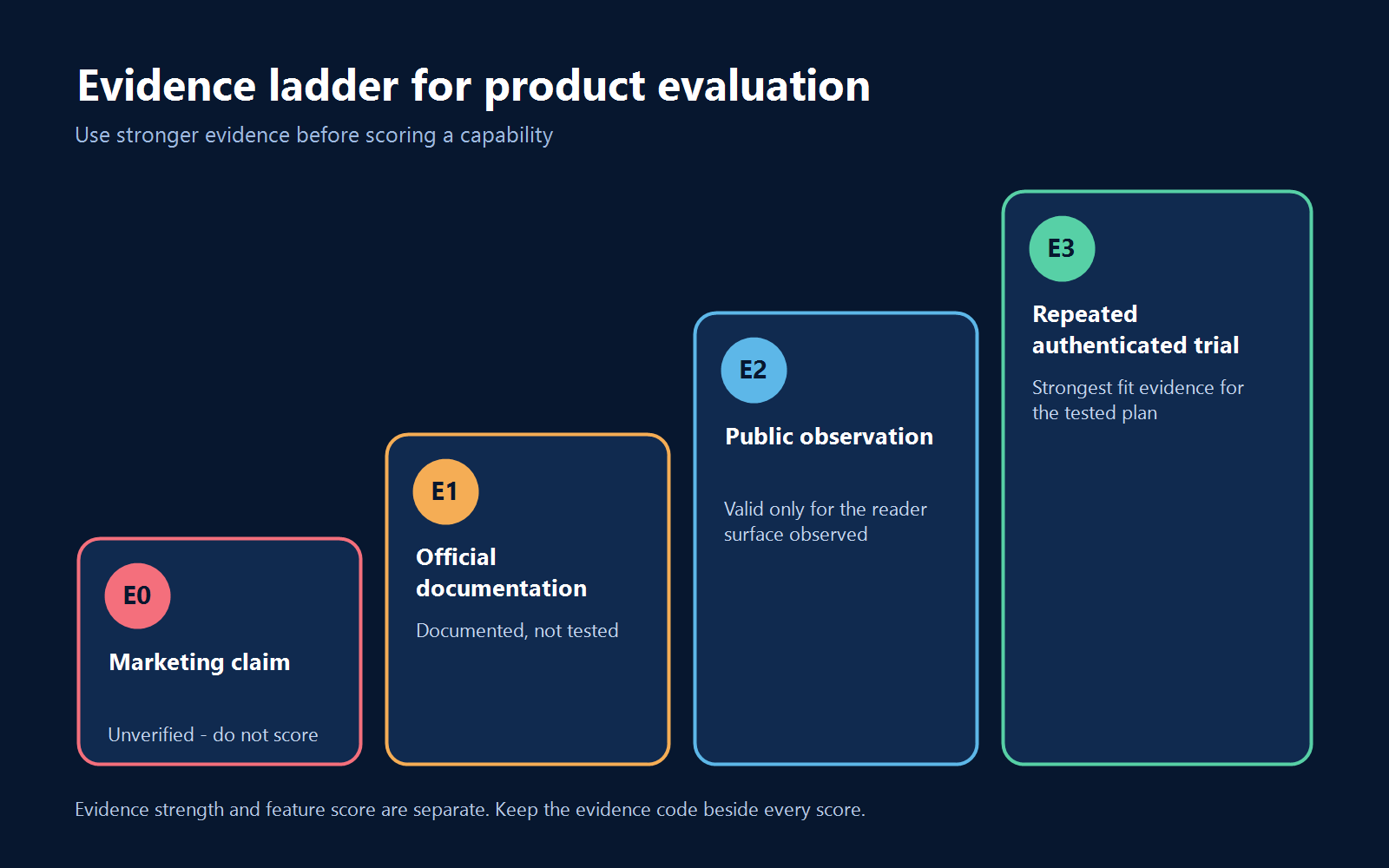
For every criterion, record the source URL or artifact, plan, configuration, test date, tester, task, result, and limitation. Save screenshots, exports, screen recordings, and written vendor answers where appropriate. If a capability is documented but not tested, label it E1. Never silently convert E0 or E1 into “tested.”
Minimum evidence record
- Criterion and required outcome
- Product, plan, region, and relevant configuration
- Evidence code
- Official source or saved artifact
- Exact task and test data
- Observed result
- Known limitation or untested condition
- Tester and verification date
- Retest trigger, such as a plan, UI, policy, or contract change
Original audit: what “export” meant in four official help centers
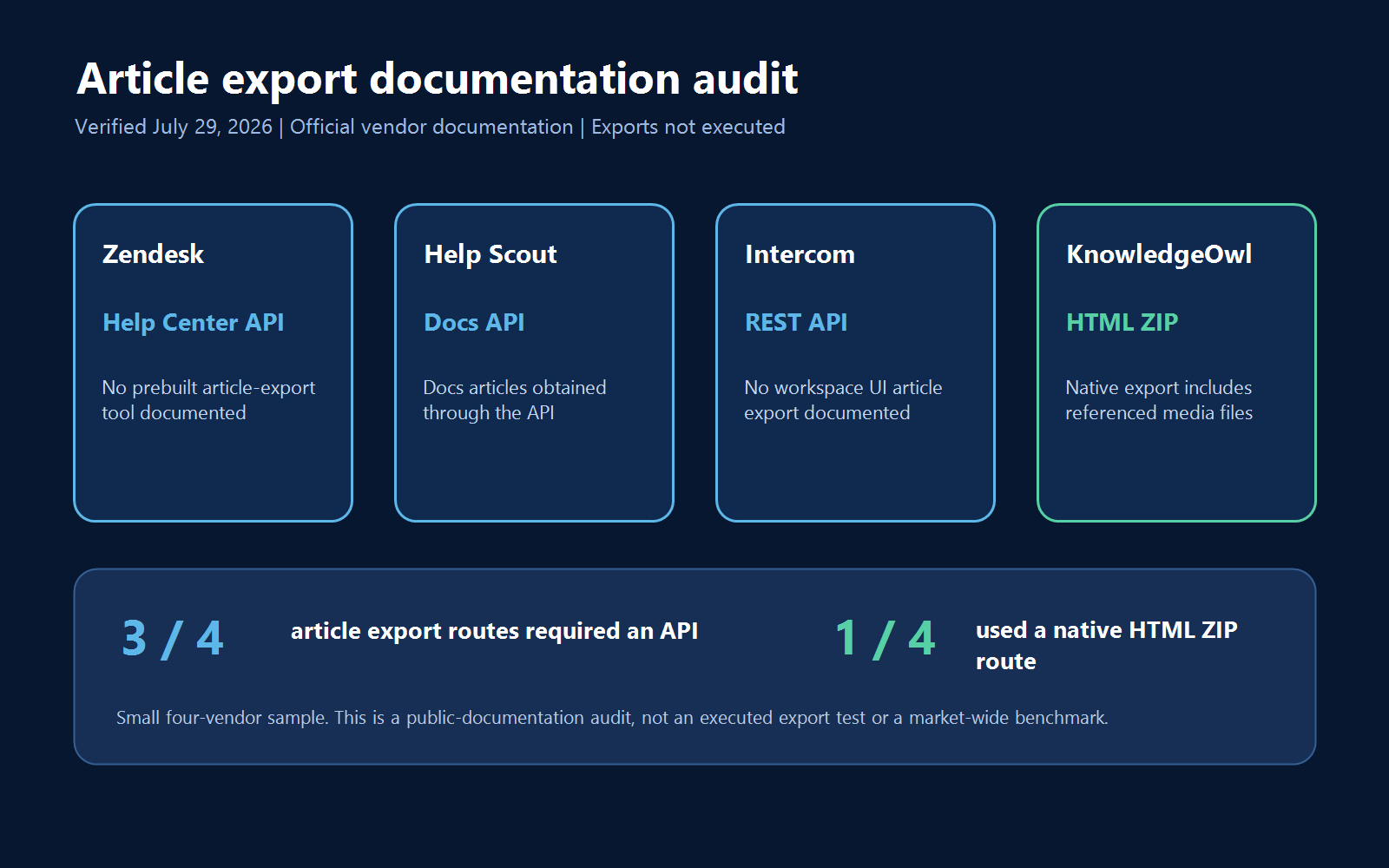
Portability is easy to under-specify. A feature table may say “export,” but that word can refer to analytics, article bodies, an API, a PDF, or a complete package with media and structure. We ran a small public-documentation audit to show why the buyer must test the exact exit requirement.
Audit method
- We selected four established help-center or knowledge-base vendors already covered on this site: Zendesk, Help Scout, Intercom, and KnowledgeOwl.
- We used only vendor-owned public documentation.
- We located the current official answer to one buyer question: How can I export all knowledge base articles?
- We recorded whether the documentation identified a native article-content export, an API route, included assets, or a portability limitation.
- We confirmed that all four evidence URLs returned HTTP 200 on July 29, 2026.
- Zendesk, Help Scout, and Intercom remained documentation-only because no ready authenticated workspace was available. In the logged-in KnowledgeOwl trial workspace, we created one synthetic draft article and ran one HTML ZIP export with Include draft articles and Include files enabled.
| Vendor | What the official documentation stated | Documented route | Official evidence |
|---|---|---|---|
| Zendesk | Zendesk says it has no prebuilt tool to export articles and directs users to the Help Center API. Theme code is handled separately, with a download path that depends on plan. | API for articles | Zendesk: How can I export my help center content? |
| Help Scout | Help Scout says its in-app exports cover selected reporting data. It states that all Docs articles are obtained through the Docs API and that API is the only export route for the other account data described on the page. | API for Docs articles | Help Scout: Data Export Options |
| Intercom | Intercom says article or article-information export is not available in the workspace UI, including Reports. It directs users to the REST API and says there is no automated or native UI migration between workspaces. | REST API for articles | Intercom: Public articles FAQs |
| KnowledgeOwl | KnowledgeOwl documents an HTML ZIP generated from Tools > Exports. It says drafts can be included and referenced uploaded media are added to the package. In our trial workspace, one synthetic draft exported successfully as one HTML file and retained its body marker. No media was present, so asset completeness was not tested. | Native HTML ZIP; one authenticated draft export completed | KnowledgeOwl: HTML Zip export |
Result and buyer implication
In this deliberately small four-vendor documentation sample, three vendors documented an API-dependent route for knowledge base article export rather than a native article-content export in the UI. One documented a native HTML ZIP route. Our narrow KnowledgeOwl run confirmed that its trial workspace could generate and download a ZIP containing the single synthetic draft article as HTML.
This is not a market-wide statistic and it is not a ranking. It is a dated documentation audit. The result shows why “export supported” is too vague for a requirement. During the trial, verify the output for article bodies, assets, hierarchy, metadata, drafts, ownership, timestamps, translations, permissions, redirects, feedback, and version history. Record what is missing, what needs code, and what requires paid services.
Audit limitation: Only the KnowledgeOwl HTML ZIP route was executed, once, in a trial workspace. The archive contained one HTML file, and the ASCII test marker in the article body was preserved. There were no uploaded files or media to validate. When the ZIP was inspected on Windows with PowerShell Expand-Archive and .NET ZipArchive, the em dashes in the article-title filename appeared as mojibake; the body remained readable. This may be environment-specific, so reproduce it with your migration toolchain rather than treating it as a universal product defect. The Zendesk, Help Scout, and Intercom rows record documentation only. No re-import, private API, hierarchy, permissions, history, redirects, multilingual content, or large-volume export was tested.
If the product will replace an existing system, use the site’s knowledge base migration plan to expand the test into a complete content, asset, URL, and redirect inventory.
Step 4: Build a representative pilot
A vendor demo is optimized to succeed. A useful pilot includes the content and edge cases that create work for your team. Use the same source pack in every shortlisted product and preserve an inventory outside each platform.
A 24-article pilot pack
| Content type | Count | Why it is included |
|---|---|---|
| Ordinary how-to articles | 8 | Tests the common create, import, format, search, and update path. |
| Troubleshooting articles | 4 | Tests scanning, warnings, ordered steps, branching, and user terminology. |
| Articles with images or tables | 3 | Exposes media handling, responsive layout, captions, alt text, and table behavior. |
| Articles with code, files, or embeds | 3 | Exposes sanitization, download handling, syntax display, and unsupported elements. |
| Near-duplicate or versioned articles | 2 | Tests disambiguation, version labels, canonical choices, and search ranking. |
| Restricted articles | 2 | Tests discovery and permission boundaries in search, APIs, analytics, and AI. |
| Translated articles | 2 | Tests language relationships, locale URLs, fallback, search, and workflow. |
| Total | 24 | A compact but varied dataset for repeatable comparison. |
The source inventory should include the title, body, category, language, visibility, owner, status, assets, old URL, and any field that must survive import or export. Keep source files and checksums where useful. The product is responsible for preserving the required information, but the buyer is responsible for defining what “preserve” means.
A 30-query search pack
| Query type | Count | What it reveals |
|---|---|---|
| Exact article title | 6 | Basic indexing and exact-match behavior |
| Natural-language customer question | 6 | Intent matching beyond internal titles |
| Customer synonym | 4 | Vocabulary mismatch and synonym support |
| Realistic typo | 4 | Error tolerance and correction behavior |
| Version- or audience-specific query | 4 | Disambiguation and filtering |
| Deliberately unanswerable question | 3 | Zero-result handling and AI abstention |
| Permission-sensitive question | 3 | Whether restricted content is exposed |
For answerable queries, record whether the correct target appears in the top three, the first correct click, and the time to the first correct result. For no-answer queries, record whether search presents a useful next step and whether AI refuses to invent an answer. For permission-sensitive queries, any unauthorized title, snippet, source, attachment, or generated answer is a gate failure.
Do not publish a universal success threshold unless it has a comparable method and source. Set the minimum acceptable result before testing, then compare products on the identical pack. The guides to designing and testing knowledge base search and knowledge base performance benchmarking provide additional measurement context.
Step 5: Run the same six tests in every product
Write the procedure before the first trial and do not change it for a favored product. If a product requires a different workaround, document the additional effort rather than quietly changing the task.
Test 1: Public reader experience and search
- Publish the same permitted pilot content.
- Run the 30-query pack on desktop and mobile.
- Record top-three retrieval, first-click success, time, filters, and zero-result behavior.
- Use keyboard-only navigation across the home page, search, results, article, and escalation path.
- Inspect headings, link purpose, focus visibility, contrast, media alternatives, and responsive tables.
- For a public help center, check status, title, meta description, canonical, robots directive, crawlable links, sitemap inclusion, and structured data where applicable.
- Test representative public URLs with field data where available and a controlled lab tool, recording device, location, date, and limitations.
Google’s current Core Web Vitals are LCP, INP, and CLS. Its official methodology evaluates the 75th percentile and defines “good” thresholds of LCP at or below 2.5 seconds, INP at or below 200 milliseconds, and CLS at or below 0.1. Use Google’s Core Web Vitals threshold documentation as the source, and distinguish field data from a single lab run. A one-time test from one location is not proof of global production performance.
Original no-login public-reader lab: four vendor help articles
On July 29, 2026, we opened the four vendor-owned help articles used in the export audit in an unauthenticated live browser session. We checked the same narrow reader signals on each page: whether the article opened, whether a search control and article title were visible, whether the page exposed a contextual path, whether a publication or update date was visible, and how level-one headings appeared in the browser’s semantic snapshot.
| Public-reader check | Result | What it means |
|---|---|---|
| Article opened without a login | 4/4 | All four selected vendor help articles were publicly reachable in the test session |
| Search control was visible | 4/4 | A search entry point existed; result relevance was not tested |
| Article title was visible | 4/4 | The target answer was identifiable on every page |
| Contextual path was visible | 3/4 | Help Scout exposed a Home link but no comparable topic path in the reviewed snapshot |
| Publication or update date was visible | 3/4 | No article date was observed on the selected Zendesk page |
| One article-level H1 in the semantic snapshot | 3/4 | The selected Intercom page exposed its article title plus five section labels as level-one headings |
The result is not that one vendor “wins.” It is that a generic feature such as public help center or search does not define the whole reader experience. A buyer should turn requirements into fixed tasks, record what was actually observed, and distinguish presence from quality. The raw CSV is included in the downloadable evaluation kit below.
Lab limits: We did not submit search queries, measure relevance or speed, run keyboard or screen-reader tasks, change the viewport, test mobile rendering, assess accessibility conformance, access authenticated articles, or inspect editor and administration workflows. The semantic snapshot helped record headings and controls; it is not an accessibility audit. Re-run the complete pilot on shortlisted products with your content, users, devices, and eligible accounts.
Test 2: Authoring and governance
- Import or create the pilot pack.
- Format headings, lists, tables, code, files, images, captions, and alt text.
- Assign an owner and review date.
- Submit a draft, request a change, approve it, and publish it using distinct roles.
- Update one shared fact and determine whether the tool exposes every affected article.
- Inspect history, attribution, comparison, rollback, archive, and redirect behavior.
- Measure active work time and waiting time separately.
Record the number of steps only when the task is identical. Fewer clicks are not automatically better if the shorter path removes required review or evidence. The important result is whether the workflow is understandable, repeatable, and auditable for the people who will operate it.
Test 3: Identity, permissions, and security controls
- Use the exact required plan and identity provider.
- Test SAML 2.0 or OpenID Connect sign-in, including failure and recovery paths.
- If SCIM is required, create, change, disable, and remove a test identity.
- Test allowed and denied actions for reader, author, reviewer, and administrator roles.
- Search for restricted content from unauthorized roles and inspect titles, snippets, attachments, APIs, analytics, and AI answers.
- Confirm audit-log events, timestamps, actor identity, retention, and export.
- Record session controls, multi-factor authentication dependencies, and emergency access procedure.
This test requires authenticated access. Official documentation can establish an E1 record, but only the configured trial can produce E3 evidence. If a required enterprise control is unavailable in the trial, obtain a guided technical validation and preserve the evidence; do not mark it as independently reproduced.
Test 4: AI answers and controls
Test AI as a system that can fail, not as a label. The US National Institute of Standards and Technology says trustworthy AI evaluation should use documented test sets, metrics, methods, and conditions similar to deployment. Its AI Risk Management Framework and AI Resource Center provide an official basis for testing, evaluation, verification, and validation.
- Ask exact questions with one approved source.
- Ask ambiguous questions that require clarification.
- Ask questions where two articles conflict or one article is outdated.
- Ask deliberately unsupported questions and record abstention behavior.
- Ask permission-sensitive questions from allowed and denied roles.
- Check whether every factual answer cites the correct approved source.
- Repeat a sample to measure variability.
- Record how administrators exclude content, review feedback, investigate failures, and disable the feature.
Score retrieval and answer generation separately. A fluent answer with the wrong source is not a search success. For a larger controlled method, use the site’s 600-output AI answer quality test.
Test 5: Integrations and analytics
- Choose one required workflow, such as suggesting an approved article inside a support ticket.
- Trigger it with realistic data and permissions.
- Confirm the correct content, context, actor, and destination.
- Cause a safe test failure and record error visibility, retry, duplication, and recovery.
- Change or revoke access and confirm that the integration respects the new permission.
- Verify search, no-result, article-view, feedback, and contact events at the required granularity.
- Export a sample report and inspect fields, retention, timezone, filters, and row limits.
An app-directory logo is E0 or E1 evidence, not an end-to-end test. Document setup effort, plan dependencies, API limits, middleware, monitoring, and who owns failures after launch.
Test 6: Exit and recovery
Use the free Knowledge Base Export & Recovery Readiness Validator to inspect the actual CSV, JSON, or ZIP package locally, preserve integrity evidence, and compare a post-restore export instead of accepting an untested export checkbox.
- Export the complete 24-article pack.
- Compare article count, titles, body structure, assets, hierarchy, language, visibility, status, owner, dates, and identifiers with the source inventory.
- Inspect whether links and asset paths remain usable outside the platform.
- Record missing fields and transformations.
- Determine whether the export requires an API, custom code, paid service, elevated role, or plan upgrade.
- Where safely possible, import the output into a clean test destination and document what is lost.
- Test backup or restore behavior separately from migration export; they are not automatically the same capability.
Do this before contract signature, not after cancellation. Ask how long access continues after cancellation, when data is deleted, whether API credentials keep working, and what assistance is available. Preserve the written answer with the contract record.
Step 6: Score only observed evidence
Set weights before testing. The defaults below are a starting point, not a universal ranking. A regulated internal deployment may increase security and identity. A public documentation team may increase search, accessibility, SEO, and portability. Keep the total at 100% and keep pass/fail gates outside the score.
Use the editable file: download the knowledge base software evaluation scorecard to record evidence, mandatory gates, weights, risks, and decision readiness in one workbook.
| Category | Default weight | Representative evidence |
|---|---|---|
| Search and retrieval | 20% | Fixed query pack, top-three result, first correct click, time, and no-answer behavior |
| Authoring and governance | 15% | Repeated create-review-publish-update-rollback workflow |
| Security and identity | 15% | Configured sign-in, lifecycle, role, denial, and audit tests |
| Portability and migration | 10% | Sample export and inventory comparison |
| AI answer quality and controls | 10% | Documented prompt set, source check, abstention, and access-boundary test |
| Analytics and feedback | 10% | Event validation and usable report export |
| Public UX, SEO, performance, and accessibility | 10% | Public URL inspection, mobile/keyboard task, field and lab evidence |
| Integrations | 5% | End-to-end workflow including safe failure and recovery |
| Total cost and vendor support | 5% | Normalized written quote, terms, response path, and escalation evidence |
| Total | 100% |
Use fixed scoring anchors
- 1 – Cannot complete: the required task fails.
- 2 – Fragile or high-friction: the task needs a risky workaround, substantial manual effort, or an unacceptable limitation.
- 3 – Works with material limitations: the task completes, but the limitation requires an accepted operating control.
- 4 – Reliable in the tested scenario: the task completes consistently under the defined conditions.
- 5 – Reliable and governable at the required scale: the task completes consistently and includes the required configuration, evidence, and administrative control.
Weighted score = sum of (criterion score / 5) x criterion weight.
Leave unverified criteria blank. Do not substitute a neutral 3, because that rewards missing evidence. Keep the E0-E3 code next to every score so decision makers can distinguish a high score supported by a repeated trial from one supported only by documentation.
Recommended scorecard fields
Use these columns in a spreadsheet or procurement record:
- Category and criterion
- Gate or weighted item
- Weight
- Test task
- Evidence required
- Product result
- Evidence code
- Score
- Source or artifact
- Limitation and accepted control
- Owner and verification date
Keep raw observations separate from the executive summary. A decision maker should be able to trace every score back to a task and artifact.
Includes five files: the blank CSV scorecard, the four-vendor documentation audit, the no-login reader lab, the authenticated KnowledgeOwl export-test record, and a scope-and-limitations readme.
Step 7: Compare total cost and contract evidence
Normalize every quote to the same operating assumptions. Include authors, reviewers, agents, private readers, public sites, brands, languages, storage, API use, AI volume, identity features, analytics, sandbox, migration, implementation, training, support, and expected growth.
Calculate at least three views:
- First year: subscription plus migration, implementation, training, and internal setup time.
- Renewal year: recurring seats, usage, add-ons, support, and internal administration without one-time setup.
- High-usage scenario: expected growth in people, sites, languages, storage, AI answers, and API volume.
Ask which trial features are not included in the quoted plan and what event triggers an overage. Confirm discount duration, renewal rules, minimum commitment, cancellation, export access, deletion timing, and professional-services charges in writing. Use the detailed guide to knowledge base pricing and total cost of ownership instead of comparing advertised starting prices inside this selection framework.
Step 8: Make and document the final decision
- Eliminate products that failed an unchanged gate.
- Compare weighted scores only for the remaining products.
- Review low-confidence E0 and E1 items that could change the result.
- Inspect category-level results, not only the total. Two products can reach the same total with very different risks.
- Document every accepted limitation, workaround, owner, cost, and retest date.
- Run reference, security, legal, and contract review appropriate to the purchase.
- Negotiate the selected configuration, service levels, assistance, and exit terms.
- Preserve the decision brief, evidence ledger, scorecard, artifacts, quote, and signed exceptions.
If two products are close, prefer the one with stronger evidence for the highest-risk workflows, not automatically the one with the larger total score. A small difference built from E1 documentation may be less meaningful than a repeated E3 result on permissions, search, or recovery.
Use a short decision record
- Decision and date
- Products and plans evaluated
- Non-negotiable gates and results
- Final weights and scores
- Most important evidence
- Known limitations and accepted controls
- Three-year cost assumptions
- Implementation and exit owners
- Conditions that trigger reevaluation
For a formal procurement, move the approved requirements into the site’s knowledge base software RFP template. The RFP gathers comparable written responses; the controlled trial verifies the behaviors that matter most.
Methodology and limitations
This guide was reviewed on July 29, 2026. We used current official standards and vendor-owned documentation. Technical terminology was checked against Microsoft, IETF RFCs, the OpenID Foundation, OASIS, W3C, Google Search documentation, NIST, ISO, the European Commission, and the US Department of Health and Human Services.
For the portability audit, we checked the public export documentation of Zendesk, Help Scout, Intercom, and KnowledgeOwl and confirmed that all four evidence URLs returned HTTP 200. We recorded the routes and limitations stated in those official pages. We then used a logged-in KnowledgeOwl trial workspace for one additional, narrow export check: one synthetic article was kept in Draft, Include draft articles and Include files were selected, and the generated ZIP reported one exported article.
The KnowledgeOwl archive contained one HTML file and preserved the synthetic body marker. It contained no media because none had been added, so it does not establish asset completeness. The em dashes in the title appeared as mojibake in the ZIP entry filename in our Windows inspection environment; that observation needs reproduction on other migration toolchains. We did not call private APIs or test the Zendesk, Help Scout, or Intercom export routes. We also did not test approval workflows, permission boundaries, integrations, AI answers, re-import, paid-plan eligibility, multilingual content, or production-scale exports.
The four-vendor audit is a deliberately small dated sample, not a market statistic and not a product ranking. Vendor documentation, plans, interfaces, and contract terms can change. Buyers must confirm the current state and preserve dated evidence for the exact plan and configuration under consideration.
The scorecard is a reusable decision framework, not a universal ranking. Its default weights are editorial recommendations. Set gates and weights before testing, use the same representative pilot in every product, and obtain appropriate security, accessibility, privacy, legal, and procurement review for your organization.
Final recommendation
Choose knowledge base software in this order: define the job, set gates, build one representative pilot, record evidence, test the same workflows, score only observed results, and execute a sample exit. This approach turns a subjective feature comparison into a reproducible decision.
Start with a shortlist from the main knowledge base software guide. Eliminate any product that fails a mandatory requirement. Then let the controlled trial – not the demo, logo list, or feature count – determine which platform your team can operate, govern, trust, and leave safely.